ChangeKeeper
Install: VS Code Marketplace · Open VSX (Cursor / VSCodium / Windsurf) · or run code --install-extension argalla.changekeeper.
Keep, review hunk by hunk and roll back every change your AI coding agent makes — including the ones made from the shell. ChangeKeeper takes a baseline of your workspace, watches what changes afterwards (from any process: Claude Code, Codex, OpenCode, Cline, Copilot agent mode, Cursor, a script, sed -i, or you) and lets you review each change block by block, discard the bad ones and restore a file — or the whole session — with one click. Local-first, no telemetry, no account.
Not affiliated with, endorsed by, or sponsored by any agent vendor. Claude Code, Codex, Copilot, Cursor and other names belong to their owners. ChangeKeeper only watches your files.
Leer en español
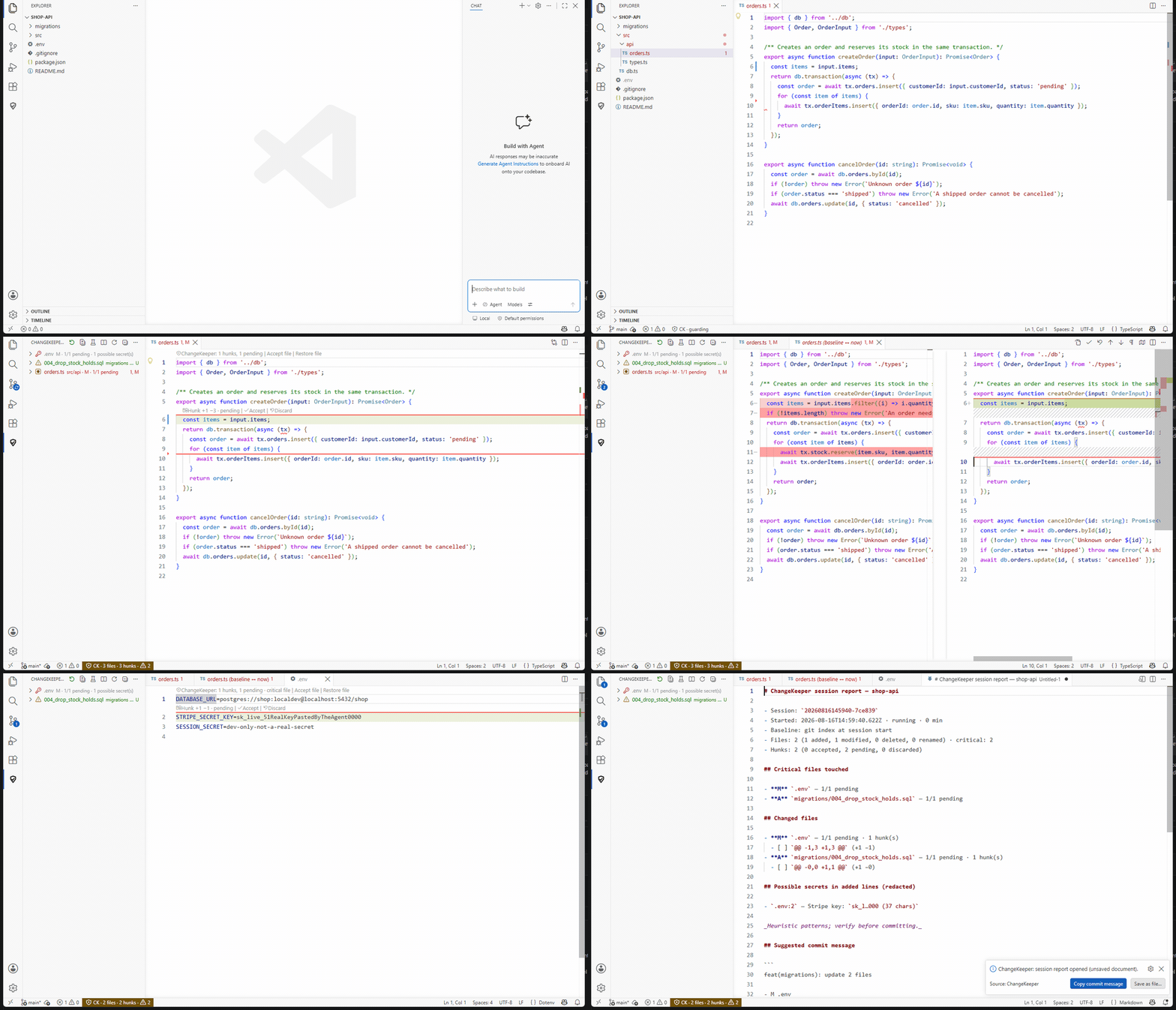
A CLI agent edits orders.ts, rewrites a key in .env and drops a table in a new migration. ChangeKeeper lists all three (critical files first), the bad hunk is discarded from the diff, and the session report redacts the secret it found.
What it looks like
|
|
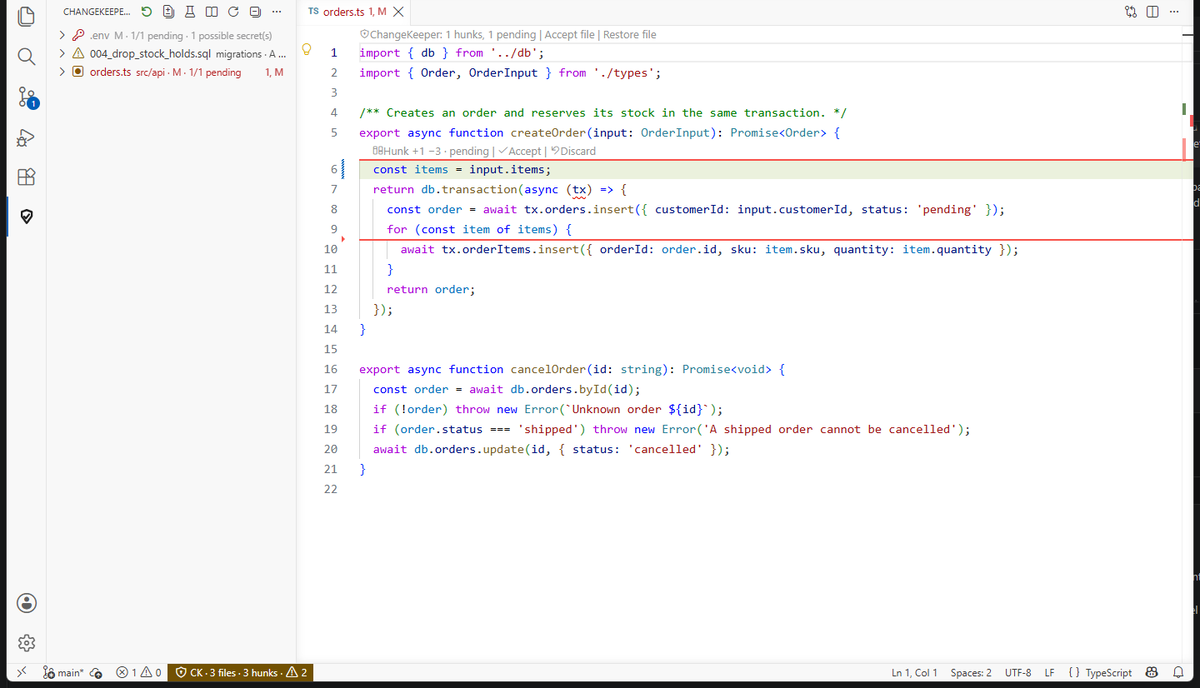 |
Every change, critical files first. .env shows 1 possible secret, the new migration is flagged, and each hunk carries Accept · Discard right above it. |
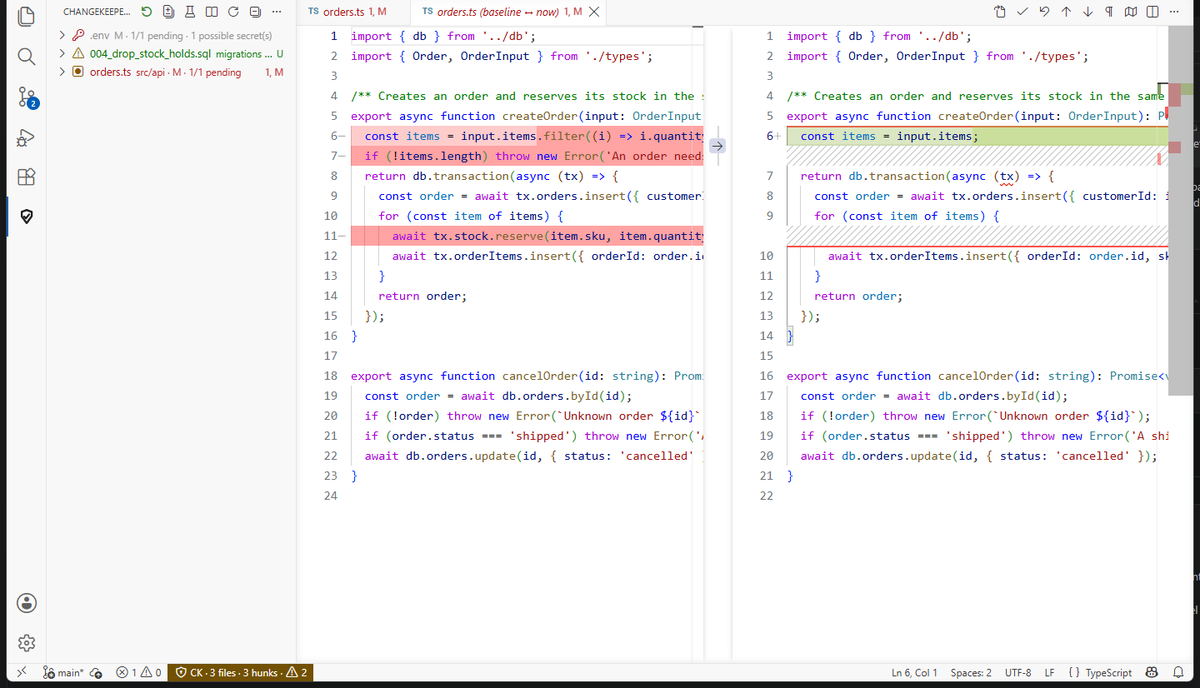 |
Baseline ↔ now in the native diff. The agent silently dropped the stock reservation and the input validation; discarding that hunk restores those lines and leaves the rest untouched. |
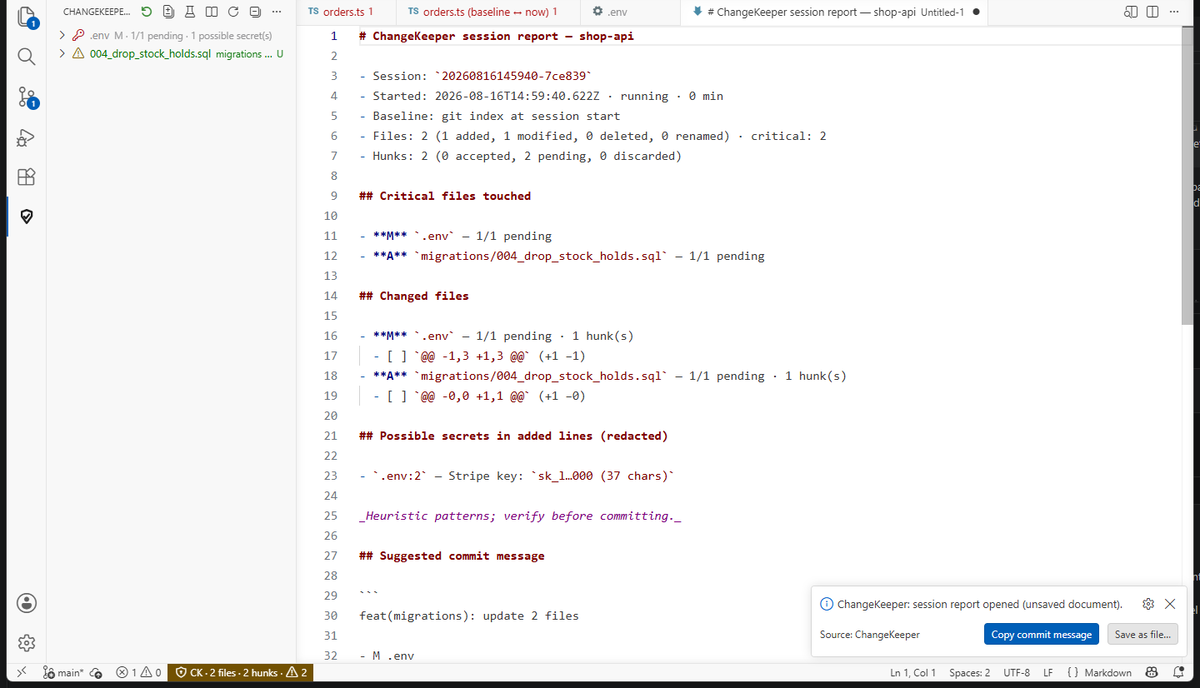 |
Session report in Markdown: critical files, hunks, secret findings (redacted) and a suggested commit message you can copy. |
Why this exists
Agents with their own IDE already offer Keep / Undo for the edits they make themselves. But the moment you use a CLI agent (Claude Code, Codex CLI, OpenCode…), a second agent, or the agent runs a shell command that rewrites files, that safety net is gone: nothing groups what changed, nothing shows you the before/after per block, and "undo" means digging in git or the timeline. ChangeKeeper is that missing layer, and it works the same for every agent because it watches the file system, not the agent.
What it does
|
|
| Baseline in a blink |
In a git repository the baseline is the index at session start: clean files aren't copied, only their git object id is kept (files already modified or untracked when the session starts are copied, within limits). Non-git folders are copied (within limits). |
| Sees every change |
Files written by any process (agent CLI, scripts, git checkout), files edited in the editor, created, deleted and renamed files. Git-ignored files are skipped — except critical ones like .env*, which are always watched. |
| Review hunk by hunk |
The ChangeKeeper view lists changed files (critical ones first) and their hunks. Click a file for the native diff (baseline ↔ now): VS Code's own gutter offers Revert block, and the diff's title bar and context menu offer Accept / Discard hunk at cursor; in the normal editor a CodeLens above each hunk offers Accept · Discard · Diff and changed lines are highlighted. |
| Discard exactly one hunk |
Discarding rewrites only that block with the baseline lines — every other line keeps its content and its own line ending. Open documents are edited through the editor (undoable with Ctrl+Z); closed ones on disk, with the previous bytes kept so Undo last restore can put them back. |
| Restore file / session, undo |
Restore a file (or the whole session) to the baseline; created files are deleted. Everything overwritten is kept, so Undo last restore puts it back — and refuses to overwrite files that changed since. |
| Critical files |
Migrations, SQL, CI workflows, Dockerfiles, .env*, auth/security folders, package manifests and lock files, .vscode, .claude, .cursor, .github are flagged and listed first. Add your own globs. |
| Session report |
A Markdown summary of the session (files, hunks accepted/discarded, critical files) with a suggested commit message — export it or paste it in a PR. |
| Guardrails |
A burst of hundreds of new files (npm install, build, checkout) pauses the tracking of new files and asks you. Binary and huge files are recorded but not diffed. Agent commits or checkouts move HEAD? You are told and can re-baseline. |
| Works everywhere |
Windows (CRLF preserved), macOS, Linux (the engine is covered by CI on all three); Remote-SSH / WSL / Dev Containers (runs where the files are); VS Code, VSCodium, Cursor, Windsurf. English and Spanish. Agent-agnostic: it watches your files, so any agent works — the only agent-specific piece is the optional hook attribution (Claude Code today). |
How it works
- Open a folder inside a git repository → ChangeKeeper starts guarding it (status bar
CK). No git? Use ChangeKeeper: New Session or set changekeeper.autoStart to always.
- Let the agent work. Every changed file appears in the ChangeKeeper view with its hunks.
- Review: Accept what you keep, Discard what you don't, Restore what went wrong. Review All Changes opens everything in the multi-diff editor.
- When you are done: Show Session Report → copy the commit message, or New Session to take a fresh baseline.
Where the data lives
Baselines and session state live in the extension's global storage on this machine (…/globalStorage/argalla.changekeeper/), never inside your repository and never on a server (the only files ChangeKeeper writes in your workspace are the ones you explicitly discard or restore, written atomically through a temporary .ck-tmp next to them). Baselines of files that changed can contain secrets — the same secrets that are already on your disk. Closed sessions are kept for changekeeper.retentionDays (30 by default) or until changekeeper.retentionMaxMB; the running session is never deleted. ChangeKeeper: Purge All Data wipes everything. See PRIVACY.md.
Limitations (honest ones)
- ChangeKeeper needs VS Code open: what an agent does while the window is closed is caught up when you reopen (git-based reconciliation), but without the per-step detail.
- The baseline is what your files looked like when the session started. If the agent commits, checks out or stashes mid-session you are told; New Session re-baselines.
- The diff gutter blocks (Revert block) are computed by VS Code's own differ and do not always coincide 1:1 with ChangeKeeper's hunks; the ChangeKeeper view and the CodeLens are the source of truth.
- The session report lists file paths and, for non-critical files, the first changed line of each hunk; for critical files (
.env*, keys, CI) only the line ranges are included.
- Files larger than
changekeeper.maxFileSizeKB (2 MB) and binaries are tracked but not diffed; files stored with Git LFS have no baseline.
Settings
| Setting |
Default |
Meaning |
changekeeper.autoStart |
git |
Guard automatically: folders in a git repo (git), every folder (always), or only on New Session (off). |
changekeeper.exclude |
[] |
Extra globs never tracked (critical files are tracked anyway). Applies to the next session. |
changekeeper.excludeDefaults |
true |
Built-in exclusions (node_modules, dist, out, build, caches, logs). |
changekeeper.criticalGlobs |
[] |
Extra critical globs. |
changekeeper.maxFileSizeKB |
2048 |
Larger files are recorded, not diffed. |
changekeeper.burstThreshold |
500 |
New files in 5 s that trigger the burst guard. |
changekeeper.retentionDays / retentionMaxMB |
30 / 500 |
Retention of closed sessions. |
changekeeper.codeLens / decorations |
true |
Inline review actions and highlights in the editor. |
changekeeper.validations |
[] |
Pro. Commands to run after a review (name, command, cwd, runOn: manual / afterReview / onSessionEnd, timeoutSec). |
Pro
The core above is free forever and stays free: sessions, hunk review, restore/undo, critical files, the report and its export. ChangeKeeper Pro (7 €, one-time payment per person, licence key through Polar) adds the automation around it:
| Pro feature |
What it does |
| Validations |
Run npm test, tsc, pytest, cargo check… (presets detected from your project, or any command) manually, automatically once every hunk is reviewed (afterReview) or when the session ends. Each command is confirmed the first time in a workspace and again if the command, its cwd, its trigger or the package.json scripts it points to (including pre/post) change — that reduces the risk, but a validation still executes code from the repository (node_modules, .npmrc…) that the agent may have touched: review critical files first. Results (exit code, duration, output tail) go into the report. Never runs in Restricted Mode. |
| Secret scanner |
Added lines are checked locally for token shapes (AWS, GitHub, Slack, Stripe, private keys, JWTs, password = "…", credentials in URLs). Findings are redacted, flagged in the tree and listed in the report. No network. |
| Commit message into the SCM box |
The suggested message goes straight into the git input box (the report's export is free). |
| Agent attribution through hooks |
Opt-in: ChangeKeeper Pro: Install Agent Hooks writes three HTTP hooks (SessionStart, UserPromptSubmit and PostToolUse for Edit/Write/NotebookEdit — the prompt text is never read or stored) into Claude Code's settings — one project (.claude/settings.local.json, recommended; ChangeKeeper adds it to .git/info/exclude because it holds a private token) or user-wide (~/.claude/settings.json) — with a consent dialog, a byte-exact backup (last 10 kept in the extension's storage; Purge All Data removes them) and Revert Agent Hooks — so ChangeKeeper learns when a session starts and which files each tool edited. Files show by claude-code in the tree and the report; autoStart: whenAgentDetected starts a guarded session the moment an agent does. The hooks only POST to 127.0.0.1:<changekeeper.hooks.port> (47391 by default) on your machine, with a per-user token; the receiver runs only when hooks are installed (or whenAgentDetected is on), one window per machine owns the port and the others receive through it. Hooks never decide permissions and never add context to the agent. Claude Code only for now (Codex/Cursor installers are on the roadmap). Note: user-wide hooks fire in every Claude Code session on the machine — with no VS Code window open Claude shows a non-blocking "hook error" line, which is why the project scope is the default. Hooks Doctor checks port, token and allowlist. Uninstalling the extension removes the user-level hooks (project files: revert first). |
Everything Pro adds can be removed without a licence: delete a validation from settings, turn the scanner off (changekeeper.secretScan), revert hooks — the free features never depend on it. Activate with ChangeKeeper Pro: Enter Licence Key; the key is validated once and re-checked every 24 h with a 14-day offline grace period. Sent to Polar: the key, this computer's name, your OS and the extension version — nothing else, ever. Buy: ChangeKeeper Pro: Get ChangeKeeper Pro.
Requirements
VS Code 1.95 or newer (or a compatible host). git on your PATH (or configured in the built-in git extension) for git-based baselines; folders without git work with autoStart: always.
Privacy & security
Everything happens on your machine. No telemetry, no account, and no network calls except Pro licence activation and its 24-hourly re-validation, only on machines where you entered a key. Details in PRIVACY.md; vulnerabilities via SECURITY.md.
Support & refunds
Questions, bugs and ideas: GitHub issues (preferred, so everyone benefits) or info@tecniartgalicia.com. This is a small, independent project: expect an answer in a few working days, not in minutes.
Bought Pro and it is not for you? Write to info@tecniartgalicia.com within 30 days of the purchase and you get your money back, no questions asked — payments go through Polar, the merchant of record, which issues the refund. Deactivating a licence key is free and always available (ChangeKeeper Pro: Deactivate Licence), and everything Pro adds can be removed without a licence.
Contributing & licence
MIT. Issues and pull requests on GitHub; see CONTRIBUTING.md. Made by Argalla (Tecniart Galicia).
| |

