Write Anki Notes in Visual Studio Code
This is a set of tools designed for people who love Anki’s spaced repetition system but prefer writing and managing
notes in a normal text editor instead of Anki’s built-in editor.
The tools include:
It enables a workflow where you:
- Write notes in a simple human-readable text-based format.
- Store them in a regular directory.
- Import them into Anki automatically.
This makes it possible to:
- Use a real editor like Visual Studio Code.
- Version control your notes with Git.
- Collaborate with others.
- Avoid Anki’s proprietary binary deck format.
Example Note Files
File astronomy.note:
!type: Basic
!deck: Astronomy

!front: The first planet from the Sun.
!back: Mercury
~~~

!front: The second planet from the Sun.
!back: Venus
~~~

!front: The largest planet in the Solar System.
!back: Jupiter
~~~
File geography.note:
!type: Cloze
!deck: Geography
!tags: Capitals

!text: The capital of {{c1::Mongolia::country}} is {{c2::Ulaanbaatar::city}}.
~~~

!text: The capital of {{c1::Syria::country}} is {{c2::Damascus::city}}.
~~~
File math.note:
!type: Basic
!deck: Math
!tags: Algebra

!front: Quadratic Formula
!back: $$ x = \frac{-b \pm \sqrt{b^2 - 4ac}}{2a} $$
~~~

!front: Euler's Formula
!back:
$$
\begin{align*}
    e^{ix}  &= \cos x + i \sin x \\
    e^{-ix} &= \cos x - i \sin x
\end{align*}
$$
~~~
Anki Addon
To simplify importing notes, we developed an Anki addon that imports all
note files from a specified directory.
The addon:
- Asks the user to select a directory containing note files.
- Recursively scans the directory.
- Parses the note records.
- Creates or updates Anki notes.
Visual Studio Code Extension
This VS Code extension is here to make writing notes easier.
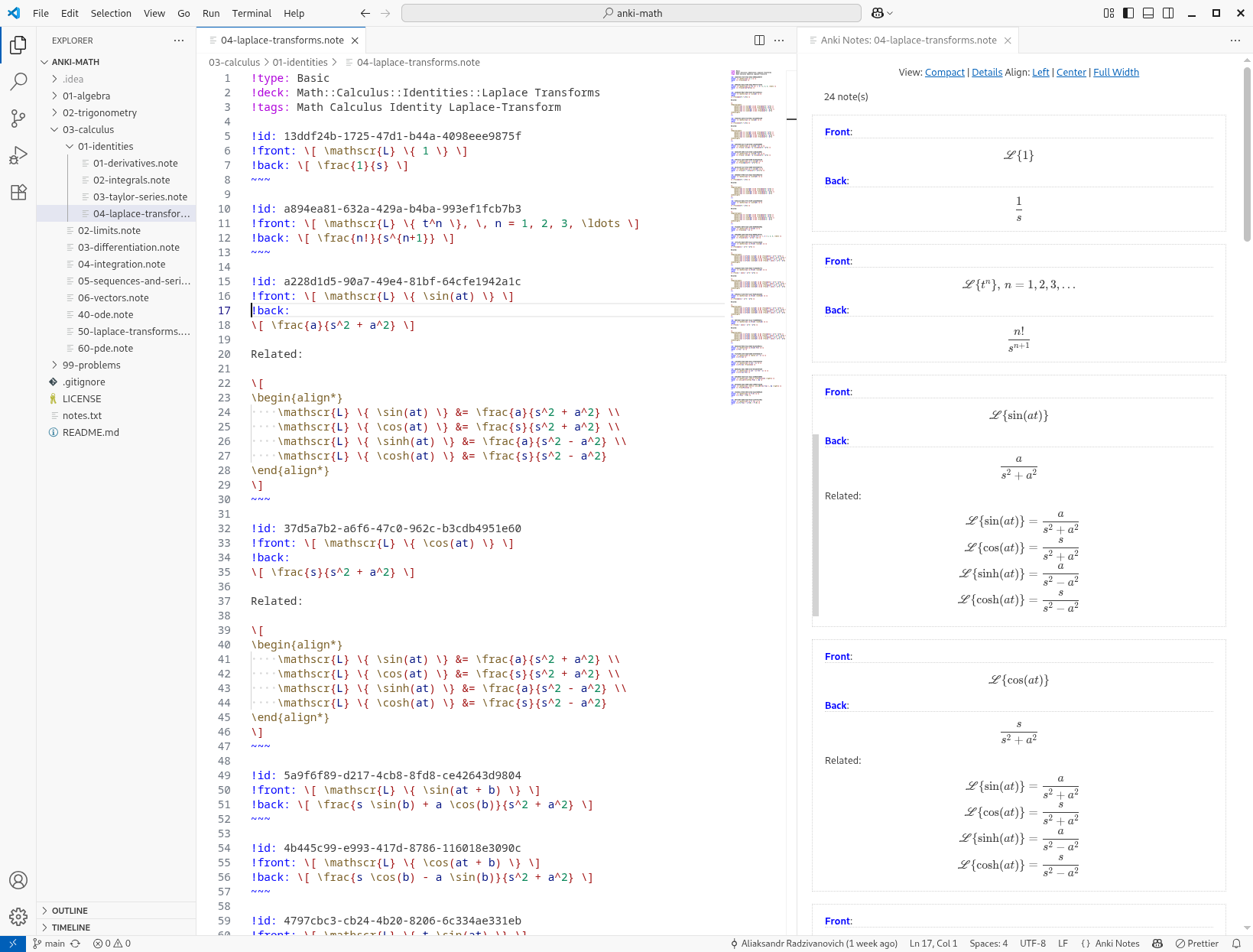
The extension provides:
- syntax highlighting for note files
- auto-completion
- structural validation
- note preview on the side
This makes writing Anki notes feel like writing documentation.
Features
Preview
Open the preview with Ctrl+Shift+V (Cmd+Shift+V on Mac), or Ctrl+K V if you'd rather have it open to the side.
Both are also available from the editor context menu and the command palette, and there's a "locked" variant of the side
preview that stays put on the file it was opened for even if you switch tabs.
The preview updates as you type, no need to save first. Each note's fields are rendered through Markdown and KaTeX, so
bold text, lists, images and math all show up the way they will in Anki. If a note or its model has a parse error,
you'll see it listed right below the notes, and clicking it jumps you straight to the offending line in the editor —
clicking a field does the same in reverse, scrolling the editor to match what you clicked in the preview.
Syntax Highlighting
Both .note and .model files get proper syntax highlighting. In .note files this covers the !type:, !deck:
and !tags: properties, field names, the ~~~ terminator, cloze deletions like {{c1::...}}, and KaTeX math
expressions. In .model files, the front and back card templates are highlighted as embedded HTML and the
styles block as embedded CSS, so you get real HTML/CSS highlighting inside your card templates rather than plain text.
Autocompletion
Start typing ! at the beginning of a line in a .note file and you'll get suggestions for field names, pulled from
every .model file in your workspace — not just the model the current note happens to use. Typing !type: suggests the
names of models you've defined elsewhere in the project. The extension watches your .model files in the background, so
as you add fields or models, the suggestions stay up to date.
Automatic Note ID Insertion
Each note can carry an !id: field, a short random identifier that lets the Anki addon recognize a note across
re-imports and update it in place instead of creating a duplicate. By default, the extension inserts one of these
automatically whenever you save a .note file, filling in an id for any note that doesn't already have one. If you'd
rather not have that happen on every save, turn off the anki-notes.insertIdOnSave setting and run "Insert Unique Note
Identifiers" manually instead, from the command palette or the editor context menu.
Workflow
Typical workflow:
- Write notes in Visual Studio Code.
notes/
  calculus.note
  algebra.note
  trigonometry.note
- Version control them.
git add notes
git commit
- Import into Anki using the addon.
File → Import Models and Notes...
- Select the directory with your notes.
The addon will parse and import everything.
- Optionally, share your notes with others so they can collaborate and contribute new notes.


