DevBuddy for VS Code
Jira + Linear workflows on steroids. All in VS Code.





Work Faster with Your Issues Inside VS Code
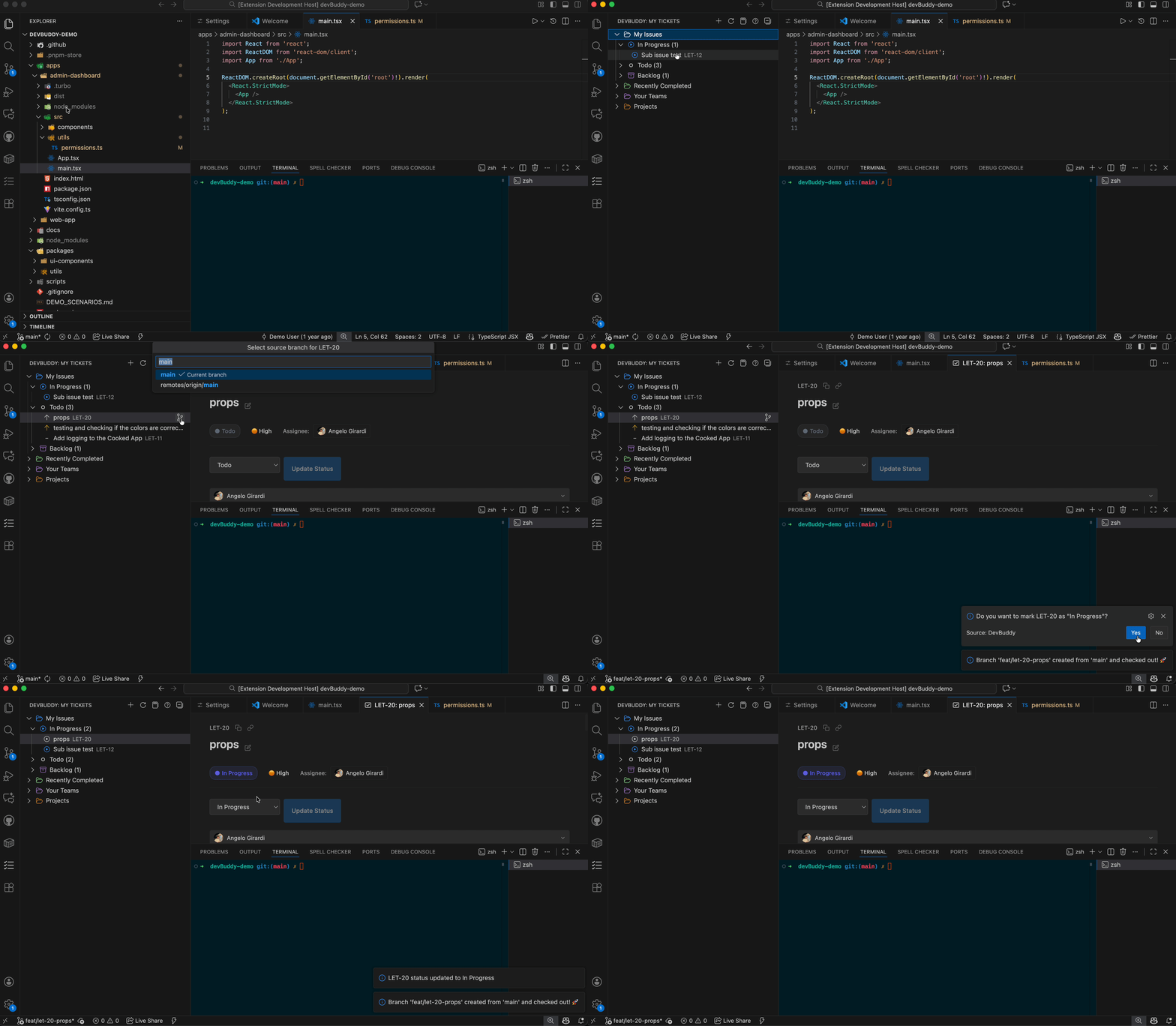
DevBuddy brings your tickets into a single sidebar so you can browse, create, update, and work on issues without switching to the browser.
Key Features
| Feature |
Description |
Platforms |
| Unified Issue Explorer |
View and manage all tickets from VS Code |
Linear, Jira Cloud, Jira Server (beta) |
| AI Agents Know Your Tickets |
Let @workspace and Copilot help you with your work |
Linear, Jira Cloud |
| TODO Converter |
Convert TODOs to tickets with automatic code permalinks |
Linear, Jira Cloud |
| AI Workflows |
Generate PR summaries and standups automatically |
Linear, Jira Cloud |
| Branch Integration |
Create and manage branches directly from tickets |
Linear, Jira Cloud |
| Chat Participant |
Ask @devbuddy questions in natural language |
Linear, Jira Cloud |
| Monorepo Support |
Intelligent package detection and validation |
All platforms |
Example Workflows
Convert TODO → Ticket
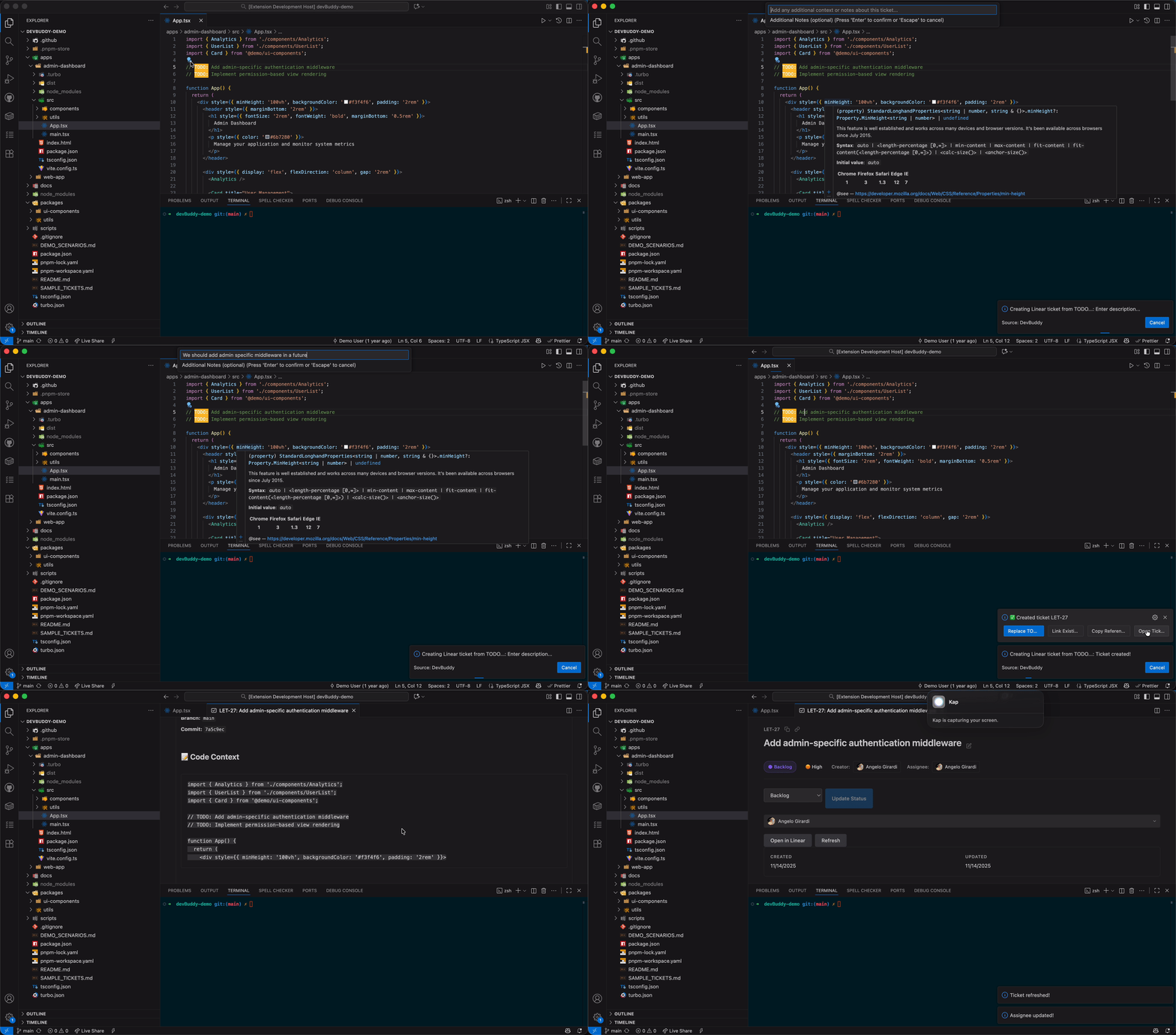
Write a TODO comment, right-click → "Convert TODO to Ticket". DevBuddy automatically:
- Creates a ticket with file path and line number
- Generates GitHub/GitLab/Bitbucket permalink to exact code location
- Includes 5 lines of surrounding code context
- Links to current branch and commit SHA
Create a Branch from an Issue
Right-click any ticket → "Start Branch for Ticket". DevBuddy creates a branch with smart naming (conventional, simple, or custom) and automatically associates it with the ticket.
Edit Tickets Directly in VS Code
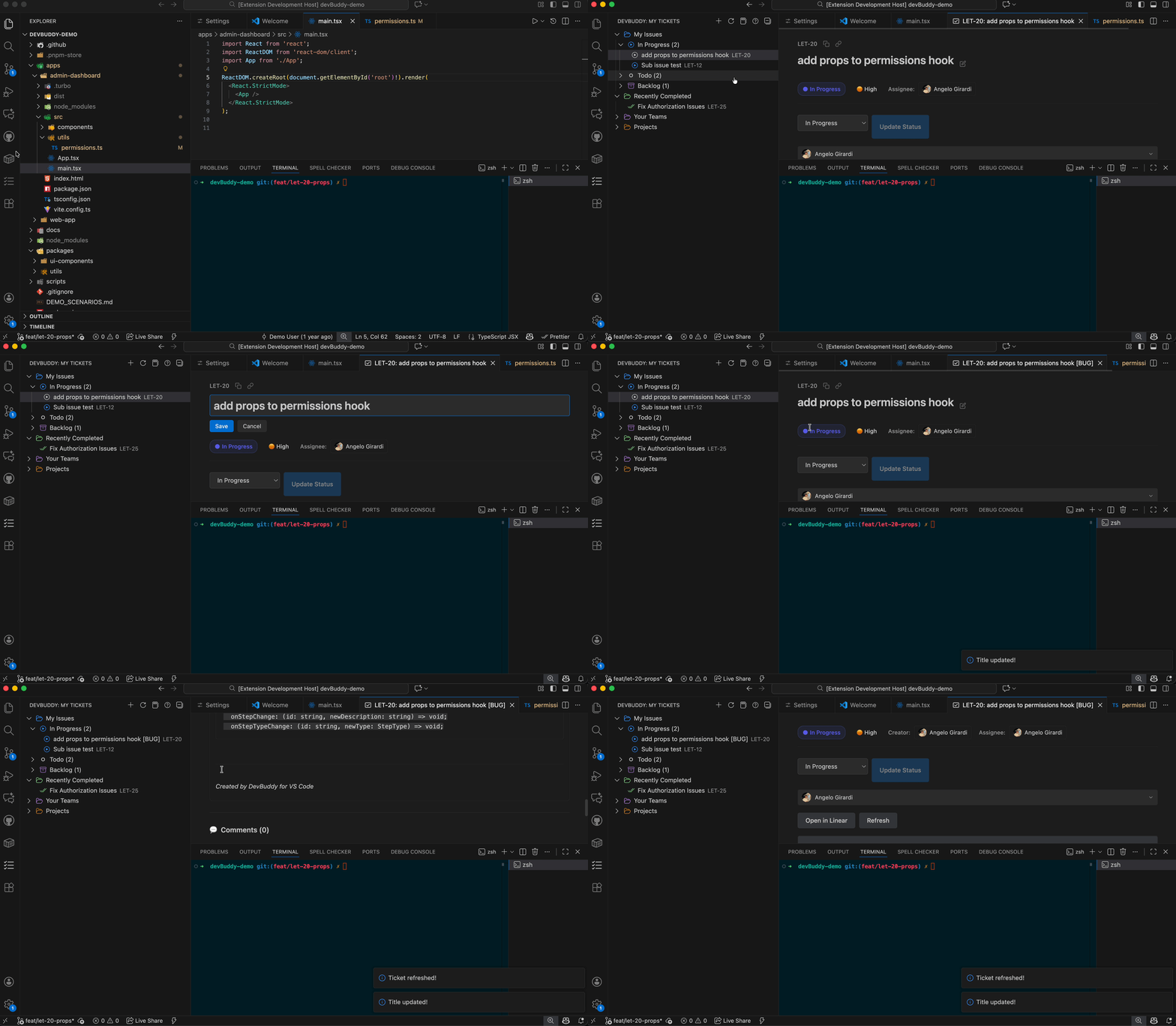
Click any ticket to view full details, update status, add comments, and manage all ticket properties without leaving your editor.
AI-Powered Standup Generator
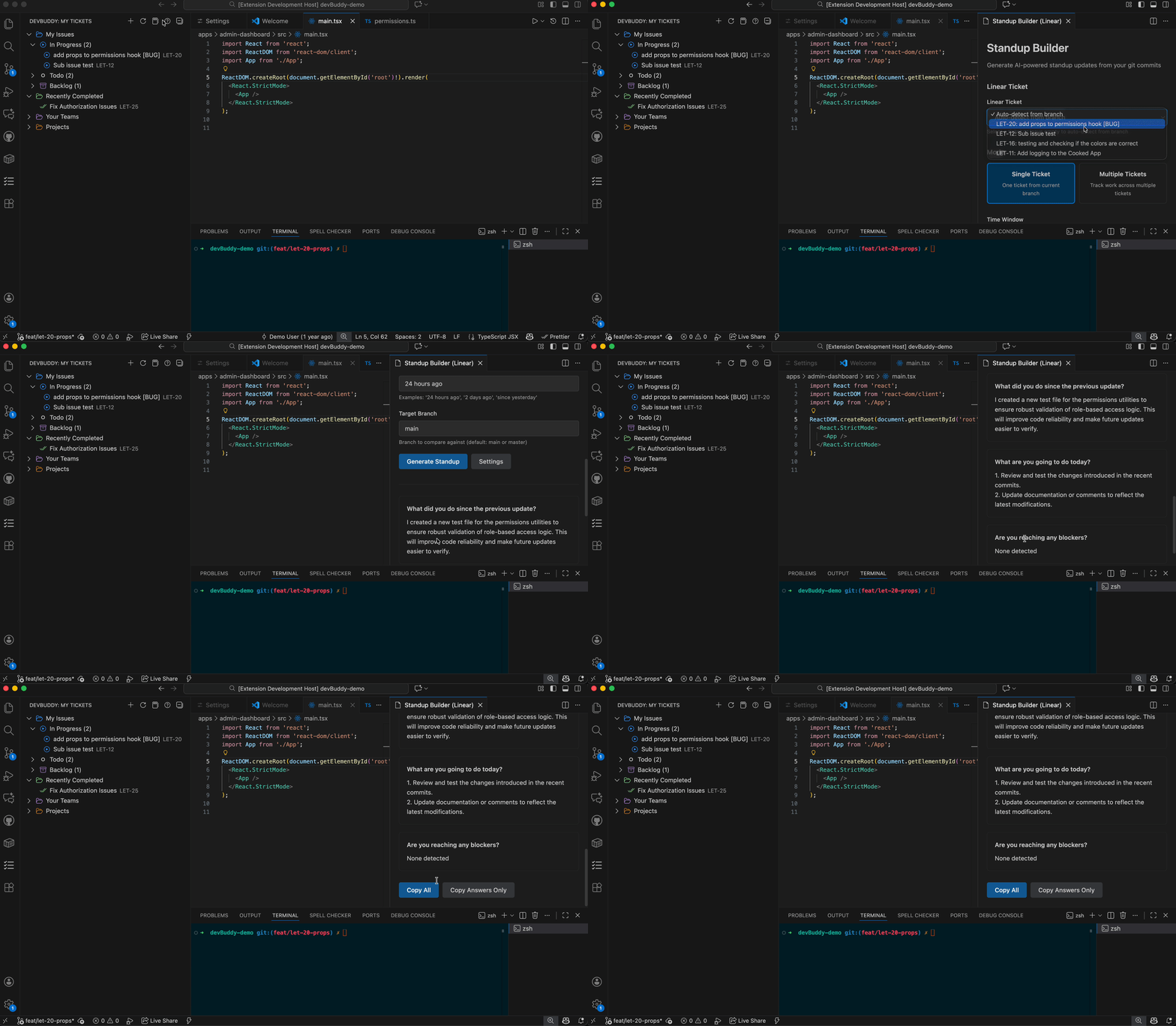
Run DevBuddy: Generate Standup Update to automatically generate standup reports from your commits and ticket activity with:
- Yesterday's completed work
- Today's planned tasks
- Blockers and dependencies
- Automatic ticket linking
Quick Start
- Install DevBuddy from the VS Code Marketplace
- Open the DevBuddy sidebar (click the checklist icon)
- Connect your platform:
- Linear:
DevBuddy: Update Linear API Key
- Jira Cloud:
DevBuddy: Setup Jira Cloud
- Start managing issues directly inside VS Code
Full documentation: DevBuddy Quick Start Guide
Fully Supported
- Linear - Complete feature set with AI integration
- Jira Cloud - Full feature parity with Linear
In Beta
- Jira Server / Data Center - Read-only support (editing coming soon)
Optional AI Enhancements
Connect GitHub Copilot or another LLM provider to unlock:
- Pull request summaries
- Standup reports
- Ticket drafts with descriptions and acceptance criteria
AI features are optional — DevBuddy works fully without them using intelligent rule-based analysis.
Privacy and Security
- ✅ All credentials stored using VS Code Secret Storage
- ✅ No telemetry collected
- ✅ DevBuddy doesn't run servers or proxy your data
- ✅ Only Jira/Linear APIs you configure are contacted
- ✅ Privacy-first: AI is completely optional
What's New in v0.8.0 🎉
🤖 AI Agents Now Understand Your Tickets
Teach VS Code's AI assistants about your work—automatically.
DevBuddy extends @workspace, GitHub Copilot, and other AI agents with real-time access to your Linear and Jira tickets. No more hallucinations, no more guessing—your AI assistants finally know what you're working on.
Just ask naturally:
@workspace what ticket am I working on?
→ Based on your branch feat/eng-125-oauth, you're working on ENG-125: Implement OAuth2 Authentication

@workspace what should I work on next?
→ Your highest priority ticket is ENG-126: Fix payment timeout (Priority: High, Estimate: 3 points)

@workspace help me implement this ticket
→ [AI generates implementation plan with full ticket context]
How it works:
- DevBuddy provides 3 powerful tools that AI agents automatically discover
- 🎫 Get Ticket Details - Fetch any ticket by ID
- 📋 List My Tickets - See all your active work
- 🌿 Get Current Ticket - Detect ticket from your branch name
The magic: When you ask @workspace or Copilot questions about your tickets, they automatically invoke DevBuddy's tools to provide accurate, real-time information—no hallucinations, just facts from your Linear or Jira workspace.
You can also reference tools directly:
@workspace #getCurrentTicket
@workspace #listMyTickets
@workspace #getTicket ENG-125
Configure: Settings → Search "language model tools" to enable/disable individual tools.
Learn more about AI agent integration →
🎯 Also in v0.8.0
- Enhanced Chat Participant - Natural language ticket planning with
@devbuddy
- Smart Work Suggestions - AI-powered recommendations on what to work on next
- Debug Logging - Comprehensive diagnostics for troubleshooting
- Version Banner - See your DevBuddy version and build type on startup
Commands Overview
DevBuddy: Refresh Tickets - Reload ticket listDevBuddy: Create Ticket - Open ticket creation formDevBuddy: Generate PR Summary - Generate PR descriptionDevBuddy: Generate Standup Update - Generate standup report
DevBuddy: Update Linear API Key - Configure LinearDevBuddy: Setup Jira Cloud - Configure Jira CloudDevBuddy: Setup Jira Server - Configure Jira Server/Data Center
Roadmap
- ✅ Linear - Full support
- ✅ Jira Cloud - Full support
- 🚧 Jira Server/Data Center - Beta (editing coming soon)
- ⏳ GitHub Issues integration
- ⏳ YouTrack support
- ⏳ Monday.com integration
- ⏳ Enhanced multi-account workflows
Track updates: GitHub Repository
Documentation
Beta Testing
Want to try new features early? Join our beta testing program!
Install Pre-release Versions:
- Open VS Code Extensions view
- Find DevBuddy
- Click the dropdown → "Switch to Pre-Release Version"
Beta versions include experimental features and improvements before they reach stable release. Learn more about beta testing →
Support
Documentation: github.com/angelo-hub/devbuddy
Issues & Feature Requests: GitHub Issues
If DevBuddy improves your workflow, please consider leaving a review or starring the repository! ⭐
License
Dual License:
- Core Features: MIT License - Free and open source
- Pro Features: Commercial License (when available)
All current features are free to use. Future Pro features will require a subscription.
Version 0.8.0 | Made with ❤️ for developers who hate context switching

