Vaporwave - VS Code Theme
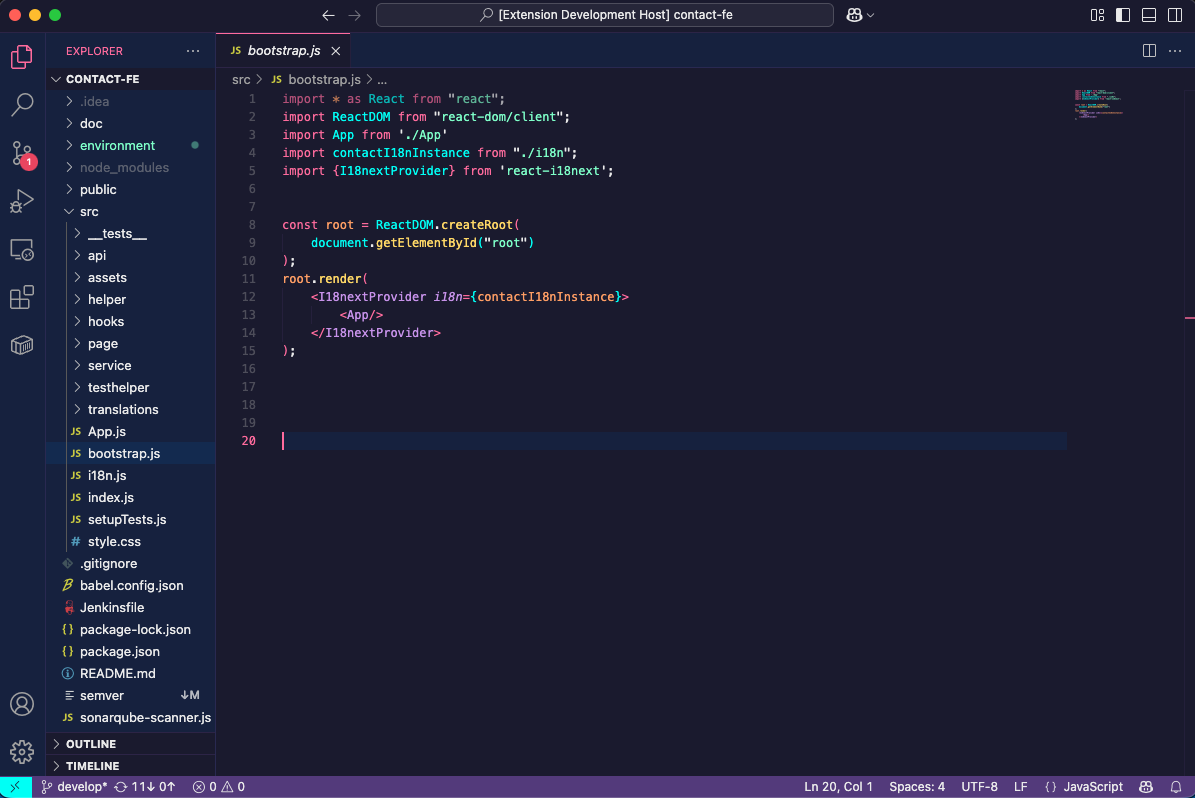
A retro-futuristic color theme inspired by 1980s aesthetics, Miami sunsets, and neon-lit nights.
Install
https://marketplace.visualstudio.com/items?itemName=andrei-isvoran96.vaporwave-theme
Features
- Deep indigo backgrounds for comfortable extended coding sessions
- Vibrant neon accents (pink, cyan, mint, violet, yellow, orange) for syntax highlighting
- Full workbench theming including sidebar, activity bar, terminal, and status bar
- Semantic highlighting support for modern VS Code features
- WCAG AA compliant contrast ratios for accessibility
Color Palette
| Element |
Color |
Hex |
| Background |
Midnight Indigo |
#1a1a2e |
| Keywords |
Neon Pink |
#ff6b9d |
| Variables |
Electric Cyan |
#00fff5 |
| Strings |
Mint Green |
#7effc8 |
| Types/Classes |
Pastel Violet |
#c792ea |
| Functions |
Sunny Yellow |
#ffd866 |
| Constants |
Sunset Orange |
#ff9e64 |
Installation
From VSIX (Local)
- Download the
.vsix file
- Open VS Code
- Press
Cmd+Shift+P (Mac) or Ctrl+Shift+P (Windows/Linux)
- Type "Install from VSIX" and select the downloaded file
Activate the Theme
- Press
Cmd+K Cmd+T (Mac) or Ctrl+K Ctrl+T (Windows/Linux)
- Select "Vaporwave" from the list
Screenshots
Coming soon
Supported Languages
- JavaScript / TypeScript
- Python
- HTML / CSS / SCSS
- JSON / YAML
- Markdown
- And many more...
Contributing
Found a bug or have a suggestion? Please open an issue on the GitHub repository.
License
MIT License - see LICENSE file for details.
| |

