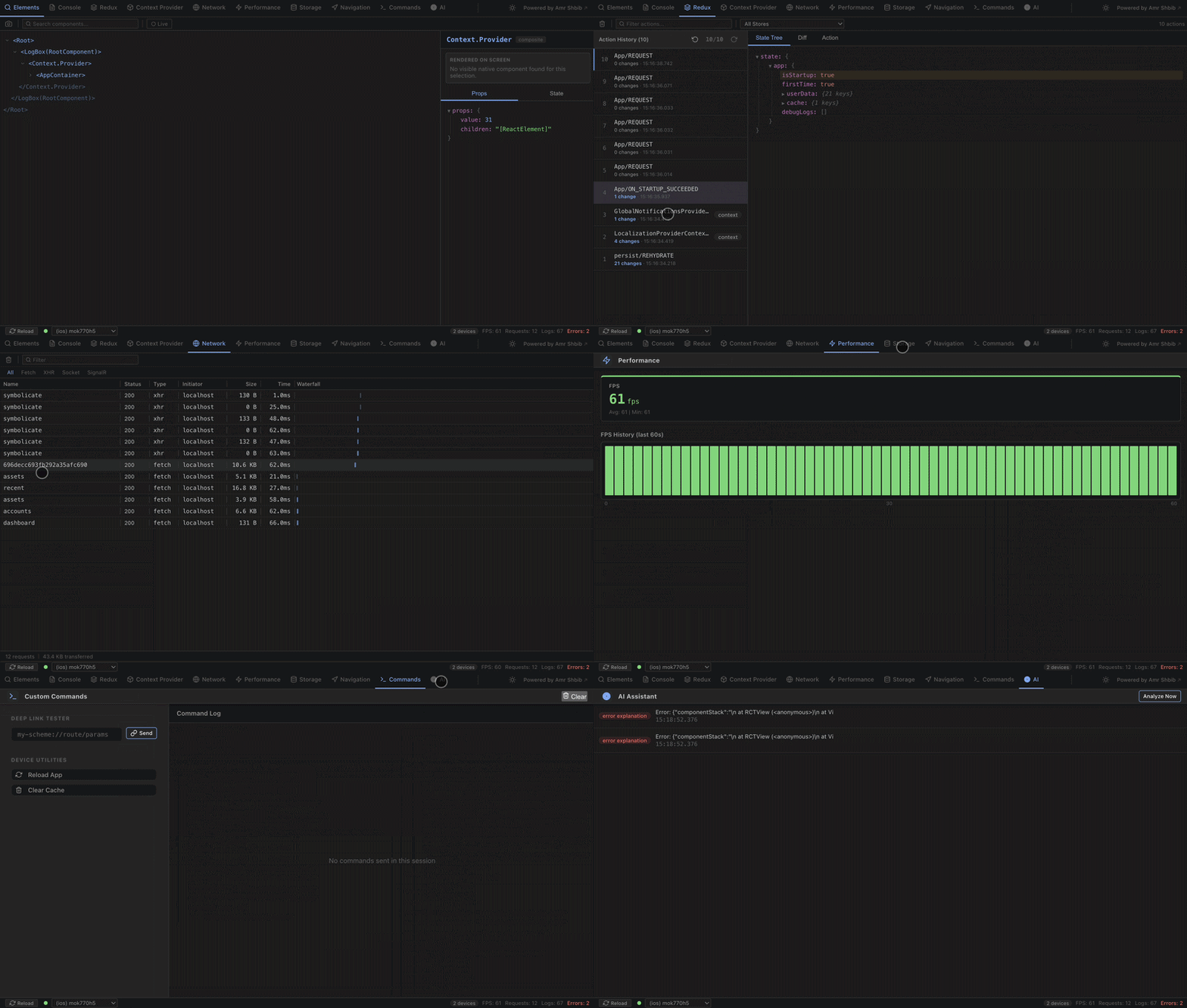
A lightweight, zero-config SDK that connects your React or React Native application directly to the React Debugger VS Code extension.
Stop relying on messy console logs and disjointed tools. Get real-time network inspection, console logs, state management debugging, performance monitoring, UI inspection, and more—all from the comfort of your editor!
✨ Why React Debugger?
- Zero Boilerplate: One line of code to initialize.
- Production Safe: Automatically disabled when
__DEV__ === false. Zero performance impact in release builds.
- Works Everywhere: Built for React Web, React Native (iOS/Android), and Expo.
- All-in-One: Network, State, Logs, Storage, Performance—all in a single beautifully integrated VS Code tab.
🚀 Features
- 🌐 Network Interceptor: Automatically captures all
fetch, XMLHttpRequest, WebSocket and SignalR traffic with headers, payloads, and execution timing.
- 📝 Console Interceptor: Captures
console.log, warn, error, debug with full stack traces.
- 🗃️ State Management: Redux support out of the box. Track actions, take state snapshots, and view beautiful state diffs.
- 🧩 Context Debugger: Track and inspect state for React Context Providers dynamically.
- ⚡ Performance Monitor: Real-time FPS, memory usage, and thread metrics.
- 🔍 UI Inspector: Captures your React component tree via the fiber tree.
- 💾 Storage Inspector: View, manage, and clear
AsyncStorage / localStorage entries remotely.
- 🔗 Deep Linking: Trigger deep links directly from VS Code.
- 🧭 Navigation Tracker: Reports route changes and params from React Navigation or custom routers.
- 🌗 Dark/Light Mode: Gorgeous UI that adapts to your system theme preferences.
📦 Installation
npm install @amrshbib/react-debugger
# or
yarn add @amrshbib/react-debugger
Note: This package is designed to work alongside the React Debugger VS Code extension, which provides the real-time UI for inspecting your app. Install the extension from the VS Code Marketplace.
Peer Dependencies
react (required)react-native (optional — only needed for React Native apps)@react-native-async-storage/async-storage (optional — only needed for Storage Inspector on React Native)
⚡ Quick Start
1️⃣ Initialize the Debugger
Add initDebugger() at the very top of your app entry point (e.g. index.js, App.tsx). This must be called before any console.log, fetch, or state changes so the SDK can intercept them.
// index.js or App.tsx
import { initDebugger } from "@amrshbib/react-debugger";

initDebugger();
That's it! Once called, the SDK automatically connects to the debugger server via WebSocket (localhost:8347), intercepts traffic, and sends it to the VS Code extension in real time.
2️⃣ Set Up Redux Middleware (Optional)
If your app uses Redux, add debuggerMiddleware to your store to enable state debugging with action tracking, state snapshots, and beautiful tree diffs.
import { configureStore } from "@reduxjs/toolkit";
import { debuggerMiddleware } from "@amrshbib/react-debugger";
import rootReducer from "./reducers";

const store = configureStore({
  reducer: rootReducer,
  middleware: (getDefaultMiddleware) =>
    getDefaultMiddleware().concat(debuggerMiddleware),
});

export default store;
Legacy Redux (createStore):
import { createStore, applyMiddleware } from "redux";
import { debuggerMiddleware } from "@amrshbib/react-debugger";
import rootReducer from "./reducers";

const store = createStore(rootReducer, applyMiddleware(debuggerMiddleware));
3️⃣ Set Up Navigation Tracking (Optional)
Track route changes in the debugger to see navigation history, route names, and params in real time.
React Navigation (recommended):
import { useRef } from "react";
import { NavigationContainer } from "@react-navigation/native";
import { reportNavigationEvent } from "@amrshbib/react-debugger";

const App = () => {
  const navigationRef = useRef(null);

  const onStateChange = (state) => {
    const currentRoute = navigationRef.current?.getCurrentRoute();
    if (currentRoute) {
      reportNavigationEvent(currentRoute.name, currentRoute.params);
    }
  };

  return (
    <NavigationContainer ref={navigationRef} onStateChange={onStateChange}>
      {/* Your screens */}
    </NavigationContainer>
  );
};
📖 API Reference
initDebugger(options?)
Initializes the debugger SDK and connects to the debug server. Only runs in development mode.
Example:
import { initDebugger } from "@amrshbib/react-debugger";

initDebugger({
  trackContexts: ["LocalizationProvider", "GlobalNotificationsProvider"]
});
debuggerMiddleware
Redux middleware that captures dispatched actions, state snapshots, and computes state diffs.
reportNavigationEvent(routeName, params)
Manually reports a navigation event for custom routers or analytics wrappers.
🏗️ What Gets Captured Automatically?
Once initDebugger() is called, the SDK automatically intercepts:
| Domain |
What's Captured |
How |
| 🌐 Network |
All fetch and XMLHttpRequest calls |
Global monkey-patching |
| 📝 Console |
console.log, warn, error, debug |
Console interception |
| ⚡ Performance |
FPS and memory limits |
requestAnimationFrame |
| 🔍 UI Inspector |
React component tree |
React DevTools fiber hook |
| 💾 Storage |
AsyncStorage / localStorage entries |
On-demand capture & clearing |
| 📱 System |
Deep Linking & App Reload |
Native Linking & DevSettings |
No additional code is needed beyond initDebugger() for these features!
🔧 Troubleshooting
- SDK Not Connecting: Make sure the VS Code extension is active and port
8347 is not blocked. For physical devices on Android, ensure your device is on the same network or use adb reverse tcp:8347 tcp:8347.
- Logs Not Appearing: Ensure
initDebugger() is called before any other logs or network requests.
- State Not Tracked: Verify
debuggerMiddleware is correctly applied to your Redux store.
📄 License
This project is licensed under the MIT License.
Made with ❤️ for the React and React Native community