
Visualize and manage handoff-mcp tasks, sessions, and metrics — right inside VS Code.



Features
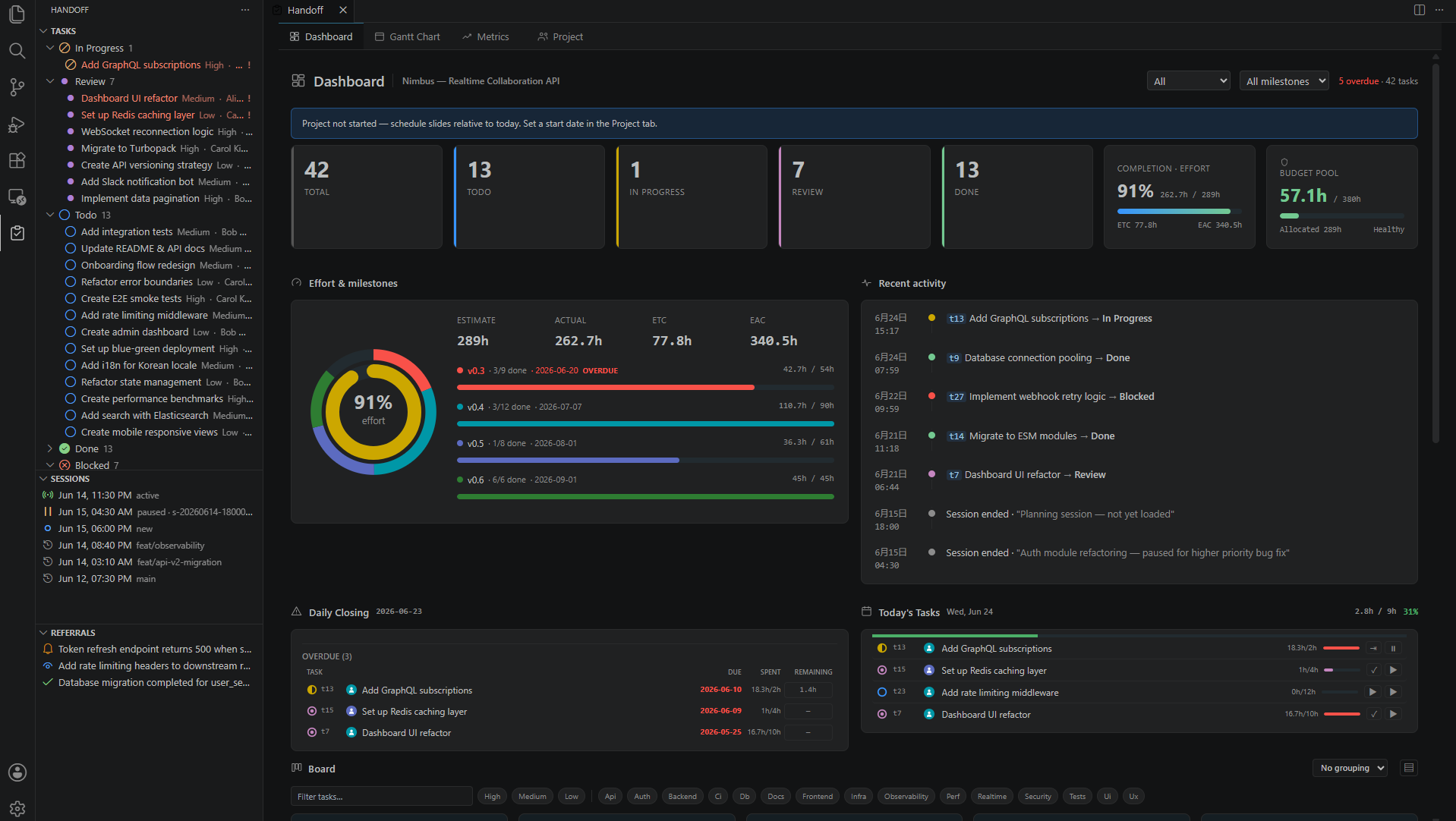
Task Explorer — Tree view with status icons, priority badges, and milestone filtering. Click any task to open its detail panel with done-criteria checklist, schedule, and time tracking.
Dashboard — Project overview showing task counts by status, completion percentage, effort budget burn-down, Kanban board, work timeline, and recent activity feed.
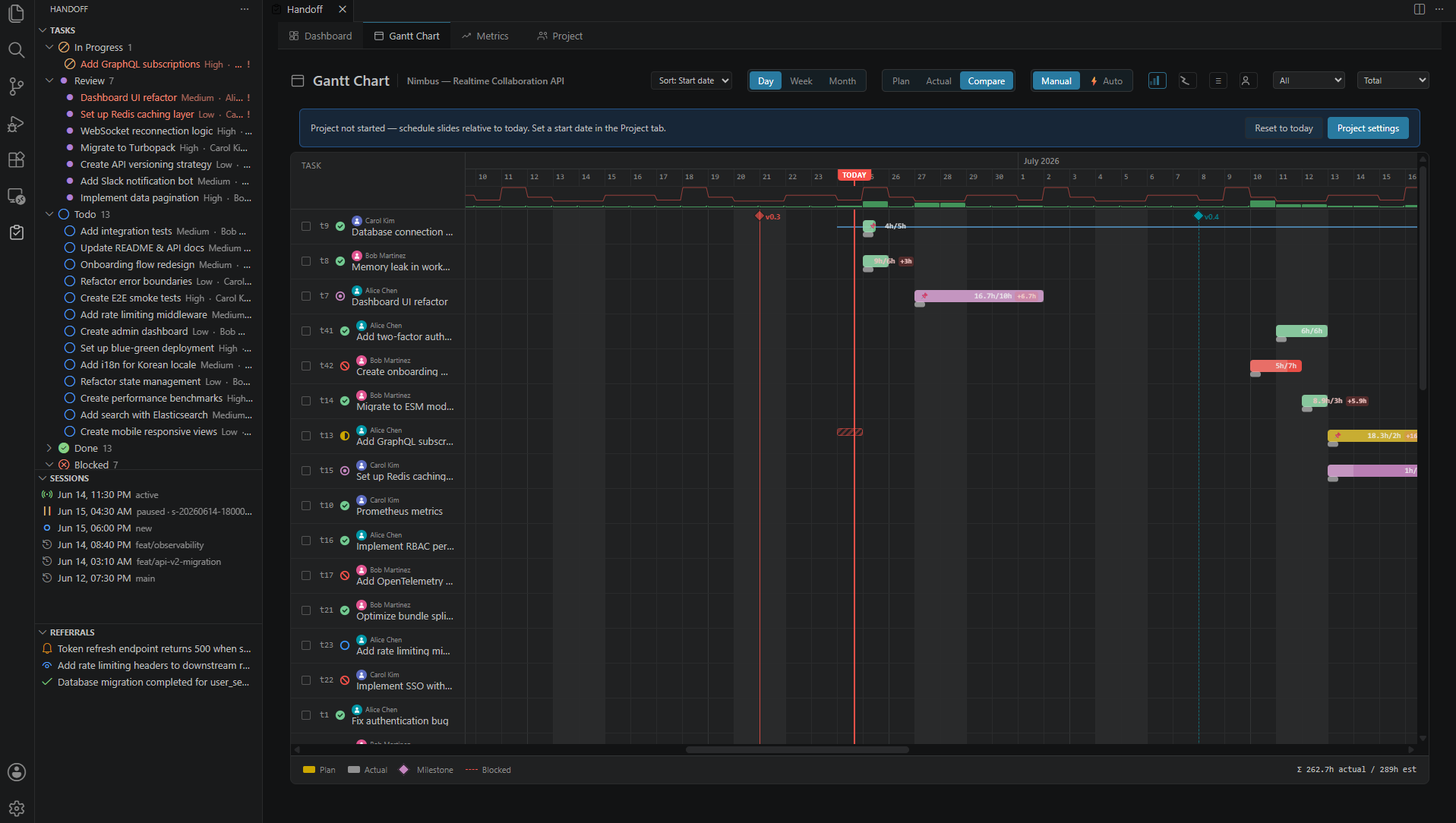
Gantt Chart — Interactive timeline with month/day headers, drag-to-reschedule, milestone grouping, and auto-scroll to today.
Kanban Board — Drag-and-drop cards across status columns (todo / in_progress / review / done). Status changes write back to .handoff/ automatically.
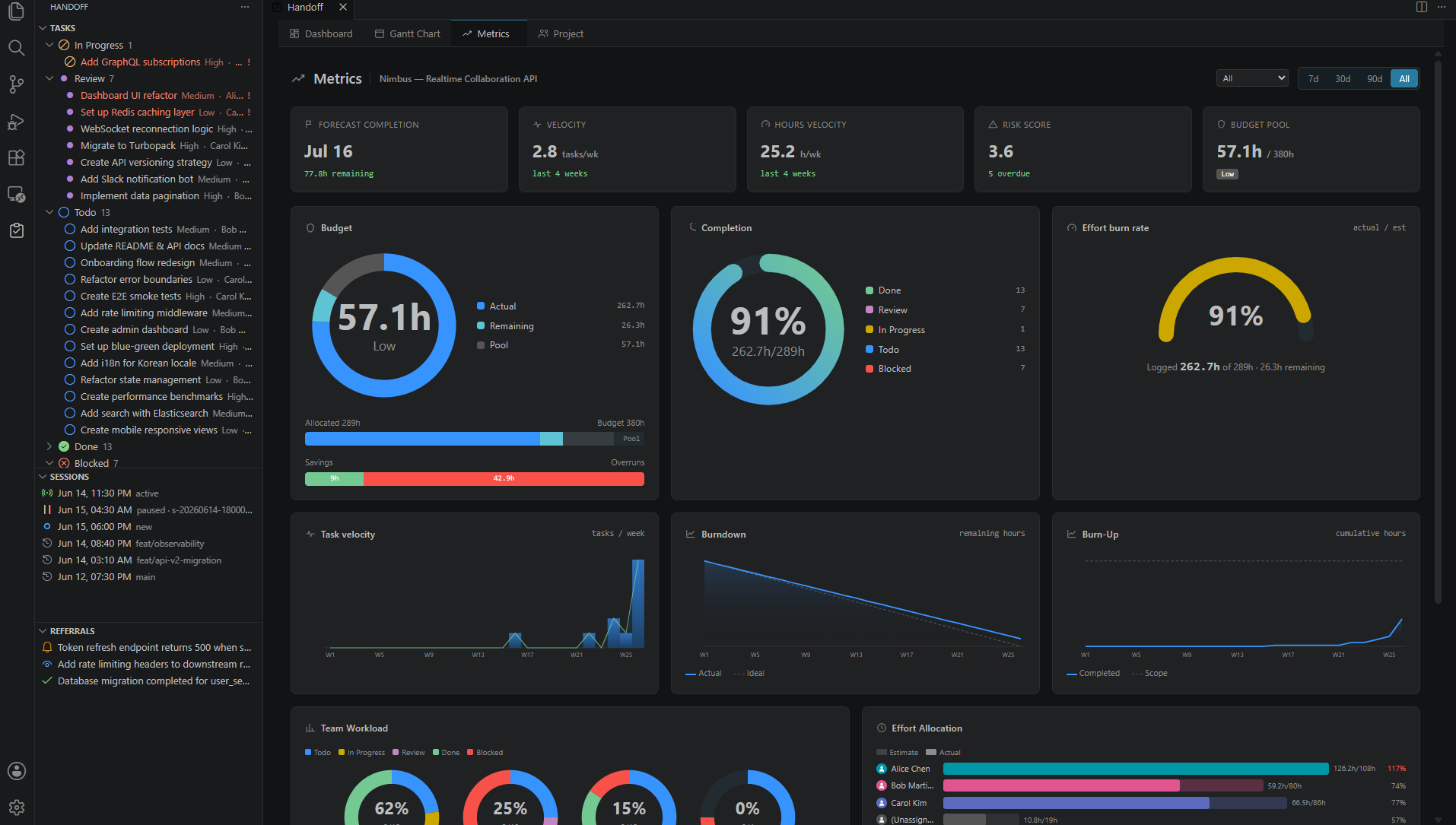
Metrics Panel — Effort hours (estimated vs actual), velocity trends, session duration analytics, and filterable label/milestone breakdowns.
Time Tracker — Start/stop timer linked to the active task. Idle detection pauses automatically. Accumulated time persists across VS Code restarts. AI agents can control the timer remotely via handoff-mcp — start, stop, pause, and resume from the coding session.
Session Browser — Browse AI session history with summaries, decisions, blockers, and file pointers from each handoff.
Effort Budget — Configure total project hours in config.toml. The dashboard shows remaining budget and burn rate.
Setup
1. Install handoff-mcp (the MCP server)
This extension visualizes data created by handoff-mcp — an MCP server that gives AI coding agents persistent memory across sessions.
Option A — Claude Code Plugin (recommended)
# Install the binary
npm install -g handoff-mcp-server

# Add the marketplace and install (in Claude Code)
/plugin marketplace add alphaelements/handoff-mcp
/plugin install handoff-mcp@handoff-mcp-marketplace
This registers the MCP server and all skills (handoff, handoff-load, handoff-memory, handoff-refer, handoff-import) automatically — no manual setup needed.
Optional: memory auto-injection hooks
/plugin install handoff-mcp-hooks@handoff-mcp-marketplace
/plugin enable handoff-mcp-hooks
Injects relevant project memories on every prompt and file edit. Disable anytime with /plugin disable handoff-mcp-hooks.
Option B — Manual setup
npm install -g handoff-mcp-server
claude mcp add -s user handoff -- handoff-mcp
Optionally copy skill files for automatic session handling:
cp -r $(npm root -g)/handoff-mcp-server/skills/* ~/.claude/skills/
3. Add to your project's CLAUDE.md
Add the following to your project's CLAUDE.md so the agent uses handoff consistently across sessions:
## Session Handoff

This project uses handoff-mcp for session continuity.

- **Session start**: Call `handoff_load_context` to load previous session state.
  If not initialized, call `handoff_init` with the project name.
  If `session_guidance` is present, immediately call `handoff_save_context`
  with `session_status: "active"` to establish a persistent session before
  starting work.
- **Session end**: Call `handoff_save_context` with a summary, decisions, and blockers.
- **During work**: Use `handoff_update_task` to track progress.
  Mark tasks `in_progress` when starting, `done` when complete.
4. Initialize your project
In an AI coding session (e.g. Claude Code), ask the agent to initialize handoff:
> Initialize handoff for this project
This creates a .handoff/ directory in your project root with config.toml and empty tasks/ and sessions/ directories.
5. Install this extension
Search "Handoff" in the VS Code Marketplace, or run:
ext install alphaelements.handoff-vscode
6. Open your project
Open the folder containing .handoff/ in VS Code. The extension activates automatically:
- Task Explorer appears in the sidebar
- Dashboard is available via
Ctrl+Shift+P / Cmd+Shift+P → Handoff: Open Dashboard
- Status Bar shows task counts and active timer
Requirements
- VS Code 1.90+
- A project with a
.handoff/ directory (created by handoff-mcp)
Try it without handoff-mcp
Clone this repo and open it in VS Code — it includes a .handoff/ directory with realistic demo data (42 tasks, sessions, milestones, and effort budget). No MCP server needed to explore the UI.
Commands
All commands are available via the Command Palette (Ctrl+Shift+P / Cmd+Shift+P):
| Command |
Description |
Handoff: Open Dashboard |
Open the main dashboard panel |
Handoff: Open Gantt Chart |
Open the Gantt chart |
Handoff: Open Metrics |
Open the metrics panel |
Handoff: Open Team |
Open the team panel |
Handoff: Open Task |
Open a task detail panel |
Handoff: Focus on Handoff View |
Show the task explorer sidebar |
Handoff: Refresh Tasks |
Re-scan .handoff/ for changes |
Handoff: Create Task |
Create a new task via quick pick |
Handoff: Filter Tasks |
Set filter conditions |
Handoff: Set Sort |
Change task sort order |
Handoff: Set Status |
Change task status |
Handoff: Set Priority |
Change task priority |
Handoff: Set Milestone |
Assign a milestone |
Handoff: Edit Schedule |
Edit start date, due date, and estimates |
Handoff: Add Dependency |
Add a task dependency |
Handoff: Remove Dependency |
Remove a task dependency |
Handoff: Toggle Done Criterion |
Check/uncheck a done criterion |
Handoff: Set Display Order |
Set task display order |
Handoff: Log Time |
Log hours to a task |
Handoff: Pause Timer |
Pause the running timer |
Handoff: Stop Timer |
Stop timer and save elapsed time |
Handoff: Cancel Timer |
Discard timer without saving |
Handoff: Timer Actions |
Quick pick for timer controls |
Handoff: Set Referral Status |
Update a cross-project referral status |
Configuration
Key settings under handoff.* in VS Code Settings:
| Setting |
Default |
Description |
handoff.autoRefresh |
true |
Watch .handoff/ for changes and refresh automatically |
handoff.locale |
"auto" |
UI language (en or ja). auto = follow VS Code |
handoff.defaultView |
dashboard |
Default panel view when opening Handoff |
handoff.statusBar.enabled |
true |
Show task count and timer in the status bar |
handoff.gantt.defaultScale |
day |
Gantt chart time scale (day or week) |
handoff.timeTracker.idleTimeoutMinutes |
3 |
Minutes of inactivity before pausing the timer |
handoff.taskExplorer.sortBy |
order |
Default sort: order, priority, updated, created, due |
For the full list of 22 settings plus config.toml reference, see Configuration.
Project Structure
The extension reads from the .handoff/ directory created by handoff-mcp:
your-project/
└── .handoff/
    ├── config.toml          # Project name, effort budget
    ├── tasks/
    │   ├── t1-auth/
    │   │   └── _task.done.json
    │   └── t2-api/
    │       └── _task.in_progress.json
    └── sessions/
        └── s-20260619-.../
            └── session.json
Task status is encoded in the filename: _task.todo.json, _task.in_progress.json, _task.review.json, _task.done.json.
Demo Data
This repository includes a .handoff/ directory with a realistic sample project ("Nimbus — Realtime Collaboration API") containing 42 tasks across multiple milestones, 6 AI sessions, effort budgets, assignee calendars, and more. Clone the repo, open it in VS Code, and the extension will pick it up automatically.
Issues & Feedback
Found a bug or have a feature request? Please open an issue.
Documentation
For detailed guides on each feature, see the Wiki:
Getting Started · Task Explorer · Task Detail · Dashboard · Gantt Chart · Metrics · Time Tracker · Session Browser · Team Panel · Configuration · FAQ
Links
License
Source code is proprietary (All rights reserved). This repository contains documentation, examples, and issue templates.

