MR Creator
Create Merge Requests from multiple branches in one click — right inside VS Code.



GitLab · GitHub · Bitbucket — one extension, one license. Free to start, no sign-up in the editor.
code --install-extension alphaZ.mr-creator-ext
Or open it directly in VS Code. Already installed? Buy a license / start the 14-day free PRO trial.
See it in action
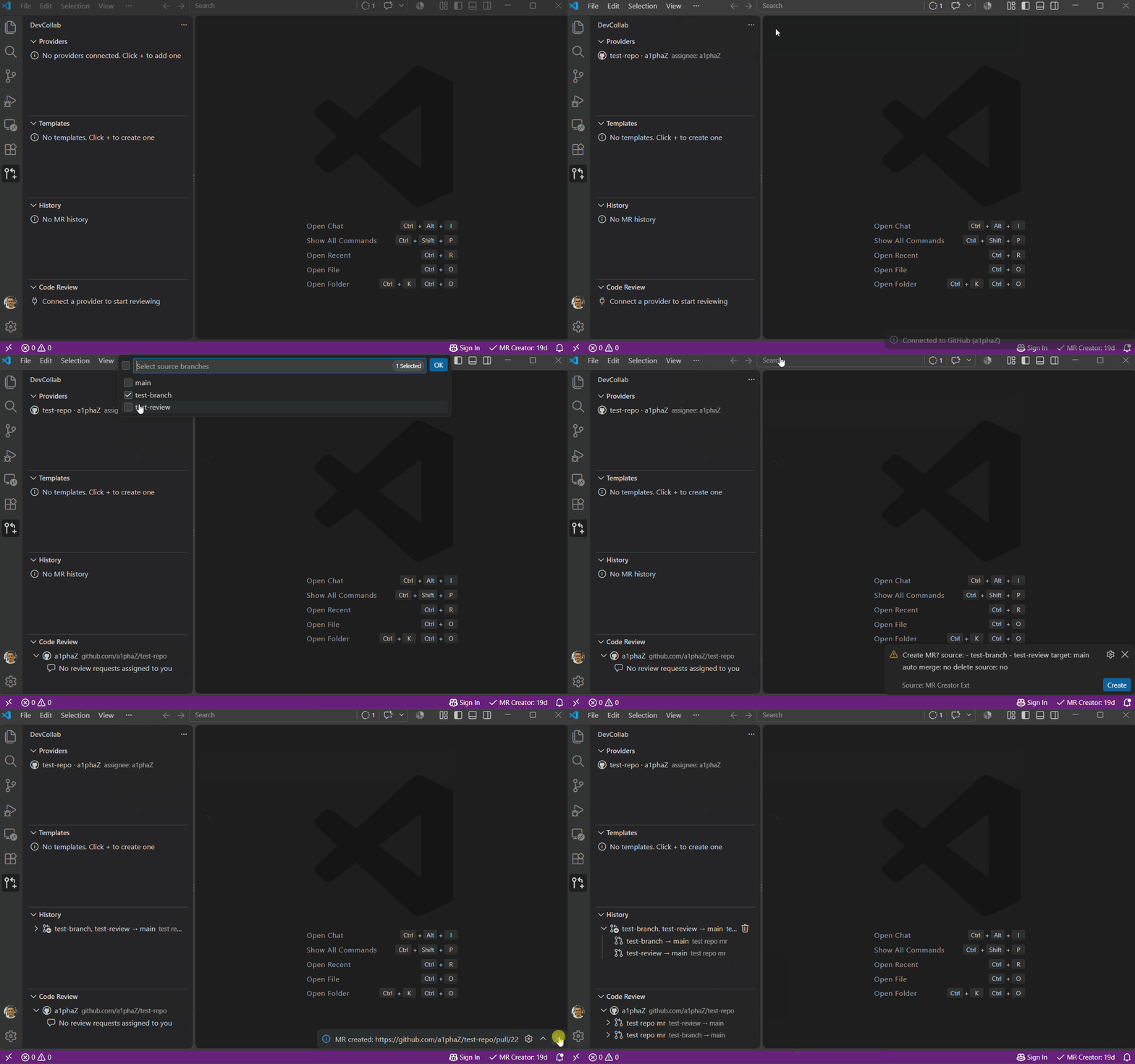
Create MRs from several branches in one click — the whole flow takes about 30 seconds:
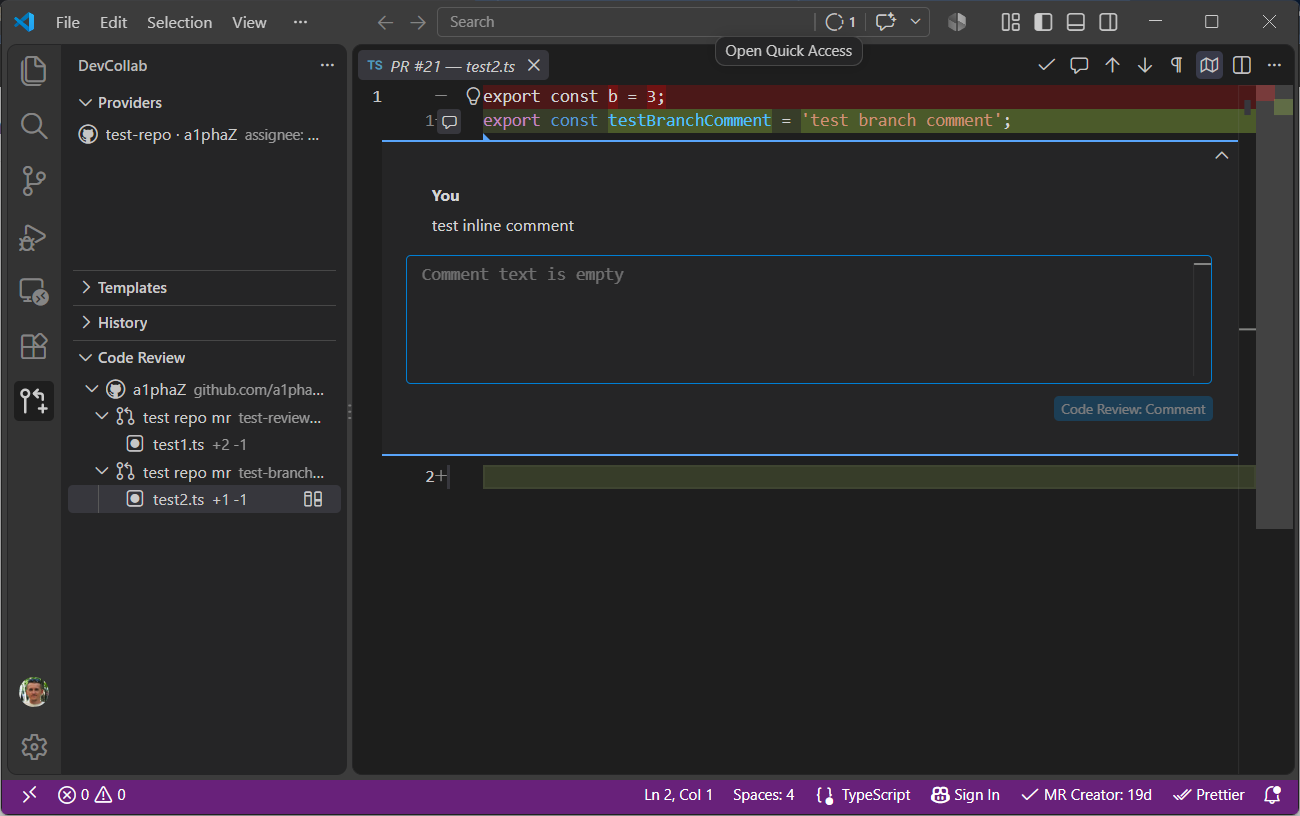
Review merge requests, comment on lines and approve right from the diff editor:
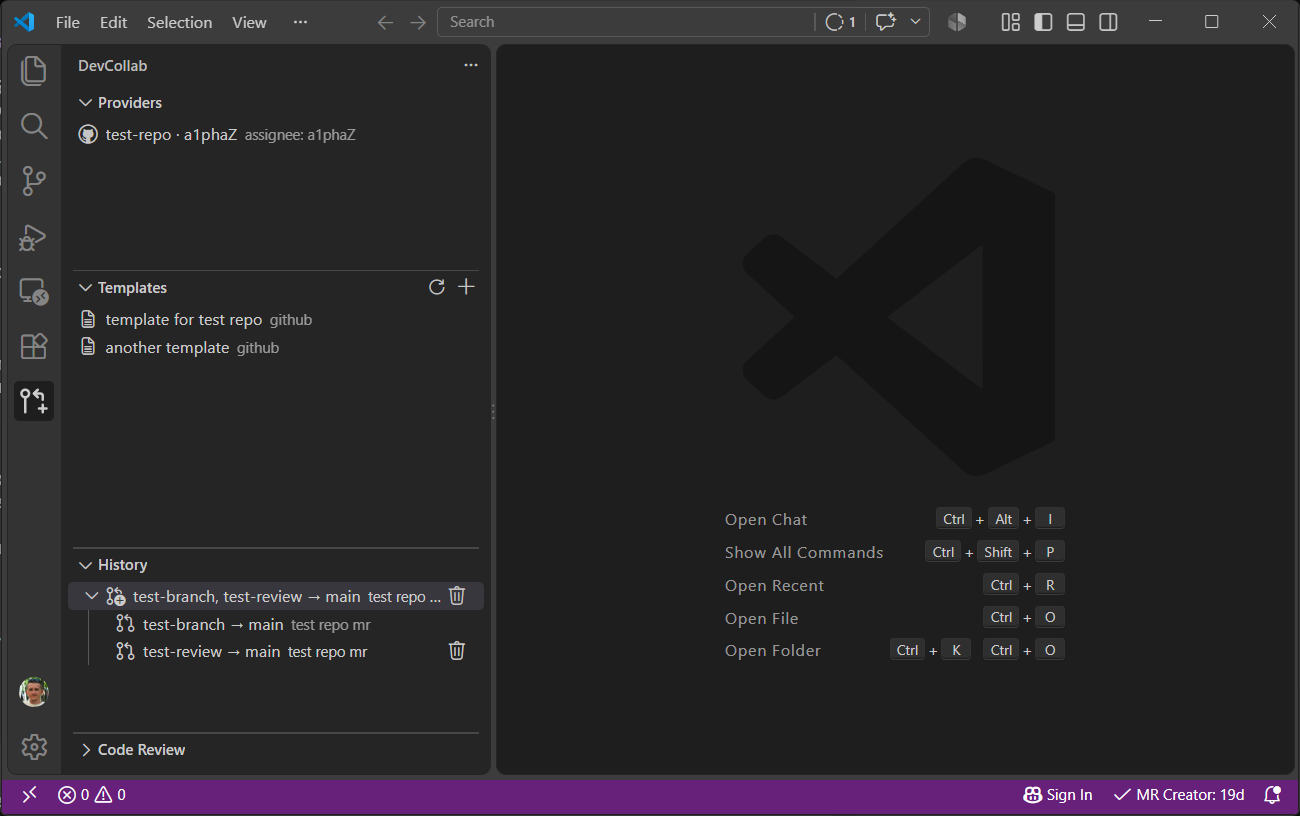
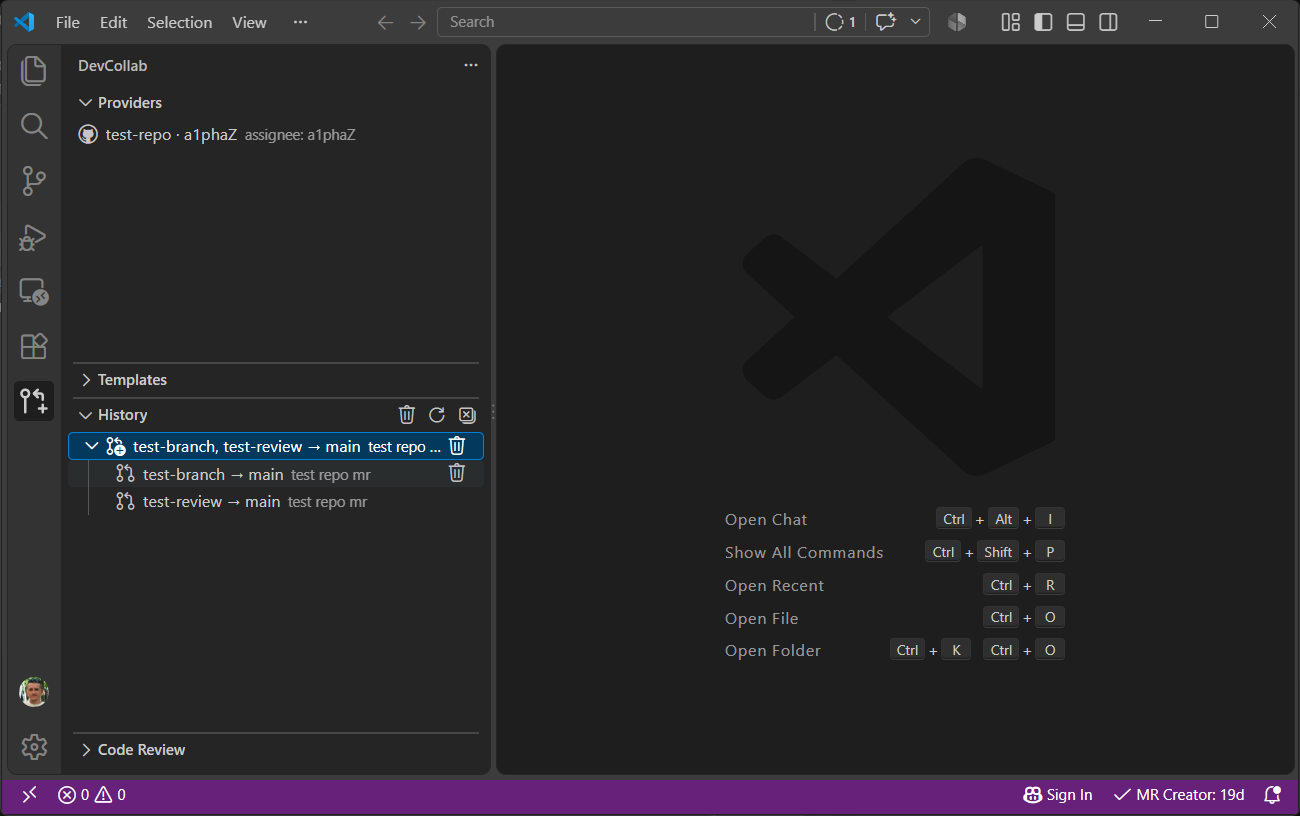
Reuse templates and track your MR history — everything stays in VS Code:
Features
- Multi-source MR — create MRs from many branches in one click; exclude unready branches, the rest are processed automatically
- Connect multiple Git providers — GitLab, GitHub, Bitbucket (incl. self-hosted GitLab)
- Code Review in the editor — approve, comment, request changes without leaving VS Code (PRO)
- Auto-merge — awaits mergeability, then merges automatically; falls back to immediate merge when already mergeable
- Auto branch creation — missing target branches are created via API
- Templates — save and reuse MR configurations (title, description, repo, reviewers, assignee, auto-merge, branch removal)
- MR History — track all created merge requests, reuse them as templates
- Smart reviewer assignment — on conflicts, the MR is assigned to the author of the last commit
- Secure secrets — tokens and licenses live in the OS keychain / VS Code SecretStorage
- Honest offline license — ECDSA P-256 signatures verified locally; once a day the extension checks that your license wasn't revoked, with a 24/72 h grace period when the server is unreachable
Free vs PRO
|
Free |
PRO |
| All Git providers |
✅ |
✅ |
| Connections |
1 |
Unlimited |
| Branches per MR batch |
up to 3 |
Unlimited |
| Code Review in the editor |
— |
✅ |
| Auto-merge watcher |
— |
✅ |
| MR history & templates |
7 days |
Unlimited |
| Price |
$0 |
from $5/month |
Start with a 14-day free PRO trial — no card required. Start the trial in the Telegram bot.
Lifetime $99 · Year $49 · 6 months $25 · Month $5 · Team $15/month for 3 seats.
Why is PRO paid?
MR Creator is an independent project funded by license sales — not ads or data selling. There is no telemetry: your code, tokens and license never leave your machine. The license is verified locally (ECDSA P-256), with one lightweight daily check against the license server and a 24/72 h offline grace period where PRO keeps working. Your payment goes into PRO development: in-editor Code Review, unlimited connections, auto-merge watcher.
One extension covers GitLab, GitHub and Bitbucket (including self-hosted) instead of three vendor plugins — and creates batch MRs from several branches in one click.
Supported Git Providers
| Provider |
Cloud |
Self-hosted |
Code Review |
| GitLab |
✅ |
✅ |
✅ (PRO) |
| GitHub |
✅ |
GitHub Enterprise |
✅ (PRO) |
| Bitbucket |
✅ |
Bitbucket Server |
✅ (PRO) |
Missing a provider? Request it — we're tracking demand for Gerrit, Gitea, Azure DevOps and more.
Code Review in the Editor (PRO)
Review merge requests without opening a browser: tree of open MRs, inline comments,
approve / request changes, diff navigation — all inside VS Code.
The whole review loop lives in your editor, not in a tab.
Quick Start
1. Get a License
Run MR Creator: License Menu from the Command Palette, then Buy License — or jump straight to the Telegram bot and start the free trial.
2. Connect a Git Provider
Click + in the Providers panel or run MR Creator: Connect Git Provider, then paste a personal access token.
| Provider |
Where to get a token |
| GitLab |
Settings → Access Tokens → api scope |
| GitHub |
Settings → Developer Settings → Personal access tokens → repo scope |
| Bitbucket |
Personal Settings → App passwords → Repositories: Read/Write |
3. Create a Merge Request
- Run MR Creator: Create Merge Request from the Command Palette
- Or use the editor title bar buttons (when a git repo is open)
- Or right-click a provider in the sidebar and select Create MR for Provider
What's New
3.1.0 — after your first MR you may see a one-time "leave a rating" prompt (once per install), and free users who select 4+ branches now get a short "Pro gives unlimited batches" nudge with a Try PRO free action opening the bot.
3.0.0 — honest offline licensing: the signature is still verified locally (ECDSA P-256), but once a day the extension now checks with the license server that your license wasn't refunded or revoked. If the server is unreachable, PRO keeps working for a 24‑hour grace period (72 h when the official server is down and the network is reachable), then pauses until the next successful check and resumes automatically — your key is never deleted. Corporate networks can whitelist license.mr-creator.ru (outbound TCP 443) and keep using the hosted license server; air-gapped teams can self-host a license container.
2.1.0 — Code Review: open the diff in the editor with file/folder tree, inline comment threads, and diff-editor Approve/Comment actions; own pull requests are clearly marked (Approve disabled on GitHub).
2.0.0 — platform architecture: single unified build, Code Review plugin, 500+ tests, shared provider SDK.
Full history in CHANGELOG.md.
Commands
| Command |
Description |
MR Creator: Connect Git Provider |
Add a new provider with token |
MR Creator: Disconnect Provider |
Remove a connected provider |
MR Creator: Set Provider Assignee |
Set default assignee for a provider |
MR Creator: Rename Provider |
Set a custom display name |
MR Creator: Set Repository for Provider |
Bind a default repository |
MR Creator: Create Merge Request |
Full MR creation wizard |
MR Creator: Create MR from Current Branch |
Create MR using current branch as source |
MR Creator: Create MR into Current Branch |
Create MR targeting current branch |
MR Creator: Create MR for Provider |
Create MR pre-selecting a provider |
MR Creator: Create Branch |
Create a new branch |
MR Creator: Save as Template |
Save MR settings as a reusable template |
MR Creator: Apply Template |
Start MR creation from a template |
MR Creator: Edit Template |
Update an existing template |
MR Creator: Save as Template from History |
Create a template from a past MR |
MR Creator: Delete Template |
Remove a saved template |
MR Creator: Enter License Key |
Activate with a license key |
MR Creator: Show License Info |
View license details |
MR Creator: Clear License |
Remove the stored license |
MR Creator: Set License Server URL |
Point the license check at a custom/default license server (self-hosted containers, corporate proxies) |
MR Creator: License Menu |
Quick access to license actions |
MR Creator: Show Logs |
Open the output channel |
License
This extension requires a valid license key. Licenses are issued through the Telegram bot @mr_creator_license_bot.
- Free — start with a 14-day free PRO trial
- Buy License — purchase a new license
- Renew License — extend an active license
- Enter License — activate with an existing key
The license is stored securely in VS Code's SecretStorage. The signature is verified locally using ECDSA P-256, so the extension keeps working offline without sending your repo data anywhere. To close the refund/abuse loophole, once a day the extension sends one lightweight request to the license server to confirm your license wasn't revoked; without a connection PRO keeps working for a grace period (24 h, or 72 h when the official server is down but the network is up), then pauses and resumes automatically on the next successful check. Your key is never erased. On a corporate proxy just whitelist license.mr-creator.ru (outbound TCP 443).
Settings
| Key |
Default |
Description |
mrCreator.locale |
auto |
UI language (auto, en, ru) |
mrCreator.licenseServerUrl |
https://license.mr-creator.ru |
License server base URL. Keep the default to use the official server; set a custom URL for a self-hosted license container |
mrCreator.licenseGraceHours |
24 |
Grace period (hours) PRO keeps working when the license server is unreachable (1–720). 72 h apply when the default server is used and the network is reachable |
mrCreator.watcherTickSeconds |
60 |
Interval in seconds between MR watcher checks (merge / branch deletion) |

