Alpaquitay AI
Astra-style AI harness for VS Code — SDLC gates, DORA metrics, debt tracking, diff-first writes, specialist routing, and now a Docs agent for Word, Markdown, EPUB and PDF.








Contents
What is it · Quick start · Harness · Work tab (SDD) · Docs tab · Architecture · Providers · Skills · Memory · Domain agents · Settings · Contributing · License
What is Alpaquitay AI?
Alpaquitay AI turns VS Code into a complete harness-driven development environment. Built on principles from Robert C. Martin (Uncle Bob), Martin Fowler, and Sergio Perez Ruiz's Código Sintético, it's not just a chatbot — it's a reception, routing, and trust layer that:
- Perceives your project — fingerprint, stack, sources (never assumes
src/)
- Decides the right lane — Flash (free), Build (SDD), Deep (specialist)
- Shows a preview before any write — diff-first, bounded
- Guards with policy, checkpoints, and debt tracking
- Verifies with DORA metrics, DoD gates, and agent review
- Leaves evidence in
.alpaquitay/ (decisions, economy, debt)
100% open source · MIT license · Privacy-first — your code and prompts go directly to your chosen AI provider. No Alpaquitay servers exist.
Website: specsolid.com · Book: Código Sintético
Quick Start
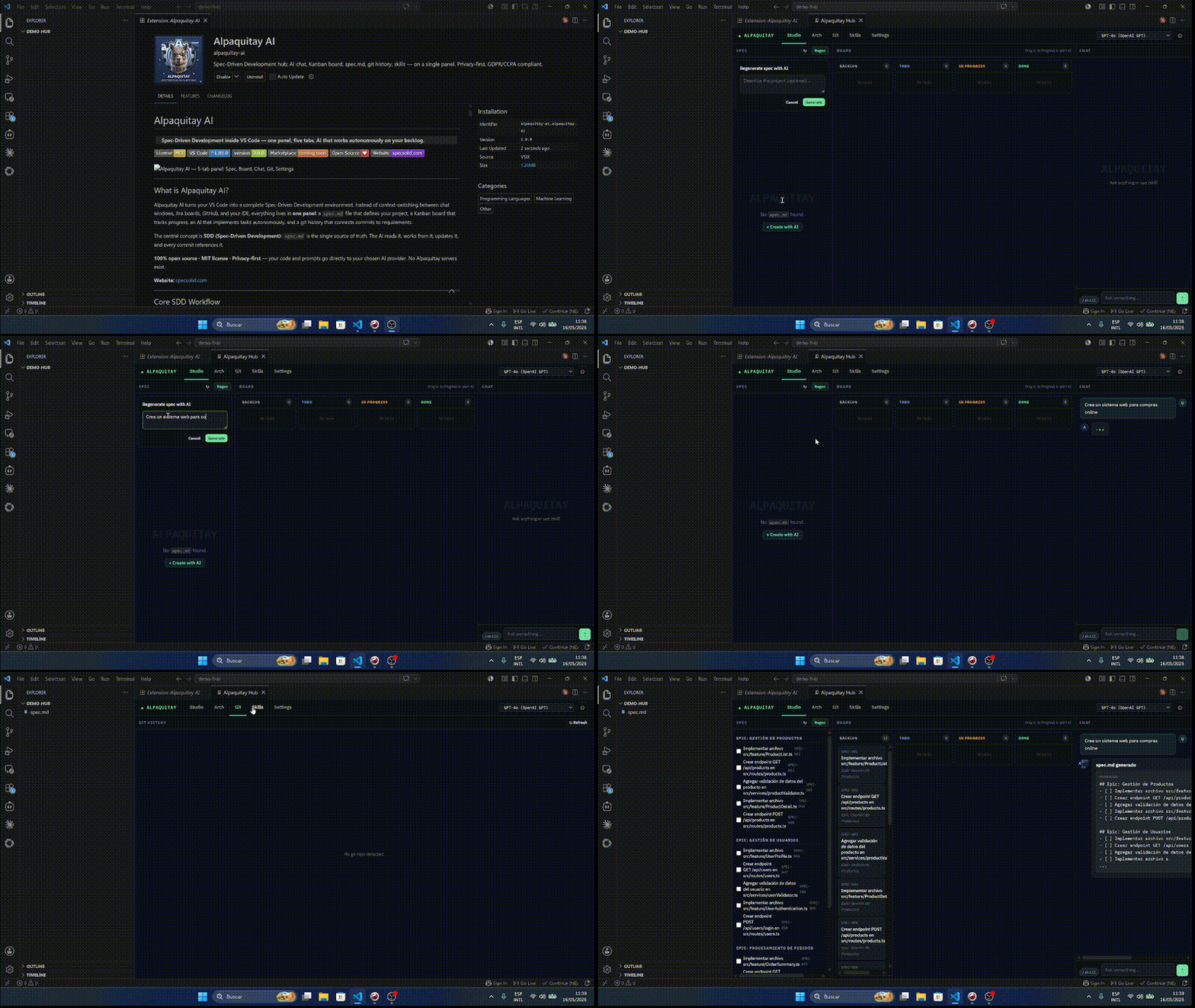
- Install Alpaquitay AI from the VS Code Marketplace or Open VSX.
- Press
Ctrl+Alt+A to open the Hub, then add a provider in Settings — a local model (Ollama / LM Studio) keeps everything on your machine.
- Code: open the Work tab, generate a
spec.md, and drag a task to In Progress.
- Writing: open the Docs tab, pick a
.docx, .md, .epub or .pdf, and tell the agent what to do.
The detailed, step-by-step version is below.
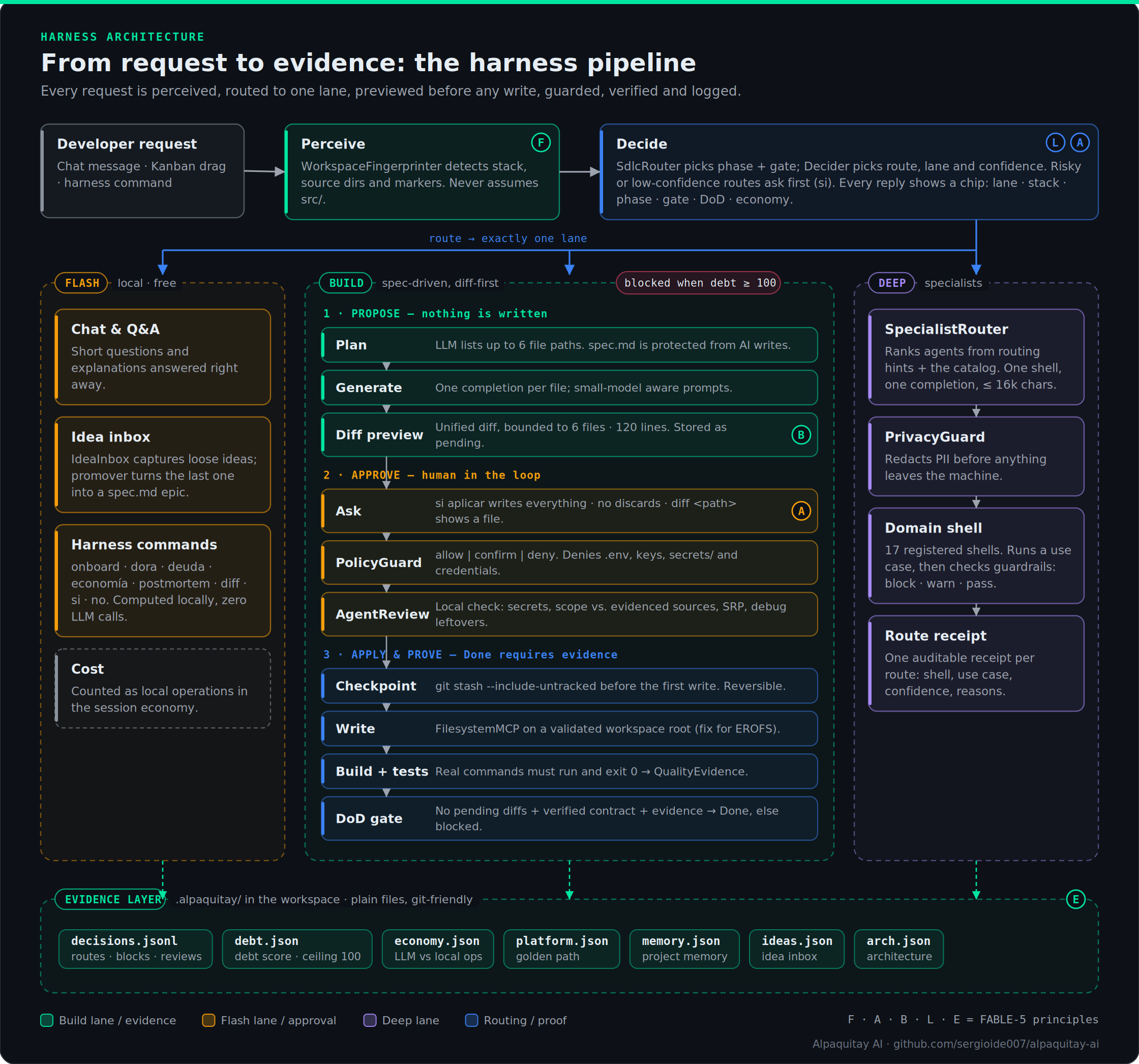
The harness in one picture
Every request is perceived, routed to exactly one lane, previewed before any write, guarded, verified and logged.
Harness Commands (free, no LLM)
| Command |
Effect |
onboard |
Legacy onboarding: fingerprint + platform + ADR-001 + DORA |
dora |
DORA metrics from git log (frequency, lead time, change failure) |
deuda |
Agentic debt meter (ceiling at 100 blocks Build) |
economía |
Session cost: LLM calls vs free local operations |
postmortem <log> |
Classify a pasted failure (build/test/lint/write) |
diff <ruta> |
Show pending diff for a file |
si aplicar |
Review + checkpoint + write all pending diffs |
no |
Discard all pending diffs |
promover |
Promote last idea to spec.md epic |
si |
Confirm proposed route |
FABLE-5 Framework
| Letter |
Principle |
Implementation |
| F |
Fingerprint-first |
Detects stack from markers, never assumes src/ |
| A |
Ask-before-act |
Every risky action asks for confirmation |
| B |
Bounded preview |
Unified diff capped at 6 files, 120 lines |
| L |
Legible-first |
Every response shows: lane · stack · phase · gate · DoD · economy |
| E |
Evidence-always |
Every decision in .alpaquitay/decisions.jsonl |
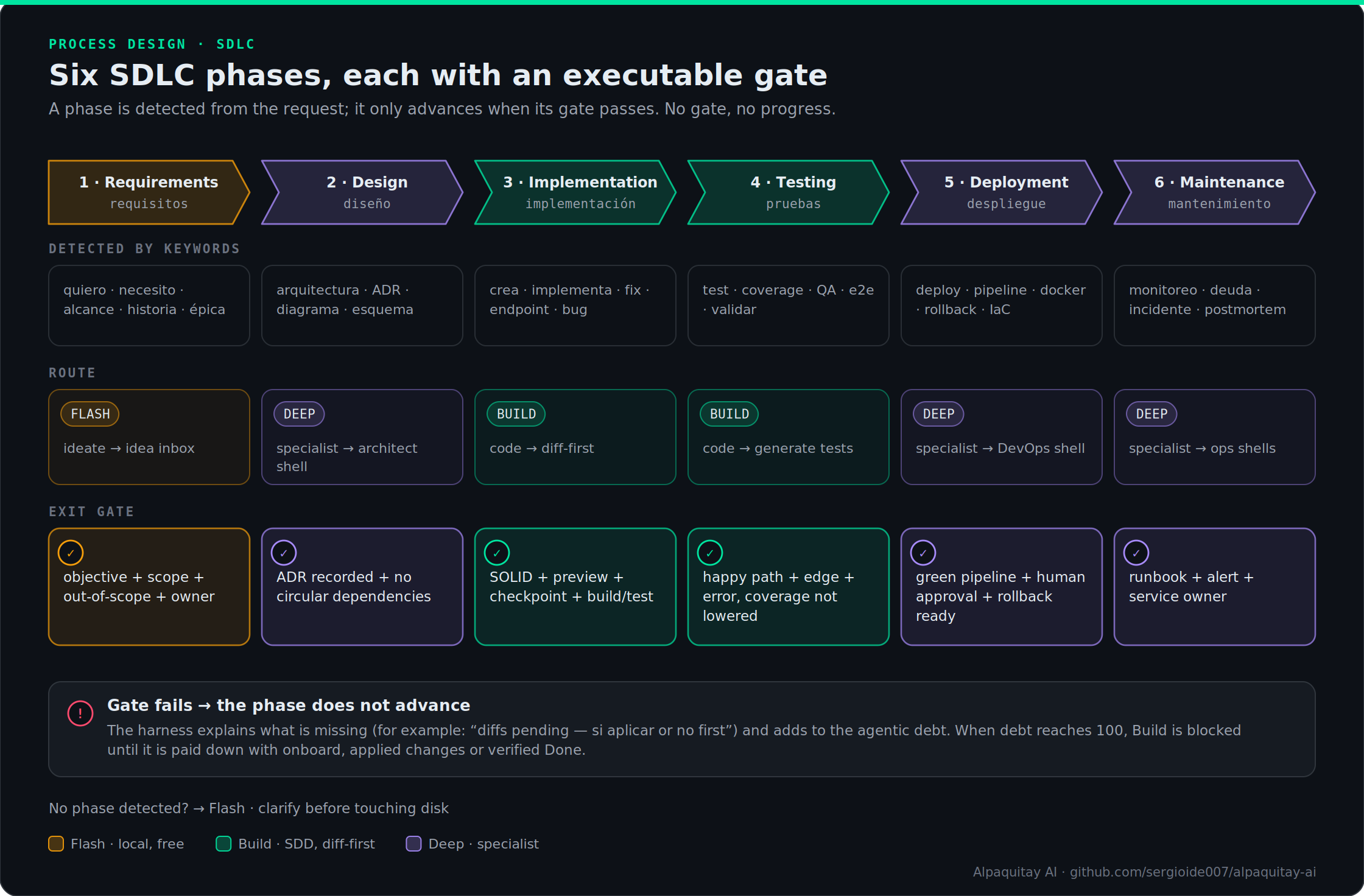
SDLC gates
The harness detects the SDLC phase from the request and only lets it advance when the exit gate passes.
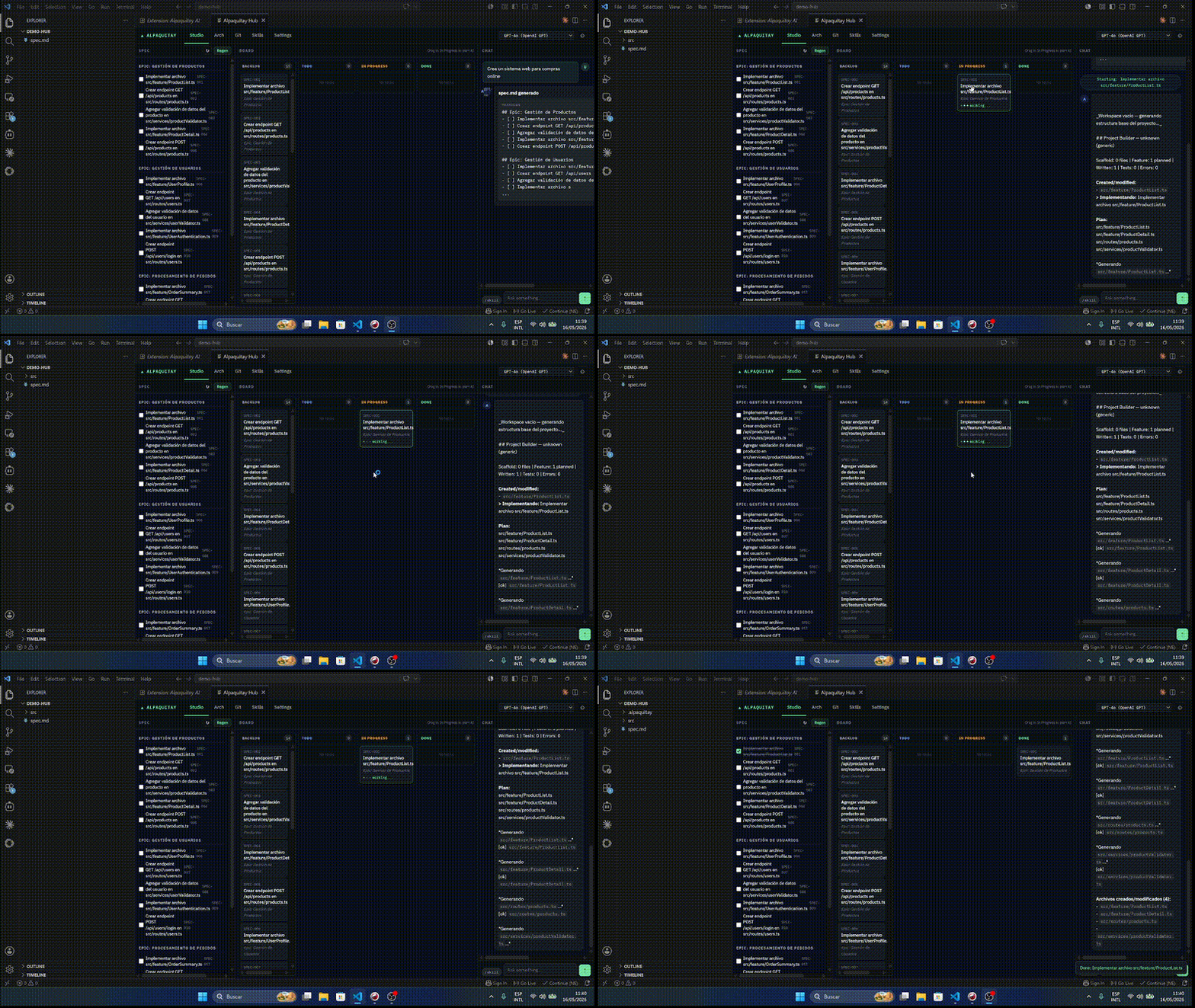
Core SDD Workflow
  spec.md ──► Kanban Board ──► AI implements task ──► spec.md [x] ──► git #SPEC-XXX
     ▲                                                        │
     └────────────────────────────────────────────────────────┘
                          feedback loop
- Write (or AI-generate) a
spec.md with epics and tasks
- Drag a task card to In Progress on the board
- The AI scans the workspace, plans which files to create, and writes the code
- The task auto-moves to Done and
spec.md is updated (- [x])
- Git commits reference
#SPEC-001 — every change is traceable to a requirement
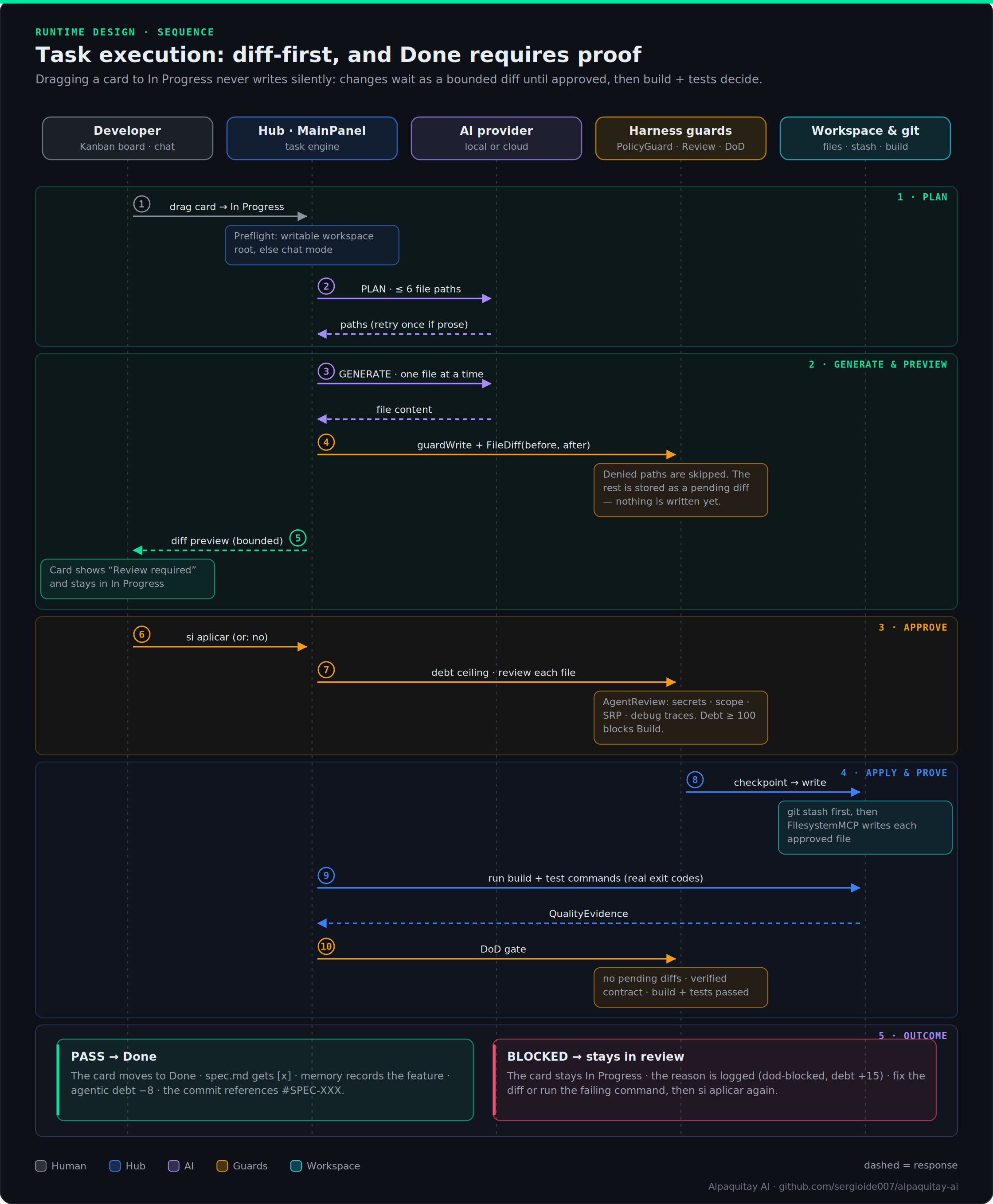
How a task runs
Dragging a card to In Progress never writes silently. The agent plans up to 6 files, generates them, and stores the result as a bounded diff. Nothing touches disk until you answer si aplicar (or no to discard). On apply, PolicyGuard and AgentReview check each file, a git checkpoint is taken, files are written, and real build and test commands run. A card only reaches Done when the Definition-of-Done gate has evidence.
Step-by-step setup
Step 1 — Install
Option A — VS Code Marketplace (recommended):
Search "Alpaquitay AI" in the Extensions panel, or run:
code --install-extension alpaquitay-ai.alpaquitay-ai
Option B — Open VSX (VS Codium / other editors):
Install from open-vsx.org/extension/alpaquitay-ai/alpaquitay-ai, or run:
ovsx install alpaquitay-ai.alpaquitay-ai
Local (free, fully private):
# Ollama — auto-detected at http://localhost:11434
ollama pull codellama
# Other options: llama3, mistral, qwen2.5-coder, deepseek-coder

# LM Studio — auto-detected at http://localhost:1234
# Load any GGUF model inside LM Studio, then start the local server
Cloud (Anthropic / OpenAI):
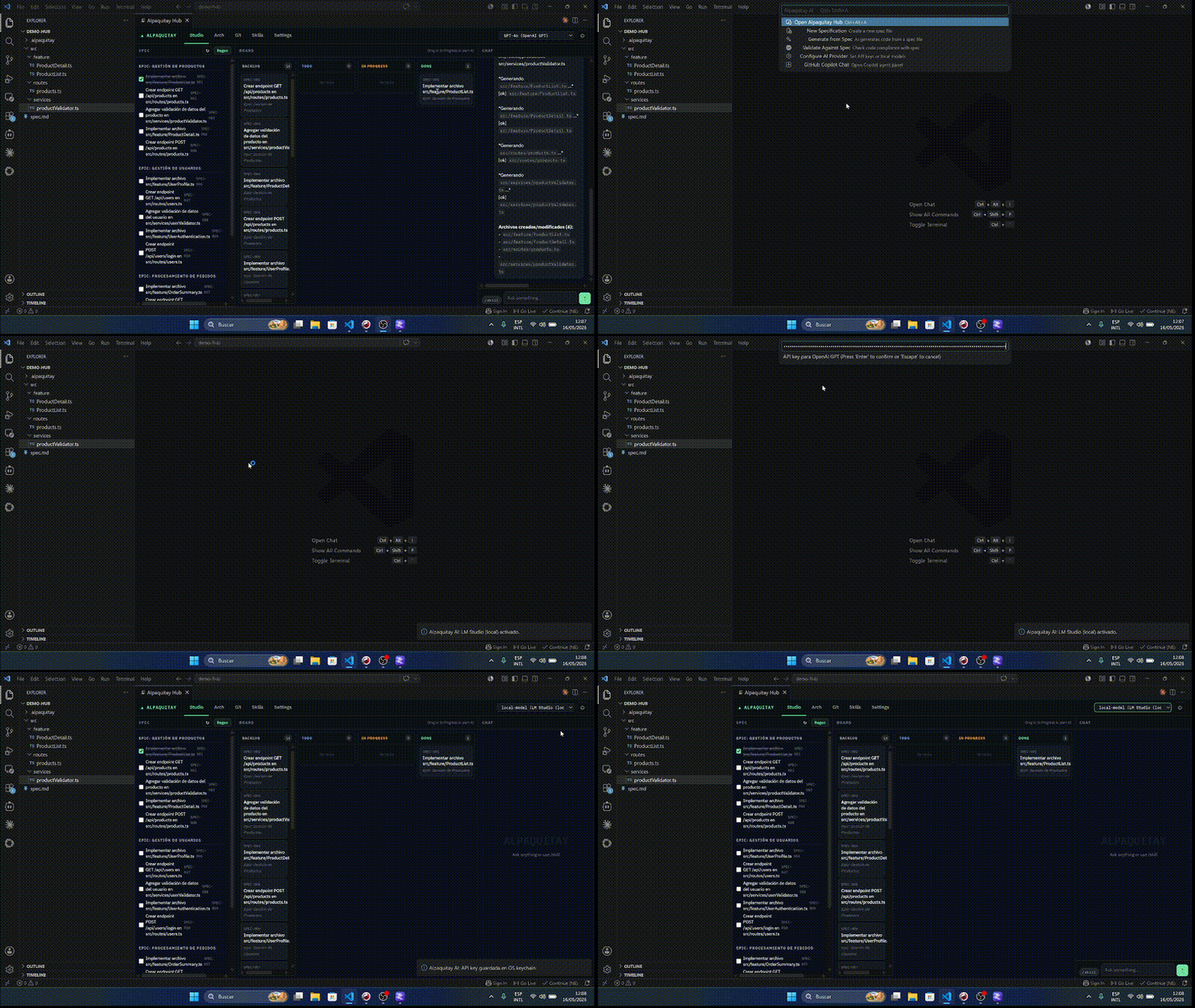
Open the command menu with Ctrl+Shift+A → select Configure AI Provider → enter your API key.
Keys are stored in the OS keychain via VS Code SecretStorage — never in plaintext, never in settings files.
Small model note: Models under ~4B parameters (1.3b, 3b, mini, nano, gemma:2b, etc.) are detected automatically. Stricter no-comment rules are injected and generation temperature is lowered so they produce cleaner output.
Step 3 — Open the hub
Ctrl+Shift+A   →  Command menu (choose hub or other commands)
Ctrl+Alt+A     →  Open Alpaquitay Hub directly
Step 4 — Create your spec
In the Work tab → Spec pane → click Generate with AI. The AI analyzes your workspace and creates an initial spec.md with epics and tasks. Refine it by hand or via the chat pane.
Step 5 — Work tasks
On the Board pane, all tasks start in Backlog. Drag one to In Progress — the AI immediately starts implementing it and streams progress to the Chat pane.
Standard Markdown with checkboxes. Level-2 headings define epics; checkboxes define tasks.
# My Project

Brief description.

## Epic: Authentication

- [ ] SPEC-001 Implement JWT provider
- [ ] SPEC-002 Add refresh token rotation
- [x] SPEC-003 Design auth flow

## Epic: Dashboard

- [ ] SPEC-004 Build metrics chart component
- [ ] SPEC-005 Add CSV export
Rules:
## Heading → epic group- [ ] text → pending task- [x] text → completed task- Task IDs (
SPEC-001, SPEC-002, ...) are auto-assigned by position
- Free-form text between tasks is used as AI context
Git Convention
Reference a spec task in your commit message to link it in the Git tab:
feat(auth): implement JWT provider #SPEC-001

Handles token generation, expiry, and validation. Uses RS256.
Both #SPEC-001 and [SPEC: 001] formats are recognized. The Git tab shows a badge on that commit.
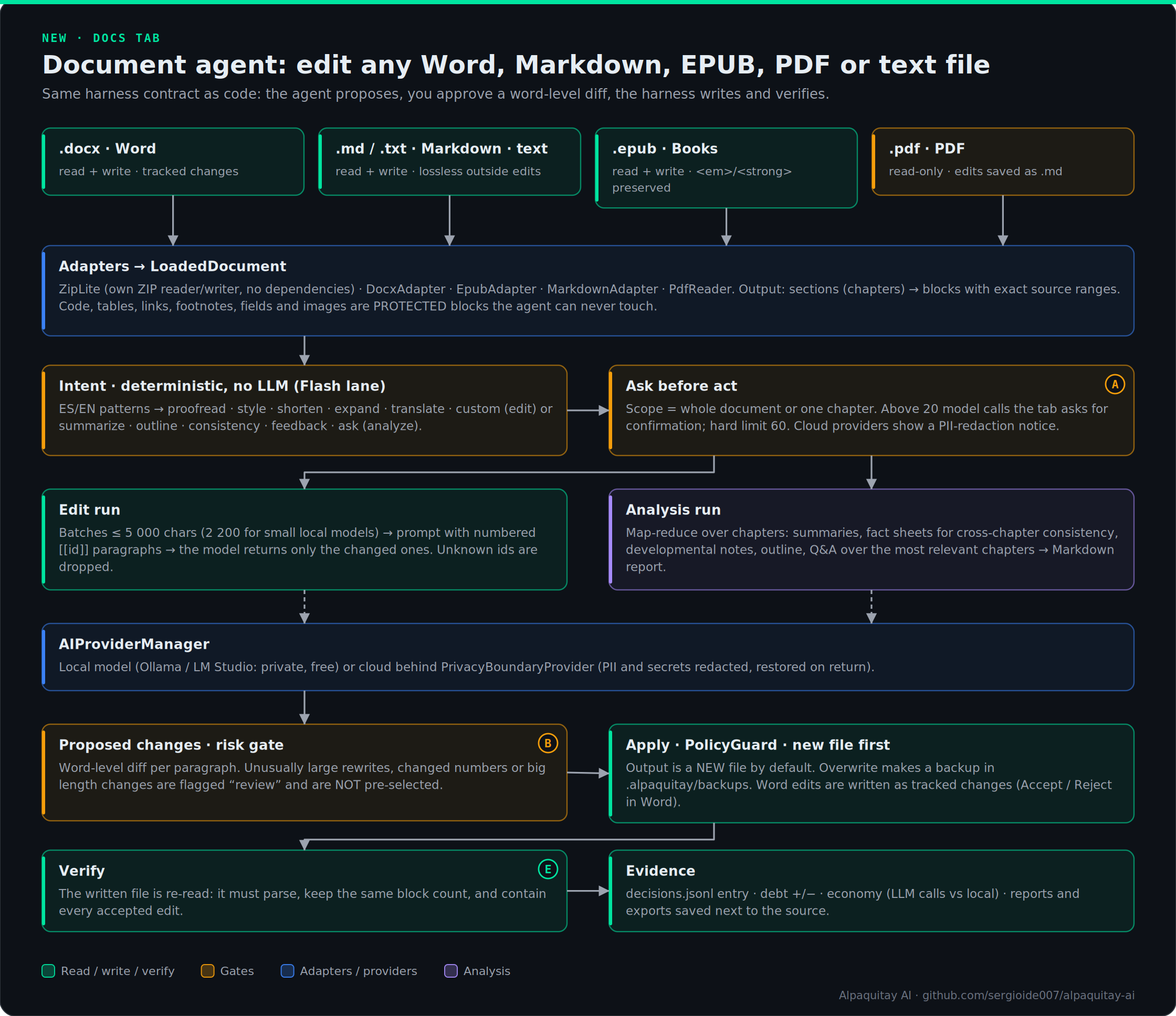
Docs tab — edit Word, Markdown, EPUB and PDF with an agent
A main tab, next to Work, for everything that is not code: manuscripts, reports, articles, and the books you write and edit. You talk to the agent in plain language, in Spanish or English:
"corrige la ortografía del capítulo 3" · "hazlo más directo, mantén mi voz" · "translate the book to English" · "revisa la coherencia entre capítulos" · "¿qué le falta a este capítulo?"
| Format |
Read |
Write |
Notes |
.docx |
✅ |
✅ |
Edits are written as Word tracked changes (Review → Accept / Reject). Untouched paragraphs stay byte-identical. |
.md / .txt |
✅ |
✅ |
Lossless outside the edited blocks; code blocks, tables and front matter are protected. |
.epub |
✅ |
✅ |
Chapters follow the spine; <em> / <strong> survive a round trip. |
.pdf |
✅ |
➡️ .md |
Read-only, best effort (text-based PDFs). Scanned PDFs need OCR first. |
Convert any document to Markdown, Word or EPUB from the same tab, so a manuscript in Markdown becomes a publishable EPUB in one click.
What the agent can do
- Edit: proofread · improve style · shorten · expand · translate · any free-form instruction.
- Analyze: summarize · outline · cross-chapter consistency check (names, dates, places, terminology) · developmental feedback · questions about the book.
Same guarantees as the code side
- The agent only proposes. You review a word-level diff per paragraph and select what to apply. Large rewrites, changed numbers and big length changes are flagged review and are not pre-selected.
- Output goes to a new file by default (
name.edited.docx). Overwriting makes a backup first in .alpaquitay/backups/.
- Links, footnotes, fields, images, tables and code are protected blocks the agent never touches.
- The written file is re-read to verify it parses and contains every accepted edit.
- Whole-book runs over 20 model calls ask for confirmation (hard limit 60). Cloud providers go through the privacy boundary (PII and secrets redacted); a local model keeps the manuscript on your machine.
- No dependencies: the ZIP, DOCX, EPUB and PDF readers/writers are built in, so the extension stays small and auditable.
Limits, stated plainly: in a Word paragraph that the agent rewrites, inline formatting inside that paragraph (a bold word, for example) is replaced by the run formatting of its first run. The tracked-changes view shows exactly what changed. Paragraphs with hyperlinks, fields or notes are skipped instead of risking damage.
Architecture
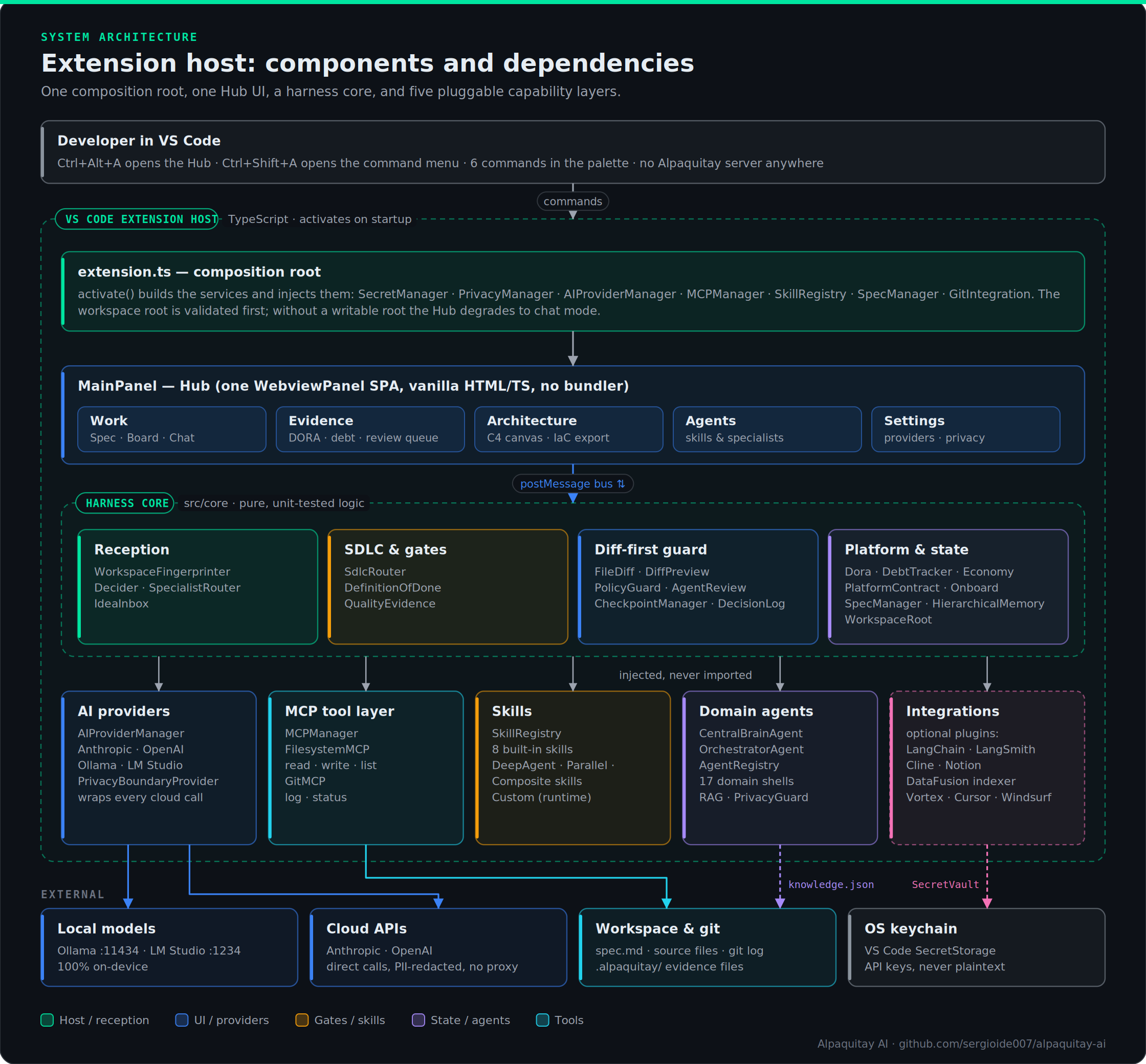
Extension host
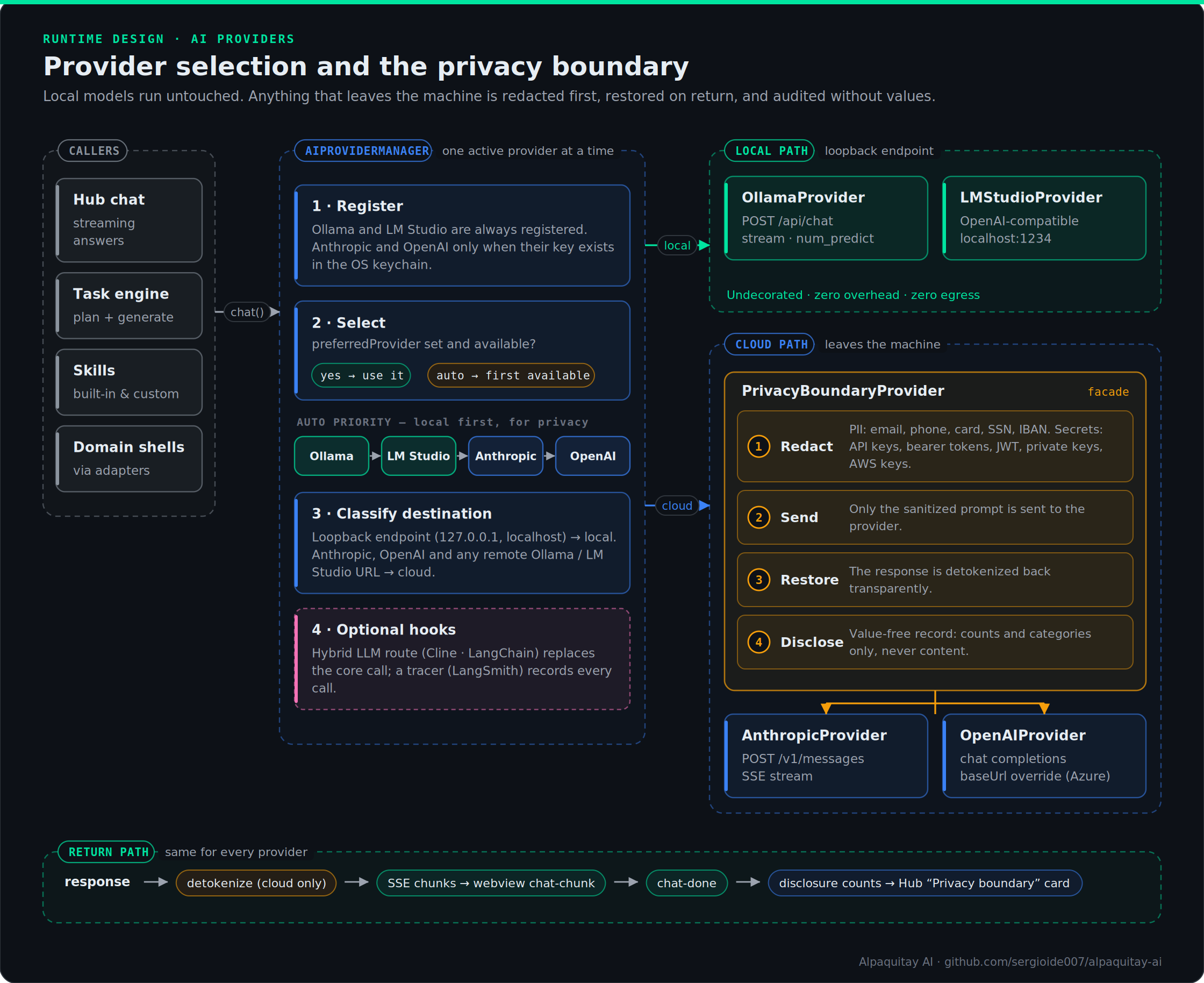
AI provider chain and privacy boundary
Local models run untouched. Anything that leaves the machine is redacted first, restored on return, and audited without values.
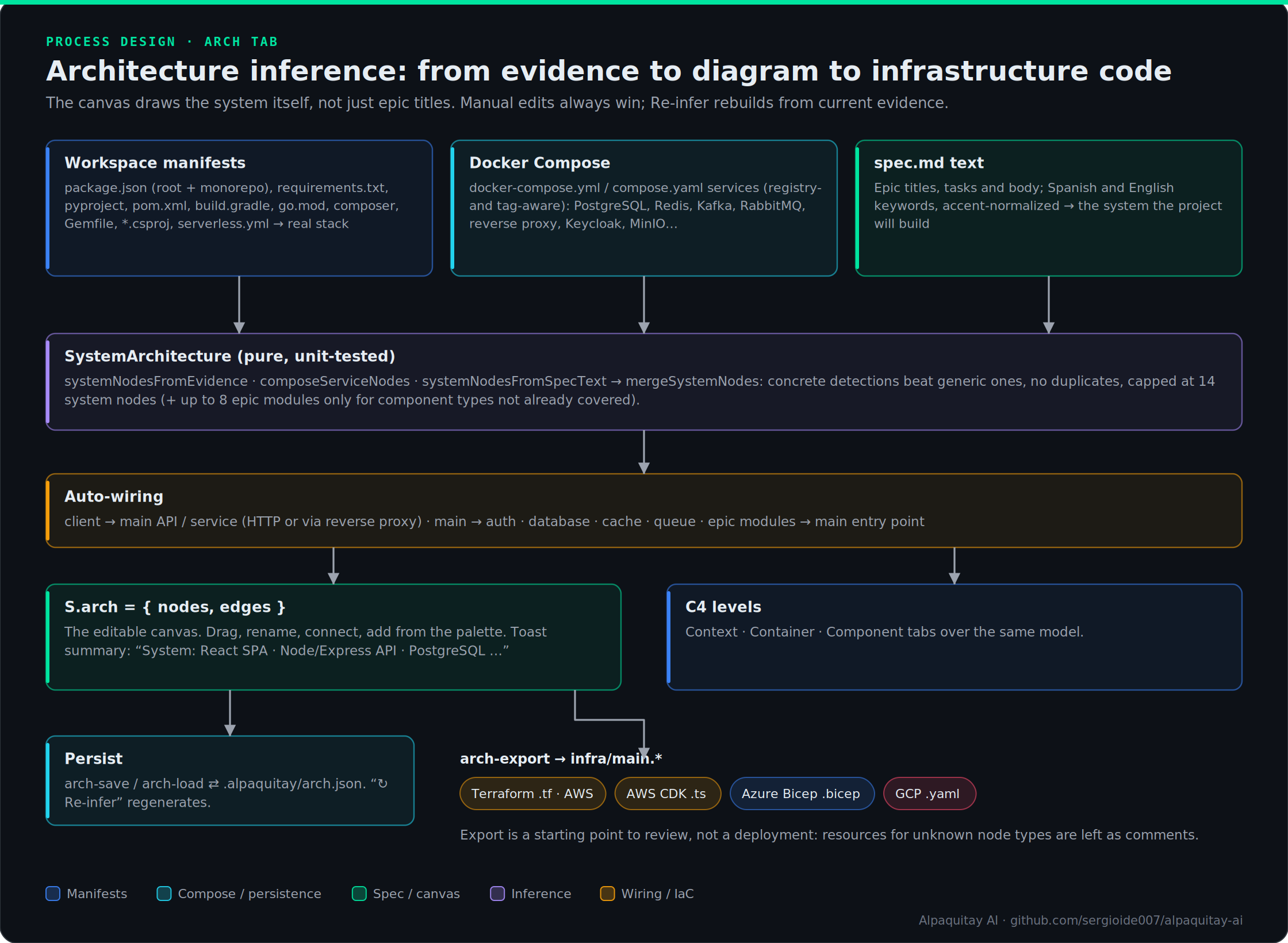
Architecture diagram module (Arch tab)
The canvas infers the real system from manifests, Docker Compose and spec.md, then exports starter infrastructure code.
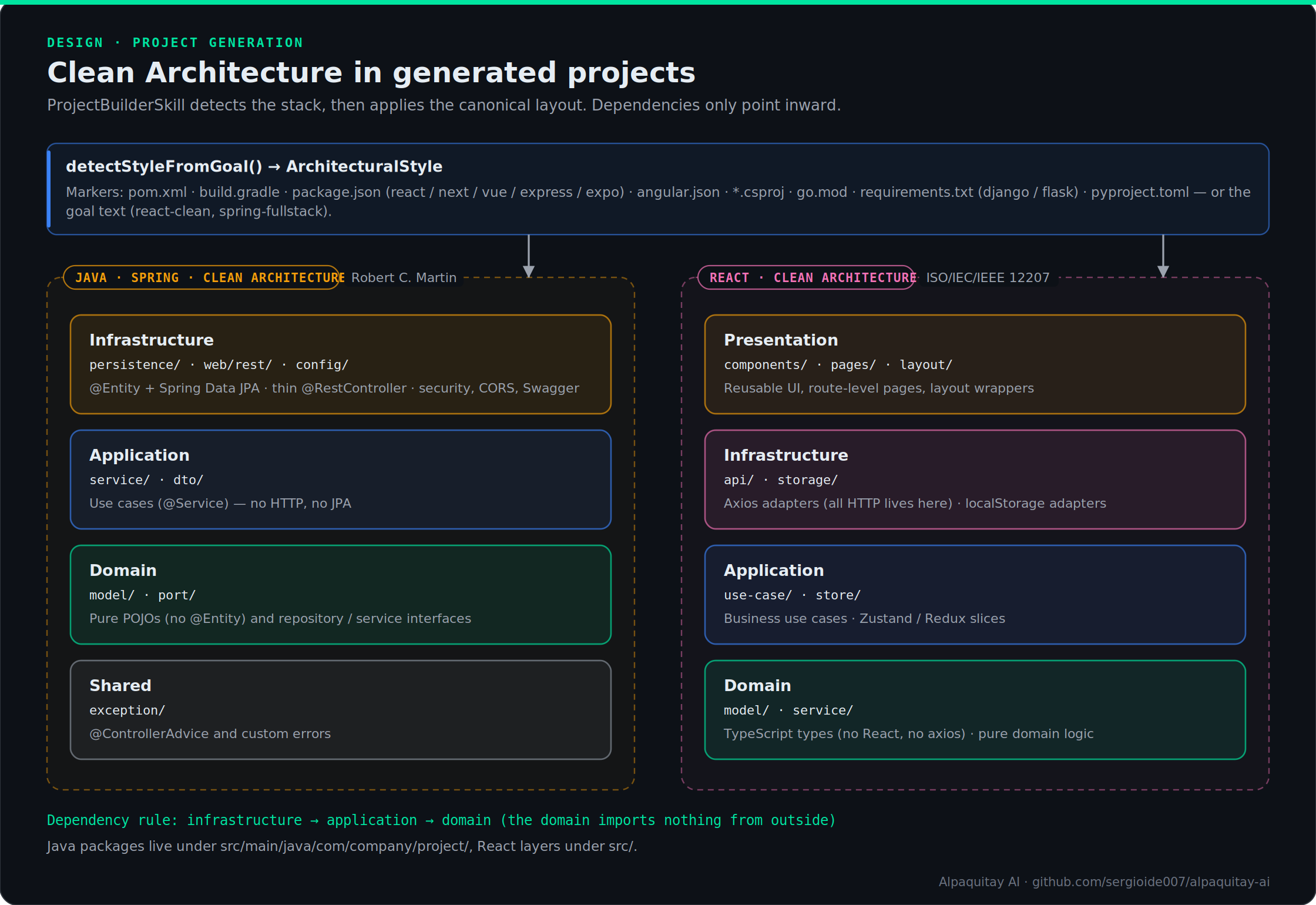
Clean Architecture project generation
AI Providers
| Provider |
Type |
Privacy |
Cost |
Setup |
| Ollama |
Local |
100% on-device |
Free |
ollama pull <model> |
| LM Studio |
Local |
100% on-device |
Free |
Load model, start server |
| Anthropic Claude |
Cloud |
Direct API |
API pricing |
API key in keychain |
| OpenAI GPT |
Cloud |
Direct API |
API pricing |
API key in keychain |
Anthropic Models
| Model |
Context |
Max Output |
Best for |
| Claude Opus 4.7 |
200k |
32k |
Complex architecture, reasoning |
| Claude Sonnet 4.6 |
200k |
64k |
Balanced — default recommendation |
| Claude Haiku 4.5 |
200k |
8k |
Fast iteration, simple tasks |
OpenAI Models
| Model |
Context |
Max Output |
Best for |
| GPT-4o |
128k |
16k |
General coding, balanced |
| GPT-4o Mini |
128k |
16k |
Fast, cost-effective |
| GPT-4 Turbo |
128k |
4k |
Legacy compatibility |
| o1 |
200k |
32k |
Multi-step reasoning |
| o1-mini |
128k |
65k |
Reasoning at lower cost |
Skills
Built-in Skills
| ID |
Name |
Description |
create-file |
Create File |
Generates a new source file from a description |
refactor |
Refactor Code |
Applies SOLID principles and clean code patterns |
generate-tests |
Generate Tests |
Writes unit tests for the active file |
generate-from-spec |
Generate from Spec |
DeepAgent: reads spec, plans files, generates all |
validate-against-spec |
Validate vs Spec |
Checks implementation matches the spec |
new-specification |
New Specification |
Creates a new spec.md from a template |
project-builder |
Project Builder |
Scaffolds a full project from a goal description |
daily-standup |
Daily Standup |
Standup summary from recent git commits |
Custom Skills (TypeScript)
import { Skill, SkillContext, SkillResult } from './core/interfaces';

export class DocumentationSkill implements Skill {
  readonly id = 'generate-docs';
  readonly name = 'Generate Docs';
  readonly description = 'Write JSDoc for all exported functions';

  async execute(ctx: SkillContext): Promise<SkillResult> {
    const { path } = ctx.parameters as { path: string };
    const file = await ctx.mcp.executeTool('filesystem', 'read_file', { path }) as { content: string };
    const documented = await ctx.ai.complete(
      `Add complete JSDoc to all exported functions.\n\n${file.content}\n\nReturn only the updated file.`
    );
    await ctx.mcp.executeTool('filesystem', 'write_file', { path, content: documented });
    return { success: true, output: { path } };
  }
}
DeepAgent Multi-Step Skills
// Each step's output is available to all subsequent steps
const steps: AgentStep[] = [
  { name: 'detect-context', async run(ctx)           { return detectStack(ctx); } },
  { name: 'plan-files',     async run(ctx, outputs)  { return planFiles(ctx, outputs['detect-context']); } },
  { name: 'generate-files', async run(ctx, outputs)  { return generateFiles(ctx, outputs['plan-files']); } },
];
export const MySkill = new DeepAgentSkill('my-skill', 'My Skill', 'Description', steps);
Hierarchical Memory
Alpaquitay maintains a hierarchical project memory in .alpaquitay/memory.json. As the AI generates code, it automatically records:
| Level |
What is stored |
project |
Name, description, architecture decisions |
component |
Major subsystems (auth, dashboard, API layer) |
module |
Specific modules within a component |
feature |
Completed spec tasks with their output files |
class |
Class names and which file they live in |
method |
Top-level exported functions |
package |
External packages and why they were chosen |
config |
Configuration entries |
This memory persists across sessions. Future tasks can query it to maintain consistency — e.g., knowing that UserService is in src/services/user.ts before generating a file that imports it.
Supported Project Architectures
Alpaquitay auto-detects the stack from project files and generates architecture-specific prompts and directory structures.
| Style |
Detection |
Structure |
Architecture Pattern |
react-spa |
package.json (react) |
src/components, pages |
Functional + Hooks |
react-clean |
goal text |
domain/application/infrastructure/presentation |
Clean Architecture |
react-node |
package.json (react+express) |
client/ + server/ |
MVC full-stack |
nextjs |
package.json (next) |
app/ (App Router) |
Server + Client components |
vue-spa |
package.json (vue) |
src/components, views |
Composition API + Pinia |
angular |
angular.json |
src/app/ |
Standalone components + NgRx |
express-api |
package.json (express) |
routes/controllers/services |
REST MVC |
java-maven |
pom.xml |
domain/application/infrastructure/shared |
Clean Architecture |
java-gradle |
build.gradle |
domain/application/infrastructure/shared |
Clean Architecture |
spring-fullstack |
goal text |
backend/ + frontend/ (monorepo) |
CA backend + CA frontend |
csharp-webapi |
*.csproj |
Controllers/Services/Models |
Minimal API / MVC |
go-api |
go.mod |
cmd/internal/pkg |
Effective Go |
django |
requirements.txt |
apps/ pattern |
DRF ViewSets + ModelSerializer |
flask |
requirements.txt |
blueprints/ |
Application factory |
python-package |
pyproject.toml |
package/init.py |
PEP 517 |
react-native |
package.json (expo) |
src/screens/components |
React Navigation |
All Java projects follow Clean Architecture (Robert C. Martin) with strict dependency inversion: infrastructure → application → domain.
Commands & Shortcuts
| Command |
Shortcut |
Description |
Alpaquitay AI: Open Hub |
Ctrl+Alt+A |
Open the unified panel |
Alpaquitay AI: Show Menu |
Ctrl+Shift+A |
Quick menu with all commands |
Alpaquitay AI: New Specification |
— |
Create a spec from a template |
Alpaquitay AI: Generate from Spec |
— |
AI generates code from a selected spec |
Alpaquitay AI: Validate Against Spec |
— |
Check implementation vs spec |
Alpaquitay AI: Configure AI Provider |
— |
Set API key or local endpoint |
Ctrl+Shift+A shows a popup menu so it does not conflict with GitHub Copilot's agent menu, which uses the same shortcut when Alpaquitay is not installed.
Settings Reference
All settings are configurable in VS Code's settings UI or settings.json. Provider-specific settings can also be changed from the Settings tab inside the hub.
| Setting |
Default |
Description |
alpaquitay-ai.preferredProvider |
auto |
auto tries local first, then cloud |
alpaquitay-ai.anthropic.model |
claude-sonnet-4-6 |
Anthropic model ID |
alpaquitay-ai.anthropic.baseUrl |
Anthropic API |
Override for proxies or compatible APIs |
alpaquitay-ai.openai.model |
gpt-4o |
OpenAI model ID |
alpaquitay-ai.openai.baseUrl |
OpenAI API |
Override for Azure OpenAI |
alpaquitay-ai.ollama.endpoint |
http://localhost:11434 |
Ollama server address |
alpaquitay-ai.ollama.model |
codellama |
Ollama model name |
alpaquitay-ai.lmstudio.endpoint |
http://localhost:1234 |
LM Studio server address |
alpaquitay-ai.maxTokens |
4096 |
Default max tokens per request |
alpaquitay-ai.temperature |
0.3 |
0 = deterministic, 2 = creative |
alpaquitay-ai.requestTimeout |
120000 |
Request timeout in ms |
alpaquitay-ai.specFile |
spec.md |
Spec filename in workspace root |
alpaquitay-ai.skill.maxParallel |
3 |
Max concurrent parallel skills |
alpaquitay-ai.mcp.filesystem.enabled |
true |
Enable filesystem read/write tool |
alpaquitay-ai.mcp.git.enabled |
true |
Enable git log tool |
Key Design Decisions
spec.md as the database. Board state is derived from the spec file, never stored separately. Git diffs are human-readable; there is no sync problem between board and file.
MCP as the tool layer. The AI does not call VS Code APIs directly. It invokes tools (filesystem.read_file, filesystem.write_file) through a typed MCP executor, making skills unit-testable outside VS Code.
Small model awareness. Models under ~4B parameters are detected by name pattern. They receive stripped-down system prompts (no epic context, no masterPrompt), zero-comment rules, and post-processing strips any narration comments they emit despite the instructions.
Hierarchical memory. After each code generation, class names, exported functions, and completed feature records are extracted and stored. This builds a growing project index that keeps multi-session AI context coherent.
Single WebviewPanel SPA. Everything in one editor tab. The webview is vanilla TypeScript-compiled HTML — no React, no bundler, fast startup, no dependency on frontend tooling in the workspace.
Fire-and-forget task engine. _startTaskWork() runs asynchronously and streams progress to the webview via chat-chunk events. If the AI call fails, the error appears in Chat and the card reverts — no silent failures.
spec.md protection. During task work, if the AI tries to write to spec.md (its source of truth), the write is silently skipped. This prevents the AI from accidentally erasing all task checkboxes.
Domain Agent Architecture — The Architecture to Win a Vertical
Stop building better prompts. Build autonomous agents that own entire workflows end-to-end.
Every industry will have an AI agent winner. The winner won't be the one with the best LLM — it will be the one who knows the domain's edge cases better than anyone else. The LLM is commodity. The moat is in the domain layer: the tool integrations, the compliance rules, the institutional knowledge encoded as structured prompts and validation guardrails.
Alpaquitay's agent engine already embodies the loop:
Objective → Decompose → Domain Tools → Validate → Done
A Domain Agent Shell wraps this engine in a vertical-specific layer and connects it to the real APIs, databases, and compliance rules of a particular industry.
The Architecture to Win a Vertical
Text version of this diagram
┌──────────────────────────────────────────────────────┐
│                 DOMAIN AGENT SHELL                   │
│                                                      │
│  ┌───────────────────┐  ┌────────────────────────┐   │
│  │ Process           │  │ Domain Tools           │   │
│  │ Definition        │  │ (Real APIs / ERPs)     │   │
│  │ (replaces spec.md)│  │                        │   │
│  └───────────────────┘  └────────────────────────┘   │
│                                                      │
│  ┌───────────────────────────────────────────────┐   │
│  │          ALPAQUITAY AGENT ENGINE              │   │
│  │    decompose  →  execute  →  validate         │   │
│  └───────────────────────────────────────────────┘   │
│                                                      │
│  ┌───────────────────┐  ┌────────────────────────┐   │
│  │ Domain Memory     │  │ Compliance Guardrails  │   │
│  │ (persistent ctx)  │  │ (domain-specific rules)│   │
│  └───────────────────┘  └────────────────────────┘   │
└──────────────────────────────────────────────────────┘
| Layer |
Alpaquitay Dev Tool |
Domain Agent Shell |
| Objective |
spec.md |
Process Definition (SOP / BPMN) |
| Decomposition |
Kanban tasks |
Domain workflow steps |
| Tools |
filesystem, git MCP |
Industry APIs (ERP, CRM, TMS, legal DB) |
| Validation |
build + diagnostics |
Business rules + compliance guardrails |
| Memory |
HierarchicalMemory |
Domain-scoped learner/case/patient context |
Architectural Foundations
ISO Industry Standards
Each vertical domain is anchored to its governing ISO standard so the agent's process definition is traceable to real-world compliance requirements:
| Domain |
Primary ISO / Standard |
Key Compliance Concern |
| English Learning ✅ |
CEFR · ISO 17024 · ISO 21001 |
Competency assessment validity |
| Software Engineer ✅ |
ISO/IEC 25010 · 12207 · SOLID |
Code quality, maintainability |
| Software Architect ✅ |
ISO/IEC 42010 · TOGAF · C4 |
Architecture decision traceability |
| Developer ✅ |
ISO/IEC 12207 · Clean Code |
Implementation quality |
| QA ✅ |
ISO/IEC 29119 · IEEE 829 |
Test coverage, defect severity |
| DevOps ✅ |
DORA Metrics · ISO/IEC 27001 |
Deployment frequency, MTTR |
| DevSecOps ✅ |
OWASP SAMM · ISO/IEC 27001 |
Shift-left security maturity |
| Security ✅ |
NIST CSF · ISO/IEC 27001/27005 |
Risk classification, incident response |
| Infrastructure ✅ |
ISO/IEC 27001 · ITIL v4 |
Availability, capacity planning |
| Cloud (AWS/Azure/GCP) ✅ |
AWS WAF · ISO/IEC 27017 |
Well-architected, cost optimisation |
| Marketing ✅ |
ISO 9001 · IAB Standards |
Campaign attribution, ROI |
| Process ✅ |
ISO 9001 · BPM CBOK · Six Sigma |
Process efficiency, compliance |
| AI Expert ✅ |
ISO/IEC 42001 · EU AI Act · NIST AI RMF |
AI governance, risk classification |
| Business ✅ |
ISO 56002 · OKR · BMC |
Business model viability, runway |
| Finance |
ISO 20022 · BIAN Banking Standards |
Transaction integrity, audit trail |
| Legal |
ISO/IEC 27001 · GDPR (Regulation) |
Data sovereignty, chain of custody |
| Logistics |
ISO 9001 · GS1 Standards |
Traceability, SLA adherence |
| Recruiting |
ISO 30405 (Human resource management) |
Bias-free assessment, GDPR |
| Healthcare |
ISO 13485 · HL7 FHIR |
Patient safety, data accuracy |
TOGAF ADM Alignment
Each Domain Agent Shell is architected through TOGAF's Architecture Development Method phases:
Phase B — Business Architecture    : Domain process model (BPMN / ArchiMate Motivation)
Phase C — Application Architecture : Use cases, ports, adapters (Hexagonal)
Phase D — Technology Architecture  : AI provider, storage, external APIs
Phase E — Opportunities & Solutions: Compliance guardrails, risk mitigation
Phase F — Migration Planning       : Version-controlled domain memory
ArchiMate 3.2 Notation
Text version of this diagram
Business Layer   : Business Process ──► Business Service (domain workflow)
Application Layer: Application Service ──► Application Component (use cases)
                   Application Interface (primary ports exposed to callers)
                   Application Interface (secondary ports to infrastructure)
Technology Layer : Technology Service (AI Provider, Storage, APIs)
BIAN Service Domain Pattern
Each Domain Agent Shell maps to a BIAN Service Domain:
- English: Learning Progress · Competency Assessment · Content Generation
- Software Engineer: Code Quality Assessment · Technical Debt Management · Pattern Advisory
- Software Architect: Architecture Decision Record · Quality Attribute Evaluation · Tech Radar
- Developer: Feature Implementation · Debug Assistance · Code Explanation
- QA: Test Planning · Defect Triage · Quality Gate Definition
- DevOps: CI/CD Pipeline Design · DORA Assessment · Infrastructure-as-Code Generation
- DevSecOps: Secure Pipeline Design · Threat Modelling · SBOM Generation · SAMM Assessment
- Security: Compliance Audit · Penetration Test Planning · Risk Register · Incident Response
- Infrastructure: Capacity Planning · Network Design · DR Planning · SLA Definition
- Cloud: Well-Architected Review · Cost Optimisation · Cloud Migration Planning
- Marketing: Campaign Planning · Audience Segmentation · SEO Analysis · ROI Measurement
- Process: Process Mapping · Gap Analysis · Value Stream Mapping · ISO Compliance
- AI Expert: LLM Evaluation · RAG Architecture · Prompt Engineering · AI Governance
- Business: Business Model Canvas · OKR Definition · Financial Model · Market Analysis
- Finance: Payment Order · Credit Assessment · Regulatory Reporting
- Legal: Contract Review · Compliance Monitoring · Document Classification
- Logistics: Shipment Tracking · Route Optimization · Carrier Management
4+1 Architectural Views
1. Logical View — Domain Model
Pure domain objects with zero framework imports. Entities, value objects, and aggregate roots define the business language of the vertical.
2. Development View — Hexagonal Package Structure
src/domains/
  interfaces/           ← DomainAgentShell (base contract for all shells)
  {vertical}/
    domain/             ← Pure model (entities, value objects)
    ports/
      input.ts          ← Primary ports (driving) — what callers invoke
      output.ts         ← Secondary ports (driven) — what infra implements
    application/        ← Use cases (orchestrate domain + ports)
    infrastructure/     ← Adapters (AI provider, storage, external APIs)
    {Vertical}DomainShell.ts  ← Main orchestrator implements IDomainAgentShell
3. Process View — Agent Execution Loop
Text version of this diagram
Receive Objective
      │
      ▼
  Decompose into Use Cases  (Process Definition)
      │
      ├── UseCase 1 ──► Primary Port ──► Application Service
      │                                        │
      │                              Secondary Port ──► Adapter ──► Real API
      │
      ├── Compliance Guardrail check
      │
      ├── Persist to Domain Memory
      │
      └── Return DomainResult
4. Physical View — Deployment
Text version of this diagram
VS Code Extension Host
  ├── CentralBrainAgent          ← Unified entry point (RAG + Privacy + Orchestration)
  │     ├── RAGEngine            ──► .alpaquitay/orchestration/knowledge.json (BM25-lite)
  │     ├── PrivacyGuard         ──► PII detection/masking (GDPR / ISO 27018)
  │     └── OrchestratorAgent
  │           ├── MetaheuristicEngine  ← Greedy | GA | Simulated Annealing (auto)
  │           ├── EnglishDomainShell
  │           ├── SoftwareEngineerShell
  │           ├── SoftwareArchitectShell
  │           ├── DeveloperShell
  │           ├── QAShell
  │           ├── DevOpsShell
  │           ├── DevSecOpsShell
  │           ├── SecurityShell
  │           ├── InfrastructureShell
  │           ├── CloudShell
  │           ├── MarketingShell
  │           ├── ProcessShell
  │           ├── AIExpertShell
  │           └── BusinessShell
  │                 └── AIProviderAdapter ──► Anthropic / Ollama / OpenAI
  └── AgentRegistry              ← Lazy factory + semantic scoring for all 17 shells
+1 Scenarios
- "Practice past perfect grammar at B1 level" → English shell
practice-grammar
- "Review this code for SOLID violations" → SoftwareEngineer shell
analyze-solid
- "Design a RAG system for our knowledge base" → AIExpert shell
design-rag
- "Build a business case for this initiative" → Business shell
build-business-case
- "Deploy this app with zero-downtime strategy" → DevOps shell
plan-deployment
- "Is my AI system compliant with EU AI Act?" → AIExpert shell
assess-governance
- "What's our LTV:CAC ratio look like?" → Business shell
financial-model
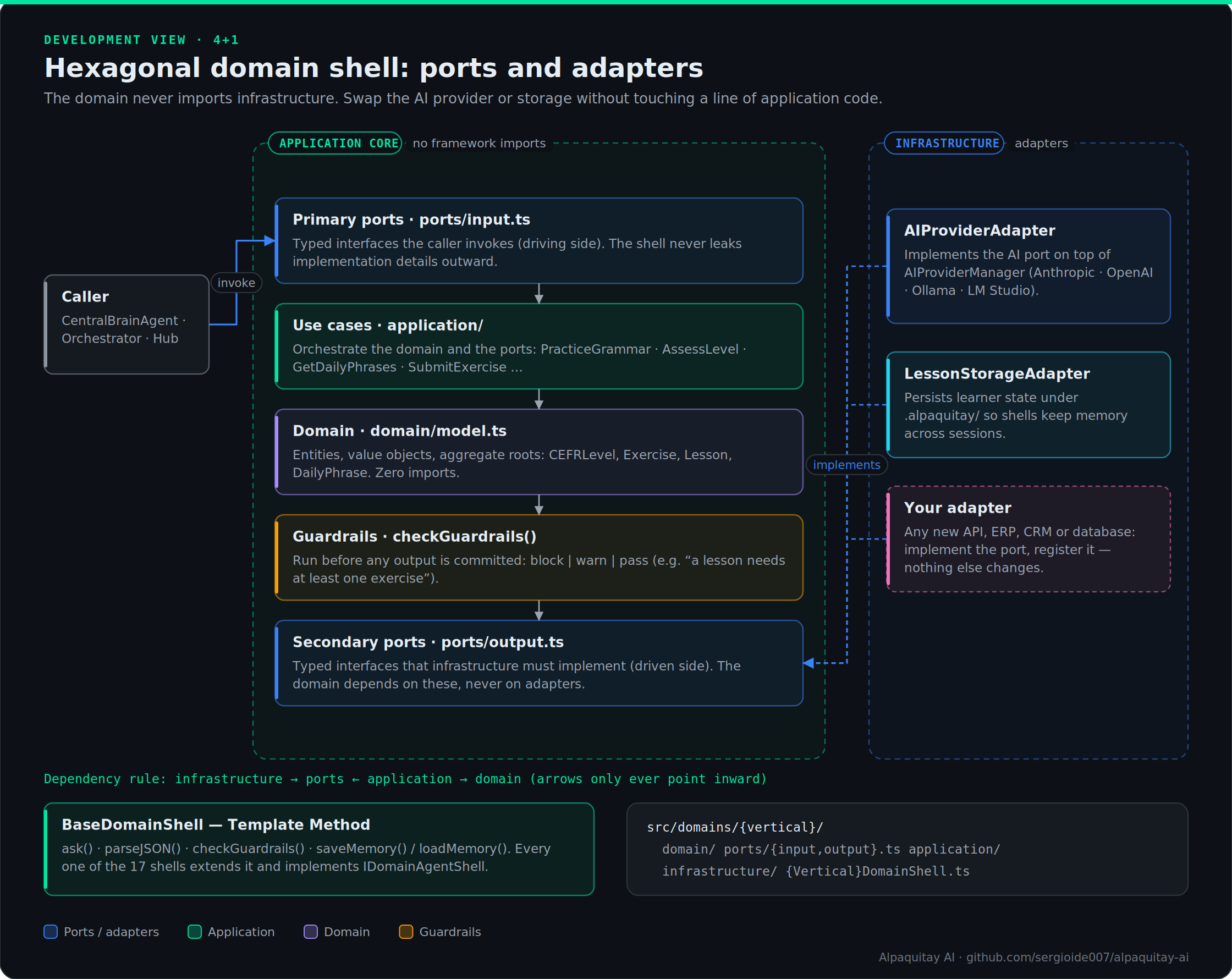
Hexagonal Architecture (Ports & Adapters)
Text version of this diagram
           ┌───────────────────────────────────────────────┐
           │               APPLICATION CORE                │
           │                                               │
 Caller ──►│ Primary Port     Use Case      Secondary Port │──► Adapter ──► Real API
           │ (input.ts)    (application/)   (output.ts)    │
           │                                               │
           └───────────────────────────────────────────────┘
Primary ports (input.ts): Typed interfaces the caller invokes. The shell never leaks implementation details outward.
Secondary ports (output.ts): Typed interfaces infrastructure must implement. The domain never imports from infrastructure/ — only from ports/.
Adapters (infrastructure/): Concrete implementations. Swap the AI provider, the storage backend, or a third-party API without touching a single line of domain or application code.
Guardrails: Before any output is committed, checkGuardrails() runs domain-specific validation rules (e.g., "a lesson must have at least one exercise", "a financial transaction must balance to zero").
17 Live Domain Agent Shells
All 17 shells are production TypeScript with 0 compilation errors. Each extends BaseDomainShell (Template Method pattern), implements IDomainAgentShell, and runs through the unified CentralBrainAgent pipeline.
| # |
Domain Shell |
Status |
Use Cases |
Key Guardrails |
| 1 |
English Mastery |
✅ LIVE |
practice-grammar, get-daily-phrases, assess-level, submit-exercise, get-progress |
CEFR level validation |
| 2 |
Software Engineer |
✅ LIVE |
review-code, analyze-solid, detect-tech-debt, suggest-patterns, estimate-complexity |
Complexity thresholds |
| 3 |
Software Architect |
✅ LIVE |
assess-architecture, create-adr, generate-c4, build-tech-radar, evaluate-quality-attributes |
ADR decision traceability |
| 4 |
Developer |
✅ LIVE |
implement-feature, debug-issue, refactor-code, explain-code, generate-tests |
Test coverage check |
| 5 |
QA |
✅ LIVE |
create-test-plan, generate-test-cases, triage-bug, evaluate-coverage, define-quality-gate |
Coverage gates |
| 6 |
DevOps |
✅ LIVE |
design-pipeline, assess-dora, plan-deployment, generate-iac, create-runbook |
DORA metrics |
| 7 |
DevSecOps |
✅ LIVE |
design-secure-pipeline, threat-model, assess-samm, scan-findings-triage, generate-sbom |
OWASP SAMM level |
| 8 |
Security |
✅ LIVE |
audit-compliance, plan-pentest, manage-risk-register, respond-incident, assess-csf |
Critical risk blocking |
| 9 |
Infrastructure |
✅ LIVE |
plan-capacity, design-network, create-sla, plan-dr, configure-monitoring |
SLA availability |
| 10 |
Cloud |
✅ LIVE |
design-architecture, well-architected-review, optimize-cost, plan-migration, generate-iac |
Well-Architected pillars |
| 11 |
Marketing |
✅ LIVE |
plan-campaign, segment-audience, analyze-seo, create-content, measure-roi |
ROAS threshold |
| 12 |
Process |
✅ LIVE |
map-process, gap-analysis, value-stream-map, iso-compliance, optimize-process |
ISO compliance gaps |
| 13 |
AI Expert |
✅ LIVE |
evaluate-llm, design-rag, engineer-prompt, design-ai-system, assess-governance, design-mlops |
EU AI Act risk tiers |
| 14 |
Business |
✅ LIVE |
design-business-model, strategic-analysis, define-okrs, financial-model, market-analysis, build-business-case |
LTV:CAC · runway · ROI |
| 15 |
Quantum Readiness |
✅ LIVE |
crypto inventory, quantum-threat timeline, PQC migration plan, CBOM, crypto-agility assessment |
QR-001…003 |
| 16 |
Well-Architected |
✅ LIVE |
pillar reviews and improvement plans across the Well-Architected pillars |
WAF-001…003 |
| 17 |
Zero Trust |
✅ LIVE |
zero-trust posture assessment and roadmap |
ZT-001…004 |
Multi-Agent Orchestration Stack
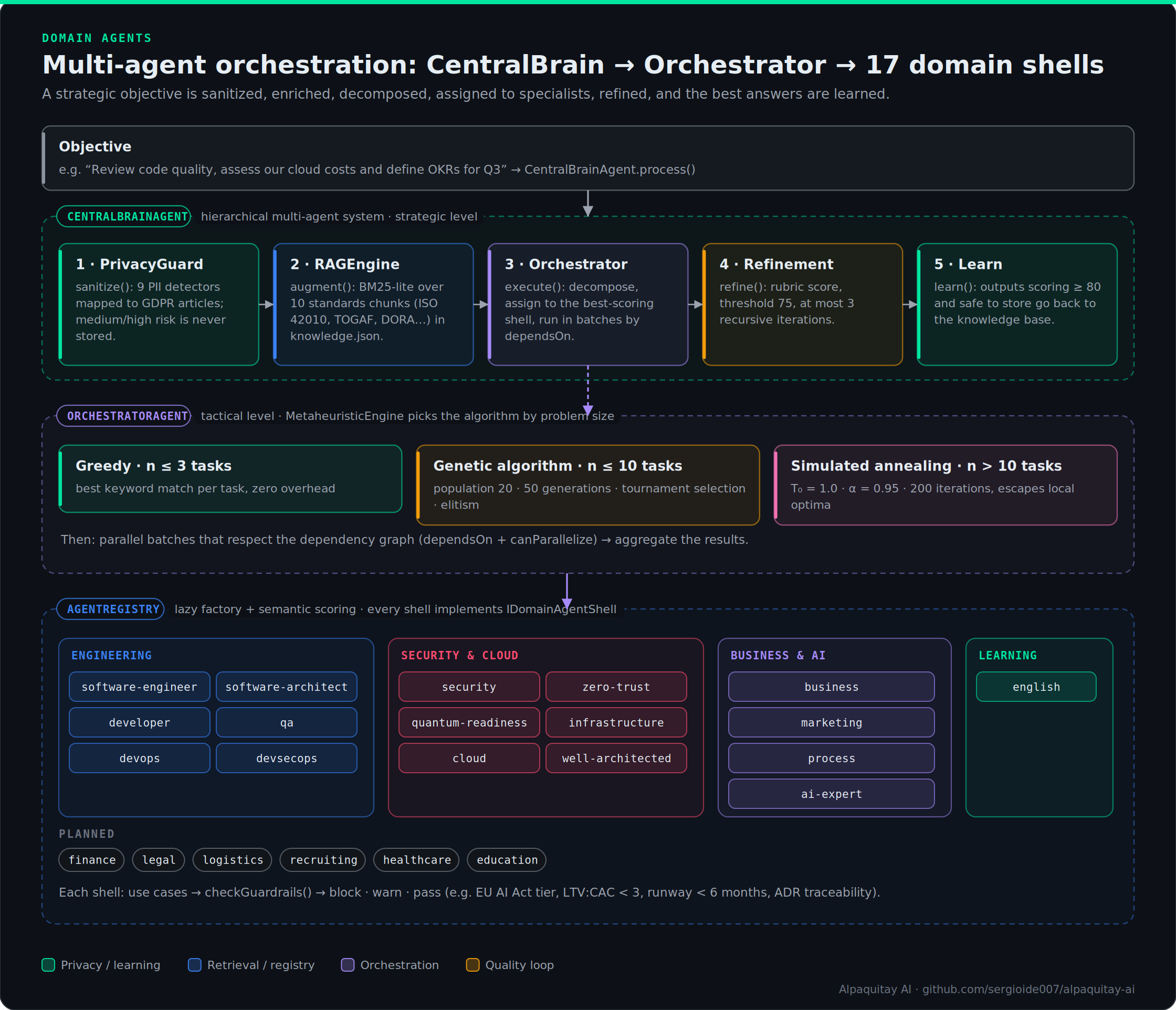
Text version of this diagram
┌──────────────────────────────────────────────────────────────────────┐
│                        CentralBrainAgent                             │
│                                                                      │
│  1. PrivacyGuard.sanitize()     ← PII detection (9 detectors)   │
│  2. RAGEngine.augment()         ← BM25-lite knowledge retrieval      │
│  3. OrchestratorAgent.execute() ← Multi-agent task dispatch          │
│  4. RecursiveRefinement.refine()← Quality improvement loop           │
│  5. RAGEngine.learn()           ← Store high-quality outputs back    │
└──────────────┬───────────────────────────────────────────────────────┘
               │
               ▼
┌──────────────────────────────────────────────────────────────────────┐
│                       OrchestratorAgent                              │
│                                                                      │
│  MetaheuristicEngine (auto-selects algorithm by problem size):       │
│  ├── n ≤ 3 tasks  → Greedy (immediate, zero overhead)                │
│  ├── n ≤ 10 tasks → Genetic Algorithm (population=20, gen=50)        │
│  └── n > 10 tasks → Simulated Annealing (T₀=1.0, α=0.95, i=200)      │
│                                                                      │
│  → Decomposes objective into tasks                                   │
│  → Assigns each task to the best-scoring Domain Shell                │
│  → Executes in parallel batches respecting dependency graph          │
└──────────────┬───────────────────────────────────────────────────────┘
               │
    ┌──────────┼──────────┬──────────┬──────────┬──────────┐
    ▼          ▼          ▼          ▼          ▼          ▼
EnglishShell  SEShell  ArchShell  AIShell  BizShell  + 9 more shells
RAG Knowledge Base (BM25-lite)
- 10 seed chunks: ISO/IEC 42010 · TOGAF · DORA Metrics · ISO 27001 · ISO 29119 · ISO 9001 · CEFR · AWS WAF · SOLID · Six Sigma
- Persists to
.alpaquitay/orchestration/knowledge.json
RAGEngine.learn() adds high-scoring outputs back (score ≥ 80)
PrivacyGuard (GDPR / ISO 27001 / ISO 27018)
- 9 PII detectors: email, phone, SSN, national ID, credit card, IBAN, IP address, date of birth, medical record number
- Sanitizes before AI calls; blocks storage of medium/high-risk content
- GDPR Article 5 (data minimization) + Article 17 (right to erasure) mapped
Complete File Structure (60+ files, 0 TypeScript errors)
Docs tab (v3.5): src/documents/ holds ZipLite, DocumentModel, the Markdown / DOCX / EPUB adapters, PdfReader, Documents (load · apply · export), DocumentAgent and DocsController; the UI is src/panel/DocsTab.ts.
src/domains/
  interfaces/
    DomainAgentShell.ts           ← IDomainAgentShell, DomainId (17 live + 6 planned)
  shared/
    BaseDomainShell.ts            ← Template Method base: ask(), parseJSON(), guardrails
  english/
    domain/model.ts               ← CEFRLevel, Exercise, Lesson, DailyPhrase
    ports/input.ts · output.ts    ← Primary + secondary ports
    application/                  ← 4 use case classes
    infrastructure/               ← AIProviderAdapter, LessonStorageAdapter
    EnglishDomainShell.ts
  software-engineer/
    model.ts · SoftwareEngineerShell.ts
  software-architect/
    model.ts · SoftwareArchitectShell.ts
  developer/
    model.ts · DeveloperShell.ts
  qa/
    model.ts · QAShell.ts
  devops/
    model.ts · DevOpsShell.ts
  devsecops/
    model.ts · DevSecOpsShell.ts
  security/
    model.ts · SecurityShell.ts
  infrastructure/
    model.ts · InfrastructureShell.ts
  cloud/
    model.ts · CloudShell.ts
  marketing/
    model.ts · MarketingShell.ts
  process/
    model.ts · ProcessShell.ts
  ai-expert/
    model.ts · AIExpertShell.ts
  business/
    model.ts · BusinessShell.ts
  orchestration/
    AgentRegistry.ts              ← Catalog of 17 shells, semantic scoring, lazy factory
    OrchestratorAgent.ts          ← Task decomposition, parallel batch execution
    CentralBrainAgent.ts          ← Unified pipeline: RAG + Privacy + Orchestration
    rag/
      KnowledgeBase.ts            ← BM25-lite retrieval, ISO seed chunks, persistence
      RAGEngine.ts                ← augment(), complete(), learn()
    privacy/
      PrivacyGuard.ts             ← 9 PII detectors, GDPR Article mapping, risk scoring
    metaheuristic/
      GeneticOptimizer.ts         ← Population 20, 50 gen, tournament selection, elitism
      RecursiveRefinement.ts      ← Bounded recursive quality improvement, rubric scoring
      MetaheuristicEngine.ts      ← Algorithm auto-selection + refinement orchestration
Usage Examples
Via CentralBrainAgent (recommended)
const brain = new CentralBrainAgent();
await brain.initialize(provider, workspacePath);

// Multi-domain objective — automatically decomposed and distributed
const result = await brain.process(
  'Review the code quality, assess our cloud architecture costs, and define OKRs for Q3'
);
// → Privacy sanitized → RAG augmented → 3 tasks assigned to SE, Cloud, Business shells
// → MetaheuristicEngine optimizes task order → Parallel execution → Refined output
Direct Domain Shell: AI Expert
const result = await brain.delegateTo('ai-expert', 'assess-governance', {
  system:  'Customer credit scoring model',
  context: 'Used in EU for automated loan decisions',
});
// result.data.euAiActRiskTier → 'high'
// Guardrail AI-001: blocks if no humanOversightMechanisms defined
Direct Domain Shell: Business
const result = await brain.delegateTo('business', 'financial-model', {
  business: 'B2B SaaS for HR teams',
  scenario: 'base',
  months:   24,
});
// result.data.unitEconomics.ltvCacRatio → 4.2
// result.data.runway → 18  (months)
// Guardrail BIZ-001: warns if LTV:CAC < 3x
// Guardrail BIZ-002: blocks if runway < 6 months
English Shell (Reference Implementation)
const result = await brain.delegateTo('english', 'assess-level', {
  learnerId:  'alex',
  sampleText: 'Yesterday I have gone to the market and buyed some vegetables.',
});
// result.data.assessment.proposedLevel  → 'A2'
// result.data.assessment.weaknesses     → ['grammar']
// result.data.generatedLessons          → 3 starter lessons
Agent Catalog
// Discover all agents and their capabilities
const catalog = brain.getAgentCatalog();
// → 17 entries with domainId, version, capabilities[], standards[], tags[]

// Semantic search for the right agent
const registry = AgentRegistry.getInstance();
const best = registry.findByUseCase('design a RAG pipeline');
// → 'ai-expert' (highest semantic score)
Why Alpaquitay?
| Feature |
Alpaquitay |
GitHub Copilot |
ChatGPT |
| Works offline (Ollama/LM Studio) |
✅ |
❌ |
❌ |
| Privacy-first (no servers) |
✅ |
❌ |
❌ |
| SDLC with executable gates |
✅ |
❌ |
❌ |
| DORA metrics from git |
✅ |
❌ |
❌ |
| Debt tracking |
✅ |
❌ |
❌ |
| Diff-first writes (review before apply) |
✅ |
❌ |
❌ |
Legacy project support (no src/ assumption) |
✅ |
⚠️ |
⚠️ |
| Open source (MIT) |
✅ |
❌ |
❌ |
Contributing
Contributions are welcome — see CONTRIBUTING.md. Quick start:
git clone https://github.com/sergioide007/alpaquitay-ai.git
cd alpaquitay-ai && npm ci
npm run compile && npm run lint && npm test
Press F5 in VS Code to launch the Extension Development Host. Diagram sources live in docs/diagrams/ (SVG for editing, PNG for the Marketplace README, plus the Python generators in src/).
License
MIT — see LICENSE.

