Skip to content
| Marketplace
Sign in
Visual Studio Code>Linters>Claude Branch Reviewer — AI Code ReviewNew to Visual Studio Code? Get it now.
Claude Branch Reviewer — AI Code Review

Claude Branch Reviewer — AI Code Review

ajmc90

|
20 installs
| (1) | Free
Deep, multi-pass code review of git branches powered by Claude Code CLI. Reasons, questions itself, explores alternatives. Precise file/line anchoring with applicable fixes. No API key required — uses your local Claude Code.
Installation
Launch VS Code Quick Open (Ctrl+P), paste the following command, and press enter.
Copied to clipboard
More Info

Claude Branch Reviewer

The code review you wish your teammate gave you — inside VS Code, powered by your Claude subscription.

No API key. No per-token bill. No new account. You log into the claude CLI once, and that's it.

Marketplace Installs Rating VS Code License

Install · Quick start · How it works · FAQ · Docs

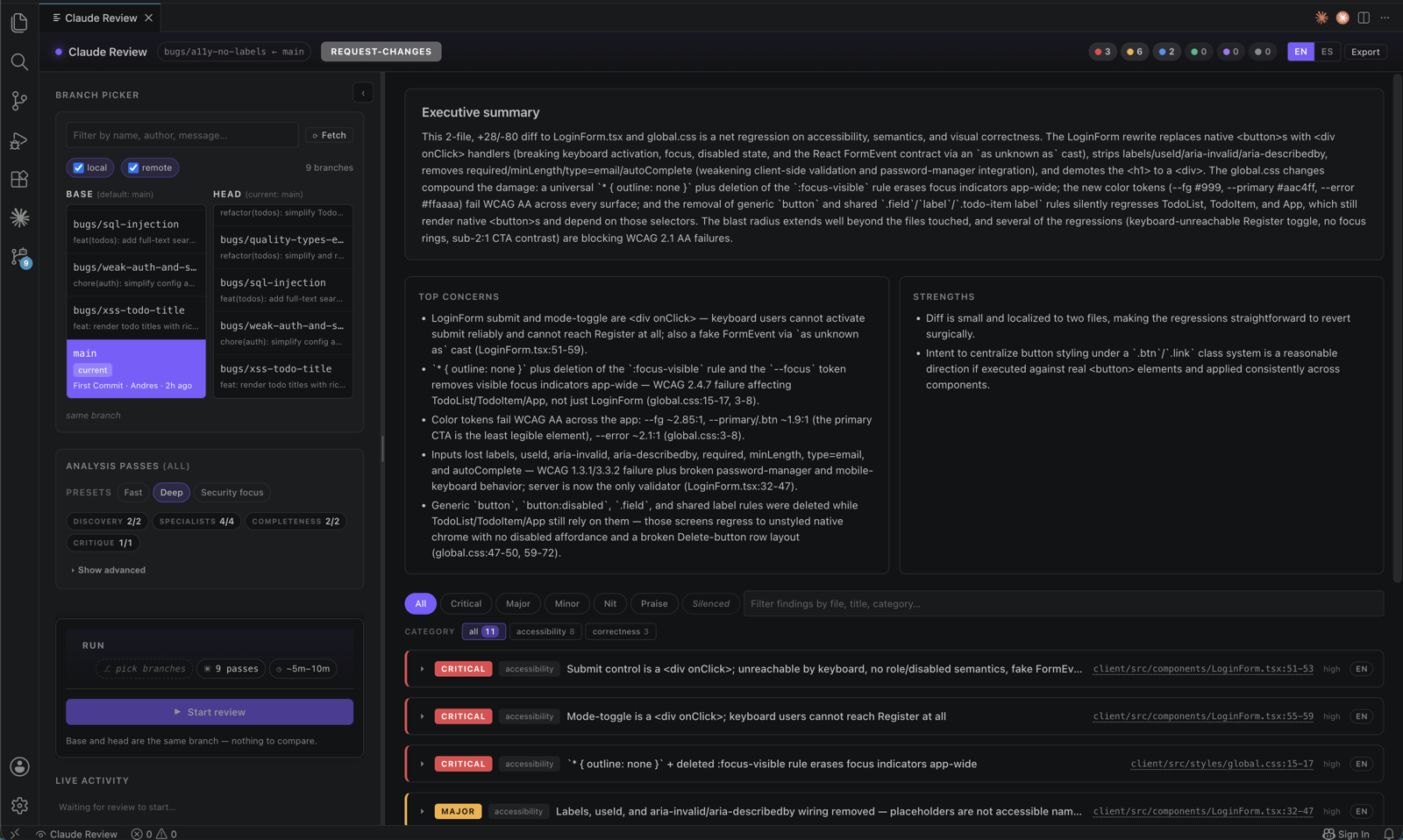
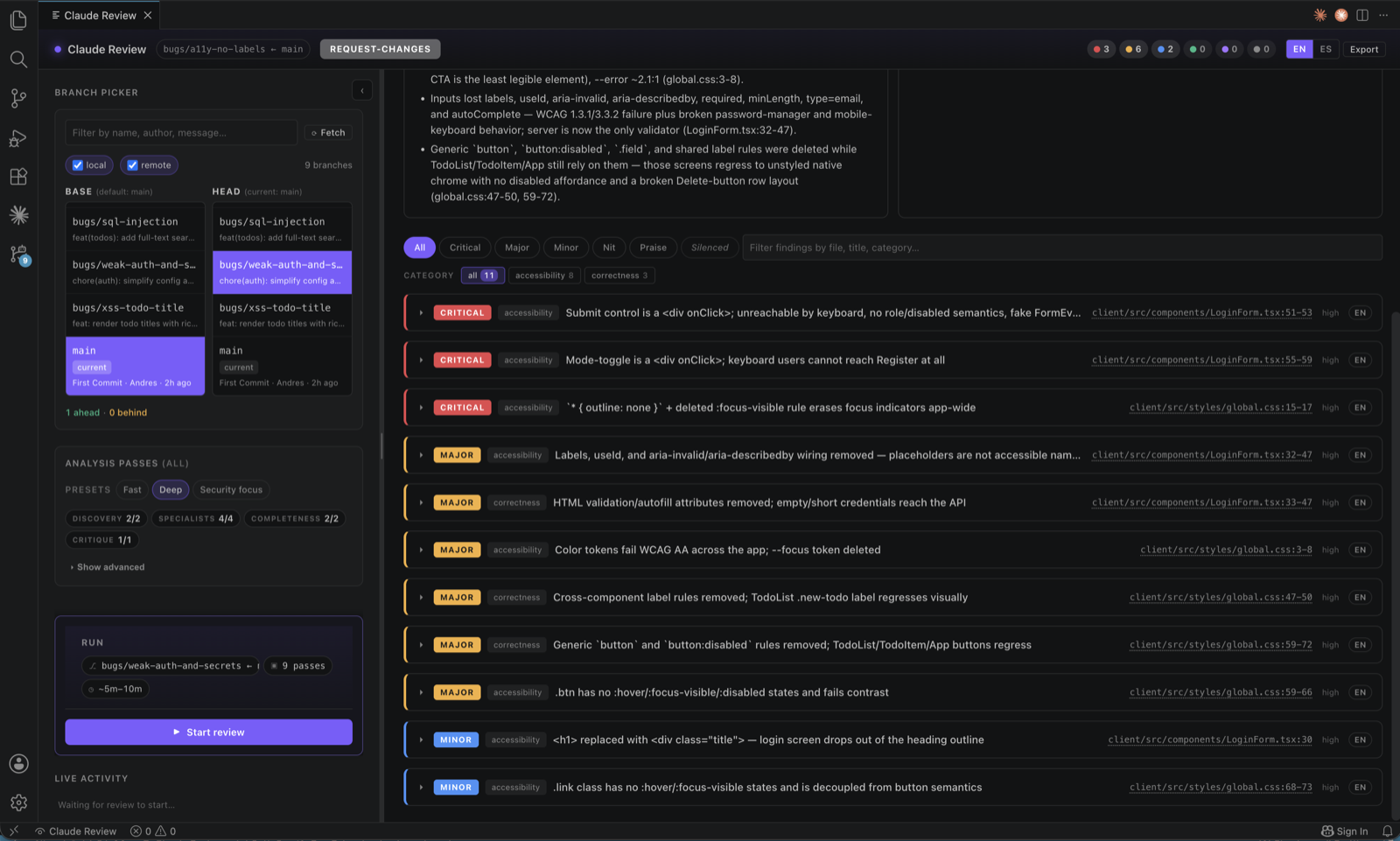
Claude Branch Reviewer panel with branch picker, analysis passes, cost pill, executive summary and findings grid


What it is

Pick a branch. Pick a base. Hit ⌘⌥R.

Claude reviews the diff five times — exploring it, then through a security lens, a performance lens, an accessibility lens, a tests lens — and then critiques its own findings to drop the noise. Every comment lands on an exact file:start-end, with reasoning, evidence, alternatives and a suggested fix you can preview before applying.

It runs entirely on your Claude Code CLI. No API key to manage, no separate billing.

Think of it as the reviewer who reads the whole PR, asks "what could go wrong here?" on every chunk, and then has the self-awareness to retract their own bad takes before you see them.


Why you might want this

  • You ship faster than reviewers can keep up. Get a first pass in 5 minutes, locally, before opening the PR.
  • You've been burned by AI tools that hallucinate findings. Every finding here is anchored to real lines, with quoted evidence, and survives a self-critique pass.
  • You don't want another API key. If claude works in your terminal, this works.
  • You want the receipts. The panel shows tokens, cache hit rate, which passes ran, and what critique dropped — no black box.

Install

From VS Code — search "Claude Branch Reviewer" in Extensions, or open the Marketplace page.

From the terminal

code --install-extension ajmc90.claude-branch-reviewer

You'll also need the Claude Code CLI installed and logged in. Run claude once in your terminal — if that works, you're done.


Quick start

  1. Open a git repo in VS Code.
  2. ⌘⇧P → Claude Review: Open Review Panel (or just press ⌘⌥R / Ctrl+Alt+R).
  3. Pick a base and head branch. The panel shows ahead/behind, staleness, age and author.
  4. (Optional) Toggle which passes to run, or pick a preset: fast · deep · security · performance · accessibility.
  5. Hit Start review. Wait ~3–6 minutes for a typical PR.

Findings stream in live. Each one has a one-click jump-to-code, a diff-preview Apply Fix, and a follow-up button that opens a Claude terminal preloaded with the context.


How it works

A review runs five phases, in order. The last one cleans up after the first four.

A · Discovery        →  Reads the diff. Builds a change map. Surveys hot spots.
B · Specialists      →  Security · Performance · A11y · Tests   (in parallel)
C · Consolidation    →  Dedupe + cluster. No CLI call — pure local logic.
D · Completeness     →  Gaps Claude expected but didn't find. Trade-off analysis.
E · Self-critique    →  Re-reads every finding. Keeps, revises, drops, or merges.
                        Emits the final verdict + executive summary.

The critique phase is the one most AI review tools skip. It's the one that catches:

  • Findings that sounded smart but don't survive a re-read.
  • Three specialists flagging the same bug from different angles → merged into one.
  • Severity inflation → bumped down with a recorded reason.

Nothing disappears silently. Dropped and merged findings live under a Revised tab with the critique's reasoning, so you can audit what it threw out.

→ Full pipeline details


What you actually see

Live activity timeline and findings grid with Revised by Critique section

While it runs. The right pane becomes a stage — phase eyebrow (PHASE 3 OF 5), elapsed timer, four-segment progress bar, live signals (tokens · files · passes · discoveries), and a per-pass timeline. Findings stay hidden until critique finishes, so you don't watch findings appear and then vanish.

When it finishes. A verdict, risk score, executive summary, and a filterable findings grid: Problem ↔ Solution cards with severity ribbons, category badges, jump-to-code, apply fix, follow-up, and a per-card EN/ES translation chip.

Always visible. The activity-bar sidebar mirrors state (idle / running / paused / failed / done), shows the last review's verdict, and keeps a history of the last 5 reviews per (base, head) pair. One click rehydrates.

→ Detailed UI tour


Cost, honestly

Before you press RUN, a cost pill estimates the run for this diff with these passes:

~95K tokens · ~6 min   [calibrated]

Click it for a breakdown by bucket (Fresh input · Cache creation · Cache reuse · Output) and per pass. After 5+ runs in your workspace, the estimator self-calibrates to your repo + machine.

No dollar figure. You're on a Claude subscription; you don't pay per token. Surfacing dollars would lie about your bill. Tokens + cache reuse % are the honest unit.

A confirmation modal only fires for runs over ~3M effective tokens — the threshold where one review meaningfully bites into a 5-hour subscription window. Anything smaller, just go.

→ How the estimator works


Features worth knowing about

  • 🌿 Branch freshness gate — flags stale branches before review starts. One-click ff-only pull for base + head (without checking out either). Sync head with base via Merge or Rebase, all from the banner.
  • ♻ Phase-scoped session reuse — passes inside the same phase share a Claude CLI session, dropping effective tokens ~65% vs. running passes in isolation.
  • 🧠 Self-critique audit trail — every prior finding tagged keep / revise / drop / merge with a reason. Nothing vanishes silently.
  • 🔁 Apply Fix preview — fixes open as a VS Code diff editor. Edit the right side, then Apply or Discard from the title bar. Claude's suggestion is a starting point, not the final word.
  • ⏸ Pause, resume, retry — failed or cancelled reviews snapshot themselves. Resume picks up where it stopped; per-pass Retry for the one that flaked.
  • 🔕 Silence noise — dismiss findings as "this one" or "this pattern, everywhere". Future matches return muted with a 🔕 badge, restorable any time.
  • 🌐 Bilingual UI — English/Spanish UI with on-demand per-finding translation (EN/ES chip on each card).
  • 🧩 Adapts to your project — auto-detects language, framework and tests; reads CLAUDE.md, README.md, CONTRIBUTING.md, ARCHITECTURE.md.

FAQ

Do I need an Anthropic API key?

No. The extension shells out to the claude CLI that's already on your machine. If claude works in a terminal, this works.

Will it use up my Claude subscription quota?

A typical review costs ~100K–300K effective tokens. Most of that is cache reads (essentially free between passes). A large review (~3M tokens) opens a confirmation modal first. The cost pill shows the estimate before you run.

Does it send my code anywhere?

Only to Anthropic, via your local claude CLI, under your own account. The extension itself has no backend and stores state in VS Code's workspace storage. See Privacy.

Which languages and frameworks does it support?

Any language. The reviewer reads diffs the way a human does — language detection is automatic, frameworks and test runners are surfaced as context. UI passes (a11y) auto-skip when no UI files are touched.

What's the difference between this and Copilot review / Cursor review?

Three things: (1) multi-pass with self-critique — five reasoning passes that question themselves, not one shot; (2) honest pre-flight cost — you see what a review will cost before pressing run, with per-workspace calibration; (3) no separate billing — runs on your existing Claude subscription via the CLI.

Can I review uncommitted changes?

Yes. Claude Review: Review Uncommitted Changes reviews your working tree against HEAD. Toggle claudeReviewer.includeUntrackedFiles to include new files too.

How do I make a review faster / cheaper?

Drop reasoning depth to fast or balanced, or untick passes you don't need. The cost pill updates live so you can see the impact. Session reuse, per-pass effort tuning, and lean discovery are all on by default — they do most of the heavy lifting already.


Requirements

  • VS Code 1.85 or newer
  • A git repository open as your workspace
  • Claude Code CLI installed and logged in — claude once in a terminal walks you through it

Privacy

The extension does not send code to any third-party API of its own. It shells out to the claude CLI on your machine, which talks to Anthropic under your account. Secret files (.env*) are stripped from the prompt by default — the review sees that they changed, not their contents. All state is stored in VS Code's workspace storage. No telemetry.


Docs

  • 📖 Pipeline & passes — what each phase does and why
  • ⚙️ Settings — every config key, what it does, what to change
  • ⌨️ Commands — every command and keybinding
  • 💰 Cost & calibration — how the estimator works
  • 🏗️ Architecture — for contributors

Develop locally

This project uses pnpm.

pnpm install
pnpm run compile
# Press F5 in VS Code to launch a dev host with the extension loaded

See docs/ARCHITECTURE.md for the source tree, and RELEASE.md for the publish flow.


Support

If this caught a bug before your reviewer did, or saved you an hour of "what is this PR even doing", consider buying me a coffee.

Buy me a coffee

⭐ Stars on GitHub and reviews on the Marketplace also help — they make this project visible to other devs.


License

MIT — see LICENSE.

  • Contact us
  • Jobs
  • Privacy
  • Manage cookies
  • Terms of use
  • Trademarks
© 2026 Microsoft