Open in cmuxOpen any folder as a cmux workspace from the VS Code Explorer context menu (macOS only). Installation Launch VS Code Quick Open ( Ctrl+P), paste the following command, and press enter.Copied to clipboard |

What it doesA one-click bridge from the VS Code Explorer into the cmux desktop app. No shell helpers, no symlinks, no env vars — the extension hands the folder path to cmux through the macOS Service the app already registers. 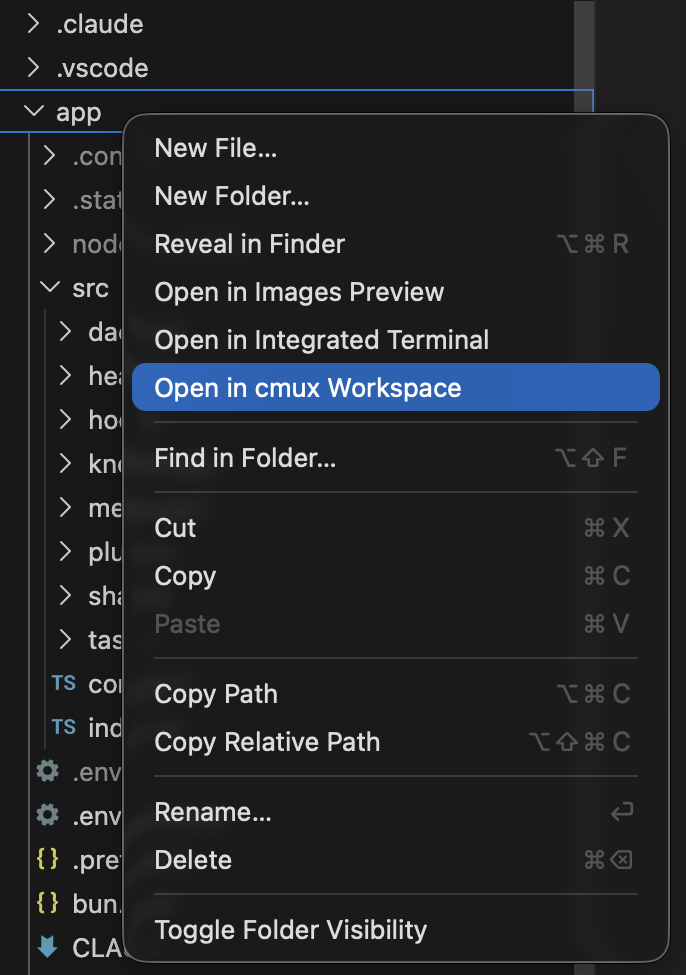
Requirements
UsageRight-click a folder in the Explorer and pick Open in cmux Workspace, or open the Command Palette ( File selections resolve to their parent directory, so right-clicking a file inside the folder you want works too. Troubleshooting"NSPerformService failed for: New cmux Workspace Here"The macOS Service isn't registered. Launch the cmux app once, then open System Settings → Keyboard → Keyboard Shortcuts → Services and confirm Nothing happens on clickRun the command from the Command Palette ( AboutThis VS Code extension is built and maintained by AgentLayer, we ship AI agent infrastructure and use cmux heavily in our day-to-day for parallel, agent-driven development. Released under the MIT License · See the changelog for release notes. |