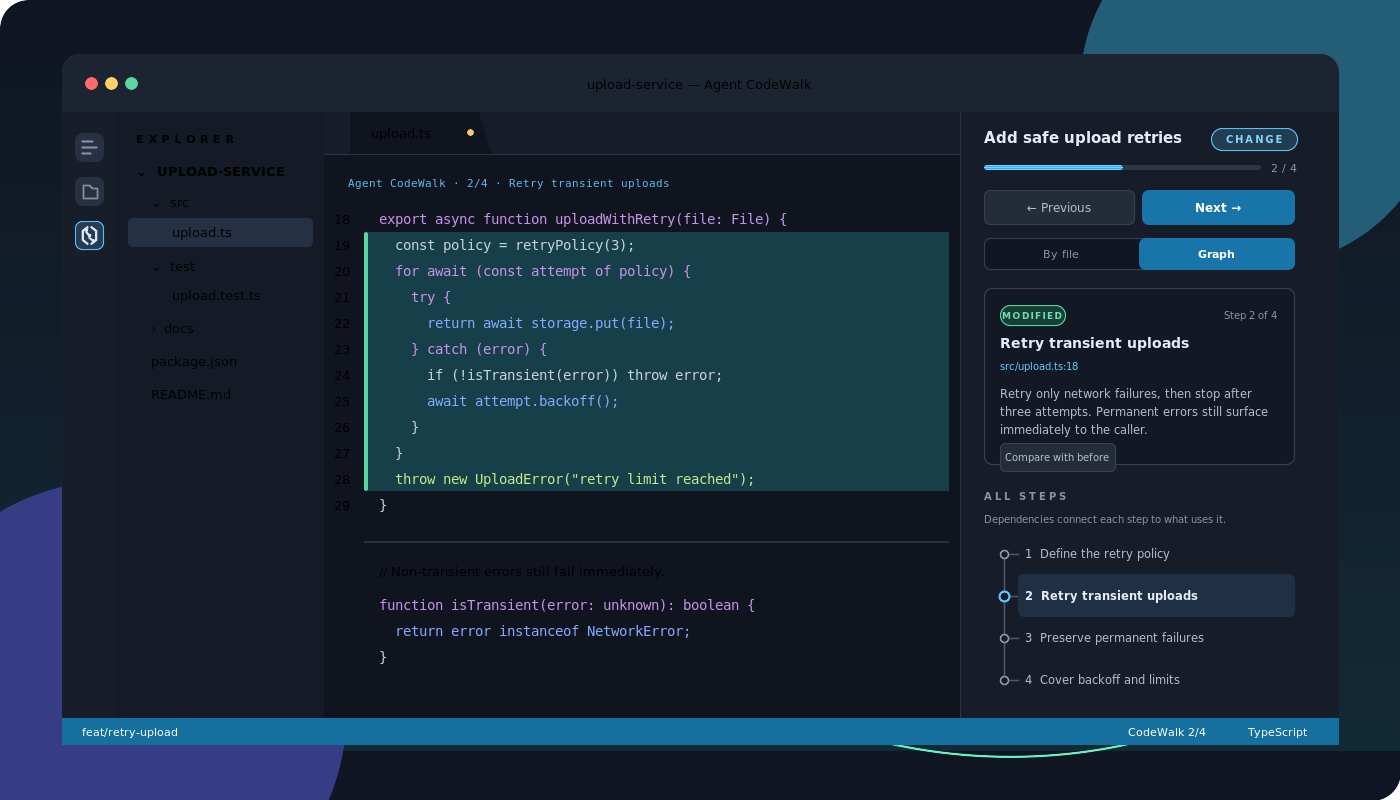
Agent CodeWalkFollow guided, local walkthroughs of code changed or explained by Codex, Claude Code, and OpenCode. Installation Launch VS Code Quick Open ( Ctrl+P), paste the following command, and press enter.Copied to clipboard |

Agent CodeWalkTurn an AI agent's work into a guided tour of the code—one meaningful block at a time.
Agent CodeWalk lets you read what Codex, Claude Code, or OpenCode changed—or what it explained—as a walkthrough inside VS Code, Cursor, VSCodium, and compatible desktop editors. Every step opens the relevant file, highlights the exact block, and keeps the agent's reasoning beside the code instead of leaving you to hunt through a chat transcript. No extra model, cloud service, or API key is required. The agent you already use creates the explanation, and the baseline and walkthrough data stay on your machine. What you get
InstallThe easiest update path is a registry installation: You can also install from a terminal: Offline and pinned packages for Linux x64 and arm64, Windows x64, macOS Intel, and macOS Apple silicon are attached to every GitHub release, together with a universal package that suits any of them and SHA-256 checksums. One-time agent setup
Setup creates backups, rolls back a failed agent integration, and refuses to overwrite a skill or MCP entry it does not own. Agent CodeWalk: Remove Agent Integrations removes only owned resources and keeps published walkthroughs. Use it naturallyAsk your agent to change code as usual: The agent records a baseline before its first edit and publishes a walkthrough after it verifies the task. The local companion checks the real diff and requires every text hunk to be covered. Or ask it to explain existing code without making a change: An explanation walkthrough needs no baseline, but every step must still point at code that exists now. NavigateAgent CodeWalk is reachable from either side, showing the same step in both:
VS Code keeps the Secondary Side Bar hidden until you open it, and a hidden bar has no
icons at all. Open it with You never have to find an icon, though: accept the publication notification, or run Agent CodeWalk: Open Latest Walkthrough. Either opens a panel for you.
The current step also appears as a CodeLens above its block and as progress in the status bar. Select Compare with before when a modified step has baseline text available. When a walkthrough is producedBy default the agent publishes one after every code change. Set Restart an active agent session after changing this, so it picks up the new instructions. Local-first and privateAgent CodeWalk includes no telemetry, makes no network requests, and does not call a model API. The Rust companion communicates over standard input/output and never listens on a port. Sessions keep paths, explanations, ranges, hashes, and a bounded amount of replaced text for step comparison; they do not copy whole source files. Read the complete privacy and security model, architecture, and troubleshooting guide in the project repository. Requirements
Browser-hosted editors cannot start the local companion. Remote SSH and WSL are supported by installing the matching package in the workspace extension host. Agent CodeWalk is open source under the MIT License. |