Fish Audio MCP
Fish Audio TTS — generate natural speech and browse the Fish voice library.



Generate natural-sounding speech from text using Fish Audio voices via Ace Data Cloud. Browse and search the voice library, fetch model metadata, submit asynchronous generation tasks, and poll single or batched results.
This extension registers the fish MCP server with VS Code so GitHub
Copilot and any other agent that speaks the Model Context Protocol
can call it directly from chat.
Quick Start
- Install this extension. VS Code registers the
fish MCP server automatically.
- Get an application API key using the detailed steps below. Check service access and your current balance before the first request.
- Open Copilot Chat in agent mode and ask for an audio task — the extension prompts for the API key the first time and stores it in the OS keychain via VS Code's
SecretStorage.
You can rotate or remove the API key any time from the command palette:
- Fish Audio MCP: Set Ace Data Cloud API Key
- Fish Audio MCP: Clear Ace Data Cloud API Key
The default config talks to the hosted streamable-HTTP endpoint at
https://fish.mcp.acedata.cloud/mcp — no Python, no uvx, no local install needed.
Get your API key
- Open Ace Data Cloud → Applications. Sign in, or register an account first.
- Find General application. If it has not been created, choose Initialize General Application. A general key can use the services available to your account; a dedicated application's key is limited to its service. Check the required service/model access and current pricing.
- Copy the API Key from the application card, or open Keys / Manage Keys → Create to create a separate key for this integration. Give it a recognizable name so you can revoke or rotate it independently.
- When creating a key, review Expiration Time, Set Usage Limitation, and Allowed APIs. Enable only the restrictions you need, allow the operations you will call, then click Create and copy the token from the key list. Task lookup does not grant permission to submit a generation. Confirm the application's balance can cover your first request; any trial allowance is whatever your account currently displays.
- Copy only the token value, without quotation marks, spaces, or
Bearer . An API Key / API Token field expects this raw value; only a manually configured HTTP Authorization header needs the Bearer prefix. A platform-... account-management token cannot replace a generation API key.
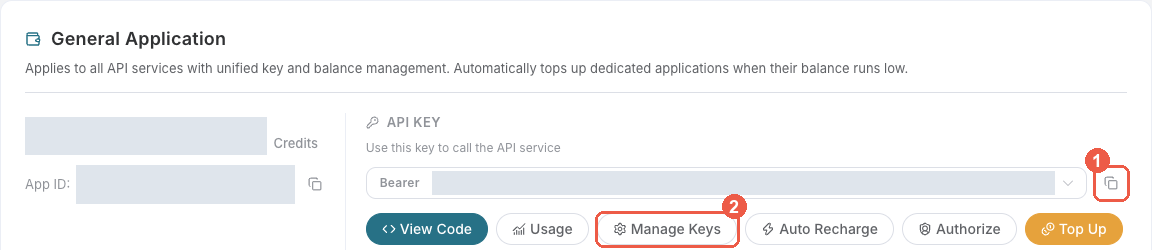
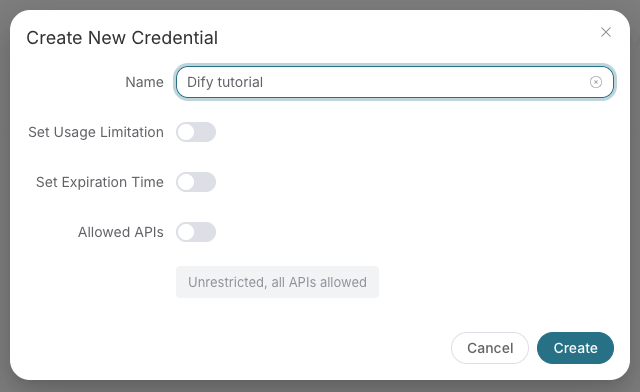
Save the key in the client's credential store or the environment variable shown below. Never put it in a prompt, shared workflow, screenshot, or Git commit. If authentication fails, check the full copied value, application/service access, expiration, usage limit, and balance before creating another key.
Example prompts
- "Generate audio for "Welcome to Ace Data Cloud" with a Fish voice and give me the URL."
- "List 10 Fish voice models and show their language, gender, and any tags."
- "Check the status of Fish task ."
6 tools available via this server.
| Tool |
Description |
fish_generate_audio |
Generate speech from text via a Fish voice model |
fish_list_models |
List available Fish voice models |
fish_get_model |
Fetch metadata for a specific Fish voice model |
fish_get_task |
Get the status / result of a generation task |
fish_get_tasks_batch |
Batch-fetch the status / result of multiple tasks |
fish_get_usage_guide |
Get the API usage guide |
Pricing
Per-character billing. Free trial credit on sign-up. See Documentation.
Configuration
This extension implements the mcpServerDefinitionProviders contribution point
and registers a single hosted server with VS Code:
Provider id : acedatacloud.fish
Server label: Fish Audio MCP
Server URL  : https://fish.mcp.acedata.cloud/mcp
Transport   : Streamable HTTP
Auth        : Bearer API key from VS Code SecretStorage (or $ACEDATACLOUD_API_TOKEN)
You don't need to edit mcp.json — the extension handles registration and
token handling automatically. If you'd rather configure things by hand, the
sections below show equivalent mcp.json snippets you can use instead of
this extension.
Alternative: manual mcp.json (hosted)
{
  "servers": {
    "fish": {
      "type": "http",
      "url": "https://fish.mcp.acedata.cloud/mcp",
      "headers": { "Authorization": "Bearer ${input:acedatacloud_api_token}" }
    }
  },
  "inputs": [
    {
      "type": "promptString",
      "id": "acedatacloud_api_token",
      "description": "Ace Data Cloud API key",
      "password": true
    }
  ]
}
Alternative: local stdio (no network roundtrip)
For offline dev, air-gapped environments, or pinning to a specific PyPI
version, install uv and use:
{
  "servers": {
    "fish": {
      "type": "stdio",
      "command": "uvx",
      "args": ["mcp-fish"],
      "env": { "ACEDATACLOUD_API_TOKEN": "${input:acedatacloud_api_token}" }
    }
  }
}
uvx will download and run the latest mcp-fish on demand.
Links
License
MIT — see LICENSE.

