
Deck
Run coding agents across multiple repos and worktrees




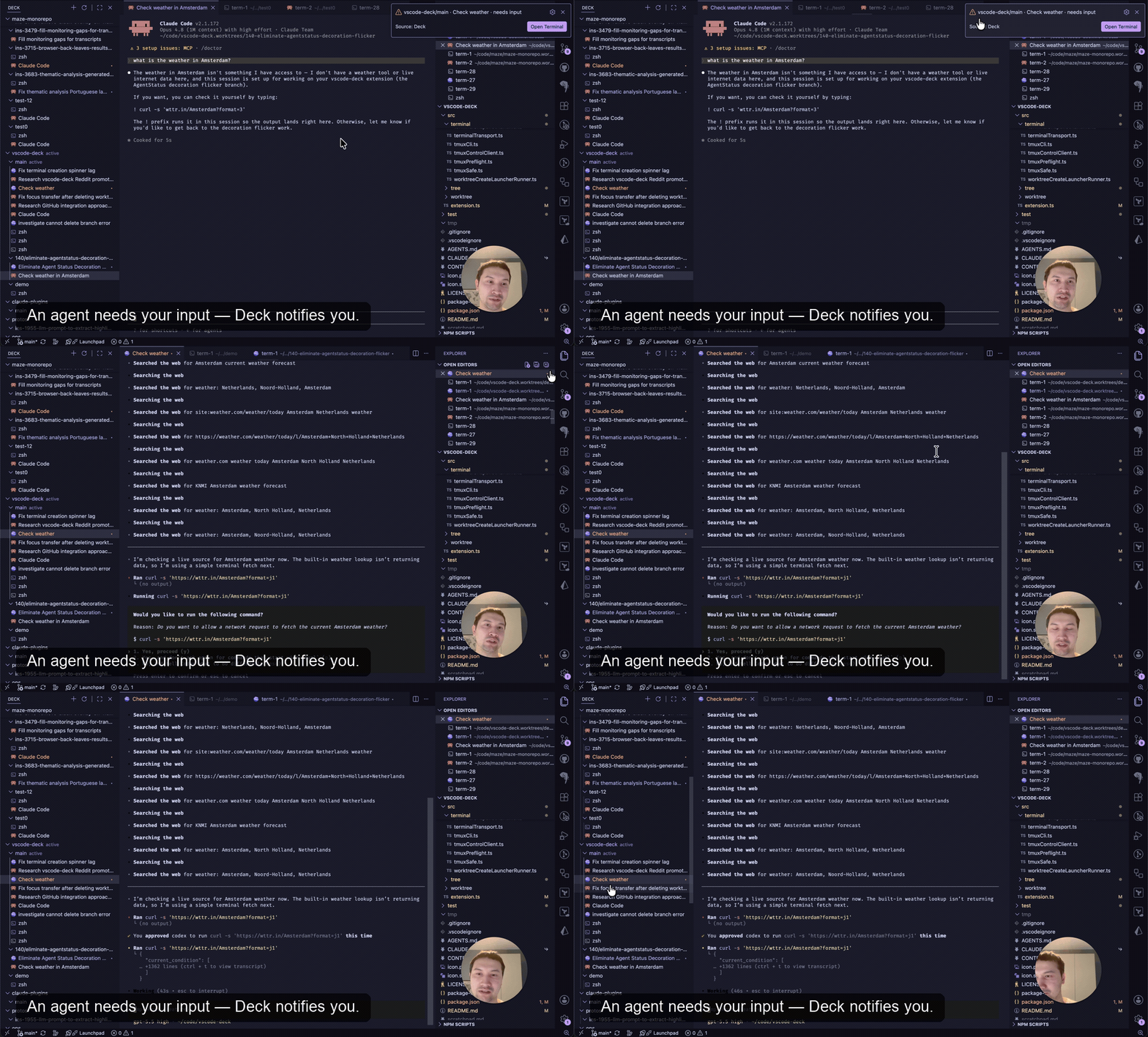
▶ Watch the full demo
Install: from the VS Code Marketplace, or open the Extensions sidebar (Cmd/Ctrl+Shift+X), search Deck, click Install. Then open Deck from the secondary sidebar.
Deck adds a Repositories & Worktrees tree to VS Code's secondary sidebar and gives every worktree its own persistent terminals. Run your coding agents in them across as many worktrees as you like — the terminals keep your agents alive through window reloads and reboots, and Deck shows each agent's status and notifies the moment one needs you.
Deck closes two gaps VS Code has — working across multiple repos and worktrees, and terminals that persist instead of dying on every reload.
Features
See every repo and worktree in one tree
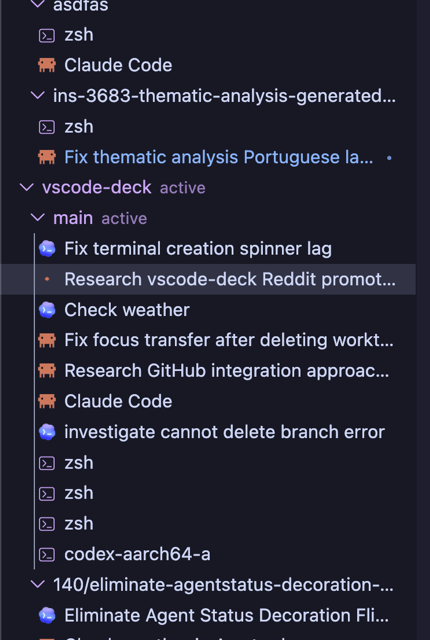
A unified Repositories & Worktrees tree lives in the secondary sidebar — register your repo and every worktree will show up automatically. Click a worktree to open it in this window, or open it in a new window to work on several at the same time.
Persistent per-worktree terminals
Each worktree gets its own terminals, opened as editor tabs (not in the bottom panel) so you can Ctrl+Tab, Ctrl+@, Ctrl+Shift+T them like any other tab. A terminal is durable like a file - a dedicated tmux server keeps them alive in the background.
- Close the tab — the terminal keeps running; reopen its row anytime.
- Open it in two windows at once — both are live views of the same terminal; type in one and it shows in the other.
- Switch worktree or reload the window — terminals reattach with whatever's running still running, untouched.
- Reboot, crash, or
kill-server — terminals come back at their working directory with scrollback, and your coding agent sessions resume automatically.
Agent status in the tree
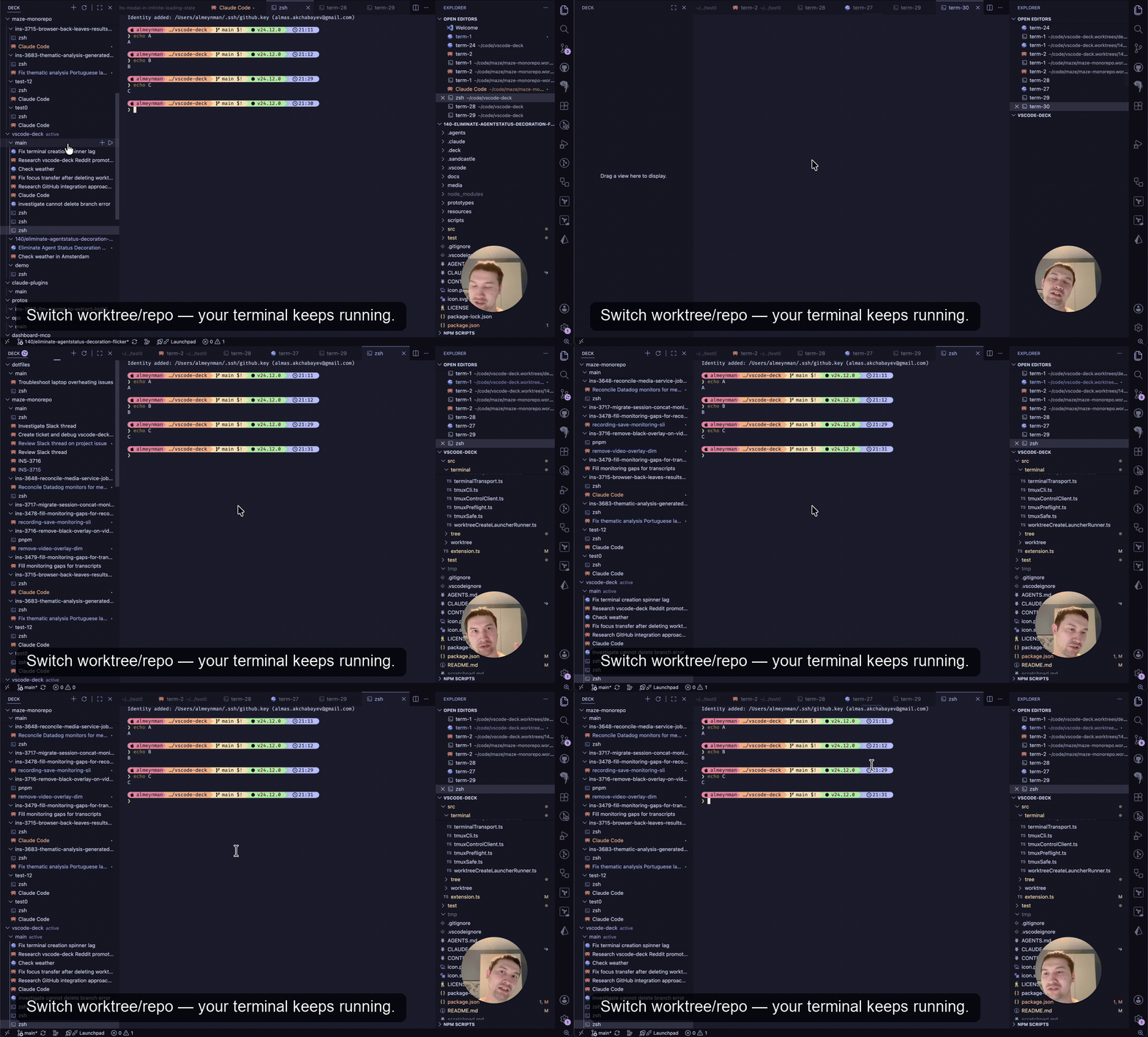
Run a coding agent in a worktree's terminal and Deck reads its status straight from the agent — working, needs input, done, or failed — and shows it on the tree row, labeled with what that agent is working on (pulled from the agent's own task summary) so a dozen concurrent agents stay distinguishable at a glance. Run several at once and only step in when one actually needs you: optional notifications fire when an agent asks a question or finishes a turn, and stay quiet while you're already looking at that terminal's tab. Deck only observes — you start and drive the agents; it gives them a durable home and a status light. (The agent status and notification are shown in the demo at the top.)
Hand your agent a file
Drop a file onto the terminal you're already looking at and Deck hands its path to whatever runs in the pane:
- From VS Code — hold Shift and drag one or more files, a folder, or an editor tab onto a Terminal tab. Deck pastes each real absolute path in drag order. Nothing is copied, so an agent reads or edits the file in your worktree.
- From Finder — drag an image onto a Terminal tab without Shift. Finder does not expose its path to the webview, so Deck saves a copy outside your worktrees and pastes the copy's path. Non-image Finder drags remain with VS Code because a copy of a source file would not be that file.
- Paste an image — copy a screenshot and press Cmd+V in a Terminal running an agent. Deck forwards the keystroke and never touches the image; your agent reads the clipboard itself.
The paths arrive as one bracketed paste, ready for you to keep typing. Deck does not guess whether the pane contains an agent or a plain shell, and takes no view on image formats or file sizes.
Shift is required for drags that start inside VS Code. Without it, the workbench blocks every webview and opens a dragged file in an editor tab instead. Shift is VS Code's own escape hatch, not a Deck setting. It is also needed for the floating thumbnail macOS shows just after a screenshot; saved files dragged from Finder need nothing special.
Paste is verified on macOS; on Linux and Windows the browser's own Ctrl+V may compete with it.
One-click terminal launchers
Save a command as a launcher — your agent with its usual flags, or a project bootstrap — and start a terminal running it in one click. Define launchers per user (global), shared with your team (committed to <worktree>/.deck/launchers.json), or personal to one repo. Flip run on worktree create and Deck fires them automatically when you add a worktree through it, so a fresh worktree can bootstrap itself and kick off an agent without you typing a thing.
Configuring launchers. Each launcher is { "command": …, "label"?: …, "runOnWorktreeCreate"?: true } — only command is required (label defaults to it; sequence commands with &&). The add button on a Worktree row opens a Quick Pick with New Terminal and Add Bookmark first, then launchers from all three sources in this order:
1. Shared, per repo — committed to the repo at <worktree>/.deck/launchers.json (a bare array):
[
  { "label": "Bootstrap", "command": "pnpm install", "runOnWorktreeCreate": true },
  { "label": "Dev server", "command": "pnpm dev" }
]
2. Personal, per repo — in your user settings.json, keyed by any path inside the repo (matched by git common dir, so it applies to every worktree):
"deck.repositoryLaunchers": [
  {
    "repository": "~/code/myapp",
    "launchers": [
      { "label": "Claude", "command": "claude --dangerously-skip-permissions", "runOnWorktreeCreate": true },
      { "label": "Open PR", "command": "gh pr view --web && exit" }
    ]
  }
]
3. All repos — in your user settings.json:
"deck.terminalLaunchers": [
  { "label": "Claude", "command": "claude --dangerously-skip-permissions" },
  { "label": "Codex", "command": "codex --no-daemon --dangerously-bypass-approvals-and-sandbox" }
]
A launcher with "runOnWorktreeCreate": true runs when you create a worktree through Deck — only for Deck-created worktrees, not ones it discovers from the CLI.
Codex and shared servers
Run Codex in a Deck Terminal with --no-daemon so its hooks stay tied to that Terminal. Deck can then show the correct status and notifications and safely resume its AgentSession after a reboot. Add the flag yourself to Codex TerminalLaunchers; Deck runs launcher commands exactly as written and never edits .deck/launchers.json.
Without --no-daemon, current Codex versions can attach to a shared background server. Its hooks do not identify which Terminal owns the event, so Deck deliberately shows no status and does not save that AgentSession. When the shared server is live, the affected Terminal shows a banner: "Deck can't see this Codex yet." Deck hides the banner as soon as it can observe that Codex, which happens at your first prompt. This covers a plain codex that Codex itself switched to its own server through its "Run without daemon this time" choice. Otherwise, exit that Codex and restart it with codex --no-daemon (plus your usual flags), choose Learn More for this explanation, dismiss the banner for that Codex run with ×, or choose Don't Show Again to turn off deck.warnCodexWithoutNoDaemon.
Unshared mode gives up shared-server features for sessions in Deck Terminals, including codex agents, codex queue, and remote control. Remove --no-daemon if you prefer those features and accept that Deck cannot observe or resume the session.
Getting started
- Install Deck and open it from the secondary sidebar.
- Add Repository → pick a folder that contains git worktrees.
- Click a worktree to switch the active folder to it.
- Click + on a worktree to open a terminal; start your agent in it.
Requirements
- VS Code 1.110+
- tmux ≥ 3.1 on your
PATH — required for the persistent terminals only. Deck drives an isolated tmux server of its own (separate from your personal tmux) entirely for you; you never run a tmux command. Without tmux, worktree switching still works and the terminal UI is hidden.
Settings
| Setting |
Default |
Description |
deck.confirmTerminalDelete |
true |
Ask for confirmation before deleting a terminal. |
deck.notifyOnNeedsInput |
true |
Notify when an agent needs input (suppressed while you're viewing that terminal). |
deck.notifyOnCompleted |
true |
Notify when an agent completes a turn (suppressed while you're viewing that terminal). |
deck.warnCodexWithoutNoDaemon |
true |
Show a banner in a Terminal whose Codex Deck cannot observe because it may use the shared server. |
deck.agentResumeTemplates.claude |
— |
Claude Code command template Deck uses to resume a session. Include {id} for the session id. |
deck.agentResumeTemplates.codex |
codex --no-daemon resume {id} |
Codex command template Deck uses to resume a session. --no-daemon lets Deck observe it. |
deck.tmux.automaticRenameFormat |
— |
tmux automatic-rename format for Deck terminals. |
deck.terminalLaunchers |
[] |
Launchers available in every repo — see terminal launchers. |
deck.repositoryLaunchers |
[] |
Per-repo launchers kept in user settings — see terminal launchers. |
FAQ
Is it free / open source? Yes — MIT licensed. Source: github.com/a9a4k/vscode-deck.
Which agents work with Deck? The terminals run any command or agent. Status, notifications, and session resume currently support Claude Code and Codex only — wired up via hooks Deck installs in each agent's config. Using a different agent? Open an issue and we'll look at adding support.
Do I have to use AI agents? No. The worktree tree and persistent terminals are useful on their own; agent status is just a bonus when you do run agents in them.
Does switching worktrees reload the window? Yes, briefly (~1–3s) — but nothing is lost. Your terminals and the agents in them live outside VS Code on tmux, and VS Code restores that worktree's own tabs, unsaved edits, and layout automatically.
Does it send telemetry? No.
Where does agent status get stored? In disposable files under ~/.local/share/deck/status/ (with read markers in the sibling status-reads/). Delete both directories to fully reset agent status; Deck prunes orphan markers on the next reload.
Contributing
git clone https://github.com/a9a4k/vscode-deck
cd vscode-deck
npm install
npm run build
# Press F5 in VS Code (uses .vscode/launch.json) to launch a dev host.
More for contributors:
License
MIT

