Catch accessibility issues in React as you code






A11y Studio adds WCAG 2.2 context, lightbulb Quick Fixes, and official W3C Understanding links on top of ESLint + eslint-plugin-jsx-a11y. No accounts. No telemetry. After install, open a trusted workspace with React .tsx / .jsx files — core lint and Quick Fixes work immediately if ESLint + jsx-a11y are already in the project (many templates include them). One-time Initialize preset only when the repo has no eslint.config.*.
Most tools stop at a rule ID. A11y Studio adds the why: the success criterion, who is affected, and where to read the standard — so you can fix with confidence before review or audit.
Platform scope: Start with React and real stylesheets; add static HTML and Flow Runner runtime proof; expand to Vue, Angular, and React Native on the roadmap. Public docs: a11ystudio.io/docs/platform-scope.
Out of the box vs project setup
| Works after install (trusted workspace + ESLint stack) |
Needs extra setup in your repo |
| Save-time lint, WCAG diagnostics, Quick Fixes |
Flow Runner — Playwright, @a11ystudio/flow-runner, dev server, Flow specs (tests/a11y by default) |
| APG, Document Intelligence, CSS gap rules |
Optional AI — a11yStudio.ai.rationaleUrl pointing at your worker (off by default) |
| Initialize preset, Apply all quick fixes |
CI scan in CI — a11ystudio scan runs jsx-a11y ESLint plus CSS, HTML app-shell, and APG/document rules from @a11ystudio/core (parity with IDE static scan) |
Where do terminal commands go? (pnpm / npm)
Commands run in your React app folder — the workspace root or package that contains package.json and (for CLI/CI) eslint.config.*. You do not run them inside the A11y Studio extension install.
| What |
Bundled in the VSIX? |
What you do |
| Save-time lint, WCAG map, Quick Fixes |
Yes — ESLint + jsx-a11y run from the extension |
Nothing if the repo already has ESLint + jsx-a11y. Otherwise: Command Palette → A11y Studio: Initialize preset (the extension writes config and runs npm install for devDependencies). |
| Flow Runner |
No — Playwright and browsers are large and OS-specific |
One-time in the app folder. The extension can open a terminal with install commands when Playwright is missing. Or copy one block below. |
CLI a11ystudio scan |
CLI is separate (@a11ystudio/cli); needs project ESLint |
Add @a11ystudio/cli to devDependencies; CI uses pnpm exec a11ystudio, yarn a11ystudio, or npx a11ystudio. Requires eslint.config.* first. |
| Optional AI |
No — off until you set a worker URL |
Set a11yStudio.ai.rationaleUrl in settings when you want AI (no install step). |
One-time copy-paste (app folder, pick your package manager) — Flow Runner + local scan scripts:
# pnpm
pnpm add -D playwright @playwright/test @a11ystudio/flow-runner @a11ystudio/cli eslint eslint-plugin-jsx-a11y
pnpm exec playwright install chromium
# npm
npm install -D playwright @playwright/test @a11ystudio/flow-runner @a11ystudio/cli eslint eslint-plugin-jsx-a11y
npm exec -- playwright install chromium
On Windows PowerShell 5, run each line separately (do not chain with &&). Yarn workspaces at the repo root: use yarn add -W -D … for the first line.
When Flow Runner offers Install Playwright here…, the extension installs @playwright/test + playwright and copies Flow Runner from the VSIX into your Flow spec directory (tests/a11y/.a11y-studio/ by default; configurable with flowRunner.testDir). On locked-down desktops, use Use system Chrome… in Flow Runner or set "browserChannel": "chrome" in a11y-studio.json.
Optional package.json scripts (so teammates run short commands):
"scripts": {
  "scan:a11y": "a11ystudio scan ./src --report",
  "test:flow:ci": "CI=true playwright test tests/a11y"
}
Generate CI/CD configuration writes a workflow that runs scan + optional Flow Runner in GitHub Actions, GitLab CI, CircleCI, Jenkins, Azure Pipelines, or AWS CodeBuild — still requires the dependencies above in the repo.
Roadmap (v0.8+): a single a11ystudio init command to add scripts and devDependencies automatically. Until then, use the install table above or Install Playwright in this project when Run flow tests detects a missing Playwright install.
Complements runtime suites — Browser-based scanners and CI SDKs focus on built pages and apps (DevTools scans, scheduled monitoring, native scanners). A11y Studio focuses on React source — save-time lint on .jsx / .tsx / .css, deterministic Quick Fixes, and optional Flow Runner specs (tests/a11y by default) — so many issues are caught before they reach the browser. Use both when you need prevention in the IDE and continuous checks on deployed UI.
Who this is for
- Frontend engineers shipping React (
.jsx / .tsx).
- Teams already using or adopting eslint-plugin-jsx-a11y who want a shared WCAG narrative in the editor.
- Accessibility champions embedding checks in everyday PR flow — pairs well with browser-based runtime suites; not a replacement for full manual audit, cloud device labs, or production URL monitoring.
Rolling out to your team
Share the public team onboarding guide: a11ystudio.io/docs/team-onboarding — day-one checklist (trust workspace, four Activity Bar views, Flow Runner, homework).
In VS Code: Activity Bar → A11y Studio → Settings (gear view) → Help & onboarding → Team onboarding guide (web).
Optional MCP for your AI coding agent: Settings → Integrations → Add MCP to this workspace (you choose .cursor/mcp.json, .vscode/mcp.json, .mcp.json, or copy-only — we never assume which client you use). Guide: a11ystudio.io/docs/mcp-server.
Contributors editing this repo: docs/onboarding/a11y-studio-team-kt.md.
See it fixed (example)
Before
<img src="/hero.png" />
Issue (Problems row, WCAG 1.1.1 Non-text Content, Level A): Screen reader users get no meaningful description of the image.
After — Quick Fix from the lightbulb (Ctrl+. / Cmd+.):
<img src="/hero.png" alt="Homepage hero banner showing the product range" />
You still own copy quality; the extension helps you wire the accessible pattern quickly.
How A11y Studio compares
Same engine underneath (ESLint + eslint-plugin-jsx-a11y). A11y Studio is the editor layer on top: WCAG mapping, links, and hand-maintained Quick Fixes.
|
A11y Studio |
jsx-a11y in ESLint only |
| jsx-a11y findings in Problems |
Yes |
Yes (when ESLint is enabled) |
| WCAG success criterion + plain-language impact |
Yes |
No |
| Clickable W3C Understanding links |
Yes |
No |
Deterministic Quick Fixes + pickers (roles, lang, iframe title, …) |
Yes — 15+ rules wired today |
No dedicated layer; limited to upstream ESLint fix where it exists |
Team tuning via a11y-studio.json + Initialize preset |
Yes |
You configure ESLint yourself |
Features
WCAG 2.2 diagnostics in plain language
Each jsx-a11y finding shows the WCAG success criterion, a plain-language explanation of the impact on users with disabilities, and a direct W3C Understanding link — not just a rule ID. Runs on save, not on every keystroke.
Quick Fixes for common cases
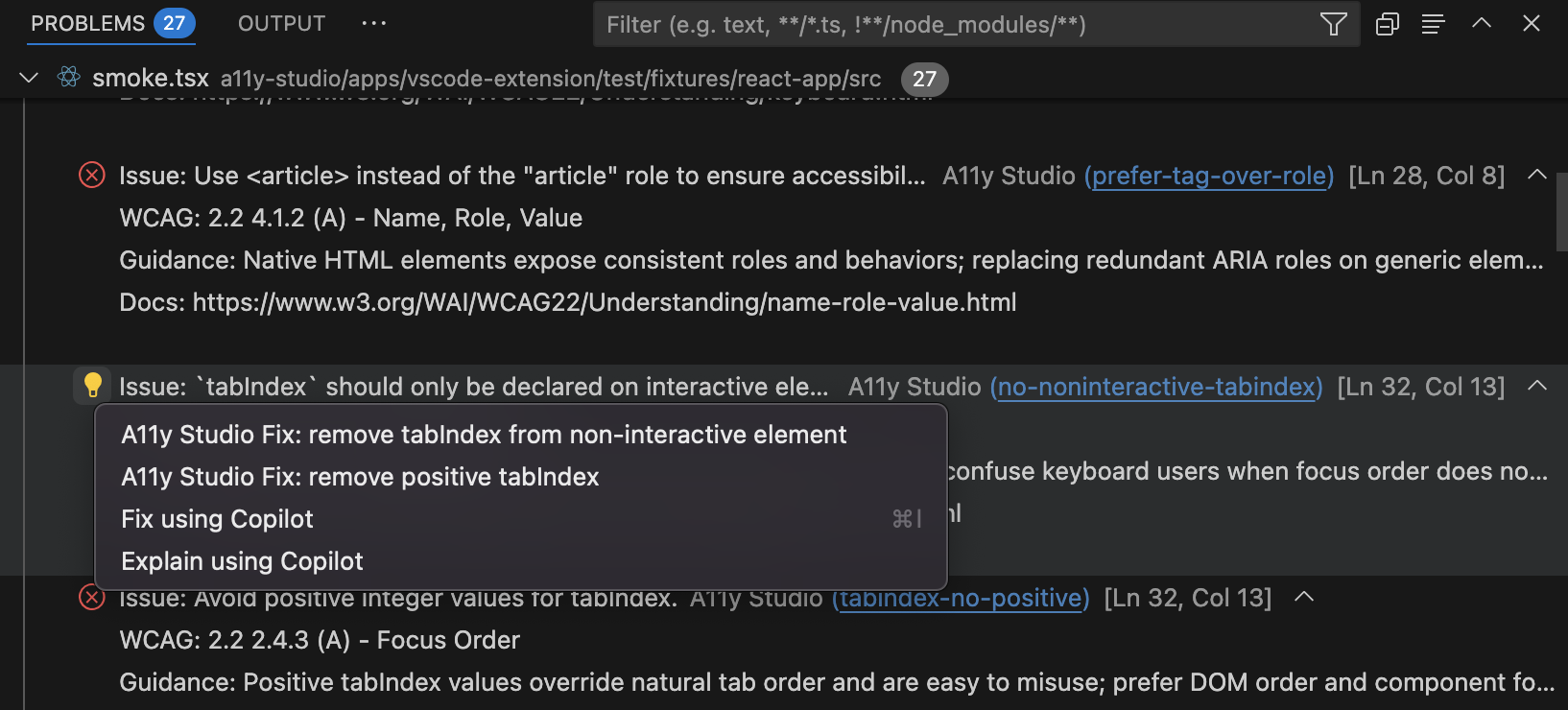
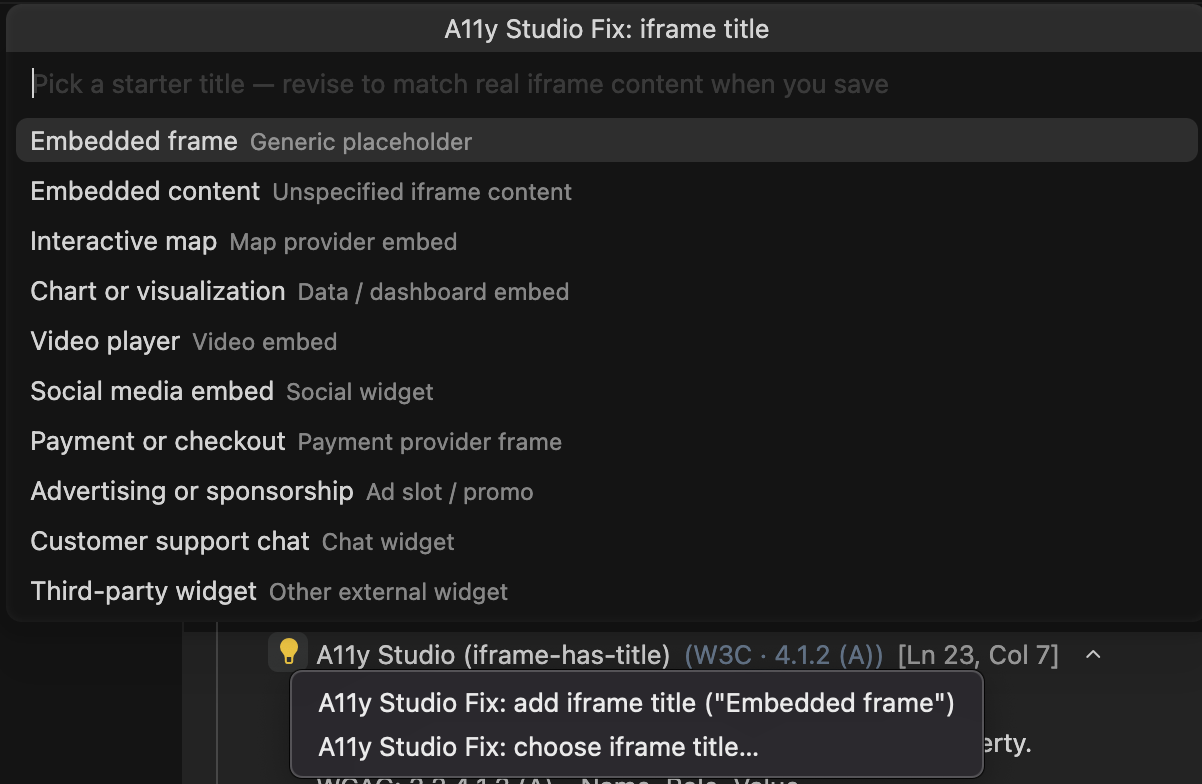
Hand-maintained fixes for 15+ rules via the lightbulb menu (Ctrl+. / Cmd+.). Covers alt text, html lang, iframe titles, label/control wiring, tabindex, ARIA roles and props, autocomplete tokens, interactive-supports-focus, and more. Each fix is safe, deterministic, and reviewed.
Apply all quick fixes in file
Command Palette: A11y Studio: Apply all quick fixes in file — applies every deterministic fix in the active .jsx / .tsx file in one step. Also in the editor right-click menu, or Ctrl+Shift+A / Cmd+Shift+A. Optional setting a11yStudio.fixAllOnSave runs the same bulk fixes after save-time lint. Skips lines with multiple findings to stay safe.
Open WCAG doc
Cmd+Alt+W / Ctrl+Alt+W opens the W3C Understanding page for the diagnostic at the cursor. Assign or change the shortcut in Keyboard Shortcuts.
Initialize preset
Command Palette: A11y Studio: Initialize preset — sets up ESLint 9 + jsx-a11y with WCAG-aligned rules in one step when those files are missing. Trusted workspace only.
Flow Runner (Playwright + axe in your repo)
Record flows → add checkA11y checkpoints → Run flow tests — violations in Problems with the same WCAG copy as lint. Activity Bar: Flow Runner (Environment, Auth, Flow tests), Help & settings (paths + onboarding). Auth lives under the Flow spec directory (tests/a11y/.auth/{profile}.json by default); public routes use no-auth when .auth/ is empty. Install Playwright here… sets up Playwright and copies Flow Runner from the extension — see Flow Runner and a11ystudio.dev/docs/flow-runner.
AI guidance (optional, ADR-005)
When a11yStudio.ai.rationaleUrl points at your A11y Studio worker (/api/claude/rationale):
- Explain current finding with AI — richer SME-style rationale in a side panel (supplements wcag-map, does not replace it).
- Suggest alt text with AI — three alt options for
jsx-a11y/alt-text on <img> (lightbulb + Command Palette).
- Generate accessibility test with AI — drafts a Jest + Testing Library + jest-axe file under
tests/a11y/ai/ (Layer 2 assist; requires worker URL; review and extend states in your project — not a full state matrix).
- Generate acceptance criteria with AI — writes Markdown criteria under
docs/a11y/acceptance-criteria/ for the current component file.
Requires a trusted workspace and server-held Claude (no user API key). Off until configured. For VS Code, use a *.workers.dev preview URL ending in /api/claude/rationale — production a11ystudio.io is behind Cloudflare Access and will not receive the browser cookie from the editor unless you add a token strategy.
Privacy (default vs optional AI)
- Default: ESLint diagnostics, wcag-map enrichment, Quick Fixes, Flow Runner, and Initialize preset run locally — no A11y Studio account, no extension telemetry, no outbound network from those features.
- Optional AI: When you set
a11yStudio.ai.rationaleUrl, explain / alt-text / test / acceptance-criteria commands POST a code snippet to your configured worker (server-held Claude per ADR-005). No user API key in settings; off until you configure it.
Screenshots
Problems vs scan tree — two severity labels, same findings
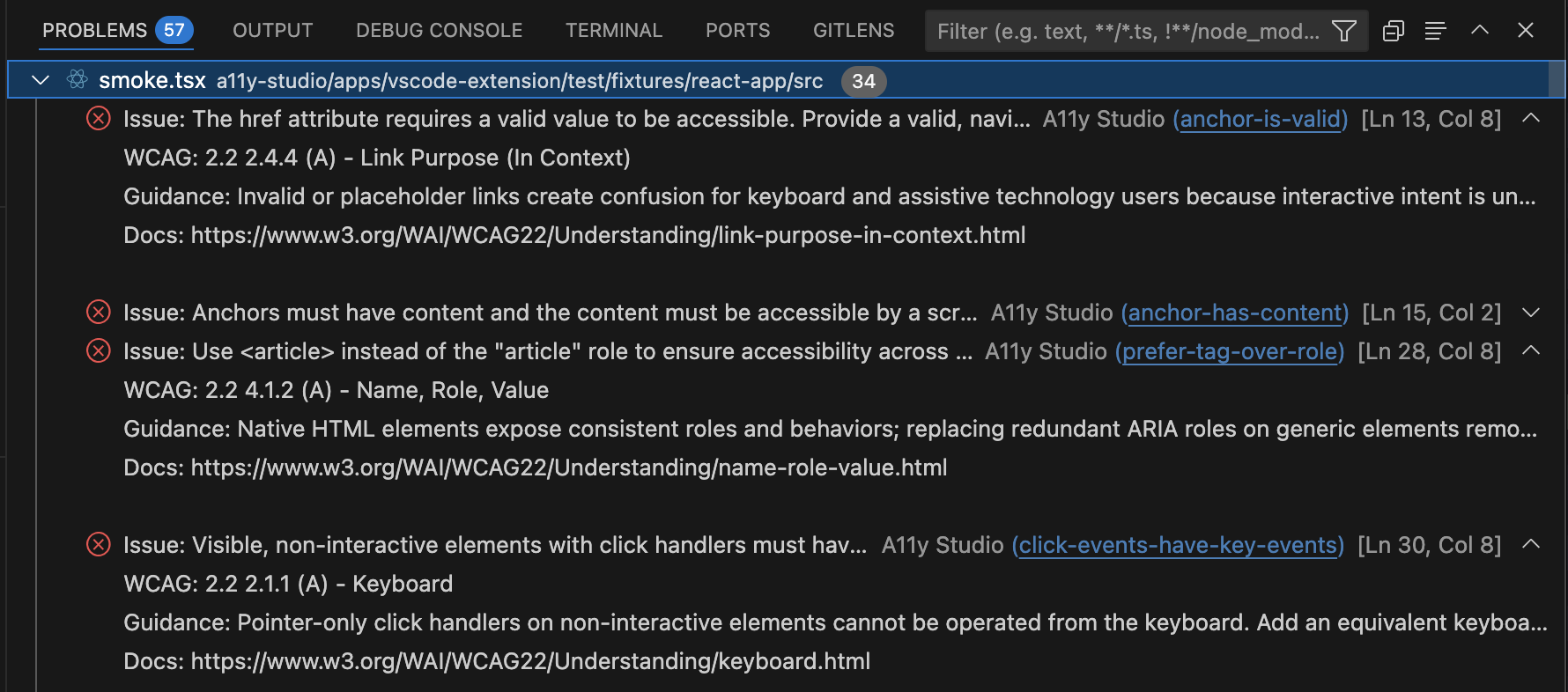
Problems shows VS Code Error / Warning / Info (ESLint marker level). The Workspace scan tree shows A11y Studio workflow tiers (Critical, High, Medium, Low, Best practice) from the WCAG map — same diagnostics, different vocabulary. See WCAG diagnostics (Problems severity vs Activity Bar workflow tiers).
Problems panel — WCAG context on every finding
Problems panel — suggestion-style rows
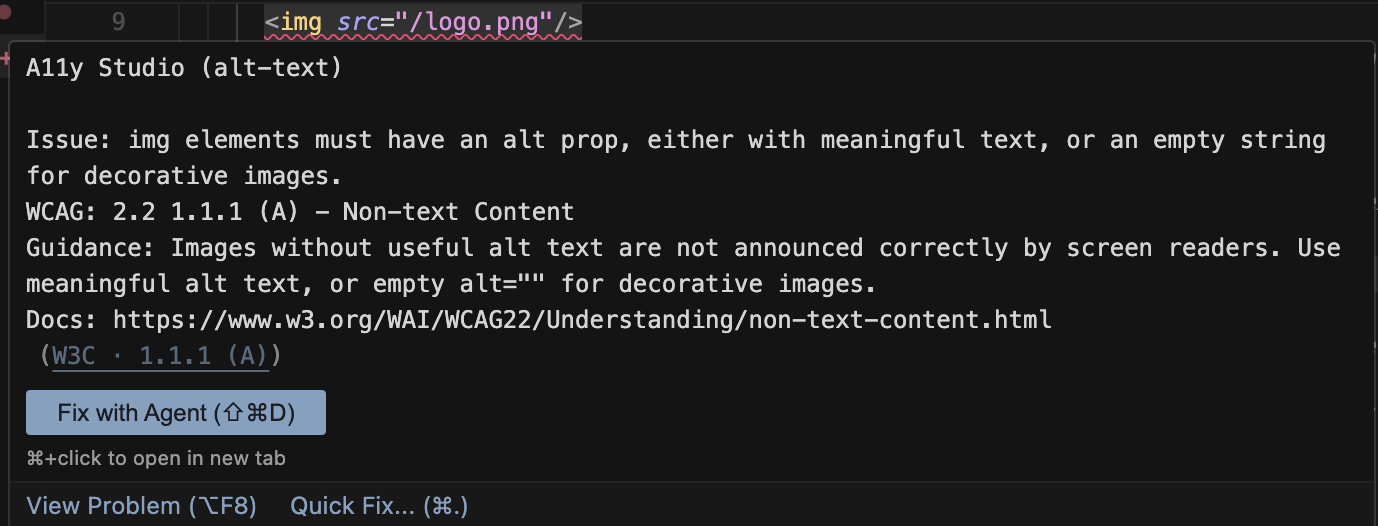
Diagnostic hover
Quick Fix — choose from options
Apply all quick fixes

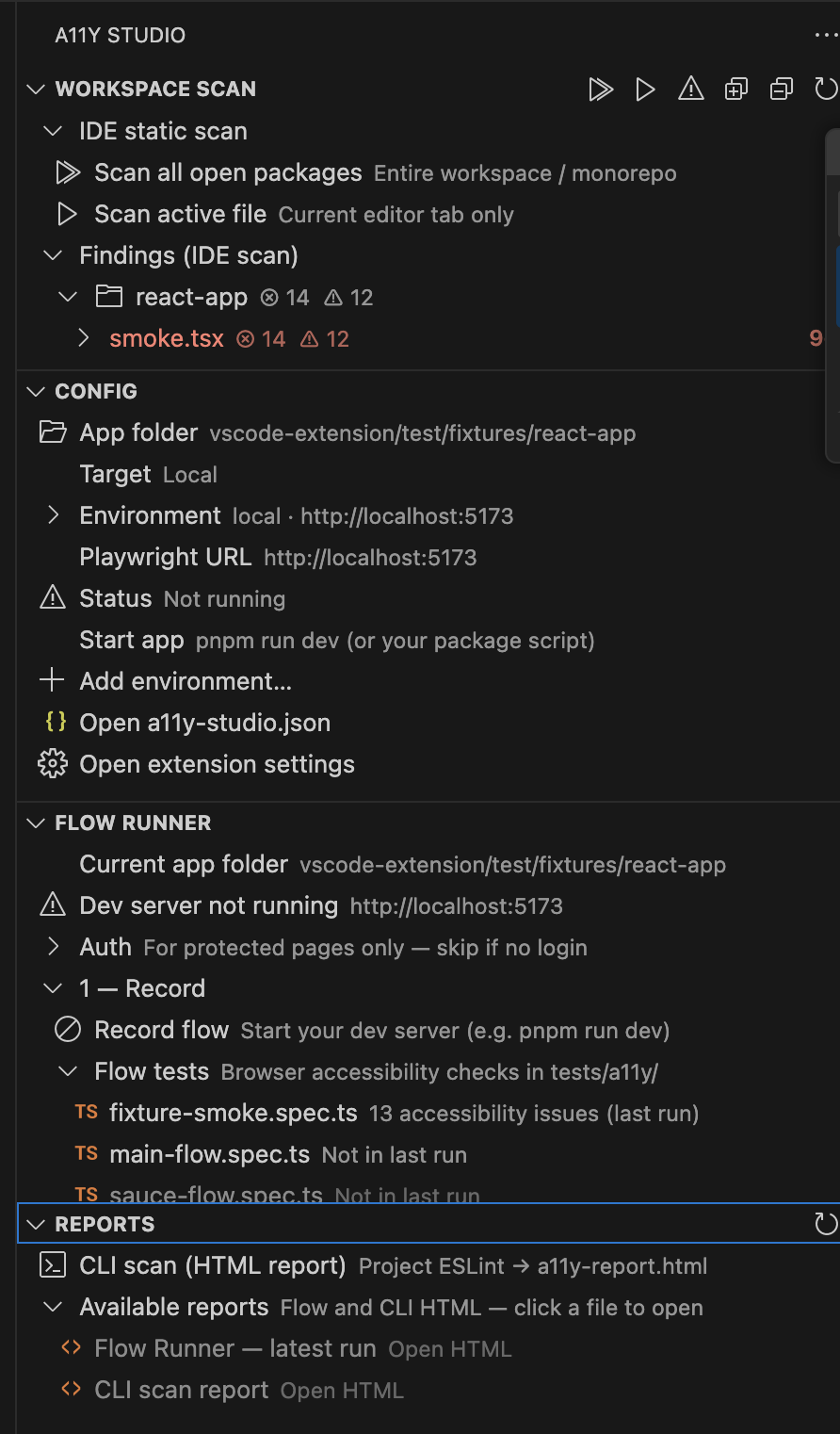
Activity Bar panel — scan, Flow Runner, reports
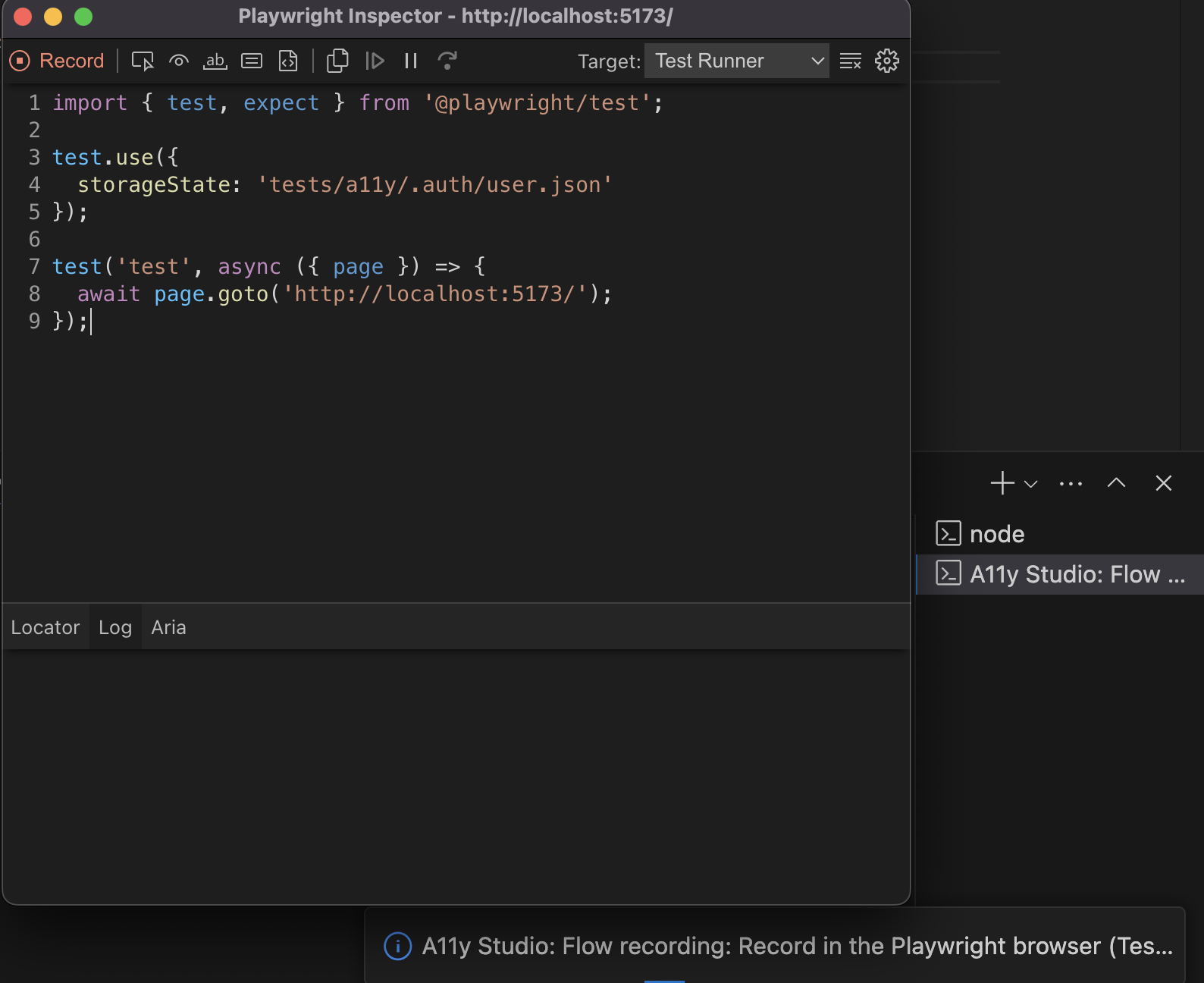
Flow recording — Playwright browser with Test badge
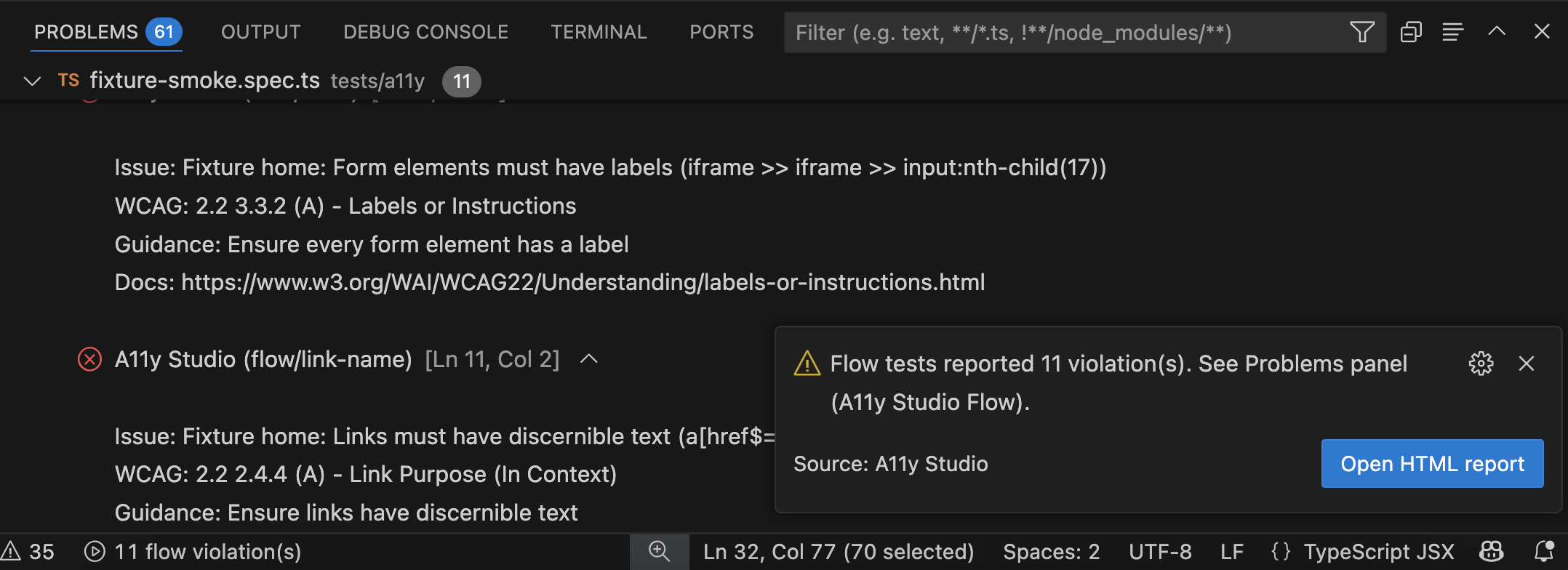
Flow tests result — violations in Problems panel
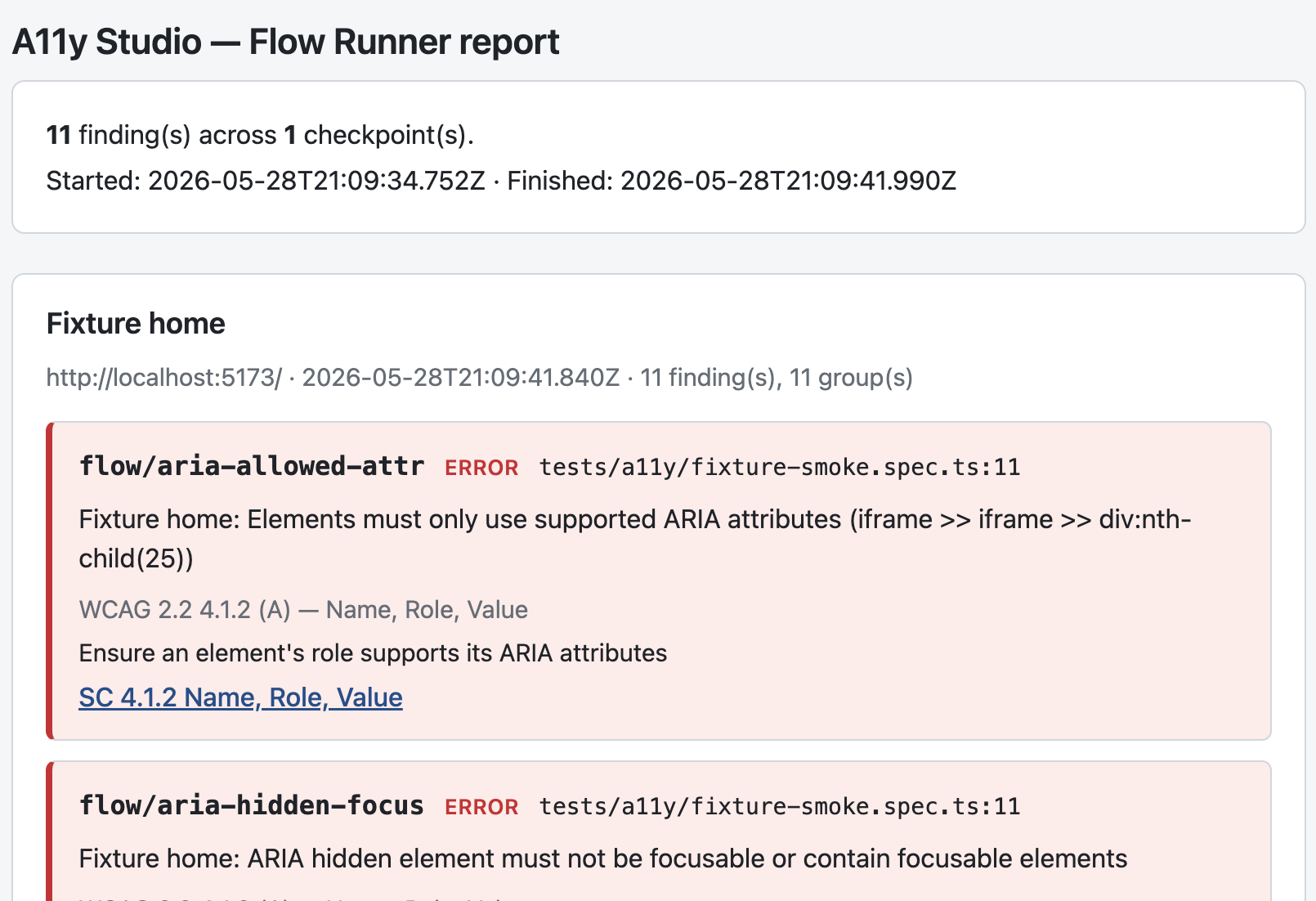
Flow Runner HTML report — SC links and WCAG context
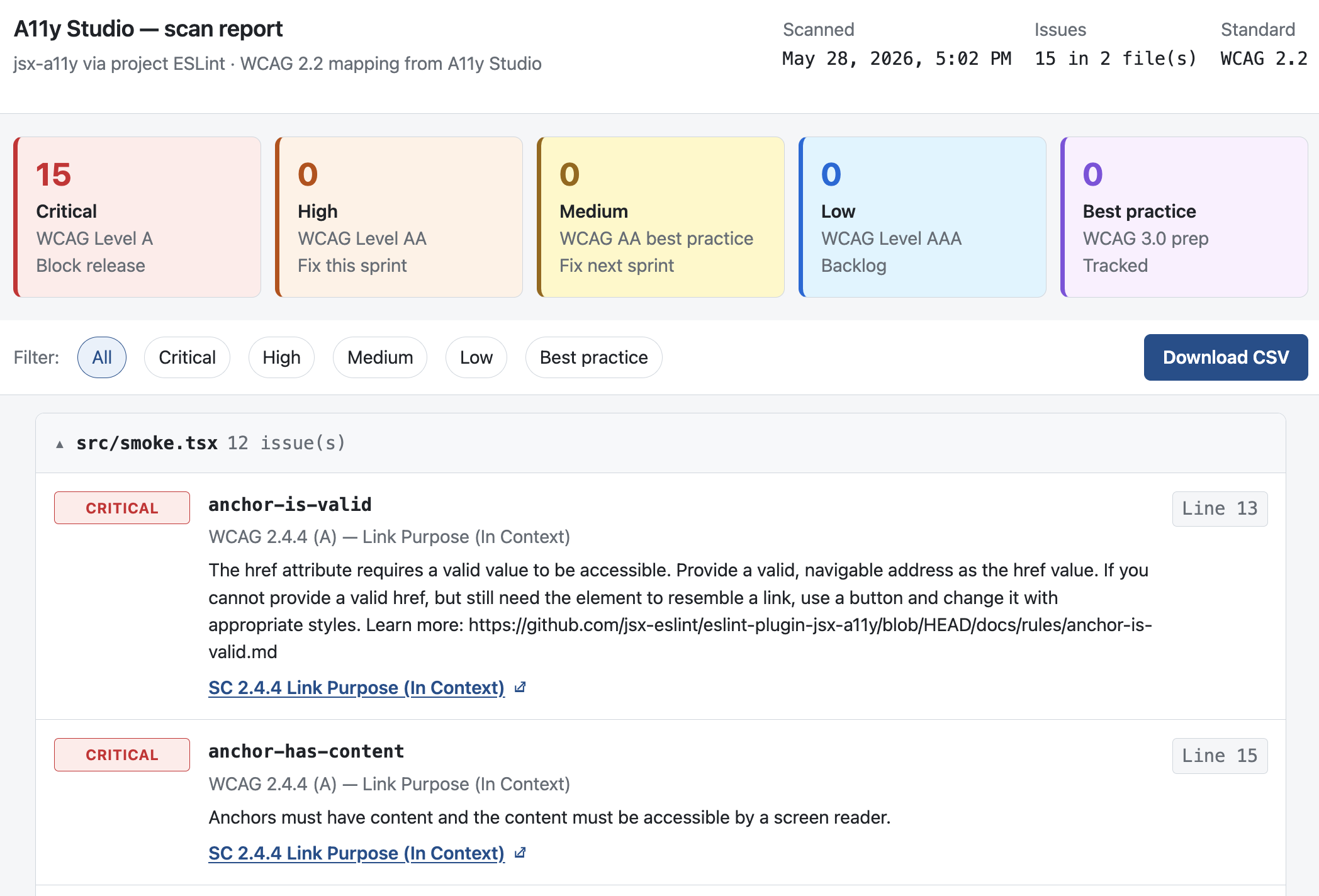
CLI scan report — severity tiers and W3C links
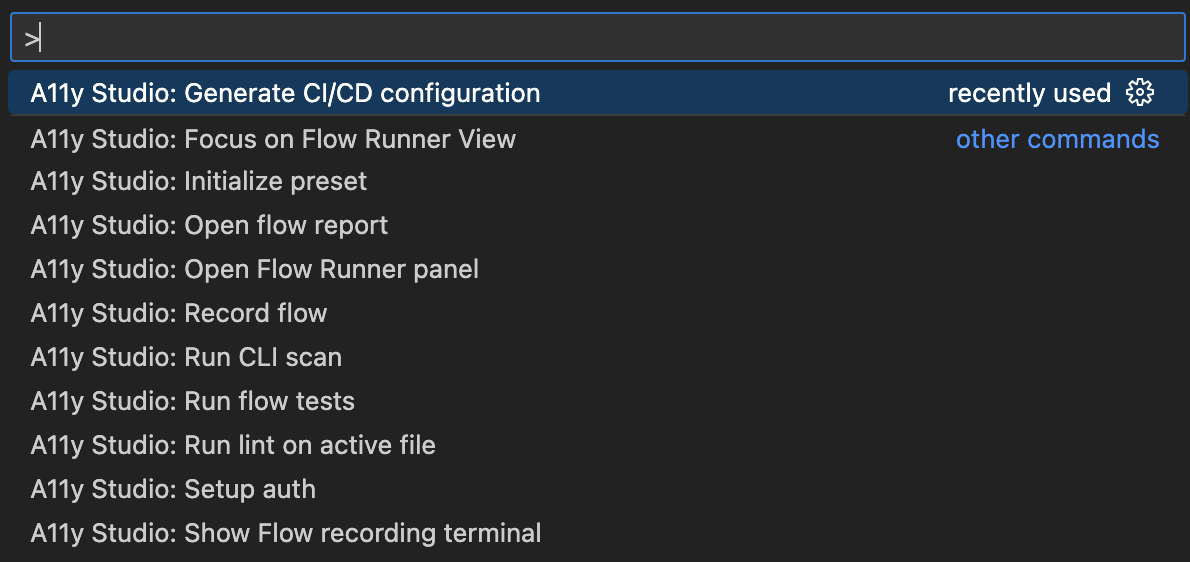
Command Palette — all A11y Studio commands
Quick start
- Install — Marketplace: A11y Studio, or Command Palette →
ext install a11ystudio.a11y-studio. No sign-in.
- Open a trusted workspace with React
.jsx / .tsx files.
- ESLint stack (zero extra A11y setup if already present) — if the repo already has ESLint + eslint-plugin-jsx-a11y +
eslint.config.*, save a file and diagnostics appear. Otherwise run A11y Studio: Initialize preset once (trusted workspace only).
- Save the file — A11y Studio updates diagnostics on save (not on every keystroke). Wrong language mode on
.jsx / .tsx? The extension still targets those paths when the file is plain JavaScript / TypeScript.
- Act on findings — Quick Fix:
Ctrl+. / Cmd+. — Open WCAG doc: Ctrl+Alt+W / Cmd+Alt+W.
Diagnostics and hovers
Each finding uses Source A11y Studio, Code (short rule id, for example alt-text), and a Message with Issue, WCAG, Guidance, and Docs — on purpose, so you are not sent elsewhere for the basics. In Problems → View as table, the Code column may read A11y Studio (alt-text) because VS Code combines source and code; filter Problems to A11y Studio to focus on extension findings.
VS Code and Cursor may also merge other diagnostics (for example TypeScript) into the same hover when ranges overlap. That is normal workbench behavior, not a duplicate message from A11y Studio.
If hovers appear too quickly or get in the way of the Problems panel, adjust your User Settings (JSON) (for example "editor.hover.delay": 800 and "editor.hover.sticky": false).
WCAG AAA / Low tier — hover lead is Note: (not Issue:), editor underline is blue Information, and the Workspace scan tree shows the Low tier with an info-style icon. Same finding, three surfaces — they should agree.
Pilot / your app repo testing
Before rolling out on a production monorepo: install from Marketplace or a .vsix, open a trusted workspace, and smoke-test one .tsx file plus Flow Runner if you use it. Monorepo tip: Flow Runner → Flow package → pick the package with package.json and your Flow specs. New setups default to tests/a11y/; existing Playwright a11y packages can set flowRunner.testDir (for example "." when specs live at the package root).
Optional AI is off until you set a11yStudio.ai.rationaleUrl (use a *.workers.dev or localhost worker — not production a11ystudio.io behind Access).
Flow Runner
Runtime accessibility testing for React apps you already lint with A11y Studio. Flow specs live in tests/a11y/**/*.spec.ts by default (flat or nested subfolders — e.g. portal/onboarding.spec.ts); set flowRunner.testDir in a11y-studio.json to adopt an existing Playwright a11y package without moving specs. Specs import checkA11y from @a11ystudio/flow-runner so the same checkpoints run in CI without the IDE. This is Layer 3 in the four-layer testing model (lint → jest-axe → Playwright → manual).
Enterprise monorepo layout (naming, environments, auth): see the public repo guide automation-architecture.md — copy the Quick start into your a11y-playwright/README.md. That doc is not bundled inside the VSIX; it stays on GitHub for your team.
Commands (Command Palette)
| Command |
What it does |
| A11y Studio: Setup auth |
Opens a headed browser; save Playwright storage state to tests/a11y/.auth/{profile}.json (for dashboards, checkout, admin, etc.). |
| A11y Studio: Select auth profile |
Pick which saved profile record and run use (also on the Flow Runner panel). |
| A11y Studio: Record flow |
Starts Playwright codegen against your dev server URL; when recording stops, normalizes the spec (relative page.goto, checkA11y import, default checkpoint). |
| A11y Studio: Reset Flow Runner state |
Settings view — clears tests/a11y/.auth/ and reports; keeps *.spec.ts and a11y-studio.json. |
| A11y Studio: Remove A11y Studio setup |
Settings view — removes config and session artifacts; keeps your *.spec.ts files by default. Choose Remove setup and specs only for a blank Flow package (type PURGE). |
| A11y Studio: Add checkpoint |
Inserts a checkA11y(page, …) call in the open flow spec (editor lightbulb / context; not in the Command Palette). |
| A11y Studio: Add checkpoint with custom check |
Inserts checkA11y with A11yStudioChecks (panel / editor only). |
| A11y Studio: Run all flow tests |
Runs Playwright against every runnable spec in the configured Flow spec directory (tests/a11y by default); violations appear under A11y Studio (Flow) in Problems. |
| A11y Studio: Diagnose Node & Playwright setup |
Verifies Node, Playwright CLI, and PATH; writes a report to Output → A11y Studio Flow Runner (Flow Runner panel, Help & settings, or Command Palette). Does not open a browser or check dev-server URL. |
| A11y Studio: Open flow report |
Opens the latest HTML report for the active environment under tests/a11y/reports/{env}/{auth}/{spec}/latest.html. Choose VS Code or system browser (a11yStudio.reports.openIn). Per-spec Open HTML report is also on each spec row under Flow tests. |
| A11y Studio: Create Flow specs folder |
Creates a nested folder under the Flow testDir (e.g. common/header) so you can organize recordings. |
| A11y Studio: Change accessibility standard… |
Pins WCAG 2.x × A/AA/AAA, Section 508 (web), or EN 301 549 (web) in policy.standard — drives Flow axe tags + report framing (not a legal determination). RGAA still HOLD. |
| A11y Studio: Preview reading order (Flow report) |
Step-through predicted reading order with spoken role labels (e.g. edit text, heading level 2) from the accessibility tree — preview only, not live NVDA/JAWS/VoiceOver. Warns on generic names like click here. Requires a report with ARIA snapshot checkpoints. Also in the Flow Runner panel Run section after a flow test run. |
| A11y Studio: Open Flow Runner panel |
Activity bar A11y Studio views: Workspace scan, Flow Runner, Reports & publish, Help & settings (alias command id unchanged for compatibility). |
| A11y Studio: Scan all workspace (IDE) |
Full static lint of every discovered package → Problems + Workspace scan tree. Activity Bar → IDE static scan. See Scan workspace scope. |
| A11y Studio: Scan active file |
Lints the current .tsx / .jsx / .css editor tab. |
| A11y Studio: Scan one package (IDE) |
Lints one monorepo package — use panel Scan package: {folder} rows or Command Palette. |
| A11y Studio: CLI scan (HTML report) |
a11ystudio scan → a11y-report.html — under Reports & publish (not Workspace scan). Requires @a11ystudio/cli and eslint.config.*. Confluence: connect token in Help & settings → Integrations; run publish in Reports & publish. |
| A11y Studio: Suppress this line |
Quick Fix / command — adds an ESLint inline disable for the finding (audit row under Suppressed). |
| A11y Studio: Suppress in file / folder / rule everywhere |
Writes a11y-studio.json path or rule suppressions with reason metadata; excluded from ci.blockOn gates. |
Demo: log in once, record, run
Same idea as Playwright storageState demos (log in once in a real browser, reuse the session). A11y Studio does not store usernames or passwords in the repo — it saves Playwright auth state under the Flow spec directory’s .auth/ folder (gitignored), like user.json for the default profile.
- Start the UI app locally (or point
flowRunner.devServerUrl at a staging URL you are allowed to use).
- Setup auth — log in in the headed Chromium window (SSO, MFA, etc.), then choose Save auth state in the Quick Pick.
- Record flow — codegen opens with
--load-storage for the active profile when a profile exists; record in the Playwright browser (Test badge), not the launcher terminal tab. When you stop recording, the spec is normalized (relative paths + default checkA11y()). Public routes skip auth setup when .auth/ is empty.
- Optional: Add checkpoint for extra UI states (modal open, error, loading).
- Run all flow tests — axe results in Problems and a report under
<flowRunner.testDir>/reports/{env}/{auth}/{spec}/latest.html (default tests/a11y/reports/...; use Run this flow test on one spec, or Run all flow tests (N specs) for every spec). If stuck, Settings → Reset Flow Runner state (keeps specs).
Multiple roles or clients: save separate files such as admin.json and checkout.json, then Select auth profile before record or run. Treat .auth/*.json like a live session — do not commit it; refresh when cookies expire.
One-time project setup
- Trusted workspace (required).
a11y-studio.json — optional flowRunner block, for example:
{
  "flowRunner": {
    "devServerUrl": "http://localhost:5173",
    "activeAuthProfile": "user",
    "environments": {
      "local": { "devServerUrl": "http://localhost:5173" },
      "qa": { "devServerUrl": "https://qa.example.com" }
    },
    "activeEnvironment": "local",
    "browserChannel": "chrome"
  }
}
With two or more environments keys, the Flow Runner panel shows Select environment (ADR-011). Legacy single devServerUrl still works when environments is omitted. On locked-down desktops where bundled Chromium is blocked, set browserChannel to chrome (or browserExecutablePath) so Setup auth, Record flow (codegen), and flow tests use system Chrome — or match channel in your existing playwright.config.ts. Record flow asks Isolated browser (default, Incognito-like) vs Chrome profile folder when you need SSO cookies.- Playwright — Install Playwright here… in Flow Runner (or
pnpm add -D playwright @playwright/test + playwright install chromium). Locked-down networks: Use system Chrome… or "browserChannel": "chrome" — see corporate setup.
- Launch PATH — if Record flow or Run tests fail with
spawn node ENOENT when VS Code was opened from the Dock/Start menu, run Diagnose Node & Playwright, open the repo via code . from a terminal, or set a11yStudio.flowRunner.nodePath / playwrightPath in extension settings (Settings → Node & Playwright path settings).
- Auth — run setup auth before recording or testing protected routes.
Reports: <flowRunner.testDir>/reports/{env}/{auth}/{spec}/latest.json (gitignored; default tests/a11y/reports/...). Contributor testing: docs/TESTING.md Part 3b.
Scan workspace scope
Scan workspace is for accessibility leads and SMEs who need a whole-codebase static pass without opening and saving every file. It uses the same engine as save-time lint (jsx-a11y + A11y Studio rules), not runtime axe.
What gets scanned
- Included:
.tsx, .jsx, .css, .scss, .sass, .less, and product .html (index.html, public/**/*.html, plus optional scan.htmlGlobs) under the workspace or a package you choose
- Monorepos: Scan all workspace for every discovered package, or Scan package: {folder} for one app (pnpm / npm / yarn workspaces). Optional
scan.packageRoots in a11y-studio.json when auto-discovery misses a layout.
- Not included: repo-wide HTML (docs sites,
dist/), plain .ts / .js without JSX, standalone .svg — see Scope
What is skipped by default
| Skipped |
Why |
node_modules, dist, build, .next, coverage, .git, .vscode-test |
Tooling and build output |
*.test.tsx, *.test.jsx, *.spec.tsx, *.spec.jsx |
Common unit/E2E filename convention (not every team uses this — see below) |
Paths in scan.excludeGlobs |
Your team’s Storybook, mocks, QA trees, fixtures, etc. |
We do not skip every folder named test or __tests__ — only the patterns above. Production code in those folders is still scanned unless you add an exclude glob.
Plain .ts / .js (no JSX) are out of scope today — same as save-time lint.
Reading results (important)
- The completion toast counts A11y Studio static lint only (prefix A11y Studio:).
- Open Problems and filter to A11y Studio — TypeScript, ESLint, Prettier, and A11y Studio (Flow) may add other rows.
- On the toast, choose Scope details for a short scope reminder (not a second scan).
Customize scope (a11y-studio.json)
Add paths your team does not want in a lead audit (we do not judge — you decide):
{
  "scan": {
    "excludeGlobs": [
      "**/*.stories.tsx",
      "**/qa/**",
      "**/mocks/**"
    ]
  }
}
Globs are merged from the workspace folder and each package root in a monorepo. Built-in skips (tooling + *.test.tsx / *.spec.tsx) always apply; there is no setting yet to force-scan *.test.tsx if you need that.
CI/CD and release hygiene
Scaffold accessibility pipelines and team commit conventions without hand-writing YAML.
| Command |
What it does |
| Scan workspace |
Product React/CSS static lint into Problems; filter to A11y Studio; optional scan.excludeGlobs. See Scan workspace scope. |
| Run CLI scan |
Same as a11ystudio scan --report locally — discoverable from the Command Palette without memorizing the terminal command. |
| Generate CI/CD configuration |
Writes GitHub Actions, GitLab CI, CircleCI, Jenkins, Azure Pipelines, or AWS CodeBuild jobs that run pnpm exec a11ystudio scan, yarn a11ystudio scan, or npx a11ystudio scan (requires @a11ystudio/cli in devDependencies). Uploads a11y-report.html and SARIF on GitHub. Optional Flow Runner steps set A11Y_DEV_SERVER_URL (preview/staging placeholder), A11Y_WEB_SERVER_COMMAND, and CI. Named flowRunner.environments in config map to panel/CLI targets (ADR-011). |
| Generate release hygiene (commitlint, Release Please) |
Writes .commitlintrc.json, .husky/commit-msg, release-please-config.json, and .github/workflows/release-please.yml. |
Requires Initialize preset (eslint.config.*) before the CLI scan step succeeds in CI. After release hygiene generation, install devDependencies shown in the A11y Studio output channel (commitlint, husky).
Requirements
- VS Code 1.90+
- Trusted workspace — ESLint runs only in trusted folders
- ESLint + eslint-plugin-jsx-a11y — A11y Studio enriches what ESLint reports; it does not replace the engine
- Initialize preset configures ESLint 9 flat-style config — legacy
.eslintrc is not covered in v1
Configuration
Add an optional a11y-studio.json file at your project root to tune rule behaviour and team presets. Rule severities and ESLint disable comments still live in your ESLint config as normal. Optional scan.excludeGlobs controls Scan workspace skips (see Scan workspace scope).
Turn off a rule (workspace or one folder)
A11y Studio custom rules (a11y-studio/custom-*), APG rules (a11y-studio/pattern-*), and CSS gap rules respect a11y-studio.json — the same filter ESLint findings use on save:
{
  "rules": {
    "a11y-studio/custom-div-text-only": "off",
    "jsx-a11y/alt-text": "off"
  },
  "pathRules": [
    {
      "include": "src/legacy/**",
      "rules": {
        "a11y-studio/custom-page-title-missing": "off"
      }
    }
  ]
}
- Whole workspace — set
"off" under top-level rules (rule id exactly as shown in Problems, e.g. a11y-studio/custom-contact-outside-address).
- Specific paths — use
pathRules with an include glob (forward slashes, relative to the package root that owns the file).
- Reload — Command Palette → A11y Studio: Reload a11y-studio.json, then save the file again.
Note: Inline eslint-disable-next-line comments affect jsx-a11y / ESLint findings only. Custom AST rules do not read ESLint disable comments yet — use a11y-studio.json for those.
Troubleshooting Problems (wrong file, noise, ignores)
| Situation |
What to do |
| Not sure the finding is from A11y Studio |
In Problems, check Source = A11y Studio. We do not lint standalone .svg files — only .tsx, .jsx, and stylesheets. Inline <svg> in a component is expected to show under that .tsx file. |
| False positive on one rule |
Turn the rule off in a11y-studio.json → rules (workspace-wide), or pathRules with an include glob for one folder (e.g. src/legacy/**). Reload config, then save the file. |
| ESLint-only rule |
eslint-disable-next-line jsx-a11y/rule-name on the line above, or turn off in ESLint config. |
| Entire package / folder out of workspace scan |
scan.excludeGlobs in a11y-studio.json (does not affect save-time lint on open files unless you also disable rules). |
| Per-line ignore for custom rules |
CSS/HTML/APG: use pathRules or rules off in a11y-studio.json (suppress quick actions in lightbulb). jsx-a11y: Suppress this line or config suppress. |
| Flow Runner install targets repo root |
Use Choose app folder… and pick the app package with package.json (not the monorepo root unless dependencies live there). |
Scope
Start with React and real stylesheets; add static HTML and runtime flows; expand to Vue, Angular, and React Native on the roadmap. We reuse open ESLint plugins (jsx-a11y, @html-eslint/eslint-plugin for HTML) and our CSS/APG engine — not proprietary multi-engine VSIX packs or Tailwind-only parsers.
In scope today (Marketplace v1.0.2)
| Format |
What runs |
.tsx / .jsx |
eslint-plugin-jsx-a11y; 22 APG pattern checks; 14 custom AST rules (skip link, headings, meaningless accessible names, etc.) |
.css / .scss / .sass / .less |
10 CSS gap rules (outline, motion, contrast, etc.) — save-time and Scan all workspace; contrast Quick Fix for static hex/rgb pairs |
Product .html |
@html-eslint/eslint-plugin — index.html, public/**/*.html, optional scan.htmlGlobs (not repo-wide docs sites) |
| Language modes |
javascriptreact / typescriptreact, and javascript / typescript when the path ends in .jsx / .tsx |
CSS gap rules at save-time in the IDE are a differentiator among common jsx-a11y-only extensions — see maintainer COMPETITIVE_NOTES.md.
Roadmap (after React-complete gate — closed 2026-06-15)
| Format |
When |
Notes |
.vue |
v1.1 |
First framework expansion |
| Angular |
v1.1+ |
After Vue unless customer demand changes order |
React Native .tsx / .jsx |
v1.1+ |
PILLAR 6 — not web jsx-a11y on RN |
Standalone .svg |
Optional v0.9.x |
JSX <img src="*.svg"> still covered by jsx-a11y where applicable |
Product .html (html-eslint) and CSS gap rules ship today — see table above. Details: product-scope-ssot.md.
Out of scope (default)
| Format |
Notes |
.ts / .js without JSX |
Not planned for static IDE engine — use .tsx or Flow Runner on the built page |
| MDX / Razor / Liquid |
Skip unless signed customer demand |
| Native iOS / Android |
Future platform surfaces (Chrome ext, etc.) |
.md, .json, .pdf, other |
Out of product scope |
Other scope rows
| Topic |
Detail |
| Scan workspace |
Product .tsx / .jsx / stylesheets; completion toast includes stylesheet count; filter Problems to A11y Studio; scan.excludeGlobs for team-specific skips |
| Runtime |
Flow Runner (team pilot) — Playwright + axe-core in your repo; requires setup (flowRunner.testDir, app folder, Diagnose). Not zero-config enterprise — follow team onboarding. Playwright Test for VS Code can stay ON — coexist by avoiding parallel browser sessions; stop cli.js test-server only if Diagnose reports Chrome storms. Announcement Preview on Flow report checkpoints. |
CLI (a11ystudio scan) |
Full static engine parity: jsx-a11y via your ESLint config plus CSS gap, HTML app-shell, and APG/document rules from @a11ystudio/core. |
A11y Studio enriches static lint for JSX/CSS and adds optional flow-based runtime checks in your repo. It does not replace cloud DevTools crawlers, scheduled production monitoring, native app scanners, real screen-reader device labs, or legal sign-off.
Privacy
- No telemetry in this extension
- No A11y Studio accounts or OAuth in the extension
- Optional AI — HTTPS to your worker only when
a11yStudio.ai.rationaleUrl (or per-endpoint overrides) is set; not enabled by default
- Optional Figma entries in
a11y-studio.json are URLs you paste locally — the extension does not fetch them
Compliance and independence
- WCAG 2.2 wording and Understanding links describe engineering mapping — not certification, legal sign-off, or a substitute for professional audits
- ADA / Section 508: this extension is a developer workflow tool, not legal or compliance tooling
- Independent open-source software — not affiliated with Microsoft, Google, Apple, GitHub, or W3C
- Contributors are listed in the AUTHORS file bundled with this extension.
License
MIT — full license text is in the bundled MIT license file for this extension (see also the Marketplace License tab).
Security and release notes
- Security: Report vulnerabilities using the instructions in the security policy shipped inside this extension’s package. The Marketplace Details readme cannot link to bundled files; open the extension folder from Extensions if you need the file on disk.
- Release notes: Use the Changelog tab on this Marketplace page (this extension does not rely on clickable links to the bundled changelog file in the readme).

