KulLang for VSCode
Editor support for Kul — a small declarative language for kinship and family-tree data.
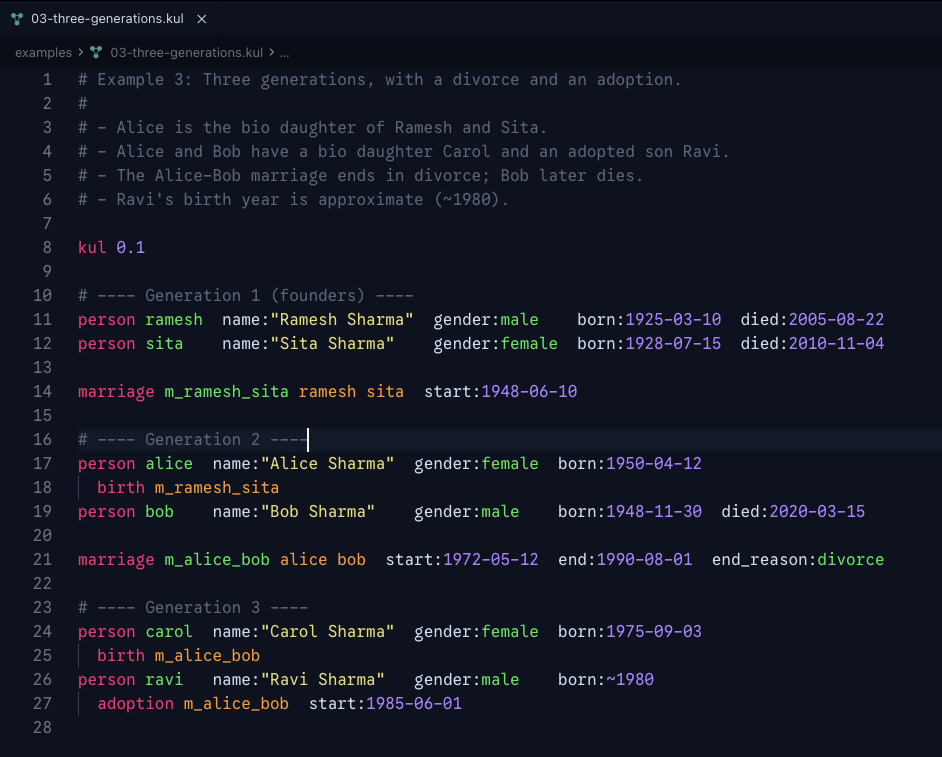
Open a .kul file and you get diagnostics, hover docs, format-on-save, go-to-definition, completion, and outline — all powered by the bundled Kul language server. No setup required.
Features
- Live diagnostics for all 13 Kul validation rules — duplicates, unresolved references, temporal contradictions, parenthood cycles
- Hover docs on keywords, fields, and identifiers
- Go-to-definition, find-all-references, rename
- Completion for keywords, field names, enum values, and existing person/marriage ids
- Format-on-save via the canonical
kul format pass
- Document outline of persons, marriages, and their nested birth/adoption sub-statements
- Quick fixes for missing required fields and end-consistency violations
- Snippets for
kul, person, marriage, birth, adoption
- Export commands —
Kul: Export to JSON and Kul: Export to Cytoscape JSON from the command palette: projects the current document (including unsaved edits) to canonical JSON. The Cytoscape form drops into Cytoscape.js, Sigma.js, vis-network, and similar graph-layout libraries
Settings
kul.serverPath — absolute path to a custom kul-lsp binary. Leave empty to use the bundled one.kul.trace.server — off / messages / verbose. Surfaces LSP traffic in the Kul LSP output channel.
Requirements
VSCode 1.85 or later — installs from the VS Code Marketplace — or any Open VSX consumer (VSCodium, Cursor, Windsurf, Theia, Gitpod, Kiro) on the same version floor.
Feedback and bug reports
File issues at github.com/YashBhalodi/kul/issues — bugs, language proposals, and editor-feature requests all go there. Please skim the language spec and examples before filing a language proposal.
AI authoring is separate
If you're looking for AI-assisted .kul authoring, that's delivered as a separate agentskills.io-compliant skill — not as a VSCode command. This extension is the tooling surface (diagnostics, formatting, export); the kul-authoring skill is the authoring surface for LLM agents. Install it into your project with npx skills add YashBhalodi/kul --skill kul-authoring and any agentskills.io-compliant agent (Claude Code, Cursor, Copilot, Codex CLI, Gemini CLI, …) will pick it up.
Resources

