unstringify for VS Code
Paste the mess. Read the structure. — now inside the editor.
The engine behind unstringify.com, where VS Code keeps
such things: broken JSON fixed with named fixes on the lightbulb and in the
Problems panel; CSV, NDJSON and logs read as records through the reading
question; conversion into a new editor; comparison by structure in the diff
editor; stringified JSON opened in place.
Everything runs on your machine. Nothing you open is uploaded — the only
request this extension ever makes is to the licence service, when you enter a
licence key.
What it looks like
What it does
Each thing lives where VS Code keeps such things — a command, a quick fix on
the lightbulb, a hover, the diff editor, the status bar — not in a panel of
its own.
|
Where |
What happens |
| Fix JSON |
command · context menu · the status bar |
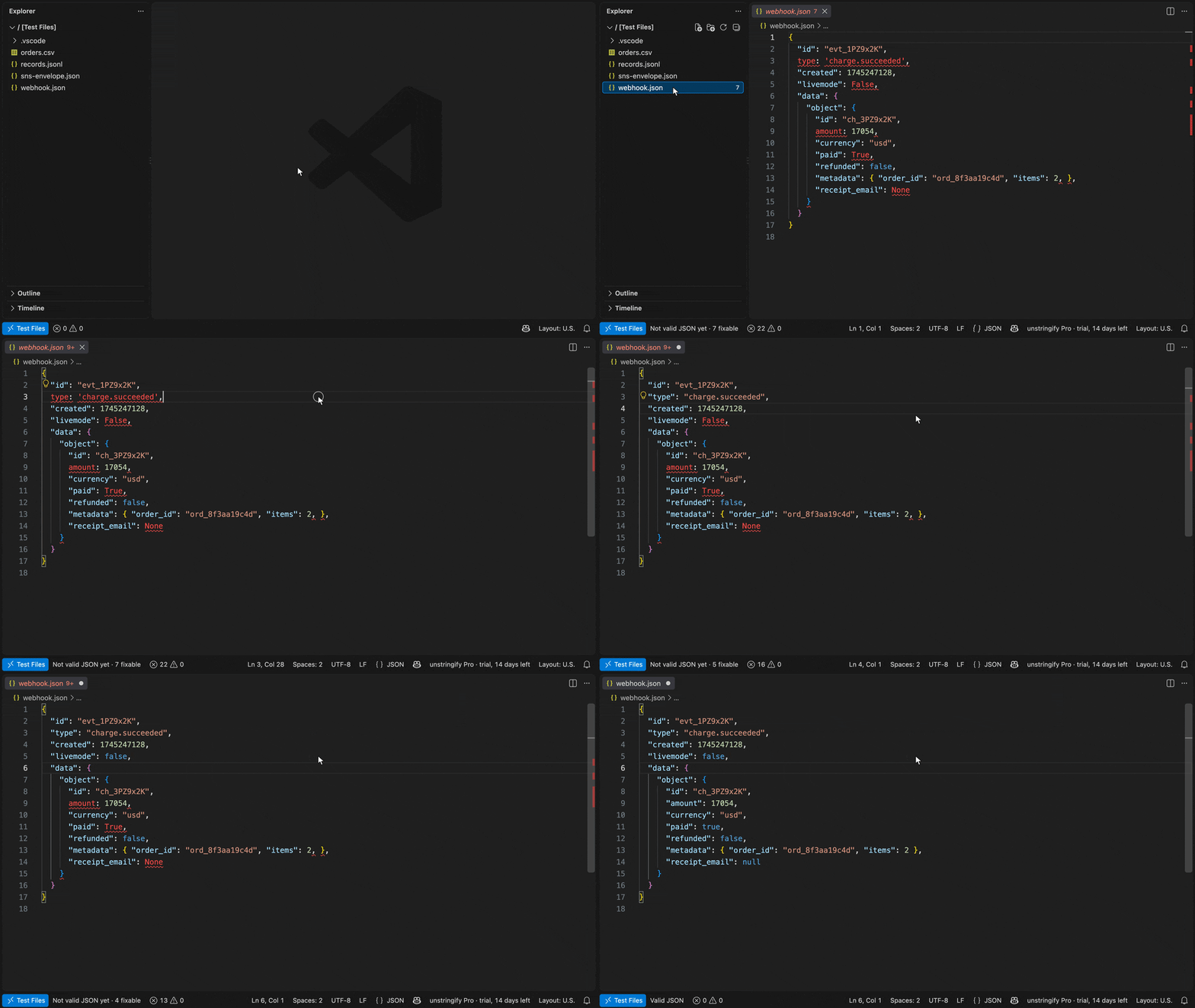
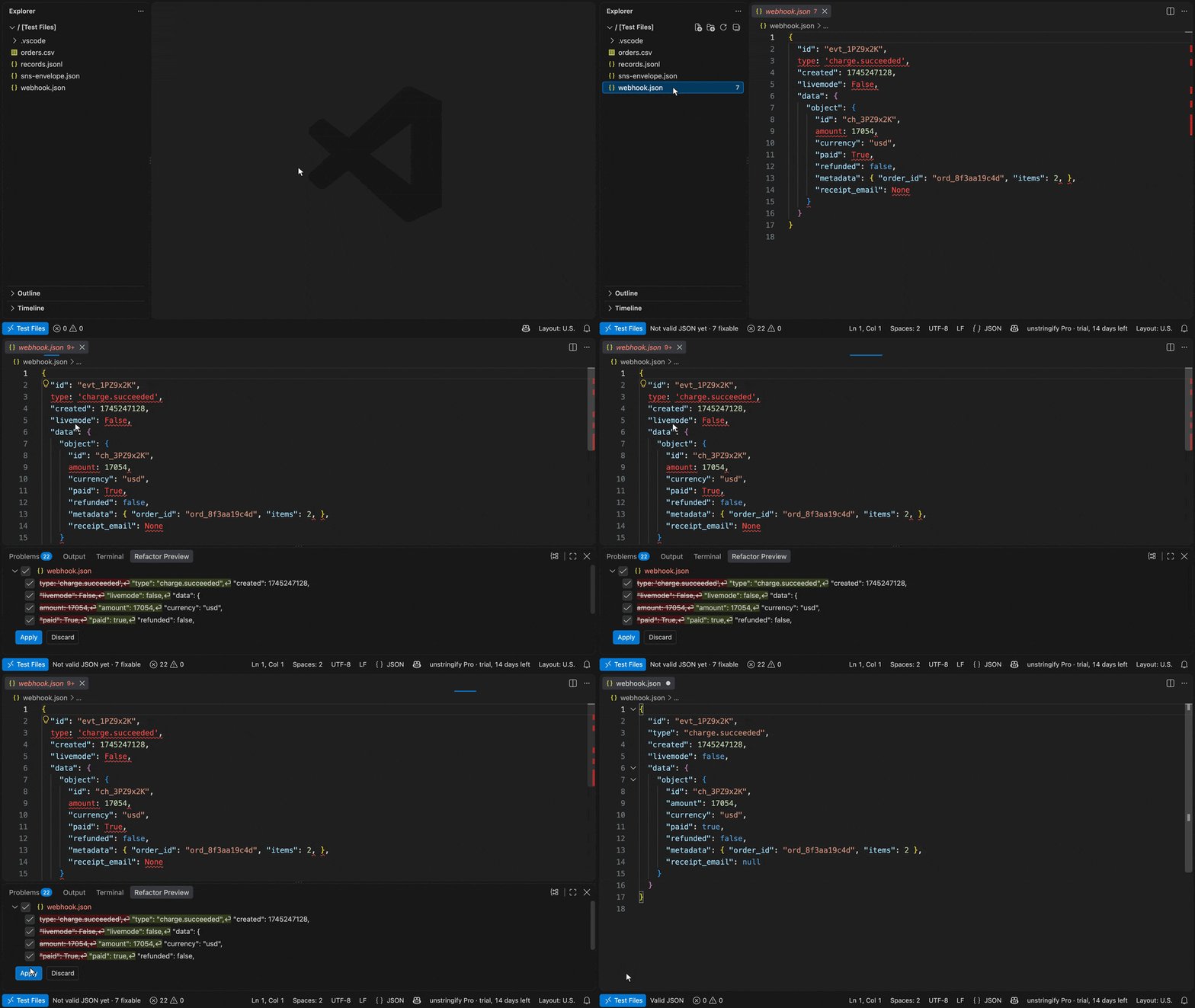
Every fix at once, and the editor's undo restores every byte. To see them first: on the lightbulb or in the Refactor menu (⌃⇧R) pick "Fix all N" and press ⌘⏎ (⌃⏎ on Windows and Linux) — the Refactor Preview lists every hunk, "line 12 · Single → double quotes", "line 31 · Python None → JSON null", each ticked; untick what you keep as it is, Apply. On a JSON Lines file each broken record is fixed alone. |
| Quick fixes |
the lightbulb · the hover's Quick Fix… · the Problems panel |
The fix for the line under the cursor, named after what it does, plus "Fix all N" — tied to the diagnostic it resolves, the way a linter with a fixer offers its fixes. Hovering VS Code's own JSON error meets the same fix. |
| Diagnostics |
the gutter · the Problems panel |
The lines the parser gives up on, marked with the sentence the fix would print, on JSON, JSONC and JSON Lines. |
| The fact |
the status bar |
"Not valid JSON yet · 6 fixable" on a document; "CSV · 1,284 rows", "NDJSON · 312 records · 3 broken", "Log · 1,277 records · 7 raw lines kept" on a rows file. Click it. |
| Read as records… |
command · context menu · the status bar |
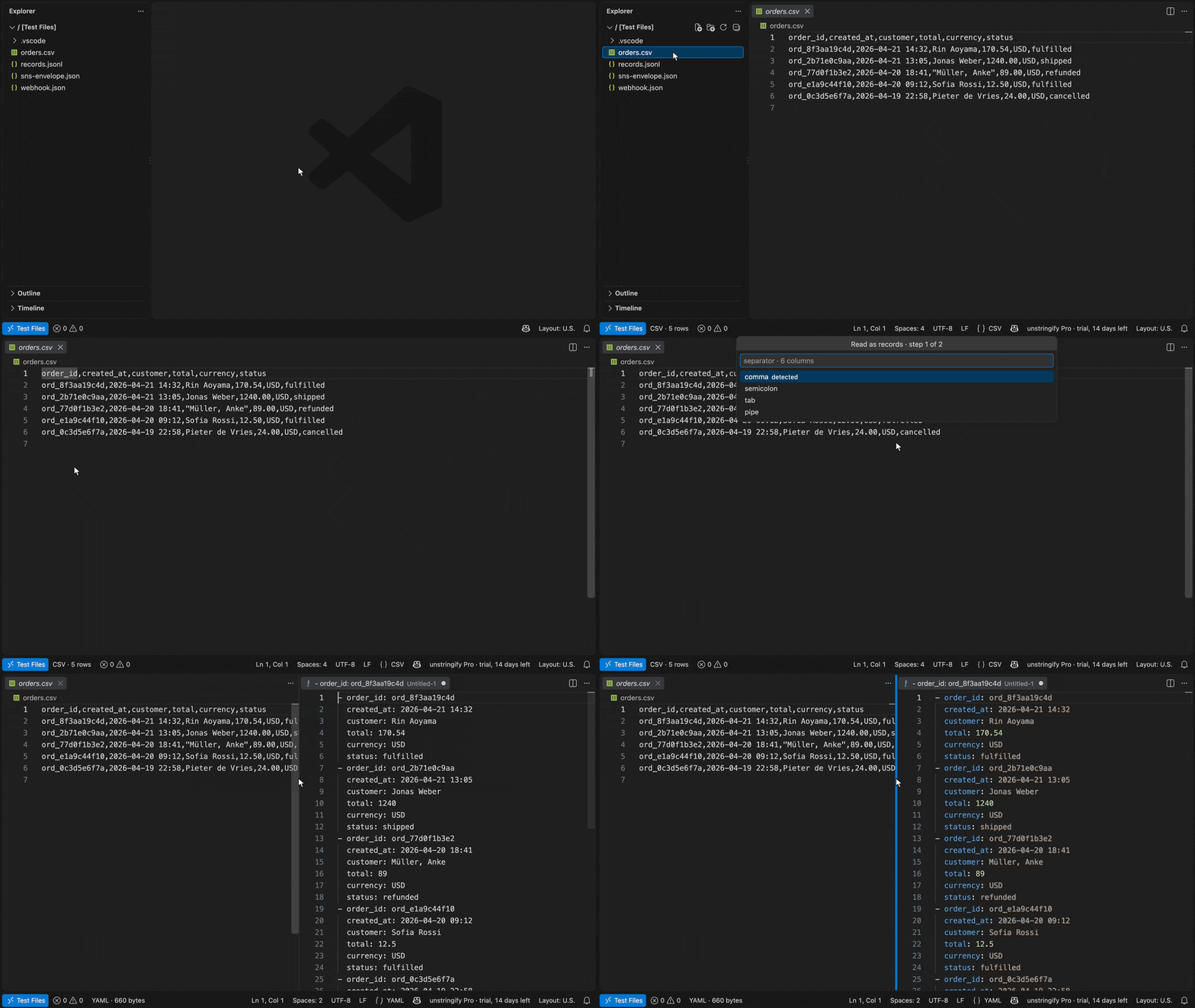
The reading question, as QuickPick steps with the measured default first: separator · first row · the split decimal for CSV and TSV (asked only when the file holds one); which known shape — measured over the file — or a regex with named groups for a log. Then a target, and the records open beside the text. NDJSON and a Markdown table have nothing to decide and are not asked. |
| Convert to… |
command · context menu |
YAML · XML · CSV · NDJSON · Markdown table · TypeScript · JSON · minified — and JSON Schema (draft 2020-12), Zod, Pydantic v2, Go structs, each in its own language's editor — from a JSON, YAML or XML document or a selection, and from CSV, TSV, NDJSON, a Markdown table or a log, through the reading question — into a new editor beside it. |
| Python dict → JSON |
command |
The same fixes, for the print(event) you copied out of a log: single quotes, True / False / None, trailing commas. |
| Generate TypeScript interfaces |
command |
One interface per object, arrays typed from every element, a key missing in some elements optional. |
| Copy JSON path |
command · context menu |
$.items[0].sku for the value under the cursor, the way the tree writes it. |
| Sort keys · Minify |
command · context menu |
Every object's keys sorted, at the editor's indent; or the document on one line (JSON and XML). Undo restores the layout. |
| Open on unstringify.com |
command · context menu |
The document opens on the site, carried in the link's fragment — compressed, and never sent to a server, because a browser does not send a fragment. Refused past 16 kb compressed, with the size. |
| Unpack this value |
command · the hover · context menu |
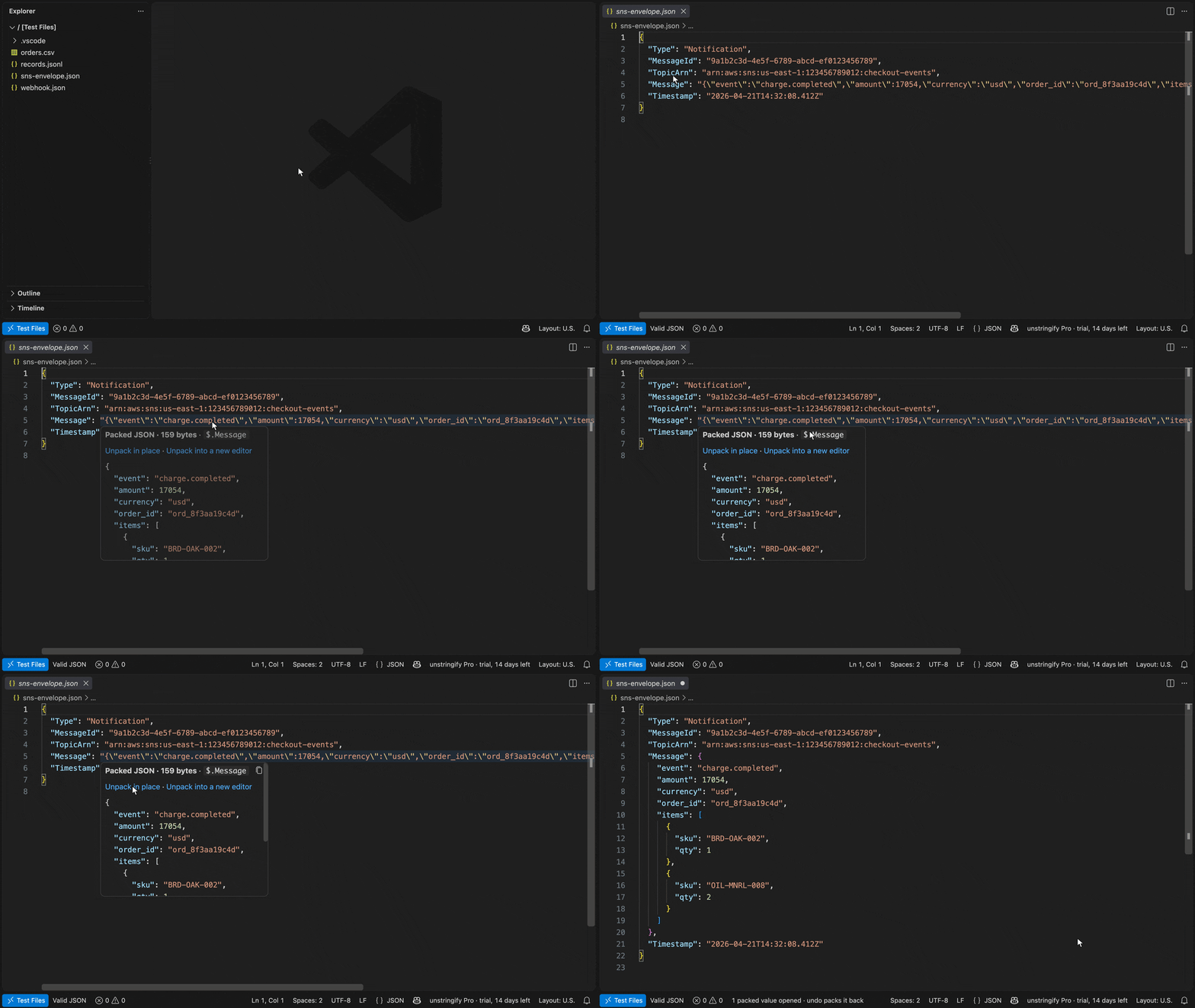
A string value that holds JSON, XML or YAML shows what it holds on hover, pretty; its first door opens that one value in place — undo packs it back. An SNS envelope reads as one tree. Works on JSON, YAML and XML documents, and on NDJSON — the line unpacks on its own, so the file stays one record per line. |
| Unpack all (Pro) |
command · the hover |
Every packed value in the file, in place or into a new editor — the hover's door carries the count. Across the workspace: every JSON, YAML, XML and NDJSON file read, listed with its count, all ticked, opened in one edit; the ones that were not open are saved. |
| Compare by structure with… (Pro) |
command · context menu |
Another open document, the clipboard or a file, in VS Code's own diff editor over the structural reading: keys sorted and whitespace normalised for a document, one record per line for a rows file — so a reordered key is no difference and a changed value is. |
| Open as records (Pro) |
command · context menu · Open With… |
The site's records view over a CSV, TSV, NDJSON or log file, as a custom editor beside the text: the rows, the level chips, the Filter bar (level=error, -retry, /regex/), the record panel with packed JSON opened in place. A click on a row reveals its line in the text editor; the view follows every edit; Reading… reopens the separator, header and pattern questions. Your VS Code theme, not ours. Up to 25 mb — unstringify.com reads bigger files in a worker. |
Coming to Pro: Fix across a workspace.
With Copilot — one command (Pro)
Filter records with Copilot, open on unstringify.com — on a CSV, TSV,
NDJSON, Markdown table or log: describe the rows you want ("errors from
checkout that were retried"); your own model, through VS Code's
language-model API, answers in the site's Filter grammar (level=error service=checkout-api retry); the engine counts what it leaves and the box
shows 182 of 1,284 match before anything happens. ⏎ opens those rows on
unstringify.com — where the records view, the level chips and the Filter
bar are — carried in the link's fragment, which a browser never sends to a
server. Rows that compress past 16 kb are too big for a link; the command
says so, with the size, and opens them beside the text instead.
It needs a model in VS Code — Copilot, or another chat provider; without
one the command says so and stops. The model is never trusted: its terms
are measured by the engine, shown, and ⏎ stays yours.
With Copilot — the MCP server
Installing the extension registers unstringify's MCP server for Copilot's
agent mode: the six tools — fix_json, validate, convert,
read_records, unpack, compare — appear in the chat's tool list with
nothing written to any mcp.json. The server is the npm package
@unstringify/mcp, started by npx on
your machine when a chat first asks for it (Node 18 or later on PATH). It
makes no network request. Free, in every tier. VS Code 1.101 or later;
vscode.dev cannot spawn a process, so no server is registered there.
Fixing, the three ways VS Code has
Nothing is applied without a gesture — the editor's rule, and ESLint's. The
three gestures, and what each does here:
|
What happens |
| ⌘. or the lightbulb |
A list: the fix for the line under the cursor, named after what it does, and "Fix all N". The other entries on that list belong to other extensions. |
| ⇧⌥. (Auto Fix) |
The line's fix, applied — no menu. It is the one preferred quick fix at the cursor. |
| Fix All (the command) |
Every fix in the file, applied — no menu. It is source.fixAll.unstringify, which is also what fix on save runs: |
"[json]": { "editor.codeActionsOnSave": { "source.fixAll.unstringify": "explicit" } }
Off unless you write that; "[jsonl]" for JSON Lines. Fix JSON is the
fourth door — every fix at once — and ⌘⏎ on any of these actions is the
preview: the Refactor Preview with every hunk ticked, Apply when you have
unticked what stays.
Install
From the Extensions view — search unstringify — or from
the Marketplace listing.
Cursor, Windsurf, VSCodium and code-server find it through
Open VSX.
Trial, Free, Pro
Every install starts a 14-day trial of everything. When it ends:
- Free, forever: Fix JSON and the quick fixes, Python dict → JSON, Read as records, Convert, Generate TypeScript, Copy path, Sort keys, Minify, diagnostics, Open on unstringify.com, Unpack this value, the MCP server for Copilot.
- Pro: Unpack all (a file, the workspace), Compare by structure, the Copilot filter, the records view, and what follows them — a one-time personal licence, $19,
three activations, from unstringify.com/vscode.
unstringify: Pro: enter a licence key activates this machine;
unstringify: Pro: deactivate this machine frees the seat. The key is kept in
VS Code's secret storage and re-checked at most once a week, with a 30-day
offline grace.
Privacy
No telemetry. No document ever leaves the editor on its own. The one network
call the extension makes is api.lemonsqueezy.com — activate, validate,
deactivate — carrying the licence key and this machine's name, and only when
you use those commands or a weekly re-check is due. The Copilot filter is the
exception you choose: when you run it, your sentence with the records' field
names and a few rows go to the model you have in VS Code, through VS Code's
own language-model API — to that provider, never to us — and the rows it
selects travel to unstringify.com in the link's fragment, which a browser
never sends to a server. Open the network panel of the extension host and
watch it stay empty otherwise.
Settings
unstringify.fix.preview — Fix JSON opens the Refactor menu on the fix (⏎ applies, ⌘⏎ previews) instead of applying at once. Off by default.unstringify.diagnostics.enabled — lint JSON and JSON Lines as you type.unstringify.diagnostics.maxBytes — skip live linting, and the status-bar count, above this size (default 1 MB).
Languages
.csv and .tsv / .tab files get the csv and tsv language ids (another
extension naming them the same merges, it does not clash); .ndjson joins VS
Code's own JSON Lines. YAML and XML keep the diagnostics of the extensions that
own them — our quick fixes attach to those squiggles.
Not open source
The extension and the engine are proprietary; see LICENSE. Questions to
hello@unstringify.com.
| |

