Claude Code Diff Review




Per-hunk review of every change Claude Code makes. Accept, reject, edit, or ask "why?" — with risk flags and a typecheck signal pointing you at what matters, without leaving VS Code and without touching git.

If you let Claude Code edit dozens of files in a single autonomous turn, you need a way to review each change before keeping it. This extension turns that review into a per-hunk Accept / Reject / Ask Claude flow — session-aware, snapshot-backed, no git required.
Highlights
- Per-hunk decisions — Accept, Reject, Edit-in-place, or Ask Claude on each hunk independently, even within one file.
- Decision support, not just mechanics — heuristic risk flags and a post-turn TypeScript build signal surface the hunks worth scrutinising so you don't review 50 changes blind.
- Keyboard-driven — fly through a review with
j / k / a / r / e / ?; jump straight to flagged or build-breaking hunks.
- Snapshot-backed, no git — every reject/edit replays against a captured pre-edit snapshot; reversible at any time, independent of your VCS.
- Full history + Resume — every session is logged; reopen one mid-review with decisions intact, roll a turn back, or mine cross-session Insights.
- In-context AI chat — chat scoped to a hunk, augmented with the original prompt + surrounding tool calls that produced it.
- Pro / Max plan support — uses your
claude /login OAuth automatically; API key also supported.
What it does
When Claude Code finishes a turn, the review panel opens with every file it touched. You decide on each change — keep it, drop it, fix it, or interrogate it — before it becomes part of your working tree.
Per-hunk review — four verbs
- ✓ Accept — keep the change, mark the hunk reviewed.
- ✗ Reject — revert just that hunk on disk (the rest of the file stays), mark reviewed.
- ✎ Edit — open the hunk's result inline, tweak it, and commit your version. The edited content is what lands on disk and what's recorded.
- 💬 Ask — open a chat scoped to that hunk.
Decisions are set-based and reversible: every reject/edit re-renders the file from the captured pre-edit snapshot plus the set of accepted (and edited) hunks, so any decision can be undone deterministically — no git required. Bulk actions (✓ File / ✗ File, Accept all / Reject all) and per-hunk / session Undo are built in.
Decision support
Reviewing dozens of hunks is only useful if you know which ones matter. Two signals triage them for you:
- Risk flags — heuristic, zero-cost triage at review time: sensitive paths (
.env, secrets, auth, migrations), pure deletions, removed error-handling / null-checks, oversized hunks, lockfiles, test files. Flagged hunks get a chip; the header shows an N flagged count; Shift+J / Shift+K jump between them. Toggle with claudeReview.riskFlags.enabled.
- TypeScript build signal — after each turn the extension runs your workspace's
tsc --noEmit in parallel with panel-open and marks every file + hunk that affects a failing typecheck. The header shows ⏳ tsc: running… → ✓ tsc: passed / 🚨 tsc: N errors; affected hunks get an inline badge with the error messages; Shift+N / Shift+P jump between them. Auto-detects tsconfig.json (or tsconfig.build.json), switches to tsc -b for project-references repos, force-kills on a configurable timeout, and never blocks the panel. Override the command with claudeReview.buildSignal.typecheckCommand (passed via argv — no shell injection) or disable with claudeReview.buildSignal.enabled.
Reject-with-feedback
Rejecting a hunk loses the most valuable signal — why. Add a reason on reject; reasons collect into a drafts queue in the chat overlay, then send as one consolidated message so Claude reworks with your feedback in hand.
Refactor grouping
When a rename touches the same identifier across many files, those hunks are grouped with a ↻ rename · N more chip — accept or reject the whole group in one action instead of clicking through twenty identical changes.
History, Resume & Insights
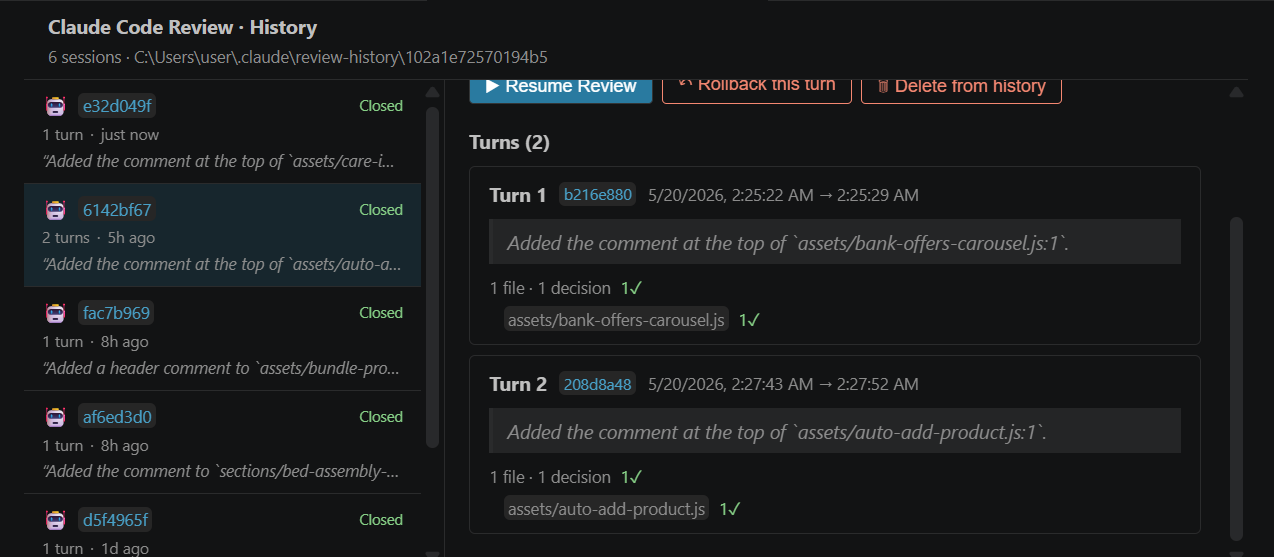
Every session is logged to a content-addressed event log (default 30-day retention; claudeReview.history.enabled, claudeReview.history.retentionDays). Open it via Claude Review: Open History Panel:
- Resume Review — reopen a session you closed mid-review, with all accept/reject/edit decisions reconstructed.
- Rollback this turn — restore every file in a session to its pre-edit content.
- Delete from history — remove the event log + its unreferenced blobs.
- Insights tab — cross-session analytics no other tool gives you: per-file accept rates ("
README.md accepted 80%"), per-sub-agent acceptance, a 30-day rejection-rate trend, and recurring rejection-reason themes.
- Live — sessions started while the panel is open appear within ~300 ms; a
↶ N pending status-bar item tracks unfinished hunks across recoverable sessions.
Transcript-aware chat & sub-agent attribution
Clicking 💬 augments the prompt with the user's original message for the turn plus Claude's surrounding tool calls (read host-side from the session transcript — never forwarded to the webview; toggle with claudeReview.chat.transcriptContext). Files edited inside a Task invocation are labelled via Task: <description> in both the review and history panels, so you always know which sub-agent produced a change.
Resilient auth & editor integration
- Bearer token for the local hook server is stored in the OS keychain and reused across reloads. If a stale terminal returns 401, a burst-detector toast offers one-click recovery (
Open New Terminal / Show Logs / Rotate Token); legacy hook entries are auto-stripped on activation.
- Files also appear in a dedicated Source Control group by review status, and CodeLens Accept / Reject buttons sit directly above each hunk in the editor.
Setup
1. Install
Install the extension from the VS Code Marketplace.
2. Open a workspace
Open the project folder you want Claude to edit. The extension writes its hooks to <workspace>/.claude/settings.json automatically.
3. Authenticate Claude
Three options, in resolution order:
| Method |
When to use |
How |
| Claude Pro / Max OAuth (recommended) |
You signed in with claude /login |
Already done — the extension reads ~/.claude/.credentials.json automatically |
| OAuth token paste |
You have a sk-ant-oat01-… token |
Command palette → Claude Review: Set Claude OAuth Token (Max plan) |
| Anthropic API key |
You have a sk-ant-api03-… key |
Command palette → Claude Review: Set Anthropic API Key |
Verify which auth path the extension picked: Claude Review: Use Claude Code Auth prints the active source as a toast (without revealing the token).
4. Run a Claude session
Open the integrated terminal in your workspace and run:
claude
Ask Claude to make some edits. When it finishes the turn, the review panel opens automatically.
Daily flow
- Claude finishes a turn → review panel opens in a new editor tab;
tsc starts in the background.
- File list (left) shows every touched file, colour-coded by status, with risk chips and a build dot.
- Header summarises progress,
N flagged, and the build signal. Use 🏷 Flagged only to focus.
- Diff pane (right, split or unified) — each hunk has ✓ Accept, ✗ Reject, ✎ Edit, 💬 Ask, plus a risk badge /
🚨 tsc errors badge / rename-group chip where relevant.
- CodeLens above each hunk mirrors Accept / Reject; the status bar tracks pending hunks across sessions.
Bulk: per-file ✓ File / ✗ File, per-session Accept all / Reject all, and per rename-group. Reject/edit decisions are reversible via per-hunk and session Undo.
Keyboard shortcuts
Open the most recent panel with Ctrl/Cmd + Shift + R. Inside the review panel:
| Key |
Action |
j / k (or ↓ / ↑) |
Next / previous hunk |
a / r |
Accept / Reject the selected hunk |
e |
Edit the selected hunk in place |
? |
Ask Claude about the selected hunk |
Space |
Expand / collapse the selected file |
Shift+J / Shift+K |
Next / previous flagged hunk |
Shift+N / Shift+P |
Next / previous build-affected hunk |
Shift+/ |
Toggle the shortcuts help overlay |
Esc |
Close the chat / overlay |
Configuration
| Setting |
Default |
What |
claudeReview.riskFlags.enabled |
true |
Surface heuristic risk flags on hunks/files. |
claudeReview.buildSignal.enabled |
true |
Run tsc --noEmit after each turn and annotate failing hunks. |
claudeReview.buildSignal.typecheckCommand |
"" |
Override the auto-detected typecheck command (argv-split, no shell). |
claudeReview.buildSignal.timeoutMs |
120000 |
Wall-clock timeout for the typecheck subprocess. |
claudeReview.chat.transcriptContext |
true |
Inject the turn's prompt + surrounding tool calls into hunk chat (host-side only). |
claudeReview.history.enabled |
true |
Log sessions to the event log (powers History, Resume, Insights). |
claudeReview.history.retentionDays |
30 |
Days before a session is swept from history. |
claudeReview.installScope |
"workspace" |
Where hooks are written: workspace (.claude/settings.json) or user (~/.claude). |
claudeReview.autoOpenPanel |
true |
Open the panel on the Stop hook. |
claudeReview.defaultDiffView |
"split" |
Initial diff view ("split" or "unified"). |
claudeReview.chatModel |
"claude-haiku-4-5-20251001" |
Model used for hunk chat (e.g. "claude-sonnet-4-6" for deeper review). |
claudeReview.chatMaxTokens |
2048 |
Max output tokens per chat response. |
claudeReview.port |
53117 |
Loopback port for the hook server. 0 = always dynamic. |
claudeReview.maxSessionBytes |
52428800 |
Per-session snapshot byte cap (50 MB). |
claudeReview.maxFilesPerSession |
200 |
Per-session file count cap. |
claudeReview.telemetry |
"off" |
Opt in to anonymous usage telemetry (also gated by VS Code's global setting). |
claudeReview.logLevel |
"info" |
Output channel verbosity. |
Commands
| Command |
What |
| Claude Review: Open Review Panel |
Bring the most recent session's panel to the front (Ctrl/Cmd+Shift+R) |
| Claude Review: Open History Panel |
Open the history + Insights panel |
| Claude Review: Use Claude Code Auth |
Probe credentials and report which source is active |
| Claude Review: Set Anthropic API Key |
Store an API key in OS keychain |
| Claude Review: Set Claude OAuth Token (Max plan) |
Store an OAuth token directly |
| Claude Review: Clear Anthropic API Key |
Remove the stored API key |
| Claude Review: Clear Claude OAuth Token |
Remove the stored OAuth token |
| Claude Review: Switch Install Scope |
Move hooks between workspace (.claude/settings.json) and user (~/.claude) scope |
| Claude Review: Remove Hooks |
Strip the extension's entries from settings |
| Claude Review: Rotate Bearer Token |
Force a new bearer for the local hook server (reload window after) |
| Claude Review: Show Log |
Open the structured Output Channel |
Troubleshooting
Stop hook returns 401
Cause: the integrated terminal predates the extension's activation, so it doesn't have CLAUDE_REVIEW_TOKEN in its environment.
Fix:
Developer: Reload Window- Close every existing integrated terminal
- Open a fresh terminal and re-run
claude
Verify by running $env:CLAUDE_REVIEW_TOKEN.Length (PowerShell) or echo ${#CLAUDE_REVIEW_TOKEN} (bash). Expect 64.
Review panel is blank
Open the webview's DevTools: command palette → Developer: Open Webview Developer Tools → Console tab. Any unhandled error renders inside the panel via the built-in <ErrorBoundary>. If it's blank with no error, the React tree may have un-mounted; reload the window.
"Extension host did not start under 10 seconds"
On slower machines the activation may flirt with VS Code's 10 s timeout. The extension externalises the Anthropic SDK and defers the hook-config write to keep activation fast (~1–2 s typical). If you still hit this, file an issue with the Output → Claude Code Review panel contents.
Chat says "No Claude credential found"
Run Claude Review: Use Claude Code Auth. It prints which source the resolver picked, or a warning if none matched. Resolution order:
CLAUDE_CODE_OAUTH_TOKEN env varCLAUDE_REVIEW_OAUTH_TOKEN env var- SecretStorage OAuth (set via the command)
~/.claude/.credentials.json (the file claude /login creates)- SecretStorage API key
Reject says "Could not cleanly revert a hunk"
A formatter (or another tool) ran after Claude's edit and the post-edit content has drifted too far for jsdiff's fuzzFactor: 2. The banner offers a Revert file to original snapshot button — that writes the captured before content back in one disk write.
Port 53117 already in use
The server falls back to an OS-assigned dynamic port automatically and rewrites the hook URL accordingly. Check the Output → Claude Code Review panel for the actual port. To force a fixed port, set claudeReview.port to a number that's free.
Roadmap
- Multi-language build signal —
jest / vitest / pytest / cargo test / go test via structured (--reporter=json) output, scoped to the languages a turn touched. Lands when a non-TypeScript user needs it.
- v1.0 — file-based hook-token resolution (so terminals spawned outside VS Code work without the env var), zero-config onboarding (credentials prompt only when you first use chat), OpenCode + multi-agent adapter support, multi-root workspace history, and Remote / SSH / Dev Container / WSL.
Feature requests, bug reports, and discussion are welcome at GitHub Issues.
Known limitations
- Single workspace folder. Multi-root workspaces use the first folder for
.claude/settings.json and history. v1.0 may shard.
- Remote / SSH / Dev Container / WSL. v0.x is local-only. The hook server binds to
127.0.0.1; remote development needs the server to live in the remote host. Out of scope until v1.0.
- External terminals. Terminals spawned outside VS Code (Windows Terminal, tmux not inside an integrated terminal, etc.) don't inherit the
CLAUDE_REVIEW_TOKEN env var. The burst-detector toast catches this and offers [Open New Terminal] in-VS-Code. v1.0 plans file-based token resolution to fix this fully.
- Claude Code version. Requires Claude Code ≥ 2.1.47 for
last_assistant_message and stop_hook_active fields in the Stop hook payload.
- Localisation. English only.
Privacy & security
- API keys / OAuth tokens are stored exclusively in VS Code's
SecretStorage (OS-keychain backed). They never cross into the webview, never appear in logs, and never get written to a file.
- Loopback server binds to
127.0.0.1 only. Bearer authentication uses a 256-bit token, stored in OS keychain (SecretStorage), reused across reloads, compared in constant time. Explicit rotation available via Claude Review: Rotate Bearer Token.
- Webview CSP sets
connect-src 'none' — the webview cannot make network calls. All chat traffic flows through the extension host.
- Telemetry is opt-in (
claudeReview.telemetry) and additionally gated by VS Code's global telemetry setting. Events are scrubbed for PII (file paths, message content, tokens) before emission.
Changelog
Full version history is in CHANGELOG.md. Latest: v0.6.1 — a performance + reliability pass (faster review rendering, lower IPC/I/O, fixed a chat-on-large-transcript stall and a mid-session sub-agent attribution bug).
License
MIT. See LICENSE.
Built to make Claude Code more reviewable. If something's off, run Claude Review: Show Log and file an issue with the output.

