Skip to content
| Marketplace
Sign in
Visual Studio Code>Programming Languages>UZDoom ZScriptNew to Visual Studio Code? Get it now.
UZDoom ZScript

UZDoom ZScript

UZDoom

|
5 installs
| (0) | Free
UZDoom's multiple scripting languages support (with a focus on ZScript) for VSCode (and compatible editors)
Installation
Launch VS Code Quick Open (Ctrl+P), paste the following command, and press enter.
Copied to clipboard
More Info

UZDoom logo

UZDoom-VSCode


UZDoom's ZScript language support for VSCode (and compatible editors).

Made with the help from:

  • marrub--'s ZScript documentation.
  • Every single other UZDoom modder

FEATURES

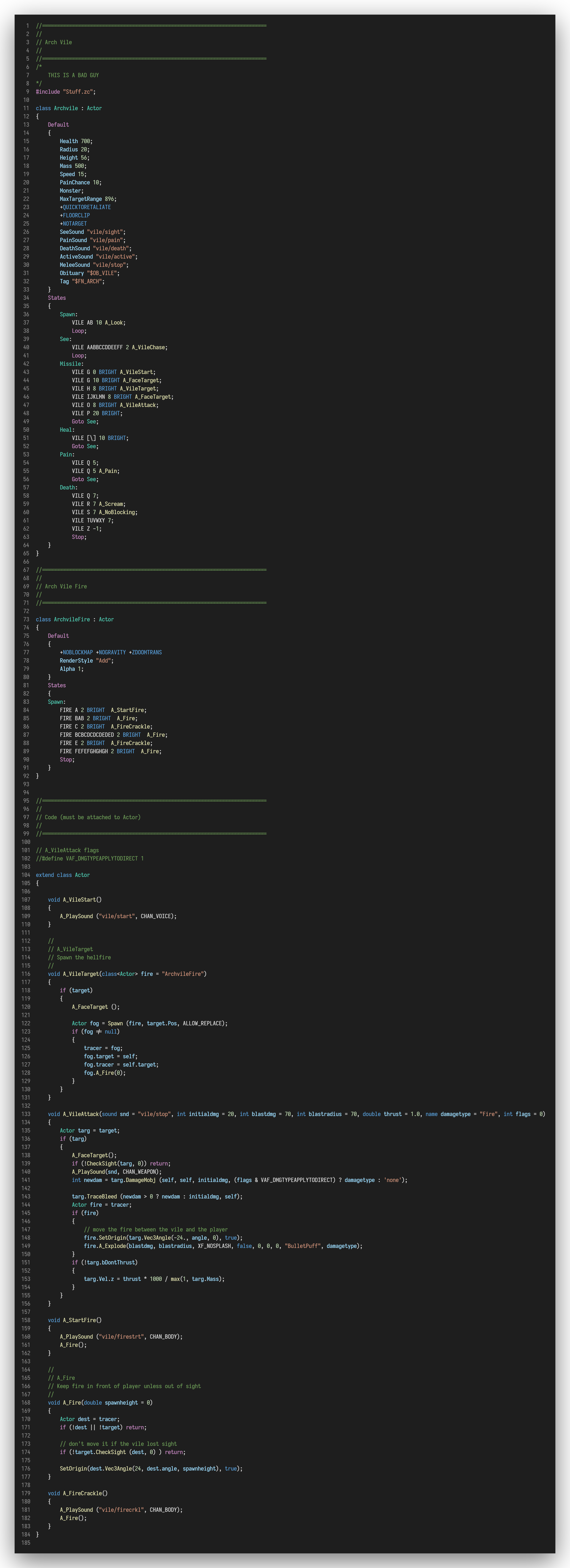
  • Syntax highlighting for many languages needed for UZDoom modding
  • ZScript Debugging support
  • WAD mounting
  • PK3 mounting

IMAGES

archvile.zs (from uzdoom.pk3)

archvile.zs


HOW DO I USE IT?

PREREQUISITES

  • Visual Studio Code
  • Or some other editor that supports Visual Studio Code's extensions

FOR VERSIONS >= 0.9.0

  • Get the .vsix from the "Releases" page
  • Open VSCode
  • Press "Ctrl + Shift + p"
  • Type "Extension: install from VSIX"

FOR VERSIONS >=1.0.0

Just do the same thing for earlier versions

OR:

Get it from Visual Studio's Marketplace

OR:

Get it from Open VSX Registry


CONTRIBUTING

Just clone the repo and run npm install.


SPECIAL THANKS

  • KaptainMicila for creating the original extension
  • Nash Muhandes for giving me the will to make this syntax highlighter;
  • marrub-- for the ZScript documentation;
  • Microsoft for making VSCode;
  • The ZDoom comunity for creating the source port;

  • Contact us
  • Jobs
  • Privacy
  • Manage cookies
  • Terms of use
  • Trademarks
  • Your Privacy Choices
  • Consumer Health Privacy
© 2026 Microsoft