Skip to content
| Marketplace
Sign in
Visual Studio Code>Programming Languages>Ixion language supportNew to Visual Studio Code? Get it now.
Ixion language support

Ixion language support

TraumDE

|
1 install
| (0) | Free
Installation
Launch VS Code Quick Open (Ctrl+P), paste the following command, and press enter.
Copied to clipboard
More Info

Ixion language support

Version Visual Studio Code

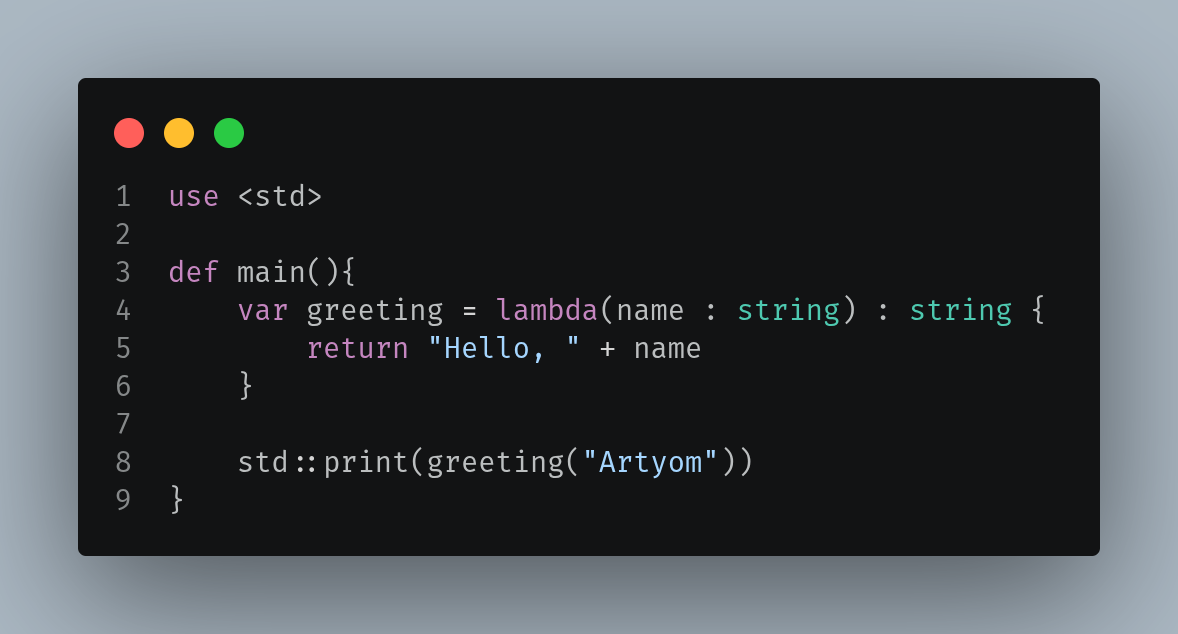
Visual Studio Code extension providing syntax highlighting for the Ixion programming language (.ix files).

Table of Contents

  • Features
  • Installation
  • Requirements
  • Roadmap
  • Contributing
  • License

Features

  • Support for line comments (//) and block comments (/* */)
  • Highlighting of all core keywords (pub, def, var, const, type, use, struct, enum, case, lambda, etc.)
  • Built-in type highlighting (int, float, double, string, bool, any, void)
  • String literals with escape sequences
  • Number literals (decimal + hexadecimal)
  • Operator highlighting
  • Automatic bracket matching and auto-closing pairs
  • Proper .ix file association

Installation

From VSCode Marketplace (Recommended)

Now you can find extension in extensions menu https://marketplace.visualstudio.com/items?itemName=TraumDE.ixion

From Releases

  1. Go to the Releases page
  2. Download the latest ixion-*.vsix file
  3. Open VS Code
  4. Go to the Extensions view (Ctrl+Shift+X)
  5. Click the ⋯ (three dots) menu
  6. Select "Install from VSIX..."
  7. Choose the downloaded .vsix file

Build from Source

Prerequisites:

  • Node.js
  • Git
  • pnpm (or npm)
# Clone the repository
git clone https://github.com/TraumDE/ixion-language-support-vscode.git

# Go to the project directory
cd ixion-language-support-vscode

# Install dependencies
pnpm install

# Build the extension
pnpm build

# Install the extension
code --install-extension ./ixion-<version>.vsix

Requirements

  • Visual Studio Code ^1.125.0

Roadmap

  • Code completion

Contributing

Contributions are welcome! Feel free to:

  • Open an issue with bug reports or feature requests
  • Submit pull requests
  • Improve documentation or grammar rules

License

Project under MIT license - see the LICENSE for details

  • Contact us
  • Jobs
  • Privacy
  • Manage cookies
  • Terms of use
  • Trademarks
© 2026 Microsoft