C++ HeadDoc
English | 简体中文
C++ HeadDoc brings Doxygen documentation from header declarations directly beside .cpp and .c implementations. The initial view stays compact; CodeLens expands wrapped documentation with three relative text sizes. Hover, declaration navigation, and an optional Markdown preview provide quick and detailed access.
Current version: 0.2.3
Interface
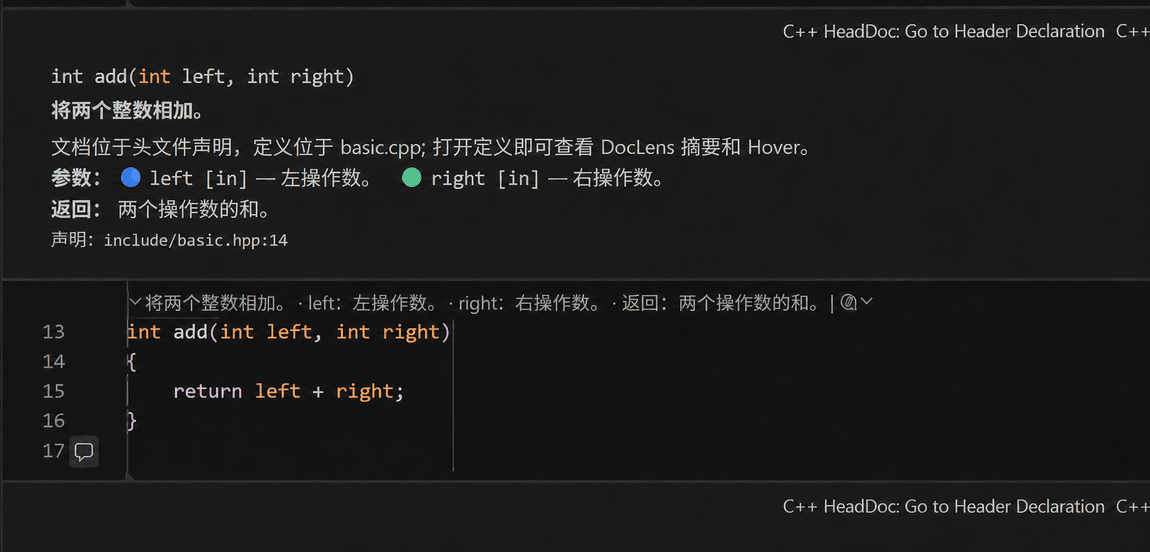
The extension uses VS Code's native inline comment component, follows the active color theme, and reflows when the editor width changes. The screenshot shows the expanded state after selecting the CodeLens above a function.
Features
- Readonly inline documentation beside functions, methods, constructors, and operator definitions.
- Compact summaries that expand into full documentation, with
small, medium, and large text-size tiers plus stable color markers for individual parameters.
- Hover documentation and a CodeLens expand/collapse control.
- Header declaration navigation and an optional full Markdown preview.
- Doxygen support for
/** ... */, /*! ... */, ///, and //!, including brief, param, tparam, return, retval, note, warning, throws, deprecated, and see.
- Document-symbol and declaration integration with clangd or Microsoft C/C++ across local, Remote SSH, WSL, and Dev Containers workspaces.
- English and Simplified Chinese commands, settings, messages, and documentation labels that follow the VS Code display language.
Requirements
- VS Code
1.134.0 or newer.
- clangd or Microsoft C/C++ with working Go to Declaration support.
- Node.js
24.11.1 for development and packaging.
C++ HeadDoc relies on the language service for symbol and declaration locations. Compiler options, macros, and include paths remain the responsibility of the language service and compile_commands.json.
Installation
Download the VSIX from GitHub Releases, then run:
code --install-extension cpp-headdoc-0.2.3.vsix
You can also select Install from VSIX… from the Extensions view menu.
To package from source:
npm ci
npm run package
code --install-extension release/cpp-headdoc-0.2.3.vsix
Quick start
- Install and configure clangd or Microsoft C/C++.
- Open a workspace containing header and implementation files.
- Add Doxygen documentation above a header declaration.
- Open the matching
.cpp or .c implementation; a compact summary and expand control appear above visible functions.
- Use CodeLens to collapse or expand it. The inline toolbar provides declaration navigation and Markdown preview.
The sample project is in examples/basic-cmake/.
Settings
All settings use the cppHeadDoc.* prefix.
| Setting |
Default |
Description |
cppHeadDoc.enabled |
true |
Enable the extension in the workspace. |
cppHeadDoc.showInlineComments |
true |
Show wrapped inline documentation beside implementations. |
cppHeadDoc.inlineCommentsExpanded |
false |
Set to true to expand inline documentation when it first appears. |
cppHeadDoc.inlineCommentTextSize |
medium |
Relative size: small, medium, or large. |
cppHeadDoc.showCodeLens |
true |
Show compact summaries and expand/collapse controls. |
cppHeadDoc.showHover |
true |
Show full documentation when hovering function names. |
cppHeadDoc.summaryStyle |
briefAndTags |
brief, briefAndParams, or briefAndTags. |
cppHeadDoc.maxSummaryLength |
180 |
CodeLens summary length from 40 to 500. |
cppHeadDoc.showParametersInCodeLens |
true |
Include parameters in summaries. |
cppHeadDoc.showReturnValueInCodeLens |
true |
Include return documentation in summaries. |
cppHeadDoc.headerExtensions |
.h, .hpp, .hh, .hxx |
Header extensions. |
cppHeadDoc.sourceExtensions |
.c, .cc, .cpp, .cxx |
Implementation extensions. |
cppHeadDoc.maxCommentSearchLines |
40 |
Header search window from 5 to 500 lines. |
cppHeadDoc.debounceMs |
300 |
Refresh delay from 50 to 5000 ms. |
cppHeadDoc.maxCacheEntries |
500 |
In-memory cache limit from 20 to 5000. |
cppHeadDoc.logLevel |
error |
off, error, info, or debug. |
Example:
{
  "editor.codeLens": true,
  "cppHeadDoc.enabled": true,
  "cppHeadDoc.inlineCommentsExpanded": false,
  "cppHeadDoc.inlineCommentTextSize": "large"
}
The VS Code Comment API does not expose arbitrary per-extension pixel font sizes. These tiers use native Markdown typography so themes, zoom, and accessibility settings remain compatible.
Commands
| Command |
Purpose |
C++ HeadDoc: Refresh |
Clear caches and refresh inline documentation, CodeLens, and Hover. |
C++ HeadDoc: Enable/Disable |
Toggle the extension for the workspace. |
C++ HeadDoc: Expand Documentation |
Expand documentation for the implementation at the cursor. |
C++ HeadDoc: Expand/Collapse Documentation |
Toggle inline documentation. |
C++ HeadDoc: Open Markdown Preview |
Open the optional full Markdown preview. |
C++ HeadDoc: Go to Header Declaration |
Navigate to the header declaration. |
C++ HeadDoc: Check Setup |
Inspect the current file, CodeLens, symbols, and declaration service. |
Language service setup
Generate a compilation database for CMake projects:
cmake -S . -B build -DCMAKE_BUILD_TYPE=Debug -DCMAKE_EXPORT_COMPILE_COMMANDS=ON
cmake --build build --config Debug
clangd:
{ "clangd.arguments": ["--compile-commands-dir=${workspaceFolder}/build"] }
Microsoft C/C++:
{ "C_Cpp.default.compileCommands": "${workspaceFolder}/build/compile_commands.json" }
Once the language service is ready, C++ HeadDoc follows: implementation symbol → declaration candidate → header Doxygen → inline documentation. Overloads, templates, macros, and conditional declarations follow the language-service result.
Remote development, privacy, and security
C++ HeadDoc is a workspace extension. Install it and the selected C/C++ language service in the same remote extension host, and generate the compilation database there. URI and VS Code filesystem APIs allow non-file: locations returned by language services.
Documentation is processed through VS Code workspace APIs, the language service, and in-memory caches. The extension contains no telemetry or network upload. Doxygen content is escaped before display, Markdown trust remains disabled, and caches are released when the extension stops.
Development
npm ci
npm run check
npm run lint
npm run compile
npm run test:unit
npm run test:integration
npm run verify
npm run package
Ubuntu integration tests use xvfb-run -a npm run test:integration. See docs/ for architecture, configuration, testing, and compatibility details.
FAQ
Inline documentation does not appear
Check cppHeadDoc.enabled, cppHeadDoc.showInlineComments, and editor.codeLens, wait for language-service indexing, then run C++ HeadDoc: Check Setup.
Install from the VS Code Marketplace
Open the C++ HeadDoc Marketplace page, or search for C++ HeadDoc in the Extensions view. The extension identifier is TimZou.cpp-headdoc.
Uninstall
code --uninstall-extension TimZou.cpp-headdoc
License
MIT. See LICENSE.

