PRISM
MRO & Inheritance Visualizer







Know exactly which version of a method actually runs.
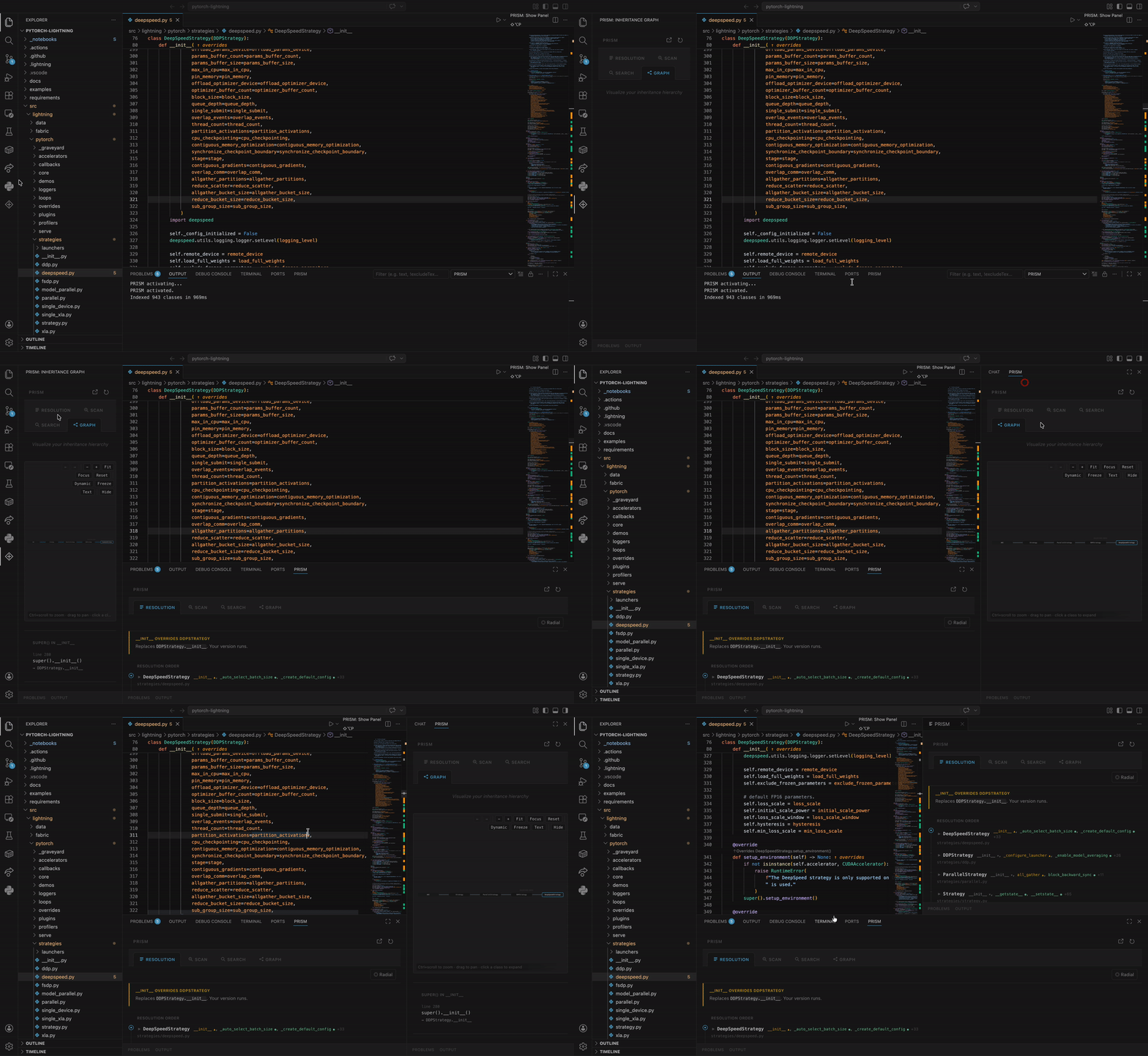
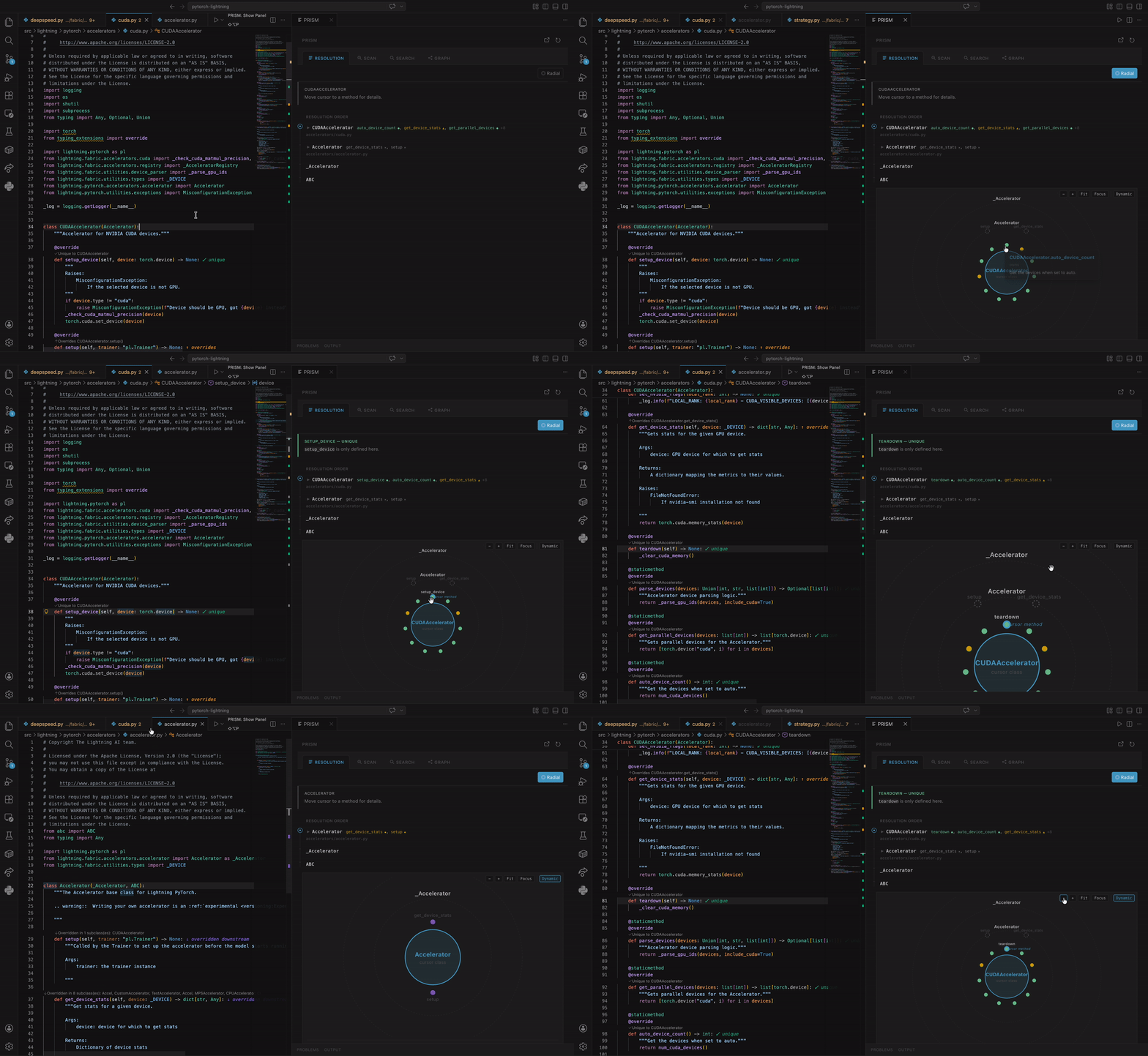
Move your cursor into any class and PRISM instantly shows where every method lives in the inheritance chain — and whether the version you're editing is the one that actually executes. Every cursor move, within 200ms.
Python, TypeScript, JavaScript, Java, Kotlin, C++, Go, C#, Ruby, Scala — all supported, all free.
You edit DeepSpeedEstimator.setup_dataloader(). You add logging. Nothing happens — because DLEstimatorBase.setup_dataloader() is what actually runs. Your version is shadowed and never executes. PRISM catches this the moment your cursor lands on the method.
See the changelog for what's new in each release.
Who Is This For
- Developers ramping up on a new codebase — get a full picture of any class hierarchy without digging through layers of inheritance by hand
- Teams maintaining large frameworks — instantly see which methods are overridden or shadowed across your entire project
- Open-source contributors — understand unfamiliar inheritance structures in seconds, not hours
- Enterprise teams — onboard faster, ship with confidence that you're editing the code that actually runs
- Polyglot teams — same experience across Python, Java, TypeScript, JavaScript, C++, C#, Go, Kotlin, Ruby, and Scala
Supported Languages
| Language |
Inheritance Model |
Parser |
| Python |
Class inheritance, multiple inheritance, MRO |
Python AST |
| Java |
Class extends, implements |
Tree-sitter |
| TypeScript |
Class extends |
Tree-sitter |
| JavaScript |
Class extends |
Tree-sitter |
| C++ |
Class inheritance, multiple inheritance |
Tree-sitter |
| Go |
Struct embedding, method receivers |
Tree-sitter |
| Kotlin |
Class inheritance, open/override |
Tree-sitter |
| C# |
Class inheritance, interfaces |
Tree-sitter |
| Ruby |
Single inheritance, mixins |
Tree-sitter |
| Scala |
Class/trait inheritance, extends/with |
Tree-sitter |
Features
Live MRO Panel
Move your cursor into any class and PRISM instantly shows the full Method Resolution Order — a vertical stack of class cards with color-coded method pills. Every cursor move triggers a fresh analysis. No manual refresh needed.
Four Method States
| State |
Color |
What It Means |
| Owns |
Green |
This class defines the method. No parent defines it. It runs. |
| Overrides |
Amber |
This class redefines a parent's method. This version wins. |
| Overridden |
Purple |
This version runs here, but a child class has its own version. |
| Shadowed |
Red |
A parent class's version runs instead — this one never executes. |
Four Analysis Tabs
Resolution Tab — The main view. Summary bar tells you in one sentence what's happening. MRO chain shows every class in resolution order with clickable navigation. Method pills are color-coded by status.
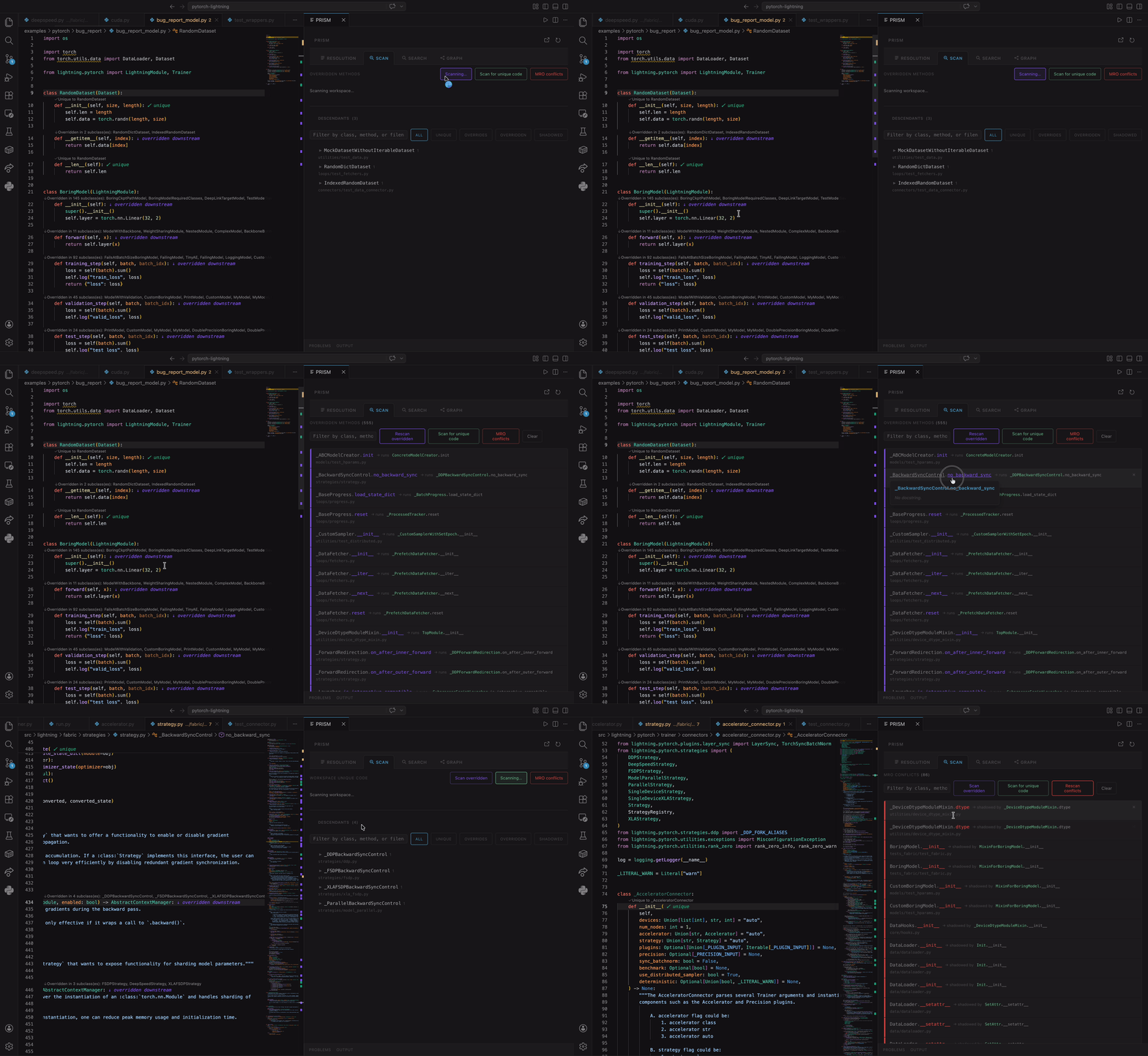
Scan Tab — Workspace-wide inheritance analysis. Scans every class in your project and surfaces overridden methods, unique methods, and MRO conflicts. Toggle between scan modes with paginated results.
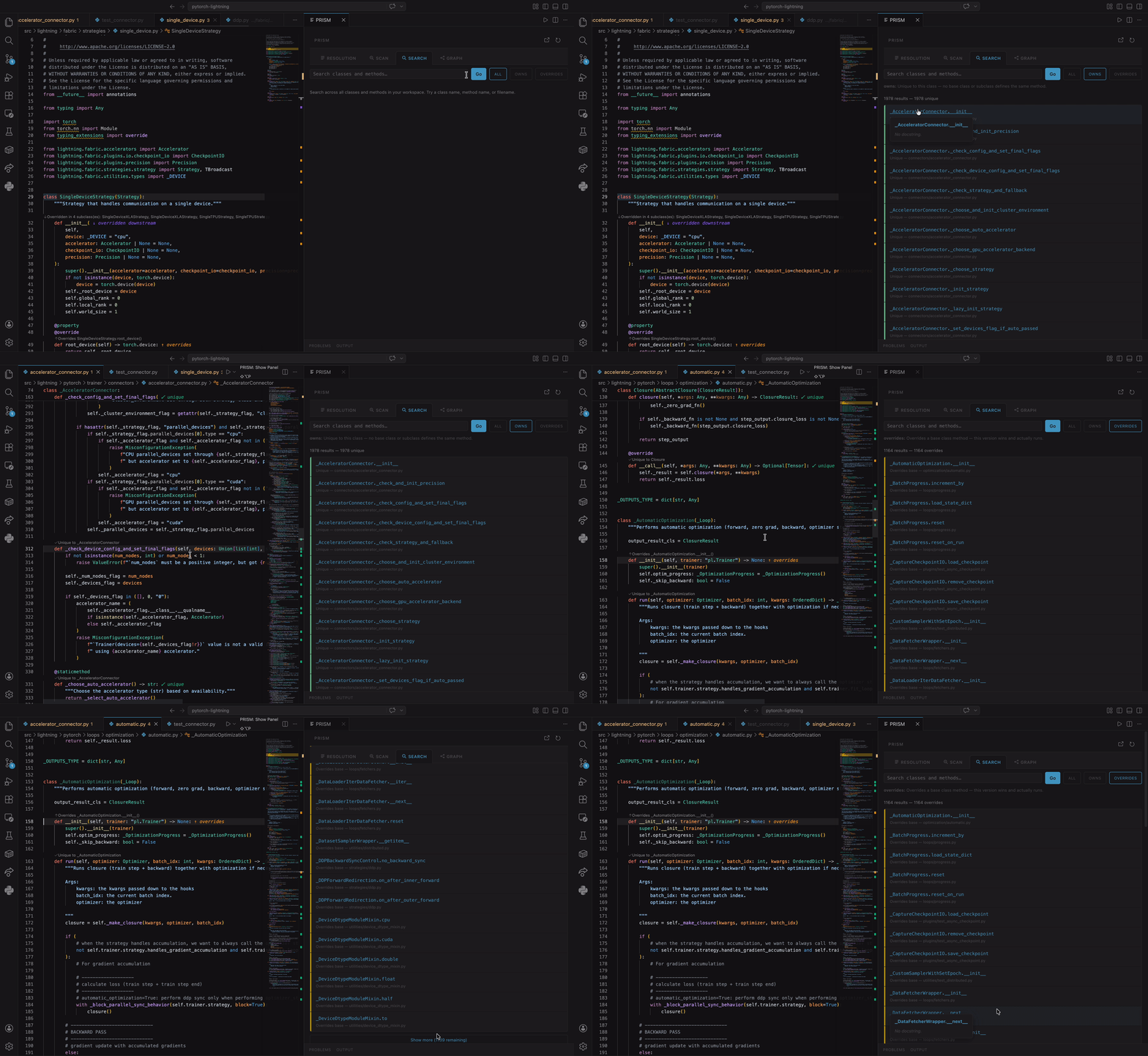
Search Tab — Find classes and methods across your entire workspace. Filter by name, navigate results, and jump to definitions instantly.
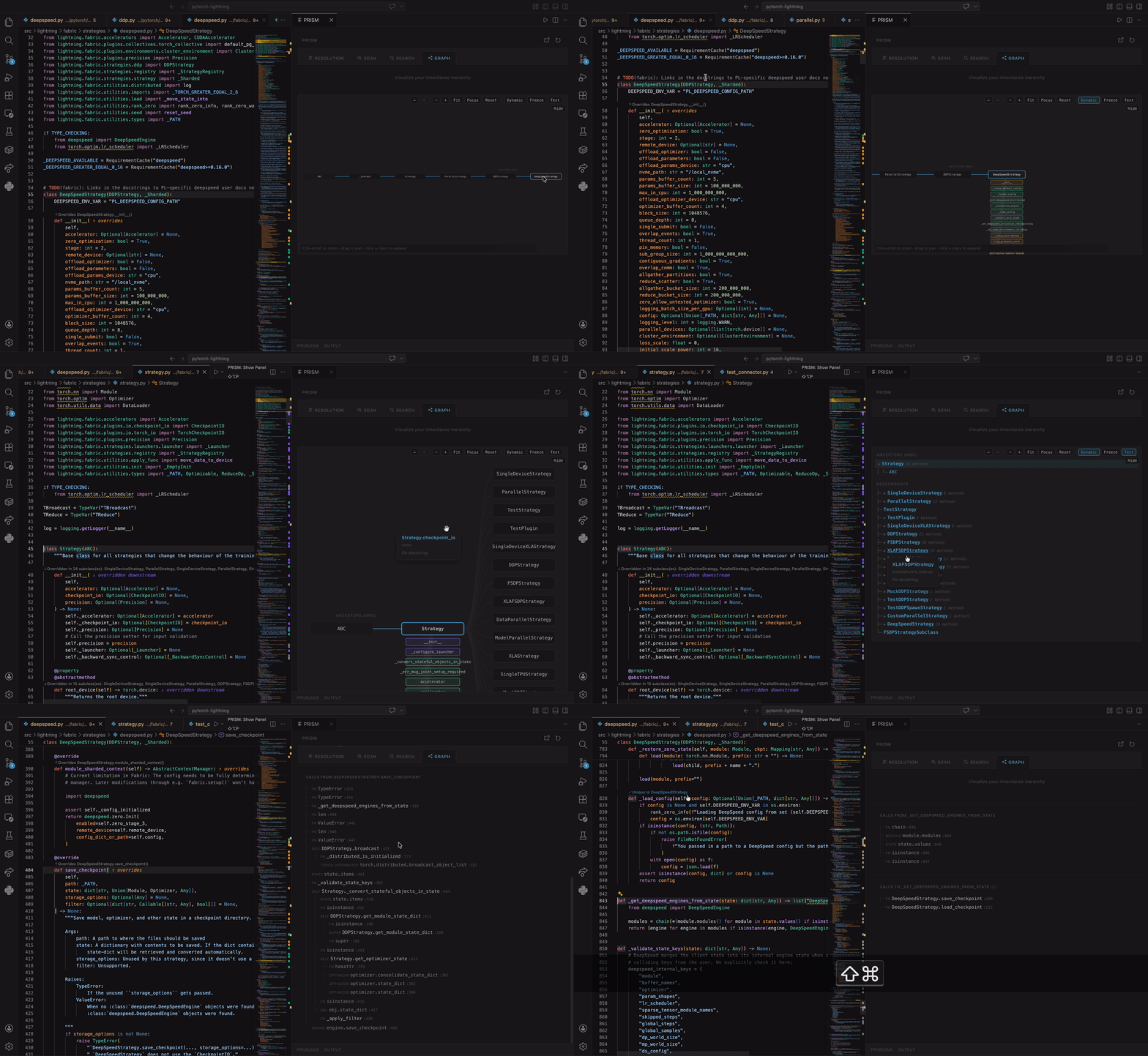
Graph Tab — Interactive SVG mindmap of the class hierarchy. Pan, zoom, fit-to-view, focus on cursor class, and toggle dynamic camera follow. Radial view shows MRO classes with method dots.
Editor Integration
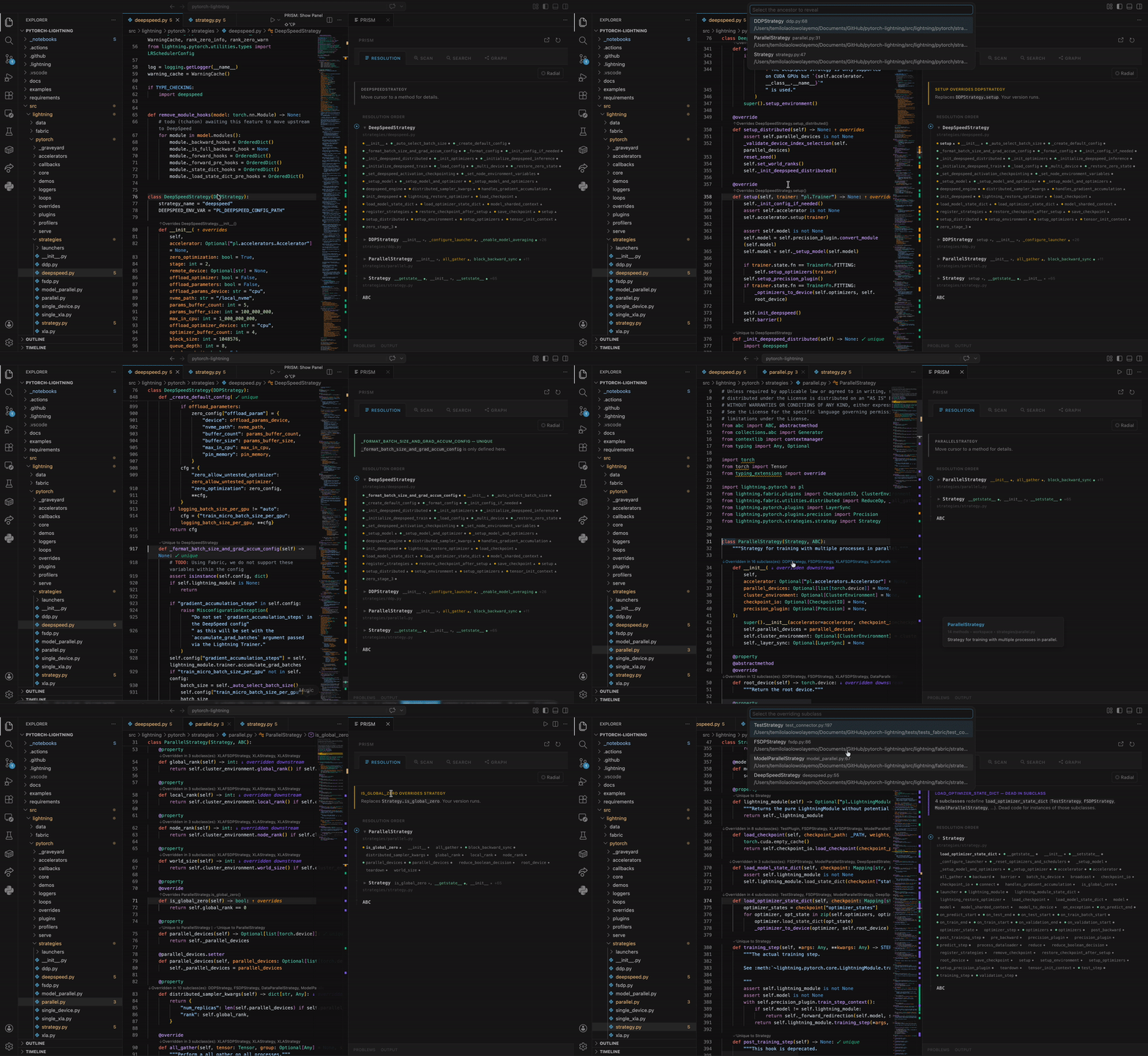
- CodeLens — Inline badges appear directly in your editor:
overridden downstream warns that a child class replaces this method, shadowed by base flags methods that never run. Click any badge for a quick-pick menu that jumps you straight to the relevant class.
- Hover Cards — Hover over any class or method name for a rich detail popup showing its status, where it's defined, and what overrides or shadows it.
- Inline Decorations — Shadowed methods are visually dimmed. Overridden methods get a purple underline. You can spot issues without even opening the panel.
- Diagnostics — Shadowed-method warnings appear in the Problems panel, integrated with your existing workflow.
- Jump to Definition — Click any class name in the MRO chain and your editor jumps to that file and line. Navigate a 10-level inheritance chain in seconds.
Workspace-Wide Inheritance Scan
Run PRISM: Scan Workspace for Overridden Methods from the command palette to scan your entire project. PRISM indexes every class in every supported language, computes every MRO, and reports overridden methods, unique code, and MRO conflicts — giving you a complete picture of your inheritance hierarchy.
- Sub-200ms updates from cursor move to visible change
- AST caching per file — only reparses when the file actually changes on disk
- Persistent backend — a long-lived subprocess stays warm between requests. Zero cold starts.
- Workspace pre-indexing — on activation, PRISM indexes your entire workspace in the background so class resolution is instant from the first cursor move
- File watcher — when you save, create, or delete files, the index updates automatically
- Incremental re-indexing — only re-indexes changed files, not the entire workspace
What's New
v0.4.8
- Instant warm starts — the workspace index persists across sessions; reopening a repo re-analyzes only changed files. Large repos go from minutes to seconds.
- PRX010 protocol compliance + real multi-hop circular-import detection (PRX007), severity-based routing (change a rule's severity in
pyproject.toml and it moves between the Problems panel and the PRISM panel).
- Big-workspace reliability — no more endless re-indexing on monorepos, no errors on unsaved files, no error flashes while typing, and analysis no longer freezes when a class inherits from
Protocol, Enum, TestCase, and other stdlib bases.
- Panel consistency — methods shadowed via a descendant's MRO (mixin ordering) now show the same story in the panel as in the editor, with a dedicated Audit-with-AI prompt.
- Test-aware views — mindmap and text tree group test subclasses behind a collapsible node; scans label production-only scope and tag test-file conflicts.
v0.4.7
- Startup crash fix — v0.4.6 could fail to start (
ModuleNotFoundError: src.backend.rules) because the packaged bytecode bundle was incomplete. The release pipeline now auto-discovers backend modules and CI verifies the bundle imports cleanly.
v0.4.6
- PRX rules — deterministic inheritance rules with codes, like a linter. Dead code (PRX001), MRO errors (PRX002), and circular inheritance (PRX003) show in the Problems panel; informational rules (PRX004-008) show in the PRISM panel as a collapsible section.
- Configurable — disable rules or change severity via
[tool.prism] in pyproject.toml, or suppress inline with # noqa: PRX001.
- Hook-aware — Template Method hooks (pass/docstring-only bodies in non-ABC classes) are never flagged as abstract or broken chains.
- Multi-inheritance dead code — sibling MRO shadowing (mixin wins over base) now surfaces in the Problems panel.
- Older Linux support — bundled backend runs on Ubuntu 22.04+; auto-falls back to Python if the binary can't start.
v0.4.5
- Same-name class collision fix — classes with identical names in different files are now correctly distinguished. Override counts are accurate.
- Test/production separation — test-file descendants no longer inflate override counts or affect status classification. Collapsible "Also overridden in N test files" info shown when relevant.
- Hover card repositioning — hover cards position beside the trigger element, not on top. Long docstrings scroll instead of overflowing.
- @overload deduplication — methods with
@overload signatures no longer produce duplicate CodeLens entries.
v0.4.4
- Fix with AI — when cursor is on dead code (shadowed method), sends a prescriptive prompt with fix options to your AI agent
- Audit with AI — when cursor is on an overridden method, sends a diagnostic prompt to classify the pattern
- 6-agent support — GitHub Copilot Chat, Cline, Claude CLI, Codex CLI, Aider, Gemini CLI
v0.4.0 – v0.4.3
- 6 method states (cooperative + abstract), Callers tab with reverse call graph, product analytics, new branding
Tested On
PRISM has been tested on real-world, production-scale repositories across all supported languages:
Python
| Repository |
Scale |
What We Tested |
| PyTorch Lightning |
1,200+ classes |
Deep trainer inheritance chains, complex multiple inheritance MRO. Full workspace indexes in seconds. |
Java
| Repository |
Scale |
What We Tested |
| Spring Framework |
Enterprise-scale |
Deep framework hierarchies, abstract base classes, interface implementations |
| Elasticsearch |
100K+ files |
Massive codebase stress test, FilterReader subclasses, query builder chains |
TypeScript
| Repository |
Scale |
What We Tested |
| VS Code |
15K+ files |
Editor component hierarchies, view item inheritance, render overrides |
| TypeORM |
ORM framework |
QueryRunner chains (3-level inheritance), driver-specific overrides |
JavaScript
| Repository |
Scale |
What We Tested |
| Three.js |
3D engine |
Render target hierarchies, material inheritance, geometry chains |
| Babel |
Compiler toolchain |
Plugin hierarchies, transformer class chains |
C++
| Repository |
Scale |
What We Tested |
| OpenCV |
Computer vision |
ParallelLoopBody subclasses, virtual method overrides |
| LLVM |
Compiler infrastructure |
ReferenceBase hierarchies, deep template chains |
Go
| Repository |
Scale |
What We Tested |
| Kubernetes |
Container orchestration |
Struct embedding, method receiver resolution |
Kotlin
Combined Multi-Repo Stress Test
All 11 repositories opened in a single workspace — 136,000+ classes indexed across 7 languages. PRISM resolved every cursor position without errors.
Requirements
- VS Code 1.85+ or Cursor
- Python 3.10+ installed and available as
python3 on your PATH (required for the backend analysis engine)
No configuration needed. No API keys. No setup wizards. Install and go.
Getting Started
- Install PRISM from the marketplace (or install the
.vsix directly)
- A guided Quick Tour walks you through the key features on first install
- Open any project with class inheritance in a supported language
- The PRISM sidebar appears automatically in the Activity Bar
- Move your cursor into a class — the panel updates in real time
- Use PRISM: Show Panel (
Cmd+Shift+P) to open the floating panel for more space
Want to retake the tour? Open the command palette (Cmd+Shift+P) and run PRISM: Open Quick Tour.
Commands
| Command |
Shortcut |
Description |
PRISM: Show Panel |
Shift+Alt+P |
Open the floating PRISM panel for a wider view |
PRISM: Scan Workspace for Overridden Methods |
Shift+Alt+S |
Scan every class in your workspace for overridden methods |
PRISM: Focus Sidebar |
Shift+Alt+M |
Bring focus to the PRISM sidebar |
PRISM: Open Quick Tour |
|
Reopen the guided walkthrough anytime |
Settings
| Setting |
Default |
Description |
prism.ui.defaultTab |
resolution |
Which tab to show when the panel opens |
prism.ui.showWelcomeOnStartup |
true |
Show branded welcome state when no class is selected |
prism.ui.scanPageSize |
25 |
Number of scan results before "Load more" |
prism.analysis.debounceMs |
80 |
Milliseconds to wait after cursor stops before analyzing |
prism.analysis.maxDepth |
10 |
Maximum inheritance depth to resolve |
prism.output.autoShow |
false |
Auto-show the output channel when a supported file opens |
prism.output.showTimings |
true |
Log per-request analysis timings in the output channel |
prism.telemetry.enabled |
true |
Enable anonymous usage analytics (respects VS Code telemetry) |
Status Bar
PRISM — cursor is inside a class, analysis activePRISM: outside class — cursor is not inside a class definitionPRISM: error — backend issue (check Output panel)
Troubleshooting
If something looks wrong, open the Output panel (View → Output → select "PRISM") to see analysis timing and any backend errors. Analysis should show under 200ms per request but could go slightly higher for indexing larger codebases.
"externally-managed-environment" error
If you see externally-managed-environment in the PRISM output channel, your Python installation (commonly Homebrew on macOS) restricts pip installs. PRISM will retry automatically with the --break-system-packages flag, but if that fails you can install manually:
python3 -m pip install --user --break-system-packages tree-sitter tree-sitter-java tree-sitter-typescript tree-sitter-javascript tree-sitter-cpp tree-sitter-go
Or use a virtual environment:
python3 -m venv ~/.prism-venv
~/.prism-venv/bin/pip install tree-sitter tree-sitter-java tree-sitter-typescript tree-sitter-javascript tree-sitter-cpp tree-sitter-go
Multi-language support unavailable
PRISM's Python MRO analysis works out of the box. Multi-language support (Java, TypeScript, C++, Go, etc.) requires tree-sitter pip packages. PRISM auto-installs these on activation — if installation fails, only Python analysis is affected. Check the Output panel for details.
Panel not updating
Ensure the Output panel shows analysis: Xms lines when you move your cursor. If not, the backend may not be running — try reloading the window (Cmd+Shift+P → "Reload Window").
What's Next
Coming soon:
- CI/pre-commit hooks
- Git blame integration on overridden methods
- PR diff mode
- Claude Code integration that automatically catches inheritance bugs during AI-assisted development
Enjoying PRISM? Leave a rating — it helps other developers discover PRISM and keeps development going.
Found a bug, have feedback, or want to request a feature? Reach out at hello@prism-tools.dev or support@prism-tools.dev, or leave a review directly on the marketplace.
Visit prism-tools.dev for documentation, blog posts, and the full feature catalog.
License
All rights reserved. This software may not be copied, modified, or redistributed without explicit permission.

