Discord Coding Presence
A VS Code / Cursor / TaxCode extension that shows your coding activity on Discord.


Features
- Shows current file name on Discord
- Shows workspace name
- Detects and displays programming language (40+ languages)
- Six artwork modes: editor logo, language text, language text with an embedded editor logo, outlined text, outlined text with an embedded editor logo, or language logo
- GitHub-hosted artwork and a cached, remotely refreshed language catalog
- English and Turkish Rich Presence messages
- Privacy mode and customizable Details / State text
- Tracks elapsed time
- Idle mode when window loses focus
- Auto-connect and reconnect
- Status bar connection indicator
Discord Preview
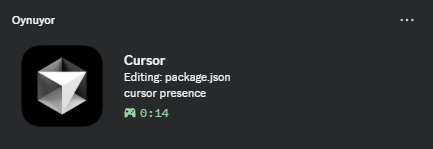
Artwork Modes
Choose between a clean language abbreviation, the language's original logo,
or a custom outlined font. Editor-aware modes can also place a small editor
badge on the artwork.

Editor Badge Styles
VS Code, Cursor, and plugin-enabled TaxCode editions are supported. The flat
style embeds the editor logo in the large image, the oval style previews
Discord's native circular small_image badge, and glass is an alternate
embedded treatment.

Open individual editor badge previews
| Editor |
Flat / embedded |
Oval / Discord badge |
Glass |
| VS Code |
 |
 |
 |
| Cursor |
 |
 |
 |
| TaxCode |
 |
 |
 |
Installation
Cursor (Recommended)
Open Cursor → Extensions → Search "Cursor Discord Rich Presence" → Install
VS Code
Open VS Code → Extensions → Search "Cursor Discord Rich Presence" → Install
TaxCode
Use a plugin-enabled TaxCode edition.
Open Extensions and search for Taxperia.cursor-presence (Discord Coding
Presence), or run Extensions: Install from VSIX... from the Command Palette
to install a locally built release. The CLI equivalent is:
taxcode --install-extension path/to/cursor-presence.vsix
TaxCode is detected automatically using its application name or taxcode URI
scheme. All six artwork modes use its white icon where an editor logo is shown.
No separate extension or Discord application ID is needed. Builds that disable
third-party extensions must allow this extension before it can run.
TaxCode artwork and GitHub-hosted images are available starting with version
1.2.0. Use that version or newer for these features.
Manual Installation
- Download the latest
.vsix from GitHub Releases
- Open Cursor/VS Code
- Press
Ctrl+Shift+P
- Type "Extensions: Install from VSIX..."
- Select the downloaded
.vsix file
- Restart
Settings
Ctrl+Shift+P → "Preferences: Open Settings" → search cursorDiscord:
| Setting |
Default |
Description |
enabled |
true |
Enable or disable Rich Presence |
language |
"auto" |
Use the editor language, English, or Turkish |
largeImageMode |
"languageText" |
Choose the editor logo, language text, filled or outlined text with an embedded editor logo, or language logo |
privacyMode |
false |
Hide file and workspace names |
showSmallEditorIcon |
true |
Show the detected editor as Discord's small badge in compatible modes |
showWorkspace |
true |
Show workspace name on Discord |
showFileName |
true |
Show current file name on Discord |
showLanguage |
true |
Show programming language on Discord |
showElapsedTime |
true |
Show elapsed time on Discord |
customDetails |
"" |
Custom Details template |
customState |
"" |
Custom State template |
idleMessage |
"" |
Custom idle message; empty uses the selected language |
Custom Details and State support {file}, {workspace}, {language}, and
{app} variables. Privacy mode replaces file and workspace variables with
private labels.
Commands
| Command |
Description |
Discord RPC: Open Settings |
Open all extension settings |
Discord RPC: Reconnect |
Reconnect to Discord |
Discord RPC: Disconnect |
Disconnect from Discord |
Supported Languages
JavaScript, TypeScript, Python, Java, C++, C, C#, Go, Rust, Ruby, PHP, Swift, Kotlin, HTML, CSS, SCSS, JSON, Markdown, YAML, XML, SQL, Shell, Bash, PowerShell, Docker, TOML, Vue, Svelte, JSX, TSX, Lua, Dart, R, Elixir, Haskell, Scala, Solidity, Terraform and more.
Requirements
- Cursor, VS Code 1.74 or higher, or a compatible plugin-enabled TaxCode edition
- Discord desktop app (running)
Technical Details
- Uses raw Discord IPC Protocol (no external dependencies)
- Uses Named Pipe connection instead of WebSocket (more reliable)
- Runs in the local UI extension host so Discord IPC stays on the desktop during remote workspace sessions
- Sends ping every 30 seconds to keep connection alive
- Artwork is served from public GitHub URLs; no per-image Developer Portal upload is needed
- The language catalog refreshes in the background every six hours, with cached and bundled fallbacks
- See artwork folders, adding languages, and deployment order
Run npm run test:taxcode on Windows to check activation, commands, editor
detection, and artwork selection in the installed TaxCode extension host.
The test uses an isolated profile with Rich Presence disabled. It does not
verify Discord rendering or install into your normal TaxCode profile. For a
custom installation path, run:
powershell -NoProfile -ExecutionPolicy Bypass -File scripts/test-taxcode.ps1 -TaxCodePath "C:\path\to\TaxCode.exe"
Extension activation, commands, local UI hosting, TaxCode detection, and
TypeScript artwork selection were verified in TaxCode 1.139.2 on Windows.
Contributing
- Fork the repository
- Create a feature branch
- Commit your changes
- Push to the branch
- Open a Pull Request
License
Apache License 2.0

