



Forge your Salesforce sandboxes. SandForge populates your developer sandbox with realistic data: cloned from a real record or generated synthetically, with production guardrails. One WebView UI, no Command Palette required.
Why switch from SFDMU or Data Loader?
- No config file to author. Paste a record ID: BFS discovery walks the relationship graph for you and lookups are remapped on write (a record type the target does not have keeps its source Id, and the SandForge log names it). No
export.json to hand-write, no field mapping to keep in step with the schema.
- No mandatory CSV round-trip. Records move org to org over the API. CSV import is still there when you want it — one door in, not the only one.
- Production Guard on by default. Double confirmation before any write to a Production org, DELETE blocked outright. Nothing to switch on, nothing to remember.
- Your existing SFDMU config keeps working. The Migration module imports an
export.json into a Sync config, so what you already built comes with you.
Your first clone in 2 minutes
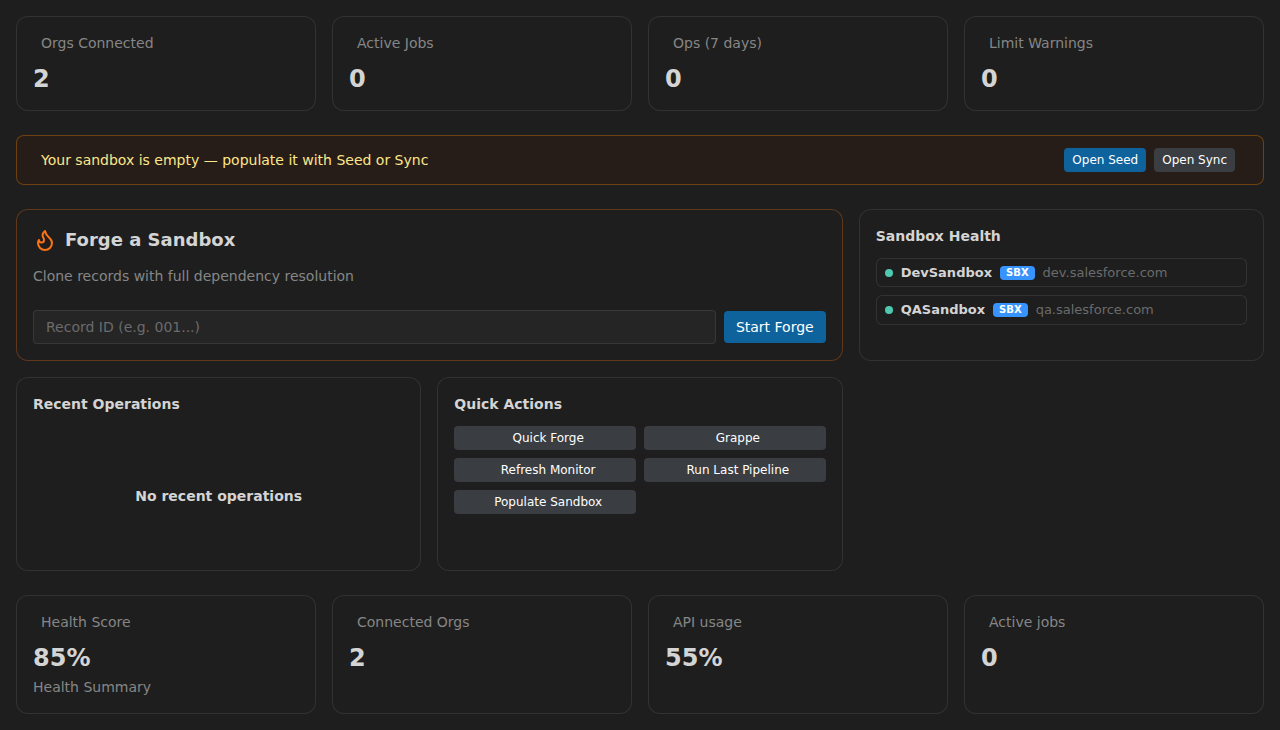
- Connect your orgs: click the SandForge icon in the Activity Bar, open the org dropdown at the top of the Launcher, choose New organization…, then Import from SF CLI to pull in every org authenticated in the Salesforce CLI.
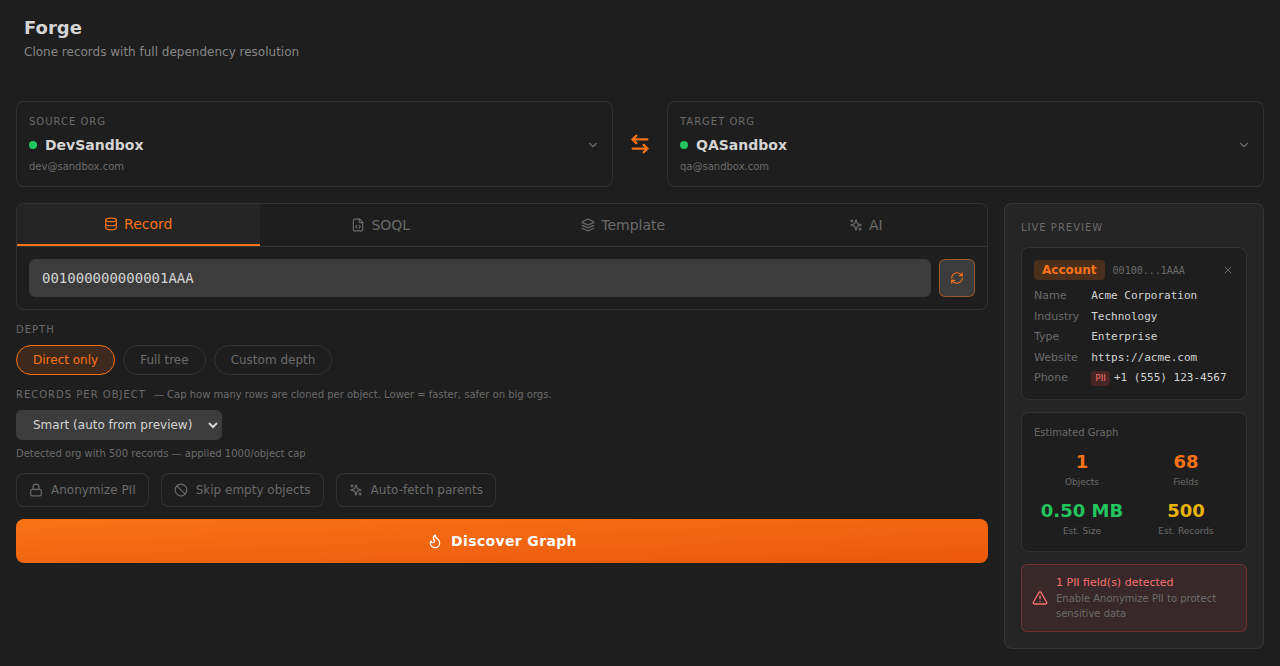
- Open Forge: click the flame icon in the sidebar, or run SandForge: Open Forge from the Command Palette.
- Paste a root record ID from your UAT sandbox into Record ID or Salesforce URL (an Account works well).
- Click Discover Graph, then tune Depth, Records per object, and Anonymize PII.
- Click Review & Execute toward your dev sandbox. IDs are remapped as the records are written; a record type with no active record type of the same API name on the target keeps its source Id, and the SandForge log names it.
New here? The built-in Get Started walkthrough (Help → Welcome → "Get started with SandForge") guides you through these steps directly inside VS Code.
Modules
SandForge ships 14 modules in a single extension:
| Module |
What it does |
| Forge |
Clone a record and its relationship graph between orgs, with BFS dependency discovery and automatic ID remapping |
| Frozen Dataset |
Extract once, pseudonymize deterministically, replay identically after every sandbox refresh |
| Seed |
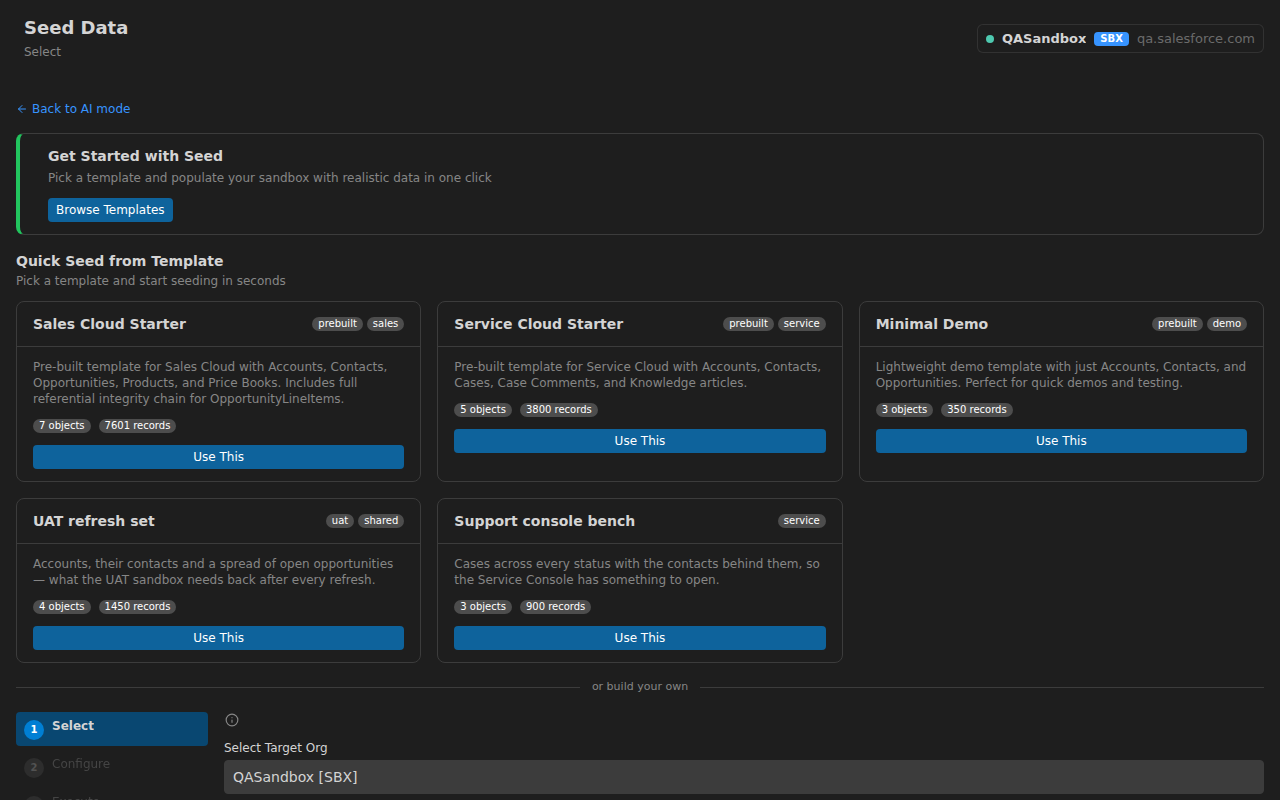
Synthetic data from AI personas, templates, CSV import, or LLM-backed field rules |
| Sync |
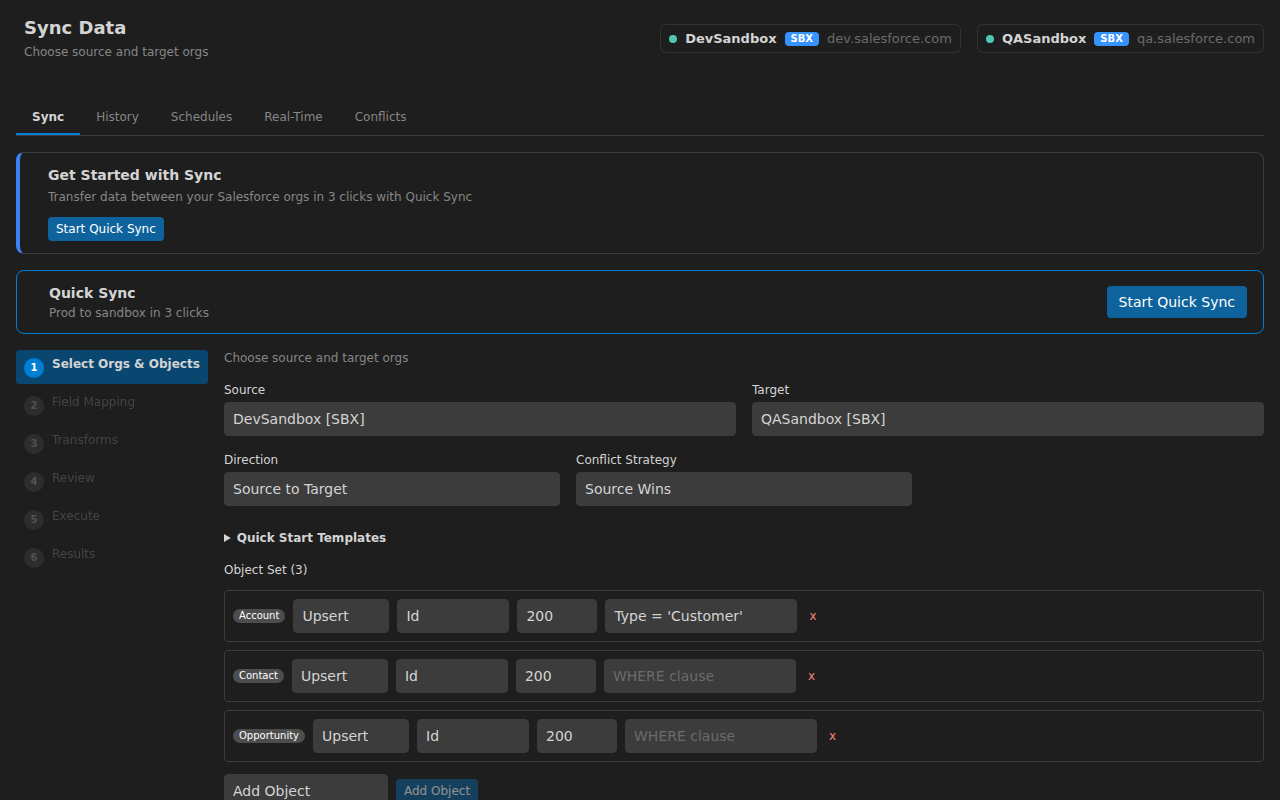
Source-to-target sync between orgs with field mapping, transforms, and conflict resolution against the target |
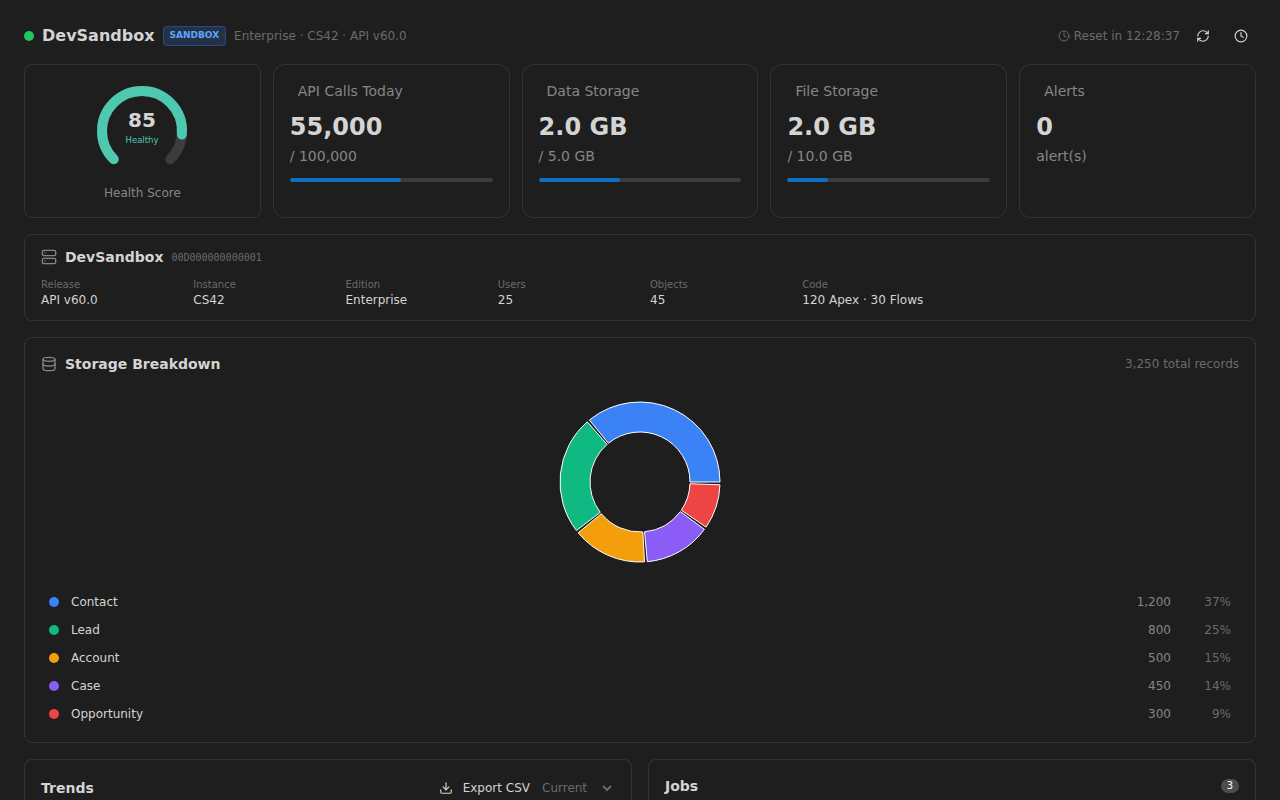
| Monitor |
API limits, jobs, storage, and health score in real time, with threshold alerts |
| Compare |
Metadata diff, permission set and profile presence, and five Organization settings, compared between two orgs |
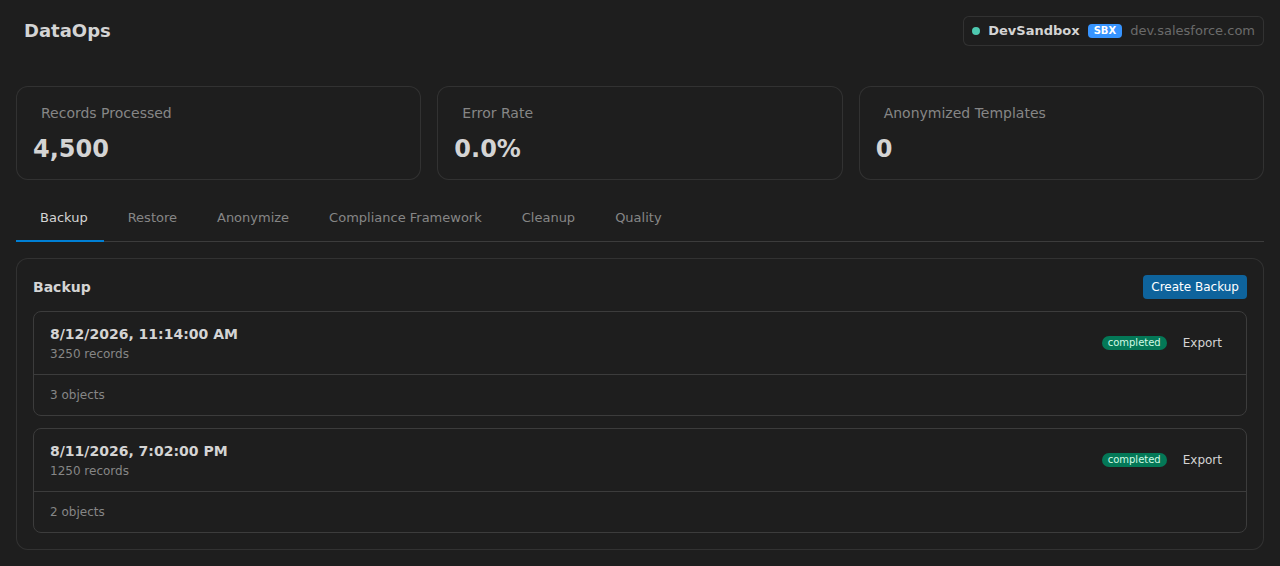
| DataOps |
Org backup, restore from any backup, PII anonymization templates, a read-only data-quality scan, a personal-data inventory with data subject requests (one person found by email, name or phone, exported, and erased in place or deleted, with a local request log of counts only), and a cleanup of stale, orphaned and duplicate records, exported or deleted through Production Guard |
| Automation |
Visual pipeline builder with 15 step types, each followed live as a run goes, and a run you can cancel. backup (a DataOps snapshot into local storage), compare, precheck (the Monitor's health signals), notification (a VS Code notification), delay and condition run. No pipeline step writes to an org: seed, sync, restore, anonymize and delete run from their own pages, and they, script, approval, loop and parallel are refused before a pipeline starts. A saved pipeline also starts on a cron schedule or when a sandbox is refreshed, while VS Code is open (event, webhook and deployment triggers coming soon) |
| AI Assistant |
With your own Anthropic key: chat, pipeline drafts in Automation, and NL2SOQL, custom personas and AI field rules (picked by you or set by a built-in persona) in Seed. A saved chat continues after a restart or an AI setting change, and the model is given its last 20 messages of it. While AI is on, a failed Seed, Sync, DataOps or Automation run sends its error message — every Salesforce Id in it replaced by <id> — to the model for a fix suggestion shown as a VS Code notification. A built-in table of common Salesforce error codes answers the codes it knows first, on your machine, AI on or off, and sends nothing. The failures SandForge writes itself, and any failure raised with no SandForge view open, send nothing either. sandforge.ai.errorResolution turns that sending off on its own; turning AI off stops it at once. Compare's schema advice and Monitor's anomaly scan are rule-based: they run with AI off and no key |
| Grappe |
Per-partition progress reporting for large Seed and Sync runs — an Autopilot run reports only its start and its end — behind sandforge.grappe.enabled (off by default). Execution itself is sequential — this splits the reporting, not the work |
| Migration |
Import existing SFDMU export.json or CSV/JSON files into Sync configs |
| Autopilot |
Zero-config sandbox seeding through a guided wizard, with GDPR, CCPA, HIPAA and PCI-DSS anonymization rule sets |
| Organizations |
Org registry with SF CLI import and tier-based safety coloring |
| Reports |
Execution reports and success-rate analytics, built from your Forge and Sync run history; an audit trail of every run that writes to an org, and the data lineage of the records each run carried |
Safety is on by default: Production Guard requires double confirmation before any write on a Production org and blocks DELETE there. Each of its decisions is recorded with the run it concerns, in Reports → Audit Trail. Expired org sessions are auto-refreshed at startup via the sf CLI — no more mid-operation auth walls.
Screenshots
FAQ
- Does my data leave my machine? No. Telemetry is opt-in (off by default), the AI assistant is disabled by default, and your API key stays in VS Code Secret Storage.
- Can I point it at production? Reads, yes. Writes go through the Production Guard: double confirmation, and destructive operations (DELETE) are blocked outright.
- Is this an SFDMU replacement? For moving data between orgs from your editor, yes — and without the config file: you paste a record ID, SandForge discovers the relationship graph and remaps IDs on write (a record type the target does not have keeps its source Id, and the SandForge log names it). SFDMU keeps the edge for headless CI, where it has a real binary and SandForge does not. Switching costs nothing you already built: the Migration module imports your existing
export.json into a Sync config, non-destructively — nothing is written to your orgs.
- Which orgs are supported? Any org authenticated in the Salesforce CLI (
sf), imported in one click.
- Is it free? Yes — MIT licensed, no account, no paid tier.
Documentation
| Guide |
Description |
| Getting Started |
Install, connect your org, run your first operation |
| Forge: Dev Sandbox Quickstart |
Clone a record graph from a partial-copy sandbox into your dev sandbox (wizard + CLI) |
| Forge: Record-Scoped Architecture |
Internals of the scoped clone pipeline (BFS discovery, RecordType mapping, cycle 2-pass, orphan parent expansion) |
| Frozen Dataset |
Replayable reference datasets |
| Seed |
AI generation, CSV import, org-to-org cloning |
| Sync |
Org-to-org data synchronization with field mapping and conflict resolution |
| Monitor |
Real-time org health, API limits, and job tracking |
| Compare |
Metadata diff, permission set and profile presence, and five Organization settings |
| DataOps |
Backup, restore, anonymization, data subject requests, cleanup and a data-quality scan |
| Automation |
Visual pipeline builder: backups, comparisons, checks, notifications, by hand, on a schedule or on a sandbox refresh |
| FAQ & Troubleshooting |
Common questions and solutions to frequent issues |
Requirements
| Requirement |
Version |
| Visual Studio Code |
1.95+ |
Salesforce CLI (sf) |
Latest |
| AI API key (optional) |
Anthropic (Claude) |
Installation
From Marketplace (recommended)
- Open VSCode
- Go to Extensions (
Ctrl+Shift+X)
- Search for SandForge
- Click Install
From VSIX
Download sandforge.vsix from the Releases page, then run Extensions: Install from VSIX... from the Command Palette.
Keyboard Shortcuts
| Shortcut |
Action |
Ctrl+Shift+R |
Open Grappe (partition progress) |
Ctrl+Shift+A |
Open Automation |
In-app, press Ctrl+K for the command palette and G + a letter to jump between modules (see the Help page for the full map). On macOS, use Cmd instead of Ctrl.
Configuration
| Setting |
Description |
Default |
sandforge.telemetry |
Record extension errors locally for diagnosis. Nothing is sent over the network. |
false |
sandforge.orgs.validateOnStartup |
Validate registered orgs at startup and auto-refresh expired sessions via the sf CLI |
true |
sandforge.seed.defaultBatchSize |
Default batch size for Seed data operations |
200 |
sandforge.sync.defaultBatchSize |
Default batch size for Sync data operations |
200 |
sandforge.sync.maxConcurrentOps |
Maximum concurrent sync operations |
3 |
sandforge.ai.enabled |
Enable the AI Assistant (requires an API key) |
false |
sandforge.ai.provider |
AI provider (only anthropic is implemented) |
anthropic |
sandforge.ai.model |
AI model used by every AI feature (chat, NL2SOQL, pipeline drafts, error resolution, Seed) |
claude-sonnet-4-5-20250929 |
sandforge.ai.errorResolution |
Send a failed run's error message to the model for a fix suggestion (Salesforce Ids removed first) |
true |
sandforge.ai.tokenBudgetMaxPerSession |
Maximum AI tokens per window session, shared by all AI features (warns at 80%) |
200000 |
sandforge.backup.maxCount |
Maximum number of backups retained per org |
10 |
sandforge.pipeline.timeout |
Pipeline execution timeout (ms) |
300000 |
sandforge.safety.requireProdConfirmation |
Require confirmation for Production org operations |
true |
sandforge.safety.auditLogging |
Record each Production Guard decision with the run it concerns in the audit trail |
true |
sandforge.grappe.enabled |
Report large Seed and Sync runs partition by partition (an Autopilot run reports only its start and end); execution stays sequential |
false |
sandforge.grappe.autoActivateThreshold |
Record count at or above which that partitioned reporting starts |
10000 |
sandforge.grappe.grappeSize |
Records per grappe partition |
5000 |
See the full list of settings in the VSCode Settings UI under "SandForge".
Internationalization
Full UI in 6 languages: English, French, German, Spanish, Japanese, Brazilian Portuguese. Key parity across locales is enforced in CI. Your language choice persists across sessions.
Support
Missing a feature? Open a feature request — responses are fast.
Author
Stephane Berthoz
License
MIT
| |

