StackBlender OpenAPI Guard
Keep OpenAPI contracts and Spring Boot Java/Kotlin, NestJS TypeScript, Express
(TypeScript or JavaScript), or AWS Lambda (API Gateway) implementations
synchronized while you code.
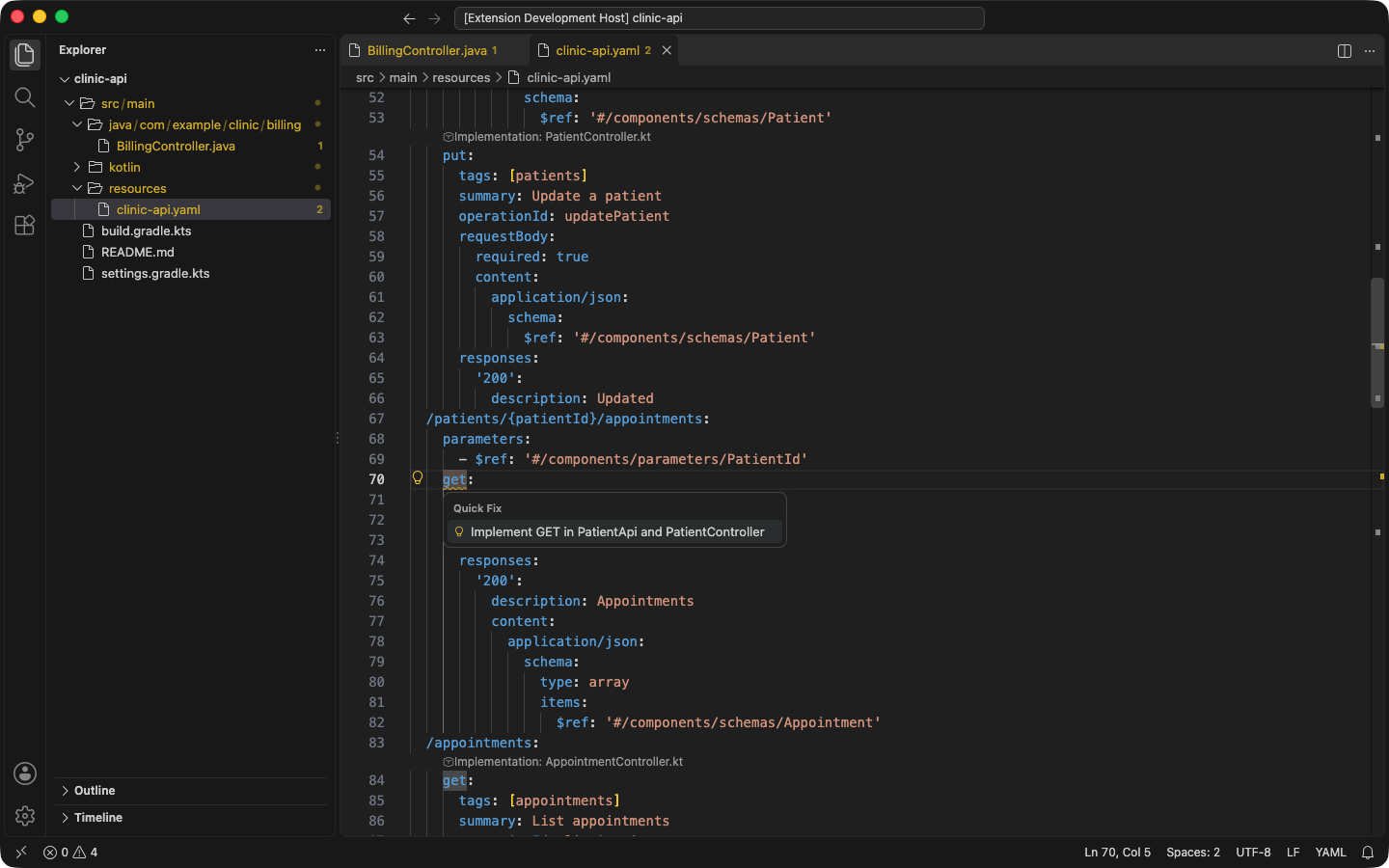
Fix drift in one step with quick fixes, including implementing a missing operation
through your API interface:
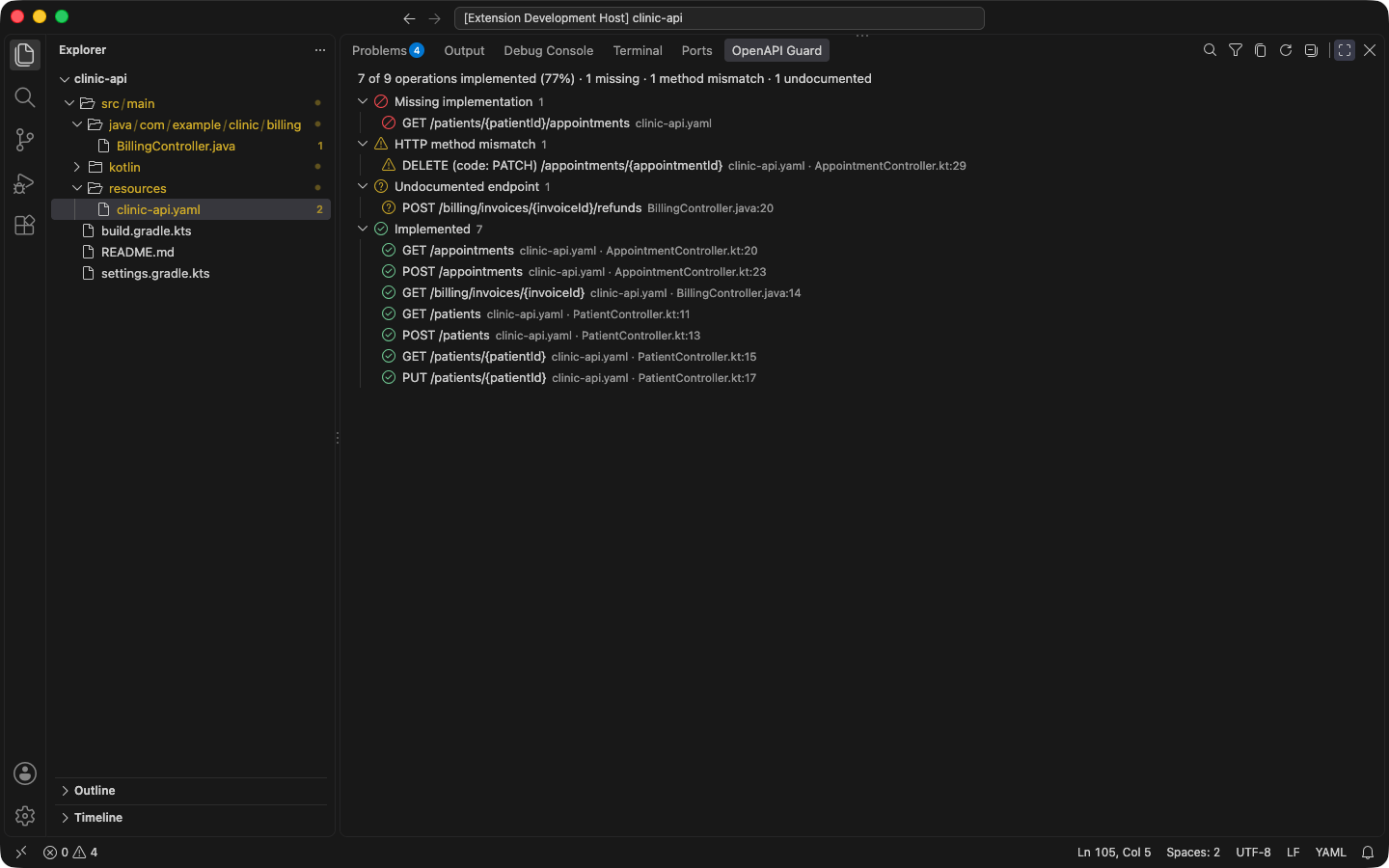
See every operation's status, with a coverage summary, in the Operations view:
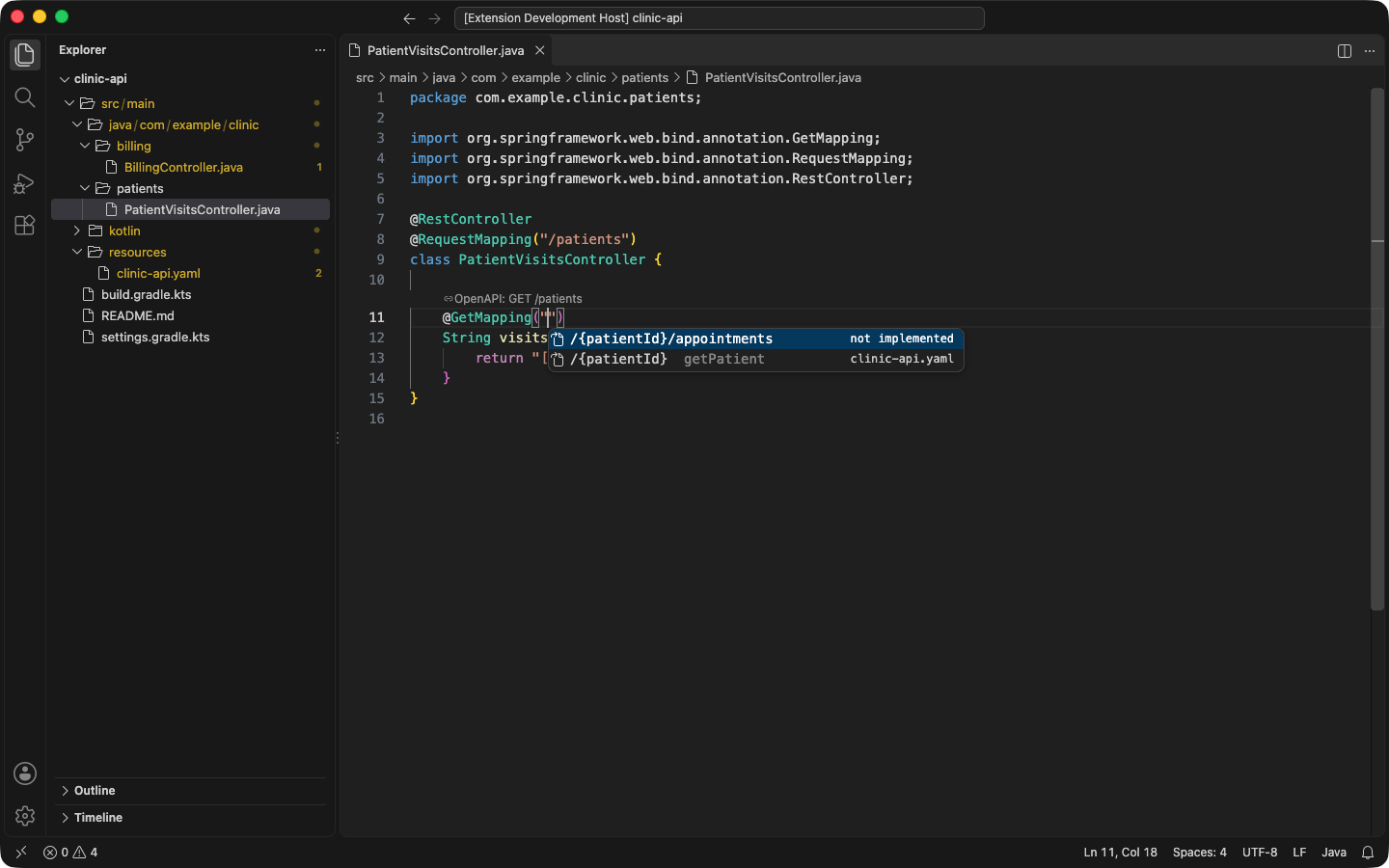
Complete contract paths inside mapping annotations, unimplemented operations first:
Navigate between an operation and its implementation with CodeLens or Go to Definition:
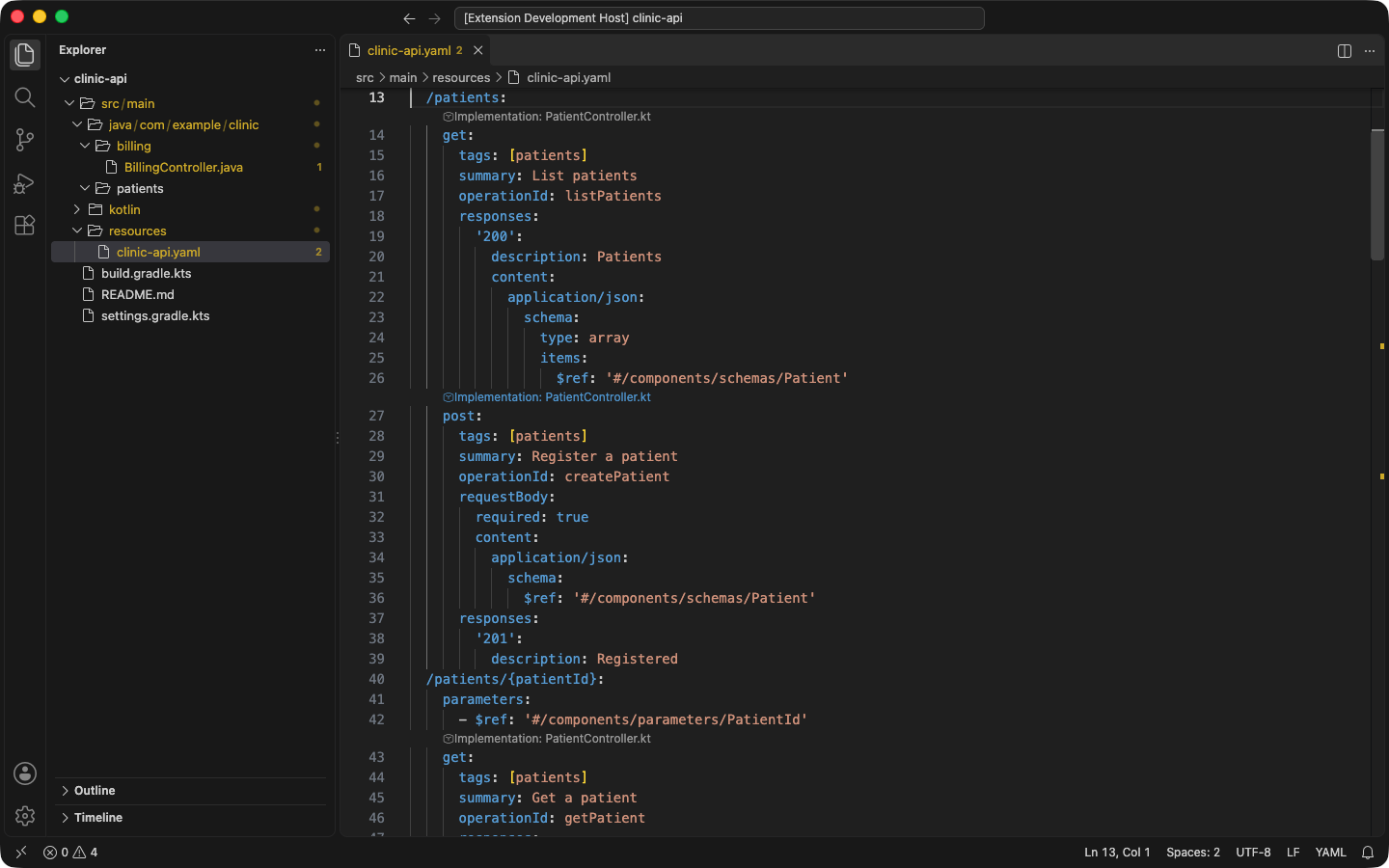
OpenAPI Guard discovers local OpenAPI 3.x YAML/JSON specifications and extracts
endpoints from Java/Kotlin Spring controllers, NestJS controllers, Express
applications and routers, and AWS Lambda handlers that dispatch on API Gateway's
routeKey, in TypeScript or JavaScript.
It reports missing, undocumented, and HTTP-method-mismatched endpoints as VS Code
diagnostics and navigates between related contract and implementation locations.
Install
Install OpenAPI Guard
from Visual Studio Marketplace, or run:
code --install-extension StackBlender.openapi-guard
Open a supported Spring Boot, NestJS, Express, or AWS Lambda workspace containing an OpenAPI 3.x
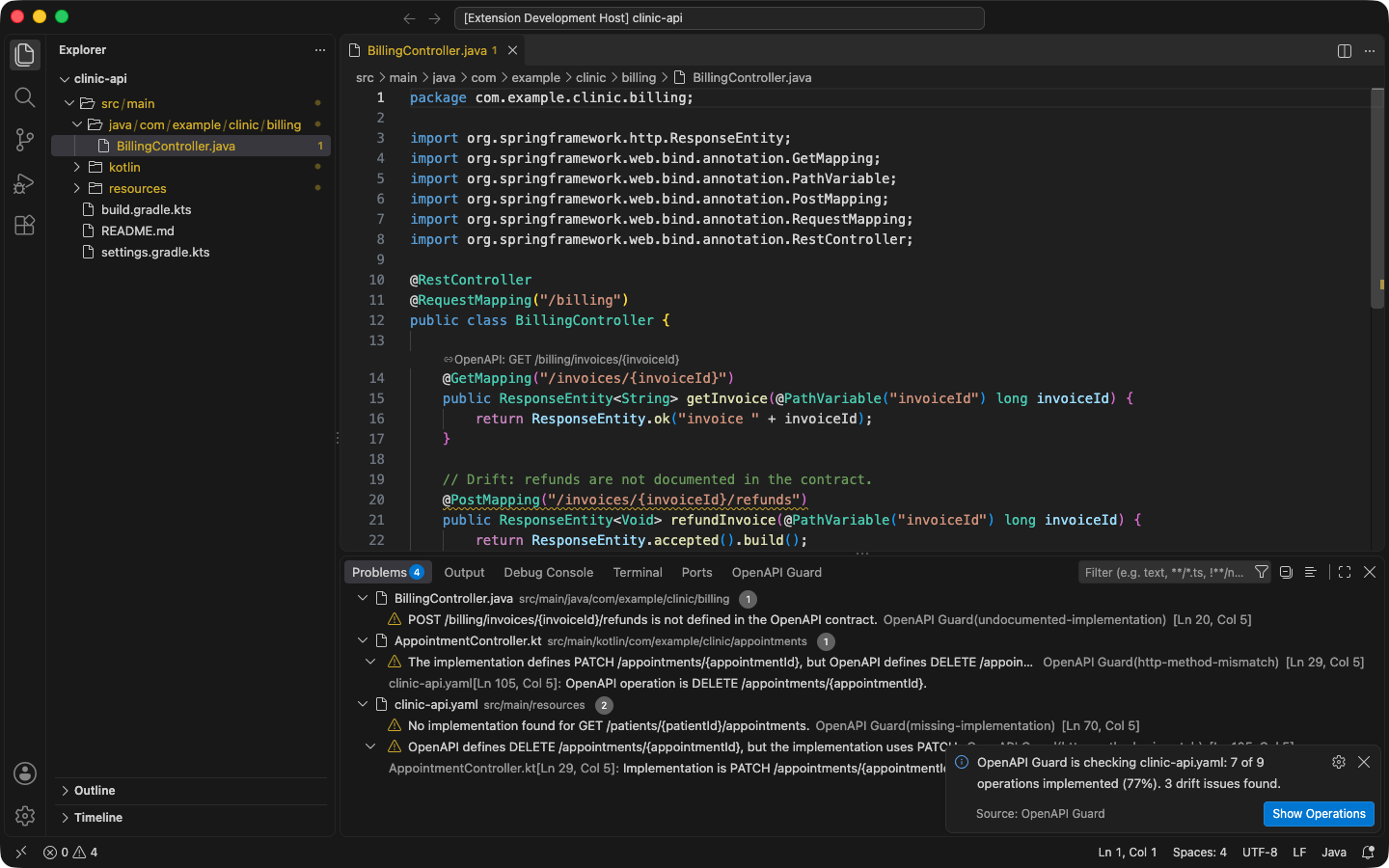
document. Analysis starts automatically. Review drift in the Problems panel, use
F12 or Ctrl/Cmd+click to navigate between endpoints, and run OpenAPI Guard:
Select OpenAPI Specification to choose which contracts to analyze if automatic
discovery finds ones you do not want.
Features
- Local discovery and parsing of OpenAPI 3.x YAML/JSON specifications, found by
content (any file declaring
openapi: 3.x, whatever its name); test sources,
dependency caches, and build output are skipped. Every discovered
specification is analyzed; in a multi-module Maven, Gradle, or npm workspace,
each covers its own module and the modules that depend on it. Set
stackblender.openApiGuard.specs (or use Select OpenAPI Specification) to
analyze only chosen specifications.
- Endpoint extraction from Java and Kotlin Spring controllers (
@RestController,
@Controller, @RequestMapping, and the five shortcut mapping annotations),
including mappings inherited from implemented interfaces and base classes (the
openapi-generator interface-only and delegate patterns), constants from any
source file (static final, const val) with + concatenation, and ${...}
placeholders resolved from application.properties / application.yml.
Generated sources under build/generated, build/generate-resources, and
target/generated-sources are read even though build output is otherwise
excluded.
- OpenAPI
servers base paths and Spring server.servlet.context-path are aligned
automatically, so a contract written relative to /api matches controllers
mapped under /api.
- Endpoint extraction from TypeScript NestJS controllers using directly imported
@Controller, @Get, @Post, @Put, @Patch, and @Delete decorators.
- Endpoint extraction from TypeScript AWS Lambda handlers behind an API Gateway
HTTP API: literal
"METHOD /path" keys of route maps (object literals and
new Map) and case labels of switch statements dispatched on
event.routeKey, plus declared alias maps that resolve legacy routes to
versioned ones (see AWS Lambda routes).
- Endpoint extraction from Express applications and routers in TypeScript or
JavaScript (ES modules and CommonJS), composing mounted routers across files
(see Express routes).
- Endpoint-level drift detection: missing implementations, undocumented
implementations, and HTTP method mismatches, ignoring path-variable names.
- Automatic, incremental diagnostics in the editor and Problems panel.
- Completion of contract paths inside Spring mapping annotations, unimplemented
operations first.
- An Operations view in the OpenAPI Guard panel: every operation's
implementation status with a coverage summary, filter, problems-only toggle,
navigation, and Copy as Markdown.
- Quick fixes (Ctrl/Cmd+.): add an undocumented endpoint to a YAML specification,
implement a missing operation in the matching Spring controller or its API
interface, or align a mismatched HTTP method on either side.
- Bidirectional navigation: CodeLens links, commands, editor context menu, and
standard Go to Definition (F12 / Ctrl/Cmd+click), presenting all matching
implementations.
- A headless CLI, a VS Code agent tool (
#checkOpenApiContract), and a local MCP
adapter, all sharing one deterministic, versioned report contract.
To exempt an operation from implementation checks, add
x-openapi-guard-ignore: true to it, its path item, or the document. To accept an
intentional difference in code, annotate the handler or controller with
@SuppressWarnings("OpenApiUndocumentedEndpoint") (Java) or
@Suppress("OpenApiHttpMethodMismatch") (Kotlin) — the same IDs as the IntelliJ
plugin, or ALL. Endpoints hidden with springdoc's @Hidden /
@Operation(hidden = true) or NestJS @ApiExcludeEndpoint() are never reported as
undocumented. stackblender.openApiGuard.ruleSeverity sets each rule's severity or
turns it off.
Path-variable names are intentionally ignored during endpoint matching. Computed
or unresolved source paths are skipped rather than guessed to avoid false
positives, and an operation that such a mapping could implement is not reported
as missing. A @RequestMapping without method serves every HTTP method, and
view-rendering Spring @Controller handlers are not reported as undocumented API.
A method mismatch is reported only when exactly one method differs on each side of
a path; otherwise the missing and undocumented methods are reported separately.
NestJS support covers .ts source, literal controller/method paths, literal path
arrays, direct import aliases, and simple :id parameters. Custom decorators,
module-router prefixes, runtime route discovery, compiled JavaScript, and NestJS
versioning are not inferred. If the OpenAPI paths include an application prefix
such as /api, set
stackblender.openApiGuard.implementationPathPrefix to the same value.
Express routes
OpenAPI Guard composes every Express application (express()) with the routers
it mounts, across files:
const app = express();
const books = express.Router();
books.route('/').get(listBooks).post(createBook);
books.get('/:bookId', showBook);
app.use('/api/v1/books', books);
- Routes:
get, post, put, patch, delete, and all (every method, never
reported as undocumented) on applications and routers, route(path) chains, and
path arrays. :id becomes {id}, parameter patterns (:id(\d+)) are dropped,
and optional parameters (:id?) and Express 5 optional groups ({/:id}) serve
both paths. app.get('setting') is not a route.
- Mounts:
use(path, ...middleware, router), nested routers, routers imported with
import or require (export default, named exports, module.exports,
exports.x), and router factory functions such as
app.use('/orders', ordersRouter(service)). Middleware is ignored.
- Paths may be literals, templates, or
+ of const strings.
- Computed paths, prefixes that cannot be read, and routers no analyzed application
mounts are analysis limitations; wildcard and regular-expression routes are
skipped.
- JavaScript (
.js, .mjs, .cjs) is analyzed for every TypeScript framework.
Minified files (.min.js), compiled output (TypeScript's CommonJS interop marker
or a source-map comment), JavaScript that does not parse, and test sources are
skipped.
AWS Lambda routes
OpenAPI Guard reads the route keys an API Gateway HTTP API sends in
event.routeKey, in the dispatch forms services commonly use:
const routes = {
  'GET /api/v1/inboxes': listInboxes,
  'POST /api/v1/email/draft': createDraft,
};
const route = routes[canonicalRouteKey(event.routeKey)];

switch (canonicalRouteKey(event.routeKey)) {
  case 'GET /api/v1/inboxes':
    return listInboxes(event);
}
- Route keys may be string literals, templates, or
+ concatenations of const
strings. The route key is followed through variables, destructured
{ routeKey }, canonicalizer calls, and local dispatcher functions. Comparisons
such as routeKey === 'GET /health' also register routes.
- Route maps may be spread together and imported from relative modules; a map in
a router module looked up with a parameter is found too.
- An alias map whose keys and values are both route keys, or a
switch case that
only returns a route key, declares legacy routes:
{ 'GET /inboxes': 'GET /api/v1/inboxes' }. An alias is implemented when its
target is registered, and navigation opens the alias declaration.
ANY routes satisfy every method on their path without being reported as
undocumented. $default, HEAD, and OPTIONS routes are ignored.- Keys, tables, and dispatch that cannot be read (computed keys, tables returned
by functions or imported from packages, greedy
{proxy+} routes, or a
routeKey handed to a custom router) are analysis limitations: OpenAPI
Guard shows an information diagnostic there and does not report operations as
missing that such code may serve. ruleSeverity.analysis-limitation changes
or hides these diagnostics.
- Test sources (
*.test.ts, *.spec.ts, __tests__/) never register routes.
For a custom router, declare its routes in an openapi-guard.routes.json
manifest anywhere in the workspace:
{
  "routes": [
    "GET /api/v1/inboxes",
    { "route": "POST /api/v1/email/draft", "handler": "createDraft" }
  ],
  "aliases": { "GET /inboxes": "GET /api/v1/inboxes" },
  "complete": true
}
Declared routes count as implementations located in the manifest. With
"complete": true, the manifest states that it lists every route the unreadable
dispatch serves, so its analysis limitations no longer hide missing
implementations. REST API (v1) payloads that dispatch on httpMethod and
resource are not supported.
Agent integrations
Inside VS Code agent mode, the extension contributes the read-only
#checkOpenApiContract tool. It analyzes the open workspace through the same
report boundary as the CLI and editor diagnostics; OpenAPI Guard does not call a
model or upload project content. Results contain at most 100 issues per invocation
and include deterministic pagination metadata when another page is required.
A headless CLI and local stdio MCP adapter are bundled with the extension and are
also available in the public
@stackblender/openapi-guard
npm package. The Marketplace installation itself does not create a global
executable path. Review the current
CLI documentation
and MCP documentation
before integrating either surface.
Privacy
Application source and OpenAPI contracts are analyzed locally. Analysis does not
require a StackBlender account or network access, and OpenAPI Guard never uploads
source, specifications, diagnostics, or repository metadata.
- Discovery, parsing, diffing, and report formatting all run on your machine.
- The VS Code agent tool and the CLI return the same locally-computed report;
OpenAPI Guard does not call a language model or make its own model request.
- The local MCP adapter communicates over standard input/output and opens no
network port.
Local-only operation is enforced by automated tests: CLI process tests run with
common Node network entry points disabled, and a source-level guard test fails the
suite if any network client (http/https/net/tls, fetch, WebSocket, or a
third-party HTTP library) is introduced under src.
See the OpenAPI Guard documentation, get
support,
report a bug, or
report a security concern privately.
Dependency licenses and attributions are bundled in THIRD_PARTY_NOTICES.md.

