RippleMap
See what your AI agent just changed, and what that change does to your app's flow, in real time.
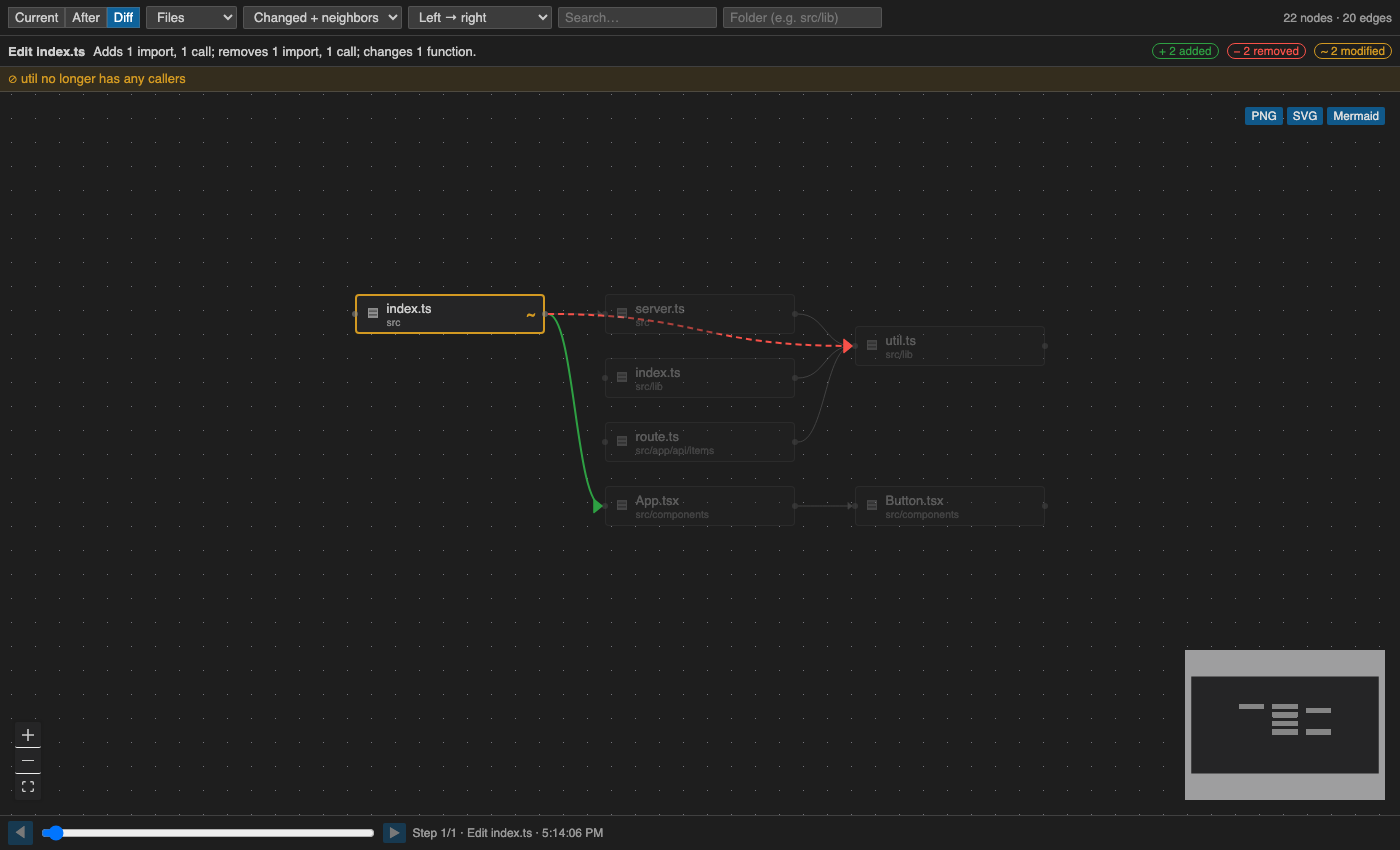
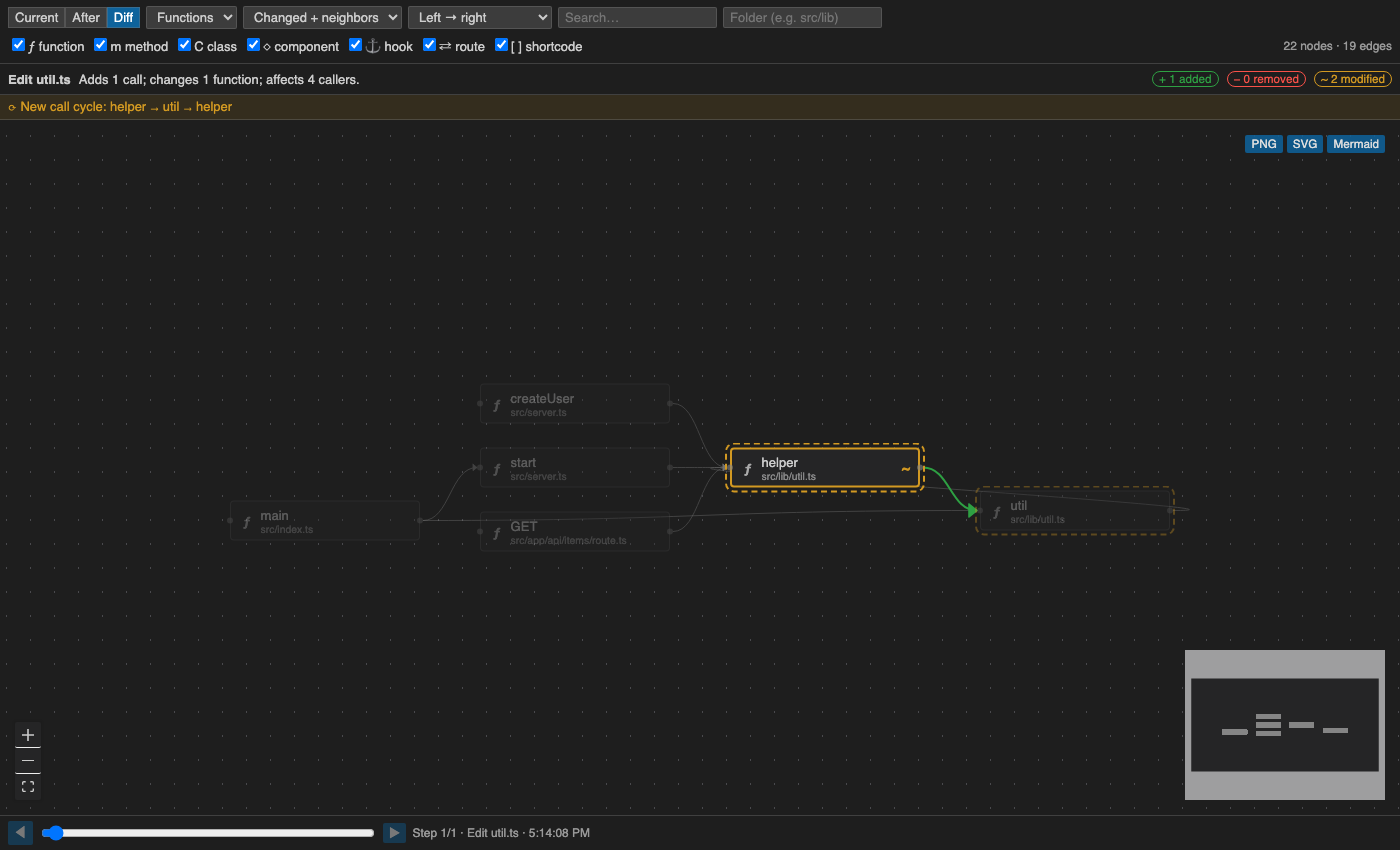
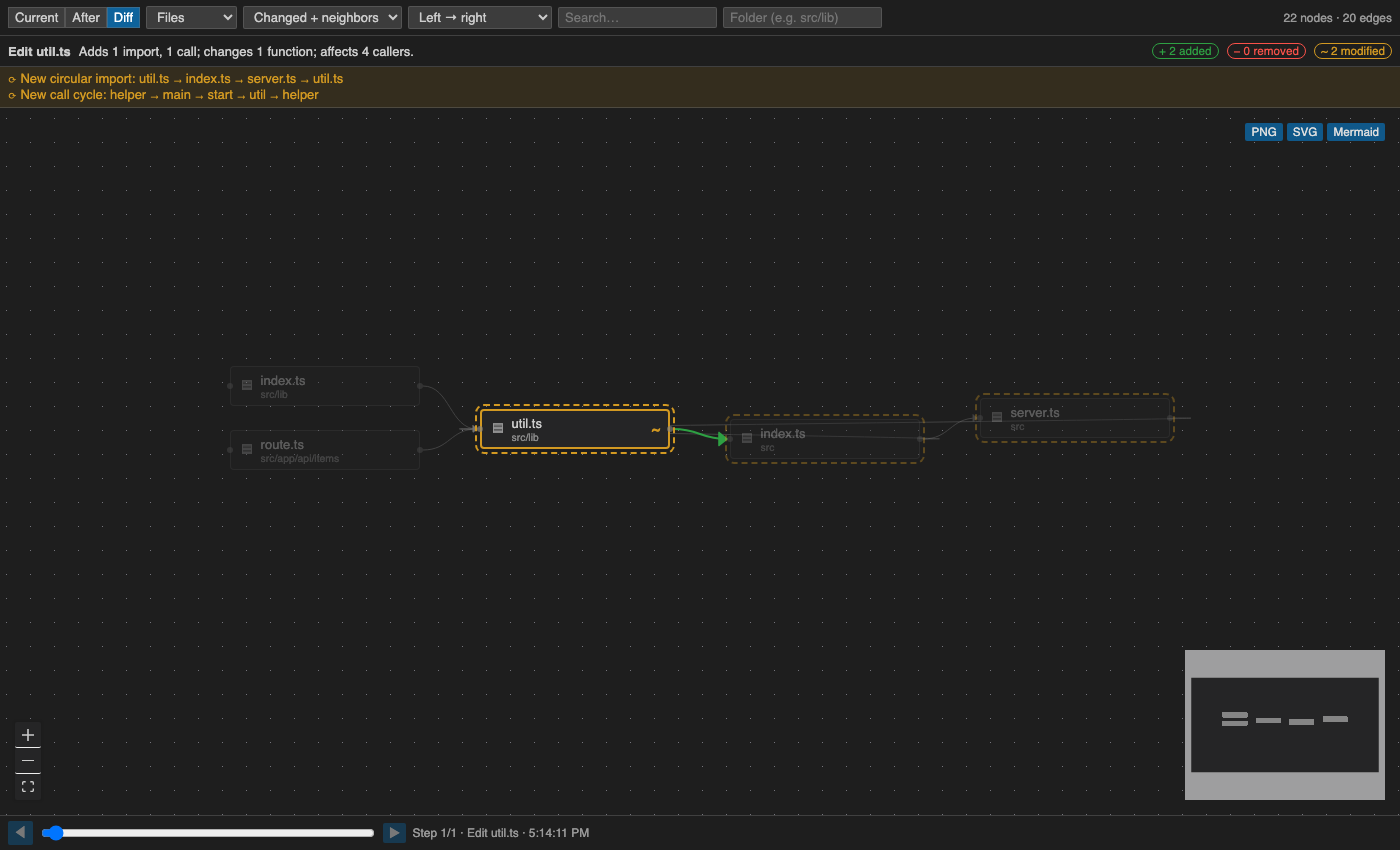
RippleMap watches edits (from Claude Code hooks, or any save / file change), keeps a live file graph and call graph of your workspace, and shows the before → after diff of that graph: added in green, removed in red, modified in amber. When Claude Code proposes an edit, RippleMap previews the graph change before the file is written.
Everything runs locally. No telemetry and no network calls, with one opt-in exception: ✨ Explain with AI sends the code of the block you clicked to your AI provider, and only when you click it.
What you get
|
|
| Edit Feed (Activity Bar → RippleMap) |
Every edit with file, +/− lines, changed ranges, touched functions, grouped by agent session. Click to open the diff. |
| Gutter highlights |
Recently edited lines are highlighted and fade out over time. |
Graph panel (RippleMap: Open Panel) |
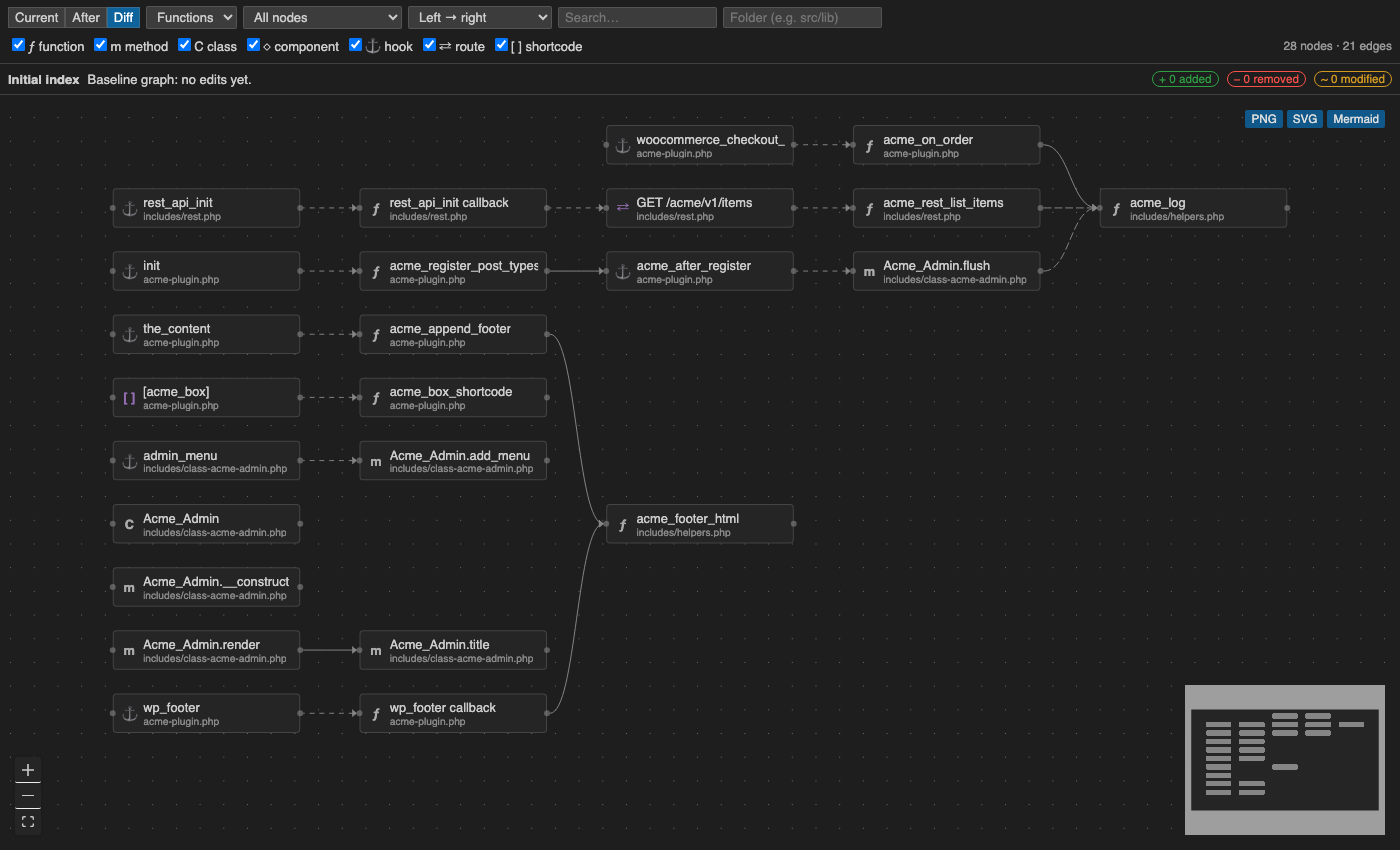
Files or Functions level; Current / After / Diff modes; scope "Changed + neighbors" or "All"; left-right, top-down or clustered-by-folder layout; search and folder filter. Click a block for its details; double-click (or Open in editor) opens the code beside the graph, which keeps focus. |
| Simple mode (on by default) |
Files used by 5+ others (utils, auth, ui/button…) keep their block but drop their incoming lines and show a ⇠N badge; files with no lines go in a grid below. Hover or click any block to light up all its lines and fade the rest. Changed lines are never hidden. |
| What this file does |
Click a block: a warning when many files/callers depend on it ("Used by 49 files. Changes here ripple widely") or nothing imports it, then the file's (or function's) own header/doc comment, plus what RippleMap can tell from the code: Next.js page/layout/API route and its URL, 'use client'/'use server', routes handled, and the main things it defines. Computed locally, no AI call. |
| ✨ Explain with AI (opt-in) |
Button in the details panel: a 1–2 sentence explanation of the file or function from an AI model. Default: OpenRouter's free models (openrouter/free). Run RippleMap: Set AI API Key once (stored in VS Code secret storage; OPENROUTER_API_KEY env var also works). Change ripplemap.ai.baseUrl / ripplemap.ai.model for Gemini, Ollama (fully local) or any OpenAI-compatible API. Explanations are cached and marked (code changed since) when the file changes. |
| Show flow of… |
Searchable dropdown of every function, method, class, hook and route. Pick one to see only its flow: what it calls (depth 1–5 or all) plus its direct callers. Also via Show flow in the node details. |
| Open anywhere |
↗ Browser opens the live graph in your default browser (Chrome etc.) on 127.0.0.1 with a secret token; ⧉ New window pops it into its own VS Code window. Clicking a node in the browser still jumps to the code in VS Code. |
| ☰ Start here |
Opens beside the graph when nothing is selected: entry points (Next.js pages and API routes, Express/Flask routes, WordPress hooks by number of handlers) — click one to follow its flow; core files that many others import (change with care; generated code excluded); and files not imported by other code (loaded another way, or dead). |
| What the agent did |
Every changed block shows a one-line summary, e.g. Claude Code: added save, changed load ((proposed) while the edit is pending). |
| Instructions for the AI |
Click a block → 📝 Instructions for the AI, e.g. "If you change this, also update the cache. Don't add dependencies." When Claude Code edits that file, the hook hands your notes to Claude so it checks its edit against them. Blocks with notes show 📝. |
| Agent Activity (sidebar + graph) |
Every MCP tool call (🔌 github › search_repositories), web fetch/search (🌐) and network command (curl, git push, npm install…) Claude Code makes: running / ✓ / ✗ / denied, duration, shortened input and result. The graph shows the servers and sites reached during the step on screen; click one to open the list. In memory only, never sent anywhere. |
| Pending preview |
Claude Code's proposed Edit/Write is applied in memory; the diff appears while the agent waits, and is dropped if the edit is rejected or fails. |
| Framework flows |
WordPress add_action/add_filter/do_action, shortcodes, REST routes (WooCommerce hooks flagged); Express and Next.js route handlers; Flask/FastAPI routes. |
| Insights |
New circular imports, new call cycles, functions that lost all callers, calls to functions that were removed. |
| Time scrubber |
Step back through every edit and see the graph diff at that point. |
| Export |
PNG, SVG or Mermaid of exactly what is visible. |
Languages: JavaScript, TypeScript/TSX, PHP, Python (parsed with tree-sitter, compiled to WebAssembly, so no native build tools are needed).
Install
Then open a project and run RippleMap: Open Panel. RippleMap is in preview: feedback and bug reports are
welcome on GitHub.
Connect Claude Code
- Open your project in VS Code.
- Run RippleMap: Install Claude Code Hooks. This adds
PreToolUse, PostToolUse, PostToolUseFailure, PermissionDenied and Stop hooks to .claude/settings.local.json in each workspace folder. Your existing hooks are kept, and the file is backed up first.
- Start a new Claude Code session in that folder. AI edits now show as Claude Code in the feed, with a pending preview before each edit lands.
The hooks watch file edits, MCP tools (mcp__.*), WebFetch/WebSearch, and (after the fact only) Bash, of which only network commands are shown. The hook runs a tiny Node script that forwards the event to RippleMap on 127.0.0.1 with a per-session token; that adds roughly 50–100 ms to each of those calls. It prints nothing (except your 📝 notes for the file being edited), always exits 0, and gives up after 0.7 s, so it can't block or slow the agent. If VS Code isn't open, it just exits. RippleMap: Remove Claude Code Hooks removes only the RippleMap entries.
Cursor: run RippleMap inside Cursor and use RippleMap: Install Cursor Hooks. It adds an afterMCPExecution hook to .cursor/hooks.json, so Cursor's MCP calls appear in Agent Activity (finished calls only: Cursor's before hooks block the action unless they answer, so RippleMap never installs one). Cursor's edits still show up through the file-change fallback.
Other agents (Copilot, …) show up through the file-change fallback, labelled manual. VS Code has no API to watch another extension's tool or MCP calls.
Commands
| Command |
|
| RippleMap: Open Panel |
Graph panel |
| RippleMap: Open Graph in Browser |
Live graph in your web browser (local only) |
| RippleMap: Open Graph in New Window |
Graph panel in a separate VS Code window |
| RippleMap: Install / Remove Claude Code Hooks |
See above |
| RippleMap: Install / Remove Cursor Hooks |
Cursor MCP calls in Agent Activity |
| RippleMap: Re-index Workspace |
Rebuild the graph from disk |
| RippleMap: Set AI API Key |
Key for Explain with AI (empty = remove) |
| RippleMap: Clear Edit History |
Empty the feed (and drop any pending preview) |
Settings
| Setting |
Default |
|
ripplemap.excludeFolders |
node_modules, vendor, dist, build, .git, wp-includes, wp-admin, .claude, … |
Folder names ignored for tracking and indexing |
ripplemap.indexOnStartup |
true |
Index the workspace graph at startup |
ripplemap.maxNodes |
1500 |
Nodes rendered at once (changed nodes are kept first) |
ripplemap.snapshotLimit |
50 |
Graph history kept for diff and scrubber |
ripplemap.ai.baseUrl |
https://openrouter.ai/api/v1 |
OpenAI-compatible API for Explain with AI (user settings only) |
ripplemap.ai.model |
openrouter/free |
Model id |
ripplemap.decorationFadeSeconds |
60 |
How long edited-line highlights last |
Good to know
- Static analysis. Calls are resolved by name and import proximity. Dashed edges are medium/low confidence. Dynamic dispatch and string-built hook names aren't followed.
- Before text. Files RippleMap hasn't seen yet (not indexed, never opened) produce a first entry with before unknown. Indexing fills these baselines in.
- History is in memory. Snapshots are not kept across VS Code restarts.
- Excludes are folder names.
.gitignore isn't read.
Development
Build and install from source:
npm install
npm run package          # builds ripplemap.vsix
code --install-extension ripplemap.vsix
Or press F5 in this folder to run it in an Extension Development Host.
npm run build             # esbuild (extension) + Vite (webview)
npm run watch
npm run typecheck && npm run lint
npm test                  # vitest: extractors (golden graphs), differ, preview, insights, hooks
npm run test:integration  # real VS Code: feed, hooks via the forwarder, index, diff timing, preview
npm run test:vsix         # same suite against the packaged .vsix
See ARCHITECTURE.md for the design and CLAUDE.md for conventions. CI runs on Ubuntu and Windows.
| |

