Drag File to Claude Code Session
Drag files from the VS Code explorer directly into Claude Code chat — automatically holds Shift for @-mention inserts.
:cn: 中文
Demo
Features
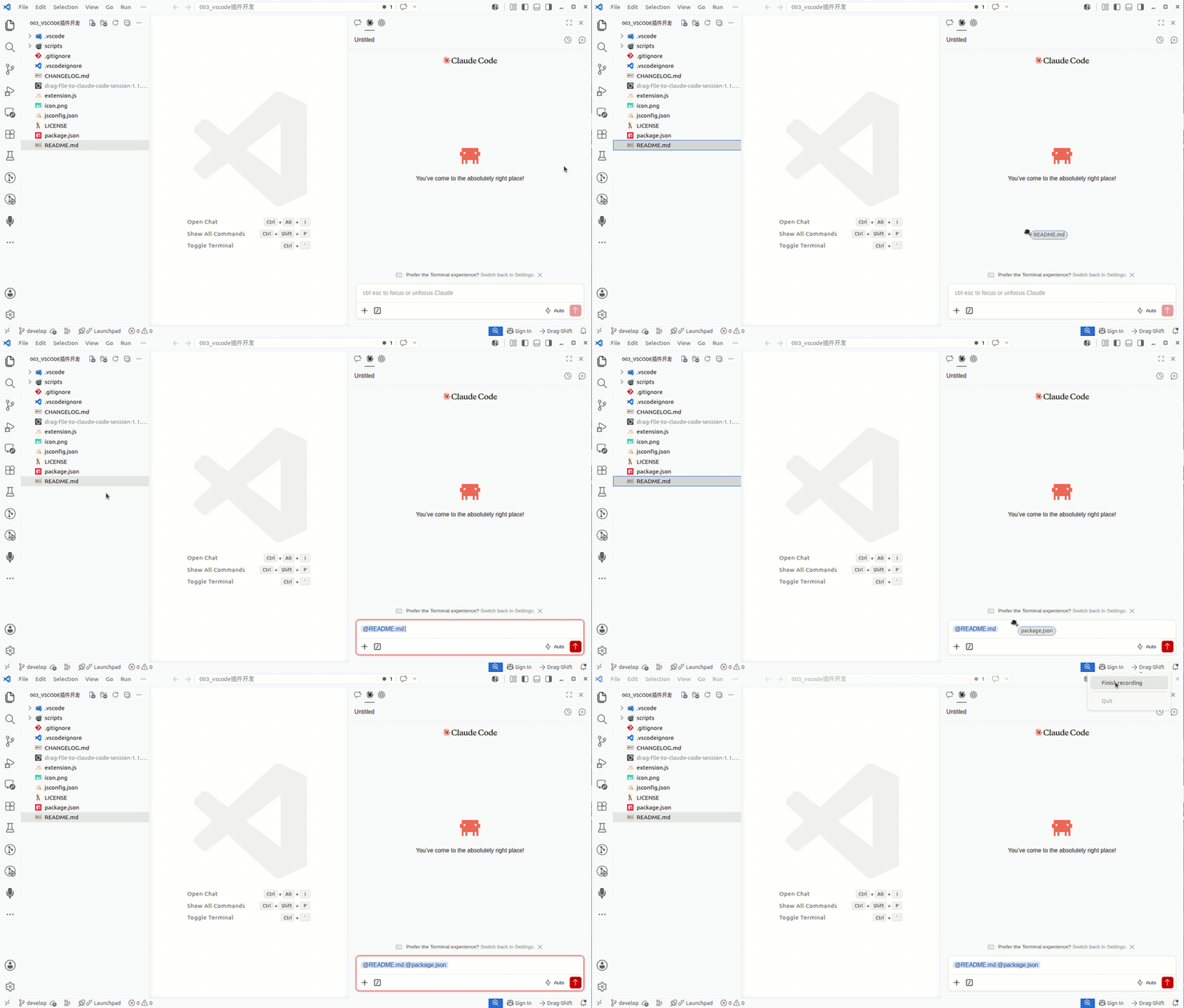
The Claude Code extension's chat panel requires you to hold Shift while dragging a file to show "drop to attach as context". This extension detects drag operations inside VS Code and automatically presses Shift for you, then releases it when you drop.
Installation
Marketplace
- Open
Ctrl+Shift+X.
- Search Drag File to Claude Code Session.
- Click Install.
VSIX
code --install-extension drag-file-to-claude-code-session-1.1.5.vsix
Usage
- After installation, the status bar shows Drag-Shift.
- Drag a file from the VS Code Explorer to the Claude Code chat panel.
- The extension automatically presses and releases Shift.
Click the status bar item to toggle on/off, or use the command palette:
| Command |
Description |
Drag-Shift: Toggle |
Toggle on/off |
Drag-Shift: Enable |
Turn on |
Drag-Shift: Disable |
Turn off |
System Requirements
| System |
Supported |
Dependencies |
| Linux (X11) |
✅ |
Python 3, xprop, libX11, libXtst, libXi |
| Windows |
✅ |
Python 3; supports py -3, python, or python3 |
| macOS |
✅ |
Python 3; requires Accessibility permission (see below) |
| Wayland without X11 |
❌ |
Not supported |
The extension is declared as a UI extension. In Remote SSH, WSL, and Dev Container scenarios it will run on the local VS Code UI side.
macOS Accessibility Permission
macOS blocks unauthorized apps from simulating keystrokes. Before using, grant VS Code Accessibility permission:
System Settings > Privacy & Security > Accessibility
Enable the toggle for Visual Studio Code. If VS Code is not listed, click +, select /Applications/Visual Studio Code.app, add it, enable the toggle, then restart VS Code.
Configuration
{
  "dragShift.enableOnStartup": true,
  "dragShift.dragThresholdPixels": 8,
  "dragShift.pollIntervalMs": 30,
  "dragShift.dragIdleMs": 2000,
  "dragShift.debug": false
}
| Setting |
Default |
Description |
enableOnStartup |
true |
Auto-enable when VS Code starts |
dragThresholdPixels |
8 |
Minimum mouse movement (px) before Shift triggers |
pollIntervalMs |
30 |
Mouse polling interval in ms |
dragIdleMs |
2000 |
Mouse idle time before releasing Shift |
debug |
false |
Enable debug logging |
The helper process restarts automatically when settings change — no need to reload VS Code.
Known Limitations
- Uses system-level mouse state detection; cannot confirm the drag source is always an Explorer file.
- Dragging selected text, tabs, or other elements inside VS Code may briefly trigger Shift.
- Linux currently supports X11 only.
Privacy & Security
This extension polls mouse button/position state locally and simulates the Shift key during drags. It does not read file contents, log keystrokes, upload data, or collect telemetry.
Development
npm run check
Resources
License
MIT © Shawn Li

