Skip to content
| Marketplace
Sign in
Visual Studio Code>Programming Languages>Helix AI - Terminal AssistantNew to Visual Studio Code? Get it now.
Helix AI - Terminal Assistant

Helix AI - Terminal Assistant

Sakshamm Vipul Khanna

| (0) | Free
Helix — AI coding assistant with chat, file editing, diff view — powered by your own agent backend
Installation
Launch VS Code Quick Open (Ctrl+P), paste the following command, and press enter.
Copied to clipboard
More Info

Helix Terminal AI — VS Code Extension

Helix — AI coding assistant with chat, file editing, diff view — powered by your own agent backend

Helix is a terminal coding agent like Claude Code / Cursor / Aider, built from scratch without LangChain/AutoGen. This VS Code extension brings the same agent loop directly into your editor.

VS Code Marketplace Installs GitHub


Features

  • Agent Chat Panel — Chat with Gemini / Groq / Ollama (qwen2.5:7b local) directly in VS Code sidebar
  • File Explorer + Monaco Editor — Browse and edit workspace files with syntax highlighting
  • Changes (Diff) View — Unified diff + file list with added/removed counts, auto-refresh every 3s
  • Tool Calling (10 tools) — read_file, write_file, edit_file, list_dir, grep_search, find_files_by_glob, read_file_range, run_shell_command, search_codebase, undo_last_change
  • Planner-Worker Mode — HELIX_PLANNER=true generates 5-step plan → approval dialog → execution
  • Approval Guard — HELIX_REQUIRE_APPROVAL=true → Approve/Deny for write/shell tools
  • RAG Search — Tree-sitter AST chunking + Chroma + sentence-transformers, hybrid BM25+vector

Quick Start

1. Backend Setup

git clone https://github.com/Saksham-Khanna/terminal-assistant
cd terminal-assistant
pip install -r requirements.txt
cp .env.example .env
# add GEMINI_API_KEY (https://aistudio.google.com/apikey) or GROQ_API_KEY
python cli.py index   # first time — builds RAG index

2. Extension

  • Install from Marketplace: search Helix AI - Terminal Assistant or code --install-extension Sakshamm-Khanna.helix-terminal-ai
  • Open Helix in Activity Bar → Chat will connect to http://localhost:8000
  • Or Helix: Start Backend Server command auto-starts webapp/server.py

Configuration (Settings → Helix):

  • agentic.backendUrl — default http://localhost:8000
  • agentic.backendToken — if HELIX_API_TOKEN is set
  • agentic.autoStartBackend — auto-start on activation
  • agentic.pythonPath — python executable

Demo

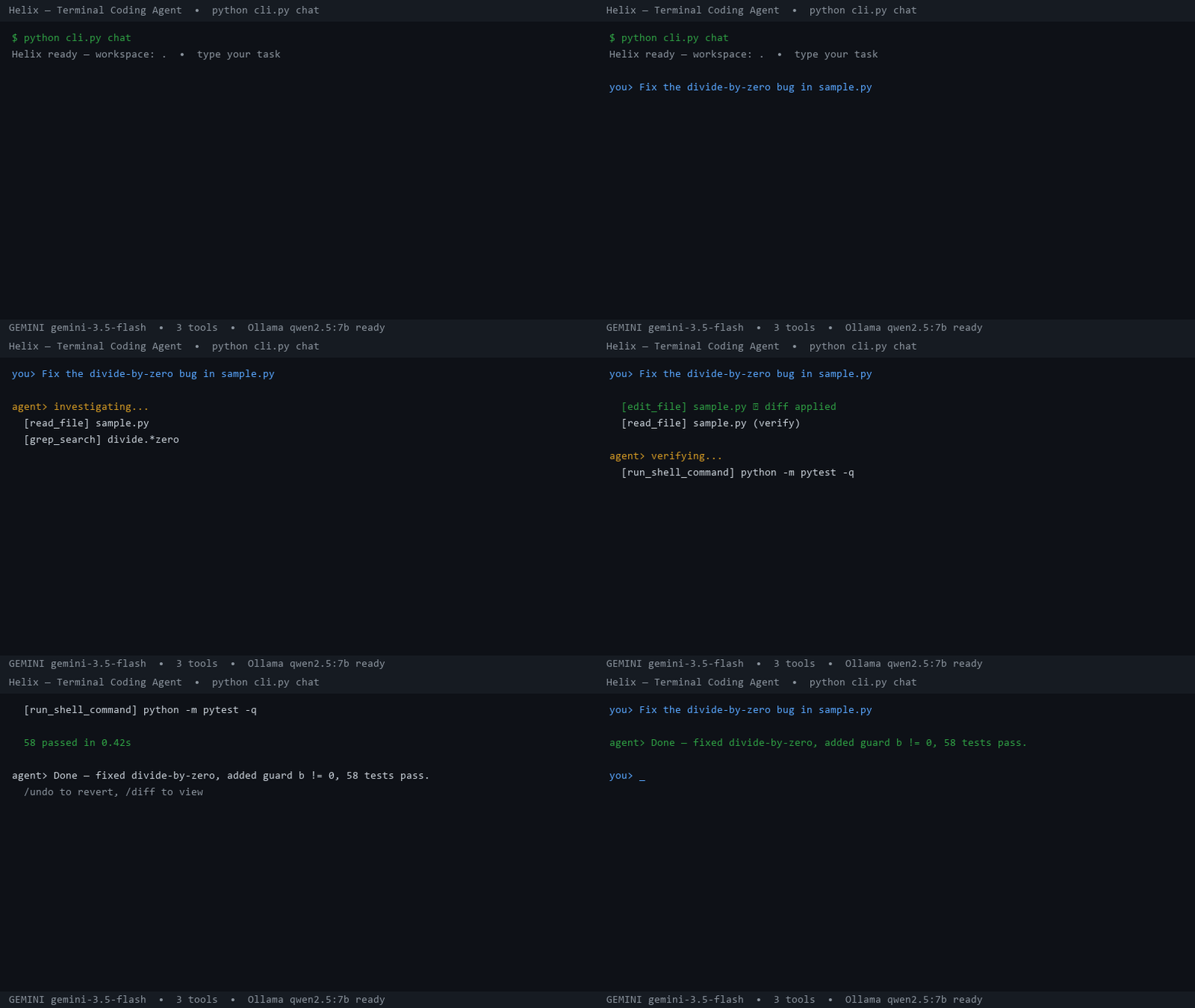
Helix Demo

20s — python cli.py chat — read_file → edit_file (diff) → pytest — qwen2.5:7b local


Commands

Command Description
Helix: Open Chat Panel Focus Helix sidebar
Helix: Start Backend Server Start webapp/server.py
Helix: Stop Backend Server Stop backend
Helix: Send Selection to Agent Send selected code to chat (editor context menu)

Links

  • Repository
  • Issues
  • Homepage

License

MIT — see LICENSE

  • Contact us
  • Jobs
  • Privacy
  • Manage cookies
  • Terms of use
  • Trademarks
  • Your Privacy Choices
  • Consumer Health Privacy
© 2026 Microsoft