Amplify Monitor




The ultimate AWS Amplify development toolkit for VS Code. Monitor builds, diagnose failures with AI-powered analysis, migrate to Gen2, and manage your entire Amplify portfolio — all without leaving your editor.
🚀 What's New in v0.1.36
- 👥 Multi-Account Support Enhanced - Fixed branch/job loading across AWS profiles
- 🖼️ New Logo & Screenshots - Fresh branding and documentation images
- 🧹 Simplified Extension - Removed redundant build watcher (use webhook notifications instead)
✨ Features
🚀 Gen1 → Gen2 Migration Helper (NEW)
Complete wizard for migrating your Amplify project to Gen2:
- Project Analysis - Scans your Gen1 project and shows compatibility report
- 5-Step Wizard - Guided migration: Analyze → Review → Initialize → Migrate → Verify
- Code Generation - Auto-generates Gen2 code for each category (Auth, API, Storage, Functions)
- Feature Mapping - Shows which Gen1 features map to Gen2 equivalents
- CDK Indicators - Identifies features requiring AWS CDK for migration
- Documentation Links - Quick access to official migration guides
Build Comparison
Compare any two builds to understand what changed:
- Side-by-Side Selection - Pick two builds from the last 20
- Status Comparison - See if builds went from success to failure or vice versa
- Duration Analysis - Track if builds got slower or faster
- Error Diff - See new errors added and errors that were fixed
- Build Phase Timing - Compare how long each phase took
- Commit History - See which commits are between builds
🎯 Custom Failure Patterns
Define your own error detection patterns:
- Regex Support - Use powerful regular expressions with capturing groups
- Pattern Testing - Test patterns against sample log output before saving
- Presets Library - 10+ pre-built patterns for common errors
- Team Sharing - Import/export patterns as JSON files
- Smart Matching - Case-sensitive/insensitive options
- Rich Metadata - Add root cause and suggested fixes to each pattern
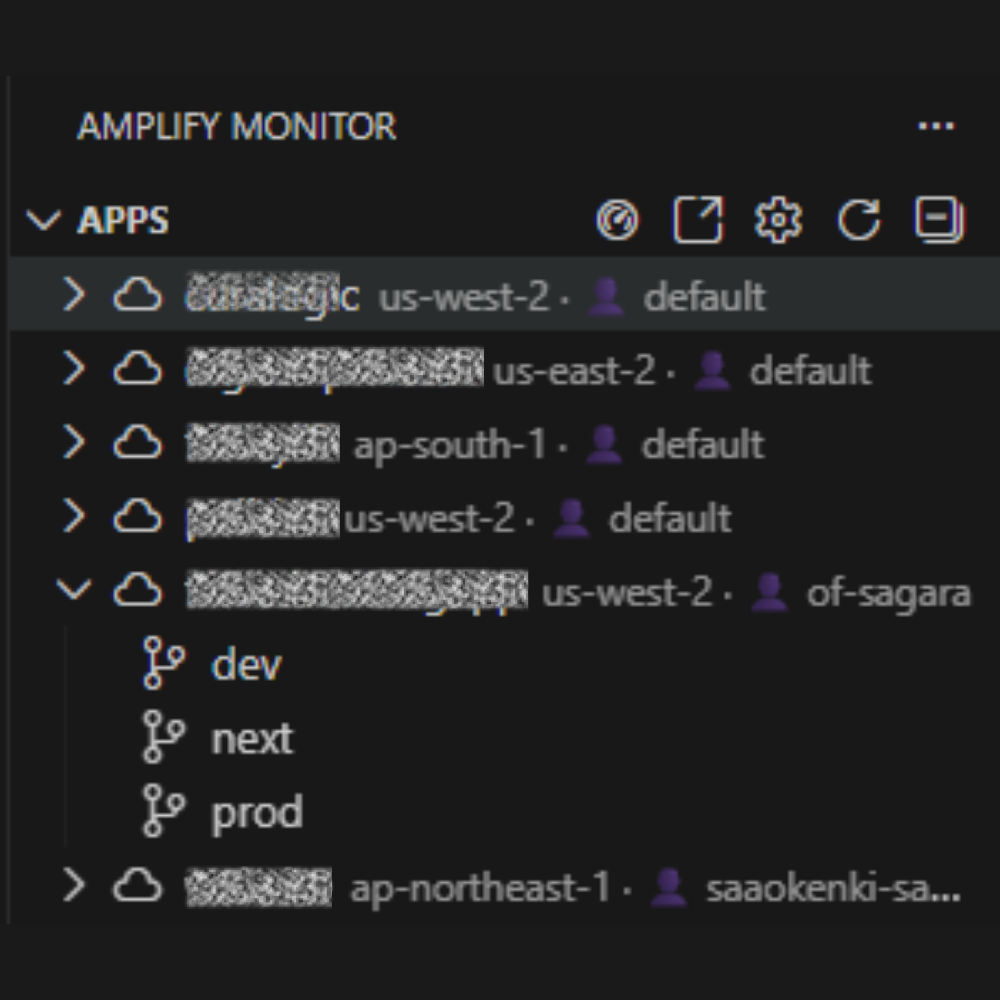
👥 Multi-Account AWS Profile Manager
Seamlessly work across multiple AWS accounts:
- Unified Apps Panel - View all Amplify apps from all configured AWS profiles in one place
- Profile Badges - Each app shows which AWS profile it belongs to
- Profile Discovery - Auto-discovers profiles from ~/.aws/credentials and config
- Cross-Account Operations - Manage branches, jobs, and env vars across all accounts
- Visual Status - Active profile clearly marked in the sidebar
- Add Profiles - Create new profiles directly in VS Code
- SSO Support - Works with AWS SSO profiles and assumed roles
📊 Portfolio Dashboard
Get a bird's-eye view of your entire Amplify infrastructure:
- Visual grid showing all apps, branches, and build statuses
- Summary bar with total apps, succeeded, failed, and running builds
- Quick action buttons: Start Build, Stop Build, View Logs, Open Console
- Relative timestamps ("5m ago", "2h ago") for last build time
- Responsive design adapts to your VS Code window

⚡ Quick Fixes (One-Click Resolution)
Stop manually fixing the same issues over and over! When you diagnose a failed build, Amplify Monitor offers automated fixes:
| Issue |
Available Fixes |
| Lock file mismatch |
Switch to npm/pnpm, delete conflicting lock files |
| Node version mismatch |
Create .nvmrc, add nvm use to amplify.yml |
| Missing env vars |
Open AWS Console, create .env.example template |
| npm install failed |
Clear cache, use legacy peer deps |
| Build command failed |
Add CI=false, open package.json |
| Out of memory |
Increase Node heap size to 8GB |
| amplify.yml errors |
Create template, validate syntax |
| pnpm install failed |
Enable corepack, pin pnpm version |
Click the ⚡ wand icon on any fixable issue to apply instantly!
🔍 Smart Build Diagnosis
Automatically analyze failed builds and identify root causes:
- 20+ detection patterns for common issues
- Lock file mismatches (npm vs pnpm vs yarn)
- Node.js version conflicts
- Missing environment variables
- Package installation failures
- TypeScript/ESLint errors
- Amplify buildspec configuration errors
🔀 Gen2 Migration Assistant
Planning to migrate from Amplify Gen1 to Gen2? Get a full compatibility report:
- Detects all Gen1 features in your project
- Shows migration compatibility for each feature:
- ✅ Fully Supported - Works out of the box
- 🔧 Supported with CDK - Requires CDK configuration
- ❌ Not Supported - Manual migration needed
- ⚠️ Blocking - Must be resolved before migration
- Links to official AWS migration documentation
🔔 Build Notifications (NEW)
Get instant alerts when builds complete:
- Slack Integration - Rich formatted messages with build details
- Microsoft Teams - Adaptive cards with action buttons
- Discord - Embedded messages in your server
- Generic Webhooks - JSON payloads for custom integrations
- Event Selection - Choose which events to notify (started, succeeded, failed, cancelled)
- Test Notifications - Verify webhook setup before going live
🔍 Node Version Detector (NEW)
Automatically detect and fix Node.js version issues:
- Multi-Source Detection - Scans package.json, .nvmrc, .node-version, amplify.yml, Dockerfile
- Conflict Detection - Identifies version mismatches between local and Amplify build
- Compatibility Check - Validates against Amplify's supported Node versions (18, 20, 22, 24)
- One-Click Fixes - Create .nvmrc, update amplify.yml with proper nvm commands
- Deprecation Warnings - Alerts for Node 14/16 deprecation, experimental Node 25
- Local vs Amplify - Compares your local Node version to what Amplify will use
🔧 Env Vars Troubleshooter (NEW)
Find and fix environment variable issues before they break your build:
- Code Scanning - Finds all
process.env.* and import.meta.env.* references
- Missing Detection - Identifies vars used in code but not defined anywhere
- Amplify Sync Check - Warns if local .env vars aren't in Amplify
- Framework-Aware - Understands Next.js, Vite, CRA prefix requirements
- Security Scanning - Detects hardcoded secrets and exposed sensitive vars
- Client-Side Exposure - Warns about sensitive vars with NEXT_PUBLIC_ prefix
- Gitignore Validation - Ensures .env files aren't committed
- One-Click Fixes - Add to .env, create .env.example, update .gitignore
🌐 Custom Domain Validator (NEW)
Validate your custom domain configuration before DNS propagation issues hit:
- DNS Record Validation - Checks CNAME, A, TXT records for proper Amplify setup
- SSL Certificate Check - Verifies certificate validity, expiration, and issuer
- Apex Domain Detection - Identifies apex vs subdomain and provides correct guidance
- CloudFront Detection - Validates CDN configuration and CNAME targets
- CDN Proxy Detection - Warns about Cloudflare/other CDN proxy conflicts
- CAA Record Check - Ensures CAA records allow Amplify certificate issuance
- Propagation Status - Confirms DNS records have propagated globally
- Configuration Guide - Shows exact records to add in your DNS provider
🔐 Secrets Manager Integration
Centralize your secrets management with AWS SSM and Secrets Manager:
- Browse SSM Parameters - Search by prefix, view SecureString/String types
- Browse Secrets Manager - List and select secrets to sync
- Sync to Amplify - Push secrets as environment variables with one click
- Backup to SSM - Export Amplify env vars to Parameter Store
- Create .env.example - Generate template from selected parameters
- Multi-region Support - Switch regions on the fly
✅ Pre-Deploy Validation (NEW)
Catch issues BEFORE they cause failed builds:
- Git Checks - Uncommitted changes, unpushed commits
- Dependency Checks - Lock files, version mismatches
- Build Validation - TypeScript errors, missing scripts
- Environment Checks - Secrets in code, .env gitignored
- One-Click Deploy - Deploy directly when all checks pass
🧙 Build Optimization Wizard
Speed up your Amplify builds with guided optimization:
- Caching Analysis - Enable Amplify build cache, Next.js cache, node_modules caching
- Dependency Checks - Use npm ci, detect duplicate packages, optimize lock files
- Build Config - Enable skipLibCheck, upgrade Node.js version, parallel builds
- Asset Optimization - Find large images, font optimization suggestions
- One-Click Fixes - Apply optimizations with a single button
- Estimated Savings - See potential build time reduction
📦 Bundle Size Analyzer (NEW)
Prevent "build output exceeds max size" errors:
- Visualize build output size vs Amplify's 230MB limit
- See largest files and directories with percentage breakdown
- Auto-detects .next, dist, build, out directories
- Get actionable recommendations to reduce bundle size
Track and optimize build times over time:
- Historical build duration tracking per branch
- Success rate metrics and trend analysis
- Detect build time regressions
- Compare performance across branches
🏗️ Monorepo Support (NEW)
First-class support for monorepo architectures:
- Auto-detects TurboRepo, Nx, Lerna, npm/pnpm/yarn workspaces
- One-click amplify.yml generation with proper baseDirectory
- Package dependency visualization
🎯 Smart Auto-Detection
The extension "just works" when you open an Amplify project:
- Automatically detects
amplify/ folder in workspace
- Fetches apps when AWS credentials are available
- Shows connection status in status bar
- Prompts for credential configuration if needed
- Re-detects when workspace folders change
🌍 Multi-Region & Cross-Account Support
- Discovers apps across all AWS regions automatically
- Switch AWS profiles with one click from the status bar
- Perfect for consultants managing multiple client accounts
🔐 Environment Variables Manager
Manage branch environment variables without leaving VS Code:
- View all variables (securely masked by default)
- Add, edit, and delete with one click
- Reveal values with copy-to-clipboard
- Changes apply immediately
⚡ Quick Actions
- Start Build - Trigger deployments instantly
- Stop Build - Cancel running builds
- Open in Console - Jump to AWS Console
📝 amplify.yml IntelliSense
- JSON schema validation with error highlighting
- 14+ code snippets for Next.js, Vite, pnpm, monorepos
- Auto-completion for all buildspec properties
🚀 Getting Started
Prerequisites
Install the CLI (required):
# Download from GitHub releases
# https://github.com/saga95/amplify-monitor/releases

# Or build from source
cargo install --git https://github.com/saga95/amplify-monitor
Configure AWS Credentials:
# Option 1: Environment variables
export AWS_ACCESS_KEY_ID=your_key
export AWS_SECRET_ACCESS_KEY=your_secret
export AWS_REGION=us-east-1

# Option 2: AWS CLI profile
aws configure
Quick Start
- Install the extension from VS Code Marketplace
- Open any project — the extension auto-detects Amplify configurations
- Check the status bar for connection status
- Open the Amplify Monitor panel from the Activity Bar
- Click the 📊 dashboard icon to see all your apps at a glance!
📋 Detected Issues
| Category |
Patterns Detected |
| Package Manager |
Lock file mismatch, npm/pnpm/yarn conflicts, corepack issues |
| Node.js |
Version mismatch, incompatible dependencies, nvm errors |
| Environment |
Missing env vars, invalid configuration, build secrets |
| Build Tools |
TypeScript errors, ESLint failures, Vite/Next.js issues |
| Infrastructure |
Out of memory, timeout, permission denied |
| Network |
Download failures, registry issues, certificate errors |
| Amplify |
amplify.yml syntax errors, invalid build phases |
⚙️ Configuration
Access settings via Amplify Monitor: Open Settings or Ctrl+, → search "amplify".
| Setting |
Default |
Description |
amplifyMonitor.cliPath |
amplify-monitor |
Path to CLI executable |
amplifyMonitor.awsProfile |
- |
AWS profile for cross-account access |
amplifyMonitor.defaultAppId |
- |
Default app ID for commands |
amplifyMonitor.defaultBranch |
main |
Default branch to monitor |
amplifyMonitor.autoRefresh |
false |
Enable auto-refresh |
amplifyMonitor.autoRefreshInterval |
60 |
Refresh interval (seconds) |
🎯 Commands
Open Command Palette (Ctrl+Shift+P) and type "Amplify Monitor":
| Command |
Description |
| Open Dashboard |
Visual overview of all apps |
| Troubleshoot Environment Variables |
Find missing/exposed env vars |
| Validate Custom Domain |
Check DNS, SSL, and Amplify config |
| Detect Node Version Issues |
Find & fix Node.js version problems |
| Configure Notifications |
Set up Slack/Teams/Discord alerts |
| Manage Secrets |
Sync env vars from SSM/Secrets Manager |
| Pre-Deploy Validation |
Check for issues before deploying |
| Diagnose Latest Failed Build |
Analyze the most recent failed job |
| Apply Quick Fix |
Fix common issues with one click |
| Build Optimization Wizard |
Guided build speed improvements |
| Analyze Bundle Size |
Check build output against 230MB limit |
| Show Build Performance |
View build time trends |
| Detect Monorepo Structure |
Auto-detect and configure monorepos |
| Analyze Gen1 → Gen2 Migration |
Check migration readiness |
| List Apps |
Refresh the apps list |
| Switch AWS Profile |
Change AWS profile |
| Start Build |
Trigger a new deployment |
| Stop Build |
Cancel a running deployment |
| Add Environment Variable |
Add new env var to branch |
| Open in AWS Console |
Open app in browser |
🔒 Security
- No credentials stored - Uses AWS CLI/environment configuration
- Secure value masking - Environment variables hidden by default
- Read-only by default - Write operations require explicit action
- Open source - Full code available on GitHub
🛠️ Architecture
This extension is powered by a Rust CLI for maximum performance:
┌─────────────────────────────────────────────────────────┐
│                    VS Code Extension                     │
│  ┌─────────┐ ┌──────────┐ ┌──────────┐ ┌─────────────┐  │
│  │Dashboard│ │Diagnosis │ │Migration │ │Quick Fixes  │  │
│  │ Panel   │ │  Tree    │ │  Tree    │ │  Service    │  │
│  └────┬────┘ └────┬─────┘ └────┬─────┘ └──────┬──────┘  │
│       │           │            │              │          │
│       └───────────┴─────┬──────┴──────────────┘          │
│                         │                                 │
│                   ┌─────▼─────┐                           │
│                   │  CLI.ts   │                           │
│                   └─────┬─────┘                           │
└─────────────────────────┼───────────────────────────────┘
                          │
                   ┌──────▼──────┐
                   │ amplify-    │
                   │ monitor CLI │ (Rust)
                   └──────┬──────┘
                          │
                   ┌──────▼──────┐
                   │  AWS SDK    │
                   │  Amplify    │
                   └─────────────┘
🤝 Contributing
Contributions are welcome! See our Contributing Guide.
📄 License
MIT © saga95
If this extension helped you, please ⭐ star the repo and rate it on the marketplace!
| |

