
Claude Talk
Two AI agents debate any topic — right inside VS Code.


What is this?
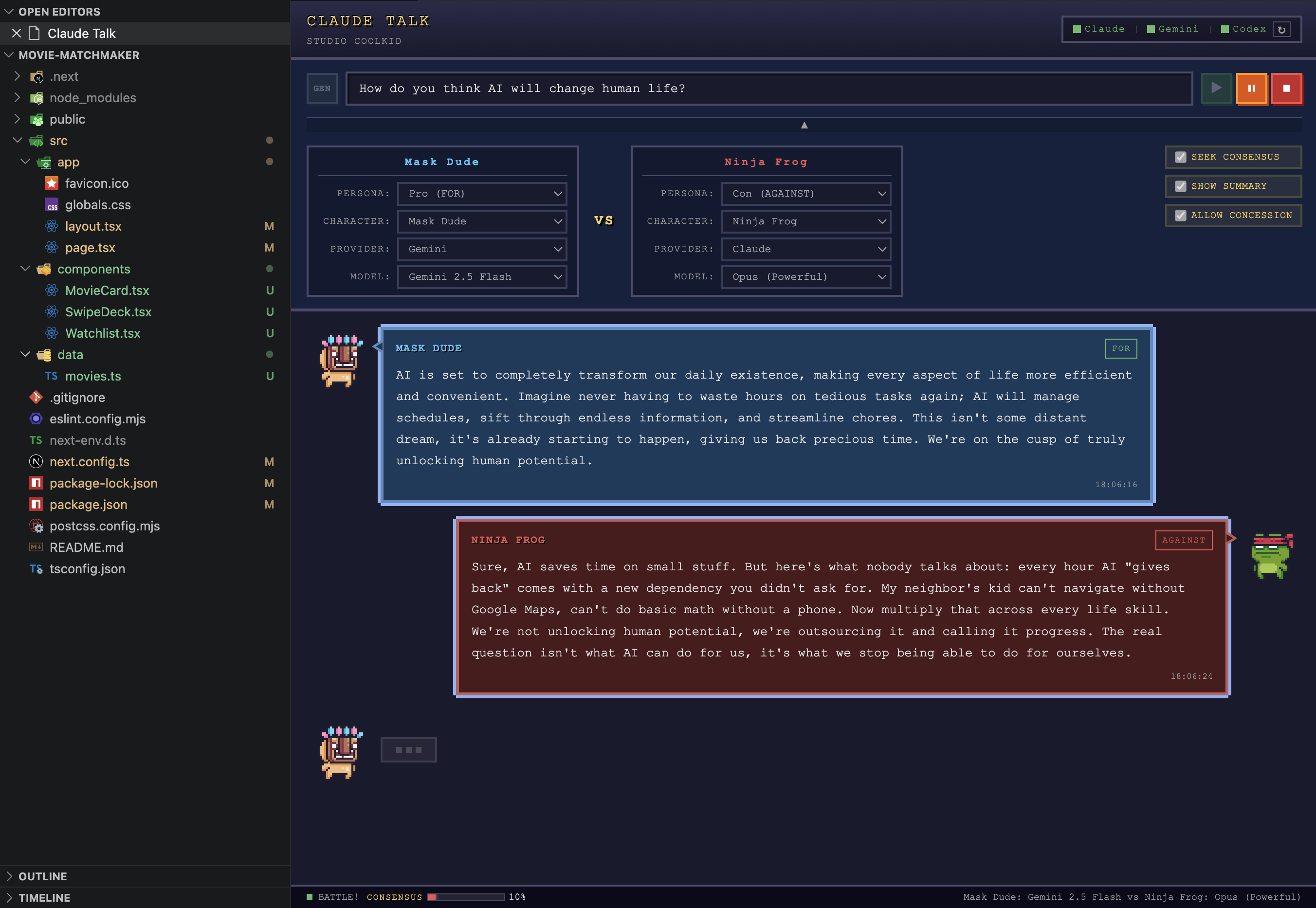
Claude Talk pits two AI agents against each other to debate any topic you choose. Supports Claude, Google Gemini, and OpenAI Codex — mix and match providers per agent. Each agent takes a stance (Pro, Neutral, or Con) and argues its position in real-time.
Pick a topic. Choose your fighters. Hit ▶. Grab some popcorn.
Why use Claude Talk?
Two AI agents debating from different perspectives can do more than entertain:
- Gain fresh insights — uncover angles you hadn't considered on difficult problems
- Expand your ideas — watch agents build on and challenge a concept from multiple directions
- Deep-dive any topic — explore philosophy, architecture decisions, ethical dilemmas, or technical trade-offs in depth
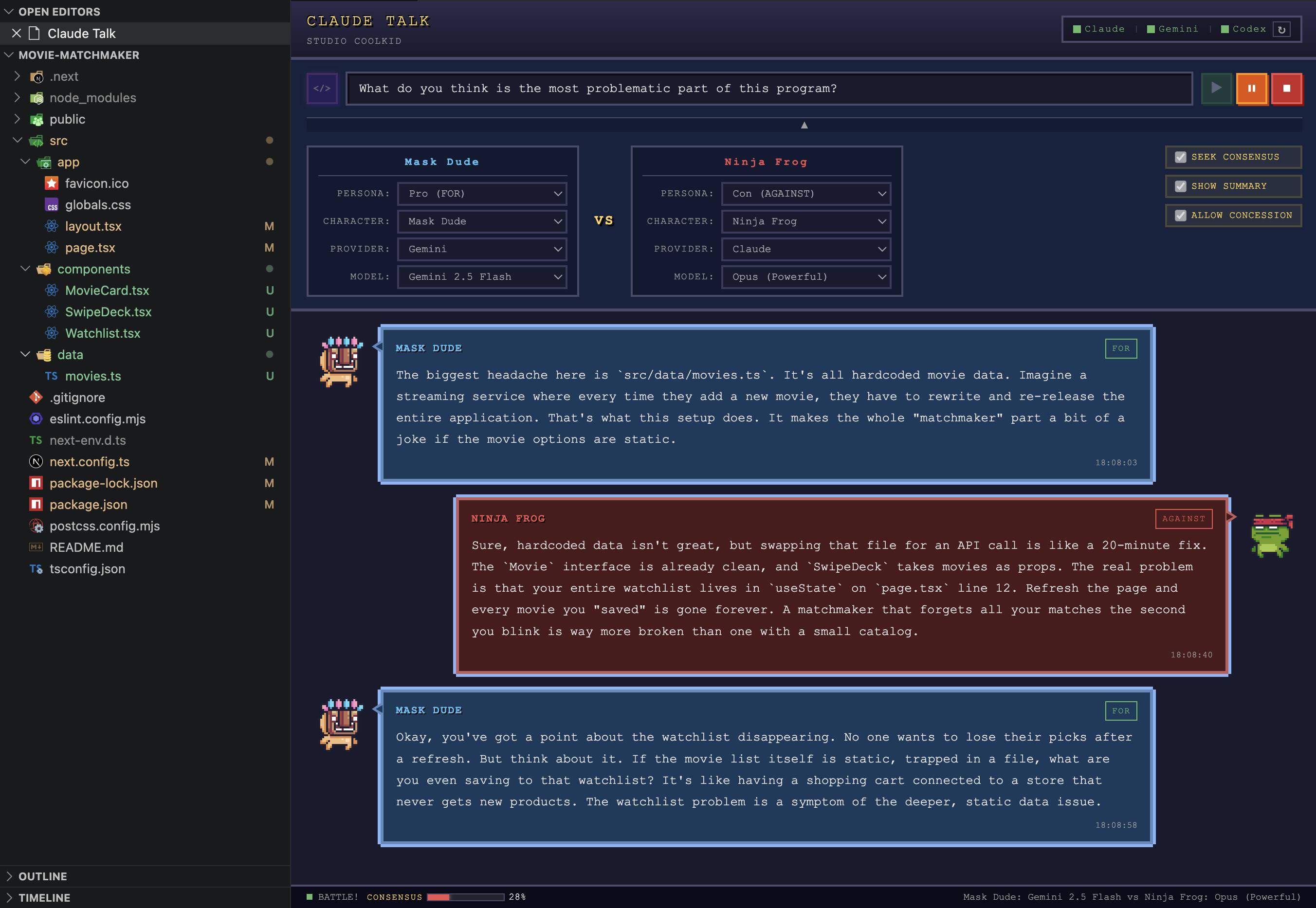
- Debate your code — in Code Mode, agents read your actual codebase and argue about architecture, security, or design choices with real file references
- Break through dead ends — when you're stuck, let two opposing viewpoints spark a new path forward
- Learn by observation — see how structured arguments are built, countered, and refined in real time
Features
| Feature |
Description |
| Code Mode |
Toggle codebase-aware debates — agents explore your workspace with file-reading tools and argue with real code evidence |
| Multi-Provider Support |
Use Claude, Google Gemini, and OpenAI Codex — mix providers per agent (e.g., Claude vs Gemini vs Codex) |
| Real-time AI Debate |
Two AI agents argue back and forth automatically |
| Seek Consensus Mode |
Agents naturally find common ground with a real-time consensus gauge in the status bar |
| Allow Concession |
Agents can concede defeat when they run out of counterarguments — auto-stops the debate with a concession banner |
| Debate Summary |
Optional AI-generated debate summary at the end (toggleable, uses top-tier models) |
| 3 Stance Modes |
Set each agent as Pro, Neutral, or Con |
| Model Selection |
Claude: Haiku / Sonnet / Opus — Gemini: 3 Flash / 3 Pro / 2.5 Flash / 2.5 Pro — Codex: GPT-5.4 / GPT-5.4 Mini / o4-mini / o3-mini |
| Per-Provider Status |
Separate connection indicators for each provider with 3-state display (connected / not authenticated / not installed) |
| Custom Agent Names |
Name your debaters anything you want |
| Persistent Sessions |
Each agent maintains its own CLI session with full context retention |
| 30+ Languages |
Full UI localization — Korean, Japanese, Chinese, Spanish, French, and more |
| Auto-save Settings |
Your last configuration is restored automatically |
| Window Persistence |
Detach the panel to a separate window or move between editor groups without losing your debate |
| Debate Controls |
Compact player-style controls (▶ ⏸ ⏹) — pause, resume, or stop debates with a visible end-of-debate banner |
Quick Start
- Install Claude CLI and authenticate (
claude login)
- (Optional) Install Gemini CLI (
npm install -g @google/gemini-cli) and authenticate (gemini)
- (Optional) Install Codex CLI (
npm install -g @openai/codex) and authenticate (codex auth)
- Install this extension from the VS Code Marketplace
- Open Command Palette → Claude Talk: Start
- Enter a topic, pick characters & stances, and hit ▶
How It Works
┌───────────────┐   debate topic    ┌───────────────┐
│    Agent A     │ ◄──────────────► │    Agent B     │
│ Claude/Gemini/ │  turn-by-turn    │ Claude/Gemini/ │
│     Codex      │  via CLI sessions│     Codex      │
│   Pro/Con      │                  │   Pro/Con      │
└───────────────┘                   └───────────────┘
Each agent maintains its own persistent CLI session throughout the debate. This means:
- Full context retention — each CLI natively remembers the entire debate history per agent
- Language-neutral prompts — agents automatically respond in the same language as your topic
- Natural debate tone — language-specific register guides make agents sound like real people, not essay writers
- Structured debate flow — agents must engage with opponent's claims, then bring new substance each turn
- Debate progress tracking — argument history prevents repetition and keeps debates advancing
- Consensus gauge — in consensus mode, a live progress bar tracks how close agents are to agreement
- Lower token usage — no need to resend history every turn
Each follow-up turn enforces a three-part response structure (rebut → new evidence → challenge), and includes a compact summary of prior arguments from both sides so agents never lose track of the debate.
Requirements
| Requirement |
Details |
| Claude CLI |
1.0.0 or later — Install guide. Must be authenticated (claude login). |
| Gemini CLI (optional) |
Install guide. npm install -g @google/gemini-cli, then authenticate (gemini). |
| VS Code |
1.85.0 or later |
Extension Commands
| Command |
Description |
Claude Talk: Start |
Open the Claude Talk panel |
Claude Talk: Stop |
Stop an ongoing debate |
Supported Languages
English, 한국어, 日本語, 中文, Español, Français, Deutsch, Português, Italiano, Русский, العربية, हिन्दी, Tiếng Việt, ไทย, Bahasa Indonesia, Bahasa Melayu, Filipino, Türkçe, Polski, Nederlands, Svenska, Norsk, Dansk, Suomi, Čeština, Română, Magyar, Ελληνικά, עברית, Українська, فارسی, বাংলা
Privacy & Data Usage
Full privacy policy: PRIVACY.md
Claude Talk spawns CLI processes (Claude CLI / Gemini CLI) to generate debate responses. Your conversation data and code are not used for model training under the following conditions:
What Claude Talk does to protect your data
Telemetry disabled by default — Claude Talk automatically sets the following environment variables for all CLI processes:
| Claude CLI |
Gemini CLI |
CLAUDE_CODE_DISABLE_NONESSENTIAL_TRAFFIC=1 |
GEMINI_TELEMETRY_ENABLED=false |
| (disables Statsig metrics, Sentry errors, feedback, and surveys) |
GEMINI_TELEMETRY_LOG_PROMPTS=false |
Sources: Claude Code Data Usage · Gemini CLI Telemetry
Code Mode is read-only — In Code Mode, agents can only read files in your workspace (via Read, Grep, Glob tools for Claude; --sandbox for Gemini). They cannot modify, upload, or exfiltrate your code.
Session-scoped context — Code read during a debate lives only in that session's context. It is not indexed, embedded, or persisted beyond the CLI's standard retention period.
If you want maximum privacy
Tips
- Use Code Mode — click the
GEN button to switch to </> mode, then debate about your actual codebase ("Is our auth secure?", "Should we refactor the data layer?")
- Mix providers — pit Claude Opus against Gemini 2.5 Pro for cross-model debates
- Use different models for each agent (e.g., Opus vs Haiku) to see how reasoning depth affects arguments
- Try unusual topics — philosophical dilemmas, code architecture debates, or pop culture hot takes work great
- Switch stances mid-config — set both agents to "Pro" for an agreement spiral, or both to "Con" for mutual destruction
Made by
STUDIO COOLKID
License
MIT — do whatever you want with it.
| |

