Devbox Agents
Run Claude Code, Codex and Antigravity on your remote dev box, each agent in its own git worktree and tmux session. Agents keep running when your laptop is closed or the connection drops. Reconnect and every session is live again, including everything that happened in between.
What it does
- One-step sessions. Pick a repository and an agent; the extension creates a worktree on a new
agent/<name> branch, opens a tmux session in it and starts the agent.
- Many agents at once. Claude Code, Codex and Antigravity side by side, each isolated in its own worktree.
- Follow along. Click a session and its terminal attaches and its worktree appears in the explorer.
- Get notified. A notification, badge and status bar counter when an agent waits for permission or has finished its turn.
- Resume anything. Browse past chats of every agent per repository and resume them in a fresh tmux session.
- Keep the server tidy. See every running
claude/codex/agy process, spot orphaned ones, and clean up worktrees only when they have no uncommitted changes.
- Repositories at a glance. Branch, ahead/behind and local changes per repository, and clone a new one on the server by pasting a link.
What you need
This extension runs on the server, inside a VS Code remote window (Remote-SSH, WSL, Dev Containers or Codespaces).
On your laptop:
On the server:
- Linux
tmux 3.2 or newer, git 2.38 or newer, bash- At least one of Claude Code, Codex or the Antigravity CLI (
agy), installed and logged in on the server. Agents that are not installed are hidden.
sudo apt install -y tmux git
curl -fsSL https://claude.ai/install.sh | bash   # Claude Code
npm install -g @openai/codex                     # Codex
curl -fsSL https://antigravity.google/cli/install.sh | bash   # Antigravity
The extension installs no software on your server and never stores anything in your repositories.
Getting started
- Connect VS Code to your server.
- Install Devbox Agents in that window. VS Code installs it on the server side.
- Run Devbox Agents: Open Settings and check
repoRoots (default ~/repos) and worktreesRoot (default ~/worktrees).
- Run Devbox Agents: Install Status Hooks… once for notifications.
- Click + in the Sessions view.
Recommended layout
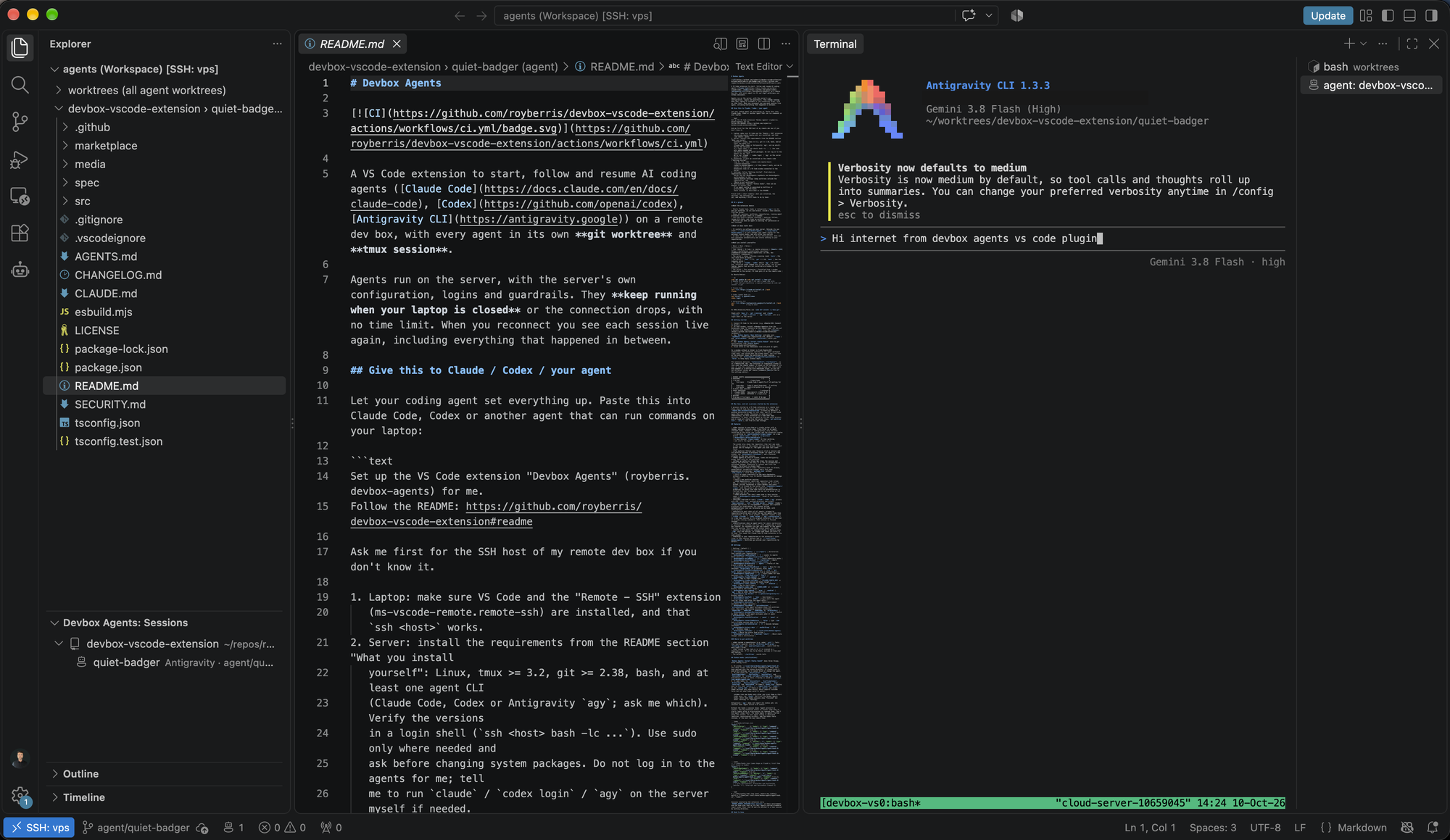
- Left: the Explorer, with Devbox Agents: Sessions docked below it. Drag the Sessions view from the Devbox Agents sidebar onto the Explorer.
- Middle: the file you are looking at. Claude's diffs open here too (Connect Claude to Editor).
- Right: the terminal with the agent session. Right-click the panel title → Panel Position → Right, or set
"workbench.panel.defaultLocation": "right".
With the default focusMode (activeSessions) the explorer shows exactly the worktrees of your running sessions, and clicking a session opens its terminal on the right.
Why tmux?
A process started by a VS Code extension on a remote host is stopped when VS Code has been disconnected for a few hours, and a pending permission prompt is lost with it. Agents in tmux survive indefinitely, so Devbox Agents is a UI over tmux sessions: it never runs an agent as its own child process.
More
Full documentation, all settings and troubleshooting: github.com/royberris/devbox-vscode-extension
Issues and ideas: GitHub issues

