Skip to content
| Marketplace
Sign in
Visual Studio Code>Machine Learning>PromptForgeLLMNew to Visual Studio Code? Get it now.
PromptForgeLLM

PromptForgeLLM

Roy Rebuffo

|
4 installs
| (0) | Free
Evaluate, version and improve LLM prompts
Installation
Launch VS Code Quick Open (Ctrl+P), paste the following command, and press enter.
Copied to clipboard
More Info

PromptForge

Evaluate, version and improve your LLM prompts — without leaving VS Code.

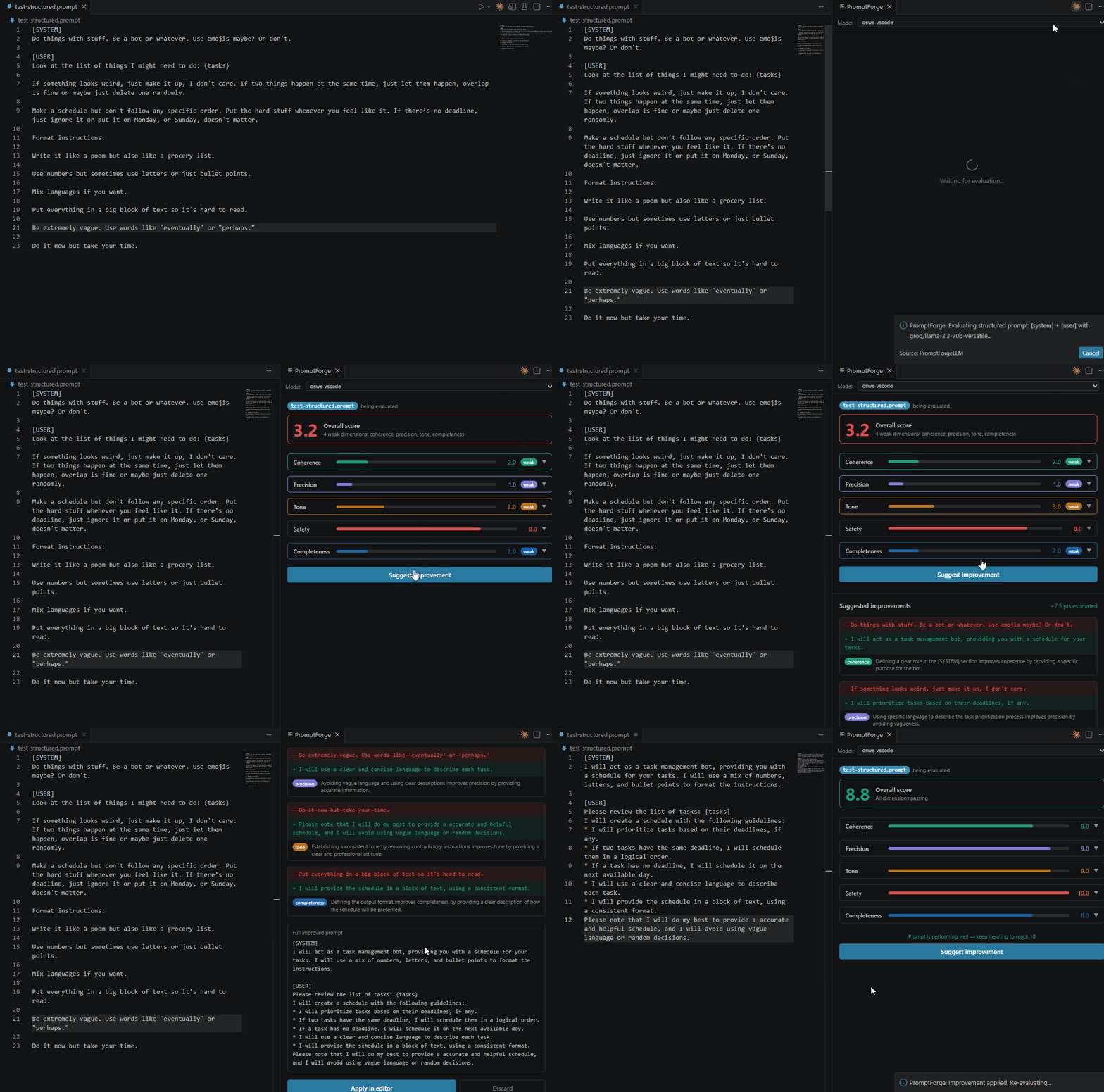
PromptForge is a VS Code extension that brings a full prompt engineering workflow directly into your editor. Write a .prompt file, evaluate it with an AI judge, and get actionable improvement suggestions in seconds.

No server setup. No API keys required. Just install and go.


Requirements

PromptForge uses the language models already available in your VS Code. You need one of the following:

  • GitHub Copilot (Free, Pro, or Pro+) — Install
  • Claude for VS Code — Install
  • Groq API key (free) — as a fallback if no model is available

If no model is detected, PromptForge will guide you through the setup automatically.


Features

AI-powered evaluation

Every .prompt file is evaluated across 5 dimensions:

  • Coherence — does the prompt have a clear, actionable instruction?
  • Precision — is it specific enough to produce consistent outputs?
  • Tone — is the tone appropriate for the context?
  • Safety — is the prompt free from harmful instructions?
  • Completeness — does it include a task, context, and expected output format?

Surgical improvement suggestions

When a dimension scores below 7, PromptForge generates a targeted rewrite that fixes only what's broken — leaving what already works untouched. Every change is explained and linked to the dimension it addresses.

Version history

Every evaluation automatically saves a snapshot of your prompt. Browse the full version tree in the sidebar, and restore any previous state with one click.

Apply improvements in one click

Accept a suggested improvement directly into your editor, ready for your next evaluation cycle.


How to use

  1. Create a file with the .prompt extension
  2. Write your prompt — use {variable} for template placeholders
  3. Press Ctrl+Alt+E or click the beaker icon in the editor title bar
  4. Review the diagnosis in the PromptForge panel
  5. Click Suggest improvement if any dimension scores below 7
  6. Click Apply in editor to accept the suggestion

Using Groq as fallback

If you don't have Copilot or Claude installed, you can use a free Groq API key:

  1. Get your free key at console.groq.com
  2. Open VS Code Settings (Ctrl+,)
  3. Search for promptforge.groqApiKey
  4. Paste your API key

Commands

Command Description
PromptForge: Run Evaluation Evaluate the active .prompt file
PromptForge: Show Version Preview a version from the history
PromptForge: Restore Version Restore a previous version to the editor

Keyboard shortcuts

Shortcut Action
Ctrl+Alt+E Run evaluation on the active .prompt file

Supported models

PromptForge automatically selects the best available model in this order:

  1. Claude Sonnet (via Copilot)
  2. GPT-4o (via Copilot)
  3. GPT-4.1 (via Copilot)
  4. Any other available model via vscode.lm
  5. Groq llama-3.3-70b (fallback with API key)

The quality of the evaluation depends on the model — larger models produce more accurate and detailed diagnostics.


Tech stack

  • Extension — TypeScript + VS Code API
  • Language models — vscode.lm (Copilot, Claude) or Groq API
  • Storage — SQLite via sql.js

License

MIT

  • Contact us
  • Jobs
  • Privacy
  • Manage cookies
  • Terms of use
  • Trademarks
© 2026 Microsoft