

WL Translation Engine
FeaturesAutocomplete for
|



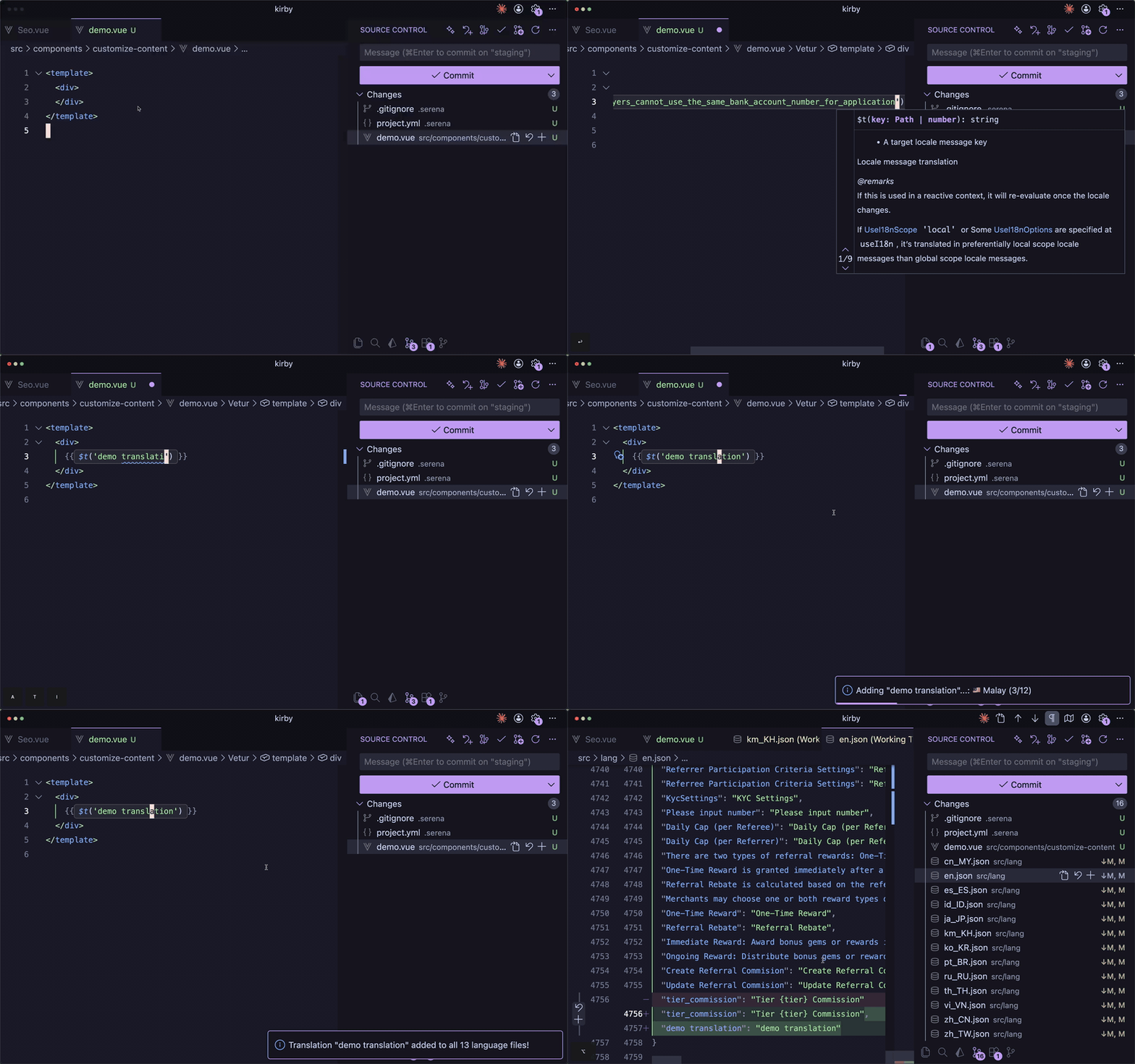
| Command | Shortcut | Description |
|---|---|---|
| Add Translation | Cmd+Shift+T |
Add a new translation key |
| Search & Insert | Cmd+Shift+K |
Search existing keys and insert |
| Refresh Cache | - | Reload all translation files |
Installation
From VS Code
- Open VS Code
- Press
Cmd+P/Ctrl+P - Type
ext install RithyTep.kirby-i18n - Press Enter
From Marketplace
Install from VS Code Marketplace
Requirements
- VS Code 1.85+
- Vue/TypeScript/JavaScript project with language JSON files
Configuration
Add to your .vscode/settings.json:
{
  // Path to language files (relative to workspace)
  "kirby-i18n.langPath": "src/lang",

  // Source language for translations (default: "en")
  "kirby-i18n.sourceLanguage": "en",

  // Custom language definitions for unknown codes
  "kirby-i18n.customLanguages": {
    "fr": {
      "name": "French",
      "flag": "🇫🇷",
      "apiCode": "fr-FR"
    },
    "de": {
      "name": "German",
      "flag": "🇩🇪",
      "apiCode": "de-DE"
    }
  }
}
Settings
| Setting | Default | Description |
|---|---|---|
kirby-i18n.langPath |
src/lang |
Path to language JSON files directory |
kirby-i18n.sourceLanguage |
en |
Source language code for translations |
kirby-i18n.customLanguages |
{} |
Custom language definitions |
Supported Languages (100+ Built-in)
The extension includes 100+ languages with proper names and flag emojis:
Popular Languages:
- 🇺🇸 English (
en) • 🇨🇳 Chinese Simplified (zh_CN) • 🇹🇼 Chinese Traditional (zh_TW) - 🇯🇵 Japanese (
ja_JP) • 🇰🇷 Korean (ko_KR) • 🇹🇭 Thai (th_TH) • 🇻🇳 Vietnamese (vi_VN) - 🇫🇷 French (
fr,fr_FR) • 🇩🇪 German (de,de_DE) • 🇪🇸 Spanish (es,es_ES) - 🇮🇹 Italian (
it,it_IT) • 🇵🇹 Portuguese (pt,pt_BR) • 🇷🇺 Russian (ru_RU) - 🇳🇱 Dutch (
nl) • 🇵🇱 Polish (pl) • 🇺🇦 Ukrainian (uk) • 🇹🇷 Turkish (tr) - 🇸🇦 Arabic (
ar) • 🇮🇱 Hebrew (he) • 🇮🇷 Persian (fa) • 🇮🇳 Hindi (hi)
Regional Languages:
- Southeast Asia: 🇮🇩 Indonesian, 🇲🇾 Malay, 🇵🇭 Filipino, 🇰🇭 Khmer, 🇱🇦 Lao, 🇲🇲 Myanmar
- South Asia: 🇧🇩 Bengali, 🇮🇳 Tamil, Telugu, Marathi, Gujarati, 🇳🇵 Nepali, 🇱🇰 Sinhala
- Europe: 🇸🇪 Swedish, 🇩🇰 Danish, 🇳🇴 Norwegian, 🇫🇮 Finnish, 🇨🇿 Czech, 🇭🇺 Hungarian, 🇷🇴 Romanian, 🇬🇷 Greek
- Africa: 🇰🇪 Swahili, 🇿🇦 Afrikaans, 🇪🇹 Amharic
Note: Unknown language codes display as 🌐 CODE. Use customLanguages setting to add custom names and flags.
How It Works
- Extension auto-detects
*.jsonfiles in your language directory - Watches for changes and updates in real-time
- Uses MyMemory API for auto-translation
- Supports any number of languages (100+ built-in!)
What's New in v1.0.18
- Sequential Translation - Removed parallel requests to prevent rate limiting
- Reliable API Calls - One request at a time with 150ms delay between each
- No More Rate Limits - Slower but guaranteed to complete without API errors
What's New in v1.0.17
- Flexible Key Names - Translation keys can now contain any characters (spaces, apostrophes, etc.)
- Simplified Validation - Only checks for empty or duplicate keys
What's New in v1.0.16
- Enhanced Rate Limiting - Prevents API rate limiting with smarter request throttling
- Retry with Backoff - Automatic retry (3 attempts) with exponential backoff for failed requests
What's New in v1.0.15
- Fixed Duplicate Matches - No more duplicate Quick Fix actions or hover messages
- Negative Lookbehind - Prevents
t()pattern from matching$t()calls
What's New in v1.0.14
- Apostrophe Support - Keys with apostrophes now work correctly:
$t("player's wallet") - Improved Regex - Separate patterns for single/double quotes for proper text matching
What's New in v1.0.13
- Fixed Hover Preview - Properly escape special characters (|, newlines) in translations
- Long Text Support - Truncates very long translations in hover for better readability
What's New in v1.0.12
- Simplified Key Input - Removed batch comma-separated key feature for cleaner UX
- Streamlined Code - Cleaner, more maintainable codebase
What's New in v1.0.11
- Parallel Translation - 10x faster! Translations now run in parallel batches
- Fast Performance - Translate to 10+ languages quickly with parallel processing
- Optimized API Calls - Smart batching for efficient translation
What's New in v1.0.10
- Enhanced Translation Panel - Click missing keys to add translations inline
- Bulk Actions - Right-click language to "Add All Missing Translations" at once
- Context Menu - Right-click missing keys to Add, Copy, or Delete
- Delete Key - Remove translation keys from all language files
What's New in v1.0.9
- Smart Key Transformation - Underscore keys auto-convert to readable text:
total_commission_earned→ "Total commission earned" - Auto-Capitalize - First letter automatically capitalized for proper English
- Pre-filled Suggestions - English text input pre-filled with smart suggestions from key names
What's New in v1.0.8
- Go to Definition - Ctrl+Click on
$t('key')to jump to the JSON file - Find All References - Find every usage of a translation key
- Missing Key Warnings - Visual diagnostics for undefined keys
- Extract to Translation - Select text and extract to i18n with auto-translate
- Translation Status Sidebar - See completion % per language with missing keys
What's New in v1.0.7
- 100+ built-in languages - Proper names and flag emojis for most common languages
- Dynamic language detection - Auto-detects from JSON files
- Configurable source language - Not limited to English
- Custom language definitions - Add any language with custom flags
- Workspace settings - Configure per project in
.vscode/settings.json
Contributing
Contributions are welcome! Please open an issue or submit a PR.
License
MIT © RithyTep
If this extension helps you, please consider:
- Giving it a ⭐ on GitHub
- Leaving a review on the Marketplace