Bachata
Get started · Documentation · Configure pipelines · Choose assistants · Browser Bridge · What’s new Build your own AI workflow for software workBachata lets you decide how AI assistants work together: choose the assistants, give each a job, and arrange the steps. It runs inside Visual Studio Code, an app used to write software. An AI assistant is a tool you can ask, in everyday language, to help with tasks such as planning a feature, writing code, or finding bugs. For example, you can have one assistant make a plan, another challenge it, then have them write, review, and revise the code. Bachata calls this sequence a pipeline. You choose the instructions, who handles each step, how results pass between steps, and when to repeat a review or ask for your decision. Start with a ready-made pipeline or edit one to fit how you work. Use a short sequence for a quick review, or a longer one for a change that needs planning and several rounds of feedback. Save your pipeline and use it again on the next task. Bachata coordinates the handoffs and keeps the results together. You can:
Bachata uses AI tools you install and sign in to separately. It does not include an AI service or subscription. The optional Browser Bridge lets pipelines use conversations on websites such as ChatGPT and Claude. Some workflows only review files. Others edit your selected folder or keep changes in a separate working copy for you to apply. Bachata shows this before you start and never creates a Git commit. AI can make mistakes, even when assistants agree. Bachata works with files on your computer. Selected code and messages go to the AI provider you choose. There is no Bachata account, hosted service, or telemetry. Requirements
Using AI chat websites is an optional advanced workflow. They additionally need the separate Browser Bridge and a local VS Code Extension Host. See Browser Bridge install. Install and run a first review
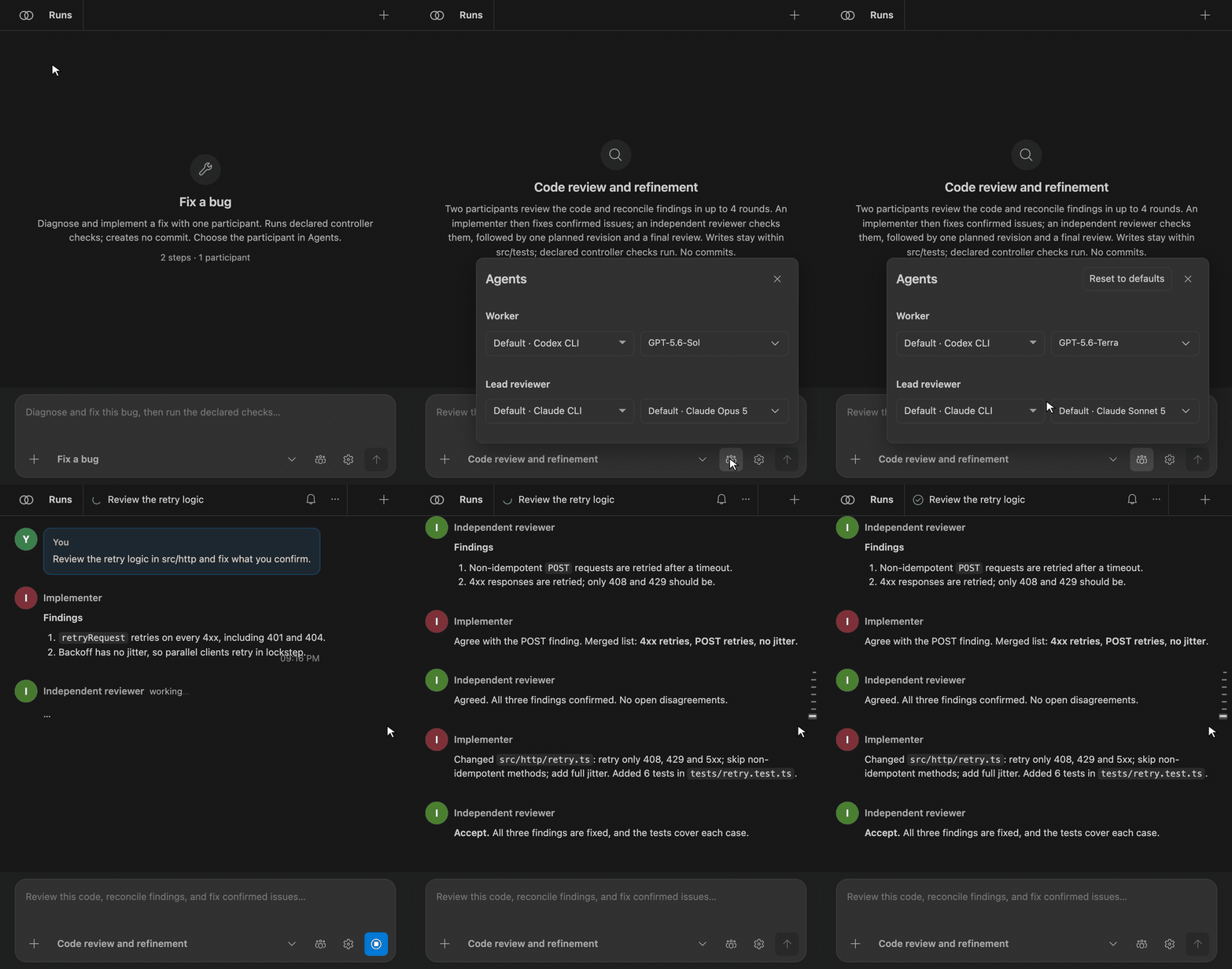
This first review is read-only. Run Bachata: Doctor if Codex or Claude Code is not ready. Run later reviews in fresh sessions against the updated codebase, and do not treat a first clean report as proof that no defects remain. What can Bachata help you do?Review codeAsk one or two AI assistants to inspect a file, selection, commit, branch, or local changes. Review runs are read-only. They cannot change the repository. Plan a changeCreate an implementation plan without changing files. The Lead can review the Worker's plan, challenge missing steps, and bubble material choices up to you. Fix a bugLet an AI assistant diagnose and implement a fix inside declared boundaries. You can use a second AI assistant to review the diagnosis and change. Some workflows can also run approved repository checks after the work. Paired managed fix combines independent diagnosis, implementation, Lead review, bounded revision, and declared checks. Work waits in a retained worktree. You can apply whole files or single hunks. Bachata reruns declared checks against exact selected bytes before staging a partial selection. Complete larger tasksBreak structured Work with browser LLM conversationsBachata can coordinate two separate browser conversations as Worker and Lead. One conversation works on the task. The other reviews it and can request a bounded revision. These are LLM conversations, not local coding agents. Bachata passes them selected context and controls any allowed code changes. Two optional features can use a local Ollama or LM Studio model with browser conversations. Both are off by default, and each is checked on its own task before use:
The interpreter also has an internal, optional typed-decision adapter seam for testing decision runtimes such as Laya. It is not a shipped Laya backend: no checkpoint, Python runtime or endpoint is included, normal Qwen/Ollama and LM Studio behavior is unchanged, and invalid or uncertain adapter output falls back to the existing path. See the Laya compatibility boundary. With a pipeline selected, turn either one on under Agents → Local models. See Local models. Why use Bachata?LLM work is probabilistic. One session can produce a useful requirement, plan, change, or review and still be incomplete or wrong. Repeated fresh cycles refine the project state. Software quality improves in the codebase and in the accepted decisions, not in one perfect conversation. LLMs also produce more text than a human can supervise. Bachata keeps the run history and the drill-down evidence, but the top-level control surface should show only accepted material outputs, direction-changing core decisions, unresolved disagreements, material assumptions, new material risks, and the minimum evidence needed to judge them. Routine chatter, repeated or resolved claims, successful mechanics, and raw outputs belong in the drill-down history. Bachata helps you:
Routine orchestration stays hidden behind progressive disclosure. Session-lived
bubble-up notifications show concise decisions, material changes, failures, or
reversible retained work. A bell with an unread count and one optional inline
line carry them. Bachata writes those lines from recorded state with no extra LLM
call. No run guarantees correctness. Two consecutive quiet fresh reviews may produce a saturation signal, which is neither proof nor a required stop. You may continue or close the cycle, and in closing it you accept the residual uncertainty. What this does not proveOne pipeline is only one pass. A second LLM can catch ordinary mistakes made by the first, but two models can share the same blind spot or follow the same wrong premise. No consensus rule and no arbiter fixes misdirection. Only a human can correct direction. Repeated refinement is the product. Accepted specifications, decisions, plans, changes, and corrections accumulate across cycles, and quality accrues in that accepted state rather than in one perfect conversation. In a refining or debugging preset, initial Lead and Worker findings are competing hypotheses, not actionable truth. The pipeline challenges each finding and records a disposition. There is no pipeline bug list before that convergence. A challenged, pipeline-accepted routine finding becomes actionable without another human ruling, and a pre-authorized pipeline may fix it. Material unresolved findings, direction or scope changes, ambiguous identity, and irreversible actions still stop for you. Rejected claims and the debate behind them stay in the history. The Lead is not right by virtue of its role. Other presets converge on different artifacts, not on bug lists. A pipeline-accepted finding carries its own state: awaiting a fix, a fix running, a fix applied, or verified. Verification can come from a fresh, independent review against the current repository state that no longer reports the applied finding, or from explicitly accepted, finding-specific external verification evidence. An applied fix is not a verified fix. You supervise by exception: inspect, reject, reopen, or restore a semantic disposition. Discard and restore appear only for reversible retained work that Bachata owns. To record a human verification, run Bachata: Record External Evidence, select a saved local evidence copy, choose the finding, and select Evidence that this finding is fixed. State the acceptance criterion and verification environment. Bachata binds that record to the current repository candidate. Accept it in Direction to resolve the finding; changed candidates, unavailable or ignored scope, expired evidence, and unresolved challenges refuse the transition. An ordinary citation records evidence without closing the finding. This flow records your verification; it does not execute the reproduction or turn a failed provider run into a successful one. Evidence copies must be regular local files of at most 4 MiB. The copy stays local. A cycle is bound to one repository candidate: the commit, the branch, and a digest of the working tree at the moment it was baselined. Recorded checks belong to that candidate. If the repository moves underneath it — a new commit, a different branch, an edited working tree — Bachata marks the recorded checks stale and asks you to rebaseline. Which run tab you happen to have open never changes any of this. Bachata can use local coding tools such as Codex and Claude Code. As an advanced option, it can also coordinate separate ChatGPT, Claude, or other supported LLM conversations in your browser. Bachata does not ship an LLM. Refinement loop
An initiative can contain many cycle types. A cycle can contain many fresh pipeline runs. A pipeline run is one bounded execution, not the whole lifecycle. Direction names one next action and can run it. An accepted finding opens a bounded fix scoped to that finding. A drifted candidate rebaselines the cycle, and stale checks are rerun. After two quiet fresh reviews, Bachata may report that no material change was found; you may continue or close. You never rebuild the workflow, the scope, or the prompt by hand. Not every artifact type is produced yet. A ruled review round persists a typed
A repository can hold more than one initiative. You create, switch, pause, complete, or abandon them explicitly; only one is active at a time, and each keeps its own cycles, findings, decisions, and artifacts. Two review rounds can describe one defect in different words. Within-run convergence owns duplicates inside one pass. Fresh review completes independent discovery first; only then does Bachata reconcile the final findings against prior stable identities. Clear matches merge automatically and keep both wordings in the finding's history. Novel findings receive new identities. Only genuinely ambiguous mappings, split descriptions, and matches against a finding you rejected reach you, and leaving them separate is a valid answer. Bachata never asks you to confirm an obvious duplicate. Different providers, or separate conversations with the same provider, may fill the Lead and Worker roles. Independent-first pipelines remain useful inside one pass. Agreement coordinates the result; it never proves the result or the direction correct. Initiative state is local to this VS Code workspace and its storage identity. It is not stored in the repository and not synchronised. Moving or re-cloning a repository to a different path can require a new initiative. Bachata does not claim portable or repository-backed initiative history. An initiative can be exported to a JSON bundle and imported elsewhere as a separate initiative; import does not combine or synchronise initiative state. See State and history. Finding reconciliation is not Git integration. Bachata never merges Git branches automatically. Accepted retained work reaches current branch only after explicit human apply, and Bachata stages it without commit, rebase, tag, push, or automatic merge. See Product doctrine for mandatory boundaries. Execution mechanicsBefore a run, Bachata states the authority that workflow holds. After a run, it keeps the changed files, the recorded checks, the decisions, and the remaining risks. These mechanics make refinement inspectable. Execution restriction is not itself product value, and new friction needs a concrete failure mode or platform requirement behind it. The exact protection depends on the workflow. Every run contract states one of five assurance labels before the run starts:
The two controller-checked labels always name the checks they ran, because the
checks differ per workflow. Which assurance a given workflow resolves to is derived per run from its pipeline, its write scope and its declared checks. The run contract states it before the run starts; this document does not restate it, because a restated table is the kind of claim that outlives the behaviour it described. A Read-only and model-reviewed are not controller checking. A model saying "the tests pass" is never recorded as a passing check. A controller check that ran syntax and type checking is never presented as a passing test suite. Bachata never creates a commit. Only the isolated workflows keep their work outside your current branch until you apply it; the others change the selected workspace directly. The run contract and the run summary both tell you which behaviour applies. Missing evidence stays missing. A model summary is not a repository check.
Consensus, Lead ruling, passing checks, and Local control and privacyBachata runs against your local Git checkout. There is no Bachata account, no hosted Bachata service, and no telemetry. Prompts, selected code, and answers still go to the LLM providers you choose. Optional local-model features send bounded evidence only to the Ollama or LM Studio endpoint they use. That endpoint is on this machine unless you separately allow a remote interpreter endpoint. Bachata shows the planned outbound context before a run. Provider credentials stay with the provider's CLI or browser session. Read Privacy, Security, and No telemetry for the full boundaries. Efficient context — experimentalFrozen. An offline pilot found no saving: after one framing fix, every recorded run was correct in both modes, and efficient mode's median provider input was equal or higher. See Token-efficient harness. Off by default, and the Efficient context · Experimental control is hidden while it is off.
The Advanced setting Current statusBachata is currently a closed-alpha candidate, not a stable public release. Automated checks exist, but exact-build provider, platform, browser, and graphical validation is still incomplete. The support matrix records what is known. Recorded longitudinal evidence for cross-run core-decision compression and review saturation remains a roadmap requirement. The current one-run benchmark has no recorded result and supports no quality claim. See Roadmap and benchmark limits. The local TODO context pilot ships in source. Compact peer handoffs and browser changes remain proposals. Project release gates remain pending. See the public documentation and technical design. Bubble-up notifications, automatic post-discovery finding reconciliation, and the first-class Z.AI GLM provider identity ship in this build. Z.AI GLM is documented as a technical configuration only: Bachata makes no GLM Coding Plan entitlement claim, and its live provider smoke is a recorded human test, not an automated one. Language-aware context beyond TypeScript/JavaScript is post-release. The release verdict, validation record, provider terms, and compatibility matrix are deliberately not packaged: each one names the SHA-256 of the artifact it describes, so shipping them inside that artifact would change the hash they had just recorded. Read them in the repository. Learn more
Autonomous verification runs `bachata:workspace-integrity` and `bachata:project-checks` by default. A `bachata:verifier:` descriptor declared in `.bachata/verifiers.json` is refused before any process starts unless one workspace-level approval has been recorded and the run was started by the Improve command; every other run refuses every descriptor. That approval says a human accepted these executables, not that they are safe: a descriptor names an executable and Bachata cannot reason about what that executable does, and an ordinary script can start a browser E2E runner from inside itself. Direct E2E command forms are still classified on the executable, argument vector and the package scripts of the stated working directory, and refused, as defense in depth. That classification does not follow a manager's `--prefix` or `--workspace` into another package, and it is not a proof that arbitrary code cannot launch E2E. `tests/humanE2ePolicy.test.cjs` asserts these boundaries at runtime, and this generated block records the declaration only.
|