Skip to content
| Marketplace
Sign in
Visual Studio Code>Programming Languages>Raze Language Support (Syntax Highlighting)New to Visual Studio Code? Get it now.
Raze Language Support (Syntax Highlighting)

Raze Language Support (Syntax Highlighting)

RazeLang

|
4 installs
| (0) | Free
Installation
Launch VS Code Quick Open (Ctrl+P), paste the following command, and press enter.
Copied to clipboard
More Info

Raze Language Support

If you're looking for the Raze compiler, please refer to the Raze compiler GitHub page

This project contains a tmLanguage grammar which is used to provide syntax highlighting for the Raze programming language. Download the Raze Language Support extension from the VScode Marketplace. Alternatively, you can manually install the extension by placing the raze-language-support directory within your vscode extensions folder (~/.vscode/extensions).

Samples

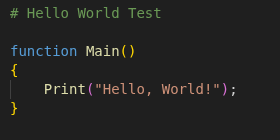
Hello, World!

Hello World Sample

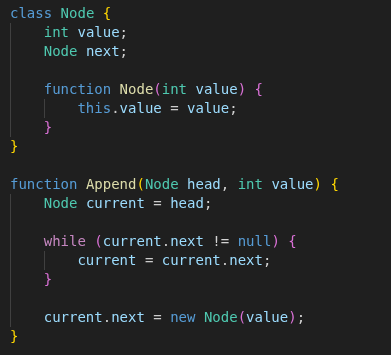
Linked List

OOP Sample

  • Contact us
  • Jobs
  • Privacy
  • Manage cookies
  • Terms of use
  • Trademarks
© 2026 Microsoft