Muse Spark Code (Unofficial)





Meta's Muse Spark as a coding agent in VS Code and compatible editors: a chat
panel that streams answers, reads and edits files with reviewable diffs, runs
commands behind permission modes, and lets you watch and steer subagents.
Available on Windows, macOS and Linux, with English and 14 translated languages.
Unofficial. Not affiliated with or endorsed by Meta. “Muse Spark” and “Muse
Code” are Meta trademarks. You bring your own credentials.
Enjoying Muse Spark Code? A star on GitHub helps other people find it.
Contents: What's new · Get started ·
Work in the panel
What's new in 0.18.2
- The landing screen shows the extension's own mark. The empty chat panel
showed the Meta logo beside the product name; it now shows the product's
own squiggled "m", blue in dark and light themes and in the theme's text
colour in high-contrast themes.
Earlier in 0.18.1
- Your own providers, a ChatGPT plan and Copilot work again. In 0.18.0
a turn on any of them stopped before it was sent, with an internal error.
Sorry for the broken release; Meta's own models were not affected.
- Usage from earlier versions is counted again. 0.18.0 left those records
out as not exact; nothing was deleted.
- Report a Problem opens again if you had changed a setting with a second
dot in its name; it used to answer "That did not work".
Earlier in 0.18.0
- Several accounts per provider, in the terminal and in ACP editors.
muse-spark-code-acp providers accounts lists, adds, orders and removes a
provider's accounts and sets their thresholds; auth set --provider <id> --account <id> stores a key for one account; exec --account <id> runs on
the account you name. In an ACP editor on a Model API key, /accounts
shows the list and the current account. Changing account inside a session,
pooled runs and an Accounts page in the editor are not available yet.
- See a tool call's arguments while the model writes them. On a Model API
key with
muse-spark-1.3-contributor, a tool row in the panel and in ACP
editors shows the file path, command, search pattern or URL as soon as it
is complete; content and edits stay hidden and nothing runs until the call
is complete. Other models keep the finished-call row for now.
- Reviewing Git changes works without a Git filter. Without Git LFS or
another filter configured, every native review was refused since 0.15.0.
- The activity-bar icon is the extension's own mark, the squiggled "m".
Earlier in 0.17.2
- Long replies from your own providers and a ChatGPT plan finish.
Since 0.15.0 a reply from a provider you added in Models & Agents, or
from a ChatGPT plan sign-in, was cut off 30 seconds after the request
started. A reply now has no limit on its total time; one that goes
silent ends after 5 minutes, and the message says so.
Earlier in 0.17.1
- The provider picker works again. Models & Agents lists every provider
again, Anthropic and custom servers included; 0.16.0 and 0.17.0 showed only
"That did not work" and an empty list.
- Saving a provider keeps what worked. Save checks everything first, then
saves in order; if a later step fails, the saved parts stay saved and the
panel says what was not. Edit and Change Key keep the saved connection.
- The wizard's spending limit is your real conversation limit. It shows
the current limit, writes only when you change it, and asks before
replacing a limit someone changed meanwhile.
- Title Case labels. English buttons, menus, tabs and titles capitalize
every major word; sentences and messages keep sentence case.
- Smaller fixes. Chat action menus fan close around the row's …
button, highlighted-text actions included; a question's own-answer field no
longer overlaps the options and buttons around it, sharing a chat from an
ACP editor or the terminal shows its preview, an ACP session on a Model API
key starts without account details, DeepSeek's Thinking off sends
DeepSeek's own switch, a nearly spent budget stops with the budget message
instead of a Meta error, a Muse Code older than 1.4.3 that hits its
approval-record fault now gets the update command, and Help and these notes
describe only what works today and name the features still being built.
Earlier in 0.17.0
- Deterministic reports.
/report builds project, quality, milestone,
release and change reports from local facts, in Markdown, HTML, JSON or text,
with saved history and comparisons; nothing is sent to a model.
- Orchestrator playbook. The nine orchestration rules ship as a first-party
skill. In the ACP agent and the CLI,
/playbook status, record and
settings answer locally without a model call.
- Refreshed design. Shared design tokens and generated palettes style every
panel surface; an optional pinned OFL font pack serves standalone installs.
Earlier in 0.16.0
- Loop guarantees. Strict tool contracts and bounded hosted search
govern Model API tool calls. Independent reads can
run concurrently while their results keep call order. The loop bounds
continuations, refuses cut-short tool execution and stops repeated unchanged
calls. Structured side calls validate answers; headless runs can require a
bounded final-answer schema. See Agent loop guarantees
for capability gates and remaining native-reader qualifications.
- CPU and memory thresholds. Set machine-scoped limits to throttle, then
pause, new background work. Work stays on this machine.
- Disk floors. Disk-heavy launches wait below the free-space floor and
critical-volume writes refuse with a reason. Temporary cleanup requires
recorded ownership and proved tree exit. See
Keeping your machine responsive for the
settings, available routes and remaining integration qualifications.
Earlier in 0.15.0
- Bring your own models. Add OpenAI, Anthropic and Gemini keys or local
models in Models & Agents. ChatGPT sign-in is a Subscription Sharing
preview for eligible Plus/Pro accounts; Copilot uses a compatible VS Code
host's models. Features follow each selected model's capabilities.
- /legal. Scan licensing, copyright and source evidence without a model
call, export the report, and confirm supported header repairs. The report
states its coverage limits; it is not a legal certificate.
- Pi/SoL-Pi context improvements. The shared engine preserves
packed output, literal recall and cache-stable prompts.
- Usage & Cost. Open the local page for provider totals, token
counts, budgets and exports. Reported, estimated and unknown costs stay distinct.
Earlier in 0.14.5
- Prompt actions in one small menu. Save, share and use saved prompts
from the bookmark button on the composer toolbar or the right-click menu;
the three full-width buttons that covered the chat box are gone.
- ACP Registry sign-in. Clients that announce terminal sign-in the older
way now get the sign-in option too.
Earlier in 0.14.4
- Save your prompts. Right-click one of your own messages and choose
Save, or save from the composer or editor. Your personal prompt library
is available in every workspace; workspace prompts stay with their project.
- Reuse prepared text. Search the library and fill its variables before
inserting a prompt. Use prepares the text; it does not submit a model
request.
- Share prompts and chats. Choose a conversation-only or full export,
review the exact Markdown, HTML or JSON preview, then confirm copying,
saving or opening it in your browser. Confidential or unknown content is
refused with an explanation; detected secrets and private paths are scrubbed.
- ACP and terminal. Use local
/prompt and /share chat commands in ACP
editors, or muse-spark-code-acp prompts and share chat in the terminal.
Help & Reference lists the commands and the opt-in prompt sync setting.
Earlier in 0.14.3
Questions never block. A question Muse asks you is pinned in the
attention dock above the composer and kept in the transcript. After a minute
(museSpark.questions.deferAfterSeconds), Muse carries on with work that
does not need the answer.
Answer later. An unanswered question becomes an Open Question you can
answer any time using Answer on its transcript marker or the open-question chip; Dismiss closes it
without an answer. A late answer reaches Muse once, as your own message, and
approves nothing.
Find open questions. The view badge, tab title and History show how many
are open; Next Open Question and Previous Open Question
(Ctrl+Alt+J and Ctrl+Alt+Shift+J) cycle through them.
ACP editors. Editors with forms get each question as a form, withdrawn at
the deadline (--questions-defer-after); other editors get the text.
/questions lists open questions and /answer <n> <text> answers one.
Faster startup. Optional panels and menus load when first opened, keeping
the chat panel quick to start.
0.14.2
- Help & Reference. Type
/help or run Muse Spark: Open Help & Reference
for every command, setting, slash command, keyboard shortcut, CLI/ACP option
and paid feature.
- Search and copy. Find features by name or shortcut, copy details, and open
related settings.
- Accurate details. Help is generated from the extension's own tables.
Defaults, availability and paid costs are now described for each backend.
- Editors and terminal. Use
/help in the chat panel and ACP editors, or
muse-spark-code-acp help --all in the terminal.
0.14.1
- Safer shell commands. Commands the agent runs no longer see your
credential variables (API keys, tokens, passwords). Name any you want passed
through in
museSpark.shell.passEnvironmentVariables; scheduled and other
unattended commands never get them.
- Exact store badges. The Marketplace and Open VSX pages show the version
you are installing, not a cached older one.
- Faster start. The chat panel loads about 100 KiB less at startup; syntax
highlighting, dialogs and Tasks load when first needed.
- Fix: stopped or timed-out commands on macOS and Linux now wait until
their processes have exited.
0.14.0
- Tab Completions (see Tab completions). Alt+\ invokes
ghost text. First-use consent names the model price and the separate
$1.00/day default hard budget; your stored Model API key pays on either backend.
- Git and Pull Requests (see Git and pull requests).
Draft a commit or PR in the conversation, commit and push with confirmation,
and open a foreign PR in a held worktree until you confirm its trust card.
- Hooks and plugins (see Hooks). Import popular agent hook formats,
run Setup and Manual hooks on both backends, and use bounded Amp and OpenCode
plugins on the Model API backend. Hooks keep their permission and paid-use limits.
- Report a Problem (see Reporting a problem). Preview
the exact scrubbed report, remove items, then copy, save or open an issue.
The report is built locally and the extension sends nothing.
- Muse Judge phase 1 (see Muse Judge). The conversation model
can add uncalibrated caution to an approval; it cannot grant permission.
Model API Judge asks for paid-use consent and shares the durable daily budget.
Earlier releases are in the
changelog.
Get started
- Open Muse Spark from the activity bar in a trusted workspace.
- Sign in through the Muse Code CLI to use its subscription, or choose
Use an API key for your own Meta Model API key and pay-as-you-go billing.
The panel offers CLI installation when it is missing.
- Ask for a change, review the edits, and approve commands when prompted.
Plan asks the agent to plan before edits; Muse Code's own allow rules
still apply. Default, Auto, Accept edits and
Bypass offer the documented permission policies. Bypass removes ordinary
approval prompts, so choose it only when you intend that behavior.
Requires VS Code engine 1.99 or newer. Muse Code signs in independently; a key
pasted into this extension is stored in VS Code SecretStorage and never given
to the CLI. Linux users can use the Model API if the CLI is unavailable.
The project ships from four places: the
VS Code Marketplace,
Open VSX,
npm (the ACP agent, for
editors beyond VS Code) and
GitHub Releases
(both the .vsix and the agent's .tgz).
Work in the panel
Open Usage & cost for journal totals, provider limits and budgets; ACP and CLI
use the same local records and read-only companion page.
Stream Markdown, code, reasoning and tool output; attach images or supported
files, mention workspace context, and use slash commands and saved prompts.
Resume, archive, rename, fork and export conversations; rewind conversation
context or restore supported Model API file checkpoints.
Review a branch, commit or uncommitted changes; accept, revert or comment on
individual edits in the review pane.
Follow goals, tasks, background commands, schedules, workflow runs, subagents
and the session board. Compare best-of-N attempts in separate worktrees.
Use project rules, custom agents, memory and bundled skills; fetch public web
pages and check local web changes with a consented, isolated browser runtime.
Dictate with the platform's speech service or opt into paid Muse Voice.
Account & usage shows available account facts, request estimates and paid use.
See What's New after an update and open its command or settings tips.
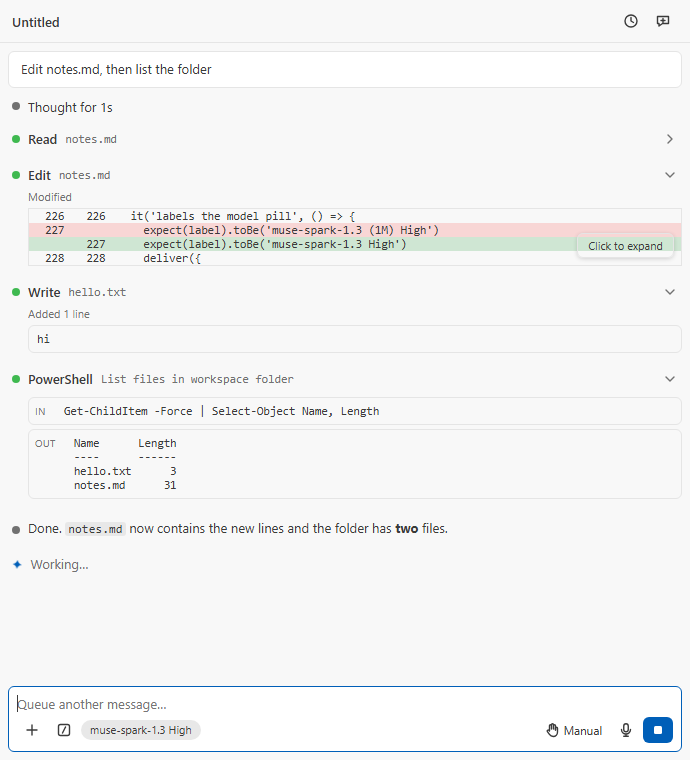
A turn: thinking, read, edit with its diff, write and shell under one summary row, the reply, and the diff tally |
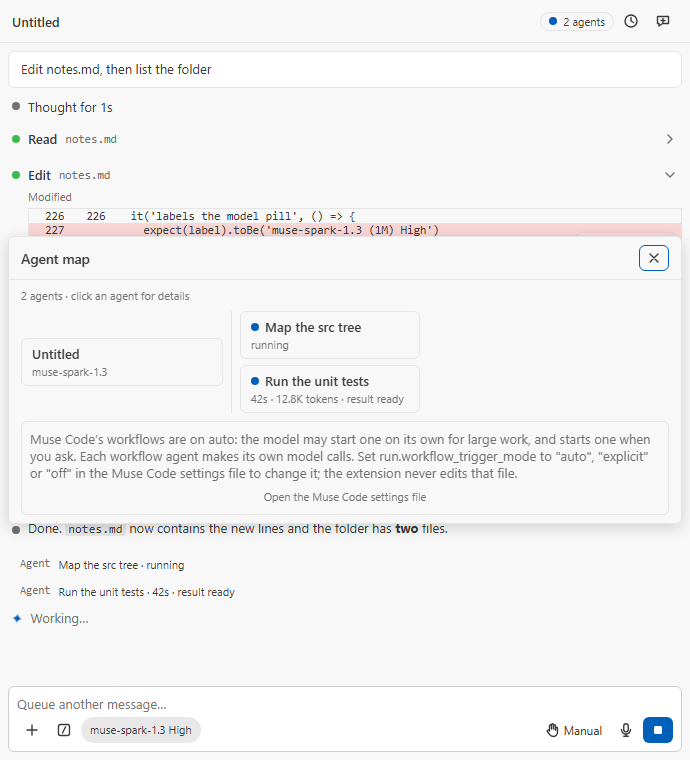
Subagents: the 2 agents pill and the Agent map |
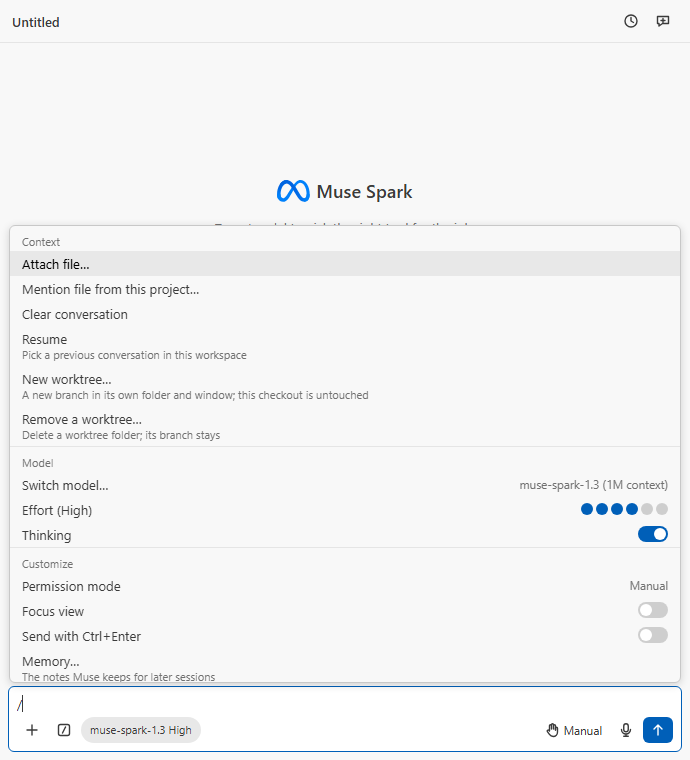
Type /: context, Git and model actions above the prompt |
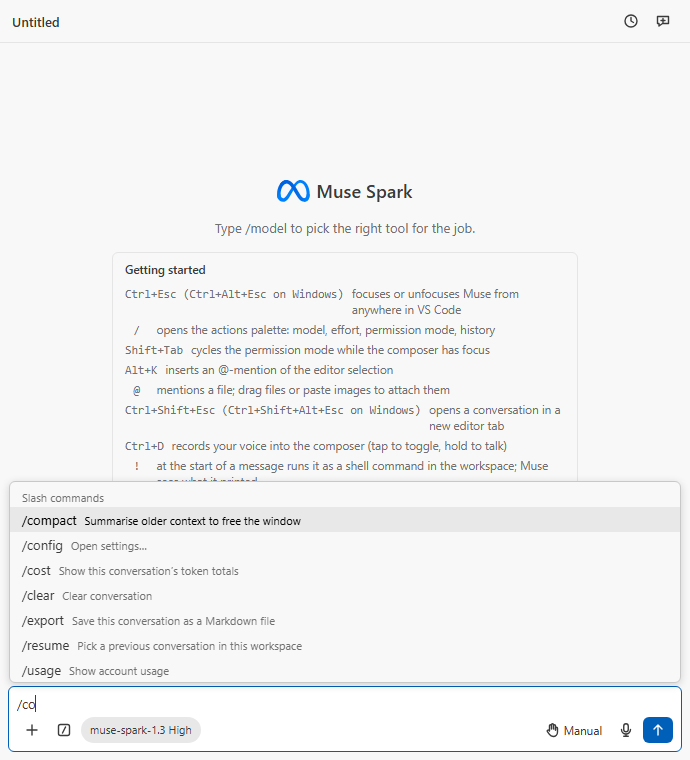
A letter more: the slash commands, ranked as you type |
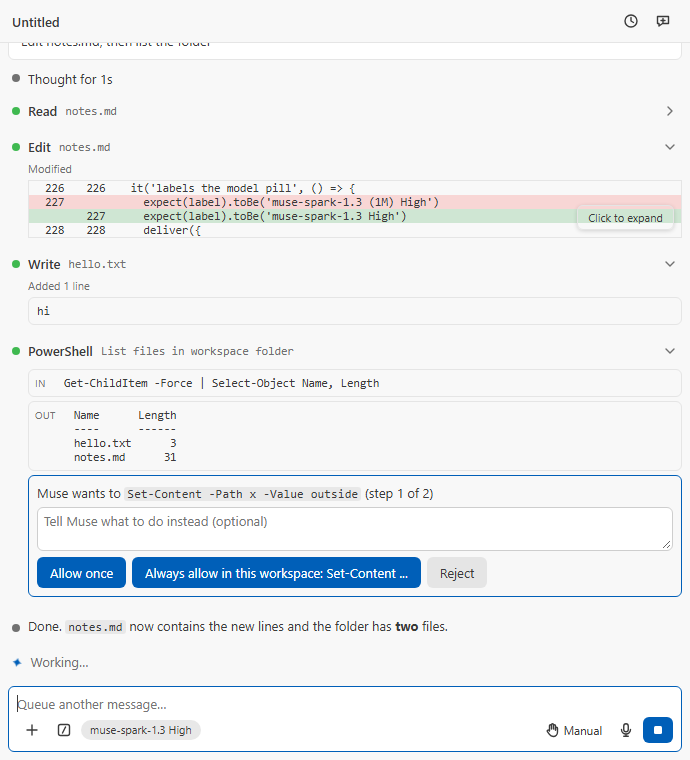
An approval card, docked above the message box, with the CLI's own choices |
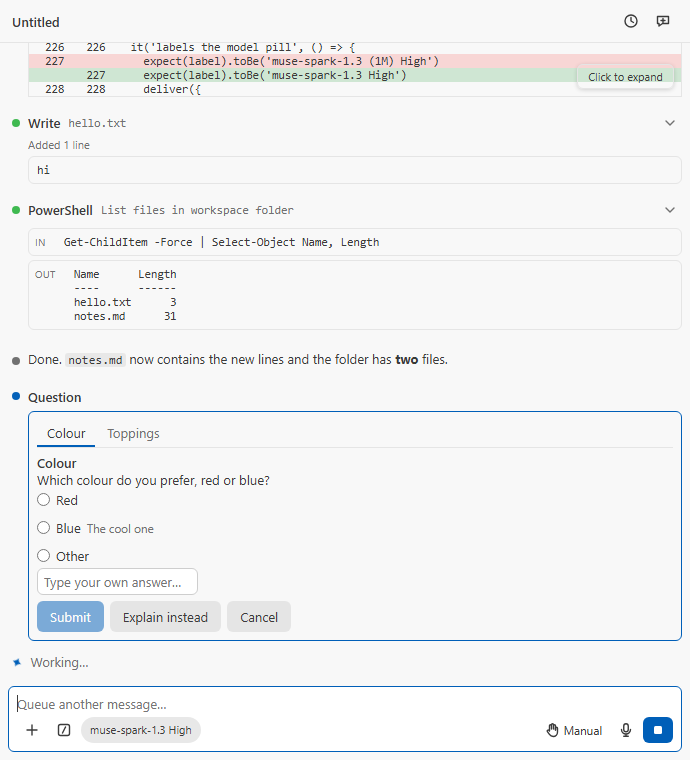
One question card, pinned above the message box; Answer on its transcript marker brings it into focus |
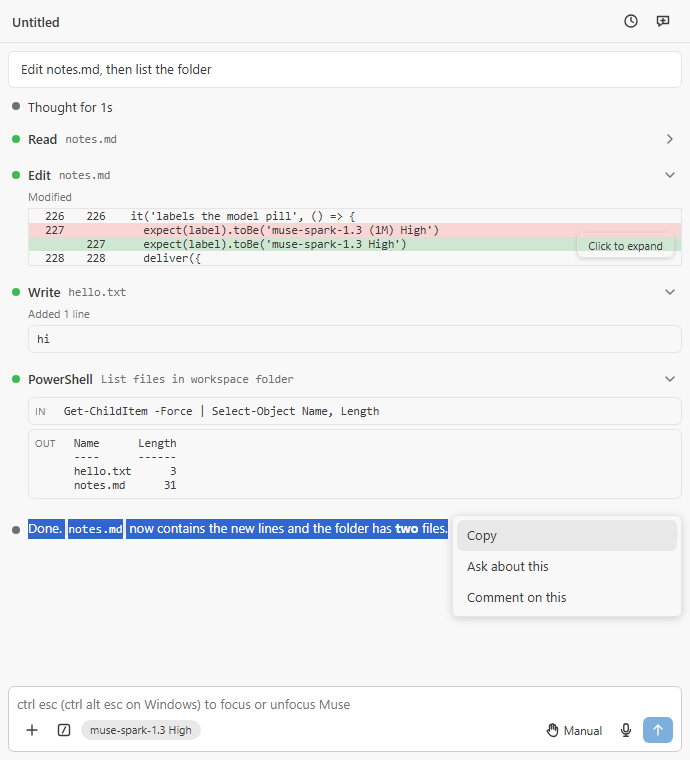
Highlight, right-click: Copy, Ask About This or Comment on This |
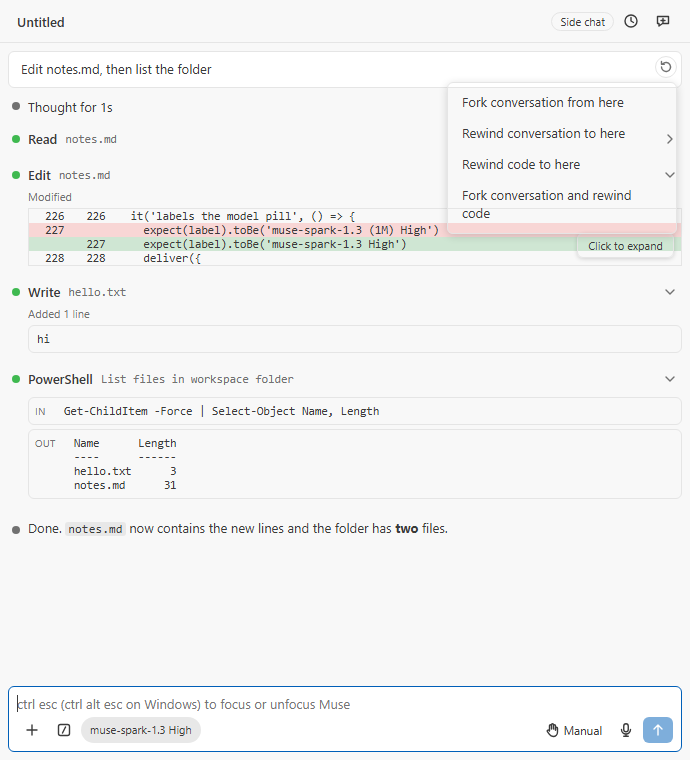
Every sent message's ⋯: fork, fork and rewind code, or open Rewind |
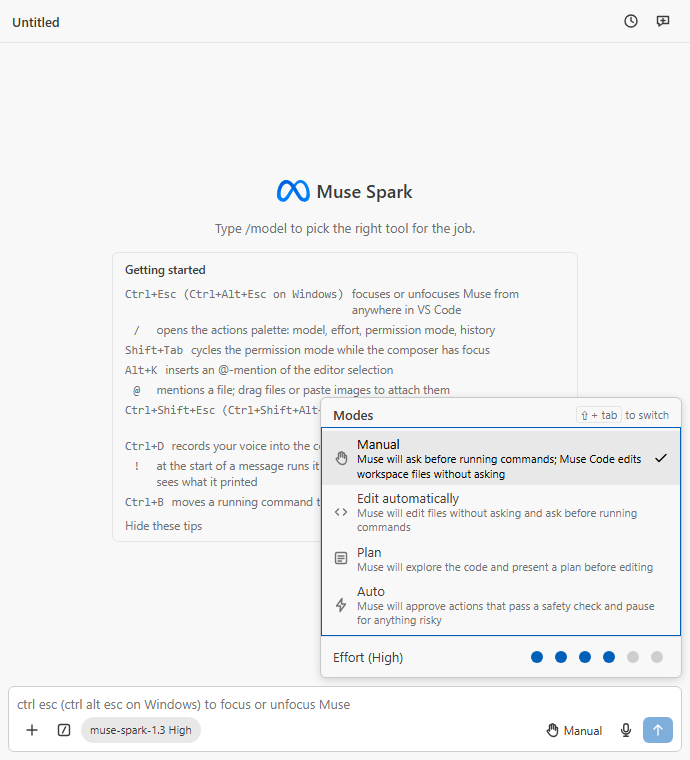
Permission modes and effort; Shift+Tab cycles modes |
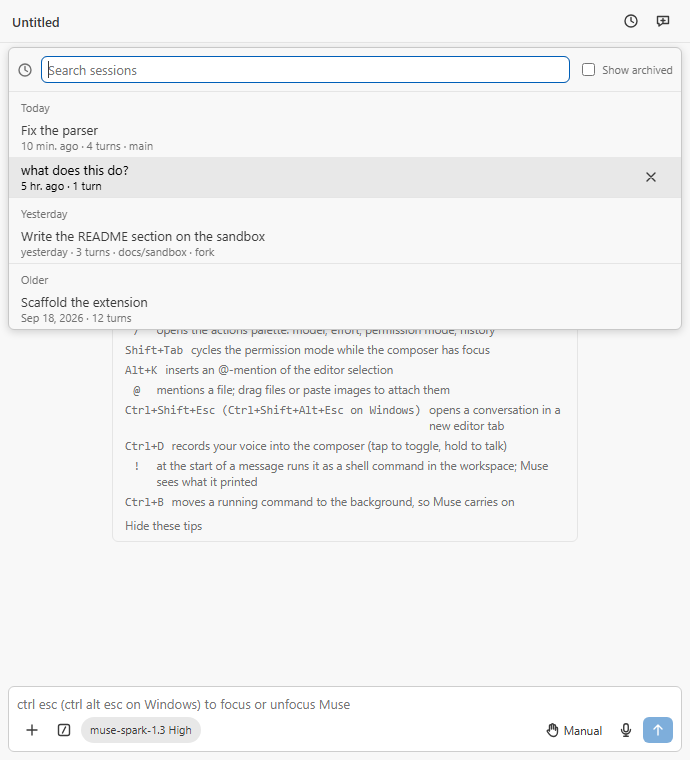
History: search, resume, archive |
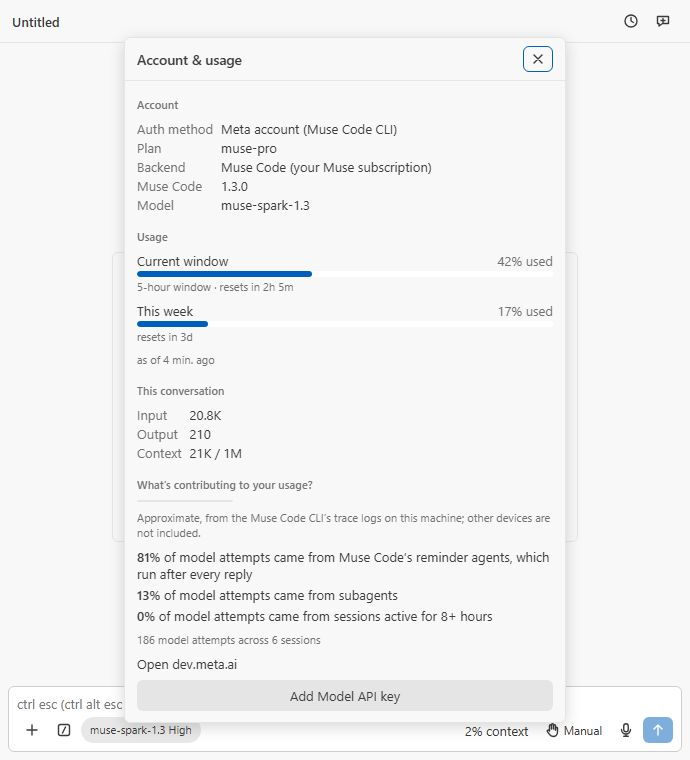
Account & usage: windows, tokens, and what is eating the usage |
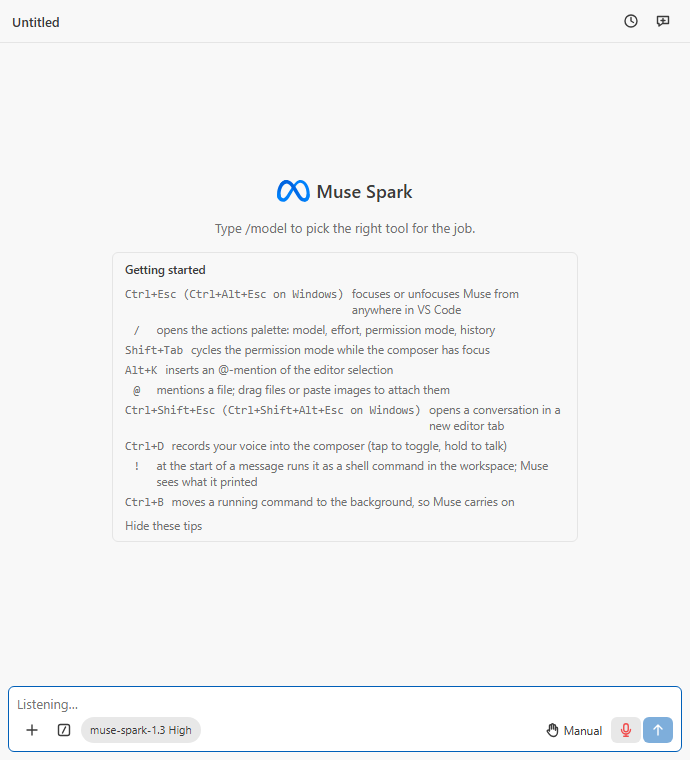
Voice dictation: tap or hold, Ctrl+D |
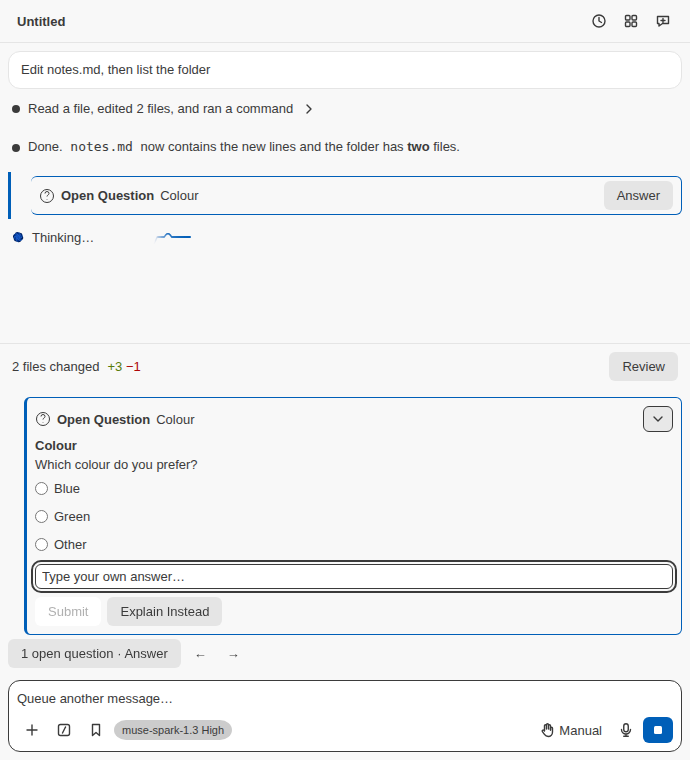
Answer an open question from the dock; its transcript row and navigation chip keep it easy to find |
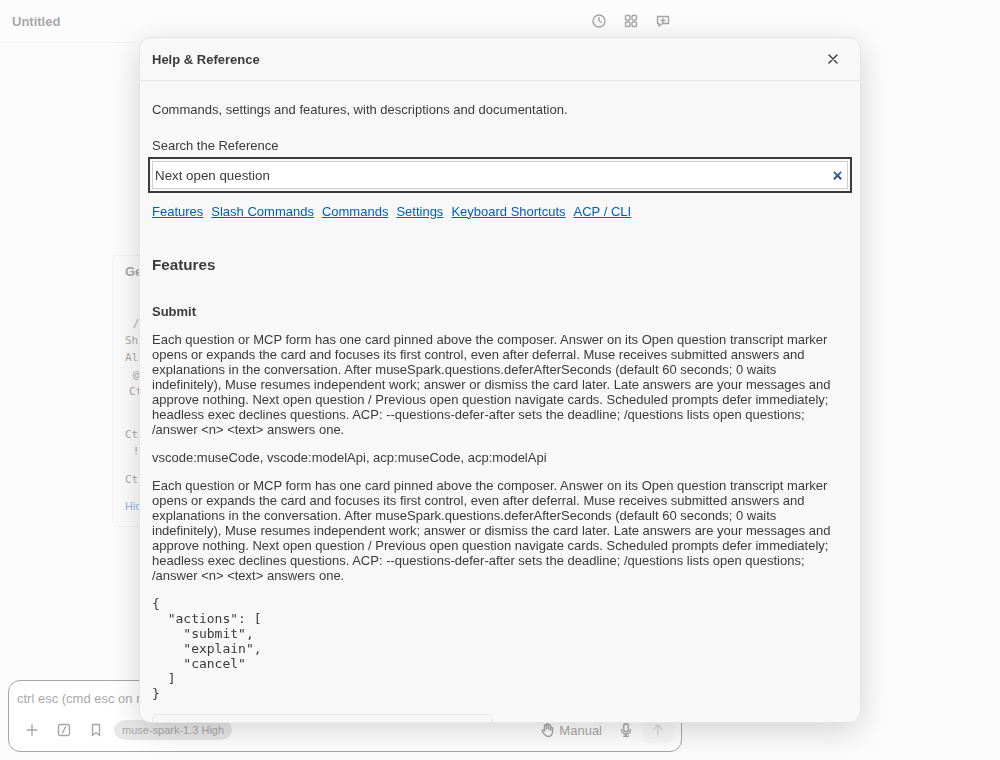
Type /help: search the reference for features, commands, settings and shortcuts |
Backend capabilities and limits differ. The
complete guide
contains screenshots, every command and setting, editor setup, requirements,
permission details and troubleshooting. The
ACP guide
covers other editors. Headless execution and the CI Action still have pending
live acceptance; their fake-only checks do not certify those live lanes.
Billing and privacy
Muse Code uses its own credential and subscription. Ordinary Model API turns
are billed to your own key. Interactive Model API enhancements are available
by default, with explicit false settings respected; their paid calls still
need consent naming the price and shared daily budget. Paid use asks before
each call unless you choose Allow Always in This Workspace. The
subscription pays none of those extension-side paid features. ACP and
headless paid defaults remain off.
File/tool permissions and workspace trust still apply. The browser check
requires its own runtime consent and isolated browser; its privacy boundaries
are described in the guide. The extension has no analytics or tracking.
Read the privacy policy
for storage, network and voice details.
Release history ·
Report an issue ·
Source and license
| |

