
DarkMatter Pro
A premium dark VS Code theme with modern surfaces, clean contrast, and Monokai-inspired syntax.
Un tema oscuro premium para VS Code con superficies modernas, contraste limpio y sintaxis inspirada en Monokai.
Rafael-Avalos.darkmatter-pro
View on VS Code Marketplace
Why It Feels Different / Por Qué Se Siente Diferente
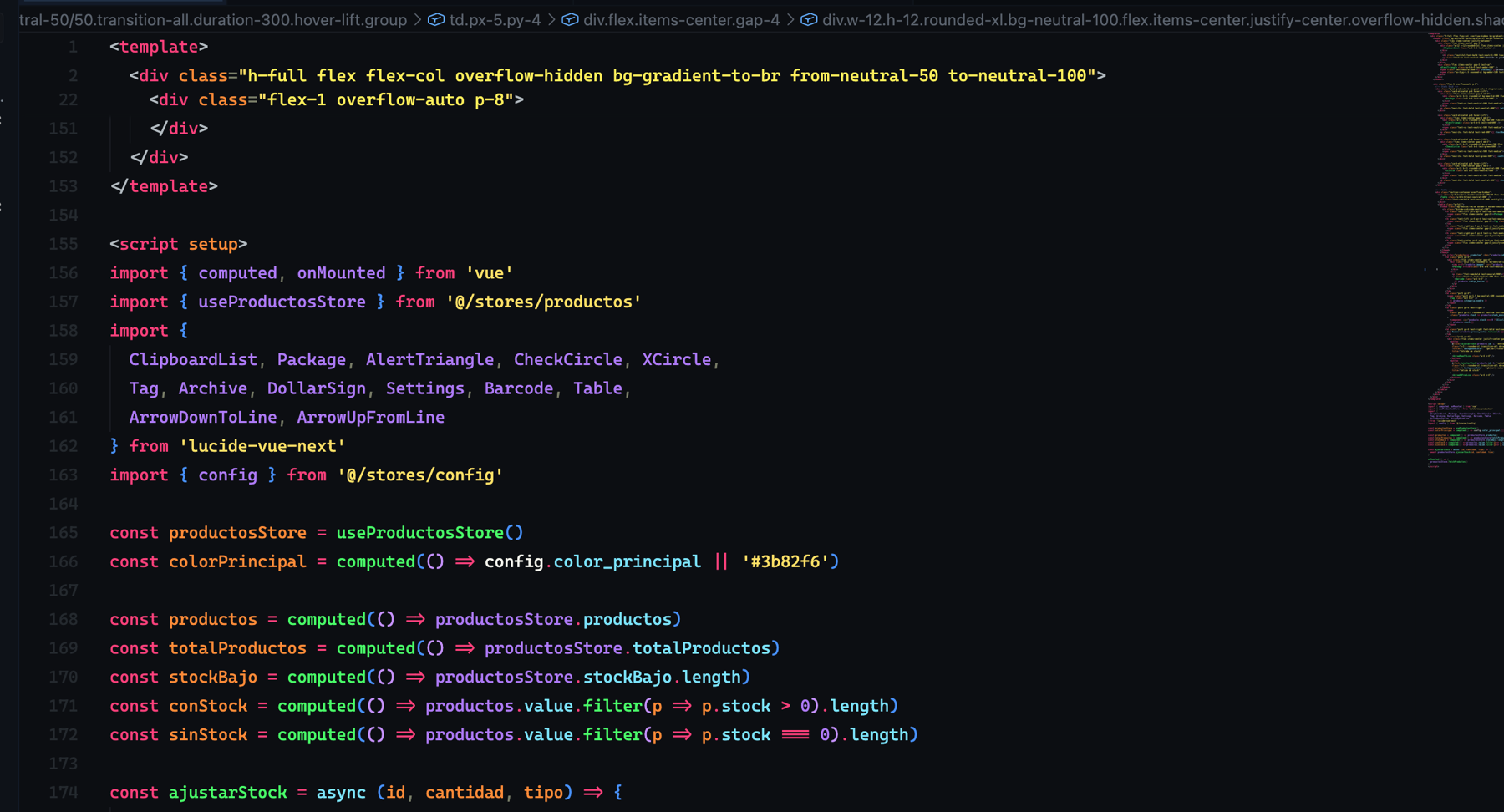
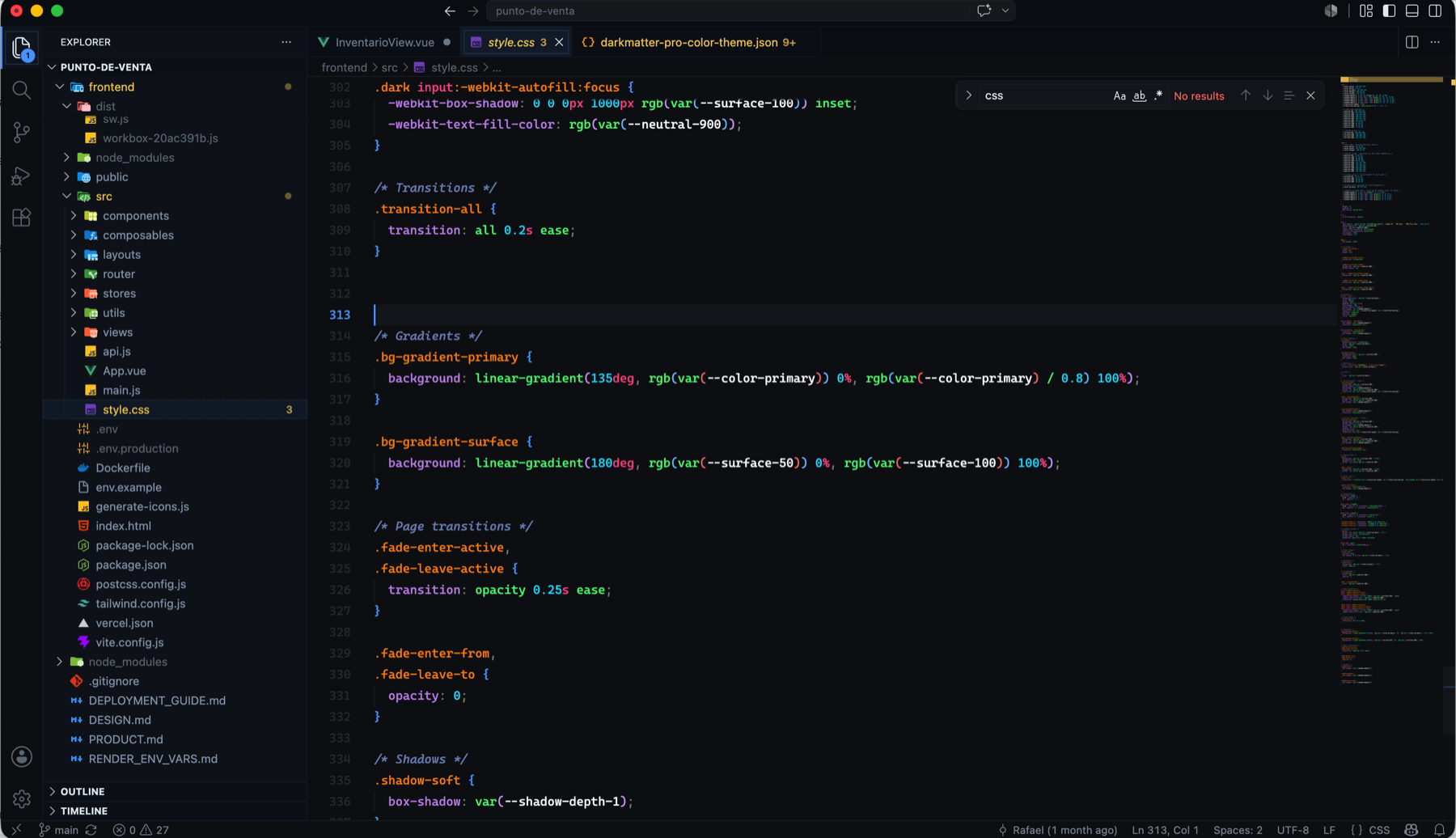
DarkMatter Pro keeps the editor deep and calm, then uses color only where it helps you scan code faster. The workbench avoids the flat gray look of default VS Code: tabs, sidebar, selection, focus, and Activity Bar use cooler blue-black surfaces with measured accents and clearer visual separation.
DarkMatter Pro mantiene el editor profundo y tranquilo, pero usa color donde de verdad ayuda a leer más rápido. La interfaz evita el gris plano de VS Code: tabs, sidebar, selección, foco y Activity Bar usan superficies azul-negras más modernas, con acentos medidos y mejor separación visual.
Screenshots / Capturas
Syntax / Sintaxis
Workbench / Interfaz
Highlights / Lo Mejor Del Tema
- Monokai-inspired syntax tuned for Vue, JavaScript, TypeScript, CSS, and JSON. / Sintaxis inspirada en Monokai, ajustada para Vue, JavaScript, TypeScript, CSS y JSON.
- A modern dark workbench with less gray and more visual depth. / Workbench oscuro con menos gris y más profundidad visual.
- Clear active Activity Bar line with quieter file selection states. / Activity Bar con línea activa clara y selección de archivos más sobria.
- Dedicated HTML/Vue string color so Tailwind-heavy templates do not turn entirely green. / Strings HTML/Vue con color dedicado para que templates con Tailwind no saturen todo en verde.
- Light gray comments and cool tag punctuation for better template readability. / Comentarios en gris claro y puntuación de tags en gris frío para leer mejor templates.
- Semantic highlighting enabled for stronger function, property, type, and variable separation. /
semanticHighlighting activo para separar mejor funciones, propiedades, tipos y variables.
Color Palette / Paleta De Colores
| Role / Rol |
Color |
Usage / Uso |
| Editor Background / Fondo del editor |
 #0D1117 |
Main editor surface / Superficie principal del editor |
| Sidebar |
 #101720 |
Explorer and side panels / Explorer y paneles laterales |
| Tab Bar / Barra de tabs |
 #080D13 |
Editor tab strip / Barra de pestañas del editor |
| Active Tab / Tab activa |
 #162335 |
Active editor tab / Pestaña activa |
| Active Selection / Selección activa |
 #182A3D |
Selected file and focused rows / Archivo seleccionado y filas con foco |
| Borders / Bordes |
 #162232 |
Sidebar, tabs, groups / Sidebar, tabs y grupos |
| Activity Accent / Acento de Activity Bar |
 #58A6FF |
Activity Bar active line / Línea activa de Activity Bar |
| Keywords |
 #F23678 |
import, const, tags, operators / import, const, tags, operadores |
| Strings / Functions |
 #A6E22E |
JS strings, functions, components / Strings JS, funciones, componentes |
| HTML / Vue Strings |
 #FFF06D |
class="...", Vue template values / class="...", valores en templates Vue |
| Types / Properties |
 #66D9EF |
Types, properties, object members / Tipos, propiedades, miembros de objetos |
| Parameters / Attributes |
 #FF9D1F |
Parameters, HTML attributes, declarations / Parámetros, atributos HTML, declaraciones |
| Constants / Named Imports |
 #AE81FF |
Numbers, constants, named imports / Números, constantes, imports nombrados |
| Variables |
 #F8F8F2 |
Normal variables and plain text / Variables normales y texto base |
| Comments / Comentarios |
 #9AA0A6 |
Comments, italic documentation / Comentarios y documentación en cursiva |
| Tag Punctuation / Puntuación de tags |
 #C0C7CC |
<, >, </div> punctuation / Puntuación de <, >, </div> |
Recommended For / Ideal Para
- Vue and Vite projects. / Proyectos Vue y Vite.
- TypeScript and JavaScript codebases with many imports. / Código TypeScript y JavaScript con muchos imports.
- Tailwind CSS and utility-class templates. / Templates con Tailwind CSS.
- Long sessions where overly bright themes become tiring. / Sesiones largas donde un tema demasiado brillante cansa.
- Developers who like Monokai color roles but want a more modern interface. / Quienes aman la lógica de color de Monokai, pero quieren una interfaz más moderna.
Feedback And Suggestions / Comentarios Y Recomendaciones
You are invited to share recommendations, ideas, and color adjustments to keep improving DarkMatter Pro. Every comment helps make the theme more comfortable for daily use.
Los invito a escribir sus recomendaciones, ideas y ajustes de color para seguir mejorando DarkMatter Pro. Cada comentario ayuda a pulir el tema y hacerlo más cómodo para el uso diario.
Installation / Instalación
Via VS Code Marketplace / Vía VS Code Marketplace
English
- Open Extensions (
Cmd+Shift+X / Ctrl+Shift+X).
- Search for "DarkMatter Pro".
- Click Install.
- Open Command Palette (
Cmd+Shift+P / Ctrl+Shift+P) and select Preferences: Color Theme → DarkMatter Pro.
Español
- Abre Extensions (
Cmd+Shift+X / Ctrl+Shift+X).
- Busca "DarkMatter Pro".
- Haz clic en Install.
- Abre la Command Palette (
Cmd+Shift+P / Ctrl+Shift+P) y selecciona Preferences: Color Theme → DarkMatter Pro.
Open it directly on Marketplace:
Ábrelo directamente en Marketplace:
DarkMatter Pro on VS Code Marketplace
Via Command Line / Vía Command Line
ext install Rafael-Avalos.darkmatter-pro
Via VSIX / Vía VSIX
English
- Download the
.vsix from Releases.
- Open Command Palette.
- Run
Extensions: Install from VSIX....
- Select the downloaded file.
Español
- Descarga el
.vsix desde Releases.
- Abre la Command Palette.
- Ejecuta
Extensions: Install from VSIX....
- Selecciona el archivo descargado.
For local development, open this folder in VS Code and press F5 to launch an Extension Development Host.
Para desarrollo local, abre esta carpeta en VS Code y presiona F5 para lanzar un Extension Development Host.
Credits / Créditos
Designed by Rafael Avalos. The syntax takes inspiration from the Monokai color family and adapts it to a darker, cleaner, more focused interface.
Diseñado por Rafael Avalos. La sintaxis toma inspiración de la familia Monokai y la adapta a una interfaz oscura más moderna, sobria y enfocada.
| |

