AutomationView



Design, Simulate, and Export Industrial PLC Sequences (SFC / Grafcet / IEC 61131-3) in Visual Studio Code - Zero Python setup required.
AutomationView (RCAutomSolutions.automationview) is a visual and code-first environment for writing, simulating, and exporting industrial control sequences. The extension ships with a self-contained Python 3.14 runtime and 9 vendor plugins, so it works immediately after installation without configuring a local Python interpreter.
Website | Documentation | 14-Day Pro Trial | Pricing | Contact & Support
Start in 10 Seconds
- Open the Command Palette (
Ctrl+Shift+P / Cmd+Shift+P).
- Run
AutomationView: Try Instant Demo Project (1-Click) (automationview.createQuickDemoProject).
- Press
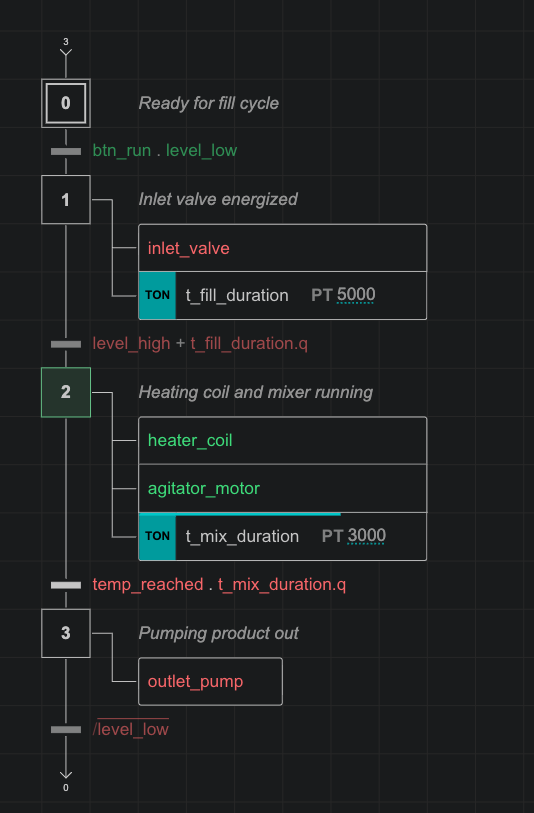
F5 to start the PLC scan emulator, toggle inputs in the Variables panel, and watch steps and timers react on the diagram.
- Run
AutomationView: Generate PLC Output (automationview.generatePLC) to export Arduino C++ code or preview generated Siemens, Rockwell, CODESYS, and FANUC code.
Supported PLCs & Robots
All 9 vendor plugins are bundled directly in the extension:
| Vendor |
Target Environment |
Output / Integration |
Availability |
| Siemens |
TIA Portal (S7-1200 / S7-1500) |
SCL (.scl) & SimaticML XML |
Code preview in Free / Export in Pro |
| Rockwell Automation |
Studio 5000 (ControlLogix / CompactLogix) |
L5X Ladder (RLL) & Structured Text |
Code preview in Free / Export in Pro |
| CODESYS |
CODESYS V3.5+ (WAGO, Beckhoff, Rexroth, Eaton) |
PLCopen XML & IEC 61131-3 ST |
Code preview in Free / Export in Pro |
| FANUC Robotics |
ROBOGUIDE / R-30iB Plus |
Teach Pendant (.LS) programs |
Code preview in Free / Export in Pro |
| Festo |
Festo Automation Suite / CPX-E |
Hardware catalog & valve terminal I/O |
Catalog in Free / Export in Pro |
| Omron |
Sysmac Studio (NJ / NX) |
Hardware catalog & IEC 61131-3 ST |
Catalog in Free / Export in Pro |
| Schneider Electric |
Control Expert / Machine Expert (Modicon) |
Hardware catalog & IEC 61131-3 ST |
Catalog in Free / Export in Pro |
| Mitsubishi Electric |
GX Works3 (MELSEC iQ-R / iQ-F) |
Hardware catalog & Structured Text |
Catalog in Free / Export in Pro |
| Arduino / C++ |
Arduino IDE / PlatformIO (ESP32, Opta, STM32) |
Non-blocking C++ state machine (.ino) |
Full export in Free |
What's Inside
1. Dual-View Graphical & Python Editor
Edit sequences on the graphical SFC/Grafcet canvas (I initial step, S step, T transition, A action, C comment) or directly in Python (.seq and .machine). Both views stay synchronized on save.
- Plain-text files: Sequences are valid Python classes, easy to diff and merge in Git with no proprietary binary format.
- Structured constructs: Initial, normal, macro, and enclosing steps; OR divergences; simultaneous AND branches; reusable dynamic classes with boolean options.
- Multiple condition styles: Write receptivities in GRAFCET notation (
a . b + /c), IEC 61131-3 ST (a AND b OR NOT c), or symbolic syntax (a & b | !c).
2. Real-Time PLC Scan Emulator
Test sequence logic locally before commissioning on hardware:
- Deterministic scan cycle: Read inputs -> evaluate transitions -> fire transitions -> execute actions -> write outputs.
- 9 IEC action qualifiers:
N, S, R, P, P1, P0, L, D, SD, plus standard timers (TON, TOF, TP, RTO) and counters (CTU, CTD).
- Variable forcing & plant scenarios: Force inputs live during emulation, or run automated YAML scenarios (
av simulate) against declarative plant.yaml digital-twin models.
3. Native VS Code AI (@automationview & vscode.lm)
Uses VS Code's built-in Language Model API (vscode.lm) with no external API keys to configure:
@automationview chat participant: /create, /validate, /simulate, and /export commands in VS Code Chat.- Agent Mode tools & MCP server: Language model tools and an integrated MCP server (
automationview.mcpServer) so Copilot Agent Mode can inspect, validate, simulate, and preview PLC code.
4. Live IEC 60848 Diagnostics
Validates graph structure and data types as you edit:
- Flags missing initial steps, unreachable or dead-end steps, overlapping OR-divergence conditions (
S008), invalid branch topology, unassigned I/O channels (M006-M008), and out-of-range array bounds.
- Offers Quick Fixes directly on the canvas and in the VS Code Problems view.
5. Industrial Dark & Light Themes
Includes AutomationView Dark and AutomationView Light color themes tuned for sequence diagrams and PLC code (.seq, .machine, .scl, .rockwell-st, .rockwell-ladder, .codesys-st, .ls), plus a high-contrast Print Mode for A4/A3 electrical cabinet dossiers.
Free Forever vs. AutomationView Pro
The Free tier has no time limit and requires no account. Pro unlocks multi-sequence machine projects and production PLC exports.
| Feature |
Free Forever |
AutomationView Pro |
| Price |
EUR 0 forever (no account required) |
EUR 29/mo or EUR 290/yr (14-day free trial) |
| Dual-view SFC / Python editor |
Up to 10 steps per sequence (.seq) |
Unlimited steps per sequence |
| Step references |
Local step references (X1) |
Cross-sequence sync (Seq.X1) & multi-instance classes |
.machine orchestration |
Single-sequence editing |
Multi-sequence .machine projects (GEMMA, safety, modes) |
| PLC emulation |
Single-sequence local emulation |
Multi-sequence emulation & automated YAML plant scenarios |
| IEC 60848 diagnostics & themes |
Included |
Included |
VS Code AI (@automationview) |
Included |
Included |
| Arduino / C++ export |
Full export |
Full export |
| Siemens, Rockwell, CODESYS, FANUC |
Interactive code preview in VS Code |
Full file export (SCL, SimaticML, L5X, PLCopen, .LS) |
| Festo, Omron, Schneider, Mitsubishi |
Equipment catalog browsing |
Full I/O mapping & code export |
| Activations per seat |
Unlimited |
2 machines per seat (workstation + field laptop) |
To try Pro for 14 days without a credit card, run AutomationView: Start 14-Day Free Pro Trial (automationview.pro.startTrial) in VS Code or visit automationview.app/free-trial.
Key Commands
| Command |
Shortcut / ID |
Action |
| AutomationView: Try Instant Demo Project (1-Click) |
automationview.createQuickDemoProject |
Open an interactive demo workspace |
| AutomationView: Create Sample Project (1-Click) |
automationview.createSampleProject |
Generate a Conveyor Ejection sample project |
| AutomationView: New Project |
automationview.openProjectGallery |
Create a project from starter templates |
| AutomationView: Start Simulation |
F5 (automationview.emulation.start) |
Run continuous PLC scan cycles |
| AutomationView: Step Simulation |
F10 (automationview.emulation.step) |
Advance by one scan cycle |
| AutomationView: Stop Simulation |
Shift+F5 (automationview.emulation.stop) |
Stop simulation |
| AutomationView: Reset Simulation |
Ctrl+Shift+F5 (automationview.emulation.reset) |
Reset to initial steps |
| AutomationView: Generate PLC Output |
automationview.generatePLC |
Export or preview PLC / robot code |
| AutomationView: Start 14-Day Free Pro Trial |
automationview.pro.startTrial |
Start a 14-day Pro trial in VS Code |
Schools, Technical Colleges & Lab Deployment
Because Python 3.14 is bundled inside the extension, student workstations require zero Python setup. You can deploy VS Code and AutomationView across Windows lab machines in a single command:
winget install --id Microsoft.VisualStudioCode --silent --accept-package-agreements --accept-source-agreements && "%LOCALAPPDATA%\Programs\Microsoft VS Code\bin\code.cmd" --install-extension RCAutomSolutions.automationview --force
Platform-specific .vsix packages (win32-x64, win32-arm64, darwin-arm64, darwin-x64, linux-x64, linux-arm64, linux-armhf) are also available for offline labs. For classroom licensing, contact automationview.app/contact.
License
Proprietary License - Copyright (c) 2026 RCAutomSolutions. See LICENSE.md for details.
| |

