🖼️ Image Converter Pro
The Ultimate Image Processing Suite for VS Code - Convert, resize, crop, enhance, extract colors, and create stunning icons directly in your editor. Professional-grade tools, zero friction.





🌟 Universal VS Code Compatibility
✅ Works with all VS Code variants:
- VS Code - Microsoft's official editor
- Cursor - AI-first development environment
- Windsurf - AI-powered code editor
- Kiro - AWS's spec-driven AI IDE
- Qoder - Interactive CLI tool with TUI
- And more... - Any editor based on VS Code
📸 Screenshots
Professional Image Processing
✨ Features
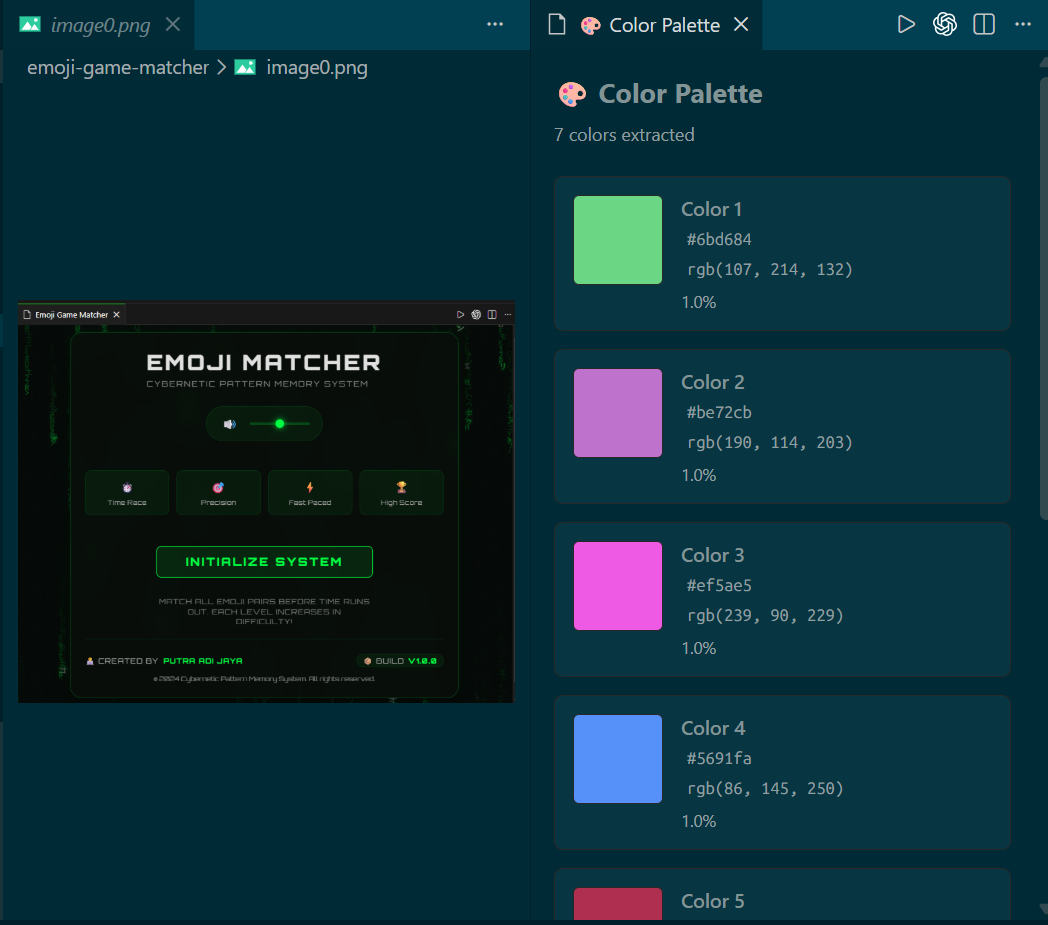
Extract beautiful color palettes from any image with AI-powered color detection:
- Intelligent Color Detection - Extracts 5-10 dominant colors using advanced pixel sampling
- Visual Palette Display - See colors with hex, RGB values, and percentage breakdown
- One-Click Copy - Copy any color to clipboard instantly
- Multiple Export Formats:
- 📄 CSS Variables - Ready-to-use
:root format for your stylesheets
- 📋 JSON - Complete metadata for programmatic use
- 🎨 Tailwind Config - Drop-in configuration for Tailwind CSS projects
- Color Scheme Generation:
- 🔄 Complementary - Opposite colors for maximum contrast
- 🔗 Analogous - Harmonious adjacent colors
- 🔺 Triadic - Three-color balanced schemes
- Smart Filtering - Automatically removes noise and near-duplicate colors
- Transparent Image Support - Works perfectly with PNG and images with alpha channels
- Format-Specific Extraction - Optimized algorithms for PNG, JPEG, GIF, BMP, WebP
Complete metadata management for privacy and analysis:
- View Metadata - Extract and view complete EXIF data from images
- Remove Metadata - Strip all EXIF data for privacy protection
- Export Metadata - Export as JSON or CSV for analysis
- Copy Metadata - Copy metadata between images
- Organized Display - Metadata organized by category (Image, Camera, GPS, Thumbnail)
- Privacy Mode - Remove sensitive location and device data
- Basic Image Info - Dimensions, file size, format, creation dates
- No External Dependencies - Works entirely within VS Code
- JPEG - Best for photos with adjustable quality
- PNG - Lossless with transparency support
- WebP - Modern format with superior compression
- AVIF - Next-generation format with best compression
- TIFF - Professional/print quality
- GIF - Animation support
- SVG - Scalable Vector Graphics support
📏 Resize Operations
- Predefined sizes: 50%, 200%, Full HD, HD, Standard, Mobile
- Custom dimensions with auto-calculate
- Maintains aspect ratio
- High-quality resampling
✂️ Smart Crop
- Center Square - Perfect 1:1 ratio
- Center 16:9 - Widescreen/YouTube
- Center 4:3 - Standard ratio
- Center 9:16 - Portrait/Mobile/Stories
- Custom crop with precise coordinates
✨ Image Enhancement
- Optimize for Web - Fast loading
- High Quality - Maximum fidelity
- Sharpen - Increase clarity
- Blur - Smooth effect
- Brightness - Adjust exposure
- Saturation - Boost colors
- Grayscale - B&W conversion
- Auto Enhance - Normalize & sharpen
🎯 Icon Creation
- Circular Icons - Create perfect circular icons with transparent backgrounds
- Rounded Rectangle Icons - Create icons with rounded corners and transparent backgrounds
- Custom sizing - Specify output size or use original dimensions
- PNG output format with full transparency support
� Usage
Installation
- Open Extensions view in VS Code (
Ctrl+Shift+X)
- Search for "Image Converter Pro"
- Click Install
- Or install from the Marketplace
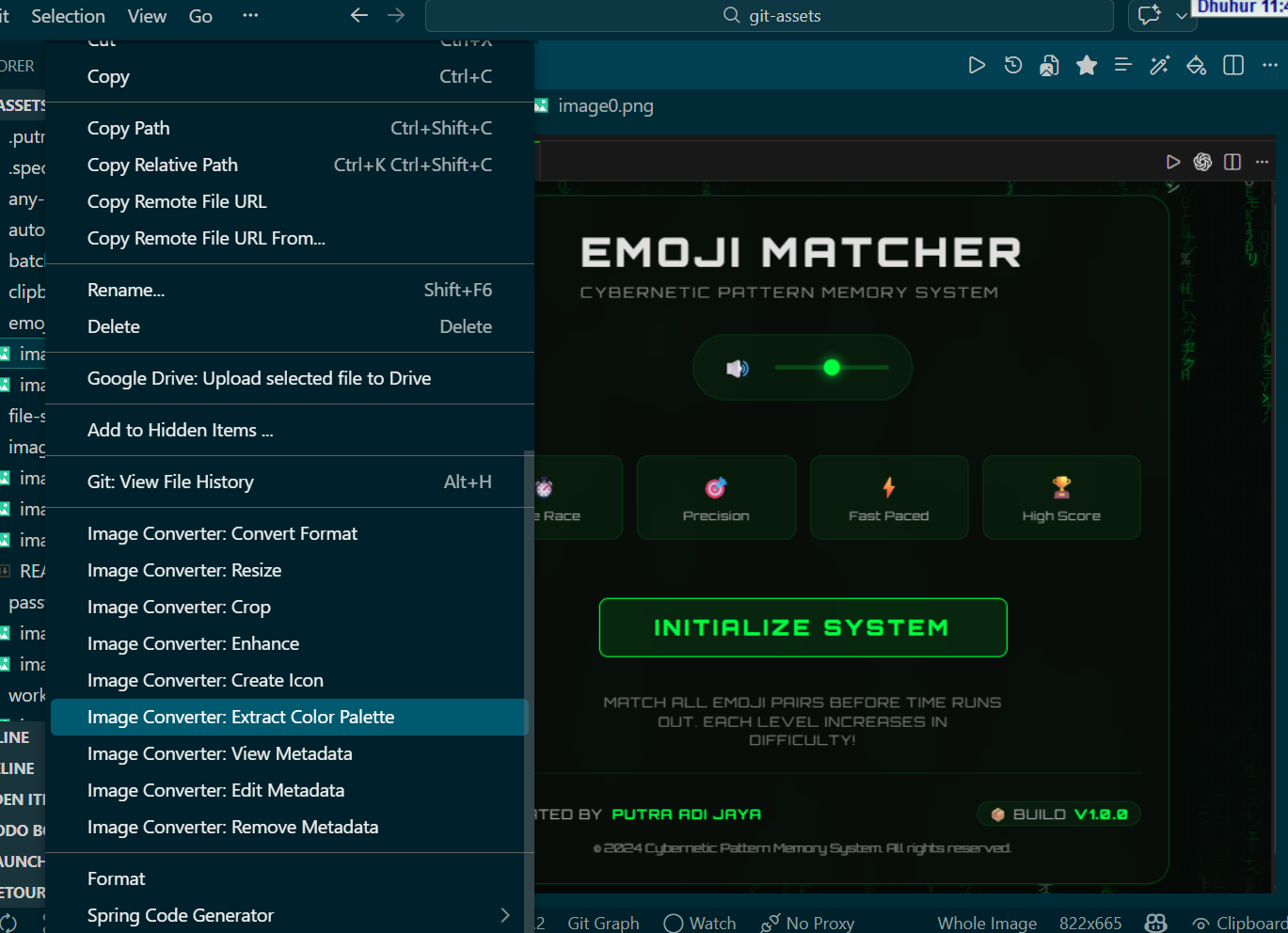
- Right-click any image file (JPG, PNG, WebP, GIF, TIFF, BMP, AVIF, SVG)
- Select "Image Converter: Extract Color Palette"
- A beautiful color panel opens showing:
- Dominant colors with visual swatches
- Hex, RGB, and percentage values
- Export options for CSS, JSON, or Tailwind
- Click any color to copy to clipboard
- Click export button to save palette in your preferred format
- Right-click any JPEG or TIFF image
- Select metadata operation:
- View Metadata - See all EXIF data organized by category
- Edit Metadata - Choose view, remove, or export options
- Remove Metadata - Strip all EXIF data for privacy
- For viewing:
- Click any value to copy to clipboard
- Click "Export as JSON" or "Export as CSV"
- For removing:
- Confirm the action
- New file saved with
_no_metadata suffix
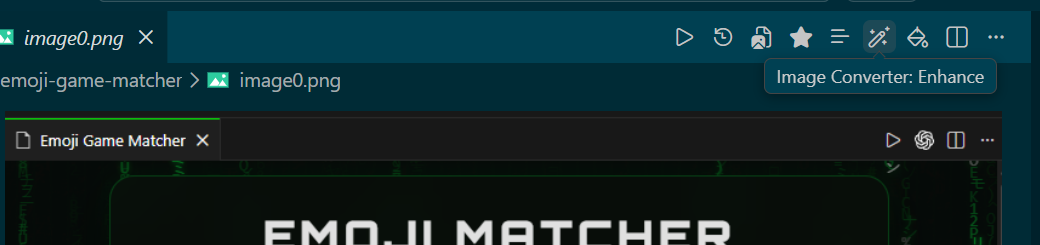
When you open an image file, toolbar buttons appear at the top:
- 🔄 Convert - Change image format
- 📐 Resize - Adjust dimensions
- ✂️ Crop - Trim image
- ✨ Enhance - Apply effects
- 🎯 Create Icon - Make icons
- 🎨 Extract Colors - Get color palette
- 📋 View Metadata - See image information
- Right-click any image file in your editor's Explorer
- Select operation:
- 🎨 Image Converter: Extract Color Palette ⭐ NEW
- � Image Converter: View Metadata ⭐ NEW
- ✏️ Image Converter: Edit Metadata ⭐ NEW
- 🔒 Image Converter: Remove Metadata ⭐ NEW
- 🔄 Image Converter: Convert Format
- 📐 Image Converter: Resize
- ✂️ Image Converter: Crop
- ✨ Image Converter: Enhance
- 🎯 Image Converter: Create Icon
- Follow the intuitive prompts
- Output file is automatically saved with suffix
⚙️ Configuration
Go to Settings → Extensions → Image Converter Pro:
- Output Directory: Where to save processed images (default: same folder)
- Naming Suffix: Suffix for output files (default: _converted)
- Default Quality: Quality for conversions (1-100, default: 80)
Input: JPEG, JPG, PNG, WebP, GIF, TIFF, BMP, AVIF, SVG
Output: JPEG, PNG, WebP, AVIF, TIFF, GIF, PNG (for icons with transparency)
📝 Requirements
- VS Code 1.75.0 or higher (or any compatible variant)
- Node.js 16.x or higher
🔄 Release Notes
1.3.0 (Latest) ⭐
- 🎨 NEW: Color Palette Extractor - Extract dominant colors from images
- Intelligent pixel-based color detection
- Visual palette display with hex, RGB, and percentages
- Export to CSS, JSON, and Tailwind config
- Color scheme generation (complementary, analogous, triadic)
- One-click copy to clipboard
- Support for transparent images
- Format-specific extraction algorithms
- 📋 NEW: Metadata Editor - Complete metadata management
- View and extract EXIF data from images
- Remove metadata for privacy protection
- Export metadata as JSON or CSV
- Copy metadata between images
- Basic image information display
- No external dependencies required
- Improved color extraction accuracy with proper pixel sampling
- Better metadata handling with file header parsing
- Enhanced VSIX packaging for marketplace distribution
- Fixed activation issues with proper command registration
1.2.1
- Added SVG support for all operations
- Convert SVG to all supported output formats
- Enhanced SVG rendering with density options
1.0.0
- Initial release
- Format conversion (7 formats including SVG)
- Resize with presets
- Smart crop tools
- Image enhancement (8 options)
- Icon creation (circular and rounded rectangle with transparency)
- Context menu integration
🏆 Why Choose Image Converter Pro?
- � Lightning Fast - Process images without leaving your editor
- 🎨 Professional Quality - Industry-standard image processing algorithms
- 🔒 Privacy First - All processing happens locally, no cloud uploads
- 🌐 Universal Compatibility - Works with any VS Code-based editor
- ⚡ Zero Dependencies - No external software required
- 📱 Mobile Ready - Create icons and images for any platform
- 🎯 Developer Friendly - Built by developers, for developers
📄 License
This project is licensed under the MIT License (see LICENSE) - Free forever!
🤝 Contributing
Contributions welcome! Feel free to submit issues and pull requests.
Development Roadmap
- ✅ Core image processing features
- ✅ Color palette extraction
- ✅ Metadata management
- 🔄 Visual dashboard (in progress)
- ⏳ Batch processing
- ⏳ Advanced filters and effects
- ⏳ Cloud integration
- ⏳ AI-powered image enhancement
📞 Support
🎉 Enjoy professional image processing without leaving your favorite editor!
⭐ Star this repository and rate the extension to support continued development!
| |

