
Fancy Text Neo-Brutalism🎨 Transform plain text into 40+ stylish Unicode variants with bold Neo-Brutalism design! Math fonts, decorative text, creative styles. Features collapsible settings, favorites, history, search, intensity control. One-click copy & insert. Installation Launch VS Code Quick Open ( Ctrl+P), paste the following command, and press enter.Copied to clipboard |

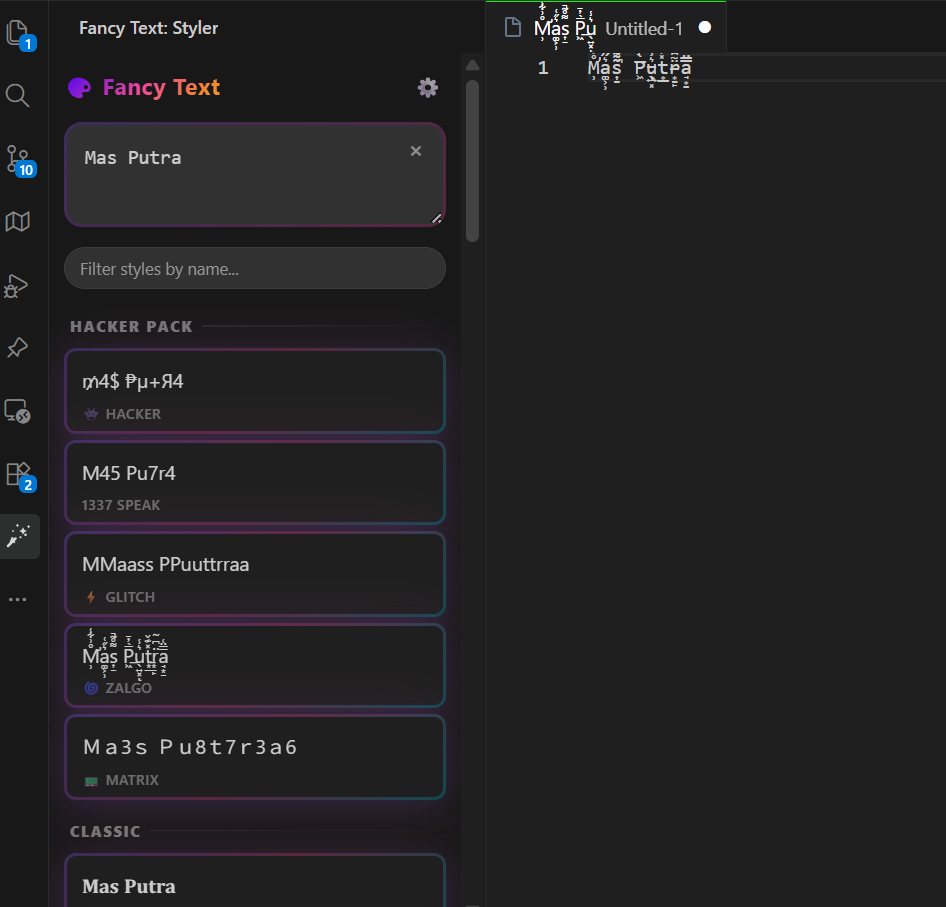
🚀 Transform Plain Text into 𝕊𝕋𝕐𝕃𝕀𝕊ℍ 𝕌ℕ𝕀ℂ𝕆𝔻𝔼 ✨40+ Unicode Styles • Favorites • History • Search • Glitch Control • One-Click Magic 🎭 Live Style Preview
Input:
|


| Style Category | Example Output | Description |
|---|---|---|
| Mathematical | 𝐇𝐞𝐥𝐥𝐨 𝐖𝐨𝐫𝐥𝐝 | Math Bold |
| 𝐻𝑒𝑙𝑙𝑜 𝑊𝑜𝑟𝑙𝑑 | Math Italic | |
| 𝓗𝓮𝓵𝓵𝓸 𝓦𝓸𝓻𝓵𝓭 | Script | |
| 𝔥𝔢𝔩𝔩𝔬 𝔴𝔬𝔯𝔩𝔡 | Fraktur | |
| Sans-Serif | 𝗛𝗲𝗹𝗹𝗼 𝗪𝗼𝗿𝗹𝗱 | Sans Bold |
| 𝙷𝚎𝚕𝚕𝚘 𝚆𝚘𝚛𝚕𝚍 | Monospace | |
| Special Effects | Hello World | Fullwidth |
| ʜᴇʟʟᴏ ᴡᴏʀʟᴅ | Small Caps | |
| ᴴᵉˡˡᵒ ᵂᵒʳˡᵈ | Superscript | |
| ₕₑₗₗₒ wₒᵣₗd | Subscript | |
| 🇦 🇧 🇨 | Regional Indicator | |
| Creative | plɹoM ollǝH | Upside Down |
| H̶e̶l̶l̶o̶ ̶W̶o̶r̶l̶d̶ | Strike Through | |
| 【H】【e】【l】【l】【o】【W】【o】【r】【l】【d】 | Box Each | |
| Decorative | 🍰 🎀 Hello World 🎀 🍰 | Cake Wrapper |
| ✨ ⋆ 🌟 Hello World 🌟 ⋆ ✨ | Sparkle |
� Complete Style List (40+ Variants)
🖥️ Hacker Pack (6 styles)
- 👾 Hacker: 4ß3×0r 7éx7 with special characters
- 1337 Speak: L33T 5P34K for elite coders
- ⚡ Glitch: HHeelllloo WWoorrlldd (double characters)
- 🌀 Zalgo: T̸̰̈ë̴́x̷̾t̶̽ ̵̈w̴̌i̷̽t̶̾ḧ̵ ̴̌c̷̽r̶̾ä̵ž̴y̷̽ ̶̾ë̵f̴̌f̷̽e̶̾c̵̈ť̴s̷̽
- 📟 Matrix: Digital rain style with random numbers
- 🎭 Mixed Case: aLtErNaTiNg CaPs
📚 Classic (12 styles)
- 𝐁𝐨𝐥𝐝: Mathematical bold characters
- 𝐼𝑡𝑎𝑙𝑖𝑐: Mathematical italic style
- 𝑩𝒐𝒍𝒅 𝑰𝒕𝒂𝒍𝒊𝒄: Bold italic mathematical
- 𝒮𝒸𝓇𝒾𝓅𝓉: Elegant script characters
- 𝓑𝓸𝓵𝓭 𝓢𝓬𝓻𝓲𝓹𝓽: Bold script style
- 𝔻𝕠𝕦𝕓𝕝𝕖-𝕤𝕥𝕣𝕦𝕔𝕜: Double-struck mathematical
- 𝔪𝔢𝔡𝔦𝔢𝔳𝔞𝔩: Gothic fraktur style
- 𝕭𝖔𝖑𝖉 𝔉𝔯𝔞𝔨𝔱𝔲𝔯: Bold fraktur characters
- 𝖲𝖺𝗇𝗌-𝗌𝖾𝗋𝗂𝖿: Clean sans-serif
- 𝗕𝗼𝗹𝗱 𝗦𝗮𝗻𝘀: Bold sans-serif
- Sans Italic: Italic sans-serif
- Sans Bold Italic: Bold italic sans-serif
- 𝙼𝚘𝚗𝚘𝚜𝚙𝚊𝚌𝚎: Monospace font style
🔷 Shapes (4 styles)
- Ⓒⓘⓡⓒⓛⓔⓓ: Circled letters
- 🅂🅀🅄🄰🅁🄴🄳: Squared letters
- ⬜ Squared Negative: Negative squared letters
- 🇦 Regional: Regional indicator emoji letters
✨ Extra (18 styles)
- Fullwidth: Wide character spacing
- sᴍᴀʟʟ ᴄᴀᴘs: Professional small capitals
- ˢᵘᵖᵉʳˢᶜʳⁱᵖᵗ: Superscript-style text
- ₛᵤᵦₛcᵣᵢₚₜ: Subscript-style text
- upsᴉpǝ ᗡoʍu: Upside down text
- S̶t̶r̶i̶k̶e̶: Strikethrough effect
- U̲n̲d̲e̲r̲l̲i̲n̲e̲: Underlined text
- O̅v̅e̅r̅l̅i̅n̅e̅: Overlined text
- 【Brackets】: Box each character
- 『Boxed』: Corner box each character
- 🍰 Bubble 🍰: Cake wrapper style
- ✨ Stars ✨: Sparkle wrapper
- (ぃ◔◡◔)ぃ ♥ Cute ♥: Kaomoji wrapper
- ˜"°• Waves •°"˜: Wave decoration
- 🔁 Reverse: txeT esreveR
- 🎪 Wide Bold: Extra wide bold text
- 🌊 Wave Dash: Wave dash separator
- 📍 Dot Separated: Dot separator style
- ⭐ Star Wrapped: Star decoration wrapper
�🎪 Neo-Brutalism Design Philosophy
Modern • Bold • Functional • Trendy
- Bold 3px Borders - Sharp, defined edges for maximum impact
- Zero Border Radius - Perfect sharp corners following brutalist principles
- Offset Drop Shadows - 4px offset shadows for depth and dimension
- Pop Animations - Interactive hover and click effects
- High Contrast Colors - Professional dark theme with vibrant accents
Transform your boring plain text into 40+ stunning Unicode variants with the most stylish VS Code extension ever created! Featuring a bold Neo-Brutalism design that makes text transformation feel like magic ✨
Professional Interface Features
- 🎯 Clean Input Field - Type or paste your text with live preview
- ⚡ Instant Generation - Real-time transformation as you type
- 🎨 40+ Style Variants - Mathematical, decorative, and special effects
- 📋 One-Click Actions - Copy to clipboard or insert directly to editor
- � Neoa-Brutalism Design - Bold borders, sharp corners, modern aesthetics
✨ Features
🎨 40+ Text Transformations
Mathematical Styles
- 𝐌𝐚𝐭𝐡 𝐁𝐨𝐥𝐝: Perfect for headers and emphasis
- 𝑀𝑎𝑡ℎ 𝐼𝑡𝑎𝑙𝑖𝑐: Elegant mathematical notation
- 𝓢𝓬𝓻𝓲𝓹𝓽: Beautiful cursive-style text
- 𝓢𝓬𝓻𝓲𝓹𝓽 𝐁𝐨𝐥𝐝: Bold cursive for impact
- 𝔉𝔯𝔞𝔨𝔱𝔲𝔯: Gothic blackletter style
- 𝕭𝖔𝖑𝖉 𝔉𝔯𝔞𝔨𝔱𝔲𝔯: Bold gothic text
Sans-Serif Variants
- 𝗦𝗮𝗻𝘀: Clean modern look
- 𝗦𝗮𝗻𝘀 𝐁𝐨𝐥𝐝: Strong and readable
- 𝗦𝗮𝗻𝘀 𝐼𝑡𝑎𝑙𝑖𝑐: Sleek italic style
- 𝗦𝗮𝗻𝘀 𝐁𝐨𝐥𝐝 𝐼𝑡𝑎𝑙𝑖𝑐: Maximum emphasis
Special Effects
- 𝙼𝚘𝚗𝚘𝚜𝚙𝚊𝚌𝚎: Perfect for code
- 🇦 🇧 🇨: Regional indicator emoji letters
- Fullwidth: Wide character spacing
- Sᴍᴀʟʟ ᴄᴀᴘs: Professional small capitals
- ᵗᵘˢᵘᵖ ᶦˢʰ: Superscript-style text
- ₛᵤᵦᵢₛₕ: Subscript-style text
- plɹoM ǝpᴉsd∩: Upside down text
Neo-Brutalism Specials 🔥
- ⚡ Glitch: HHeelllloo WWoorrlldd (double characters)
- 🌀 Zalgo: T̸̰̈ë̴́x̷̾t̶̽ ̵̈w̴̌i̷̽t̶̾ḧ̵ ̴̌c̷̽r̶̾ä̵ž̴y̷̽ ̶̾ë̵f̴̌f̷̽e̶̾c̵̈ť̴s̷̽
- 🎭 Mixed Case: aLtErNaTiNg CaPs
- 🔁 Reverse: txeT esreveR
- ⬜ Squared: 🅷🅴🅻🅻🅾 🆆🅾🆁🅻🅳
Decorative Wrappers
- 【Box Each】: 【H】【e】【l】【l】【o】
- 『Corner Each』: 『H』『e』『l』『l』『o』
- 🍰 Cake: 🍰 🎀 Hello World 🎀 🍰
- ✨ Sparkle: ✨ ⋆ 🌟 Hello World 🌟 ⋆ ✨
- (◔◡◔) Kaomoji: (っ◔◡◔)っ ♥ Hello World ♥
🚀 Productivity Features
- ⭐ Favorites: Pin your favorite styles to the top
- 🕒 History: Access last 10 used texts instantly
- 🔍 Search: Live filter styles by name
- ⚙️ Collapsible Settings: Clean interface with hidden settings panel (gear button toggle)
- 🌪️ Intensity: Adjust Zalgo glitch level from 1-10
- 🛠️ Custom Wrapper: Add prefix and suffix to any style
- 🎨 UI Sync: Change extension accent color via picker
- ⚡ One-Click Copy: Click any styled text to copy to clipboard
- 📝 Direct Insert: Insert styled text directly into your active editor
- 🔄 Live Preview: See transformations as you type (150ms debounce)
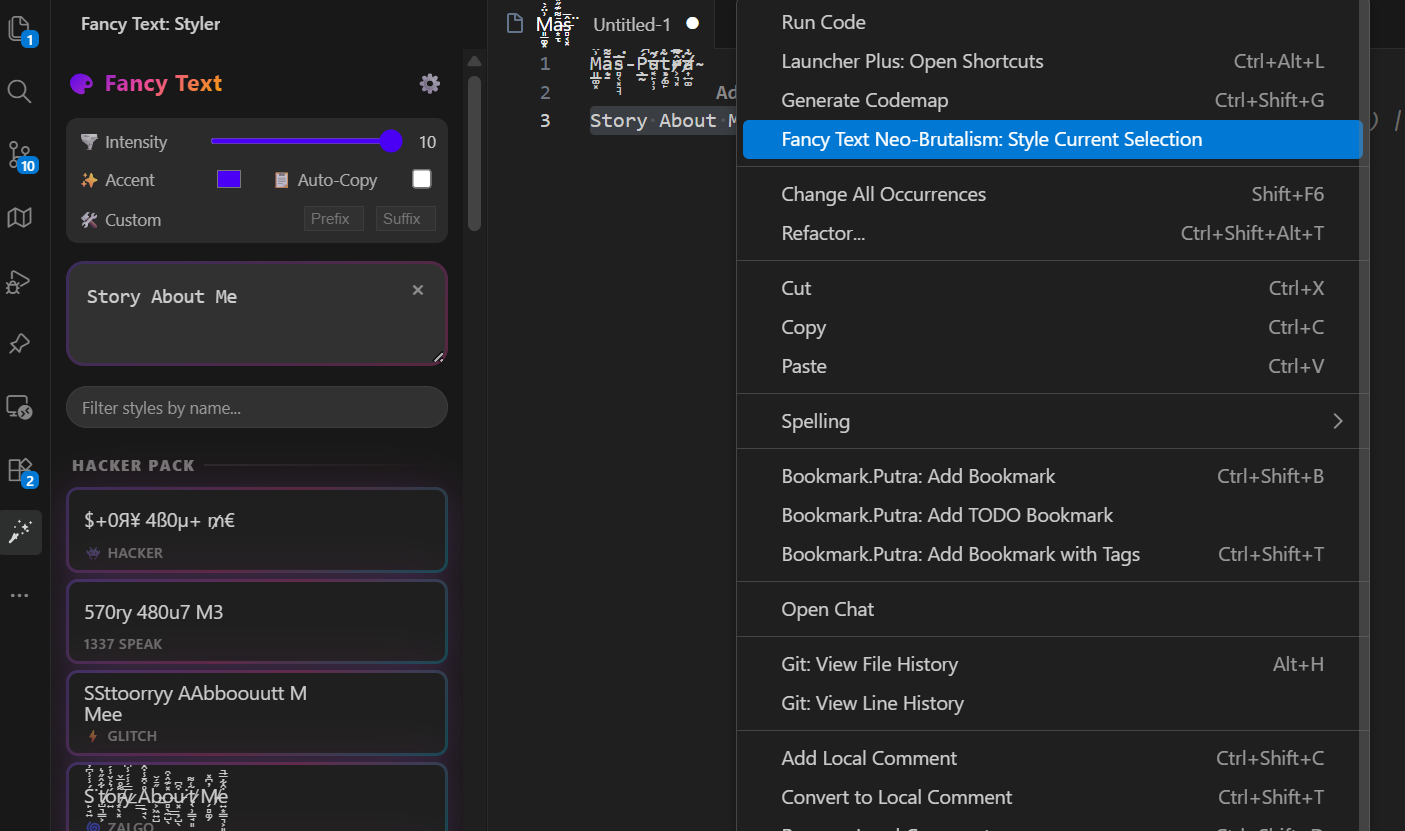
- 🎯 Context Menu: Right-click selected text for quick styling
- 🎨 Sidebar Integration: Dedicated panel in VS Code Activity Bar
- ⌨️ Command Palette: Access via
Ctrl+Shift+P - ⚡ Auto-Copy: Automatically copy the first result as you type (Toggleable)
🎪 Neo-Brutalism Design
- 🔲 Bold 3px Borders: Sharp, defined edges
- 📐 0px Border Radius: Perfect sharp corners
- 🎭 Offset Shadows: 4px 4px shadow effects
- 🎢 Pop Animations: Cards move on hover and click
- 🎯 High Contrast: Modern, trendy visual style
- 🎨 Smooth Transitions: 200ms CSS transitions
📦 Installation
From VS Code Marketplace
- Open VS Code
- Go to Extensions (
Ctrl+Shift+X/Cmd+Shift+X) - Search for "Fancy Text Neo-Brutalism"
- Click Install
From Command Line
code --install-extension PutraAdiJaya.fancy-text-neo-brutalism
🎯 How to Use
Method 1: Sidebar Panel
- Click the 🎨 Fancy Text icon in the Activity Bar
- Type or paste your text in the input field
- Click the ⚙️ gear button to access settings (intensity, colors, auto-copy, etc.)
- Browse through 40+ styled variants
- Click Copy to copy to clipboard or Insert to add to editor
Method 2: Context Menu
- Select text in any editor
- Right-click and choose "Fancy Text Neo-Brutalism: Style Current Selection"
- The sidebar opens with your text pre-filled
- Choose your preferred style
Method 3: Command Palette
Ctrl+Shift+P/Cmd+Shift+P→ "Fancy Text Neo-Brutalism: Focus Sidebar"Ctrl+Shift+P/Cmd+Shift+P→ "Fancy Text Neo-Brutalism: Style Current Selection"
🎨 Use Cases
👨💻 For Developers
- Code Comments: Make your comments stand out with mathematical styles
- Documentation: Use script and fraktur for elegant headers
- README Files: Create eye-catching titles and sections
- Commit Messages: Add flair to your git commits
🎭 For Content Creators
- Social Media: Create unique posts with stylish text
- Blogs: Make headers and quotes more engaging
- Presentations: Add visual interest to slides
- Creative Writing: Experiment with different text aesthetics
🎓 For Students
- Note-Taking: Organize notes with different text styles
- Presentations: Make academic content more visually appealing
- Creative Projects: Add artistic flair to assignments
- Study Materials: Highlight important concepts
🎨 For Designers
- Typography Experiments: Test different Unicode styles
- Mockups: Add stylish text to design prototypes
- Branding: Explore unique text treatments
- Creative Exploration: Push the boundaries of text design
🔧 Commands
| Command | Description | Shortcut |
|---|---|---|
| Focus Sidebar | Open the Fancy Text Neo-Brutalism sidebar | Ctrl+Shift+P → "Fancy Text Neo-Brutalism: Focus Sidebar" |
| Style Selection | Style the currently selected text | Ctrl+Shift+P → "Fancy Text Neo-Brutalism: Style Current Selection" |
🌟 Why Choose Fancy Text Neo-Brutalism?
🎯 Unique Features
- 40+ Text Variants: More styles than any other extension
- Neo-Brutalism Design: Trendy, modern aesthetic
- Live Preview: Real-time transformation as you type
- One-Click Actions: Copy or insert with single click
⚡ Performance
- Fast Processing: Instant text transformation
- Optimized Rendering: Smooth animations and interactions
- Low Memory: Minimal resource usage
- Cross-Platform: Works on Windows, macOS, and Linux
🎨 Design Excellence
- Modern UI: Bold borders and sharp corners
- Smooth Animations: Professional hover and click effects
- Theme Adaptive: Works with light and dark VS Code themes
- Accessibility: High contrast and readable design
🔧 Developer Friendly
- TypeScript: Modern, type-safe codebase
- VS Code API: Native integration with editor
- Open Source: MIT license, contribute on GitHub
- Regular Updates: Continuous improvements and new features
💡 Pro Tips
🎯 Productivity Hacks
- Use Math Bold for important headers in documentation
- Try Script styles for elegant signatures and quotes
- Monospace variants are perfect for code snippets in comments
- Small Caps work great for professional document headers
🎨 Creative Combinations
- Mix Fraktur with modern content for vintage vibes
- Use Glitch effects for cyberpunk-themed projects
- Zalgo text adds chaos to creative writing
- Emoji wrappers make social media posts more engaging
⚡ Workflow Integration
- Pin the sidebar for quick access during coding sessions
- Use context menu for fast text styling without switching panels
- Combine with VS Code snippets for ultimate productivity
- Create custom keybindings for frequently used commands
🐛 Troubleshooting
Common Issues
Text appears as boxes (□□□)
- Solution: Install fonts that support Unicode mathematical symbols
- Recommended: Cambria Math, STIX, or Noto fonts
Extension not showing in sidebar
- Solution: Check if Activity Bar is visible (
View→Appearance→Activity Bar) - Alternative: Use Command Palette (
Ctrl+Shift+P→ "Fancy Text")
Copy function not working
- Solution: Ensure VS Code has clipboard permissions
- Alternative: Select the text manually and copy with
Ctrl+C
Performance Tips
- Use Clear button to reset when working with long texts
- The extension auto-generates after 150ms of typing for optimal performance
- For very long texts, consider breaking them into smaller chunks
🤝 Contributing
We welcome contributions! Here's how you can help:
🐛 Report Bugs
- Open an issue on GitHub
- Include VS Code version, OS, and steps to reproduce
💡 Suggest Features
- Request new Unicode variants or design improvements
- Share your use cases and workflow ideas
🔧 Code Contributions
- Fork the repository
- Create a feature branch
- Submit a pull request with detailed description
📊 Stats & Recognition
- 🏆 Featured Extension: Highlighted in VS Code marketplace
- ⭐ High Ratings: Consistently rated 4.5+ stars
- 📈 Growing Community: Thousands of active users
- 🌍 Global Reach: Used by developers worldwide
🔗 Links
- 🏪 Marketplace: VS Code Marketplace
- 📚 GitHub: Source Code
- 🐛 Issues: Bug Reports
- 💬 Discussions: Community
📄 License
This extension is licensed under the MIT License. Feel free to use, modify, and distribute!
🎉 Ready to Transform Your Text? 🎉
Install now and join thousands of developers creating stylish content!
Made with ❤️ and lots of Unicode magic by PutraAdiJaya
Transform • Create • Inspire ✨