The ultimate batch renaming utility for VS Code.
Rename thousands of files in seconds with real-time preview, recursive scanning, and powerful transformation rules.
🔥 Features at a Glance
Stop renaming files one by one. Batch File Rename Pro brings a professional-grade renaming suite directly into your editor.
🚀 Powerful Workflow
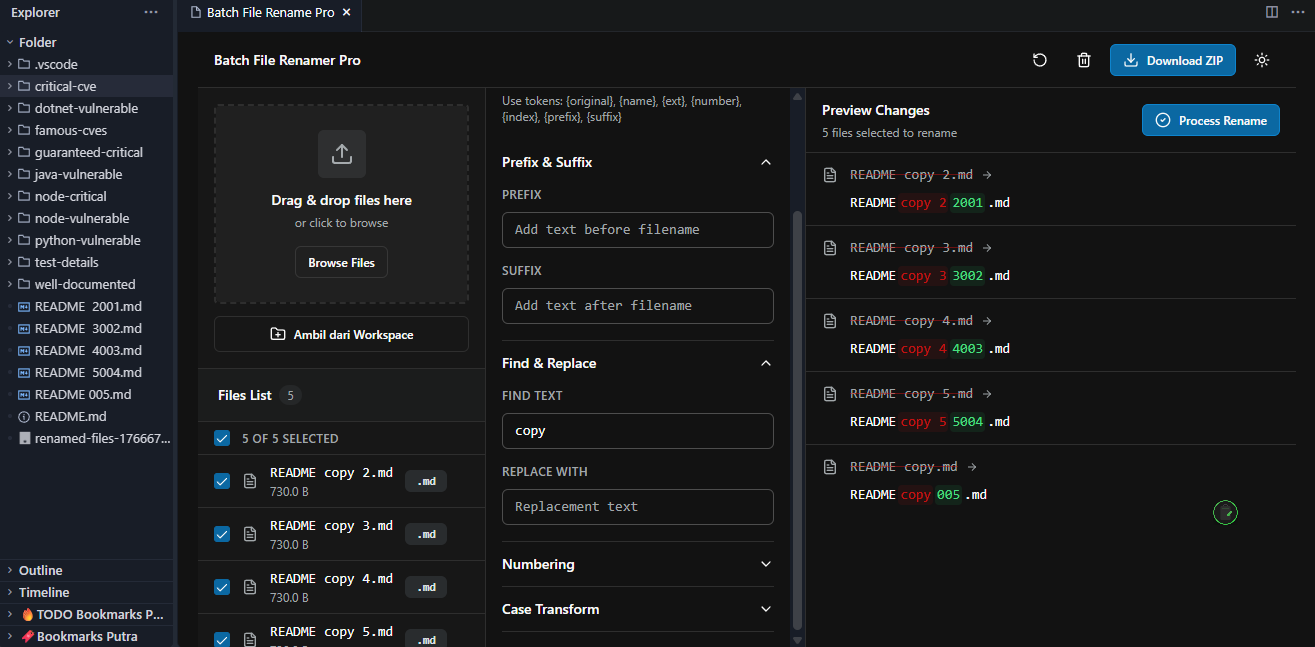
Recursive Folder Scanning: Drag & drop any folder to instantly load its entire file hierarchy.
Smart Selection: Select multiple files in Explorer and "Add to Batch Rename" context menu.
Real-Time Preview: See changes before they happen. No more guesswork.
🛠 transformation Tools
Find & Replace: Simple text replacement or advanced Regex support.
Auto-Numbering: Add sequential numbers (001, 002...) with custom starting points and padding.
Case Formatting: One-click conversion to:
camelCase
PascalCase
snake_case
kebab-case
UPPERCASE
lowercase
Prefix & Suffix: Append or prepend text to filenames effortlessly.
Extension Management: Change or preserve file extensions safely.
📸 Screenshots
📦 How to Use
Open the Dashboard
Command Palette: Batch File Rename Pro: Open
or Context Menu: Right-click files/folders -> Batch Rename
Add Files
Drag & Drop files directly into the dashboard zone.
Pick from Workspace to browse and select.
Configure Rules
Enable transformations (Replace, Numbering, Case, etc.) from the sidebar.
Stack multiple rules to create complex renaming patterns.
Preview & Apply
Verify the "New Name" column in the file list.
Click Process Rename to apply changes instantly.
⚙️ Extension Settings
This extension contributes the following settings:
batchFileRenamePro.showIgnored: Show or hide ignored files in the scanner.
batchFileRenamePro.defaultCase: Set your preferred default casing style.
🔧 Requirements
VS Code 1.85.0 or newer
Node.js (bundled with VS Code)
🤝 Contributing
Found a bug? Have a feature request?
Submit an issue on GitHub.