🧠 Project Brain
Stop repeating yourself to AI. Configure context once for Claude, Cursor, Windsurf, GitHub Copilot, and Gemini simultaneously.



Works with VS Code · Cursor · Windsurf · VSCodium · All VS Code Forks
😤 The Problem
You're using AI coding assistants. But every single time:
- 😩 "Let me explain my project structure again..."
- 😩 "No, that's not how we do authentication here..."
- 😩 "You forgot about the coding standards I mentioned 10 prompts ago..."
You waste 40% of your AI interactions re-explaining context. The AI forgets. You repeat. Productivity dies.
🧠 The Solution: Give Your AI a Brain
Project Brain automatically generates a structured memory system that AI assistants read FIRST before helping you — plus it scans your actual codebase to keep context accurate.
✅ One-time setup · ✅ Permanent context · ✅ Zero repetition
🚀 What Makes v3.0 Different
Project Brain goes far beyond static context files. It has live codebase intelligence:
🔬 Deep Scan — AI Context From Real Code
Scans your actual codebase and auto-generates a CLAUDE.md with real data:
- ✅ Detects every file, language, and line of code
- ✅ Finds API routes from Express, NestJS, FastAPI
- ✅ Discovers React/Vue/Svelte components
- ✅ Reads environment variables from
.env files
- ✅ Maps entry points, scripts, and dependencies
- ✅ No templates — real code analysis
Run: Ctrl+Shift+P → "Project Brain: Deep Scan Codebase"
📊 Context Health Dashboard
A beautiful dark-themed visual dashboard showing:
- 🎯 Context Health Score (0-100%) — how complete is your AI context?
- 📈 Codebase stats — files, lines of code, languages breakdown
- 🩺 Per-file health checks — is your
architecture.md too thin? Is api.md missing?
- 🔍 API routes & components detected in your code
Run: Ctrl+Shift+P → "Project Brain: Open Health Dashboard"
📋 Smart Context Copier
One-click generates a complete project summary from your real codebase and copies it to clipboard:
- 📦 Tech stack, dependencies, scripts
- 📁 Directory structure and entry points
- 🔌 API routes and components
- 🔑 Environment variables
Paste into ANY AI chat — ChatGPT, Claude web, Gemini, whatever you use.
Run: Ctrl+Shift+P → "Project Brain: Copy Smart Context to Clipboard"
🧠 Status Bar Indicator
Always visible in your status bar showing 🧠 Brain 🟢 85% — click to open the dashboard.
📸 See It In Action
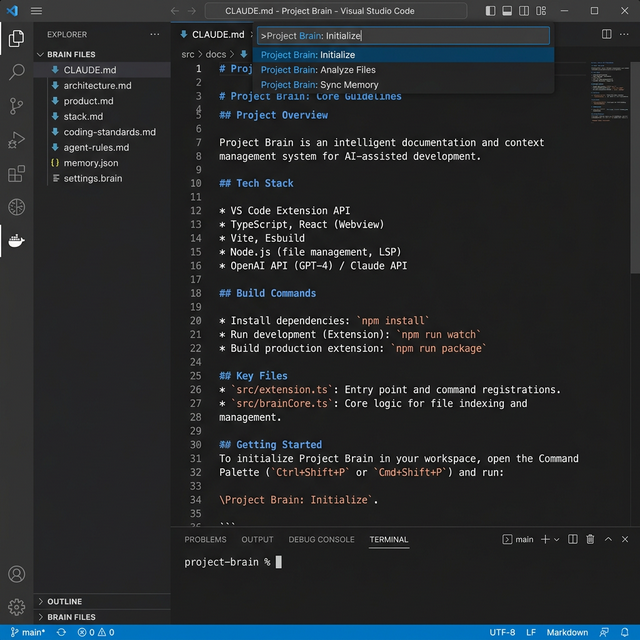
❌ Before vs ✅ After
Before Project Brain:
You: "Add a login button"
AI: *Generates React code when you use Vue*
You: "No, we use Vue here"
AI: *Uses Options API when you use Composition*
You: "We use Composition API..."
AI: *Ignores your auth system*
You: *Sighs deeply* 😮💨
After Project Brain:
You: "Add a login button"
AI:  *Reads your context files*
AI:  *Vue 3 Composition API* ✓
AI:  *Integrates Supabase auth* ✓
AI:  *Follows your code style* ✓
You: *Ships feature in 2 min* 🚀
📁 What Gets Generated
One command generates native rule files for ALL major AI assistants, referencing a single source of truth:
📄 CLAUDE.md                    ← Claude reads this
📄 .cursorrules                 ← Cursor reads this
📄 .windsurfrules               ← Windsurf reads this
📄 .github/copilot-instructions.md ← Copilot reads this
📄 GEMINI.md                    ← Gemini reads this
📂 project-brain/
   ├── 🎯 product.md            ← What you're building & why
   ├── 🏗️ architecture.md       ← System design & data flow
   ├── ⚙️ stack.md               ← Your exact tech stack
   ├── 📏 coding-standards.md   ← Your code style rules
   ├── 🤖 agent-rules.md        ← How AI should behave
   ├── 🗄️ database.md           ← Schema & relationships
   ├── 🔌 api.md                ← Endpoints & contracts
   └── 🗺️ roadmap.md            ← Current priorities
📂 tasks/
   ├── 📝 todo.md               ← Active task planning
   └── 🧠 lessons.md            ← AI self-improvement memory
🌍 Compatibility
| IDEs |
AI Tools |
| ✅ VS Code |
🟢 Claude Code |
| ✅ Cursor |
🟢 Cursor AI |
| ✅ Windsurf |
🟢 Windsurf Cascade |
| ✅ VSCodium |
🟢 GitHub Copilot Chat |
| ✅ Any VS Code Fork |
🟢 Gemini Code Assist |
⚡ Quick Start (60 Seconds)
- Open your project in VS Code
- Click the 🧠 brain icon in the sidebar
- Click "Initialize" or "Deep Scan" for auto-analysis
- Done. Your AI now understands everything. 🎉
🔍 Smart Detection
Project Brain automatically detects your stack:
| File |
Detected Stack |
package.json |
Node.js, React, Vue, Angular, Next.js, Express, NestJS |
requirements.txt |
Python, FastAPI, Django, Flask |
Cargo.toml |
Rust |
go.mod |
Go |
🎮 All Commands
Open Command Palette (Ctrl+Shift+P) and type:
| Command |
Description |
Project Brain: Initialize |
🚀 Launch guided setup wizard |
Project Brain: Quick Initialize |
⚡ Auto-detect and initialize |
Project Brain: Deep Scan Codebase |
🔬 Analyze real code → update CLAUDE.md |
Project Brain: Open Health Dashboard |
📊 Visual health score & stats |
Project Brain: Copy Smart Context |
📋 Copy project context to clipboard |
📊 The Math
|
Without Brain |
With Brain |
| ⏱️ Context per AI chat |
5 min |
0 min |
| 💬 AI chats per day |
10 |
10 |
| 📉 Wasted daily |
50 min |
0 min |
| 📉 Wasted weekly |
4+ hours |
0 hours |
That's 200+ hours per year you're getting back. ⏰
❓ FAQ
Does this slow down my IDE?
No. It activates only when needed, then sleeps. Zero performance impact.
What if I already have a CLAUDE.md?
Deep Scan will regenerate it with real data. You can always undo.
Does it work offline?
100%. Everything is local. No external calls. No telemetry.
Can I customize the templates?
Yes. Edit any generated file. Your changes are preserved on sync.
💬 What Developers Say
"I was mass-prompting context in every conversation. This fixed it permanently."
— Senior Developer at a Fortune 500
"Setup took 45 seconds. Now Claude actually understands my monorepo."
— Startup CTO
"The Deep Scan feature is a game-changer. It found 47 API routes I forgot to document."
— Full-Stack Developer
🆓 Free & Private
- ✅ Free for personal use
- ✅ No accounts required
- ✅ No tracking or telemetry
- ✅ Works 100% offline
- ✅ Just pure productivity
🐛 Support
Having issues? Open an issue on GitHub.

Stop explaining. Start shipping. 🚀

Made with 🧠 by developers who got tired of repeating themselves.

