Product Map for VS Code
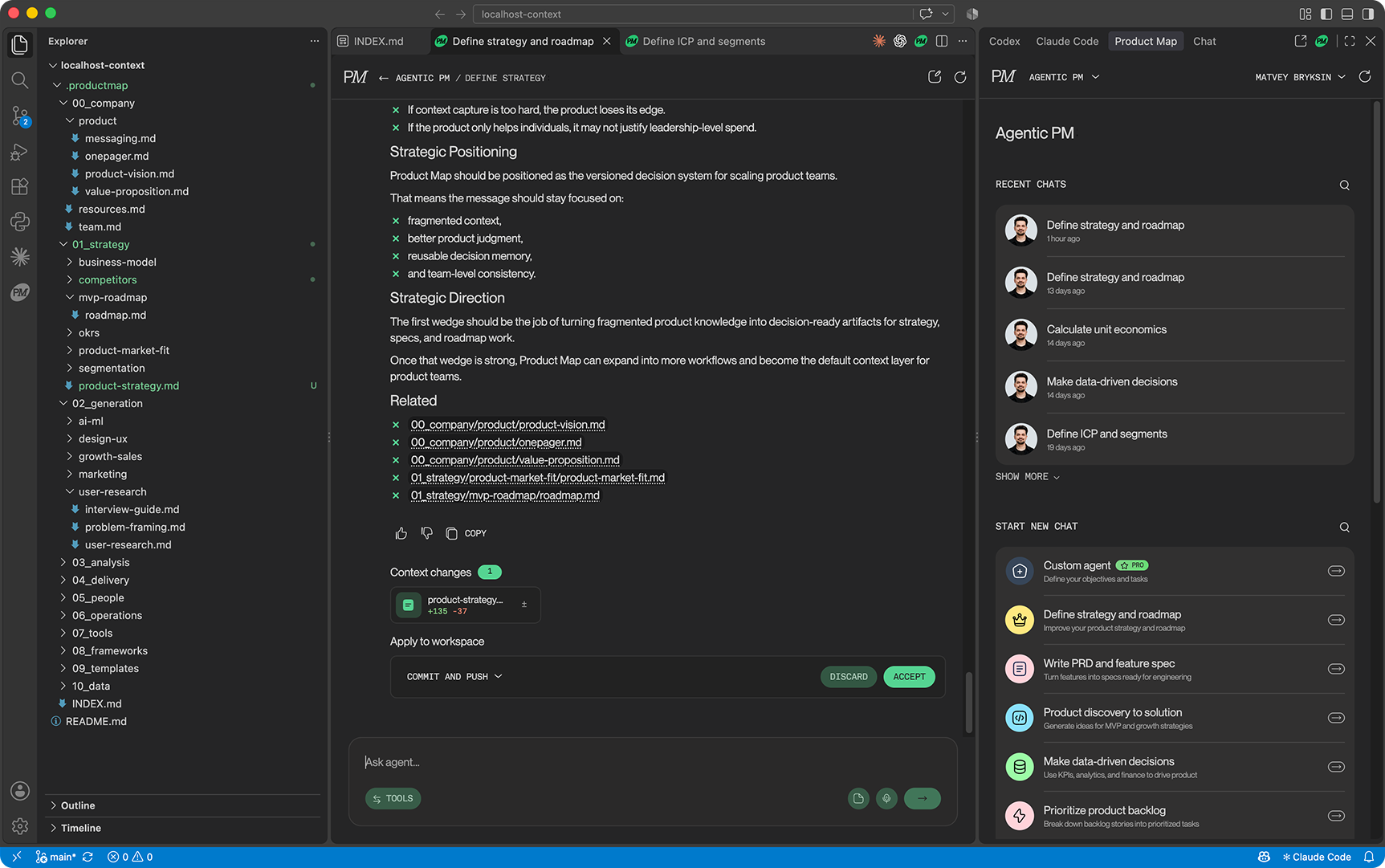
Product Map is the AI copilot for product decisions. This extension brings it into VS Code and Cursor, so you can talk to product agents and review their proposed changes to your product knowledge without leaving the editor.
Product knowledge lives as a version-controlled .productmap/ folder in your Git repository: strategy, discovery, delivery, and operations, kept as plain files your whole team can read, review, and own. Product Map works on that local checkout next to the coding agents you already run, such as Claude Code, Codex, and GitHub Copilot, so every agent in your workspace starts from the same product context.
Learn more at productmap.io. Open the web app at app.productmap.io.
Key features
- Product agents in the sidebar. Chat with task-specific agents for strategy, discovery, prioritization, research framing, and product docs. They read your project context and propose product work, not generic answers.
- One product context for every agent. The
.productmap/ knowledge base in your repo is the shared source of truth for Product Map and for Claude Code, Codex, GitHub Copilot, and other agents working in the same workspace.
- Context changes you review like code. When an agent proposes an update to product knowledge, the extension writes it into your local files. Open the diff, edit it, then accept or discard. Nothing is overwritten silently.
- Accept straight into Git. Accept commits the files and pushes to your branch, commits only, or leaves them uncommitted. With no local checkout, push to a branch or open a pull request through the Product Map app's Git connection.
- Mention your context. Type
@ in the composer to attach files from .productmap/ to a message, so the agent works from the exact documents you point it at.
- Chats in the sidebar or in tabs. Keep one chat in the sidebar and open others as editor tabs, split them, or move them to another window. Sessions survive editor reloads.
- Works in VS Code and Cursor. The same extension, same sign-in, same projects.
Why teams use it
- Grounded decisions. Agents understand your product, users, goals, and constraints before they answer.
- Versioned team memory. Product knowledge lives in Git, not in scattered slides and chat logs.
- Reviewable updates. Context changes follow the review flow your team already trusts: diff, edit, accept, commit.
- Proven practice. Agents apply established PM frameworks for strategy, discovery, delivery, prioritization, and go-to-market.
Getting started
Requirements
- VS Code 1.100 or later, or Cursor.
- A Product Map account. Create one and set up your first project at app.productmap.io.
- For local review of context changes, a checkout of the Git repository connected to your Product Map project.
Setup
- Install the extension. A Product Map icon appears in the activity bar on the left. It is also available in the secondary sidebar on the right, next to Claude Code and Codex.
- Open the Command Palette and run Product Map: Sign In. Your browser opens the Product Map login page and returns you to the editor. You can also paste an access token on the sidebar login screen.
- Pick a project, open a chat, and talk to the agent.
- When the agent proposes context changes, review them in the editor and accept or discard.
Press Cmd+Alt+M (Ctrl+Alt+M on Windows and Linux) or run Product Map: Open in New Tab to open Product Map in an editor tab.
Projects, team invites, and Git connections are managed in the web app at app.productmap.io.
Product Map elsewhere
Privacy and license
The extension sends messages and attached context only to Product Map on your behalf. See the Privacy Policy and Terms of Use.
Product Map for VS Code is proprietary software, © 2026 Product Map Ltd. See the license.
| |

