Skip to content
| Marketplace
Sign in
Visual Studio Code>Themes>RefinedVSNew to Visual Studio Code? Get it now.
RefinedVS

RefinedVS

Prince Biscuit

|
2 installs
| (0) | Free
A calm OLED dark theme: Calmppuccin Oledppuccin's UI paired with the VS2015 syntax palette used by VS Code's built-in Markdown preview.
Installation
Launch VS Code Quick Open (Ctrl+P), paste the following command, and press enter.
Copied to clipboard
More Info

RefinedVS

English | 简体中文

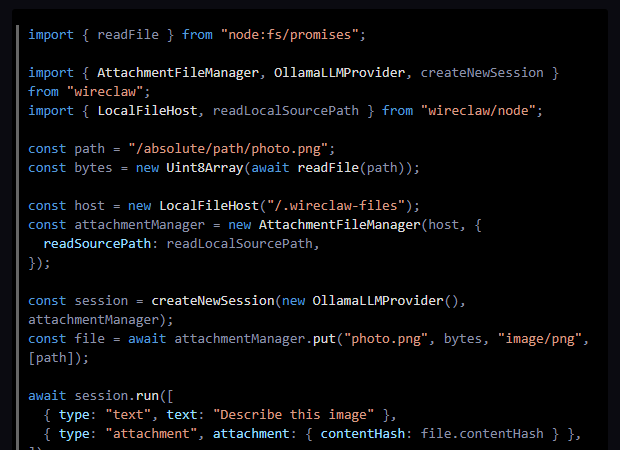
An OLED dark theme for VS Code: a deep blue-black canvas, true-black code blocks, muted blue-gray text, and blue / orange / cyan syntax highlighting.

VS Code Marketplace · GitHub

RefinedVS

Style

The page uses a near-black navy (#0B0B11), while code blocks sit on true black (#000000). Body text stays a muted blue-gray, and keywords, strings, and object keys use the VS2015 palette from VS Code's built-in Markdown preview. The result is low-contrast, easy on the eyes, and well suited to OLED displays.

Install

Search for RefinedVS in the VS Code Marketplace, or run:

code --install-extension PrinceBiscuit.refinedvs

Then choose:

Preferences: Color Theme → RefinedVS OLED

Palette

Element Color
Page background #0B0B11
Code block background #000000
Body text #8C92A7
Keywords #569CD6
Strings #D69D85
Object keys / properties #9CDCFE
Class names #DCDCDC
Comments #57A64A

Notes

The UI palette is inspired by Calmppuccin Oledppuccin, and the syntax colors follow VS Code's built-in VS2015 Markdown highlighting. Both are MIT-licensed; see NOTICE.md.

Developer: 王子饼干 (Prince Biscuit) · @529324416

License: MIT

  • Contact us
  • Jobs
  • Privacy
  • Manage cookies
  • Terms of use
  • Trademarks
  • Your Privacy Choices
  • Consumer Health Privacy
© 2026 Microsoft