FreeAgentCoder: free AI coding agent for VS Code (free Copilot alternative)


An AI coding agent that plans, edits, runs and tests your code, free, on your own free API keys. No subscription, no account, open source.
FreeAgentCoder works inside VS Code like a developer at your side: it reads your project, makes a plan, edits the files, runs your build and tests, and fixes what fails before it says done. It runs on free keys from Google Gemini, Groq, NVIDIA NIM and OpenRouter (or your own Claude, OpenAI or Mistral key), switching keys and models whenever one hits its limit. Your first tasks run on a free trial with no key at all.
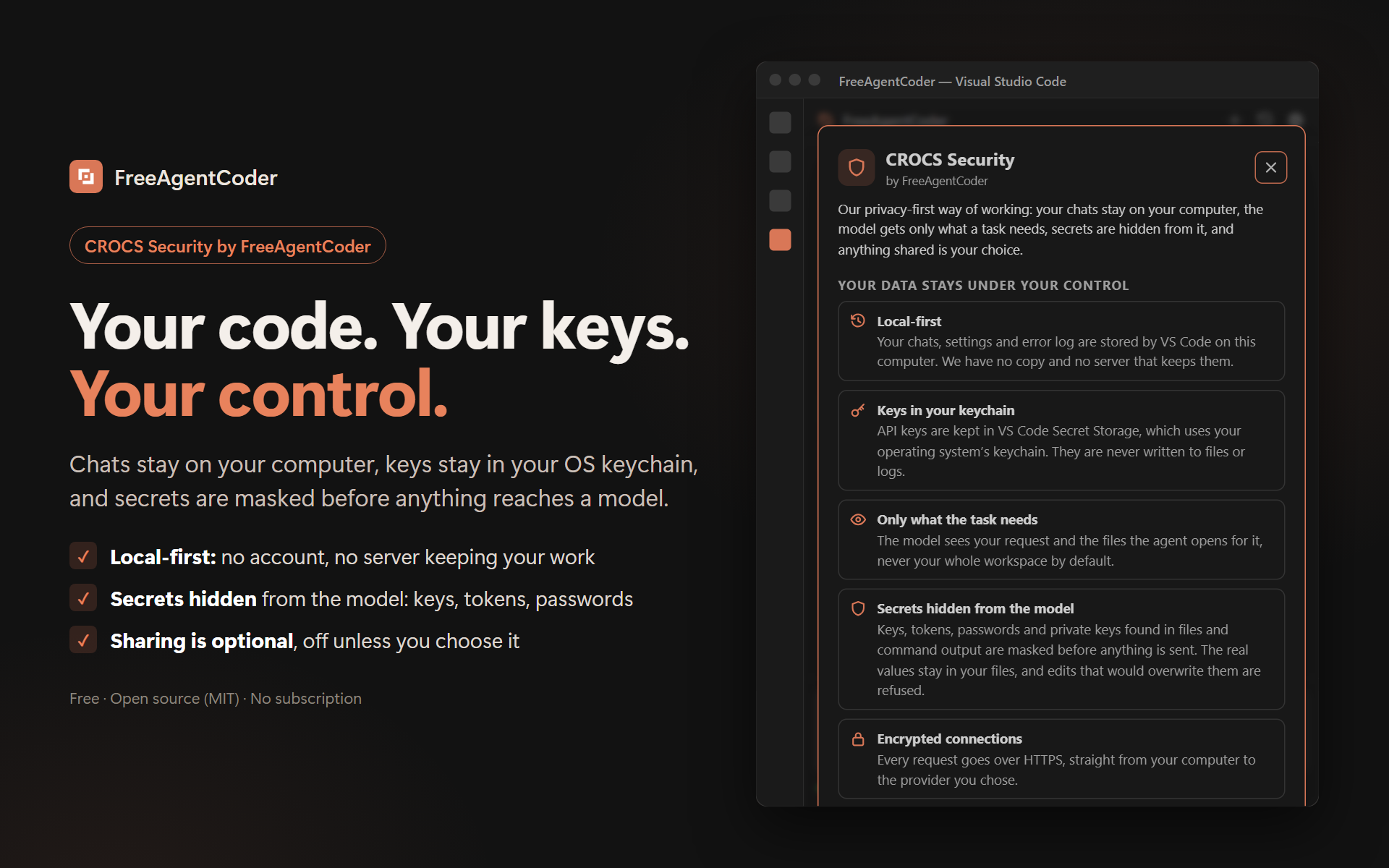
- 🛡 Private by design: CROCS Security. Your chats stay on your computer, your keys stay in your OS keychain, and keys, tokens and passwords are masked before anything reaches a model.
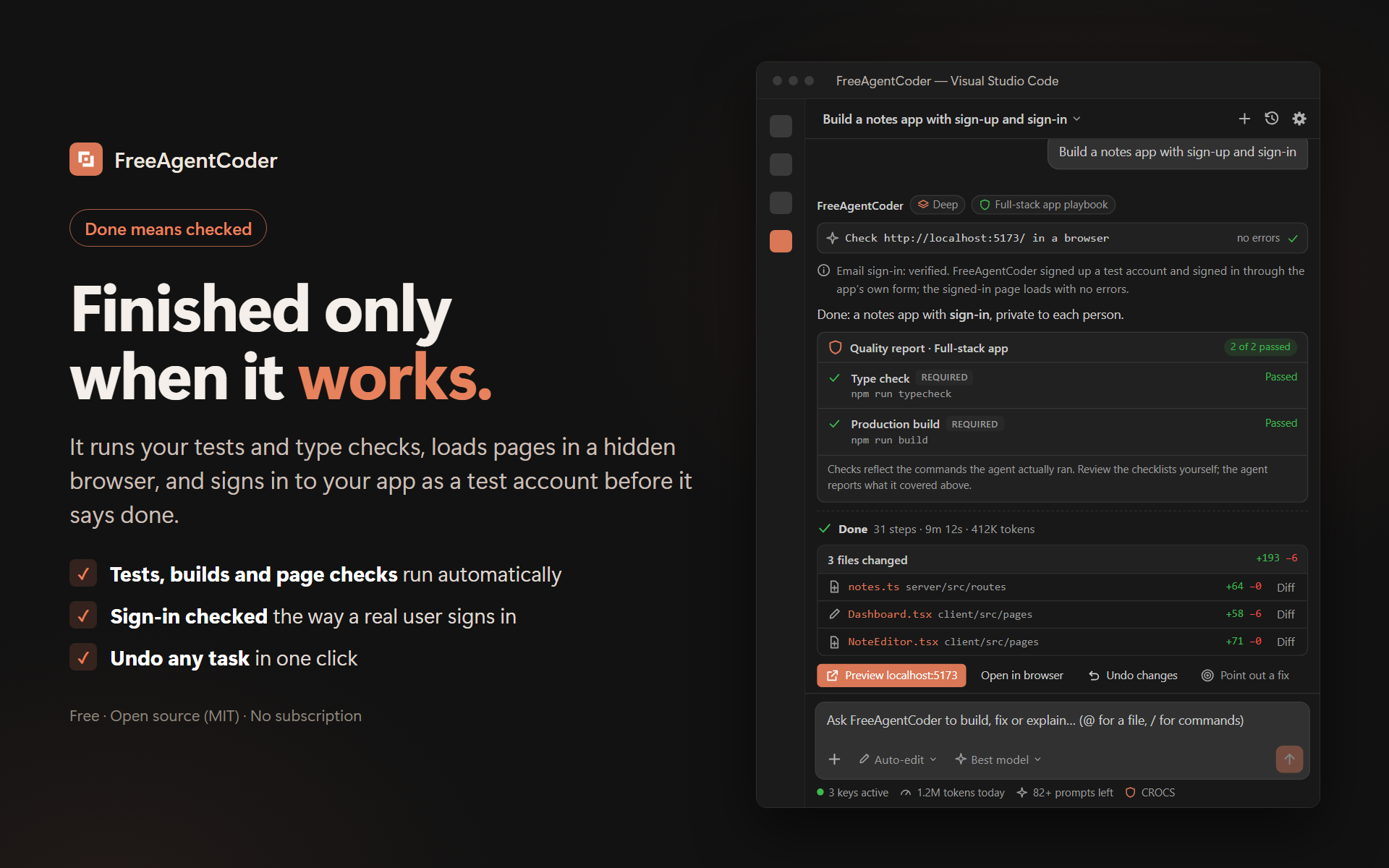
- ✅ Done means checked. Tests, type checks and builds run automatically; web pages are loaded in a hidden browser; nothing is called done on broken code.
- ⚡ Fyx saves your tokens. Git, zip, installs and dev servers run on your machine with no AI model and no tokens.
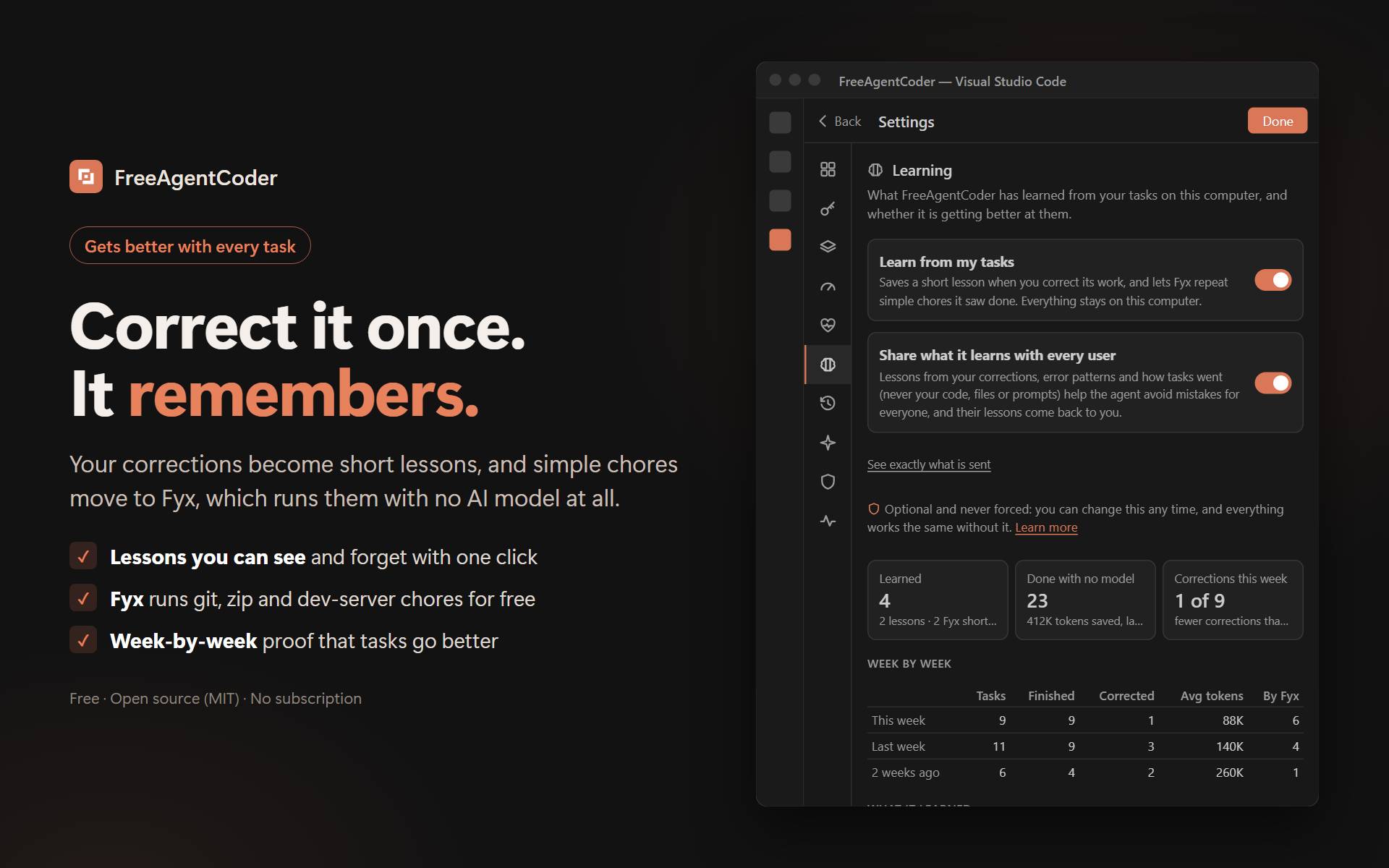
- 🧠 Learns from your corrections. Point out what's wrong once and it remembers.
- 📄 Builds from a requirements document. Attach a PDF or Word spec and it delivers against every requirement.
- 📊 Makes real presentations and documents. PowerPoint decks laid out from tested designs, with matching stock photos and their credits, checked slide by slide and exported to PDF; Word and PDF reports too.
- ▶️ Runs what it builds. It starts your app or site and gives you a link only once it really answers.
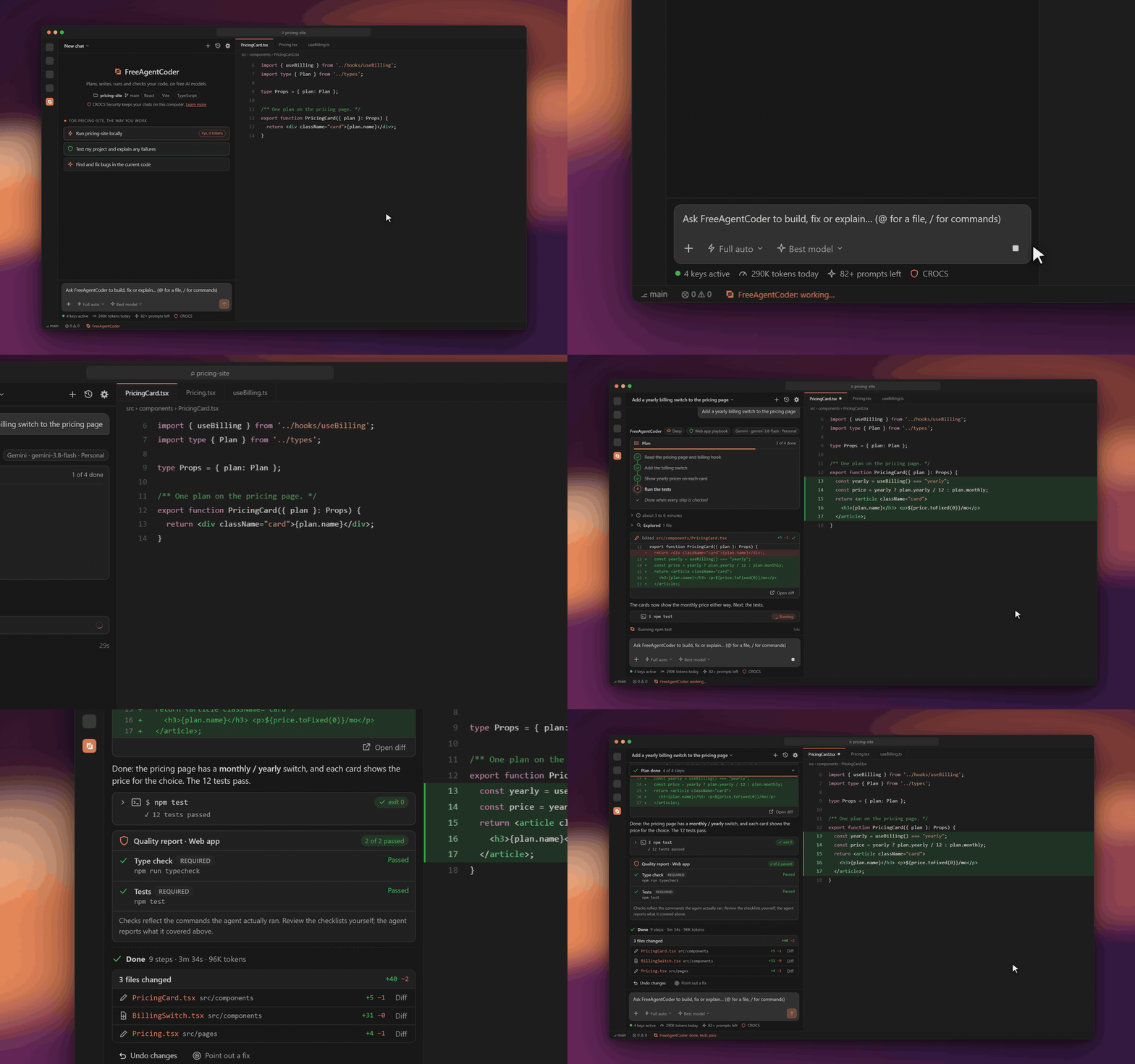
▶ Watch it in HD (21-second video)
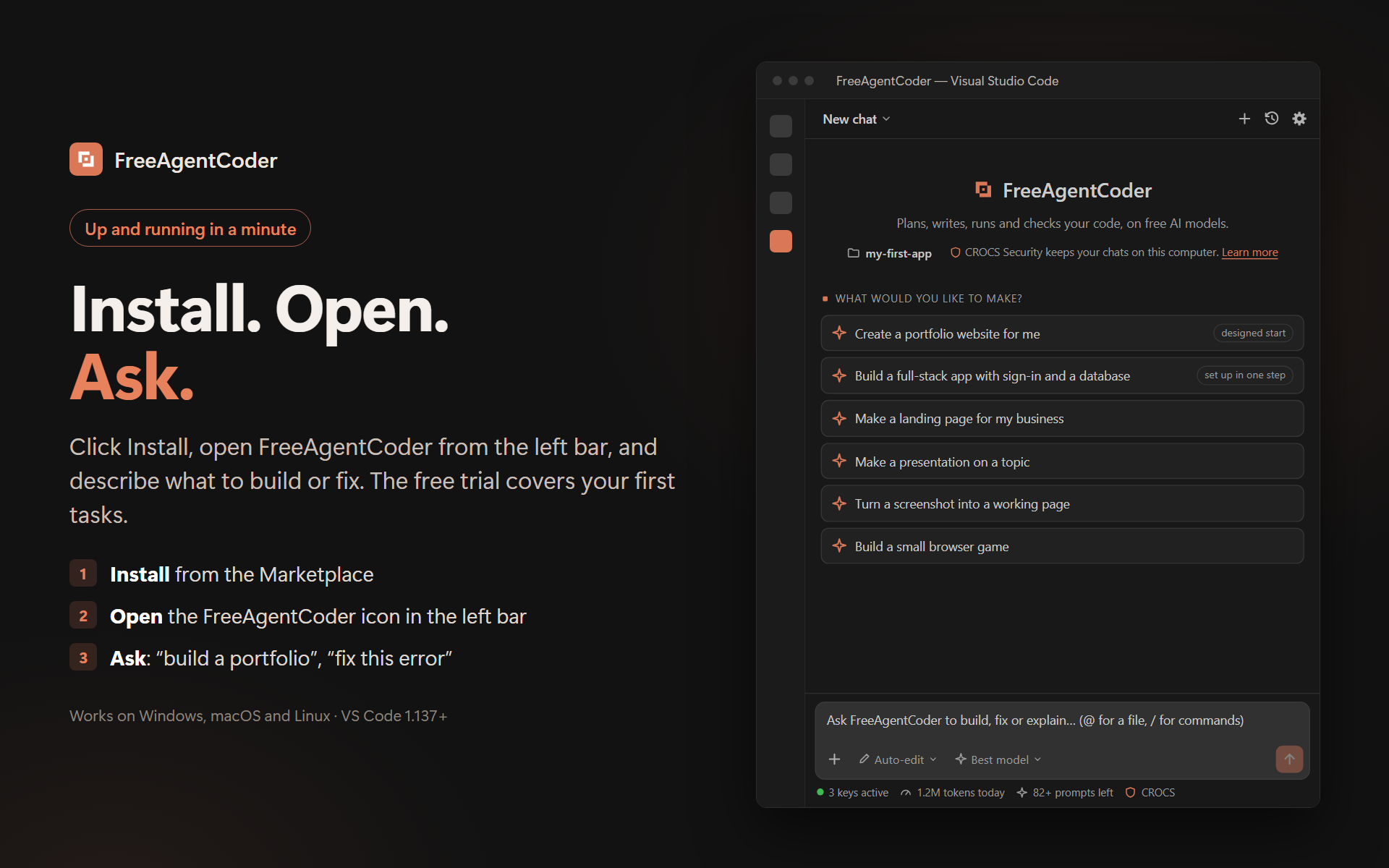
Get started in a minute
- Install FreeAgentCoder from the Marketplace.
- Open it from the FreeAgentCoder icon in the left bar (or the button at the top right of any editor).
- Ask: "Build a pricing page", "Fix this error", "Explain how this project is structured".
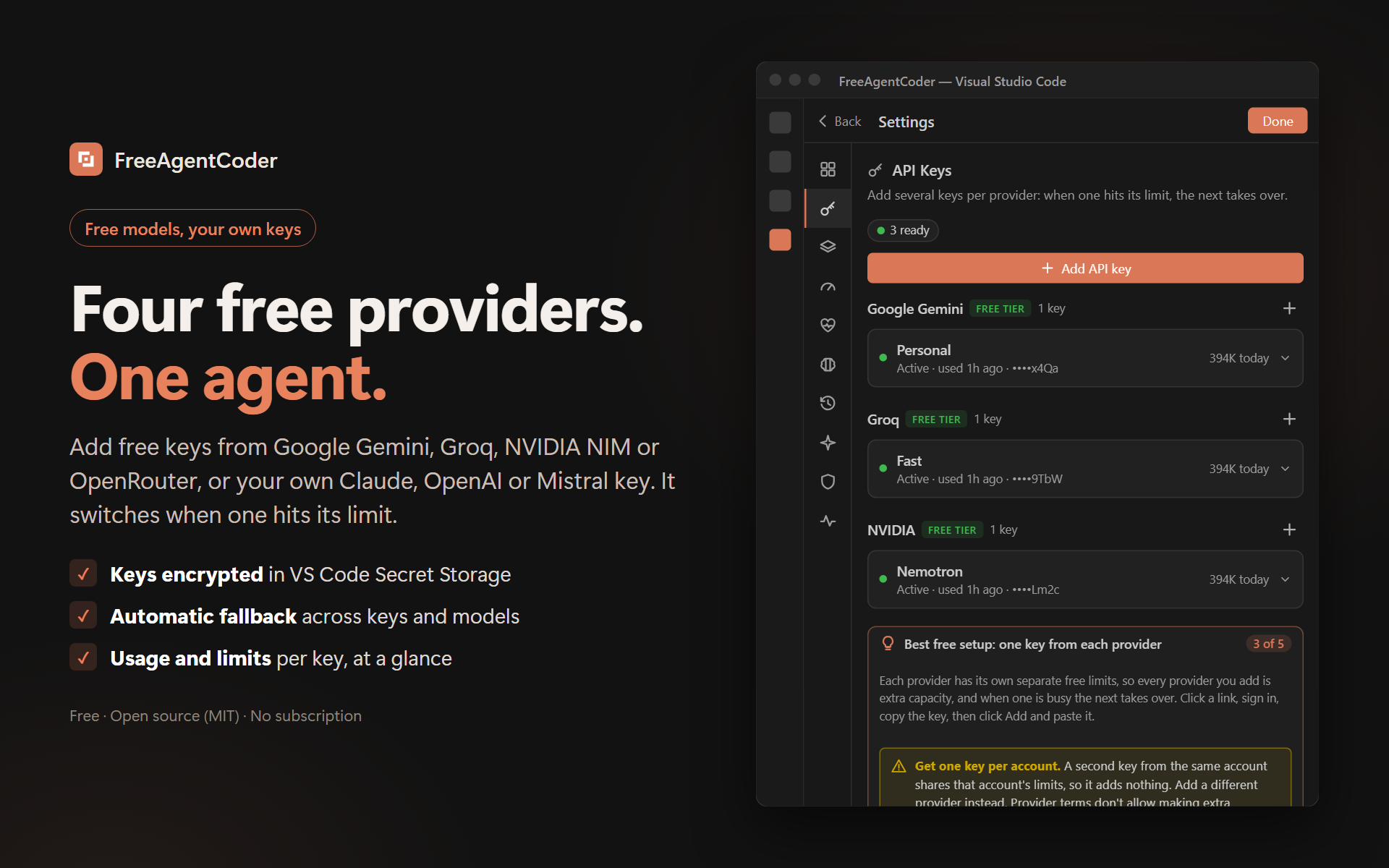
Your first tasks run on the free trial: 80 requests and 1.4 million tokens a day, up to three times that on a quiet day, plus a welcome bonus. Add your own free keys in Settings → API Keys and nothing stops you, no daily cap at all; Settings even suggests which keys would help you most. None asks for a card:
Google Gemini · Groq · NVIDIA NIM · OpenRouter
See it work
 |
 |
| Finished only when it works: tests, builds and a real sign-in |
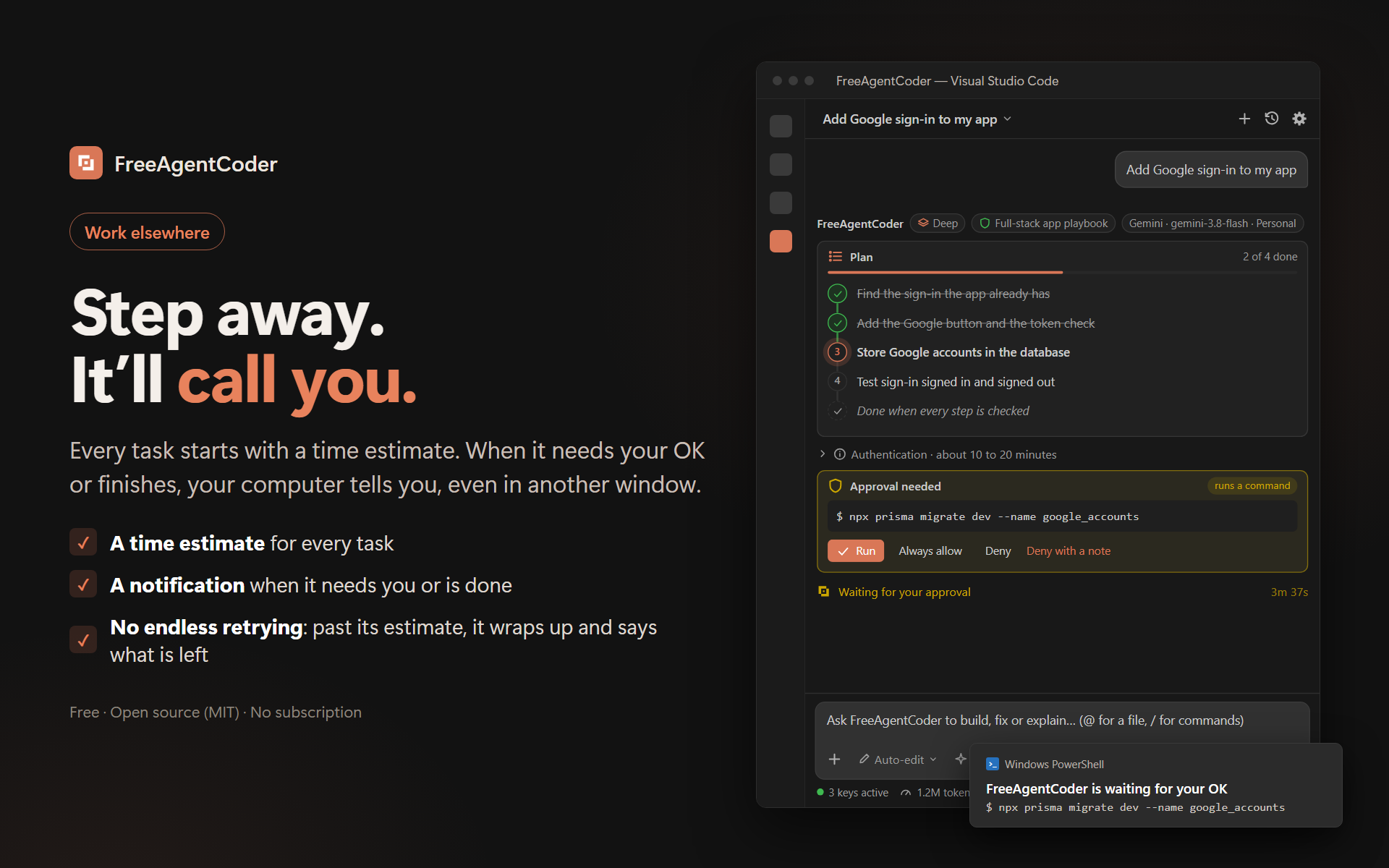
Step away, it'll call you when it needs your OK |
 |
 |
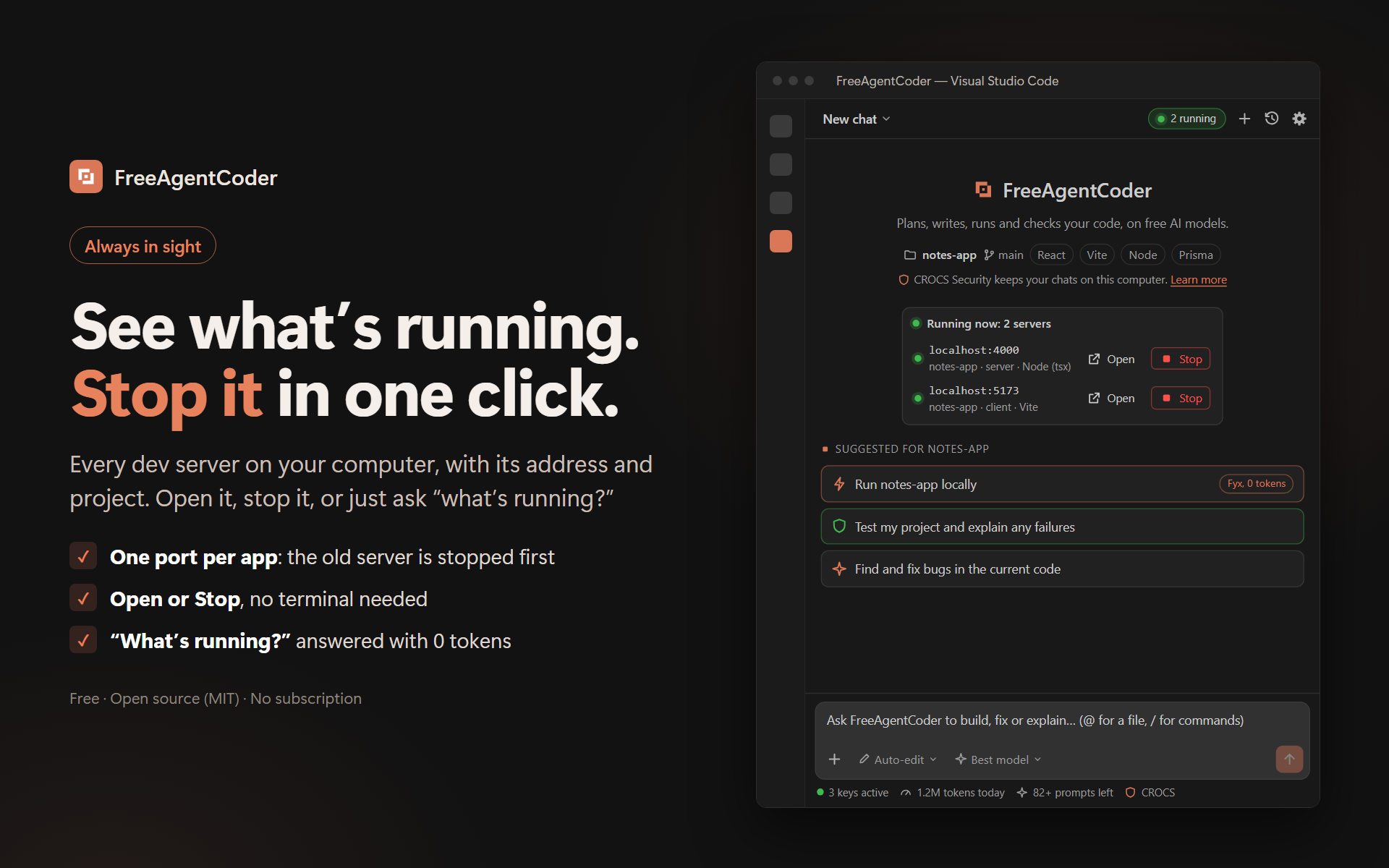
| See what's running, stop it in one click |
Four free providers, one agent |
 |
 |
| CROCS Security: your code, your keys, your control |
Correct it once, it remembers |
 |
 |
| Install, open, ask |
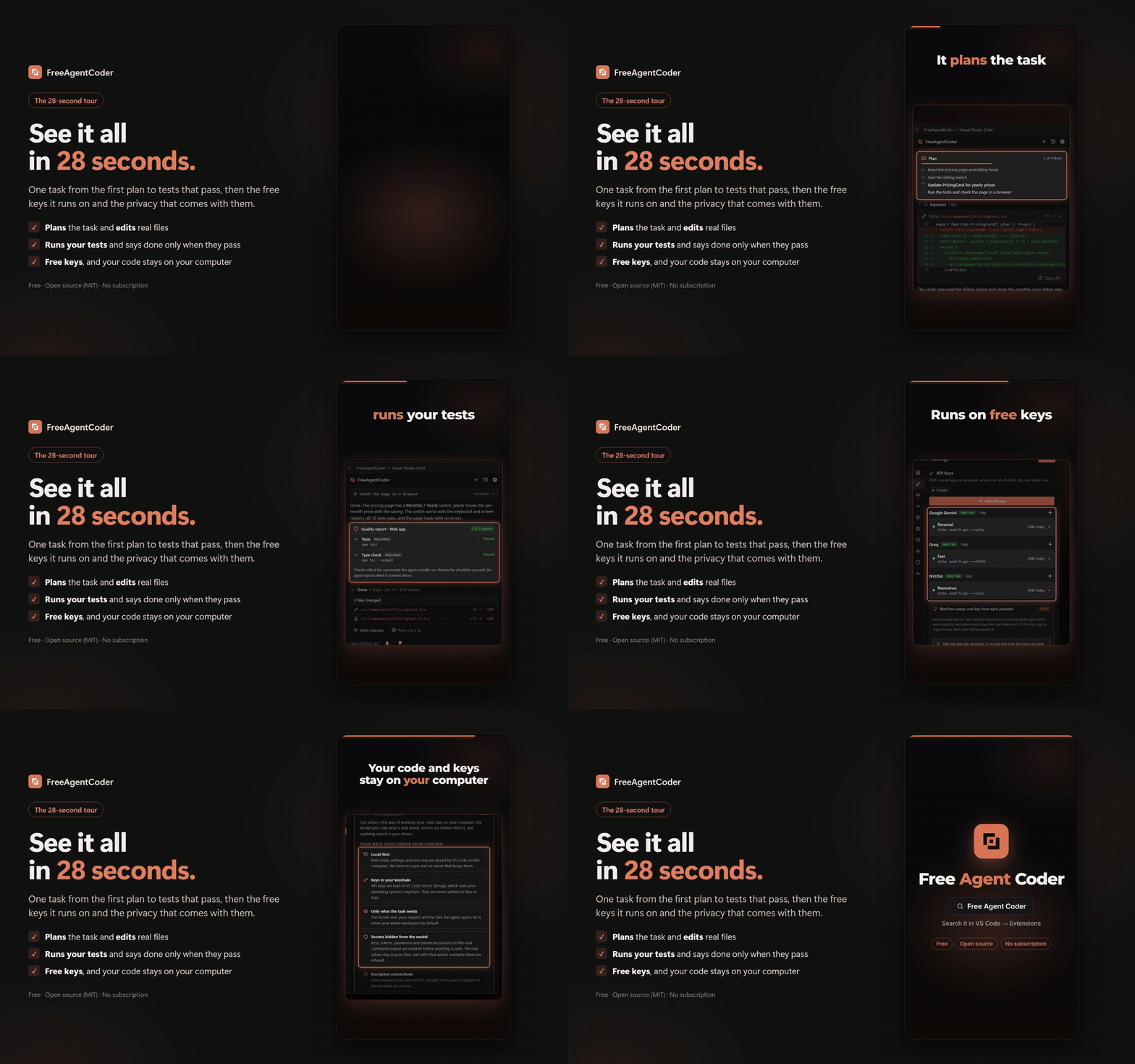
The 28-second tour |
Private by design: CROCS Security
CROCS Security by FreeAgentCoder is how we build it: keep your data on your computer, send a model only what a task needs, and make any sharing your choice. Open it any time from the 🛡 CROCS link at the bottom of the chat, or FreeAgentCoder: CROCS Security in the Command Palette.
- Local-first. Chats (if you choose to save them), settings, lessons and the error log are stored by VS Code on your computer. No account, and no FreeAgentCoder server keeps your work.
- Keys in your keychain. API keys live in VS Code Secret Storage (Windows Credential Manager, macOS Keychain or Linux Secret Service), never in files or logs.
- Only what the task needs. A model sees your request and the files the agent opens for it, not your whole workspace.
- Secrets hidden from the model. API keys, tokens, passwords, connection-string passwords and private keys found in files, command output and attachments are replaced with
[secret hidden by CROCS] before they are sent. Your files keep the real values, and an edit that would overwrite one is refused.
- Encrypted connections. Requests go over HTTPS straight from VS Code to the provider of the key in use.
- Sharing is optional. Help make it smarter for everyone by sharing what it learns (general lessons and how tasks went, never code, files, prompts or keys), or don't: everything works the same. Change it any time in Settings → Learning.
CROCS Security is our own approach, not an external certification. Secret masking catches common formats and can miss unusual ones, and providers process what they receive under their own terms (some free tiers may use requests to improve their models). Details below, under Privacy.
Free GitHub Copilot, Cursor and Claude Code alternative
Copilot, Cursor and Claude Code are excellent and paid. FreeAgentCoder gives you the same agent workflow (plan, edit across files, run commands, test, fix) inside the VS Code you already use, on free keys: no per-seat fee and no usage metering of ours. Bring a Claude or OpenAI key if you have one and it is used alongside the free ones.
Gemini Code Assist, Antigravity, Kiro and Trae alternative
Already have a free Gemini key? Paste it in and FreeAgentCoder uses every Gemini Flash model on it (3.8, 3.7, 3.6, 3.5 and 2.5), each with its own free daily limit, with no sign-in, licence or separate app.
Like Kiro and Trae, it plans before it builds and checks its own work, but inside the VS Code you already use, with your extensions and settings, on free keys instead of a new editor.
Cline, Roo Code, Kilo Code and Continue alternative
Same open-source spirit, built to stay out of your way on free tiers: it warns before a task when today's limits look too small, switches to your next key or model when one runs out, stops a loop that repeats the same error instead of burning tokens, and tells you plainly why it stopped. No surprise bills: there is nothing to bill.
Fix with FreeAgentCoder: fixes the errors your editor reports
Every error in the Problems panel gets a Fix with FreeAgentCoder quick fix, and each edit the agent makes comes back with the new type, lint and syntax errors in that file, so they are fixed on the spot.
What you can ask it to do
- Build: scaffold apps (React, Next.js, full-stack MERN, Flutter, Python, .NET), add features across many files, install dependencies, run production builds.
- Fix: run your tests or build, read the errors, fix them, and run again until they pass.
- Understand: explain code, trace how a feature works, answer questions about your codebase.
- Ship: add Dockerfiles and deployment config, and give you the exact deploy commands.
- Correct: show it what's wrong, with a screenshot or a note, and it fixes each point and verifies it.
- Make: PowerPoint presentations, Word documents and PDF reports from a short request or an attached document.
- Run: start your app or site and get a link that opens it, given only once it really answers.
- Read the web: ask about any site ("read this page: example.com", "what are its pricing plans?", "who founded it?") and it reads the site, its other pages too, and answers from them, saying which page each fact came from. Sites drawn by JavaScript are read in a browser on your computer.
- Spreadsheets and chores: Excel workbooks with a summary sheet, real formulas, tables and charts, checked for broken formulas before it says done; and Python scripts for everyday chores (rename photos, turn a CSV into a workbook) that do a dry run first and never overwrite your files.
- Sign-in that is checked, not just written. A full-stack project starts with sign-up, sign-in, sign-out and protected pages already working, and "Sign in with Google" that turns on when you add a Google client ID. Before a task on an app with sign-in is done, FreeAgentCoder signs up a test account and signs in through your app's own form in a hidden browser; a broken or blank page behind it sends the agent back with the exact error. The report says what is implemented, configured and verified.
- What is running, in sight. A green button at the top of the chat lists the dev servers on your computer with Open and Stop. Ask "what's running?" and the list comes straight back.
- Work elsewhere while it works. Each task starts with a time estimate. When VS Code is in the background, your system tells you when a task needs your OK (with Allow and Deny in VS Code) and when it finishes.
- MCP servers. FreeAgentCoder: Connect an MCP server adds GitHub, Supabase, Vercel, Netlify, Firebase, Cloudflare, Sentry, Stripe, Linear, Notion, Playwright, Chrome DevTools or Context7 docs. Each starts only when a task uses it, and your project's own
.mcp.json is used once you allow it.
- Skills. Put how you like a job done in a
SKILL.md under .freeagentcoder/skills/ (or .claude/skills/), and the agent follows it when the task is that job.
- Platform know-how. GitHub, Vercel, Netlify, Cloudflare, Supabase, Firebase, Render, Railway, MongoDB Atlas, Google sign-in and Stripe: the login check, the exact commands, where settings go, and the mistakes each is known for.
- Your chat, whole. Select and copy anything in the panel with Ctrl+C, or ask for the whole chat as a .txt file.
Presentations, documents and pictures
- Decks that look designed. Ask for a presentation and it is laid out from 16 tested layouts (title, cards, steps, timeline, big number, chart, table, gallery, quote and more), 8 themes and 85 built-in icons, then checked slide by slide for text that overflows, crowded or empty slides and leftover placeholders, and exported to PDF in the same step.
- Pictures that match the slide. Stock photos from Pexels, Pixabay and Unsplash, then Wikimedia Commons and Openverse, saved in your project with the credit line to print. Only the search words leave your computer, with the random install id the free trial uses, so the site's photo allowance is shared fairly.
- Reports and documents. Word and PDF reports with proper headings, spacing and page numbers, built by one script kept out of sight so your folder holds only what you asked for.
- Reads every file you give it. Word (with numbering, links, headers, footers and comments), PowerPoint (with chart data), Excel (with formulas), PDF (including scanned pages), OpenDocument, EPUB, ZIP archives, e-mail, and the old .doc, .xls, .ppt and .msg formats.
Attachments, corrections and memory
- Paste or drop anything. Screenshots, PDFs (including scanned ones), Word, PowerPoint and Excel files, or long pasted text. Documents are read on your computer, and so is the text in screenshots — no API request, no model, nothing sent anywhere. A vision model (Gemini, Mistral, OpenAI or Anthropic) is asked only when an image has little readable text, or when the layout, colours or a highlighted area are what matter.
- Very long documents are summarized for the agent and saved in
.freeagentcoder/attachments/ (git-ignored), so it can read the exact parts it needs.
- Correction mode. Click Point out a fix under a reply, or just say what's wrong. Each point you raise becomes its own item that is fixed with the smallest change and verified separately, and the reply ends with what was wrong, what changed and how it was checked.
- Learning. After a correction, FreeAgentCoder saves a short lesson (for example "Use Riverpod for state, not setState") and follows it in later tasks. Type "remember that …" to teach it directly. Settings → Learning shows everything it has learned (lessons, and chores Fyx now does by itself), how much that saved, and whether corrections are falling week by week. Forget anything with one click, or turn learning off. Lessons are instructions stored on your computer; they don't retrain the models.
Plan in Project Brain, build here
Project Brain is the website half of FreeAgentCoder. Paste a GitHub repository and it maps the stack and architecture, answers questions with real file references, and shows what a change would touch.
Describe the change there and click Work on this in VS Code. FreeAgentCoder opens with the plan written into the chat: the files involved and the steps in order. Nothing runs until you press Send.
Checked before it says "done"
- Your project's own checks. FreeAgentCoder finds how your project is verified: type check, lint, tests and build from
package.json scripts; pytest, ruff or mypy for Python; flutter analyze and flutter test; cargo, go, dotnet, Maven or Gradle. It uses your package manager and virtualenv.
- No "done" on broken code. A complex task that changed code can't finish until one of those checks has passed after its last edit, or it explains exactly why none can run.
- Test my project. One click runs every check it found and writes a report in plain words: what passed, and for each failure what failed, why, and how to fix it. It changes nothing unless you ask. For machine-learning projects it runs a small smoke check, never a full training run.
- Knows your project's layout. Complex tasks start with a compact map of your folders, so changes land in the right place.
- Sees your editor's errors. Each edit comes back with the type, lint and syntax errors your editor finds in the changed file (only the new ones), so the agent fixes them on the spot. Every error also has a Fix with FreeAgentCoder quick fix.
- @-mention files. Type
@ in the chat to pick a file; it goes with your request already read. Right-click a selection for Ask FreeAgentCoder About This.
Never stops without telling you why
- Warned before, not halfway. When today's remaining limits look too small for a task, a card says so before work starts, with an Add a key button.
- Daily limits handled. A key that reaches its daily limit is set aside until it resets, the next key takes over, and you're told once.
- Recovers on its own. Rate limits and dropped connections are waited out and the task resumes. A conversation that outgrows your models is summarized and continued.
- Plain-language errors. If something truly can't continue, you see what happened and what to do, with the technical details folded away.
Overview, savings and health
- Settings → Overview shows prompts left today (from the daily limits your providers report and your own average requests per prompt), how much you saved by using free keys instead of a paid model (an estimate with its basis shown), your project's stack and status, your last 7 days, and a switch for every feature.
- Settings → Health lists every job FreeAgentCoder routes to its own models (quick tasks, complex tasks, screenshot reader, scanned-PDF reader, lesson writer) and, for each key and model, whether it's healthy, rate-limited, out of daily quota or failing, with request counts, failures, average response time and the last error.
Smart routing across all your keys
- Auto mode sends quick questions and small edits to the fastest models (Groq), and building, debugging and multi-file work to the strongest (Gemini). Choosing costs no extra request.
- Several keys per provider. Give each key a name, such as "Personal" or "College". When one is rate-limited, the next one continues the same task, starting with the key you've used least today.
- Fast failover. A failing model hands over immediately and cools down for a while. A model that is overloaded at its provider (it sends nothing for minutes) is skipped within a minute and set aside for every key, so a busy Gemini model never stalls your task. Invalid keys are detected and flagged.
- Pin a model at any time from the model menu. Your other free keys stay available as fallbacks.
- No surprise bills. Paid providers (OpenAI, Anthropic) are only used automatically when you have no free key.
Senior mode for complex builds
When you ask for something big, such as "build a Flutter wallpaper app that's ready to publish", FreeAgentCoder works like a senior engineer:
- Checks your machine first. It sees which SDKs are installed before writing code, and asks before installing anything system-wide.
- Follows a stack playbook. Flutter, web apps (React, Next.js, Vue), full-stack MERN and PERN apps, Node.js APIs, Python backends, .NET and machine-learning projects each come with the structure, security rules and release steps they need.
- Designs websites like a studio would. Each site follows one complete design direction distilled from finished, professional sites (13 of them, five just for portfolios), chosen by who it is for and how it should feel, and is built with a kit of polished components: line-by-line headline reveals, pinned scroll scenes, stacking sections, a sideways work track, photo frames that drift with the scroll, a proper phone menu and a working enquiry form. No generic template look, and no made-up facts on a real person's site.
- Starts a portfolio from a finished design. Ask for a portfolio and it starts from a complete, designed site in a look chosen for you (seven of them), checked on desktop and phone; the agent then fills in only your details.
- Zips that are ready to share. "Zip this project" makes an archive that opens to the project folder, without node_modules, .env secrets or older zips.
- Keeps your app on one port. "Run it" stops the dev server FreeAgentCoder started before and reuses its port; "open the link", "run it again" and "stop the server on port 5173" happen on your machine with no AI model.
- Starts new projects from a proven setup. A plain HTML site is set up instantly with the design kit (reveals, nav and phone menu, image frames, timeline, a working form), and a React app, full-stack (MERN) app or Next.js site in one step from the official scaffolder plus a tested configuration (Tailwind CSS 4, routing, an API wired to the client), checked with a real build before any code is written.
- Never makes up facts about you. On a portfolio or CV site, every detail the agent writes is checked against what you gave; anything you never said (a company, years, "15+ projects") is sent back and becomes a placeholder for you to fill, with every section kept.
- Catches styles that do nothing. A stylesheet rule that silently cancels Tailwind's classes is pointed out the moment it is written, and the browser check reports a page whose spacing classes come out as zero.
- Checks every page on a phone too. Pages and running apps are loaded in a real browser at a desktop and a phone width, so text that runs off a phone screen, a title below the first screen, or missing alt text and page descriptions are found and fixed.
- Must pass quality checks. It can't call the task done until analysis, tests and builds actually pass, or it explains exactly why one can't run.
- Reports honestly. A quality report lists every check it ran, passed or failed, plus a security and publishing checklist for you.
- Recovers on its own. If every model is rate-limited or your connection drops, the task waits and picks up where it stopped instead of failing. Press Stop at any time to cancel.
Knows how good projects are built
- Builds from a requirements document. Attach a spec (PDF or Word) and it works like an engineer delivering against it: a REQUIREMENTS.md checklist before any code, the stack the document names, shared security and validation built first, demo logins per role, every acceptance step checked with real commands, and an EXPLAIN.md mapping each requirement to the code.
- Proven structures and designs. Complex tasks start from how strong solutions of that kind are built: an ASP.NET Core business app with central audit logging and per-user data, role-based backends, slide decks and reports, and the visual systems of real sites. The library is updated daily and matched on your computer; your request is never sent anywhere for it.
- Checks real documentation. Before using an API it is unsure of, and whenever a library rejects a call, it looks up current docs and examples for that library instead of guessing.
- Finds its way in existing projects. The first step of a complex task gets a map of the files the rest of the project uses most, with their main definitions, so it opens the right files instead of exploring.
- Fixes the cause, not the symptom. When the same error comes back, the next steps go to your strongest model with instructions to find its root cause; if it still returns five times, it stops instead of burning tokens.
Usage you can trust
- Tokens and requests for each key: today, since VS Code started, and over the last 30 days.
- Quota bars show only the limits a provider reports in its responses (Groq, Mistral, OpenRouter, OpenAI and Anthropic do). Gemini doesn't, so Gemini keys show local usage only.
- A warning when a key drops below 10% of a reported limit.
- Limits across your keys: each provider's reported limits added up across all your keys, so you can see how much is left in total.
- Key suggestions based on what actually happened: rate limits hit, limits nearly used up, fallbacks to weak models and the size of your tasks. For example: "Room for about 30 more tasks today".
Safe by default
| Mode |
Does without asking |
| Manual |
Reads files |
| Auto-edit (default) |
Reads and edits files |
| Auto |
Reads and edits files, runs commands |
- Risky commands, such as deleting files,
git push or deploys, always ask first.
- Commands that could wipe a disk are always blocked.
- Any task that changed files can be undone from the chat.
Works with your codebase
- Follows your team's conventions from
AGENTS.md, CLAUDE.md, .github/copilot-instructions.md or .cursorrules.
- Detects your stack (Node.js frameworks and scripts; Python with uv, poetry, conda or pip; Rust, Go, Java, .NET and Docker), so it spends less time exploring.
- Python and ML aware: uses your virtualenv, keeps test runs small, runs long training jobs in the background, and reads Jupyter notebooks as clean cells without their outputs.
- Respects
.gitignore and skips dependency, cache and experiment-tracking folders.
- Instant local code search: a built-in index of file names and identifiers finds the right files for a request without using any API quota, and complex tasks start with the most relevant files already attached.
How it compares
If you're looking at GitHub Copilot, Cursor, Windsurf, Cline, Roo Code, Kilo Code, Codex, Claude Code, Kiro or Trae, here's what's different about FreeAgentCoder:
- Built to run on free keys. It spreads the work across all the free Gemini, Groq, NVIDIA and OpenRouter keys you add (and optional Cohere or Mistral keys), and moves to the next one when a key hits its limit, so a free tier goes a long way. Paid Claude or OpenAI keys work too.
- No new editor, no subscription. It's an extension for the VS Code you already use, with no account and no plan to buy.
- Fyx: chores with zero tokens. Running your project, zipping folders, committing and pushing, and installing packages happen on your machine without calling a model.
- Checks its own work. It runs your build and tests, loads web pages in a real browser, and reads your editor's errors after each edit before it says it's done.
Supported providers
| Provider |
Plan |
Good to know |
| Google Gemini |
Free tier |
1M-token context; daily request quota |
| Groq |
Free tier |
Very fast; small per-minute token limit |
| NVIDIA |
Free developer key |
Nemotron models for complex work; about 40 requests a minute; key starts nvapi- |
| Mistral |
Needs billing |
Not free for the API: its free plan only works inside Mistral's own web console, so using a key here is paid per token (pay-as-you-go) |
| OpenRouter |
Free models |
50 requests a day, or 1,000 after a one-time $10 top-up |
| Cohere |
Optional |
1,000 calls a month; personal, non-commercial use only |
| OpenAI |
Paid |
Bring your own key |
| Anthropic |
Paid |
Bring your own key |
Free-tier limits change often, so check each provider's site. Keys you already have in environment variables (such as GEMINI_API_KEY) or in the Agentic CLI config (~/.agentic/config.json) are picked up too, marked ENV or CLI.
Commands
- FreeAgentCoder: Open Chat
- FreeAgentCoder: New Chat
- FreeAgentCoder: Manage API Keys
- FreeAgentCoder: Show Usage
- FreeAgentCoder: Stop Current Task
- FreeAgentCoder: Test My Project
- FreeAgentCoder: Get Started: reopens the setup guide
- FreeAgentCoder: CROCS Security: How Your Data Is Protected: what stays on your computer, what reaches a provider, and your sharing choice
In the chat box, Enter sends, Shift+Enter adds a new line, Esc stops the current task, and ↑ brings back your last prompt.
Privacy
This is the detail behind CROCS Security.
- Secrets are masked before they leave. API keys (Google, OpenAI, Anthropic, Groq, NVIDIA, OpenRouter, GitHub, GitLab, Slack, Stripe, Hugging Face, AWS access key ids), JWTs, private key blocks, passwords inside connection strings, and literal values of settings named like
PASSWORD, SECRET, TOKEN or API_KEY are replaced with [secret hidden by CROCS] in file contents, command output, mentioned files and attachments before they are sent to any model. The files themselves are not changed, and an edit that would write the placeholder over a real secret is refused. This catches common formats, not every possible one.
- Your API keys stay on your device. They're stored encrypted in VS Code's Secret Storage (your operating system's keychain: Windows Credential Manager, macOS Keychain or Linux Secret Service), are never uploaded to FreeAgentCoder or anyone else, and are sent only to the provider each key belongs to when you run a task. They're never shown again after you save them.
- No account and no sign-up. With your own keys, nothing goes through a FreeAgentCoder server.
- Attachments are saved in your project's
.freeagentcoder/ folder, which is git-ignored automatically. Lessons learned from your corrections are stored on this computer only, and you can review or delete them in Settings → Learning.
- The free trial. Until you add a key of your own, tasks run on FreeAgentCoder's free trial: a daily allowance on the project's keys. Those requests, including the code and prompts they contain, go through FreeAgentCoder's server to the provider and are not stored there; only counts are kept, against a random id made for the trial. Add your own key and the trial steps aside; turn it off with the
freeagentcoder.freeTrial setting.
- With your own keys, your prompts and code are sent only to the providers whose keys you add, directly from your editor. Their terms apply, and some free tiers may use requests to improve their models, so check a provider's data policy before working on sensitive code.
- Chat history is saved only if you agree, and only on your computer. Turn it off or delete saved chats any time in Settings → History.
- Errors are logged locally in Settings → Logs. Copy diagnostics removes API keys, tokens and your username from paths before copying.
- Reading images on this computer downloads the reader once (about 6 MB) from a public CDN, and checks it against a fixed checksum before running it. Your image is never part of that: it is read on your machine and never uploaded.
- Nothing is collected unless you say yes. The welcome screen asks once. OK, start using the agent turns sharing on; Close leaves it off, and the question is never asked if you have turned telemetry off in VS Code. With sharing on, FreeAgentCoder sends anonymous counts (how many keys you have and which providers, how many tasks ran and how they ended, short causes for failures such as
gemini:daily-limit, requests and tokens used) and what it learns: general lessons from your corrections, recurring error patterns, Fyx chore patterns with names replaced by placeholders, and your 👍 / 👎 with the reasons you pick. Names, paths and secrets are removed on your computer first, and lessons are reviewed before they are shared with other users. Never your code, prompts, file or project names, keys, or anything identifying you or your machine. See exactly what is sent (in the welcome card, CROCS Security and Settings → Learning) shows the queue, and Settings → Learning turns sharing off at any time.
- Once a day the extension fetches updated specialist instructions — how debugging, building, design and other kinds of work are approached — from the project's site. The same plain download also says which version is newest, so you get one small note when an update is out. It sends nothing about you or your project. Turn off the instructions with the
freeagentcoder.specialistUpdates setting.
- Photos for documents and pages. When the agent adds a real image to a deck, document or site, it asks the project's site for a stock photo (Pexels, Pixabay or Unsplash, searched with the site's keys), then Wikimedia Commons and Openverse, with a few words describing the picture. It downloads a freely licensed one into your project and prints its credit. Only those search words are sent, with the random install id the free trial uses so the site's photo allowance is shared fairly.
- The Plans page asks the project's site whether a paid tier exists, only when you open it.
- FreeAgentCoder has no account system and no server that holds your work.
Requirements
- VS Code 1.137 or newer
- Nothing else to start: the free trial runs your first tasks. Add a free key for more.
- A project folder open in VS Code
License
MIT
| |

