CodeGroup
File bookmarks and bookmark folders for VS Code — without moving files.
CodeGroup is a VS Code file-bookmark organizer. Collect related files from any folder into persistent bookmark-style groups, nested bookmark folders, smart working sets, and shareable collections directly inside the Explorer.




Install from Marketplace · Open VSX · Report an issue
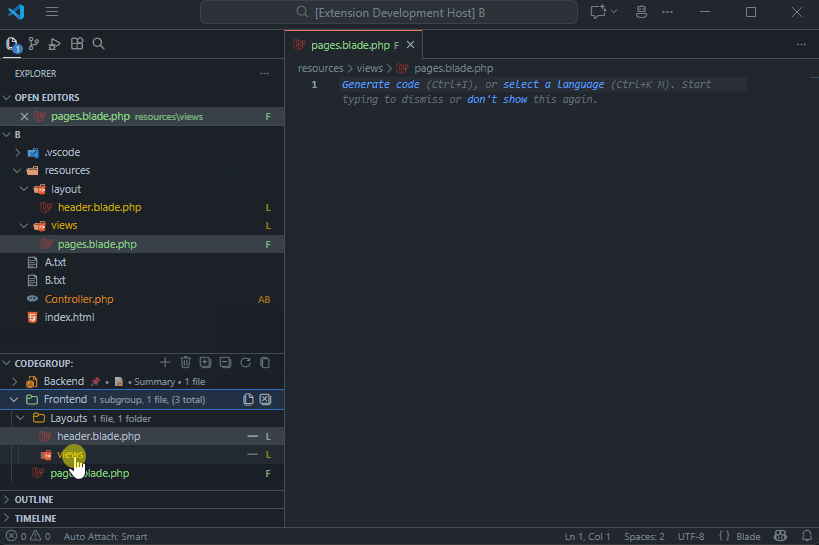
Configured groups, a nested subgroup, and their bookmarked files in the Explorer.
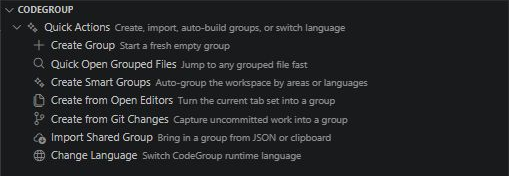
File bookmarks for VS Code
Large projects rarely fit neatly into folders. A single feature can span routes, components, tests, services, configs, and database files.
Normal folders describe where files live. CodeGroup adds bookmark folders that describe which files belong together while you work—without changing your project structure.
- Keep feature files together even when they live in different directories.
- Build working sets instantly from open editors or current Git changes.
- Navigate large codebases faster with Quick Open and pinned groups.
- Share team-specific file collections through Git-friendly JSON.
- Keep reusable global groups available across projects.
Core features
| Feature |
What it gives you |
| File bookmarks & bookmark folders |
Organize related files into groups and nested subgroups |
| Drag & drop |
Move files, folders, tabs, groups, and subgroups naturally |
| Smart Groups |
Auto-build groups by project area or language family |
| Working Sets |
Create groups from open editors or Git changes |
| Stage group changes |
Stage modified bookmarked files from a group and its subgroups without staging unrelated files |
| Quick Open |
Search grouped files, group names, notes, and paths |
| Searchable tags |
Label groups and individual file bookmarks, then find them through Quick Open |
| Global Groups |
Reuse important groups across different workspaces |
| Group customization |
120+ icons, colors, badges, descriptions, presets |
| Shareable JSON |
Export/import complete group trees |
| Git-friendly storage |
Store workspace groups in .vscode/file-groups.json |
| Smart file tracking |
Follow renames and clean up deleted files |
| Web support |
Use core bookmark workflows in vscode.dev, github.dev, and Codespaces |
Quick start
VS Code opens the native Getting Started with CodeGroup walkthrough after installation. Reopen it anytime from the CodeGroup Quick Actions list or run File Groups: Open Getting Started from the Command Palette.
- Install CodeGroup from the VS Code Marketplace.
- Open the CodeGroup view inside Explorer.
- Click + to create a group—your first bookmark folder.
- Drag files from Explorer or open tabs into the bookmark group.
- Click a file to open it, or use Open All for the full working set.
CodeGroup stores references, not copies: the same file can appear in several groups while the Explorer folder structure stays unchanged.
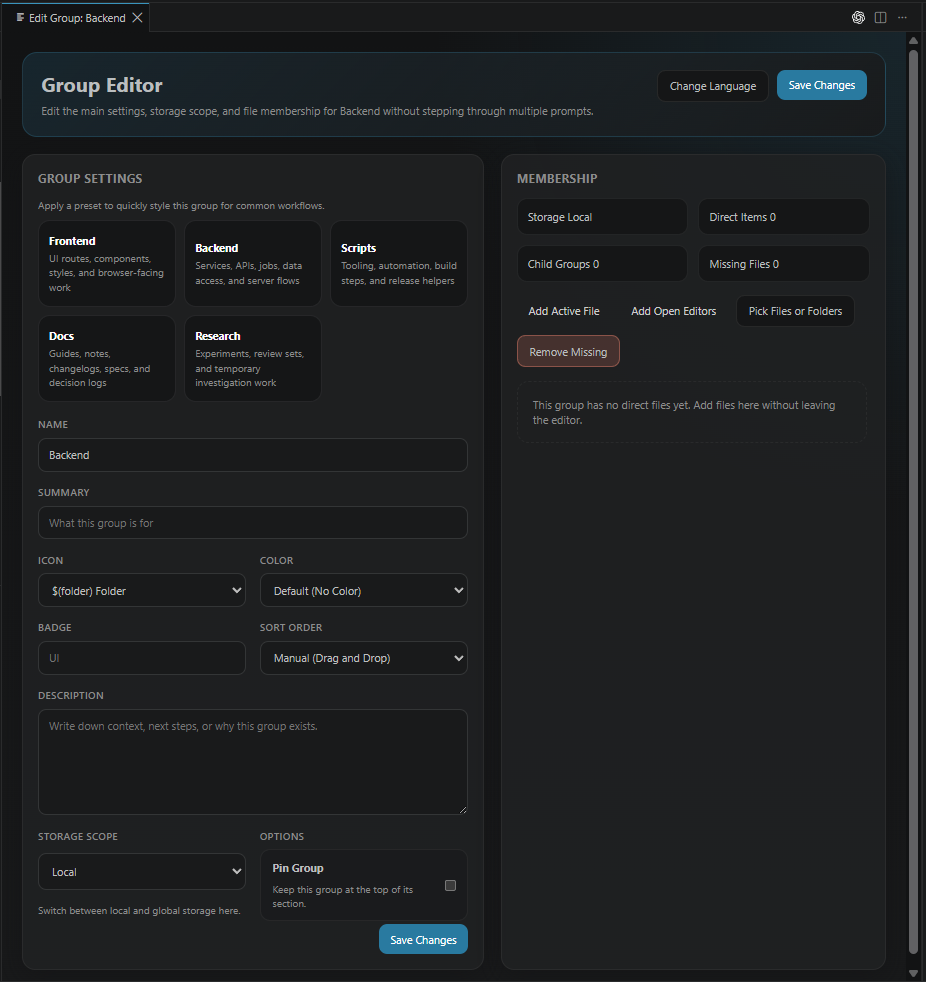
Visual group editor
Open any group in the visual editor to manage its name, tags, notes, icon, color, badge, order, storage scope, presets, and file membership.
Useful workflows
- Generate editable Smart Groups by project area or language.
- Capture open editors or Git changes as reusable working sets.
- Drag Explorer files, tabs, groups, and subgroups into place.
- Add comma-separated tags to groups or individual bookmarks and search
#tag in Quick Open.
- Keep local groups with a workspace or reuse global groups across desktop projects.
Sharing and storage
Workspace groups are stored in:
.vscode/file-groups.json
Paths are relative, so the configuration can be committed to Git and shared with a team.
You can also export an individual group tree as shareable JSON and import it elsewhere.
See the copy-paste shared-group JSON recipes for frontend/backend, bugfix, PR review, and documentation workflows.
VS Code Web and Codespaces
Core groups, file bookmarks, tags, Quick Open, and the Getting Started guide work in vscode.dev, github.dev, and browser-based Codespaces. Git-backed working sets, group staging, and global desktop storage remain available when CodeGroup runs in a desktop or Codespaces workspace extension host.
Commands
Show Command Palette commands
| Command |
Description |
File Groups: Open Getting Started |
Reopen the native in-extension guide |
File Groups: Quick Open from Groups |
Search grouped files, with recent files first |
File Groups: Edit Group Tags |
Add searchable labels to a group |
File Groups: Edit Bookmark Tags |
Add searchable labels to one bookmarked file |
File Groups: Create Smart Groups |
Auto-build groups by project area or language family |
File Groups: Import Shared Group |
Import shareable CodeGroup JSON |
File Groups: Export Group as Shareable JSON |
Export a reusable group tree |
File Groups: Copy File Paths |
Copy existing files from a group and its subgroups, one normalized path per line |
File Groups: Stage Group Changes |
Stage changed bookmarked files from a group and its subgroups in open workspace Git repositories |
File Groups: More Group Actions... |
Rename, duplicate, move, sort, export, and more |
File Groups: Create Group |
Create a root group |
File Groups: Create Group from Open Editors |
Build a working set from open tabs |
File Groups: Create Group from Git Changes |
Build a working set from Git changes |
File Groups: Create Subgroup |
Create a nested group |
File Groups: Open Group Editor |
Edit group metadata and membership |
File Groups: Open This Group's Files |
Open only files directly assigned to the selected group |
File Groups: Open Group and Subgroups |
Open files from the selected group and every nested subgroup |
File Groups: Delete Group... |
Delete a group |
File Groups: Edit Summary |
Set a short description |
File Groups: Edit Description |
Add Markdown notes |
File Groups: Pin/Unpin Group |
Keep important groups at the top |
File Groups: Set Badge Text |
Add a 1–2 character badge |
File Groups: Find Duplicate Files |
Find files used in multiple groups |
File Groups: Clean Up Missing Files |
Remove deleted files |
File Groups: Expand/Collapse All |
Expand or collapse the tree |
Requirements
Development
git clone https://github.com/MiszterSoul/codegroup.git
cd codegroup
npm ci
npm run verify
Useful commands
| Command |
Purpose |
npm run compile |
Type-check, lint, and create a development bundle |
npm test |
Run the fast unit test suite |
npm run verify |
Run type checks, lint, and unit tests |
npm run test:extension |
Test inside an isolated VS Code host |
npm run build |
Create the production bundle |
npm run build:web |
Create the browser extension bundle |
npm run package:list |
Inspect packaged extension files |
npm run package:vsix |
Build a local .vsix package |
Install the local package with:
code --install-extension dist/codegroup-file-organizer.vsix --force
Contributing
Contributions are welcome.
See CONTRIBUTING.md for development setup and contribution guidelines.
Releases
See CHANGELOG.md for release history.
The current extension manifest version is published through the VS Code Marketplace and Open VSX release flow.
License
MIT

