

Workshop your prose where you already write it.
Select an excerpt, attach a context brief built from your own story bible, and run focused craft passes — dialogue, gesture, cliché, continuity, metrics — without leaving VS Code. Bring your own OpenRouter key; Metrics and Word Search need no key at all.



What's new in v2.11.0 — Dictionary lookup history
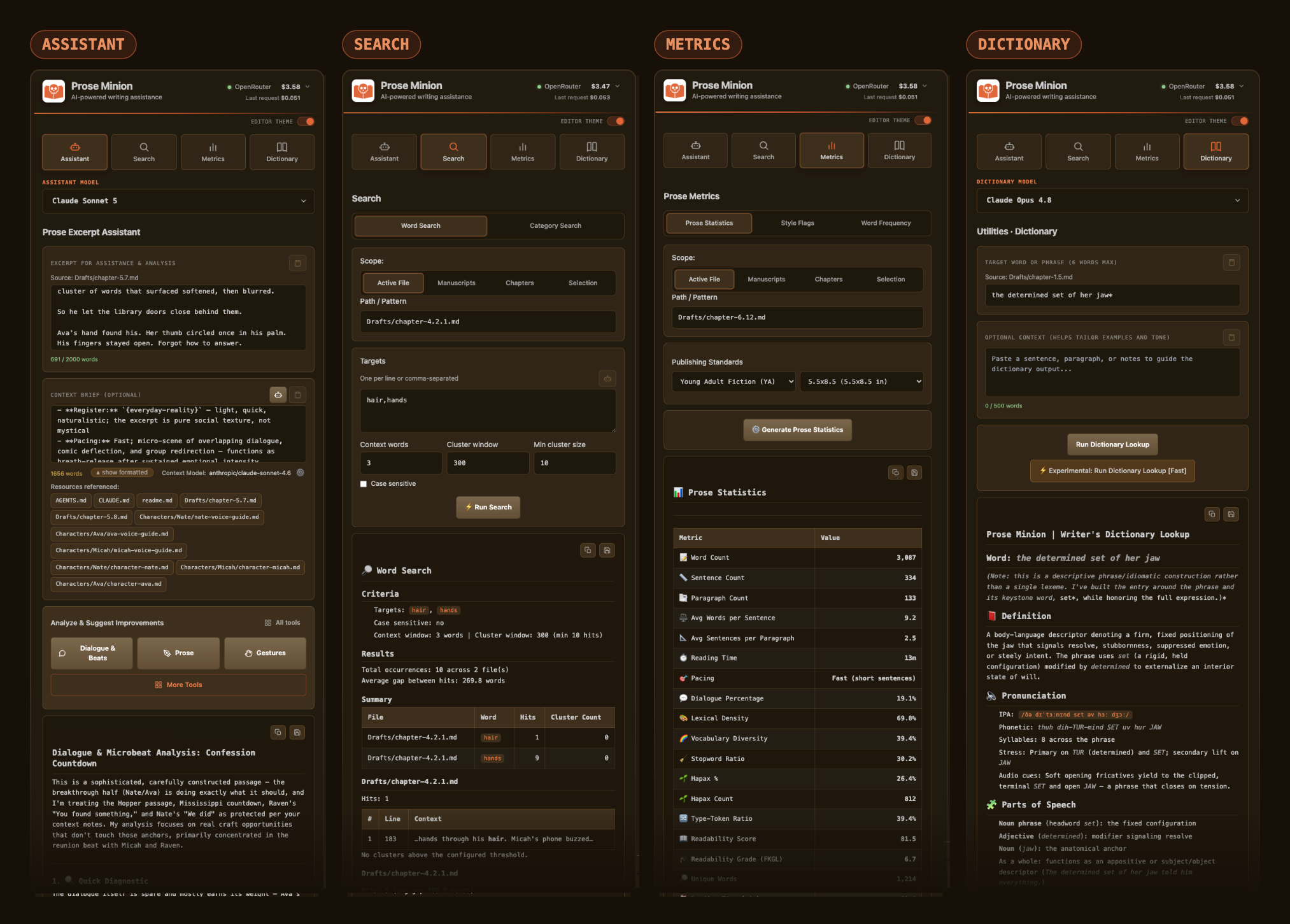
Return to a useful word. The arrows beside the Dictionary heading step through your recent lookups. The history button opens a list where you can choose an entry, delete one, or clear the list after confirmation. Opening a saved lookup restores its phrase, extra context, Encyclopedia and Palettes switches, source, and full result without generating again or changing your selected model. Move forward past the newest entry to return to your unsaved draft.
Keep up to 500 lookups. In a single-folder workspace, history lives in prose-minion/history/dictionary.json and survives a restart. With no folder, multiple workspace folders, or a persistence problem, the popup explains that history lasts only for this session. Dictionary history includes completed lookups from the Dictionary tab, including right-click lookups; Workshop persona lookups are separate.
Open it again, or look it up again. When you submit a phrase already in history, Dictionary offers the newest matching result before starting another generation. Choose Open existing entry (or Open latest entry when there are several) to reuse it, or Look up again for a fresh result. Rerunning the historical entry already on display starts directly.
Also in v2.10.1 — Gemini 4 Argon
Try Gemini 4 Argon. Google's new reasoning model joins the model pickers for writing tools, Workshop, Conversation Widgets, and Category Search. OpenRouter lists a 1M-token context window and multimodal input; its prose quality has not been evaluated in Prose Minion. Choose it when you want to try it; your defaults and saved selections stay as they are.
Also in v2.10.0 — Show vs. Tell, and color for your Dictionary
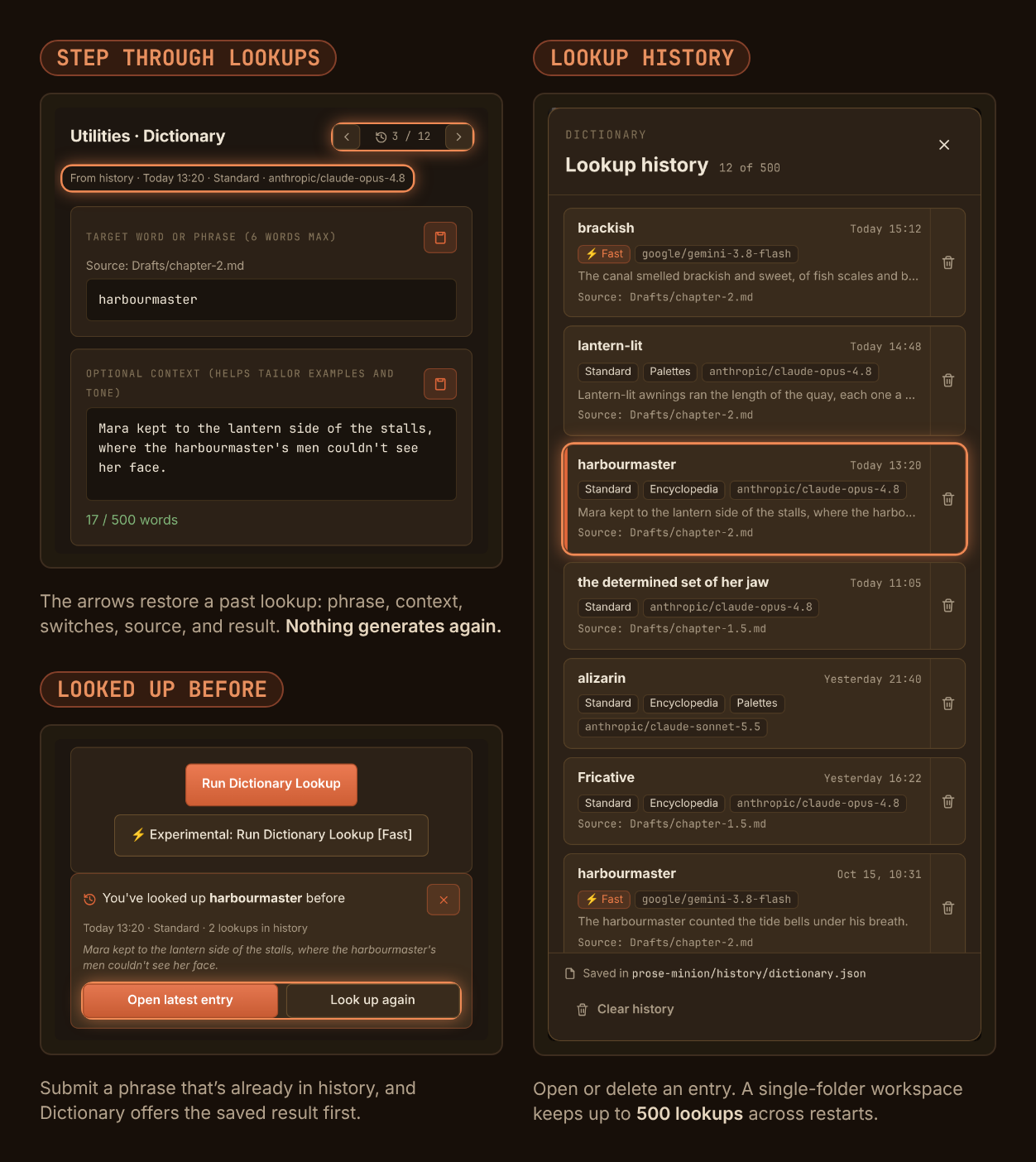
Show vs. Tell Playground. A Workshop widget for one beat. Open it from Widgets, paste or select a told beat, and move it along a five-position continuum from State it to Inhabit. A tradeoff readout shows what each position gains and costs, and no bar is a score. One generation returns four groups of alternatives: told cleanly, shown as evidence, shown from inside, and mixed. Keep the useful ones as prose or as a short direction, then commit them to the thread. You choose what commits, and the widget never edits your manuscript. Your host or a guest can suggest a beat and prefill the sheet; only you generate, keep, and commit.
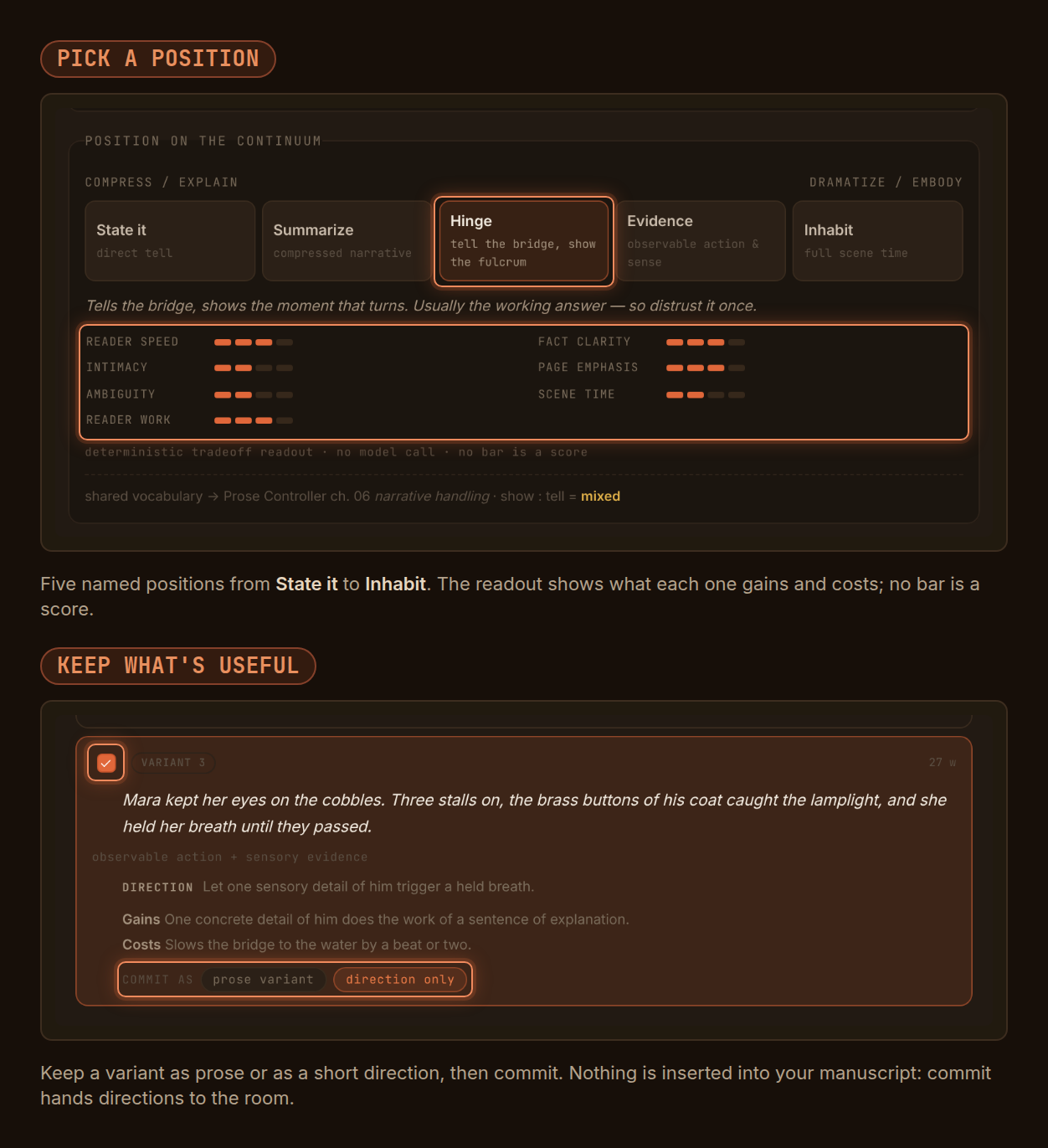
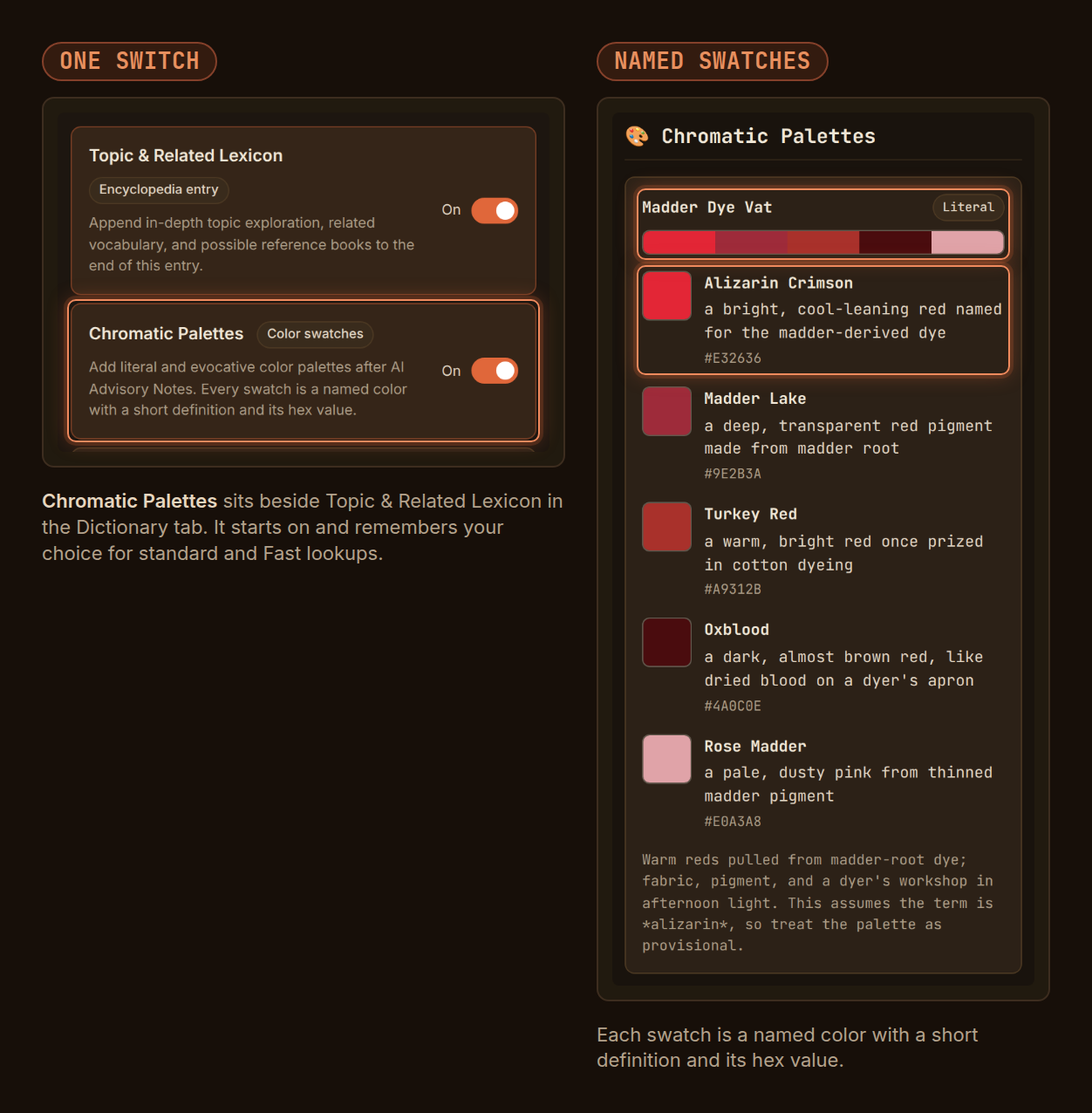
Chromatic Palettes. Dictionary entries can end with named color palettes: a strip of the palette's colors, then each swatch's name, a short definition, and its hex value. Palettes are literal when they show colors the word names or implies, and evocative when they carry its mood. The Chromatic Palettes switch beside Topic & Related Lexicon starts on and remembers your choice for standard and Fast lookups. Workshop persona lookups leave palettes out.
- Try Muse Wonder or Step 5 Preview — both join the model pickers for writing tools, Workshop, and Category Search as opt-in choices. OpenRouter lists their IDs, prices, and context limits; their prose quality has not been evaluated in Prose Minion. Defaults and saved selections are unchanged.
- A tidier model list — Qwen3 Coder Plus, Qwen3 Max, Qwen3 Max Thinking, and Qwen3.6 Max Preview leave the curated picker. Qwen3.8 Max (0902) remains.
- Steadier Dictionary output — later sections stay readable when a generated palette is left unclosed, in standard and Fast lookups.
Show vs. Tell and Chromatic Palettes are backed by automated tests. Their interactive and live-provider quality checks are still in progress.
Also in v2.9.0 — Workshop transcripts across sessions
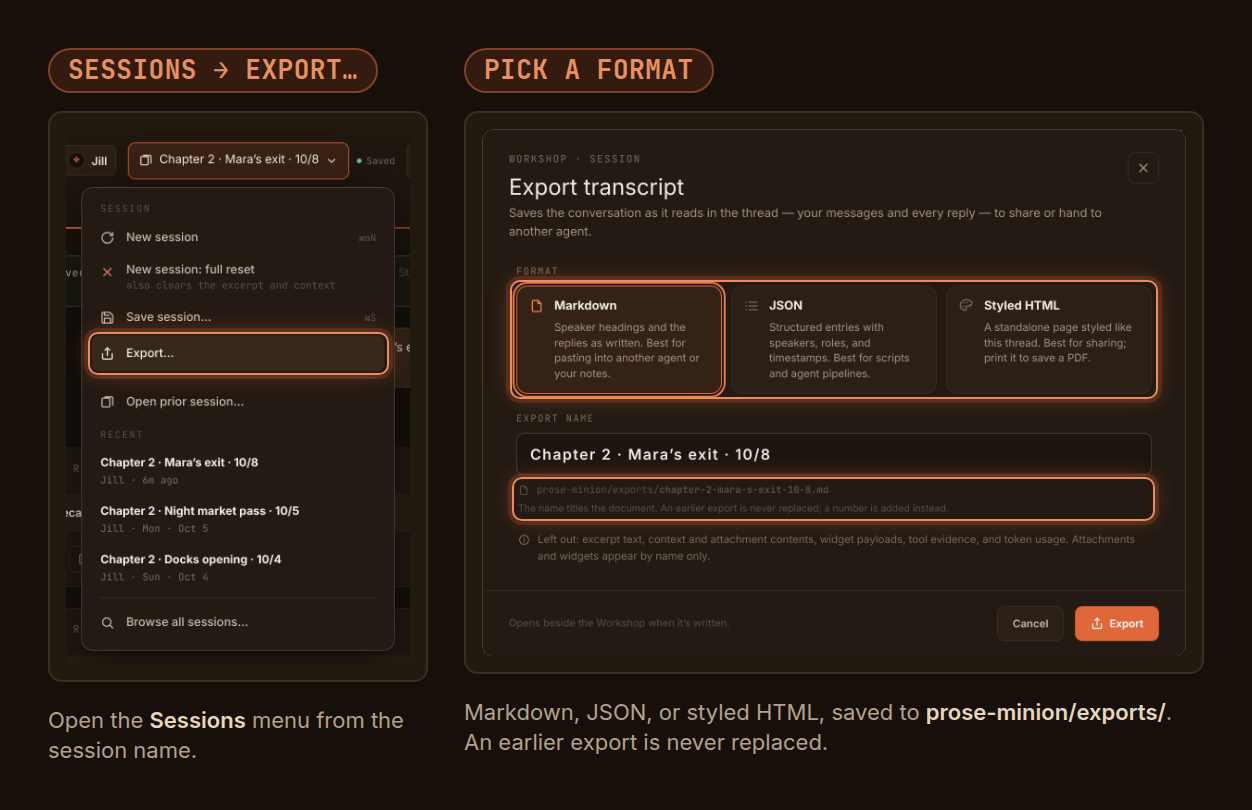
Export a conversation. Use Sessions → Export… to save a Workshop conversation as Markdown for another agent or your notes, JSON for scripts, or styled HTML to share or print to PDF. The export holds your messages and every reply, including older turns the thread no longer shows. Files land in prose-minion/exports/, and an earlier export is never replaced.
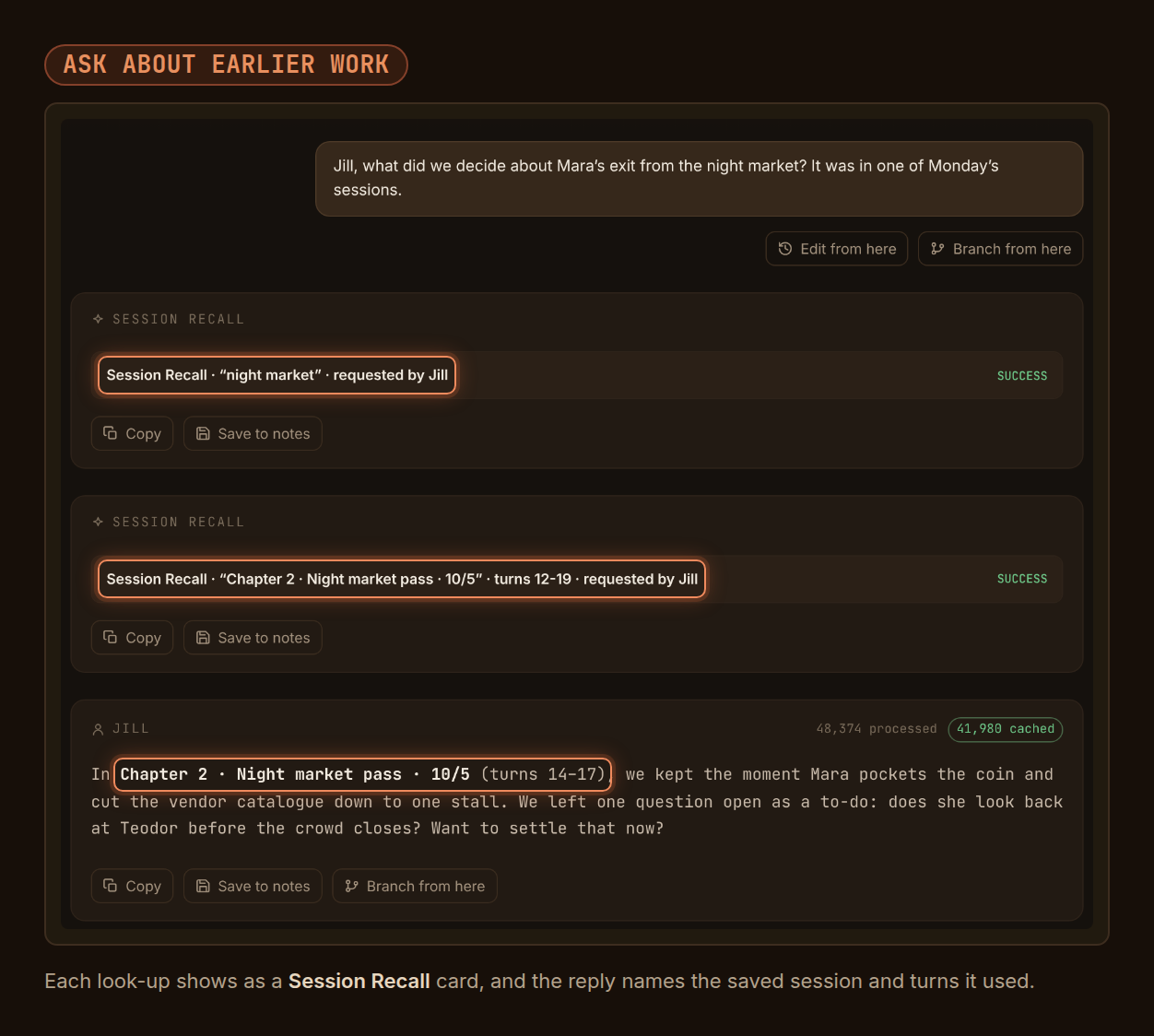
Ask about earlier work. When you ask about a past conversation or an open to-do, your host or a guest can list and search your other named sessions in this workspace, read the turns that matter, and find to-dos. Each look-up appears in the thread as a Session Recall card, and the reply names the saved session and turns so you can check the source. Personas are reading saved records, not remembering. The current room, attachment contents, widget payloads, and hidden tool evidence stay out of recall.
- Guest to-dos no longer block saving — adding a guest persona's finding to the To-do List keeps autosave and named saves working, and the to-do survives reopening.
- Update Git-synced machines together — sessions that contain recall activity can't be opened by earlier Prose Minion versions. Existing sessions still open in v2.9.0.
Saved-session recall is backed by automated tests. Its full live pass on real saved sessions is still in progress.
Also in v2.8.0 — Cache-aware Workshop conversations
- Request reuse for retained conversations — Workshop enables prompt caching for Claude and supported Alibaba/Qwen routes while preserving other providers' native behavior. Provider-reported cached-token counts show actual reuse.
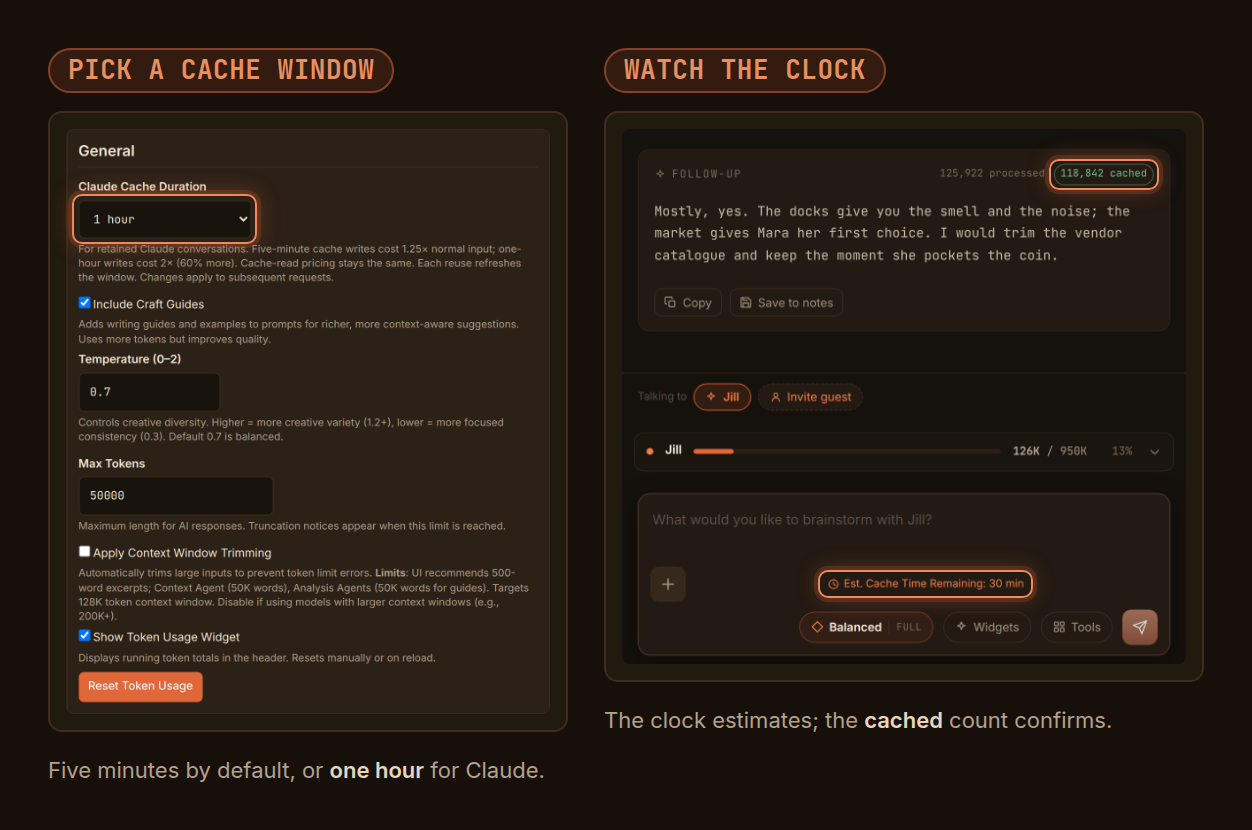
- Choose Claude's cache duration — General settings offers five minutes (default) or one hour. Cold writes cost more than ordinary input, and one-hour writes cost more than five-minute writes; choose for your working rhythm.
- See an estimated cache window — a clock beside the composer appears after qualifying provider cache activity. It is an estimate, not a promise that the next request will hit cache.
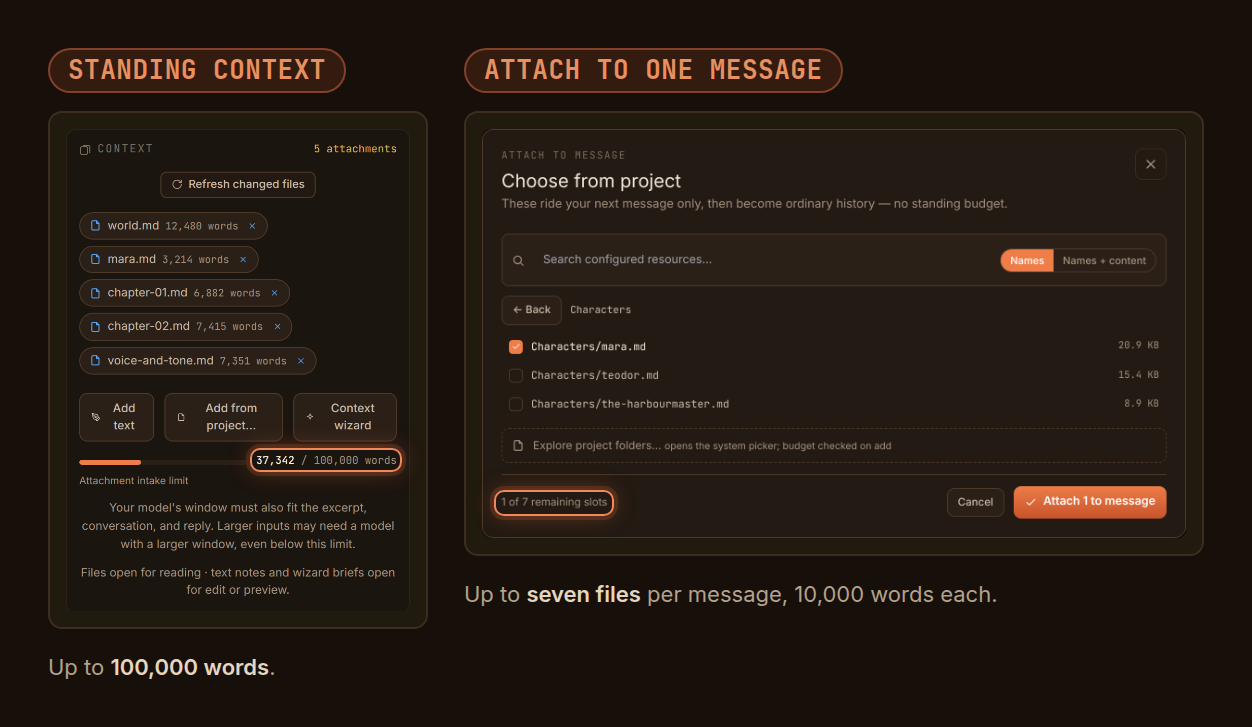
- Attach more and resend less — up to 100K words of standing context and seven attachments per message. Subsequent context edits send only changed material and removals. Known live model windows receive an estimated capacity check; a refused Workshop send restores your draft.
- Upgrade Git-synced machines together — existing sessions open, but sessions saved with the new context-delivery bookkeeping need this version or newer on every machine.
Live Claude/Qwen cache-hit and duration acceptance remain pending.
Cache-aware conversations. Pick Claude's cache window in General settings. Once the provider reports cache activity, a clock in the composer estimates how much of the window is left; the cached count on each reply is what confirms reuse.
More room for context. Standing context holds up to 100,000 words and rides with every message. Files you attach to a single message (up to seven, 10,000 words each) ride that message only.
Also in v2.7.0 — Rewind, branch, and explore
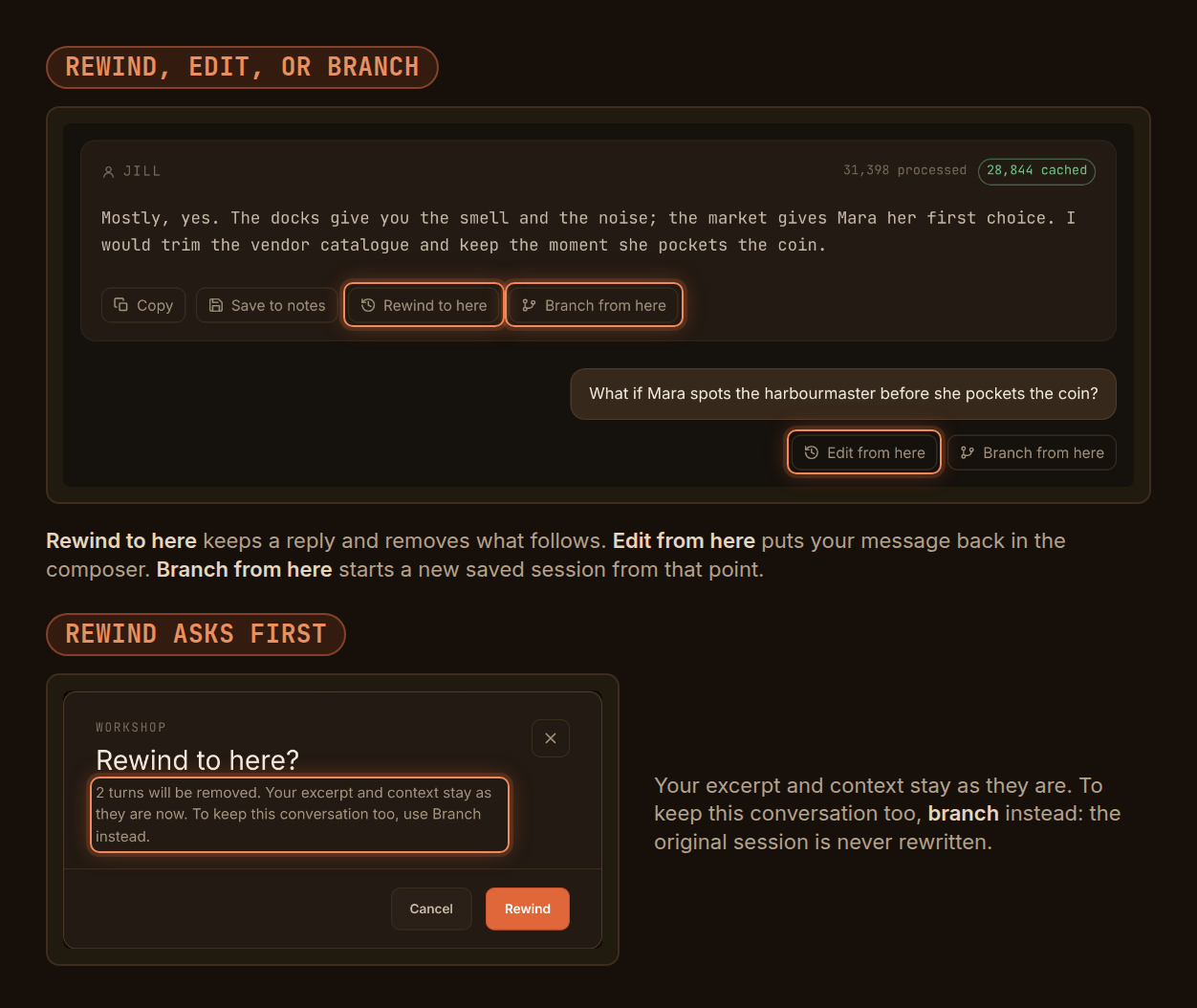
- Try another direction in Workshop — rewind to a reply, edit an earlier message in its composer or widget, or branch a saved conversation into a new session. Branch keeps the source file intact; your current excerpt and context stay with you.
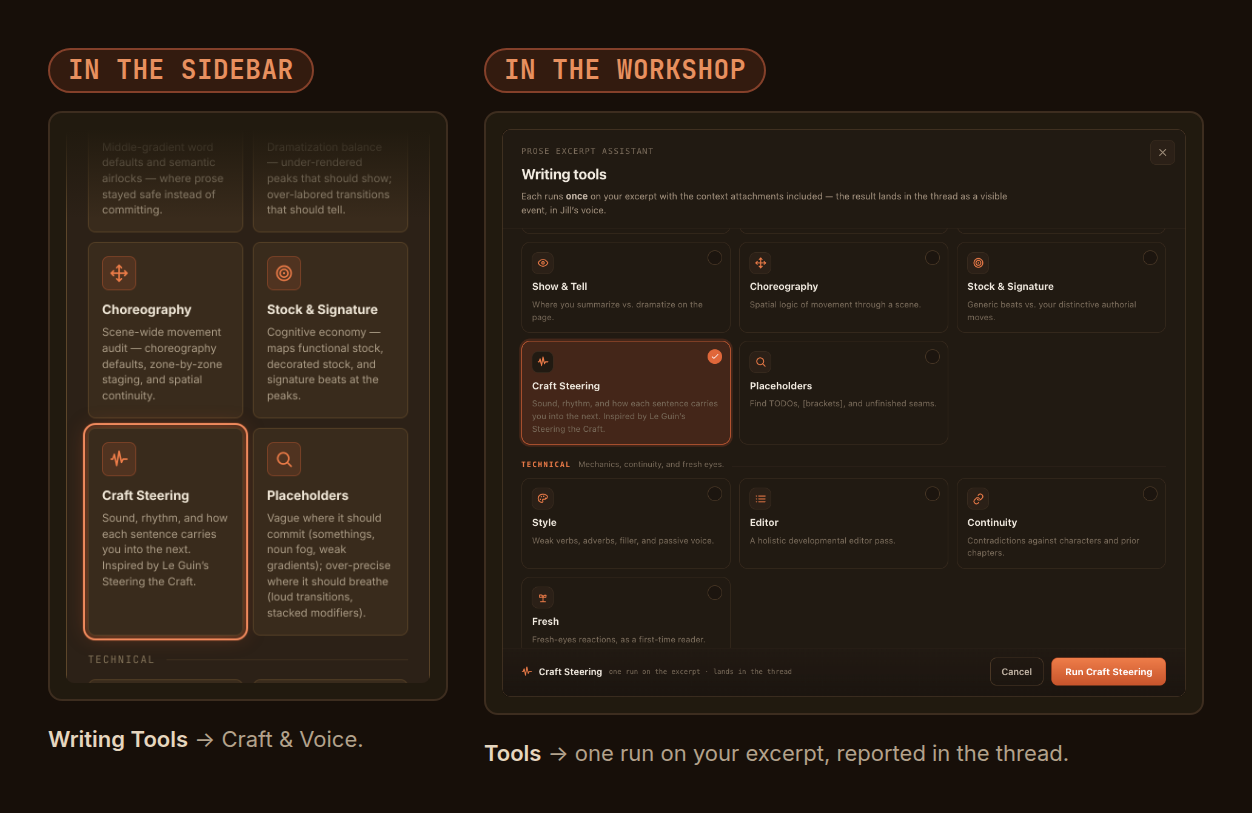
- Listen to your prose with Craft Steering — examine sound, rhythm, sentence handoffs, and narrative control in the sidebar or Workshop, with revision experiments that preserve your passage's intent.
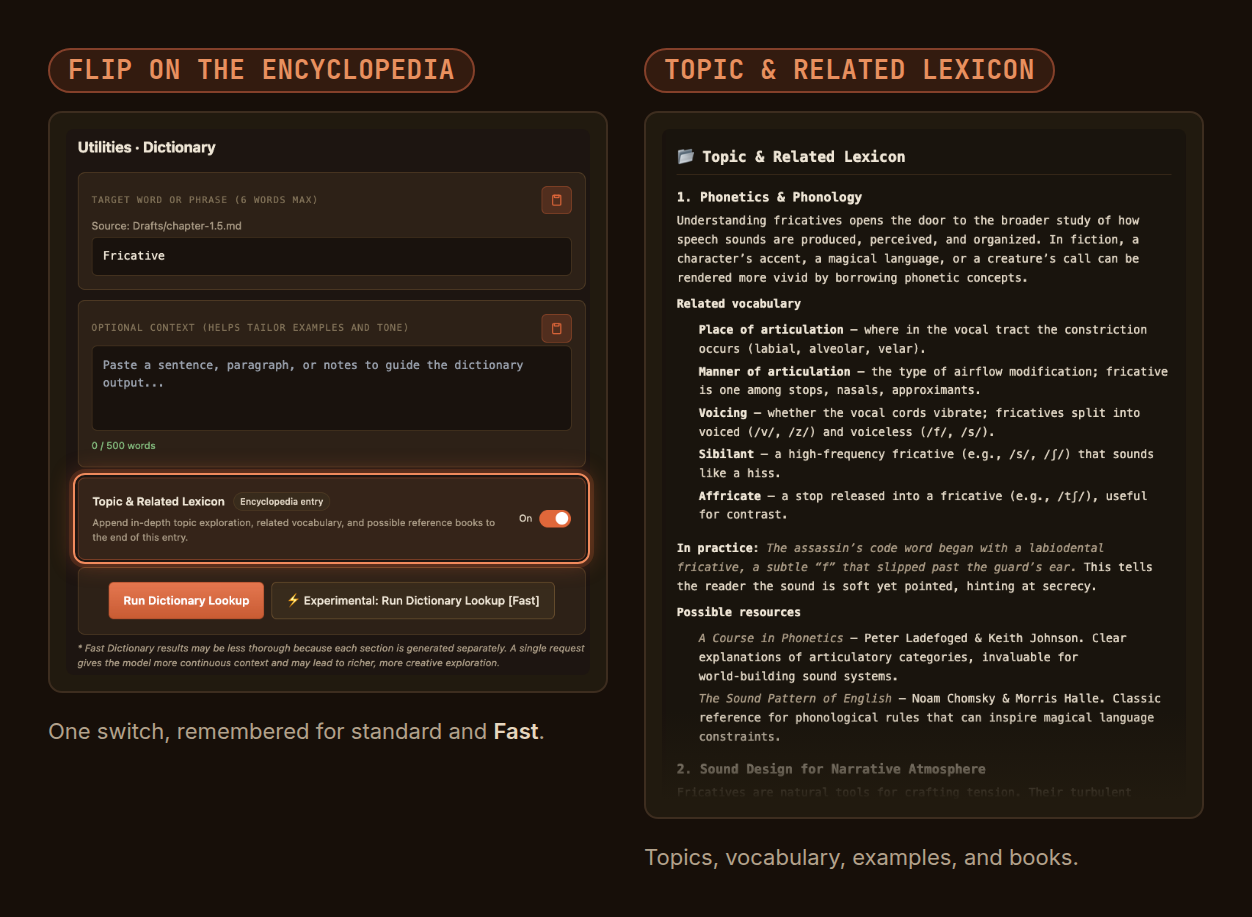
- Explore a word's wider world — the optional Dictionary encyclopedia entry, Topic & Related Lexicon, adds topic explanations, related vocabulary, writing examples, and possible reference books. Its switch remembers your choice for standard and Fast generation; persona calls leave it out.
- Update every Git-synced machine first — sessions saved by v2.7.0 cannot be opened by earlier Prose Minion versions. Older sessions still open; Rewind and Branch become available from their reopen point onward.
Rewind, edit, and branch. Under each reply and each message you sent, the thread offers a way back. Rewind to a reply, edit an earlier message and send it again, or branch into a new saved session and leave this one as it is. Rewind asks before it removes anything.
Craft Steering sits under Craft & Voice in the sidebar's Writing Tools and in the Workshop's Tools picker. Inspired by Ursula K. Le Guin's Steering the Craft, it listens to how each sentence carries you into the next, and it judges the pauses, repetition, and fragments you meant by their effect instead of smoothing them away.
Topic & Related Lexicon turns a dictionary entry outward: the topics a word belongs to, the vocabulary around it, how to use it on the page, and suggested reading. One switch in the Dictionary tab turns it on or off.
Also in v2.6.2 — GPT-6.1 Sol choices
- Try GPT-6.1 Sol or Sol Pro — both join every shared model picker and Category Search. Pro uses a deeper reasoning mode and may consume more output tokens.
- Your choices stay yours — defaults and saved selections are unchanged. OpenRouter lists these models, but their prose quality has not been evaluated in Prose Minion.
Also in v2.6.1 — More model choices
- Try Claude Sonnet 5.5 — available in every shared model picker and Category Search, alongside Sonnet 5.
- Choose a faster premium route — GLM 5.3 Prime and Qwen3.8 Max Prime offer higher throughput at higher token prices than their base models.
- Try a low-cost long-context model — Solar Mini 4 joins the pickers for utility work and exploratory prose.
- Your choices stay yours — defaults and saved selections are unchanged. OpenRouter lists these models, but their prose quality has not been evaluated in Prose Minion.
Also in v2.6.0 — See cache use and keep Dictionary takes
- See reported cache reuse — Workshop responses show
N cached when OpenRouter reports prompt tokens read from cache. An explicit zero is shown; missing cache details leave the indicator hidden. The existing context bar still shows context-window occupancy.
- Keep each Dictionary entry — saving the same word again creates
<word>-2.md, then <word>-3.md, instead of replacing the earlier file. Standard and fast Dictionary saves both use this naming.
- Downgrade note — v2.5.0 may reject Workshop sessions saved with the new cache fields. Reopen those sessions with v2.6.0 or newer.
Also in v2.5.0 — Explore and choose models
- Find models by release date — Model Explorer groups choices by month and year, with the newest models first.
- See model size at a glance — parameter tags distinguish published counts, estimates, undisclosed sizes, and multi-model systems.
- Try new writing models — GPT-6 Luna and Sol variants and Aion 3.5 Mini and Aion 3.5 join the shared model pickers as opt-in choices.
- Diagnose dictionary failures — failed lookups show the provider's error details beneath the readable message and record them in the Prose Minion output channel.
- Existing choices stay put — saved model selections and defaults are unchanged. New models have been checked against OpenRouter's catalog, without paid inference or prose-quality qualification.
Also in v2.4.0 — More models for your writing
- More choices in every model picker — Claude Opus 5.5, Grok 4.7, DeepSeek V4.1 Flash, GPT-6 Astra Pro, GLM 5.3 FlashX, and three MiMo V2.6 models are available as opt-in choices, including in Category Search.
- Current OpenRouter routes — Mercury 2.5 and Qwen3.8 Max use their current IDs. The available Mistral Large 2407 and Hermes 3 models replace unavailable interactive choices; Hermes 4 405B remains selectable.
- Your defaults stay put — existing model defaults are unchanged. New models are available to try, with provider capabilities verified against OpenRouter; prose quality has not been evaluated in this release workflow.
Also in v2.3.0 — Workshop sessions that follow your work
- Saved sessions lead after Git sync — Workshop loads the named session and preserves meaningful unsaved differences in a separate recovery session when needed.
- Opening a session leaves its saved file alone — automatic context rereads stay in memory until you work or explicitly save/refresh. Resume notices begin with your first interaction.
- Clearer loading and recovery — loading stays visible after dismissing the welcome notice, old status messages clear when you switch sessions, and cache-copy failures are reported separately from successful named saves.
- Refresh your references — reread changed context files from the project, with clearer excerpt and context cards. File-backed attachments are read-only; text briefs remain editable.
- More room for your writing preferences — writer-profile biographies now support 20,000 characters.
- GPT-6 Astra joins the model pickers — available in shared selectors and Category Search, with existing defaults unchanged.
For Git-synced projects: a named session reverted through Git also replaces its clean local cache, including autosaved turns. Older caches may produce one conservative recovery when you first load them after upgrading.
Also in v2.2.4 — Muse Spark 1.3
- Muse Spark 1.3 joins every shared picker — Meta's latest 1M-context multimodal Muse model is now available for Assistant, Dictionary, Context, Workshop, Conversation Widgets, and Category Search. Muse 1.1 and 1.2 remain available, and no defaults change.
Also in v2.2.3 — Safer Workshop sessions + Gemini 3.8 Flash
The conflict-selection behavior described below is superseded by v2.3.0: named sessions now take precedence automatically.
- No silent cross-machine overwrite — when a portable named Workshop session disagrees with the machine-local recovery copy, Prose Minion preserves both instead of guessing from timestamps and overwriting one.
- You choose the room that wins — open the named session explicitly from the Workshop session browser to promote it after a sync conflict.
- Normal autosave stays seamless — matching current and named checkpoints remain associated and continue through the existing ordered save path.
- Gemini 3.8 Flash joins every shared picker — Google's new 1M-context Flash model is available for Assistant, Dictionary, Context, Workshop, Conversation Widgets, and Category Search without changing any defaults.
Also in v2.2.2 — Portable excerpts and faster models
- Projects can move without losing their excerpts — Workshop can securely reconnect a persisted file-backed passage after the project moves to another computer or filesystem location, without weakening workspace, traversal, or symbolic-link protections.
- Mercury 2.5 Preview is ready for the quick work — the exceptionally fast, inexpensive diffusion model is now selectable for Dictionary, Assistant, Context, Workshop, and Category Search.
- Claude Fable 5.1 joins the room — Anthropic's stronger, more concise Fable generation is available alongside Fable 5, so you can choose the editorial voice that fits the work.
- The shelves stay tidy — one unavailable model and three retired dedicated Opus Fast IDs have been removed; existing defaults and saved selections are unchanged.
Also in v2.2.1 — Fresh model catalog
- GLM 5.3 Flash is here — a fast, multimodal 1.31M-context option for responsive critique, large-context analysis, and utility rewrites.
- More strong value choices — GLM 5.3, DeepSeek V4 Flash 0731, and Qwen3.8 Flash join the curated model browser; the three Flash models are also selectable for Category Search.
- Less catalog drift — retired OpenRouter IDs have been removed, so newly saved selections point to models the provider still serves.
- Your choices stay yours — existing saved model selections and the Category Search default are unchanged.
- Play before you commit — Workshop ships Gesture Playground, Lexical Gravity, and Creative Variations as interactive surfaces with explicit writer-owned commit points.
- Return to the work — committed widgets leave re-openable transcript chips; one-shot explorations clone into new turns, while standing Lexical Gravity directives remain editable between runs.
- Safer sessions — released pre-widget Workshop files migrate automatically to the new session schema, feature-owned recovery preserves supported older widget drafts, and stricter integrity checks reject malformed state before it can replace a healthy room.
- A sturdier Workshop — room orchestration, persistence, presentation workflows, and widget families have named ownership boundaries backed by architecture tests.
Full history → CHANGELOG.md
Get started in three steps
- Install from this Marketplace page, then open the Prose Minion panel from the activity bar.
- Try Metrics or Word Search right away — both run entirely offline, no API key needed.
- Add an OpenRouter key to unlock the Assistant, Context Search, and Dictionary.
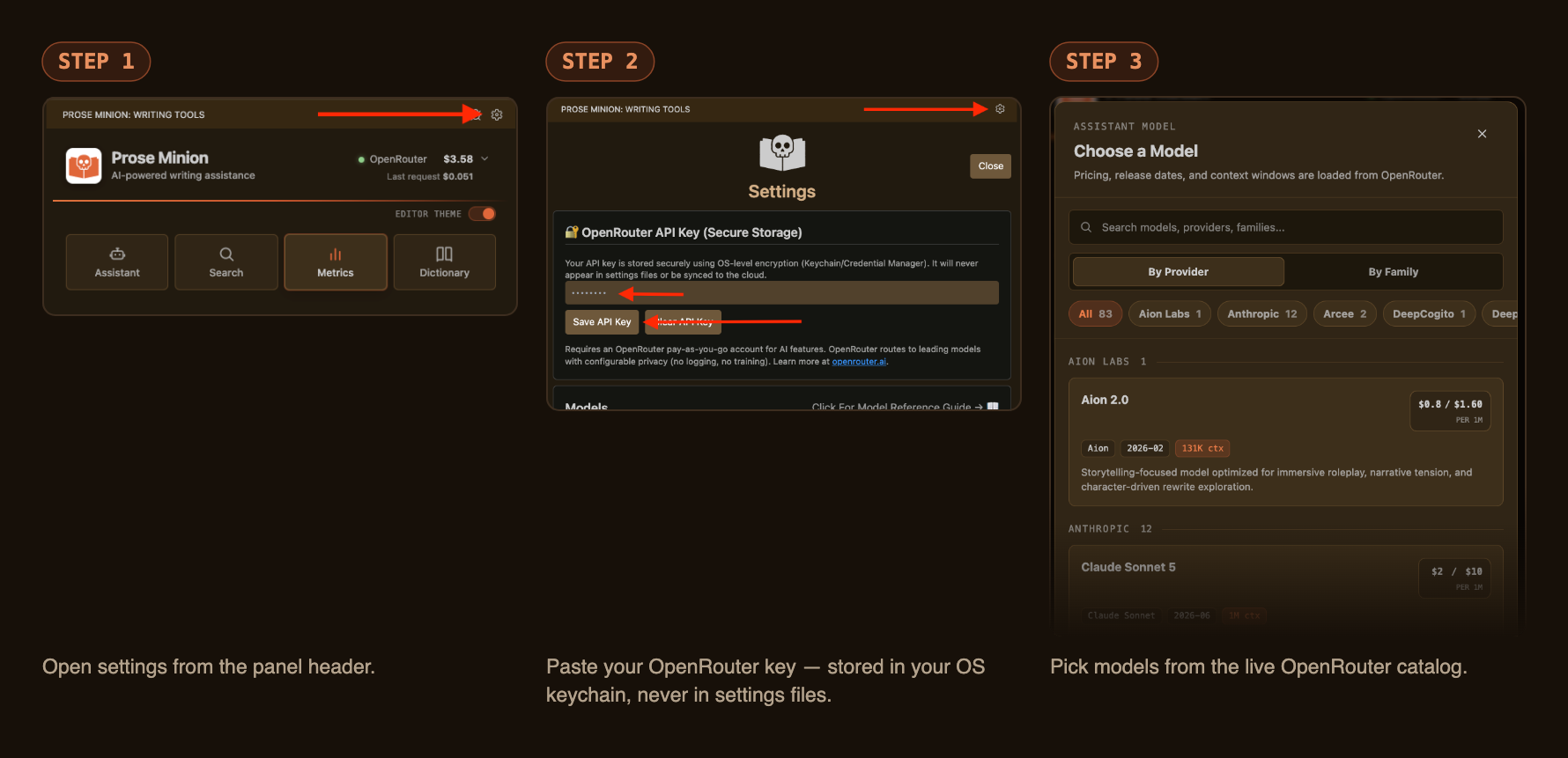
Want a guided, no-code walkthrough — project folders, glob patterns, every setting explained? → Read the Setup Guide
| Tool |
What it does |
OpenRouter API key? |
| 🤖 Assistant |
Dialogue tags, action beats, and cliché/repetition/show-vs-tell passes on a selected excerpt or whole chapter, optionally grounded in a context brief pulled from your story bible |
🔑 required |
| 🔍 Search |
Word Search (pattern matching + cluster detection) and Context Search (find words by meaning — [anger], [color red], [movement verbs]) |
Word Search free · Context Search 🔑 |
| 📊 Metrics |
Word count, pacing, dialogue %, lexical density, readability, hapax rate, publishing-standard comparisons by genre and trim size, per-chapter breakdowns |
✅ free, offline |
| 📖 Dictionary |
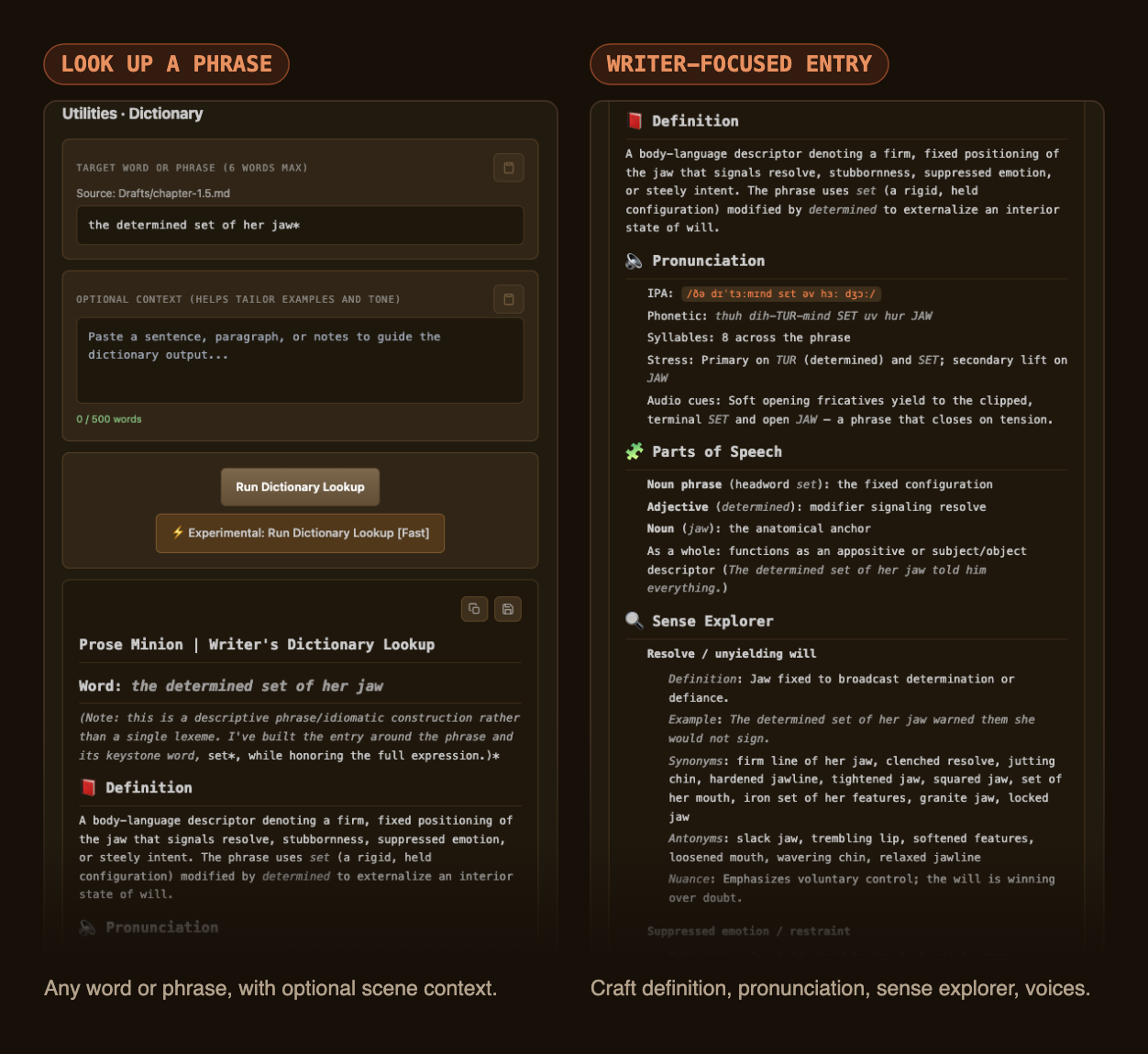
Fiction-focused definitions — pronunciation, sense explorer, register, character-voice variants — for any selected word |
🔑 required |
Curious what real output looks like on an actual manuscript? → Browse the Examples gallery
The Assistant
Pin an excerpt, attach a context brief built from your own characters and canon, and run a pass. The analysis respects what you've marked as intentional — and pushes on everything else.
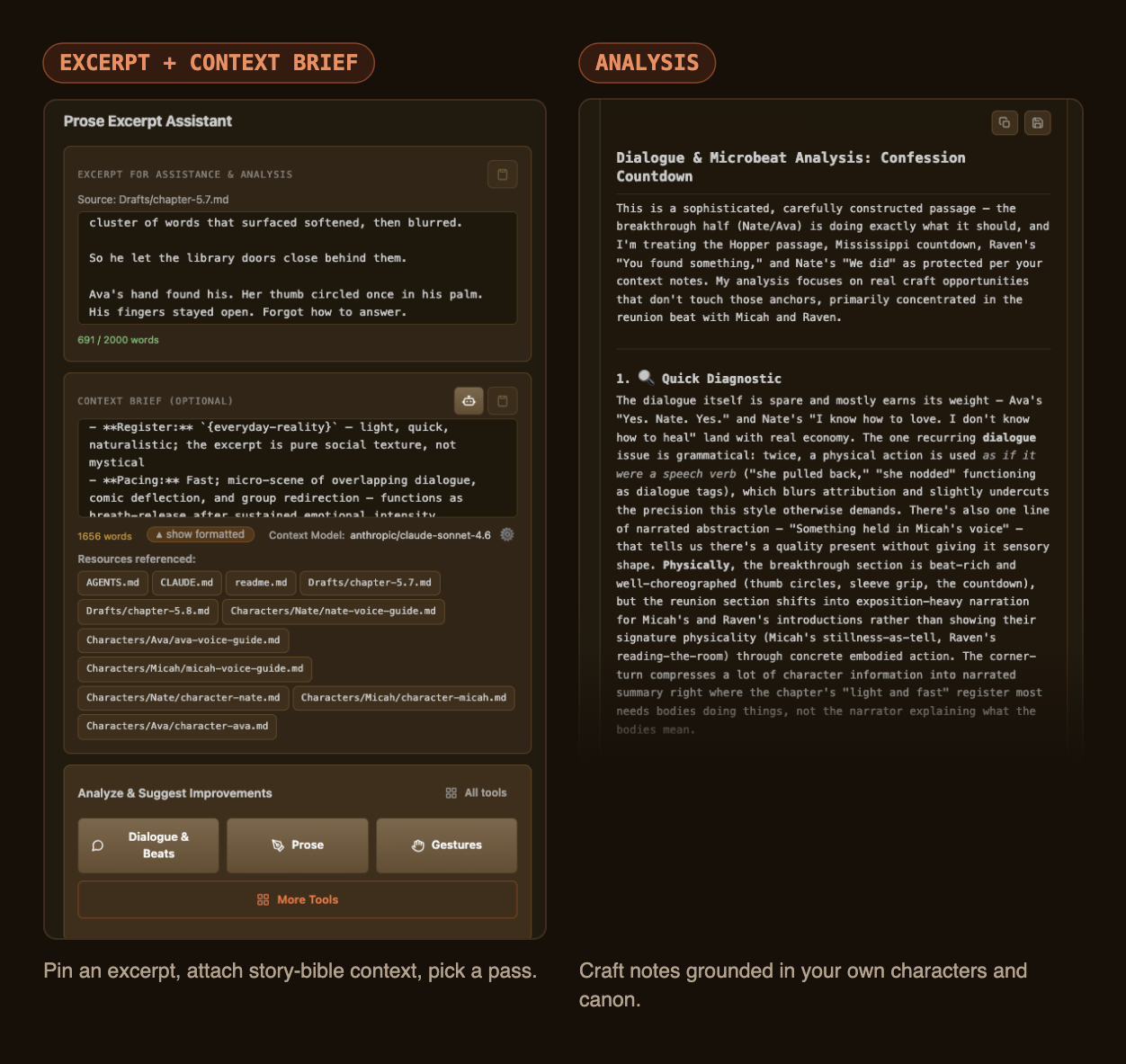
Focused passes, from Dialogue & Beats to Continuity — each one a single, opinionated read of your excerpt:
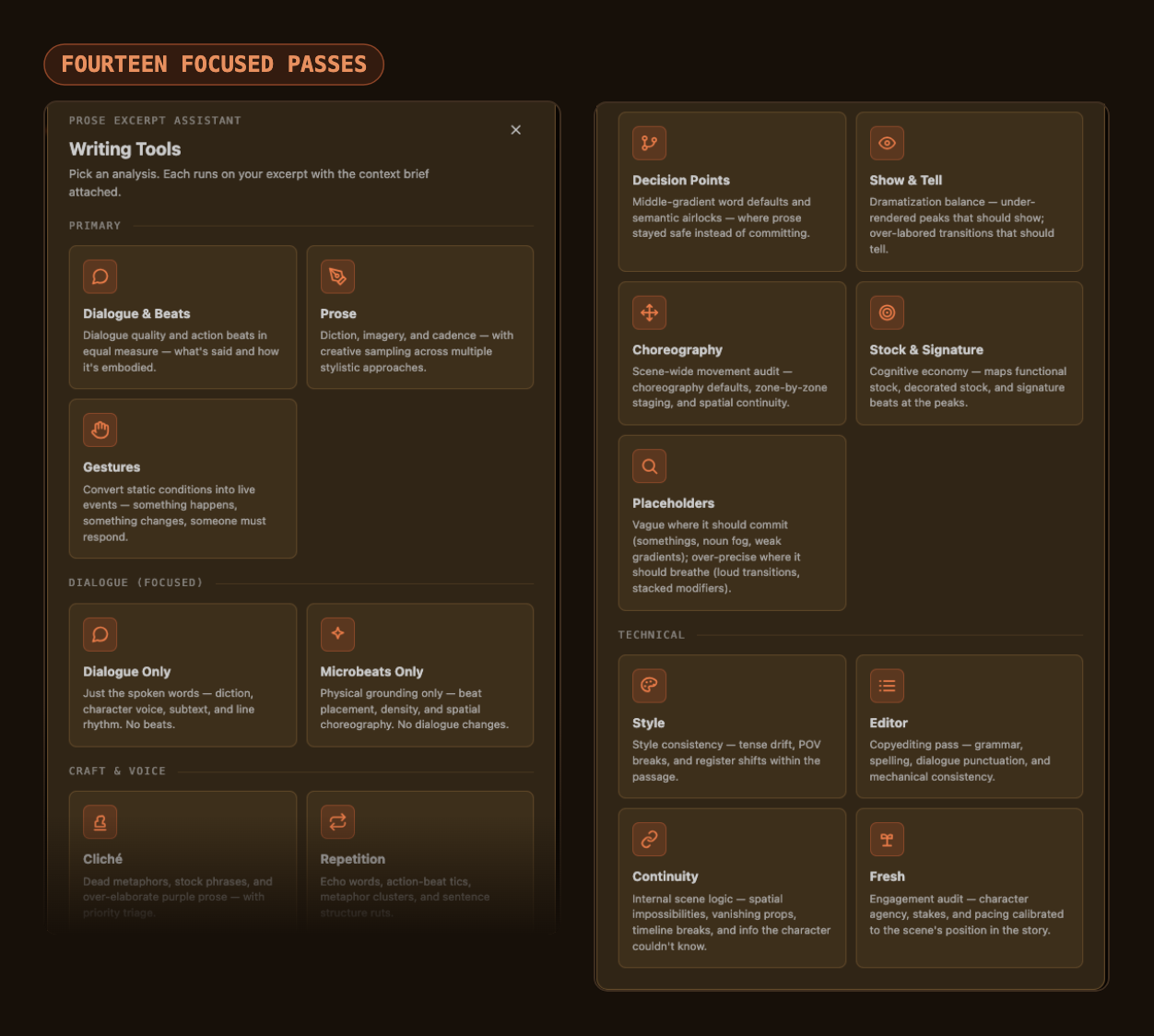
This overview image predates Craft Steering; its card is shown below.
Craft Steering appears under Craft & Voice in both the sidebar's Writing Tools picker and the Workshop tab's Tools picker. Inspired by Ursula K. Le Guin's Steering the Craft, it examines sound, rhythm, and how each sentence leads into the next. Its report identifies what to preserve, audits sound and narrative control, and traces sentence handoffs. Sample revisions show small changes; Creative Variations explore distinct treatments of a selected passage; Bound Creative Variations isolate particular craft choices. Each revision explains its gains and costs, followed by a fidelity check and optional read-aloud practice. Intentional pauses, repetition, fragments, and lyrical swells are assessed for their effect. You can also ask a Workshop persona to run Craft Steering on a passage in the conversation.
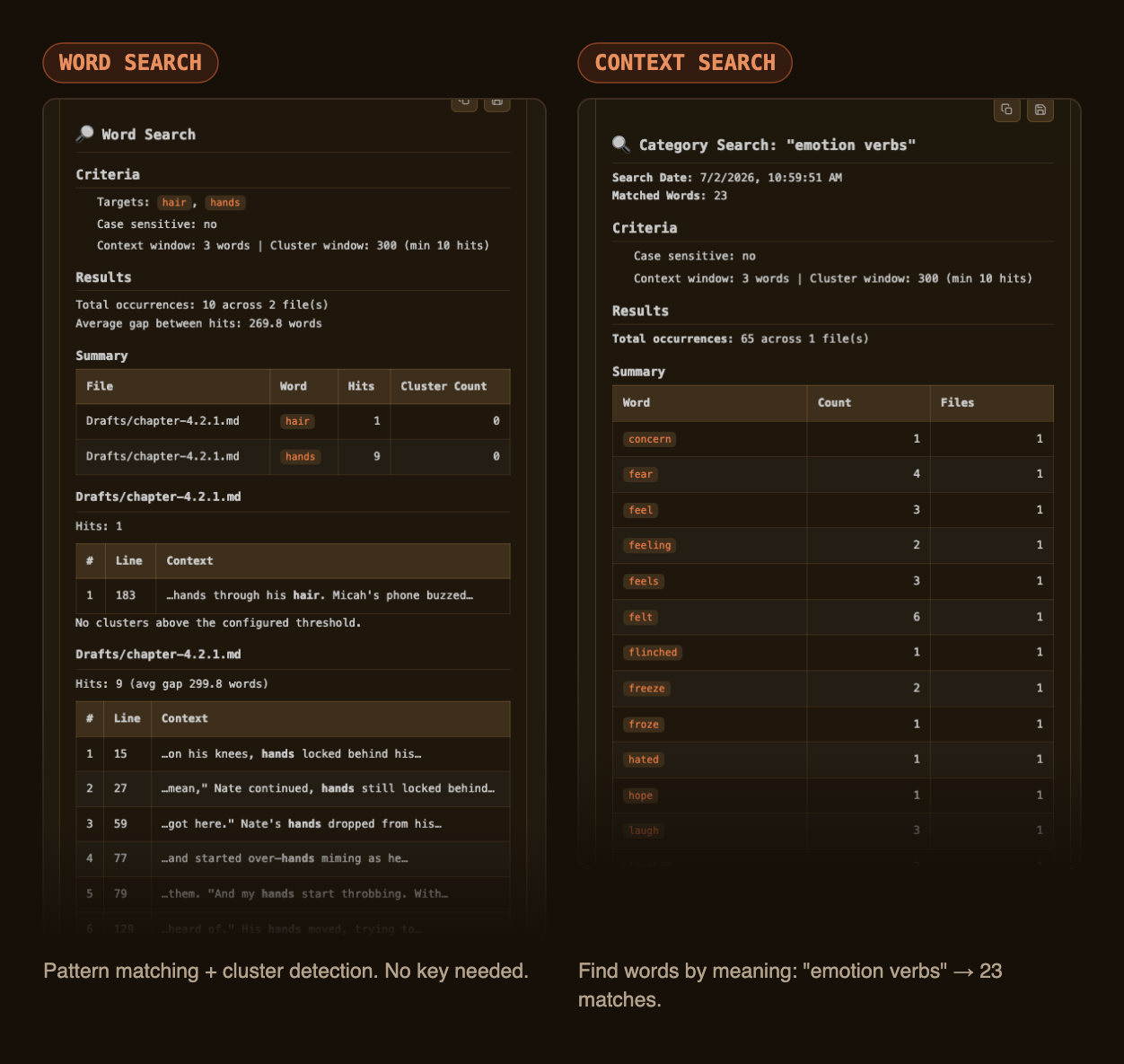
Search: by pattern, or by meaning
Word Search finds every occurrence and flags clusters — free and offline. Context Search finds words by meaning: ask for "emotion verbs" and get flinched, froze, hated back with counts.
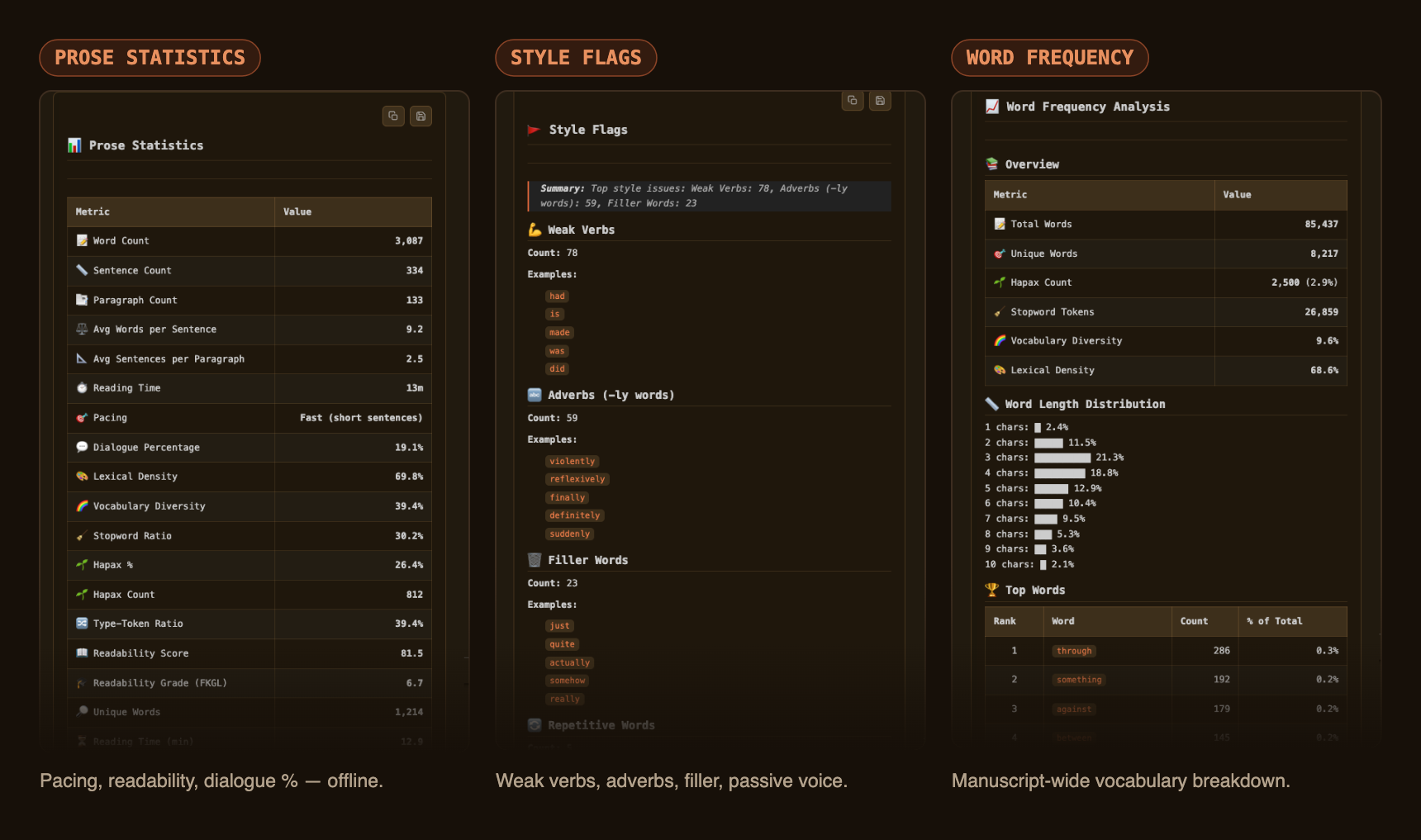
Metrics: know your manuscript
All offline, no key, no cost — from a single chapter to the whole draft, with publishing-standard comparisons by genre and trim size.
A dictionary that writes fiction
Not a definition lookup — a craft reference: connotation, register, sense explorer, soundplay, and character-voice variations for any word or phrase in your draft. Leave Topic & Related Lexicon on to close each entry with topic explanations, related vocabulary, writing examples, and possible reference books.
Project structure & context
The Assistant's context features shine with a lightly organized project: one chapter per file, plus folders for characters, locations, and story-bible material that Prose Minion turns into clickable resource pills during analysis. The Setup Guide walks through the whole layout — including glob patterns, demystified — in about five minutes, no coding required.
Privacy
- API key stored in your OS keychain via VS Code
SecretStorage — never written to settings files.
- Metrics and Word Search run entirely offline; nothing leaves your machine.
- Only Assistant, Context Search, Context, and Dictionary call OpenRouter, and only with the text you send them.
- There's no Prose Minion server — your writing has nowhere else to go.
Requirements
- VS Code 1.75.0 or higher
- An OpenRouter account for AI-powered tools (pay-as-you-go; Metrics and Search need nothing)
License
AGPL-3.0 with Commons Clause — source-available, no resale, no closed-source derivatives. Free for personal and open-source use; see LICENSE for full terms. Commercial licensing: open an issue.
A note from the author
I built Prose Minion for my own novel-writing workflow, pairing it with Cline as a copy-paste-friendly analytical companion: metrics and word searches from Prose Minion, revision discussion in Cline's chat. I kept going because it turned out other writers wanted the same setup — so here it is, publicly available. Happy writing.
Acknowledgments
Built with OpenRouter, the VS Code Extension API, and React. Development assisted by Cline, Claude Code, and OpenAI Codex.
Support development
If Prose Minion earns a place in your workflow, consider buying me a coffee — it funds the OpenRouter catalog audits and keeps this maintained.

Website •
Setup Guide •
Examples •
Changelog •
Report an Issue

