Pi Code Gui



A native VS Code editor experience for the Pi coding agent — Pi runs inside VS Code, not in a terminal. Pick your engine per session: TypeScript Pi, with full access to your editor state, diagnostics, and symbols, or Rust Pi, a fast, self-contained binary, with a stronger security model.
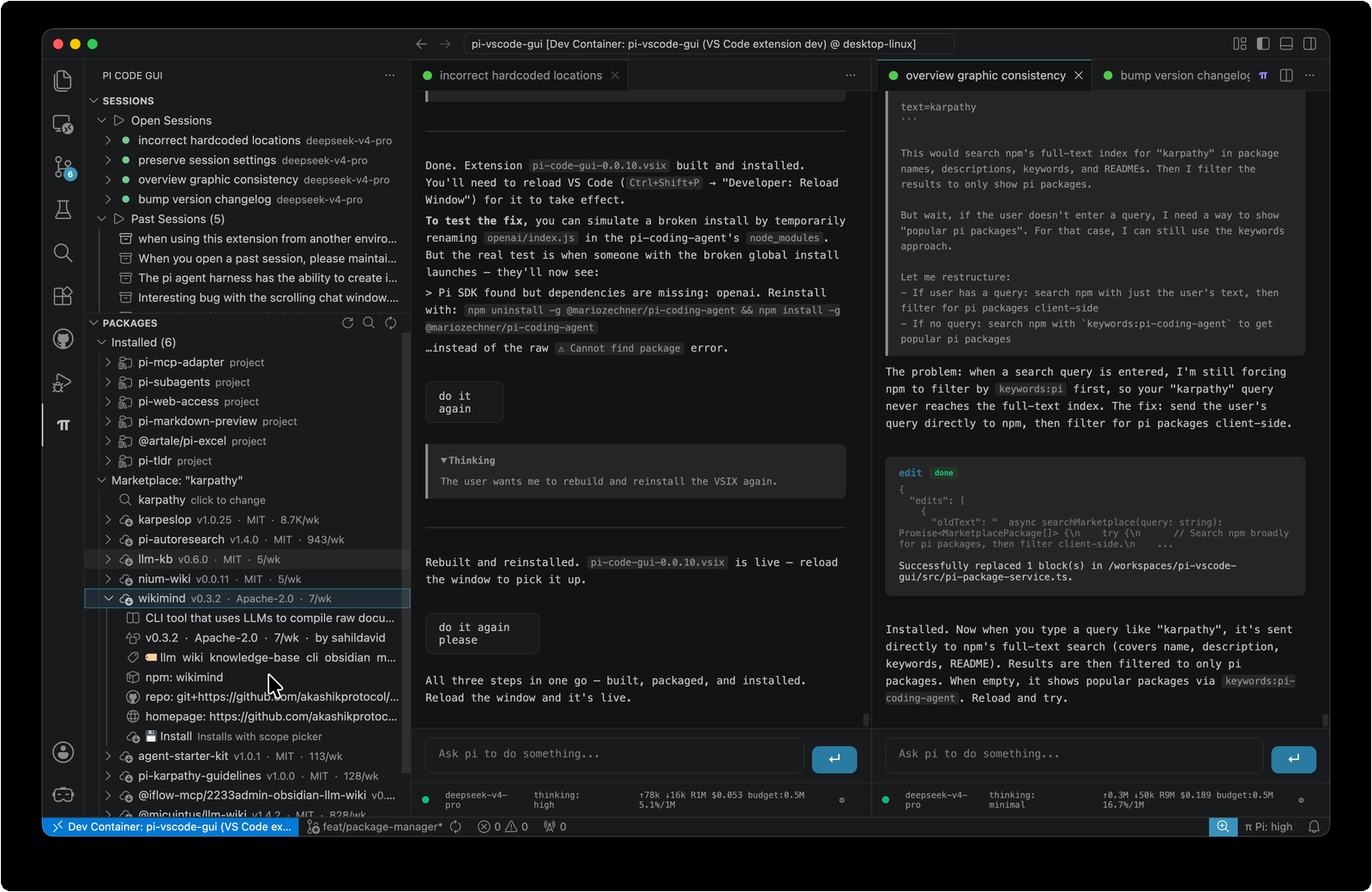
Quick Start
- Install a runtime: On first launch, Pi Code Gui detects whether TypeScript Pi or Rust Pi is installed; if neither is, it asks you to choose and installs on demand — no manual setup needed (see Choosing a runtime). To install manually instead:
- TypeScript Pi —
npm install -g @earendil-works/pi-coding-agent (needs Node.js + npm)
- Rust Pi — run PiGui: Install Rust Pi (managed binary download, official
curl | sh, or cargo install)
- Set an API key: Run PiGui: Set Up API Key / Login from the command palette (
Ctrl+Shift+P), or set ANTHROPIC_API_KEY / OPENAI_API_KEY (or DEEPSEEK_API_KEY, etc.) in your environment.
- Open the chat: Click the Pi icon in the activity bar, or run PiGui: Code Agent from the command palette.
- Start prompting: The agent reads files, runs commands, and makes edits. On TypeScript Pi it also inspects your editor state, diagnostics, and symbols through the VS Code bridge; Rust Pi works through its own built-in file and shell tools.
Why Pi Code Gui?
The Pi coding agent is a powerful AI pair programmer, with an exceptional terminal (TUI) implementation.
For people who prefer a GUI experience, this extension embeds Pi directly in VS Code's native UI:
- In-editor chat — streaming responses, thinking blocks, and tool execution results rendered in a webview panel, not a terminal buffer.
- Choose your engine — run each session on TypeScript Pi or Rust Pi, and mix them across tabs; the active runtime is badged in the status bar.
- Native VS Code bridge (TypeScript Pi) — 16 tools that call VS Code APIs directly: inspect the active editor, check diagnostics, find symbols, look up types, apply edits, and format code. Rust Pi works the same files through its own fast
read/write/edit/bash/grep tools.
- Session persistence — conversation history survives VS Code restarts; resume reopens each session on the runtime that created it.
- Multi-session support — multiple chat panels, each with an independent runtime, model, and thinking level.
- Plan before you edit (Rust Pi) — put a session in plan mode and the agent drafts a plan while every write is held, then you approve or reject it; a strip above the prompt also sets how much runs without asking.
Choosing a runtime
Every session runs on one of two interchangeable Pi runtimes:
- TypeScript Pi (default) — deepest VS Code integration: 16 editor-bridge tools, interactive cards, per-session tool control, and the full in-process extension catalog.
- Rust Pi — fast, self-contained, and the only runtime with plan mode and approval control (see Plan mode and approvals): ~100 ms startup, <50 MB idle, one ~21 MB binary with no Node.js, and a hard safety floor that blocks catastrophic shell commands. Trades away the editor-bridge tools.
New sessions use your default runtime — the defaultRuntime setting, which ships as TypeScript and is changed with PiGui: Set Default Runtime (remembered). When only one runtime is installed, that one is used regardless. You can also choose per session with PiGui: Add Rust/TypeScript Pi Session or Add Pi Session (Choose Runtime). The active runtime shows as a π TS/π Rust chip in the status bar and a tree badge. Switching opens a new session on the other runtime; live sessions don't hot-swap, and the original stays open.
Both runtimes are detected at startup and installed only when you first reach for one that's missing — never behind your back. The full trade-off:
|
TypeScript Pi |
Rust Pi |
| Project |
@earendil-works/pi-coding-agent |
pi_agent_rust |
| Process model |
In-process (shares the extension host's Node.js) |
Out-of-process (spawned binary, line-delimited JSON-RPC) |
| Install |
npm install -g @earendil-works/pi-coding-agent (needs Node.js + npm) |
Managed binary download / cargo install, or official curl \| sh, or manual |
| Startup / memory |
Heavier; Node.js runtime |
~100 ms startup, <50 MB idle, single ~21 MB binary, no Node.js |
| VS Code editor-bridge tools |
16 tools (diagnostics, symbols, types, format, apply-edit) |
Uses its own file/shell tools instead |
/tools per-session control |
Per-session tool picker |
Full built-in tool set (no picker) |
| Custom interactive cards |
Buttons, clickable rows, live polling |
Markdown rendering |
| Plan mode |
— |
Draft a plan first: the agent explores read-only and every edit waits for your approval |
| Approval control |
Tools auto-accept |
always-ask / write / yolo — choose how much runs without asking |
| Extension catalog |
In-process Pi extension/package catalog |
Separate Rust catalog (QuickJS / native) |
| Session history |
~/.pi/agent/sessions (JSONL) |
Separate Rust pool (JSONL v3 tree + SQLite index) |
| Built-in safety |
Tools auto-accept (no per-tool gate) |
Approval posture you choose, plus catastrophic-command blocking, zero unsafe, secret env filter |
Model catalog on the Rust runtime
The Rust binary ships with its own curated model registry baked into each release, so its catalog reflects whatever was current when that binary was built. To keep the two runtimes in step — and to save you any per-model setup — this extension bundles the same model catalog Pi itself uses (generated from @earendil-works/pi-ai) and writes it into the Rust agent's models.json, taking precedence over the binary's built-in list for standard API-key providers. So on Rust you get the same models as the TypeScript runtime — with matching pricing, context windows, reasoning/thinking support, and more regularly maintained model definitions — and nothing to configure: pick a model, put its provider's API key in your environment, and go.
The catalog stays current on its own. Dependabot tracks @earendil-works/pi-ai, and a build check refuses to package a stale catalog, so every release ships fresh data — updating the extension updates your Rust model list.
Cloud providers with specialized auth — Amazon Bedrock, Azure, Google Vertex, GitHub Copilot — aren't in the catalog, because their authentication and routing can't be expressed as a plain models.json entry. They keep working through the Rust binary's own native handling, exactly as in the Pi CLI.
Prefer raw, unmanaged control of the Rust model registry? That's a perfect job for the Pi CLI — this extension intentionally favors a curated, always-fresh catalog over hand-maintained model definitions. (You can still redirect the extension's Rust agent home with pi-code-gui.rustAgentDir, e.g. to a writable path of your choosing.)
Context budget: when pi-code-gui.contextBudget is set, the extension clamps each catalog model's effective contextWindow to your budget in models.json, so the Rust runtime's auto-compaction (and manual /compact) trigger at the budget rather than only near the model's full window — matching the TypeScript runtime.
Thinking level vs. reasoning (by provider): a model's thinking level (off → max) only changes generation on transports that send it — Anthropic (anthropic-messages), the OpenAI Responses API (openai-responses), and Google. On OpenAI-compatible chat APIs (openai-completions, including DeepSeek) the level isn't transmitted; the model self-allocates its reasoning, so under Rust the status bar shows a read-only reasoning: on/off badge instead of an adjustable level rather than letting you set one that does nothing.
⚠️ Cost & token figures are estimates, not your bill. The token counts and dollar amounts in the status bar are computed locally — from the bundled catalog's per-model rates and the usage each runtime reports back — purely for at-a-glance guidance. They can be wrong or incomplete: published rates change, the catalog can lag a provider's current pricing, and providers meter in ways a flat rate doesn't capture (cache reads/writes, request minimums, batch/volume discounts, taxes). Some providers report no usage for a turn, in which case the figure stays 0; where we have no rate for a model we show $?? rather than a misleading $0. Always rely on your provider account's usage/billing dashboard for actual cost — never on these in-app summaries.
Nothing fails silently: an unwritable agent directory surfaces as a clear error in the chat (and a notification for fatal cases).
Features
| Feature |
Description |
| 💬 Chat panel |
Streaming text, collapsible thinking blocks, tool call/result rendering, markdown with syntax-highlighted code blocks |
| 🔀 Two runtimes |
Run each session on TypeScript Pi (in-process SDK + editor bridge) or Rust Pi (fast ~21 MB standalone binary); per-session choice, badged in the status bar — see Choosing a runtime |
| 🧰 Editor bridge (TypeScript Pi) |
Agent reads open editors, checks diagnostics, inspects symbols/types, applies edits, formats code through VS Code APIs. Under Rust Pi, the agent uses its own file/shell tools instead |
| 🧭 Mode strip (Rust Pi) |
A strip above the prompt shows what your next message will do, and changes it before you send: plan mode — the agent drafts a plan and holds every edit until you approve it — and the approval posture governing which actions run without asking (always-ask / write / yolo). Both are visible at the moment you commit, not buried in a command palette |
| 🔄 Session history |
Auto-saved conversations can be resumed or deleted. Find with text search |
| 🪟 Multi-session |
Multiple independent chat panels, each with its own model, thinking level, and conversation tree |
| 🔐 Flexible auth |
Runtime API key overrides via VS Code settings, env vars, or the built-in auth config |
| 🔧 Settings |
Toggle auto-compaction and auto-retry (both runtimes), plus skills, context-file, and prompt-template loading (TypeScript Pi) — all from the UI |
| 📋 Custom Messages (TypeScript Pi) |
Extensions can render inline interactive cards with buttons, clickable rows, and live polling updates — see § Custom Messages. Under Rust Pi, cards fall back to markdown |
| 🛠️ Tool control (TypeScript Pi) |
/tools command opens a grouped checkbox picker to select which built-in, bridge, or extension tools are active per session. Persisted to session file, restored on resume. Rust Pi runs its full built-in tool set (no picker) |
| 📦 Runtime-aware packages |
The Packages view manages the one shared Pi catalog and follows the focused session's runtime — each package is marked active (loaded by that runtime) or available (installed but not loaded), with provenance/safety signals. Works under either runtime (drives the Rust binary when the TypeScript SDK isn't installed) |
Plan mode and approvals (Rust Pi)
New in 0.2.0. Rust Pi 0.3.0 can draft a plan before it touches anything, and can be told how
much to do without asking. Both now have a home in the UI — a strip directly above the prompt,
because what the next message will do is worth knowing before you send it, not after.
Plan mode. Switch to plan and the agent works read-only: it explores, then submits a plan
and waits. Every write is refused until you decide. When a plan arrives you get Approve or
Reject right in the strip. Approving unblocks writes and drops "Carry out the plan" into the
prompt, ready to send; rejecting returns the agent to planning, where a follow-up message is how
you say what to change.
Approval posture. always-ask needs a yes for every edit and command, write lets file edits
through while commands still ask, and yolo runs everything. Rust Pi reads this only when a
session starts, so changing it restarts the session — your conversation is reloaded from disk and
carries forward. The prompt says so, and offers Restart, don't ask again.
The setting lives in ~/.pi/agent/settings.json, which the extension shares with the pi CLI —
so a change applies to both, and the prompt tells you that too. Defaults for new sessions are
pi-code-gui.defaultMode and pi-code-gui.defaultApproval, offered whenever you change either.
Gotchas
- DeepSeek V4 sessions show
$?? instead of a cost. DeepSeek bills those models at
different rates by time of day (peak is 2x off-peak), the bundled price catalog has no field
for time-varying rates, and DeepSeek's API doesn't report the billed amount. Any figure shown
would be wrong — currently by up to 4.6x, since the catalog also still carries pre-August-2026
rates. Token counts and context % are unaffected, and the same models reached through a
gateway (OpenRouter, Vercel AI Gateway) still price normally. Tracked upstream as
pi#8510 and
pi#8491.
- Not all TUI behaviours map well into VSCode's UX. For instance, having new UI widgets spawned by extension packages. I did a best effort implementation, but there is definitely room for improvement.
Custom Messages — Minimal Working Example
Custom messages render inline in the conversation stream with interactive
elements (buttons, clickable rows, status indicators). This is the
webview equivalent of Pi's TUI MessageRenderer.
1. Register a renderer (Pi Code GUI extension host)
Pi extensions call globalThis.__piRegisterMessageRenderer(customType, sourceCode).
The second argument is JavaScript source code as a string — it runs in the
webview DOM and receives (data, containerEl, escapeHtml).
// In your Pi extension's entry point (e.g. index.ts):

export default function (pi: ExtensionAPI) {
  // Register renderer at load time. Defer to session_start if the
  // hook may not be available at file evaluation time.
  function registerRenderer() {
    const reg = (globalThis as any).__piRegisterMessageRenderer;
    if (typeof reg !== "function") return;

    reg("my-extension", `
// This code runs in the webview DOM. Variables declared here are scoped
// to this renderer invocation and won't leak to other cards or the global
// scope (Pi Code GUI wraps renderers in an IIFE or <script> tag).

// data: the full custom message payload from pi.sendMessage()
var items = (data.details && data.details.items) || [];
if (!items.length) {
  containerEl.innerHTML = "<p>No items.</p>";
  return;
}

var h = '<div class="my-card">';
for (var i = 0; i < items.length; i++) {
  var it = items[i];
  // escapeHtml() is provided by Pi Code GUI — use it for any
  // user-supplied text to prevent XSS.
  h += '<div class="my-item"' +
    // data-command attributes automatically execute the slash command
    // when clicked. The leading / is added by the framework — omit it.
    ' data-command="my_action ' + escapeHtml(it.id) + '"' +
    ' style="display:block;border:1px solid var(--vscode-panel-border,#333);margin:4px 0;padding:6px;border-radius:4px;cursor:pointer">';
  h += '<strong>' + escapeHtml(it.label) + '</strong>';
  h += ' <span style="color:#888">' + escapeHtml(it.status) + '</span>';
  h += ' <button data-command="my_approve ' + escapeHtml(it.id) + '"' +
    ' style="margin-left:8px">Approve</button>';
  h += '</div>';
}
h += '</div>';
containerEl.innerHTML = h;
`);
  }

  // Try immediately (hook may already exist), and on session_start.
  registerRenderer();
  pi.on("session_start", () => registerRenderer());
}
2. Send the message (anywhere in your Pi extension)
// From a slash command, tool, or event handler:

pi.sendMessage({
  customType: "my-extension",   // must match the registered customType
  display: true,                // true = inline card, false/undefined = notification
  content: "Fallback markdown if no renderer registered",  // graceful fallback
  details: {                    // passed to your renderer as data.details
    items: [
      { id: "abc123", label: "Fix login bug",      status: "awaiting" },
      { id: "def456", label: "Add dark mode toggle", status: "in-progress" },
    ]
  }
}, { triggerTurn: false });     // false = don't wake the LLM
When the message arrives in the webview:
- If a renderer is registered for
my-extension: the renderer runs,
containerEl is populated with your HTML, and the card appears inline.
- If no renderer is registered: the
content string is rendered as
markdown inside a bordered card (graceful fallback).
Note: Custom message renderers run in-process and therefore only work
under the TypeScript runtime. Under the Rust runtime,
custom-card extensions render only their content markdown fallback —
interactive renderers require the in-process TypeScript runtime.
Buttons with data-command attributes automatically execute the slash
command when clicked. Pi Code GUI prepends / — so data-command="my_action abc"
becomes the slash command /my_action abc.
<button data-command="my_attach abc123">Attach</button>
<button data-command="my_approve abc123">Approve</button>
Clickable rows: put data-command on any element, not just <button>:
<div data-command="nimble_attach abc123" style="cursor:pointer">
  Click this entire row
</div>
4. Polling / live updates
To refresh a card with new data, call pi.sendMessage() again with the
same customType and updated details. The webview finds the existing
card and re-runs the renderer in-place:
setInterval(async () => {
  const items = await fetchWorkItems();
  pi.sendMessage({
    customType: "my-extension",
    display: true,
    content: "Items updated",
    details: { items }
  }, { triggerTurn: false });
}, 5000);
Unique cards: If you want each invocation to create a new card
(instead of replacing the old one), use a unique customType per
invocation (e.g. my-extension-1, my-extension-2). Register a renderer
for each unique type.
5. Complete file structure (Pi extension directory)
.pi/extensions/my-extension/
  index.ts          # Pi extension entry point (registration + sending)
  renderer.js       # (optional) Renderer logic in a separate file
Using a separate renderer file: Instead of embedding the renderer as
a string literal, read it from disk at load time:
import { readFileSync } from "node:fs";
import { join } from "node:path";

const src = readFileSync(join(__dirname, "renderer.js"), "utf-8");
reg("my-extension", src);
This avoids TypeScript string-escaping issues and lets you test the
renderer independently in a browser console.
Architecture
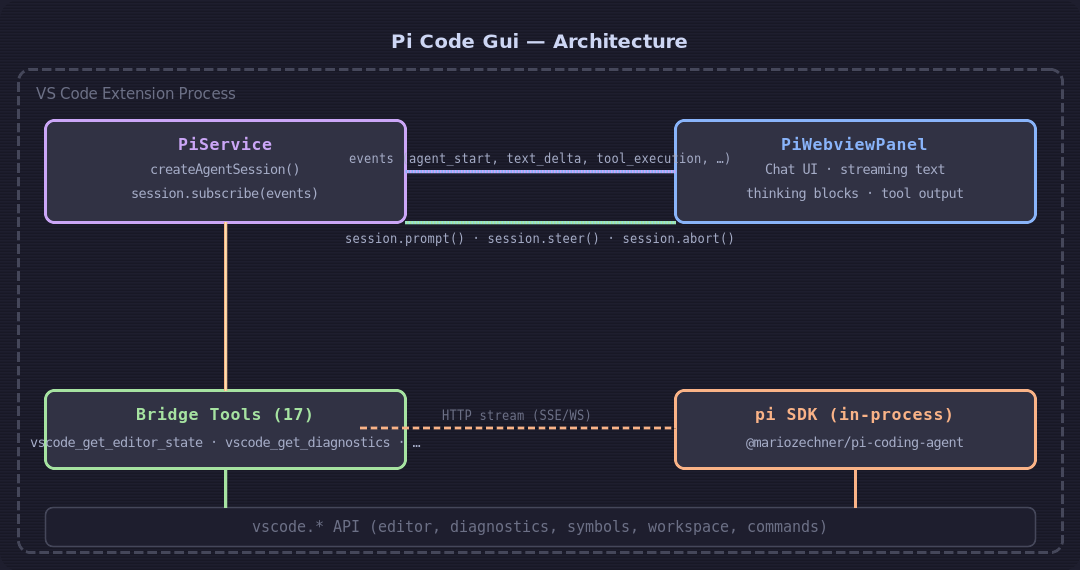
Every session runs on one of two interchangeable runtimes (see Choosing a runtime). PiService branches internally on _backendKind; roughly 85% of it — event translation, the UI bridge, pickers, status, slash commands — is runtime-agnostic.
- PiService manages the agent lifecycle and is the runtime branch point. For TypeScript Pi it loads the
@earendil-works/pi-coding-agent SDK in-process from your global npm install (so pi update --self picks up new SDK versions without an extension update). For Rust Pi it spawns pi_agent_rust as an out-of-process pi --mode rpc subprocess and speaks line-delimited JSON-RPC over stdio. Either way it subscribes to agent events, translates them into chat UI messages, and handles model/thinking/settings changes.
- PiWebviewPanel renders a webview chat UI. It subscribes to PiService events and re-renders streaming text, thinking blocks, tool execution, bash output, compaction summaries, and custom messages in real time — identically for both runtimes.
- Bridge tools are registered as SDK
customTools constructed with defineTool() and Typebox schemas, the same way the SDK's own built-in tools are defined. They are a TypeScript-runtime feature; Rust Pi uses its own built-in read/write/edit/bash/grep tools on the same files.
Extension Settings
| Setting |
Type |
Default |
Description |
pi-code-gui.promptToInstall |
boolean |
true |
Prompt to install Pi if not found |
pi-code-gui.autoOpenOnStart |
boolean |
true |
Open a Pi tab automatically when the window starts |
pi-code-gui.panelLocation |
string |
beside |
Where a chat opens: beside (split off a second group) or active (a tab in the current group) |
pi-code-gui.systemPromptAppend |
string |
"" |
Additional instructions appended to the system prompt |
pi-code-gui.enableSkills |
boolean |
true |
Load project and global pi skills |
pi-code-gui.enableContextFiles |
boolean |
true |
Inject project context files |
pi-code-gui.enablePromptTemplates |
boolean |
true |
Register custom slash commands |
pi-code-gui.defaultModelProvider |
string |
"" |
Default model provider (e.g. anthropic). Empty = auto-detect |
pi-code-gui.defaultModelId |
string |
"" |
Default model ID (e.g. claude-sonnet-4-5). Requires provider set |
pi-code-gui.defaultThinkingLevel |
string |
"off" |
Default thinking level for new sessions |
pi-code-gui.contextBudget |
number |
0 |
Per-session token budget (0 = model default). Drives auto-compaction; for the Rust runtime it clamps the custom model's effective context window |
pi-code-gui.sessionDir |
string |
"" |
Custom directory for session .jsonl files. Empty = pi SDK default (~/.pi/agent/sessions/) |
pi-code-gui.defaultRuntime |
string (typescript|rust) |
typescript |
Runtime for new sessions when both are installed. Resume always reuses a session's origin runtime |
pi-code-gui.sessionHistoryScope |
string (unified|perRuntime) |
unified |
Whether Past Sessions shows both runtimes (badged) or only the default runtime's |
pi-code-gui.rustBinaryPath |
string |
"" |
Custom path to the Rust pi binary. Empty = auto-detect |
pi-code-gui.rustInstallMethod |
string (managed|curl|manual) |
managed |
Pre-selected method in the on-demand Rust install dialog |
pi-code-gui.rustExtensionPolicy |
string (safe|balanced|permissive) |
balanced |
Capability profile for Rust Pi extensions (--extension-policy) |
pi-code-gui.rustExtensions |
string (auto|enabled|disabled) |
auto |
Whether Rust sessions load Pi extensions (--no-extensions). auto disables discovery only when the workspace has TypeScript-format .pi/ extensions the Rust runtime can't parse |
pi-code-gui.rustAgentDir |
string |
"" |
Rust agent home (PI_CODING_AGENT_DIR) where the extension writes its managed models.json (the bundled Pi model catalog). Empty = an extension-managed folder (so the full-catalog write never clobbers your ~/.pi/agent); a set path redirects Rust there. auth.json is seeded from ~/.pi/agent for OAuth |
Requirements
- VS Code 1.125+
- A Pi runtime — TypeScript Pi (needs Node.js + npm) or Rust Pi (a standalone binary). The extension detects what's installed and, if neither is, asks you to choose; install is on-demand. See Choosing a runtime.
- Rust Pi tool dependencies — Rust Pi's
find and grep tools shell out to fd and ripgrep (rg), which must be on your PATH (a documented pi_agent_rust prerequisite). Install with apt install fd-find ripgrep (Linux; Debian names fd fdfind, so also ln -s "$(command -v fdfind)" ~/.local/bin/fd) or brew install fd ripgrep (macOS). After a managed Rust install the extension detects these and offers to install them for you.
- At least one API key (Anthropic, OpenAI, DeepSeek, Gemini, etc.) — run PiGui: Set Up API Key / Login or see the Pi quickstart
Development
pnpm install          # Install dev dependencies
pnpm run compile      # Type-check, lint, and build with esbuild
pnpm run watch        # Watch mode for development
Press F5 in VS Code to launch the Extension Development Host.
To package a .vsix:
pnpm run vsix # Creates pi-code-gui-x.x.x.vsix
Contributing
Activate the repo's pre-commit checks once per clone:
git config core.hooksPath .githooks
Rust-runtime clean-room rule. pi_agent_rust (and its runtime deps asupersync / franken-*) ships under an MIT license with an OpenAI/Anthropic rider: its source and derivative works may not be made available to those parties. What that means for contributions here:
- Don't read or paste that source into AI coding assistants (Claude Code, Copilot, Cursor, …) while working on this repo — AI surfaces route content to those vendors — and don't port its code into PRs.
- Work black-box: this extension integrates with the released binary over its
--mode rpc protocol; observed wire behavior, --version/--help output, and the upstream issue tracker are the reference material. The plain-MIT ancestor earendil-works/pi may be read freely.
- The gate is not a bug:
scripts/check-cleanroom.sh runs at pre-commit and inside the packaging pipeline. If it fails your commit, a file references restricted source paths — fix the reference rather than reaching for --no-verify (CI runs the same gate).
The full rule lives in AGENTS.md §"pi clean-room — license law".
Credits
Pi Code Gui is a GUI shell around two independent upstream agents — all the hard agent work lives in them:
Thanks to both projects and their maintainers. Runtime trademarks and project names belong to their respective owners.
License
MIT — see LICENSE for details.

