
LeetCode Practice
Solve LeetCode in your editor. Track progress. Run timed interviews.
A VS Code and Cursor extension with problem browsing, template generation, inline example runners, XP and streak tracking, and timed interview workflows — with optional cloud sync.
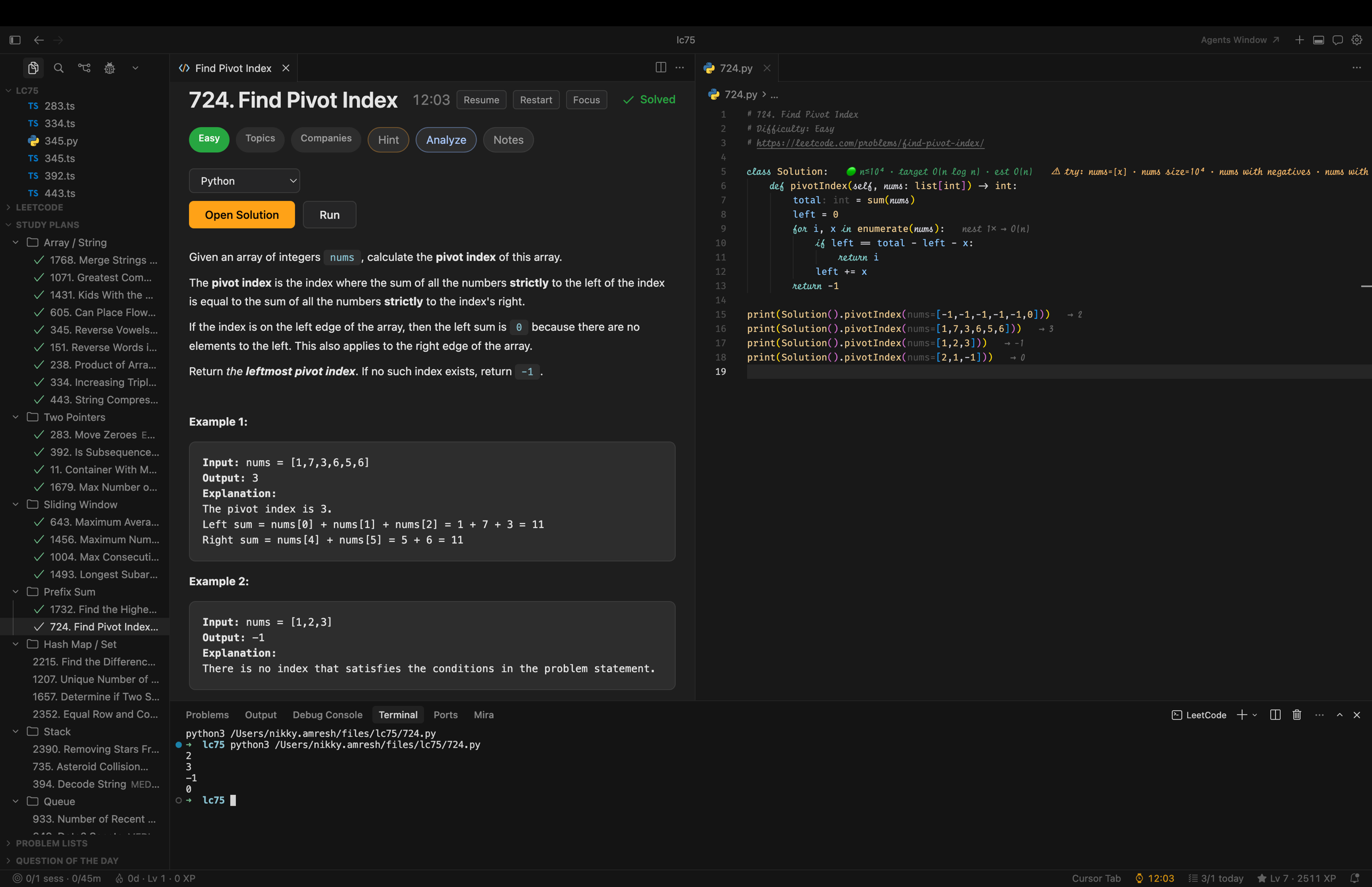
Every save now surfaces four layers of inline feedback as ghost text on the relevant line: interview anti-pattern lint, a constraint-aware complexity budget (🟢/🟡/🔴), adversarial edge-case probes, and live example results. No popups; hover any decoration to read details or click "turn off" for that feature.


Install
The extension activates automatically when a workspace contains a .leetcode file.
Quick Start
- Open a folder in VS Code or Cursor.
- Create a
.leetcode file in the workspace root (an empty {} is enough).
- Run LeetCode: Sign In from the command palette.
- Open the LeetCode sidebar and pick a problem.
- Click Create File, solve, then run with LeetCode: Run Examples or Ctrl/Cmd+Shift+R.
Features
- Browse and solve — Full problemset, study plans, curated problem lists, and Question of the Day in sidebar views. Rich problem webview with "Create File" in TypeScript, JavaScript, Python, C++, or Java.
- Companies sidebar — Browse problems grouped by 463 companies with per-company frequency, global acceptance rate, color-coded difficulty dots, and topics in the row tooltip. Click to open in the editor. Topics + companies are also surfaced inside the problem webview as collapsible chips. Toggle via
leetcodePractice.showCompanies.
- Inline feedback on save — Every save runs all enabled features at once, rendered as ghost text on the relevant line with a trusted-markdown hover and a one-click "turn off" link per feature. No popups.
- Interview anti-pattern lint — flags
mutate-input, built-in .sort() on sorting problems, magic numbers (26 / 128 / 1000000007), and indented debug print/console.log/System.out.println across py/ts/js/cpp/java. Emits a real VS Code diagnostic (squiggle + Problems panel) and an inline hint. Suppressible per line with // lcex-lint-ignore: <rule>.
- Complexity budget — parses the problem's
Constraints: section, derives a target Big-O from the largest size cap, estimates loop nesting by indent, and paints 🟢 / 🟡 / 🔴 on the function signature plus a nest k× → O(nᵏ) badge on each loop.
- Adversarial edge-case probes — turns parsed constraints into candidate edge cases (empty, single, max-size, boundary values, negatives, zeros, charset / sorted / distinct flags) and surfaces them inline on the signature. Advisory in this release.
- Run examples on save — parses
// Expected: / # expected: comments and diffs against console.log / print output; results render inline as ✓ or ✗ expected X · got Y with a dedicated timeout message for >15s runs. Also available on-demand.
- Database problems (SQL and pandas) — LeetCode's Database category is detected automatically, and the language picker switches to MySQL or pandas. Generated files carry the table schemas, seeded example rows, and expected output as comments.
LeetCode: Run Query Locally creates the problem's tables, seeds them from its own example dataset, runs your solution, and diffs the result grid against the expected table (order-insensitive when the statement says "in any order"), showing both grids side by side. MySQL runs on SQLite compiled to WebAssembly with MySQL compatibility shims, downloaded once to ~/.lcex/engines/ with your consent and verified against pinned hashes; pandas runs through your python3.
- Run in terminal — Execute the current solution file end-to-end in the integrated terminal.
- Progress tracking — Solved / attempting / cleared states, daily streaks, XP and levels, daily goals, and a stats dashboard with trends.
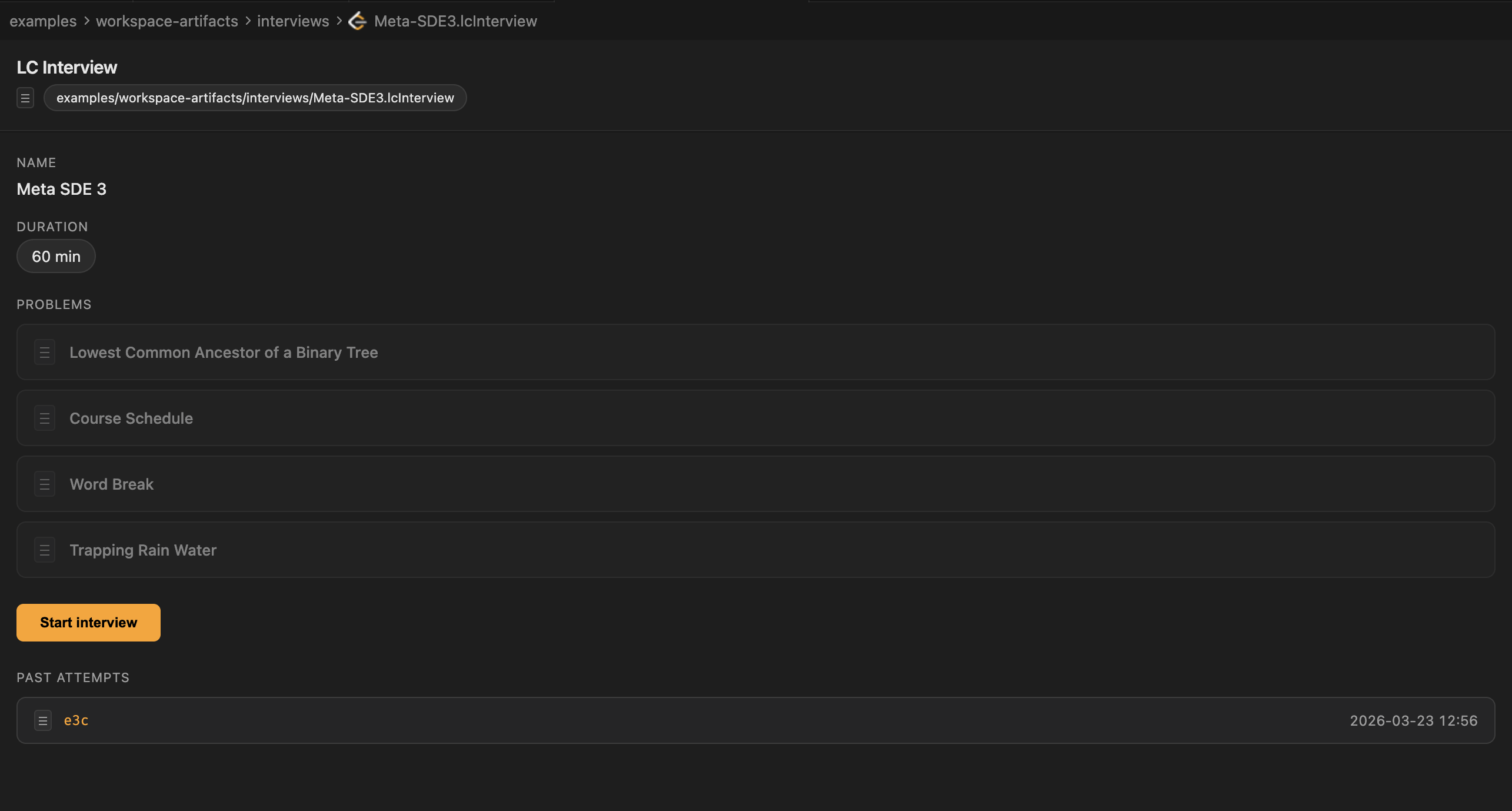
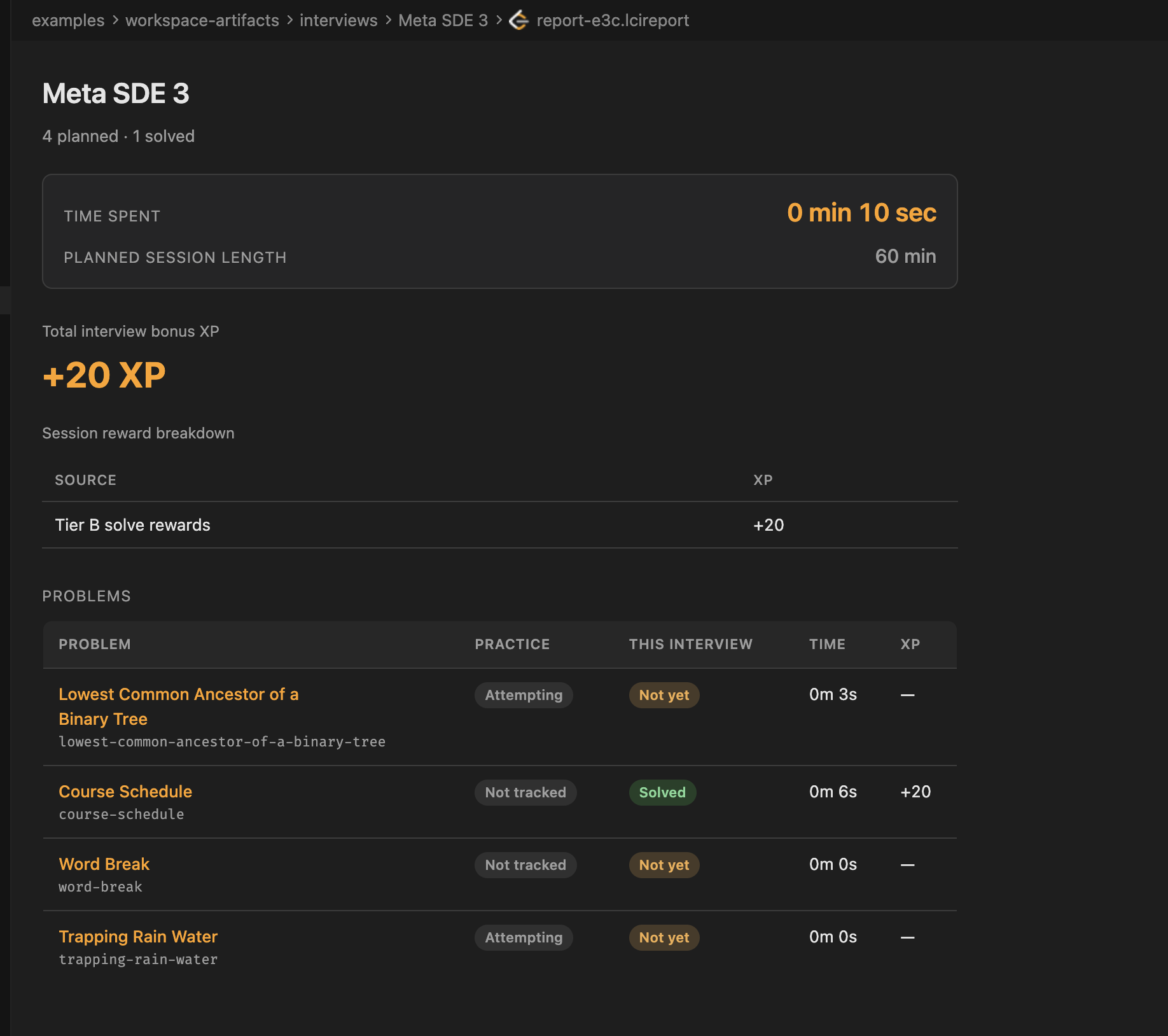
- Interview mode — Ad-hoc timed sessions (45 / 60 / 180 min) or planned
.lcInterview mocks. Focus layout hides hints; each attempt produces a .lcireport snapshot.
- Solution notes and agent actions — Capture notes in
.hint files; trigger Make Runnable, Hint, and Explain My Code from the editor. The Hint action writes a JSON sidecar (~/.lcex/hint-context/<slug>.json) with the static complexity estimate, parsed problem-size budget, verdict, and top hotspot, so the lcex-dsa-hint skill tailors the nudge to what you actually wrote.
- DSA practice loop (opt-in, all off by default) — Five features that go beyond "did your sample pass?":
- Spaced-repetition bug review (
leetcodePractice.bugReview.enabled) — failing examples are snapshotted to ~/.lcex/bug-reviews.json and resurface as re-attempt drills 3 / 7 / 30 / 90 days later; status bar shows N reviews due.
- Differential fuzzer (
leetcodePractice.fuzzer.enabled) — define bruteForce + fuzzInputs(seed) alongside your solution; the fuzzer reports the first divergence as a counterexample (and snapshots it to the SR queue if bug-review is on).
- Empirical complexity fitter (
leetcodePractice.empiricalFit.enabled) — define benchmark(n); the fitter times your solution at growing N, fits eight candidate curves, and flags when empirical complexity exceeds the static estimate.
- Recursion call-tree visualizer (
leetcodePractice.recursionTree.enabled) — define traceCall(); the visualizer instruments your recursive function and renders the live call tree with memo-hit edges (the exact cells memoization would skip).
- Iterative traversal visualizer (
leetcodePractice.iterativeVisualizer.enabled) — wrap your stack/queue with lcexTrace.track(container, "stack"|"queue") (or lcex_trace.track(...) in Python) inside traceCall(); the harness records every push/pop and renders the DFS/BFS traversal tree with revisit edges (cycles, redundant work).
- TS / JS / Python today; C++ is phase-2.
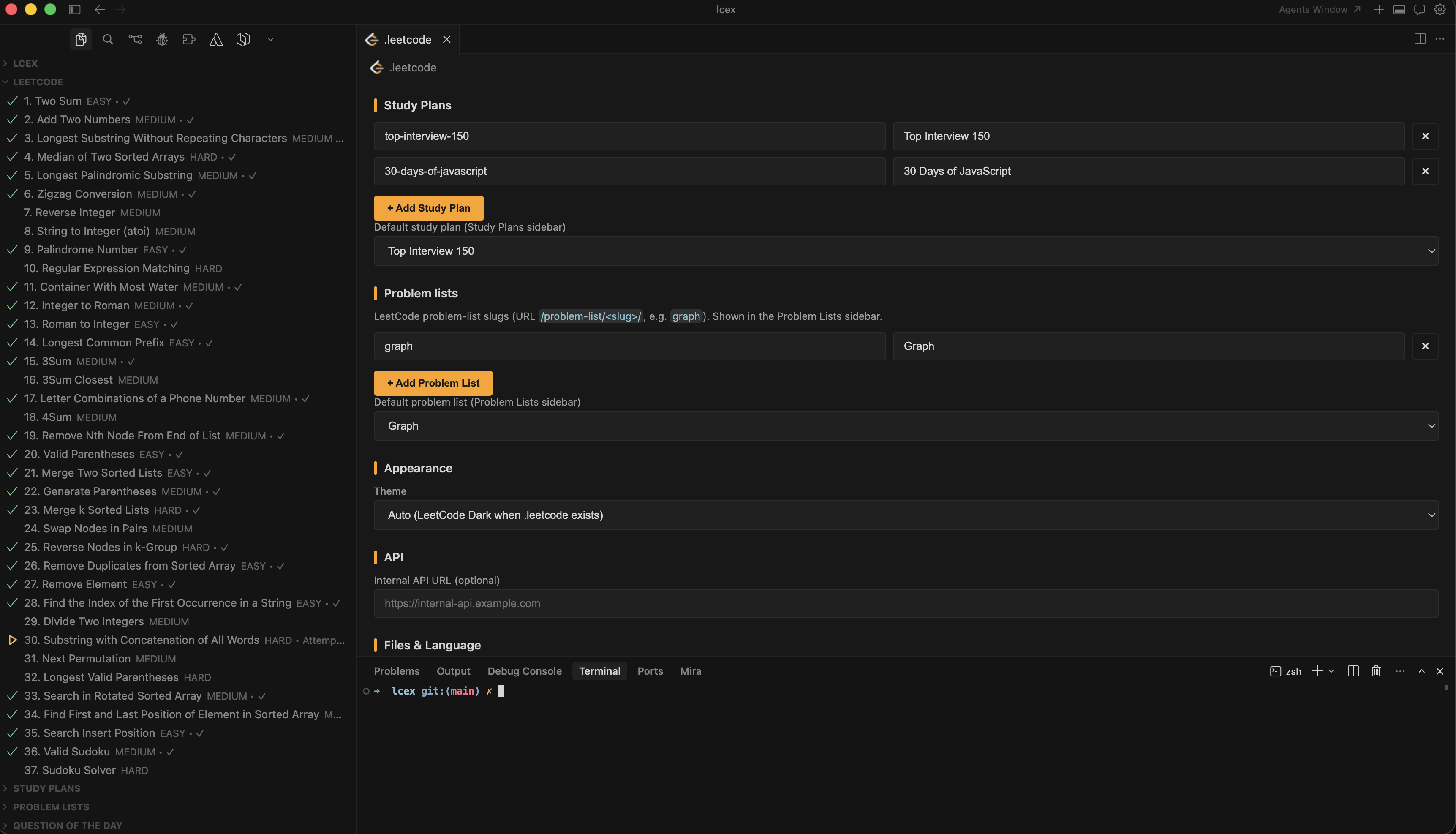
- Workspace config editor — Custom editor for
.leetcode files makes study plan, problem list, language, and file-naming overrides a UI action.
- Cloud sync (optional) — Sign in with Google to push and pull stats across machines via Firebase. Fully optional; the extension works offline without it.
Screenshots
.leetcode config editor
|
Problem view + run in terminal
|
.lcInterview plan editor
|
.lcireport interview report
|
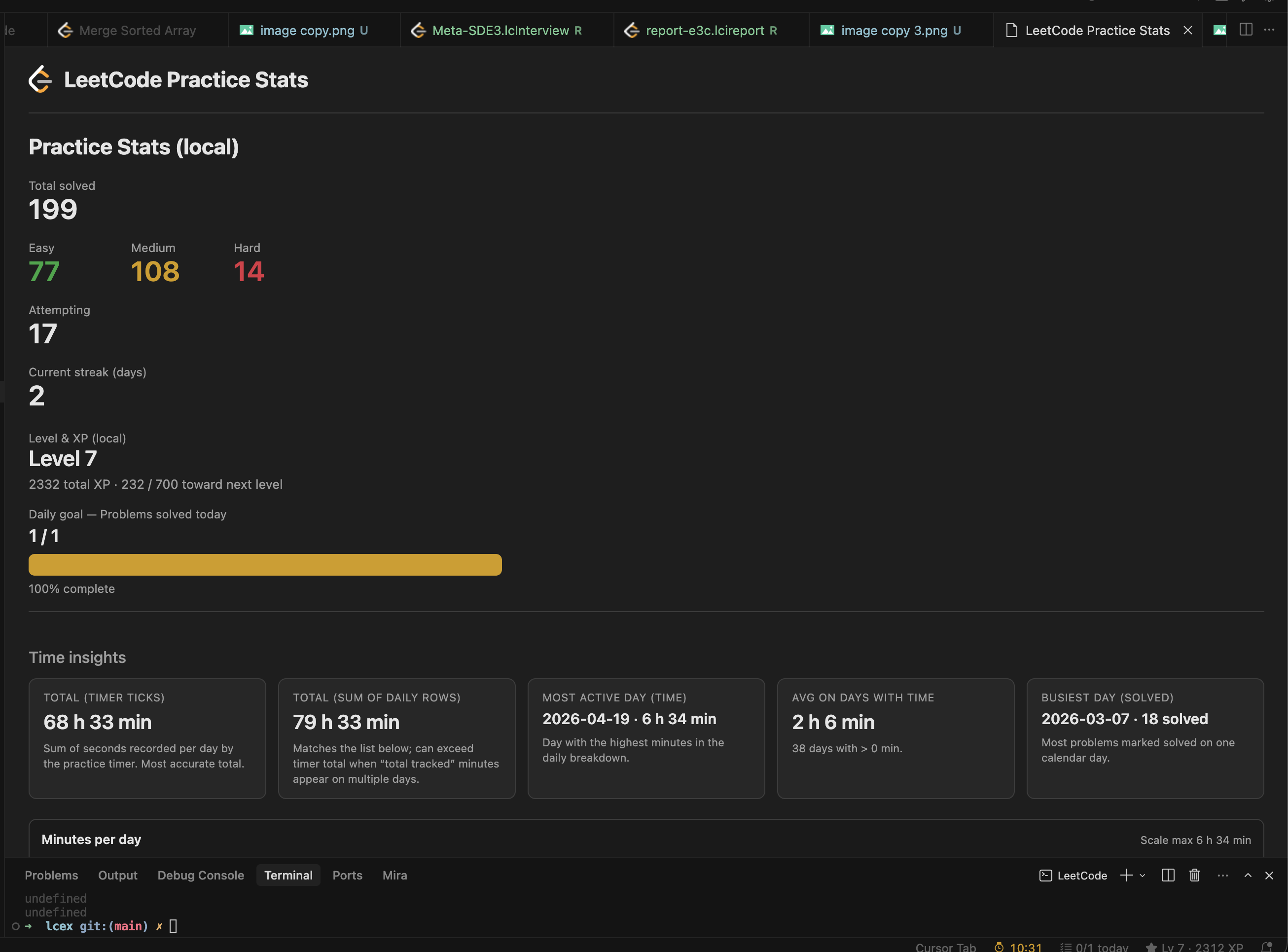
Stats overview
|
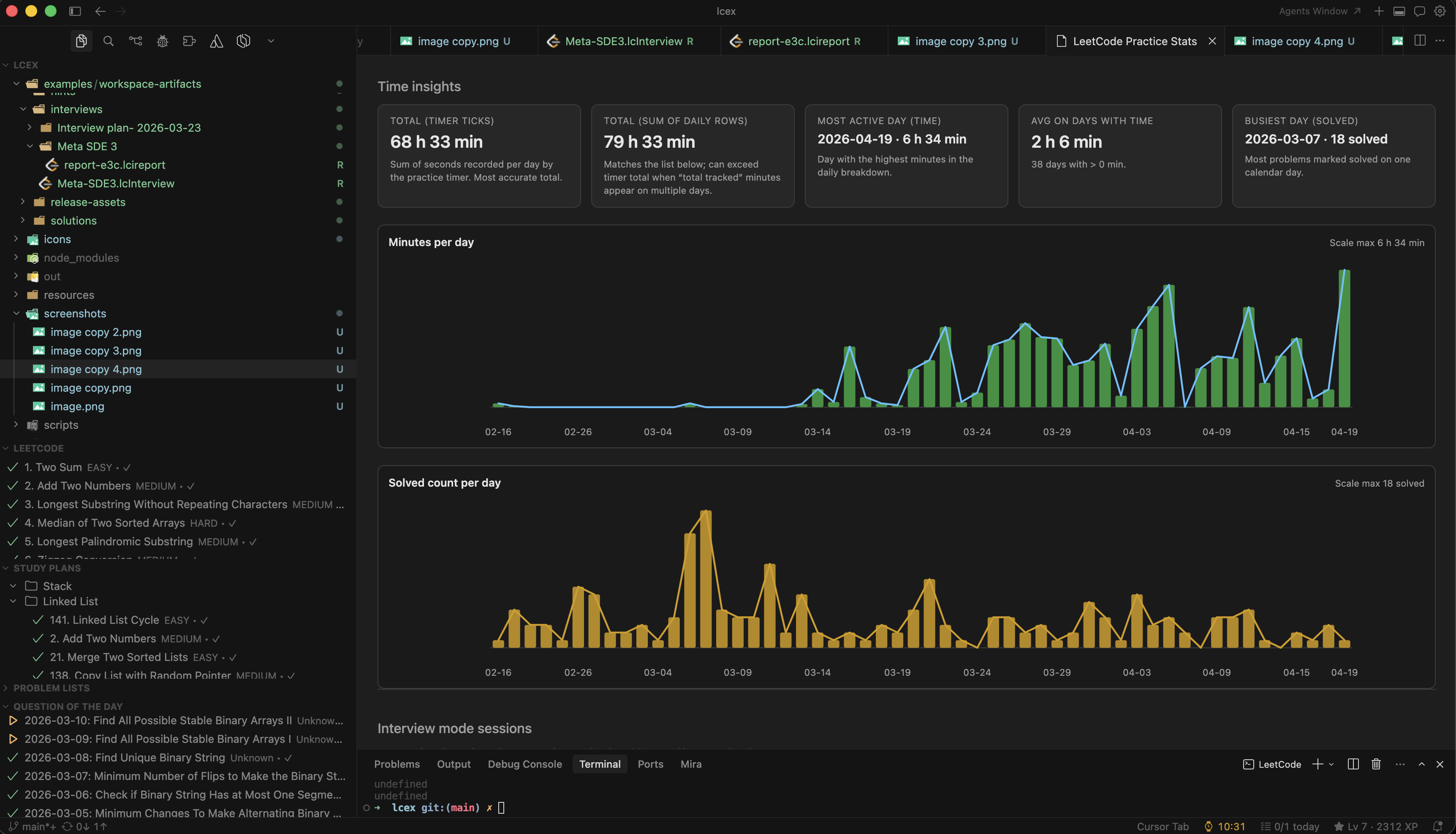
Minutes and solved trends
|
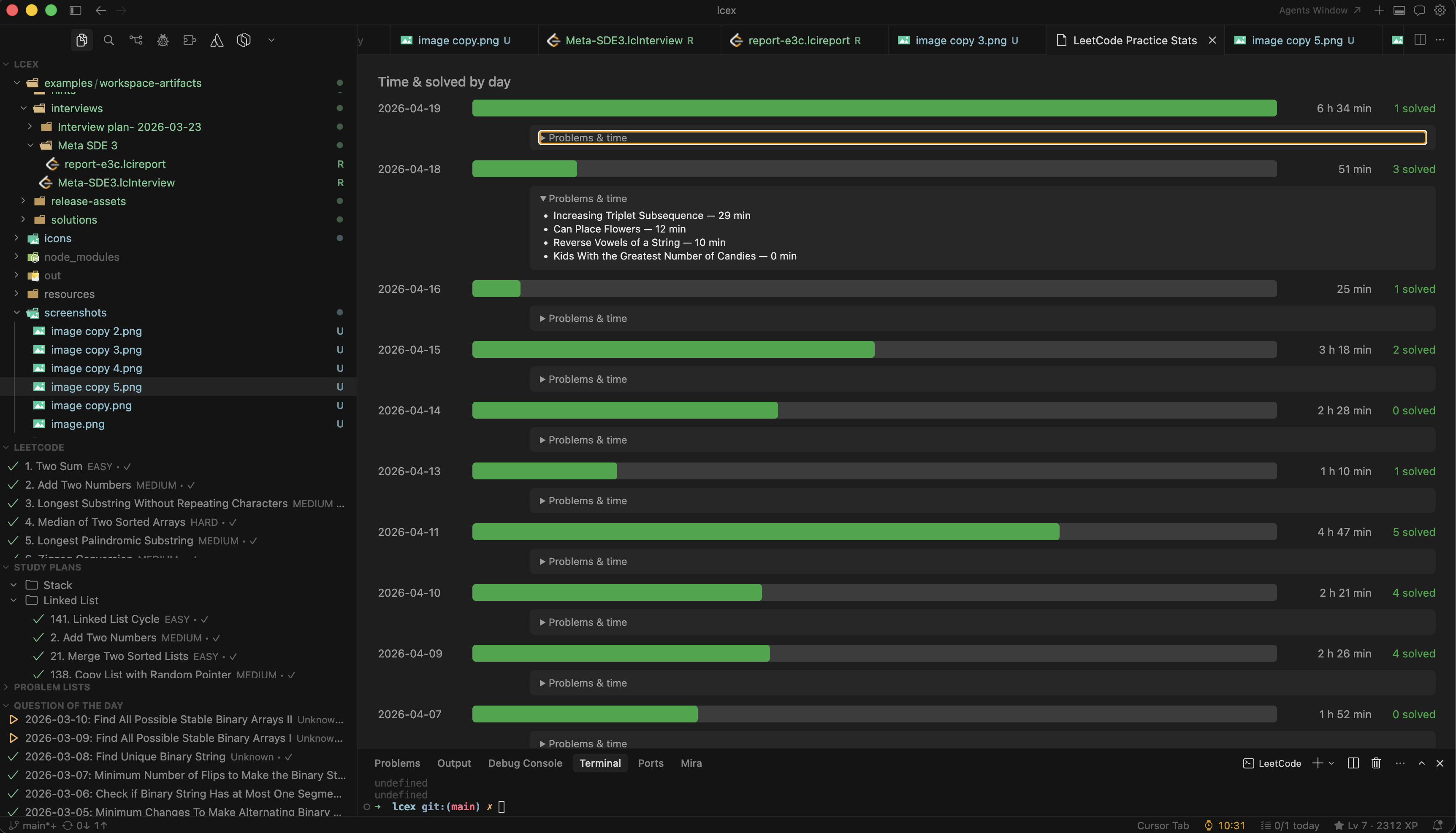
Daily time and solved breakdown
|
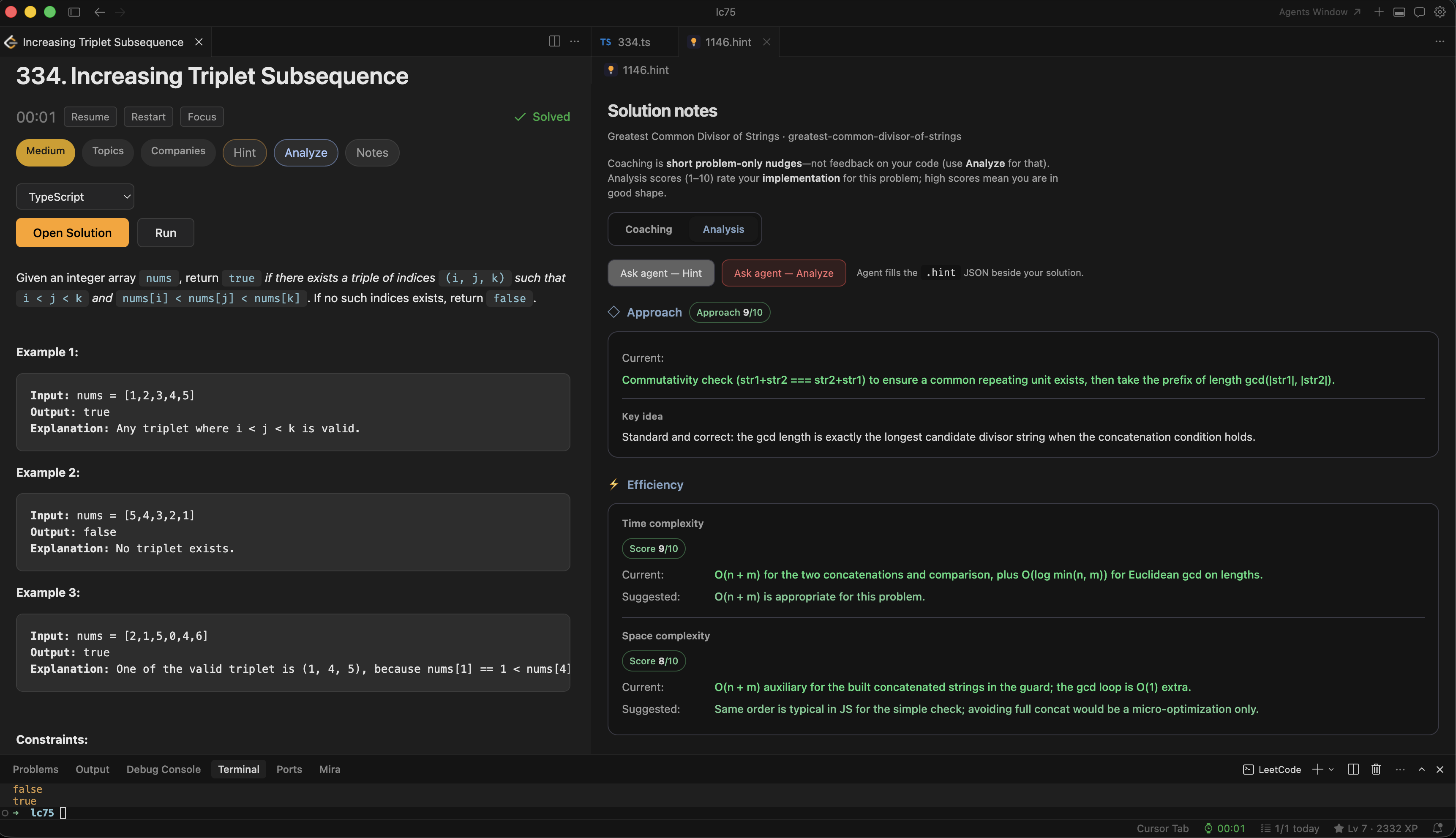
Solution notes with hint and analyze
|
Commands
All commands are available under the LeetCode category in the command palette.
Problems
| Command |
Description |
LeetCode: Open/Create Problem |
Open a problem and create its solution file |
LeetCode: Open Question of the Day |
Jump straight to today's QOTD |
LeetCode: Refresh Problems |
Re-fetch the problemset cache |
LeetCode: Search Companies |
Filter the Companies view by company / problem / topic |
LeetCode: Filter Companies by Difficulty |
Restrict the Companies view to Easy / Medium / Hard |
LeetCode: Refresh Companies |
Reload the bundled companies dataset |
LeetCode: Sign In / Sign Out |
Manage the LeetCode session cookie |
Running
| Command |
Shortcut |
Description |
LeetCode: Run Examples |
— |
Parse // Expected: comments and diff results inline |
LeetCode: Run Query Locally |
— |
Database problems: run against seeded tables and diff the result grid |
LeetCode: Run in Terminal |
Ctrl/Cmd+Shift+R |
Execute the current solution file |
Inline feedback
| Command |
Shortcut |
Description |
LeetCode: Lint Solution for Interview Anti-Patterns |
— |
Run the lint rules on demand |
LeetCode: Show Complexity Budget vs. Estimate |
— |
Parse constraints, estimate your Big-O, paint the verdict |
LeetCode: Surface Adversarial Edge Cases |
— |
Inline hint with candidate edge cases |
LeetCode: Clear Inline Decorations |
Ctrl/Cmd+K Ctrl/Cmd+L |
Wipe all lcex ghost text from the active editor |
LeetCode: Toggle Interview Lint on Save |
— |
Flip leetcodePractice.lint.enabled |
LeetCode: Toggle Complexity Budget on Save |
— |
Flip leetcodePractice.complexityBudget.enabled |
LeetCode: Toggle Edge-Case Probes on Save |
— |
Flip leetcodePractice.adversarialTests.enabled |
LeetCode: Toggle Run Examples on Save |
— |
Flip leetcodePractice.runExamplesOnSave.enabled |
LeetCode: Toggle All Inline Decorations |
— |
Master kill switch for every lcex decoration |
DSA practice loop (opt-in)
| Command |
Description |
LeetCode: Open Next Bug Review |
Opens the next due failing example as a re-attempt drill (leetcodePractice.bugReview.enabled) |
LeetCode: Fuzz vs Brute Force |
Runs bruteForce + fuzzInputs(seed) against your solution, reports the first divergence (leetcodePractice.fuzzer.enabled) |
LeetCode: Measure Complexity (Empirical) |
Times benchmark(n) at growing N, fits a curve, flags when empirical class exceeds static estimate (leetcodePractice.empiricalFit.enabled) |
LeetCode: Visualize Recursion Call Tree |
Instruments the recursive function in the open file (TS/JS/Python) and renders the call tree with memo-hit edges (leetcodePractice.recursionTree.enabled) |
LeetCode: Visualize Iterative Traversal |
Wraps a user-tracked stack/queue (lcexTrace.track(...)) and renders the DFS/BFS traversal tree with revisit edges (leetcodePractice.iterativeVisualizer.enabled) |
Interview
| Command |
Description |
LeetCode: Interview Mode — Start / Stop |
Run an ad-hoc timed session |
LeetCode: Pattern Recognition Drill |
Read a random problem with the pattern scrubbed out, recall the approach within 5 minutes, then reveal and self-grade; tracks accuracy and streak |
LeetCode: Generate LC Interview (AI) |
Scaffold a planned .lcInterview |
LeetCode: Open LC Interview Report… |
Browse .lcireport history |
Stats and goals
| Command |
Description |
LeetCode: View Stats |
Open the stats dashboard |
LeetCode: Set Daily Goal |
Configure daily problem / minute targets |
Cloud sync
| Command |
Description |
LeetCode: Sign in to Cloud Sync / Sign out of Cloud Sync |
Manage Firebase session |
LeetCode: Set LeetCode username |
Link your LeetCode handle |
LeetCode: Push stats to cloud now / Pull stats from cloud |
Manual sync |
Privacy
| Command |
Description |
LeetCode: Toggle anonymous analytics |
Opt in or out of anonymous usage analytics |
LeetCode: Send Feedback |
Rate lcex 1 to 5 stars with an optional comment (also asked about once a week) |
Extension Settings
| Setting |
Description |
leetcodePractice.defaultDirectory |
Where new solution files are created |
leetcodePractice.fileNamePattern |
id (e.g. 1.ts) or slug (e.g. two-sum.ts) |
leetcodePractice.language |
typescript, javascript, python, cpp, or java |
leetcodePractice.problemViewMode |
Layout for the problem webview |
leetcodePractice.suppressAiTabOnSolve |
Don't reopen AI tab after marking solved |
leetcodePractice.suppressAiTabWorkspaceWide |
Workspace-wide version of the above |
leetcodePractice.internalApiUrl |
Use a custom backend instead of LeetCode's GraphQL |
leetcodePractice.activeStudyPlan |
Currently active study plan slug |
leetcodePractice.activeProblemList |
Currently active problem list slug |
leetcodePractice.studyPlans |
Study plans to show in the sidebar |
leetcodePractice.problemLists |
Curated problem lists to show in the sidebar |
leetcodePractice.showProblemLists |
Toggle the problem lists view |
leetcodePractice.showContests |
Toggle the Practice Past Contests view |
leetcodePractice.showCompanies |
Toggle the Companies view (default: on) |
leetcodePractice.leetcodeUsername |
LeetCode username for cloud sync |
leetcodePractice.analytics.enabled |
Send anonymous usage analytics (default: on) |
leetcodePractice.feedback.enabled |
Weekly personalised feedback prompt (default: on) |
leetcodePractice.inlineDecorations.enabled |
Master switch for all lcex inline ghost text (default: on) |
leetcodePractice.lint.enabled |
Run interview anti-pattern lint on save (default: on) |
leetcodePractice.complexityBudget.enabled |
Derive target Big-O from constraints and paint 🟢/🟡/🔴 on save (default: on) |
leetcodePractice.adversarialTests.enabled |
Surface edge-case probes on save (default: off — run LeetCode: Surface Adversarial Edge Cases on demand) |
leetcodePractice.runExamplesOnSave.enabled |
Run example lines automatically on save (default: on) |
leetcodePractice.runExamples.sandbox |
Sandbox solution execution: auto (sandbox on macOS, normal elsewhere), sandbox (force), off (default: auto) |
leetcodePractice.bugReview.enabled |
Spaced-repetition queue of failed examples; resurfaces 3/7/30/90 days later (default: off) |
leetcodePractice.fuzzer.enabled |
Differential fuzzer vs bruteForce + fuzzInputs(seed) (default: off) |
leetcodePractice.empiricalFit.enabled |
Empirical complexity fitter; needs benchmark(n) (default: off) |
leetcodePractice.recursionTree.enabled |
Recursion call-tree visualizer; needs traceCall() (default: off) |
leetcodePractice.iterativeVisualizer.enabled |
Iterative traversal visualizer; needs lcexTrace.track(container) inside traceCall() (default: off) |
Privacy & anonymous analytics
The extension can send anonymous, bucketed usage analytics to Firebase to
help prioritise which features to improve. This is opt-outable at any time.
What is sent:
- A pseudonymous per-install UUID (generated on first launch, never linked to your identity).
- Which feature you used (e.g.
run_examples, interview_start, agent_hint).
- Where it was triggered (command palette, sidebar, webview…).
- Coarse dimensions: language bucket (
ts/js/py/cpp/java), difficulty bucket (E/M/H),
duration bucket (0_5m / 5_15m / 15_60m / 60m+), count bucket.
- Extension version, VS Code version, OS platform, locale, local hour of day.
What is never sent:
- Your uid, email, LeetCode username, or session cookie.
- Problem slugs, titles, descriptions, notes, or any code.
- File paths, workspace names, or folder names.
- Exact timestamps, error messages, stack traces.
How it's protected:
- Analytics events live in a separate Firestore collection (
/logs).
Security rules restrict reads to a single admin uid — no user, including you,
can read logs back. Writes are strictly schema-validated: only enum values
from an allow-list are accepted.
- Requires sign-in to cloud sync. If you're not signed in, nothing is sent.
- Respects the VS Code
telemetry.telemetryLevel setting. If VS Code telemetry
is off, analytics is off too.
Opt out:
- Run
LeetCode: Toggle anonymous analytics, or
- Set
leetcodePractice.analytics.enabled to false in settings, or
- Set VS Code's
telemetry.telemetryLevel to off.
Workspace Config (.leetcode)
Any setting above can be overridden per-workspace in the .leetcode file. Workspace values take precedence over user settings.
{
  "studyPlans": [{ "slug": "top-interview-150", "name": "Top Interview 150" }],
  "problemLists": [{ "slug": "graph", "name": "Graph" }],
  "activeStudyPlan": "top-interview-150",
  "activeProblemList": "graph",
  "language": "typescript",
  "fileNamePattern": "id",
  "defaultDirectory": "."
}
Requirements
- VS Code or Cursor 1.85+
- Node.js — for TypeScript / JavaScript execution
- Python 3 — optional, for Python solutions
- A C++ toolchain — optional, for C++ solutions
- A JDK (
javac + java) — optional, for Java solutions
- Python 3 with pandas — optional, for pandas solutions to database problems
- Network access on first local SQL run — optional, to fetch the WebAssembly SQLite engine into
~/.lcex/engines/
Development
npm install
npm run compile         # or: npm run watch
npm test                # integration test against LeetCode API
npm run package         # produces a .vsix
npm run install-extension
See CLAUDE.md for a module-by-module architecture tour.
Changelog
See CHANGELOG.md for release notes.
License
MIT
Credits
The Companies sidebar uses problem-frequency / acceptance / topic data sourced
from liquidslr/interview-company-wise-problems
(snapshot dated 1 June 2025). Many thanks to the upstream maintainers for
curating and publishing that dataset.
| |

