OpenCodeCommit
AI commit messages should not require copy-pasting diffs into chat windows, leaking secrets by accident, or fighting a different tool for every backend.
OpenCodeCommit gives you one local workflow for commit messages, branch names, pull request drafts, changelog entries, and CI secret scanning. It runs in VS Code / VSCodium, as the occ CLI, as a terminal TUI, and as a GitHub Action.
Before a prompt is sent to any AI backend, OpenCodeCommit scans the diff locally for secrets, credential files, private keys, source maps, and other sensitive artifacts.
Why It Exists
Good commit history is useful only if writing it is cheap enough to do every time.
OpenCodeCommit is for teams and solo developers who want:
- specific commit messages that match the repository's recent style
- PR drafts and changelog entries without another browser round trip
- local-first safety checks before any diff reaches an AI provider
- one config shared by the extension, CLI, TUI, and CI scanner
- fallback across Codex, OpenCode, Claude, Antigravity, Grok Build, hosted APIs, and local OpenAI-compatible endpoints
Install
Extension:
- Search for
OpenCodeCommit in VS Code or VSCodium
CLI:
cargo install opencodecommit
# or
npm i -g opencodecommit
Optional CLI backends:
npm i -g @openai/codex
npm i -g opencode
npm i -g @anthropic-ai/claude-code
# Antigravity
curl -fsSL https://antigravity.google/cli/install.sh | bash
Direct API backends are also supported for OpenAI, Anthropic, Google Gemini, OpenRouter, OpenCode Zen, Ollama, LM Studio, and custom OpenAI-compatible endpoints.
Use It
VS Code / VSCodium:
- Open Source Control.
- Click the sparkle action.
- Use the
occ menu for refine, branch, PR, language, backend, config, and diagnose actions.
Terminal:
occ tui
occ commit
occ commit --backend codex --dry-run --text
occ branch --dry-run
occ pr --backend openrouter-api --text
occ changelog --text
CI and local scanning:
occ scan --format text
occ scan --format sarif --output occ-scan.sarif
occ guard install
occ git commit -m "manual draft"
occ evidence install --profile samd
occ evidence snapshot
What You Get
- Commit generation that can adapt to recent commit style or force conventional commits.
- Branch names, PR drafts, and changelog entries from the same context pipeline.
- A terminal TUI with backend picks, diff view, output panels, and file staging.
- Local sensitive-content scanning with
warn, block-*, and strict-* enforcement modes.
- A repo-local Git guard that routes raw
git commit messages through OCC using prepare-commit-msg.
- Optional repo-local evidence sidecars and
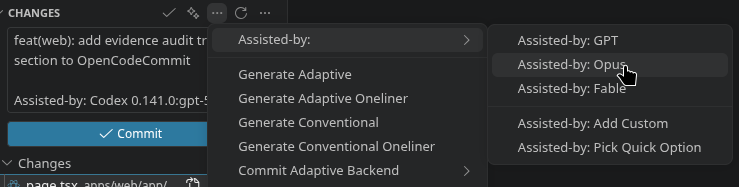
Assisted-by AI attribution for samd and all-in defence profiles, linked by compact OCC-Evidence trailers.
- CI output as text, JSON, SARIF, or GitHub annotations.
- Built-in language templates for English, Finnish, Japanese, Chinese, Spanish, Portuguese, French, Korean, Russian, Vietnamese, and German.
Privacy And Security
OpenCodeCommit has no hosted service and no telemetry. Diffs and file context are processed locally first, then sent only to the backend you configure.
The scanner can block provider tokens, webhooks, credential-bearing connection strings, .env* files, key stores, private keys, source maps, and other high-risk artifacts before generation runs.
See SECURITY.md for vulnerability reporting and data-flow details.
Evidence And Audit Trails
For regulated work — Software as a Medical Device (SaMD) and defence software — OpenCodeCommit can keep an optional, repo-local audit trail. It is off by default and enabled per repository with occ evidence install.
Each commit records a snapshot of the repository and build environment — branch, HEAD, index-tree hash, staged files, tool and AI-agent versions, and (by profile) network and security state. The snapshot is written as a versioned sidecar, scanned for secrets before it lands, and linked from the commit by a compact OCC-Evidence trailer.
samd — strict redaction; safe to commit into the repository.defence — all-in cleartext machine and network state for private, access-controlled stores, gated behind an explicit acknowledgement before it can land in a repo.
Storage is local (uncommitted), repo (committed sidecars), or artifact (referenced by SHA-256 digest).
Commits can also carry Assisted-by trailers that attribute the AI harness and model — picked from the editor's Source Control menu or queued from the CLI.
feat(monitor): clamp ECG sampling window

OCC-Evidence: repo:.occ/evidence/2026/06/20260623T091205Z-a1b2c3d.toml
Assisted-by: Codex 0.133.0:gpt-5.6-sol
Assisted-by: Claude Code 2.1.0:claude-opus-5
occ evidence install --profile samd
occ evidence snapshot
occ evidence assist add --quick Opus
Configuration
~/.config/opencodecommit/config.toml is the shared config for the CLI, TUI, and extension. The extension syncs VS Code / VSCodium settings with that file.
Override the path with OPENCODECOMMIT_CONFIG.
Start here:
CI/CD
Use the bundled GitHub Action:
- uses: Nevaberry/opencodecommit@v1
  with:
    enforcement: block-high
    upload-sarif: true
Examples are available for GitHub Actions, Azure Pipelines, and GitLab CI.
Contributing
OpenCodeCommit intentionally tests against both deterministic unit paths and real AI backends. See CONTRIBUTING.md for setup, verification, and live E2E commands.
License
MIT


 Open VSX
 VS Code Marketplace
 npm
npm crates.io
 GitHub