



API testing that lives in your repo. Send a request from the editor, keep the
collection as files beside your code, and let a script assert on the response. No
account, no cloud, no telemetry — and no runtime dependencies.
Install
code --install-extension Nafisarkar.asterisk --pre-release
--pre-release is required: 0.1.0 is only on the pre-release channel. In the
Extensions view, search Asterisk and pick Switch to Pre-Release Version.
From source instead: bun install && bun x vsce package, then
code --install-extension asterisk-0.1.1.vsix.
Why it is different
Everything you build is a file in .asterisk/ — diffable, reviewable, and
yours after you close the editor. There is no workspace database to export, and
nothing leaves the machine.
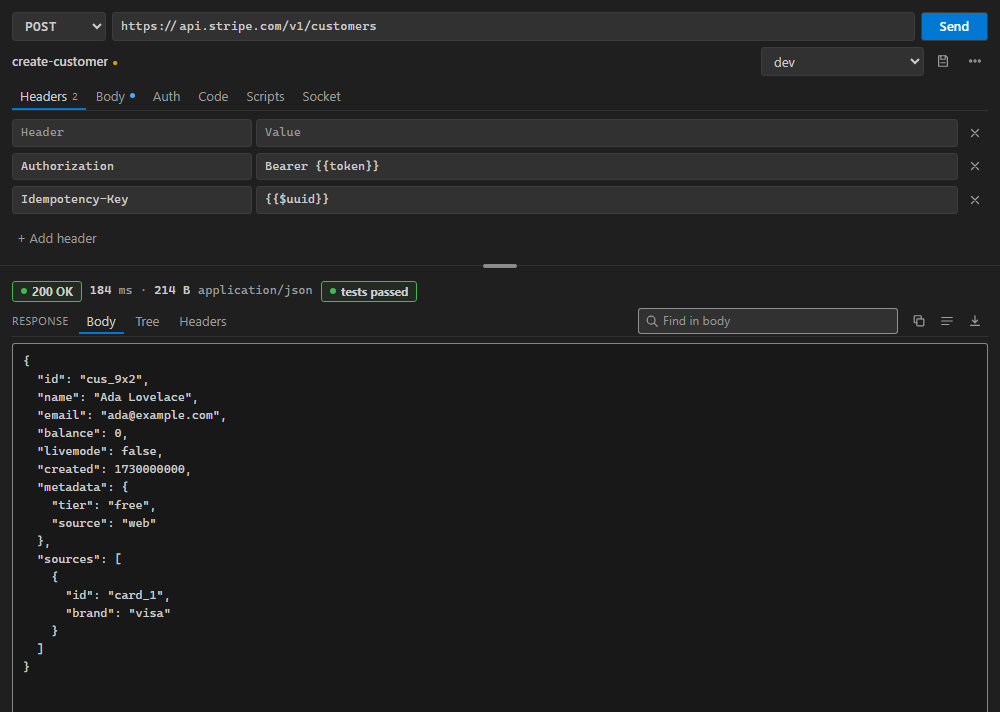
- Any method, any body — JSON, text, form, multipart, binary
- Bearer, Basic, API key, OAuth 2.0 with refresh
{{variables}}, environments, :path params- JSON tree, find, timings, save the response
- Scripts with assertions; a runner that replays a collection over a CSV
- WebSocket and SSE
- cURL / Postman v2.1 / OpenAPI 3.x import; cURL / fetch / Python / Go export
Use
Ctrl+Alt+A opens the client. Paste a URL, Enter sends, Ctrl+S saves it into
a collection. Ctrl+Enter sends from anywhere, Esc cancels.
repo/.asterisk/
├── .environments.json      # named environments, active one
└── My Collection/          # a collection is a folder
    └── users/list.json     # a request is a file
A test script gets the response and nothing else:
// response is { status, statusText, headers, body, timeMs, size }
expect(response.status).to.equal(200);
expect(JSON.parse(response.body).items).to.have.length(2);
It runs sandboxed, with request, vars and setEnv — not process,
require, or the network.
Develop
bun install && bun test    # unit and DOM suites
bun run test               # inside a real VS Code host
bun x vsce package         # build the .vsix
bun test fails if the shipped webview has drifted from the source one. Gaps
and milestones live in FEATURES.md; the design rules are in
DESIGN.md.
MIT licence · pre-release · no telemetry

